$ ./1 a 255 a 255 a 255 b 255 c 255 d 255 e 255 f 255 g 255 h 255
+
두개중에 하나만 주면 되는진 모르겠지만, 둘 다 주거나 -fsigned-char 만 주어도 결과가 -1로 나오긴 한다.
원문으로 보니 --signed-chars는 RVCT 컴파일러를 위한 옵션인 듯.
The ANSI C standard specifies a range for both signed (at least -127 to +127) and unsigned (at least 0 to 255) chars. Simplechars are not specifically defined and it is compiler dependent whether they are signed or unsigned. Although the ARM architecture has theLDRSB instruction, that loads a signed byte into a 32-bit register with sign extension, the earliest versions of the architecture did not. It made sense at the time for the compiler to treat simplechars as unsigned, whereas on the x86 simplechars are, by default, treated as signed. One workaround for users of GCC is to use the -fsigned-char command line switch or--signed-charsfor RVCT, that forces allchars to become signed, but a better practice is to write portable code by declaringcharvariables appropriately. Unsignedcharmust be used for accessing memory as a block of bytes or for small unsigned integers. Signedcharmust be used for small signed integers and simplecharmust be used only for ASCII characters and strings. In fact, on an ARM core, it is usually better to useints rather thanchars, even for small values, for performance reasons. You can read more on this inOptimizing Code to Run on ARM Processors.
-fsigned-char Let the typecharbe signed, likesigned char. Note that this is equivalent to-fno-unsigned-char, which is the negative form of-funsigned-char. Likewise, the option-fno-signed-charis equivalent to-funsigned-char.
-funsigned-char Let the typecharbe unsigned, likeunsigned char. Each kind of machine has a default for whatcharshould be. It is either likeunsigned charby default or likesigned charby default. Ideally, a portable program should always usesigned charorunsigned charwhen it depends on the signedness of an object. But many programs have been written to use plaincharand expect it to be signed, or expect it to be unsigned, depending on the machines they were written for. This option, and its inverse, let you make such a program work with the opposite default. The typecharis always a distinct type from each ofsigned charorunsigned char, even though its behavior is always just like one of those two.
예전에 stellarisware(ti/cortex-m3) 쓸 때 이런 컨셉이 있었던 것 같은데, 플래시 용량 줄이는 것 외에는 큰 메리트가 있는지
몰랐는데 아키텍쳐의 차이인진 모르겠지만 벤치마크를 보니 꽤나 혹한다.
2.7.2. Floating-point Support The SDK provides a highly optimized single and double precision floating point implementation. In addition to being fast, many of the functions are actually implemented using support provided in the RP2040 bootrom. This means the interface from your code to the ROM floating point library has very minimal impact on your program size, certainly using dramatically less flash storage than including the standard floating point routines shipped with your compiler. The physical ROM storage on RP2040 has single-cycle access (with a dedicated arbiter on the RP2040 busfabric), and accessing code stored here does not put pressure on the flash cache or take up space in memory, so not only are the routines fast, the rest of your code will run faster due them being resident in ROM. This implementation is used by default as it is the best choice in the majority of cases, however it is also possible to switch to using the regular compiler soft floating point support.
bootrom에 있는 함수들을 이용하면 더욱 빠르게 부동소수점 연산이 가능하다는데
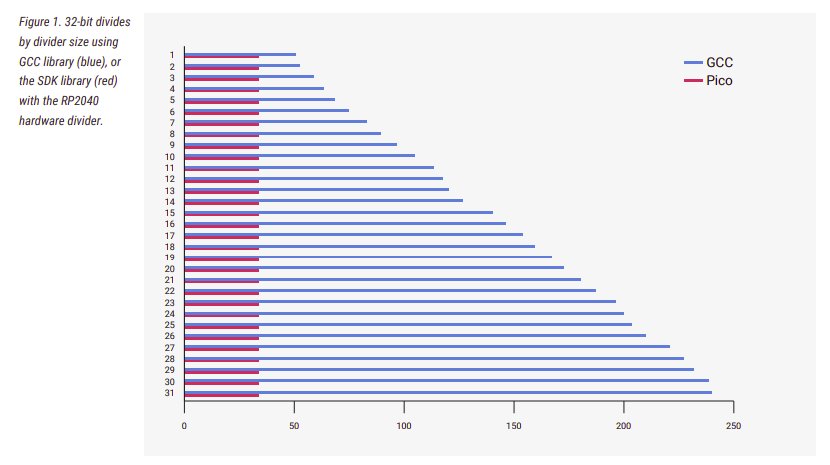
나누기 연산의 경우 GCC 라이브러리에 비해서 586% 감소한다고
아래 두개는 먼가 미친듯한 성능 차이가 있어서 끌어 와봄.
Function ROM/SDK (μs) GCC 9 (μs) Performance Ratio __aeabi_fdiv 74.7 437.5 586% __aeabi_f2lz 63.1 1240.5 1966% __aeabi_f2ulz 46.1 1157 2510%
27페이지에 나오는 내용인데(2021.07.07 기준)
GCC 라이브러리를 사용하여 계산하는 것과
SDK 라이브러리(RP2040 hardware divider)를 이용하는 것의 속도 차이가 어마어마하다고 한다.