마트도 쉬고
갈데도 없고
완전 재미없이 소소하게(?)
크리스마스 분위기 하나도 안나는 단순한 쉬는날 느낌
'개소리 왈왈 > 육아관련 주저리' 카테고리의 다른 글
| 개 목욕 (0) | 2025.01.01 |
|---|---|
| 보험... 쟁이? (0) | 2024.12.26 |
| 정수 필터 구매 내역이.. 끄응 (0) | 2024.12.01 |
| 아내 대장내시경 (0) | 2024.11.23 |
| 실손보험 면책기간이라.. (0) | 2024.11.19 |
마트도 쉬고
갈데도 없고
완전 재미없이 소소하게(?)
크리스마스 분위기 하나도 안나는 단순한 쉬는날 느낌
| 개 목욕 (0) | 2025.01.01 |
|---|---|
| 보험... 쟁이? (0) | 2024.12.26 |
| 정수 필터 구매 내역이.. 끄응 (0) | 2024.12.01 |
| 아내 대장내시경 (0) | 2024.11.23 |
| 실손보험 면책기간이라.. (0) | 2024.11.19 |
간단하게 설치 iso 받아서
마운트 하고 패키지 경로를 설정해주면 되는 듯.
| # vi /etc/yum.repos.d/local.repo[local] name=CentOS-7.9-Basic baseurl=file:///root/repo enabled=1 gpgcheck=0 |
[링크 : https://lilo.tistory.com/26]
[링크 : ]https://boring-notes.tistory.com/entry/CentOS-local-YUM-Repository-만들기]
| centos8 init level 3로 부팅시키기 (0) | 2020.12.14 |
|---|---|
| centos8 virbr0? (0) | 2020.12.14 |
| centos 8.3-2011 용량이 많이 늘었나? (0) | 2020.12.14 |
| centos stream? (0) | 2020.12.10 |
| centos 8.2 네트워크 설정 (0) | 2020.12.02 |
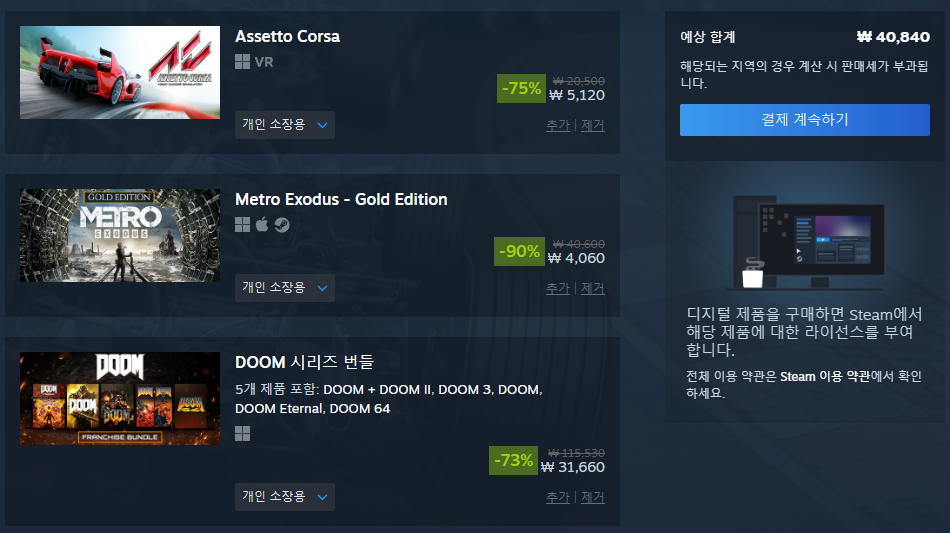
둠 이터널이 목표였는데
지르고 지르고 지르다 보니 저번 ace combat 7 포함
6만원을 이번달에 지름..
베데스다 할인이라 fallout 4랑 skyrim도 2만원만 더 얹으면 되긴한데
그건 내년 할인을 노리지 머 굳이.. 지금있는 것만 하세월이다~ 참자! 라는 느낌이 들어서 여기까지로!
assetto corsa도 telemetry 정보 받아볼까? ㅋㅋㅋ(먼가 주객이 전도된 느낌..)
| 스팀 여름 할인 시작 -_- (0) | 2025.06.27 |
|---|---|
| steam 에서 일반 조이스틱 엑박패드로 인식하기 (0) | 2025.01.05 |
| 아 몰라 질러 (1) | 2024.12.17 |
| epic 무료 게임! (0) | 2024.12.06 |
| 블랙 프라이데이 할인... 흐음.. (0) | 2024.12.01 |
[링크 : https://github.com/JamesCJ60/AMD-APU-Tuning-Utility]
[링크 : https://www.reddit.com/r/AMDLaptops/comments/ssraz2/ryzen_controller_preset_for_5800h/?rdt=38341]
[링크 : https://github.com/JamesCJ60/Universal-x86-Tuning-Utility]
| transmission for windows (0) | 2025.02.02 |
|---|---|
| Apache ECharts (0) | 2025.01.14 |
| ryzen controller? (0) | 2024.12.21 |
| modbus online 생성기 (0) | 2024.12.18 |
| double commander (0) | 2024.11.29 |
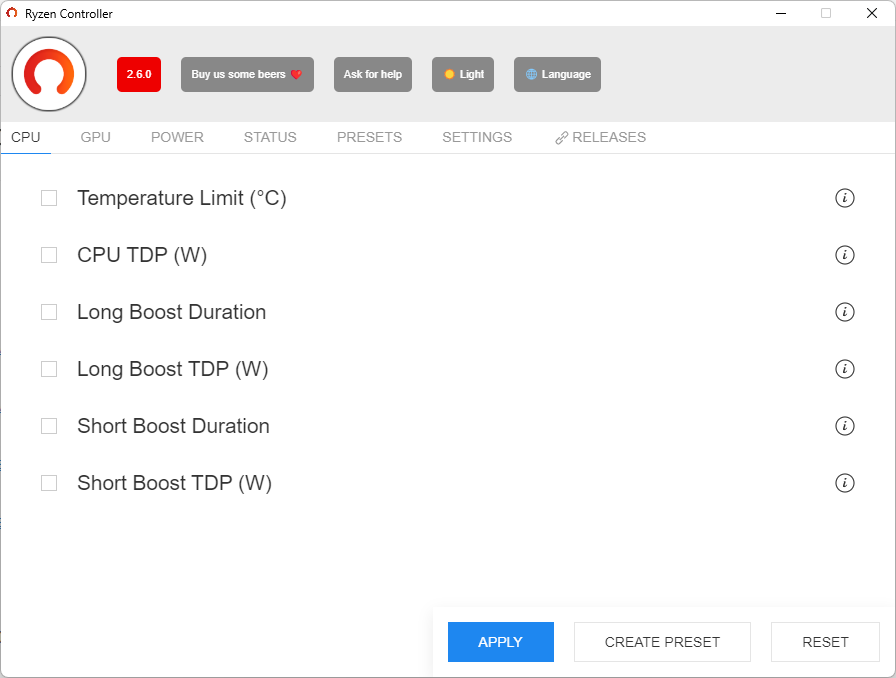
일종의 오버클럭 유틸리티.
TDP 내에서 자유롭게 설정 할 수 있다는데
현재 설정을 모르니 결국에는 도박을 해야하나?
[링크 : https://gitlab.com/ryzen-controller-team/ryzen-controller/-/releases]
[링크 : https://gitlab.com/ryzen-controller-team/ryzen-controller]
[링크 : https://m.blog.naver.com/padamu1/222180171695]
[링크 : https://c-p-u.tistory.com/4]
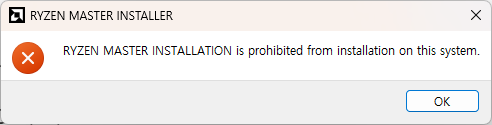
ryzen 7 5800U 인데 설치가 막혀있다.
[링크 : https://www.amd.com/en/products/software/ryzen-master.html]
| Apache ECharts (0) | 2025.01.14 |
|---|---|
| AATU -> UXTU (0) | 2024.12.21 |
| modbus online 생성기 (0) | 2024.12.18 |
| double commander (0) | 2024.11.29 |
| f3d - glb viewer (0) | 2024.08.09 |
잠만오네 ㅠㅠ
설마 또 항 히스타민제인가?
| 핸들 돌려받고, 다른 사람에게 빌려줌 (0) | 2025.01.22 |
|---|---|
| 회사 정리 줍줍 (0) | 2025.01.02 |
| 점심시간의 소소한(?) 유흥 (0) | 2024.12.20 |
| 지르고 싶은건 많은데 (5) | 2024.12.15 |
| 외근 (0) | 2024.12.12 |
Lenovo ThinkPad E15 Gen3 15
amd ryzen 7 5800U 8Core 16Thread / Vega 내장 그래픽
8 (온보드) + 16GB
512GB nvme
15.6인치
hwinfo 실행하면 아래와 같이 뜨는데
온보드는 8GB고 메모리는 16GB SK 하이닉스 DDR4-3200이 달려있다.
우려처럼 온보드 메모리가 느려서 발목 잡진 않을 듯.
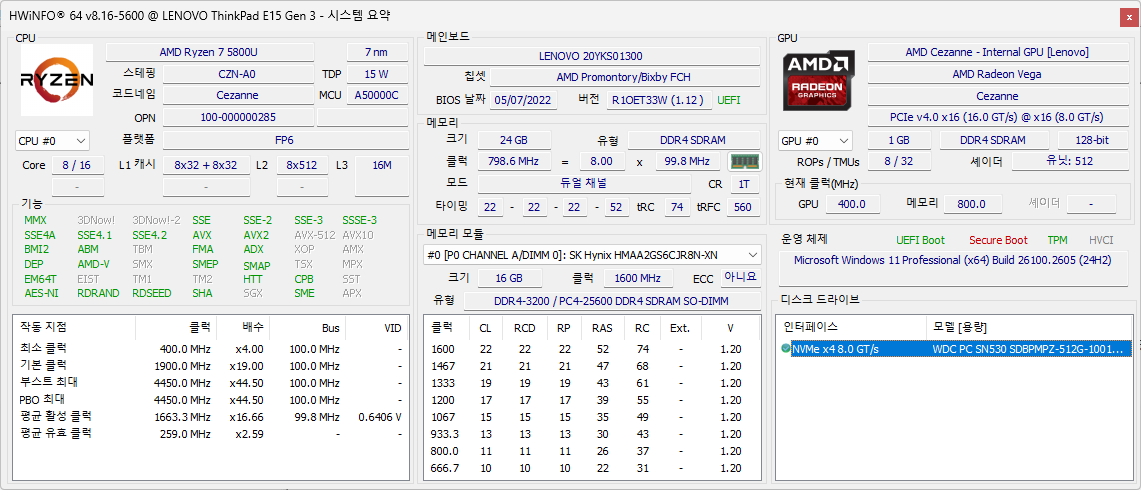
38만원에 보증기간 남았다고 해서 가져왔는데 보증기간은 솔찍히 생각이 별로 없고
1.7kg 라서 걱정했는데 부피 대비로는 가벼운 편이라 나름 마음에 든다.
그런데 배터리가 만충되도 좀 써도 4시간에서 2시간 정도 밖에 안떠서(균형으로 설정)
게임을 하면 이거.. 1시간도 안 갈 느낌인디...

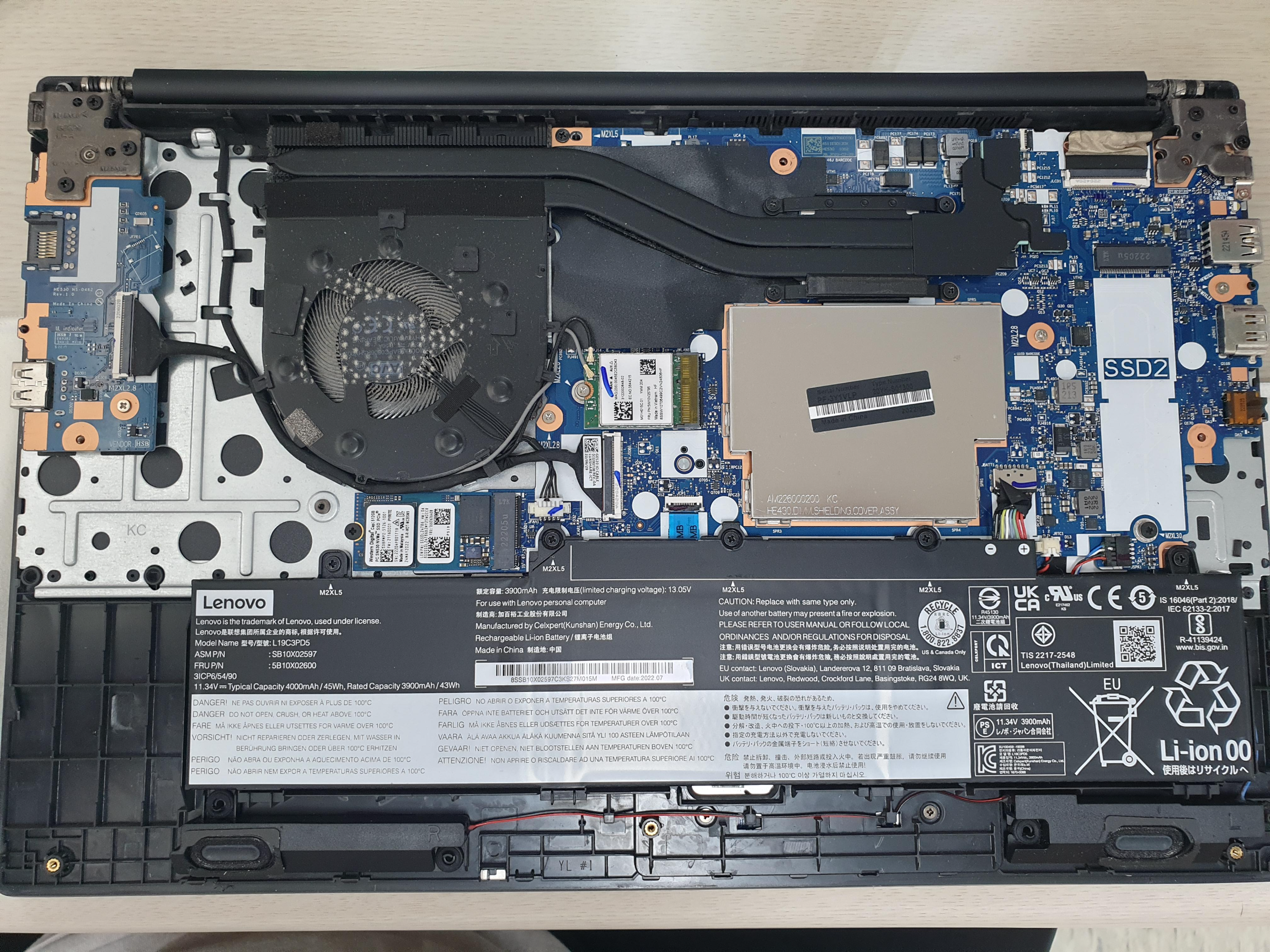
분해해서 보니 왼쪽 RJ45는 커넥터가 커버쪽 기구랑 공유되서 연결이 되는 구조라..
RJ45가 잘 안되면 하판을 갈아야 하는 문제가 생길 드러운 커넥터고..
SSD2 라고 해서 슬롯이 하나는 남아있는데 DDR4 메모리는 어디있는지 보이질 않는다.
검색해보니 저 중앙의 깡통이 메모리 슬롯이라고.. EMI 통과 실패했나 왜 저런 미친짓을..
[링크 : https://m.blog.naver.com/ff1100v/222815943640]
게다가 저가버전(?)이라 그런가 배터리가 11.34V / 4000mAh
3S 에 4000mAh 인 것 같은데 2시간 정말 버틸 수 있는거 맞나?
그래도 nvme가 512GB 라서 전체 파티션 날리고 usb로 설치하는데 secure boot 때문에 한 번 고생하고
윈 11 포맷하면서 해상도가 이상해서 좀 고생했지만 대충 찍어서 설치하고
forza horizon 4도 프레임까진 모르겠지만
720p 낮음으로 끊어지지 않는 느낌으로 게임이 가능했고
스팀덱보단 그래픽 사양이 좀 낮겠지만 이런저런 설정하면 나름 괜찮을 듯
이정도면.. 휴대용 게임기로 봐도 괜찮을 듯?
ace combat 7이랑 death stranding 설치하려니 각각 70기가.. 젠장 -_-
나중에 시간 들여 천천히 깔아야겠다.
어댑터는 65W를 주었는데, 회사에서 PD3.0 충전기로 모니터 해보니
충전시에는 45W
컴퓨터 켜면 54W 까진 먹는 것 같다. (TDP 15 니까 45W 충전 = 1시간 만충, 60W 인데 여유 해서 65W 제공?)
인터넷 찾아보니 10% 할인해서 108만원 이고 16GB / 512GB 사양이 있는걸 봐서는 나름 비싼 녀석인 듯
[링크 : https://www.11st.co.kr/products/3680571275]
일단 잠시 써본 결과 단점
1. 액정 어두워!
싼거라 어쩔수 없었나 최대로 밝게해도 밝다는 느낌이 없다.
2. 터치패드 끄기 어디갔냐?!
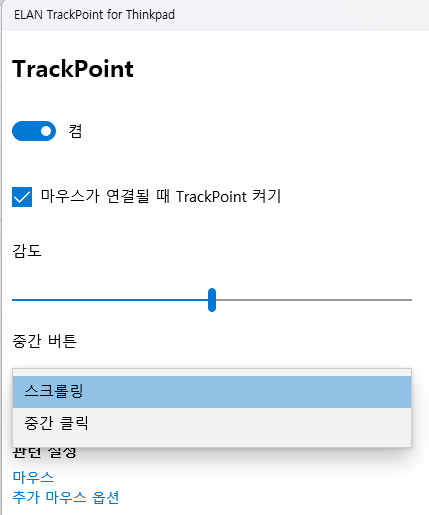
키보드에 끄는 버튼이 없다. 젠장!!!! 빨콩 쓰다가 은근히 자꾸 건들려서 터치되서 짜증난다.
3. 아 땀차
겨울이라 그런가 빨콩쓰면 팜 레스트에 땀찬다. 떼면 금세 사라지긴 하지만...
4. 으아아 먼지 으아아아 손자국!
윗판 겉면은 손닿으면 지문똭! 남는건 아니지만 미묘한 재질로 인해서 손자국이 막 난다.
결벽증 있는 사람은 쓰려다가 뒷목잡고 쓰러질 듯.
5. 아니 왜 거기에 캡쳐키가 있어?!
한영 키 위치에 prtsc가 있고 누르면 영역 선택해서 캡쳐가 된다.
아니 난 한영 변환하려 했을 뿐이라고...
6. 배터리 누구 코에 걸어..
적은 용량도 큰용량도 아닌 좀 애매한 용량.. 무게 맞추려고 용량을 줄인게 아닐까 싶긴한데
5V/2A 로는 충전도 되지 않아서 USB-PD 가 반드시 있어야 한다.
삼성 always 9은 5V 2A 로도 충전은 되는디.. 좀 아쉽
아무튼 싸게 좋은물건을 살 수 있어서 크리스마스는 행복해질...지도!?
회사 동료가 구매했던 rc 카를 빌려서 운행해보는데 나름 어렵고 재미있음
애들 데리고(?) 놀기에는 좋을지도
그리고 이번에 새로 구매한 5800U 노트북에
윈11 pro 재설치 / Driving Force GT 드라이버 설치 / 스팀 설치 / forza horizon 4 설치해서
짧게나마 force feedback을 사람들에게 체험시켜 줌
윈10 부터 슬슬 시동 걸리더니 11에서는 인터넷 연결을 강제하고 있네 -_-
그냥 오프라인 계정/로컬 계정으로 쓰고 싶은데 말이야 -_-!
shift-f10 (콘솔 열기 단축키)
| oobe\bypassnro |
[링크 : https://atecbs.tistory.com/entry/윈도우-11-인터넷-연결-없이-설치하는-방법]
| sdelete for win (0) | 2025.02.04 |
|---|---|
| 윈도우 11 캡쳐키(prtscr) 캡쳐 프로그램 연동 끄기 (0) | 2025.01.05 |
| 컴퓨터 구매, 포맷! 안되잖아?! (0) | 2024.12.20 |
| 윈도우 바탕화면 경로 변경하기 (0) | 2024.07.13 |
| 3d 그림판 보다는 3d builder (0) | 2024.02.19 |

|