오른쫏 뒤5 타이어
주차장에서 올라오다 긁어먹음
오른쪽 터이어는.저번에도 연석 밟랐킄데 ㅜㅠ
'개소리 왈왈 > 부릉이 라이프' 카테고리의 다른 글
| 냉각수, 에어컨 문제 없음 (2) | 2026.10.07 |
|---|---|
| 타이어 손상 (3) | 2026.06.29 |
| 유류비 지원 때문인가? (0) | 2026.05.01 |
| k5 와이퍼 들기 (0) | 2026.03.03 |
| 새차 첫 장거리 (2) | 2026.01.03 |

오른쫏 뒤5 타이어
주차장에서 올라오다 긁어먹음
오른쪽 터이어는.저번에도 연석 밟랐킄데 ㅜㅠ
| 냉각수, 에어컨 문제 없음 (2) | 2026.10.07 |
|---|---|
| 타이어 손상 (3) | 2026.06.29 |
| 유류비 지원 때문인가? (0) | 2026.05.01 |
| k5 와이퍼 들기 (0) | 2026.03.03 |
| 새차 첫 장거리 (2) | 2026.01.03 |
[링크 : https://code.claude.com/docs/ko/goal]
goal로 하면 프로젝트 하나 알아서 돌릴수 있으려나?
일단 아래는 테스트 내용
| $ cat test.txt 1. bird 이름으로 파일을 생성한다. 2. 파일 생성후 1초 쉰다. 3. 파일이 총 100개를 생성한다. 4. 디렉토리를 하나 생성하고 위에서 생성한 파일만 디렉토리로 옮긴다 5. 생성된 파일을 목록을 생성한다. |
| $ claude Claude Code v2.1.311 Opus 5.5 with medium effort · Claude Pro ~/work/work/cc ❯ /goal "test.txt"를 읽고 checkbox 로 모든 것이 수행한것으로 체크 될 때까지 ⎿ Goal set: "test.txt"를 읽고 checkbox 로 모든 것이 수행한것으로 체크 될 때까지 Goal acknowledged — reading test.txt and working through every checkbox until all are checked. Ran 1 shell command Plan: create bird_001…bird_100 with a 1-second pause after each, move them into a new directory, write a list file, then add checked boxes to test.txt. Creating the files takes about 100 seconds. Ran 2 shell commands I completed all five tasks in test.txt and checked off every item. 1. 파일 생성: bird_001부터 bird_100까지 bird 이름으로 빈 파일을 만들었습니다. 2. 1초 대기: 파일을 하나 만들 때마다 1초씩 쉬었습니다. 3. 100개 생성: 확인해 보니 정확히 100개입니다. 4. 디렉토리 이동: birds/ 디렉토리를 만들고 이 bird 파일들만 옮겼습니다. test.txt는 그대로 두었습니다. 5. 목록 생성: 옮긴 파일 목록을 bird_list.txt에 저장했습니다. 100줄입니다. 원래 test.txt에는 체크박스가 없어서 각 항목 앞에 - [x]를 붙여 다시 작성했습니다. 항목 문구는 바꾸지 않았습니다. ✔ Goal achieved (1m · 1 turn · 1.8k tokens) ✻ Baked for 1m 59s · done 오후 5:20 |
실행되고 나서는 아래처럼 파일과 디렉토리가 생성되는데
| ~/work/work/cc$ ls bird_list.txt birds test.txt |
test.txt 를 md 스타일의 체크리스트로 바꾸고 다 체크를 해버렸다.
| $ cat test.txt - [x] 1. bird 이름으로 파일을 생성한다. - [x] 2. 파일 생성후 1초 쉰다. - [x] 3. 파일이 총 100개를 생성한다. - [x] 4. 디렉토리를 하나 생성하고 위에서 생성한 파일만 디렉토리로 옮긴다 - [x] 5. 생성된 파일을 목록을 생성한다. |
아무튼 이렇게 하면 할일 적어주고 혹은 프로젝트 순차적으로 진행할 방법 적어놓고
하위 task별 작업할 일을 적도록 하고 하면 스스로 열심히 토큰 빨아 먹으면 가능할듯?
| gpt 무료사용자 codex 사용 가능하네? (0) | 2026.10.24 |
|---|---|
| 프로그래밍도 할 줄 아는 local LLM 만들기.. part 2? (0) | 2026.10.20 |
| strata (0) | 2026.10.20 |
| 프로그래밍도 할 줄 아는 local LLM 만들기.. part 1? (0) | 2026.10.16 |
| cyc 프로젝트, dreamcoder (0) | 2026.10.16 |
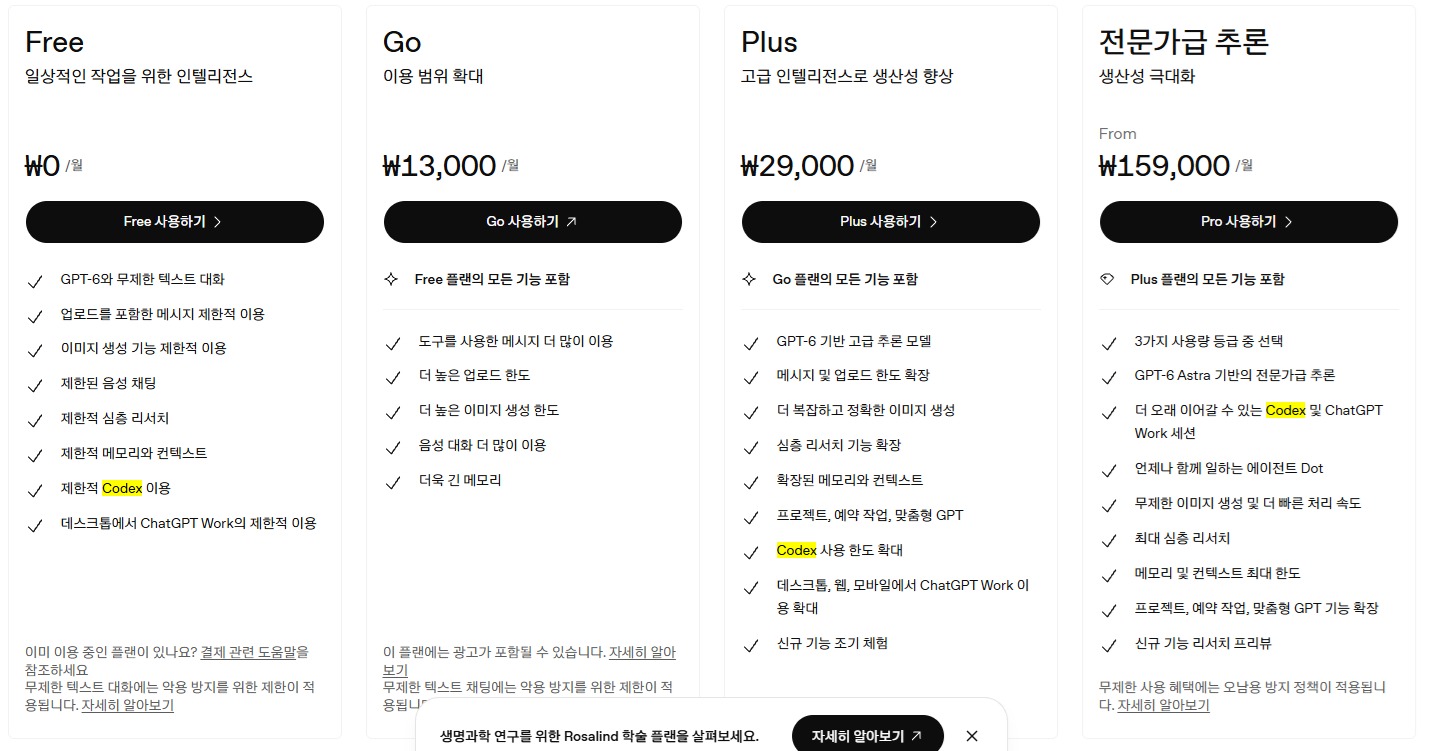
유료로 멀 가입할까 하다가, codex cli가 있나 해서 찾아보고 가격을 보니.. 어? 제한적 codex 이용?
클로드는 제한적도 아니고 free는 클로드 코드 자체를 못쓴거 같았는데 역시 후하구만
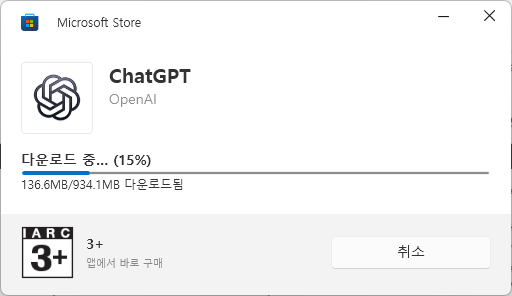
음.. 윈11이라 그런가 자체 인스톨러 아니고 마이크로 소프트 스토어 통해서 받는데
와우. 934MB?
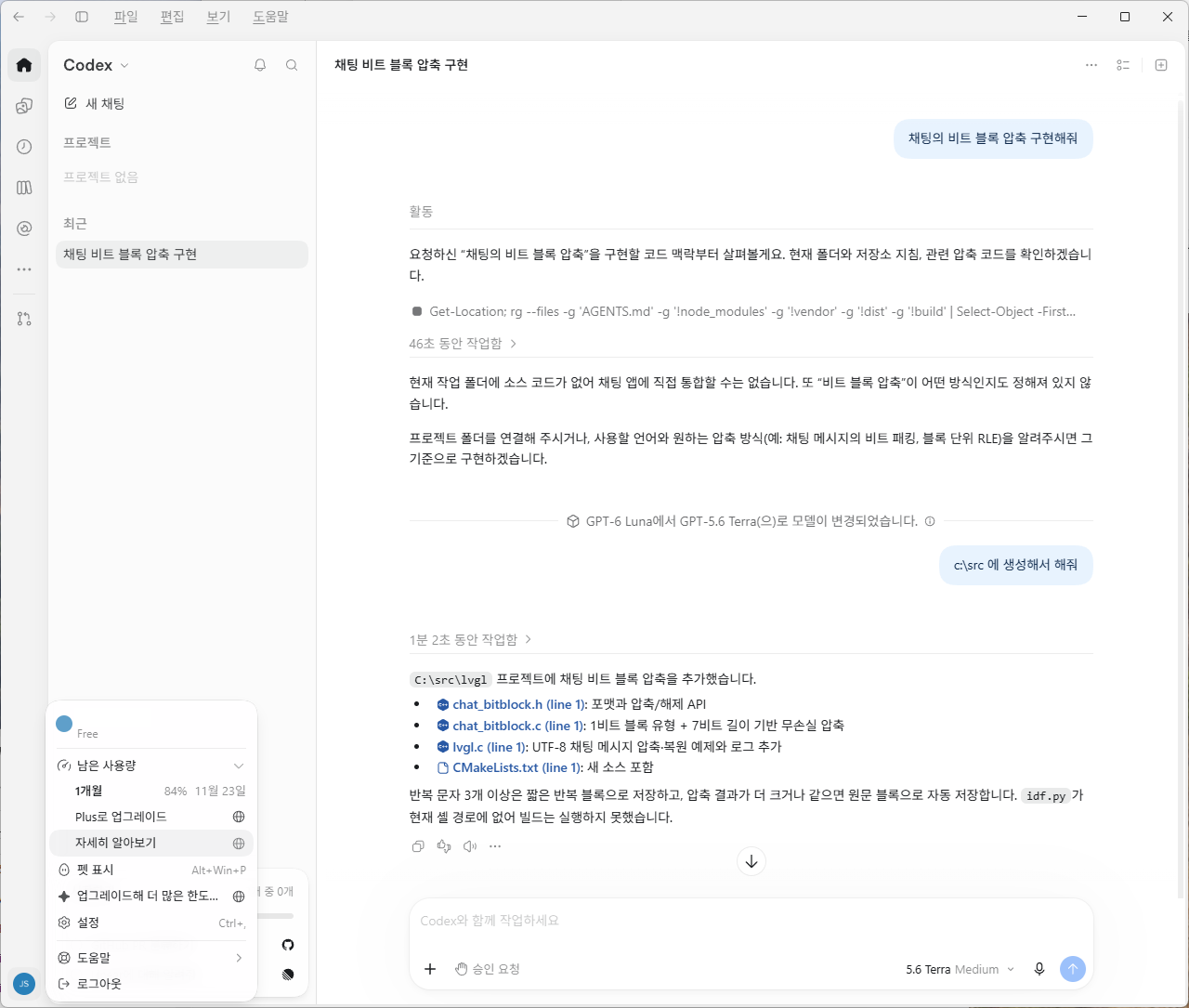
설치하고 나니 2.4GB 와우..

채팅 두 번 했는데 한 달 사용량의 16% 증발 -0-!!
그나저나 쟤 머하니 -ㅁ-?? 왜 갑자기 lvgl이라고 폴더명을 짓고 난리야
코드를 따라가봤더니 lvgl / esp32 ... 어.. 무슨 끔직한 혼종이 생겨난겨?
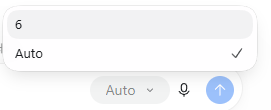
codex 쪽으로는 5.6 과 6대 버전인데
6버전은 astra / sol / luna 버전중 luna 까지 쓸 수 있나 보다
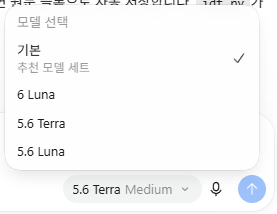
chatGPT 에서는 더 성의가 없네 6 이 머여 -_-
| claude code /goal 사용해보기 (0) | 2026.10.27 |
|---|---|
| 프로그래밍도 할 줄 아는 local LLM 만들기.. part 2? (0) | 2026.10.20 |
| strata (0) | 2026.10.20 |
| 프로그래밍도 할 줄 아는 local LLM 만들기.. part 1? (0) | 2026.10.16 |
| cyc 프로젝트, dreamcoder (0) | 2026.10.16 |
그냥 easymode로 끝!
총 12시간

그나저나 엔딩본 사람이 6% 밖에 안되는군
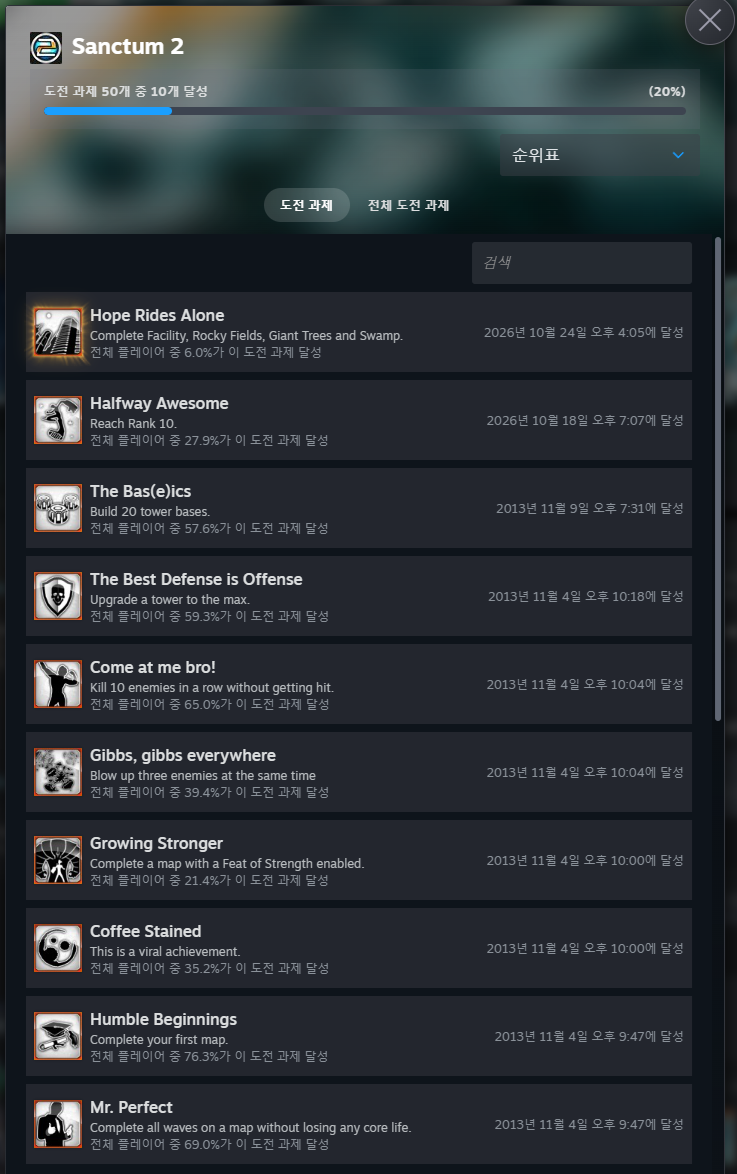
다 깨고 나니 50% 조금 넘는다. 체력 추가 등등 이런거 해야지 100% 채울듯
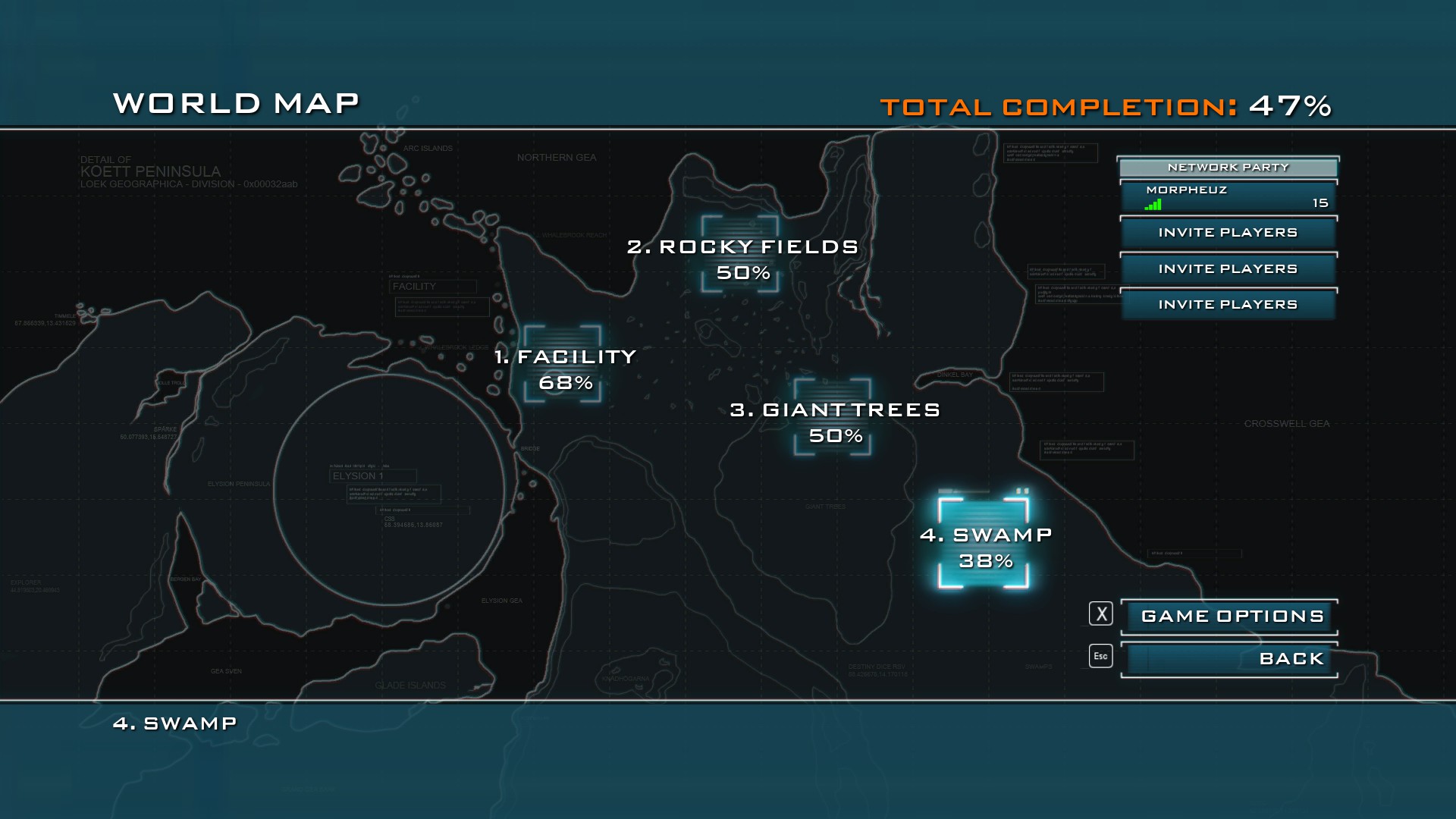
마지막 은 1 wave만 있는데 보스가 무슨 ㅋㅋㅋ
focus로 조져버림

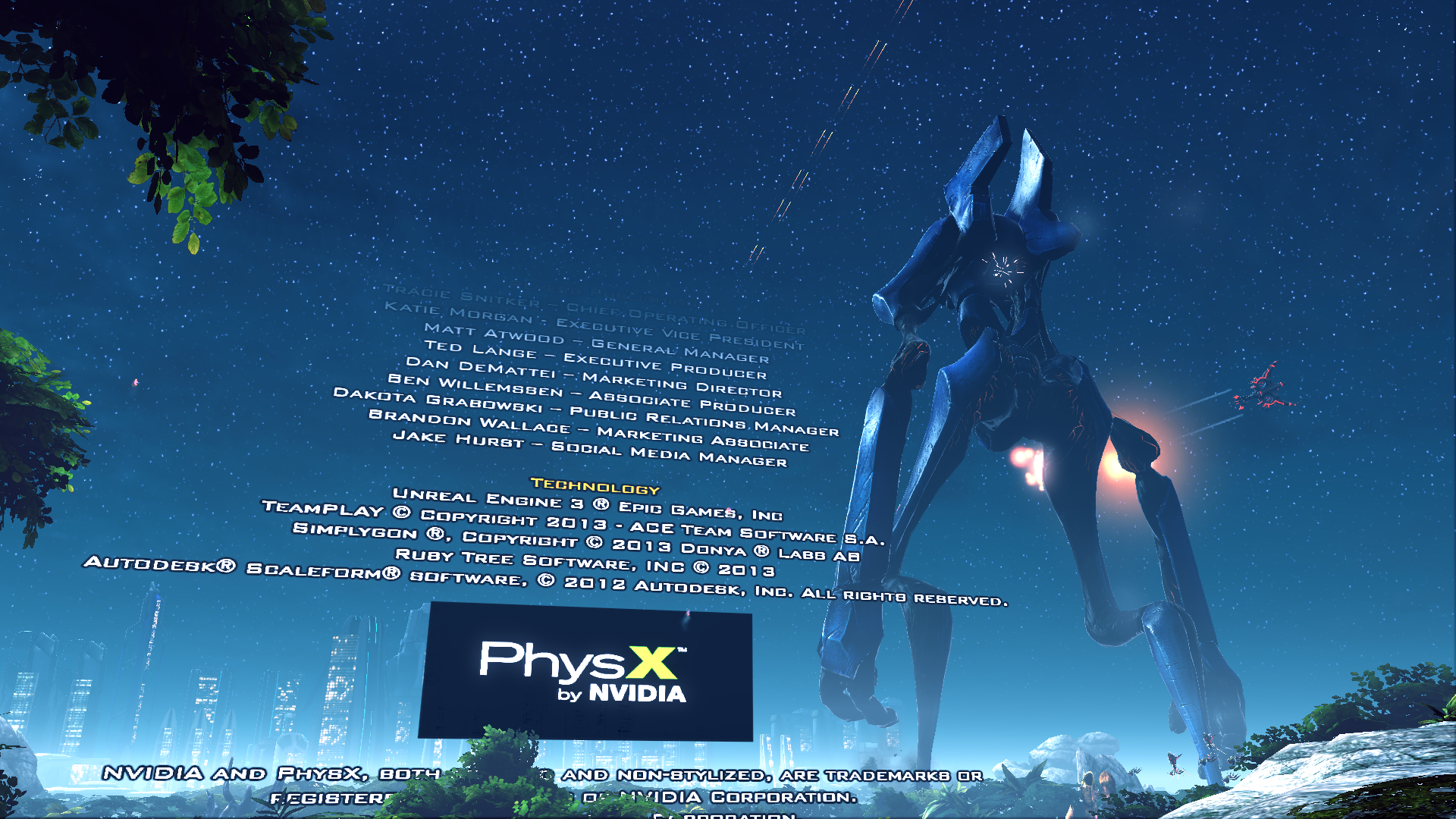
크레딧 올라오고 먼가 엄청 큰 놈 오는거 보여주면서 끝, 그나저나 physx 지원이었네?
| 생텀 2 (0) | 2026.10.18 |
|---|---|
| microsoft flight simulator X stream edition (0) | 2025.12.06 |
| forza horizon 4 - fortune island! (4) | 2025.09.27 |
| forza horizon 4 - 가을시즌 획득! (0) | 2024.11.24 |
| flight simulator X (0) | 2021.06.27 |
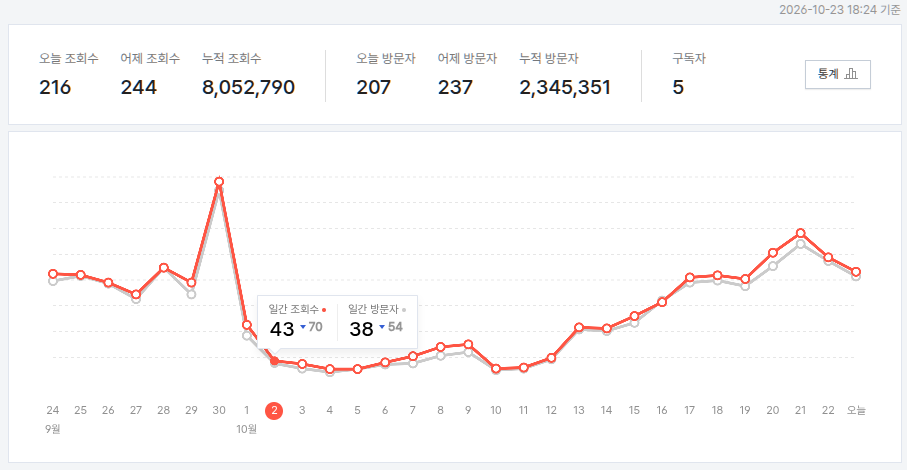
ai로 뽕 맞고(?)
연휴 2주 있어서 좀 쉬었더니 100 미만으로까지도 추락
이제야 겨우겨우 200대 재진입 ㅠㅠ
| 블로그 방문자가!!! (0) | 2026.10.06 |
|---|---|
| 곧 마법이 풀리겠군 (2) | 2026.10.01 |
| 방문자 어디까지 올라가는거에요? (2) | 2026.09.02 |
| 해피빈 기부 (0) | 2026.08.18 |
| 불법촬영물 여부 검토 (2) | 2026.07.24 |
별 희한한게 많네 -ㅁ-
gdm에 끌려왔다는것 같은데, 아무튼 별의 x인것 처럼 격리해서 테스트 해보기도 가능한 x 인듯
| Xephyr is a nested X server that runs as an X application. |
[링크 : https://wiki.archlinux.org/title/Xephyr]
[링크 : https://en.wikipedia.org/wiki/Xephyr]
+
2026.10.23
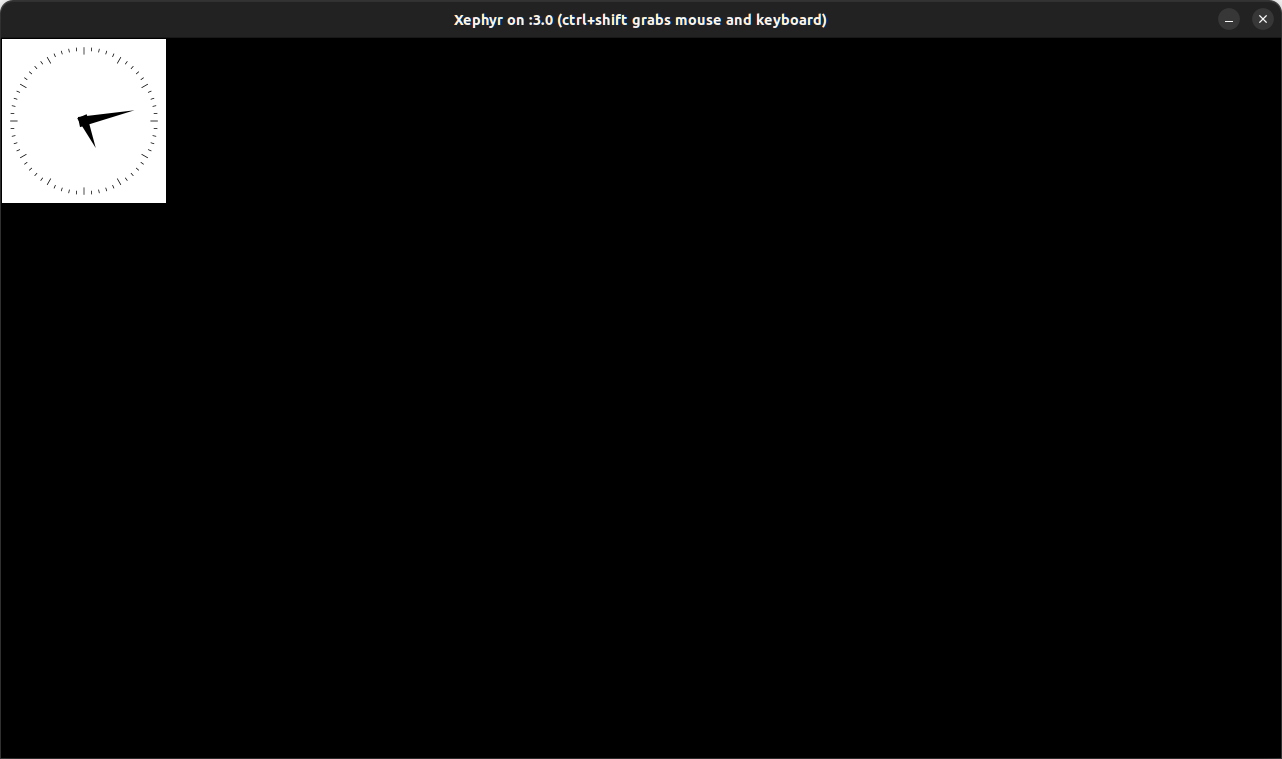
| $ Xephyr :3 -screen 1280x720 & $ DISPLAY=:3 xclock |
| 터치 테스트용 프로그램 (0) | 2026.10.20 |
|---|---|
| espeak-ng TTS (0) | 2026.09.07 |
| festival lite TTS (0) | 2026.09.07 |
| ubuntu 22.04 24.04 설치 파티션 차이 (0) | 2026.07.09 |
| hp 2760p 우분투 26.02 설치 실패 (0) | 2026.06.23 |
imx8mp 에는 여러가지 이상한(?) 것들이 달려있다.
cortex-m7 800Mhz 랑
HiFi DSP 라고 tensilica / xtensa 계열 dsp가 그건데
Advanced Multimedia and Display
|
[링크 : https://www.nxp.com/products/i.MX8MPLUS]
이전에 생각만 해오던거 오늘은 ai 도움으로 조사중
| 4 Building DSP Framework on Linux OS Before you compile the DSP-related code, set up the DSP-related toolchains. The DSP framework, DSP codec wrapper, and DSP codec use Xtensa development toolchain. |
[링크 : https://www.nxp.com/docs/en/user-guide/UG10167.pdf]
cortex-m7 처럼 rpmsg로 하고, 똑같은 방법으로 펌웨어를 올려서 작동시키면 된다.
기본 컨셉은 ahb를 통해 주변장치가 있으니까 도메인이 존재할거고
리눅스 dtb는 리눅스에서 사용하지 않을 녀석(mcu 들이 사용할 녀석을 제외)을 골라서 사용한다.
ddr 메모리는 mcu / dsp 통신용으로 영역을 선정하고(즉, 리눅스에서 사용하지 않도록 영역 지정)
rpmsg 를 통해서 거기 데이터 있으니 가져가서 처리하라고 찔러준다.
xtensa 이긴한데 정확한 아키텍쳐는 찾아봐도 안나오고
그래도 혹시나 하는 마음에 esp32 / esp32-s2 / esp826 바이너리를 빌드해서 dsp에서 돌아가나 테스트 해보려고 함
다운로드 경로(zephyr rtos sdk)
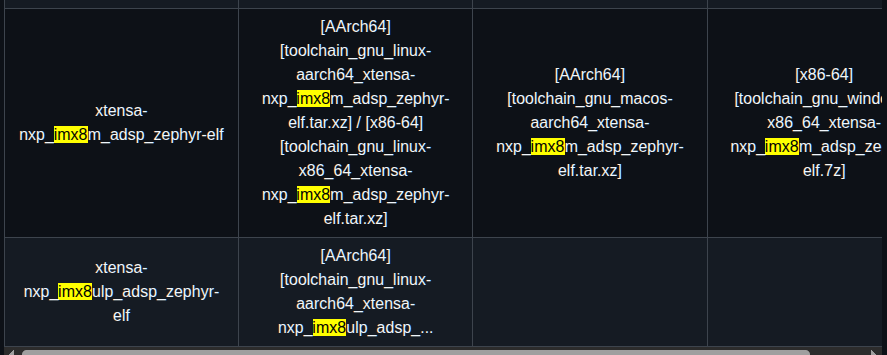

[링크 : https://github.com/zephyrproject-rtos/sdk-ng/releases/]
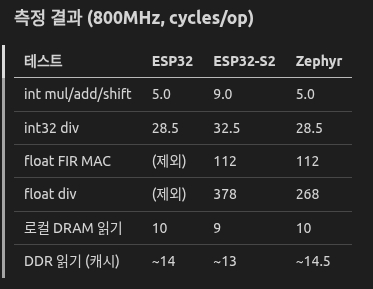
테스트 결과

일단 esp32 / esp32-s2 로도 돌릴수 있는데 이상하게 느리다는게 좀 단점
zephyr의 것을 쓰면 아무튼 cadence sdk 안쓰고도 가벼운건 돌릴수 있다 정도가 될 듯.
+
2026.10.22
zephyr 언급된 문서들
| AN13970 Running Zephyr RTOS on Cadence Tensilica HiFi 4 DSP |
[링크 : https://www.nxp.com/docs/en/application-note/AN13970.pdf]
[링크 : https://community.nxp.com/t5/i-MX-Processors/Programming-the-Tensilica-HiFi4-DSP/m-p/2079878]
[링크 : https://openamp-libopenamp-prs.readthedocs.io/en/latest/demos/system_reference-NXP.html]
| For details on how to harness the power processing of the DSP by running Zephyr RTOS on the DSP, while running Linux OS on the main Cortex-A core, see the Running Zephyr RTOS on Cadence Tensilica HiFi 4 DSP (AN13970). This covers simple and more complex examples, such as hello_world or IPC samples. In the application note, all examples are explained using the existing drivers and/or frameworks from the Linux OS and Zephyr RTOS. |
[링크 : https://www.nxp.jp/docs/en/user-guide/UG10167.pdf]
[링크 : https://github.com/zephyrproject-rtos/zephyr/tree/main/samples/hello_world]
[링크 : https://www.nxp.com/company/about-nxp/smarter-world-blog/BL-HIFI4-DSP-CORE-WITH-ZEPHYR]
| eiq-portal로 학습 시도(cpu) (0) | 2026.05.27 |
|---|---|
| nxp CMSIS-NN (0) | 2026.05.13 |
| g2d_surface g2d_blit() (0) | 2026.02.10 |
| eiq 모델 정리 (0) | 2025.09.16 |
| eiq 데이터 구조 (0) | 2025.09.05 |
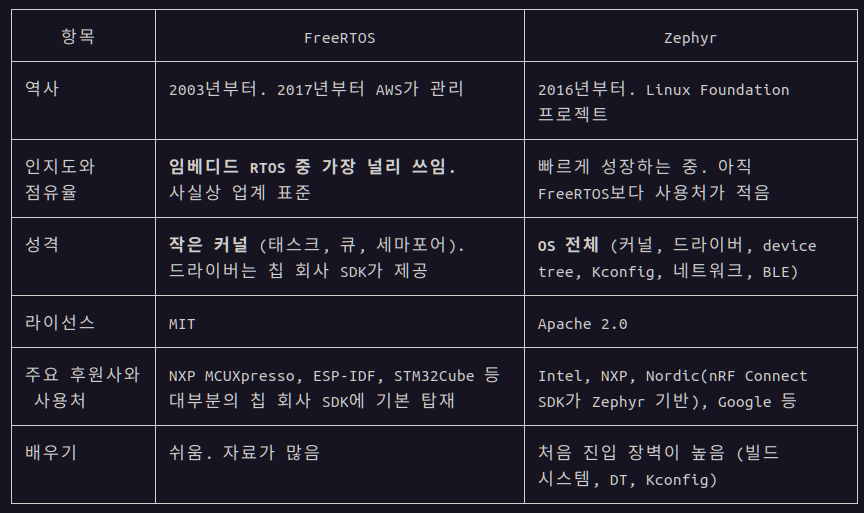
리눅스 재단에서 관리하는 rtos 라고 한다.
한번 들여다는 봐야겠네. freeRTOS 보다는 인지도가 없으려나?
[링크 : https://www.nxp.com/docs/en/application-note/AN13970.pdf]
[링크 : https://www.zephyrproject.org/]
[링크 : https://m.blog.naver.com/chcbaram/222755342935]
+
claude 말로는 아래와 같다고 한다.
그나저나 freertos가 aws에 인수 당했구나..
[링크 : https://www.clien.net/service/board/news/11501037]
| mbed studio with 32f469idiscovery (0) | 2026.02.21 |
|---|---|
| mbed studio / cli (0) | 2026.02.20 |
| Ethos-U85 (0) | 2026.02.06 |
| SVE(Scalable Vector Extension) (0) | 2025.08.28 |
| emmc 파티션 정렬 (0) | 2024.02.07 |
ts_print는 hexdump /dev/input/event0 와 비슷하게 작동하고(좌표가 나와서 더 좋지만)
ts_print_mt / ts_print 는 화면에 터치가 어디서 되는지 보여주면서 작동한다.
| # ts ts ts_finddev ts_print_mt ts_test_mt tsort ts_calibrate ts_harvest ts_print_raw ts_uinput ts_conf ts_print ts_test ts_verify |
| xephyr - nested x server (0) | 2026.10.22 |
|---|---|
| espeak-ng TTS (0) | 2026.09.07 |
| festival lite TTS (0) | 2026.09.07 |
| ubuntu 22.04 24.04 설치 파티션 차이 (0) | 2026.07.09 |
| hp 2760p 우분투 26.02 설치 실패 (0) | 2026.06.23 |
그냥 클로드가 다해줘버리는 느낌이라 모르겠다 ㅋㅋㅋㅋ
아무튼, 이번 실험의 주제는 model이 우선이냐, sft가 우선이냐 인데
결론만 보면 "결과물의 품질은 model이 우선이다, 하지만 사용자 체감은 model 이 동등할 경우 sft가 크다." 이다


정작 학습된 모델도 openSCAD로 내가 원하는대로 작동을 만들어낼 순 없긴한데..
얼마나 더 많은 자료와 gpu를 때려박아야 작동할까 -ㅁ-?
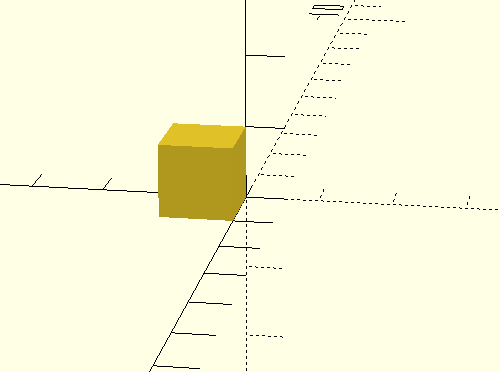
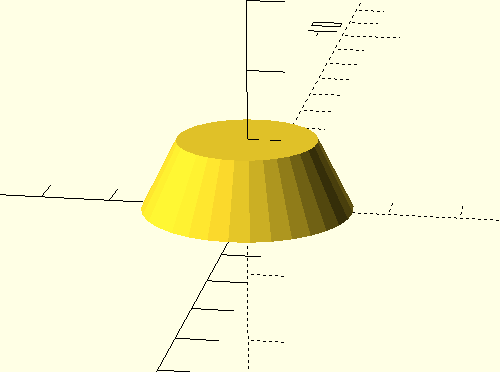
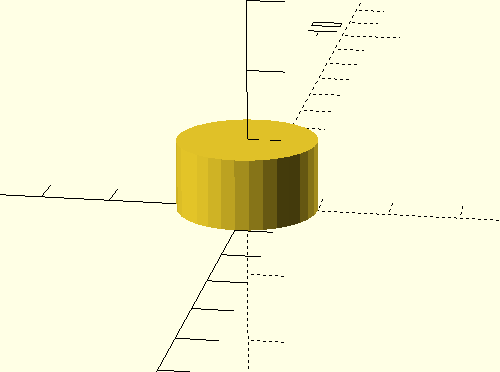
아래는 그나마 그려지는 예. 그 와중에 python 으로 하라는데 sft 영향을 강하게 받아서 openSCAD로 해버린다.
| > cube each 1m cube([1,1,1]); [ Prompt: 9.9 t/s | Generation: 40.3 t/s ] |
 |
| > donut cylinder (h=1, r1=1.5, r2, $fn=32); [ Prompt: 155.9 t/s | Generation: 39.6 t/s ] |
 |
| > rectangle in python cylinder (h=1, r1=1, r2, $fn=32); [ Prompt: 177.6 t/s | Generation: 42.0 t/s ] |
 |
일단 이번 테스트 요약하면
1. model의 크기, 정보량이 결국은 결과의 품질을 보장한다.
2. epoch가 높진 않다. 1~2 epoch. 그래서 미친듯이 원본 데이터를 수집하는 거군.. ai 업체들이 톤 단위로 책 사들이는 이유..
3. sft는 생각외로 사용자 체감이 크고, 본 학습 시간보다 sft는 빠르게 끝난다. 좋게 보면 학습에 대한 효율이 좋다.
| claude code /goal 사용해보기 (0) | 2026.10.27 |
|---|---|
| gpt 무료사용자 codex 사용 가능하네? (0) | 2026.10.24 |
| strata (0) | 2026.10.20 |
| 프로그래밍도 할 줄 아는 local LLM 만들기.. part 1? (0) | 2026.10.16 |
| cyc 프로젝트, dreamcoder (0) | 2026.10.16 |

|


