요즘 핫하던데 (엄청난 비용의 토큰을 쓴 경험을 바탕으로 한국인이 만들었다고)

local llm에도 붙일수 있어서 한번 해봐야 할 듯.

gui 시대에 tui라니 끌리는데? ㅋㅋ

[링크 : https://www.elancer.co.kr/blog/detail/1048]

[링크 : https://wikidocs.net/338090]

[링크 : https://opencode.ai/ko]


llama.cpp
llama.cpp의 llama-server 유틸리티를 통해 로컬 모델을 사용하도록 구성할 수 있습니다.

opencode.json
{
  "$schema": "https://opencode.ai/config.json",
  "provider": {
    "llama.cpp": {
      "npm": "@ai-sdk/openai-compatible",
      "name": "llama-server (local)",
      "options": {
        "baseURL": "http://127.0.0.1:8080/v1"
      },
      "models": {
        "qwen3-coder:a3b": {
          "name": "Qwen3-Coder: a3b-30b (local)",
          "limit": {
            "context": 128000,
            "output": 65536
          }
        }
      }
    }
  }
}

이 예제에서:

llama.cpp는 사용자 정의 공급자 ID입니다. 원하는 문자열로 지정할 수 있습니다.
npm은 이 공급자에 사용할 패키지를 지정합니다. 여기서는 OpenAI 호환 API를 위해 @ai-sdk/openai-compatible을 사용합니다.
name은 UI에 표시될 공급자 이름입니다.
options.baseURL은 로컬 서버의 엔드포인트입니다.
models는 모델 ID와 해당 구성을 매핑합니다. 모델 이름은 모델 선택 목록에 표시됩니다.

[링크 : https://opencode.ai/docs/providers/]

'프로그램 사용 > ai 프로그램' 카테고리의 다른 글

openai api .. 오디오 처리 성공  (0) 2026.05.07
ollama multimodal gemma4:e2b 테스트  (0) 2026.05.07
llm tts?  (0) 2026.05.05
stablie diffusion 모델 변경 / 다운로드 하기  (0) 2026.05.05
gemma4 e?b 멀티모달  (0) 2026.05.05
Posted by 구차니

llama-outeTTS 가 많이 검색되어 나오는데 한번 돌려봐야 할 듯.

확장자가 safetensor로 되어있고

[링크 : https://huggingface.co/unsloth/Llama-OuteTTS-1.0-1B/tree/main]


걍 -m 뒤에 넣어줘보면 될 듯.

[링크 : https://github.com/ggml-org/llama.cpp/issues/688]


[링크 : https://huggingface.co/unsloth/Llama-OuteTTS-1.0-1B]

[링크 : https://github.com/ggml-org/llama.cpp/discussions/11679]

[링크 : https://www.reddit.com/r/LocalLLaMA/comments/1l0qbot/tts_support_in_llamacpp/?tl=ko]

[링크 : https://arca.live/b/aispeech/136125630]

Posted by 구차니

음.. 받고 리프레시 하면 바로 뜨는듯?

다운로드한 파일을 이제 'C://StableDiffusion/stable-diffusion-webui/models/Stable-diffusion' 경로에 이동해서 넣으시면 됩니다. (이태릭체는 설치한 경로예요.)

[링크 : https://selgyun.tistory.com/entry/Stable-Diffusion-체크-포인트Checkpoint-학습-모델-추가하기-SD-2]


먼가 추천 링크들 보면 이런게 떠서 가입을 해야만 한다고 하니 귀찮...

아무튼 여기서 illustrious 로 검색하라는데 그게 모델명인가?

[링크 : https://civitai.com/]


+

2026.05.06

실행하면 하나 밖에 없었는데


위의 경로에 하나 넣고 우측의 refresh 을 눌러보니


오옹~!

250W 거의 풀로 먹고 83도.. ㄷㄷㄷ


근데 모델을 바꾸어도

내가 원하는걸 그리는건 또 다른 문제구나.

예제대로 해봐도 똑같이 안나온다.


1girl, masterpiece, general, lineart, white background, simple background
Negative prompt: bad quality,low quality,worst quality,lowres,displeasing,very displeasing,bad,bad anatomy,bad hands,text,error, multiple views, messy, amateur, blurry, blurry background, blurry foreground, rough, roughly drawn, messy, bad, what, guro, gore, futanari, yaoi, bara, pectorals, Steps: 28, CFG scale: 7.5, Sampler: Euler a, Seed: 1790244969, Size: 832x1216, Model: Illustrious-XL-v0.1, Version: f1.0.2-v1.10.1RC-latest-691-g37223711, Model hash: 3e15ba0038, Schedule type: Automatic, Discard penultimate sigma: True


1girl, masterpiece, general, lineart, white background, simple background
Negative prompt: worst quality,bad quality,bad hands,very displeasing,extra digit,fewer digits,jpeg artifacts,signature,username,reference,mutated,lineup,manga,comic,disembodied,futanari,yaoi,dickgirl,turnaround,2koma,4koma,monster,cropped,amputee,text,bad foreshortening,what,guro,logo,bad anatomy,bad perspective,bad proportions,artistic error,anatomical nonsense,amateur,out of frame,multiple views,weibo username,
Steps: 28, Sampler: Euler a, Schedule type: Automatic, CFG scale: 7.5, Seed: 1790244969, Size: 768x1024, Model hash: 3e15ba0038, Model: illustriousXL_v01, Version: v1.10.1-96-g1937682a

같은 시드라도 다르게 나오나?


Discard penultimate sigma: True 를 설정하려면 settings - Sampler parameters - Always discard next-to-list sigma를 체크하고 apply 하면 되나본데..

[링크 : https://github.com/AUTOMATIC1111/stable-diffusion-webui/discussions/14169]


다시보니 negative prompt 문제인것 같은데 다시 해봐도 같은건 안나온다. 그림 해상도 영향도 받나?


먼가.. 확대하니 이상하다. 그리고 그림도 다르게 나오네 

'프로그램 사용 > ai 프로그램' 카테고리의 다른 글

opencode + llama.cpp  (0) 2026.05.06
llm tts?  (0) 2026.05.05
gemma4 e?b 멀티모달  (0) 2026.05.05
stable diffusion + 1080 ti 시도  (0) 2026.05.04
stable diffusion + pytorch 관련 조사  (0) 2026.05.04
Posted by 구차니

어..?!

31b가 오히려 audio를 지원하지 않는다.


qwen3.6 이나 gemma4 31B 이런애들만 되는 줄 알았는데, e2b e4b 에서도 되서 시도!

6. Audio
Use the following prompt structures for audio processing:

Audio Speech Recognition (ASR)
Transcribe the following speech segment in {LANGUAGE} into {LANGUAGE} text.

Follow these specific instructions for formatting the answer:
* Only output the transcription, with no newlines.
* When transcribing numbers, write the digits, i.e. write 1.7 and not one point seven, and write 3 instead of three.

Automatic Speech Translation (AST)
Transcribe the following speech segment in {SOURCE_LANGUAGE}, then translate it into {TARGET_LANGUAGE}.
When formatting the answer, first output the transcription in {SOURCE_LANGUAGE}, then one newline, then output the string '{TARGET_LANGUAGE}: ', then the translation in {TARGET_LANGUAGE}.

[링크 : https://huggingface.co/google/gemma-4-E2B]

[링크 : https://huggingface.co/unsloth/gemma-4-E4B-it-GGUF/tree/main]


+

실행은 아래와 같이 해주고

D:\study\llm\llama-b8916-bin-win-vulkan-x64>llama-server.exe -m ..\gemma-4-E4B-it-Q4_K_M.gguf --mmproj ..\mmproj-F16.gguf


심심하니 nvidia-smi 스샷찍어둔걸 사골로 우려먹기 ㅋㅋ


골든 mp4로 받고 ffmpeg 으로 mp3 변환하고

[링크 : https://www.youtube.com/watch?v=yebNIHKAC4A]


구글 검색에서 뜨는 가사랑 diff 떠보니 음.. 맞는것 같으면서 안 맞는

그래도 노래를 TTS로 돌린거 치고는 제법 비슷하게 나왔다는게 대단한 듯.

'프로그램 사용 > ai 프로그램' 카테고리의 다른 글

llm tts?  (0) 2026.05.05
stablie diffusion 모델 변경 / 다운로드 하기  (0) 2026.05.05
stable diffusion + 1080 ti 시도  (0) 2026.05.04
stable diffusion + pytorch 관련 조사  (0) 2026.05.04
stable diffusion 관련  (0) 2026.05.02
Posted by 구차니

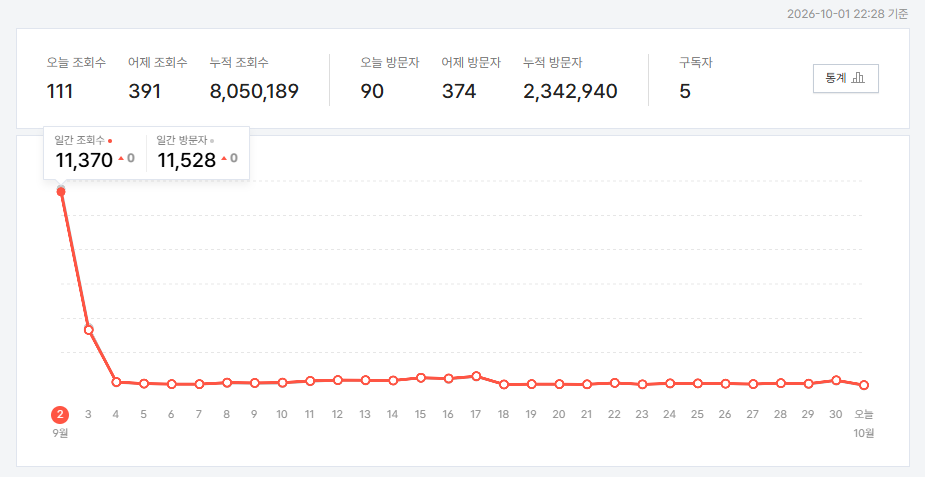
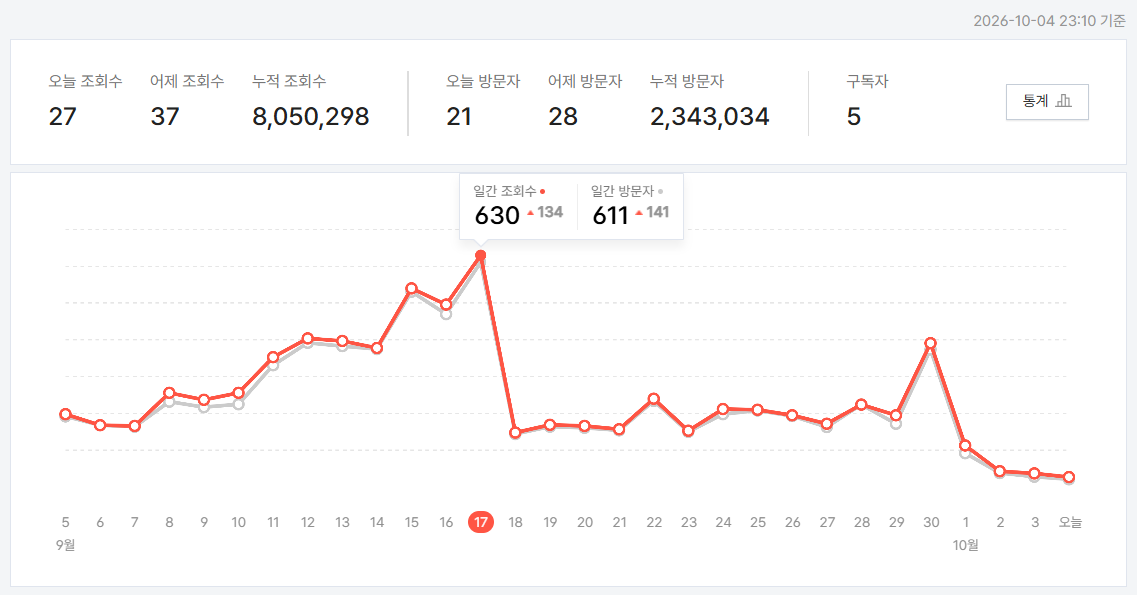
에베레스트 찍고 하염없이 바닥으로 ㅋㅋㅋ


Posted by 구차니

2025년 2월 이후로 업데이트 없어서 사살상 현재는 죽은 상태

[링크 : https://github.com/AUTOMATIC1111/stable-diffusion-webui]


1.7.0 으로 설치시도


에러 메시지 대응은 아래 명령으로 venv 를 실행해주고 web_ui.sh 실행하면 되고

cannot activate python venv, aborting.. 
cd stable-diffusion-webui
python3 -m venv venv/

[링크 : https://github.com/AUTOMATIC1111/stable-diffusion-webui/issues/1120]


뜬금없이 저장소 계정을 물어보는건, 임의의 브랜치를 만들어서 먼가를 더 받거나 할 수 있도록 하면 해결

Installing open_clip
Cloning Stable Diffusion into /mnt/Downloads/stable-diffusion-webui/repositories/stable-diffusion-stability-ai...
Cloning into '/mnt/Downloads/stable-diffusion-webui/repositories/stable-diffusion-stability-ai'...
Username for 'https://github.com':
Password for 'https://github.com':
remote: Repository not found.
fatal: Authentication failed for 'https://github.com/Stability-AI/stablediffusion.git/'
git switch dev

[링크 : https://www.reddit.com/r/StableDiffusion/comments/1pu9ef7/please_help_error_128/?tl=ko]


요건 그냥 패키지 깔아주면 된다고 한다.

Cannot locate TCMalloc (improves CPU memory usage)
Cannot locate TCMalloc. Do you have tcmalloc or google-perftool installed on your system? (improves CPU memory usage)

[링크 : https://www.clien.net/service/board/cm_aigurim/18066331]


localhost:7860 만되는건 --server-name 으로 해결

$ ./webui.sh --server-name=0.0.0.0

[링크 : https://github.com/AUTOMATIC1111/stable-diffusion-webui/discussions/7558]


기본 설정으로는 512 x 512 인데, 한장에 대략 8초 정도 걸린다.


혹시 다이내아 그려보려고 하는데 영 이상하고 내가 원하는대로 안되서

ai의 도움을 받아서 해보는데


음.. 100% 인데 153W라..

아무튼 메모리 생각외로 많이 먹...네?


1024x768 생성하는데 


42.5초. 근데 나의(?) 다이애나는 이렇지 않아!!

Time taken: 42.5 sec.     A: 6.62 GB, R: 7.11 GB, Sys: 7.3/10.9043 GB (67.0%)


음.. 좀 귀찮은데 ㅋㅋ

[링크 : https://github.com/AUTOMATIC1111/stable-diffusion-webui/discussions/8293]

[링크 : https://github.com/AUTOMATIC1111/stable-diffusion-webui/discussions/1621]

    [링크 : https://github.com/papuSpartan/stable-diffusion-webui-distributed]


모델 교체법은 찾아봐야겠다.

[링크 : https://civitai.com/models/795765/illustrious-xl?modelVersionId=889818]

Posted by 구차니

sd 1.8.0 부터 pytorch 2.x 대로 업그레이드

sd 1.7.0 으로 시도하면 되려나?


1.8.0
Features:
Update torch to version 2.1.2

[링크 : https://github.com/AUTOMATIC1111/stable-diffusion-webui/releases]


구버전 하드웨어 지원 종료

Highlights/Performance Improvements
Deprecation of Cuda 11.6 and Python 3.7 support for PyTorch 2.0
If you are still using or depending on CUDA 11.6 or Python 3.7 builds, we strongly recommend moving to at least CUDA 11.7 and Python 3.8, as it would be the minimum versions required for PyTorch 2.0. For more detail, please refer to the Release Compatibility Matrix for PyTorch releases.

[링크 : https://pytorch.org/blog/pytorch-2-0-release/]


pascal(1080) / cuda 12.6.3


이렇게 보면 2.1.2로 간다고 해서 문제 될 것 없어 보이는데 버전 문제가 아닌가?


[링크 : https://github.com/pytorch/pytorch/blob/main/RELEASE.md#release-compatibility-matrix]


'프로그램 사용 > ai 프로그램' 카테고리의 다른 글

gemma4 e?b 멀티모달  (0) 2026.05.05
stable diffusion + 1080 ti 시도  (0) 2026.05.04
stable diffusion 관련  (0) 2026.05.02
opanai api로 local LLM 하니 똑똑해진 기분  (0) 2026.05.02
llama.cpp multi modal 시도  (0) 2026.05.02
Posted by 구차니

이제는 떠나와 살아온 시간이 거기서 살았던 시간보다 길어졌음을 문득 깨닫는다.

그럼에도 가보니 옛날 그대로면서도 많이 달라졌고

그래서 더 추억에 잠기는 곳인듯.

'개소리 왈왈 > 육아관련 주저리' 카테고리의 다른 글

유류비 지원 때문인가?  (0) 2026.05.01
레일 교체  (0) 2026.04.08
개피곤  (0) 2026.04.02
앉아보기  (0) 2026.03.29
잠 + 밥 + 화장실 반복  (0) 2026.03.28
Posted by 구차니

남의 저장소에 issue 쓴 걸 제외하면 나름 나에게 도움이 될 느낌.

I have recently run into some issues. After several hours, I got the process down to a reproducible science/recipe.

If you are running stablediffusion with an Nvidia GTX 1080Ti and are having issues, read on...

🧩 Final Working Fix Summary

Hardware: NVIDIA GTX 1080 Ti (SM 6.1 Pascal)
OS: Windows 10 x64
Environment: Automatic1111 v1.10.1
Python: 3.10.6
Torch Stack:

torch==2.1.2+cu118
torchvision==0.16.2+cu118
torchaudio==2.1.2+cu118
xformers==0.0.23.post1  (optional)
Installed from: https://download.pytorch.org/whl/cu118

Other Key Dependencies:

transformers==4.36.2
tokenizers==0.15.2
safetensors==0.4.2
onnxruntime==1.17.1
accelerate==0.21.0

[링크 : https://github.com/easydiffusion/easydiffusion/issues/1980]


pytorch 2.x 대로 업그레이드 해도 되는것 같긴한데..

[링크 : https://github.com/AUTOMATIC1111/stable-diffusion-webui/discussions/8709]


[링크 : https://www.reddit.com/r/StableDiffusion/comments/1qg5gha/i_made_a_new_ui_integrating_stablediffusioncpp/]

[링크 : https://github.com/Danmoreng/diffusion-desk]


제법(?) 여러가지 모델들이 있나보다.

🔥Important News

  • 2026/04/11 🚀 stable-diffusion.cpp now uses a brand-new embedded web UI.
    👉 Details: PR #1408
  • 2026/01/18 🚀 stable-diffusion.cpp now supports FLUX.2-klein
    👉 Details: PR #1193
  • 2025/12/01 🚀 stable-diffusion.cpp now supports Z-Image
    👉 Details: PR #1020
  • 2025/11/30 🚀 stable-diffusion.cpp now supports FLUX.2-dev
    👉 Details: PR #1016
  • 2025/10/13 🚀 stable-diffusion.cpp now supports Qwen-Image-Edit / Qwen-Image-Edit 2509
    👉 Details: PR #877
  • 2025/10/12 🚀 stable-diffusion.cpp now supports Qwen-Image
    👉 Details: PR #851
  • 2025/09/14 🚀 stable-diffusion.cpp now supports Wan2.1 Vace
    👉 Details: PR #819
  • 2025/09/06 🚀 stable-diffusion.cpp now supports Wan2.1 / Wan2.2
    👉 Details: PR #778


stable diffusion 이라고 SD 라고 하는건가?

Supported models

[링크 : https://github.com/leejet/stable-diffusion.cpp]


음.. Image랑 Iamge Edit 이랑 서로 다른 용도인가?

[링크 : https://huggingface.co/unsloth/Qwen-Image-Edit-2511-GGUF]

[링크 : https://huggingface.co/unsloth/Qwen-Image-GGUF]

[링크 : https://huggingface.co/unsloth/Qwen-Image-2512-GGUF]


일단 pip 패키지는 아니고 직접 설치를 해야 하는 것 같고

pip install git+https://github.com/huggingface/diffusers


코드 자체는 평이하긴 한데.. 딱 봐도 llama.cpp에서 돌릴만한 녀석은 아닐것 같은 느낌이..

from diffusers import DiffusionPipeline
import torch

model_name = "Qwen/Qwen-Image"

# Load the pipeline
if torch.cuda.is_available():
    torch_dtype = torch.bfloat16
    device = "cuda"
else:
    torch_dtype = torch.float32
    device = "cpu"

pipe = DiffusionPipeline.from_pretrained(model_name, torch_dtype=torch_dtype)
pipe = pipe.to(device)

positive_magic = {
    "en": ", Ultra HD, 4K, cinematic composition.", # for english prompt
    "zh": ", 超清,4K,电影级构图." # for chinese prompt
}

# Generate image
prompt = '''A coffee shop entrance features a chalkboard sign reading "Qwen Coffee 😊 $2 per cup," with a neon light beside it displaying "通义千问". Next to it hangs a poster showing a beautiful Chinese woman, and beneath the poster is written "π≈3.1415926-53589793-23846264-33832795-02384197". Ultra HD, 4K, cinematic composition'''

negative_prompt = " " # using an empty string if you do not have specific concept to remove


# Generate with different aspect ratios
aspect_ratios = {
    "1:1": (1328, 1328),
    "16:9": (1664, 928),
    "9:16": (928, 1664),
    "4:3": (1472, 1140),
    "3:4": (1140, 1472),
    "3:2": (1584, 1056),
    "2:3": (1056, 1584),
}

width, height = aspect_ratios["16:9"]

image = pipe(
    prompt=prompt positive_magic["en"],
    negative_prompt=negative_prompt,
    width=width,
    height=height,
    num_inference_steps=50,
    true_cfg_scale=4.0,
    generator=torch.Generator(device="cuda").manual_seed(42)
).images[0]

image.save("example.png")

[링크 : https://huggingface.co/unsloth/Qwen-Image-GGUF]

Posted by 구차니
embeded/FPGA - ALTERA2026. 5. 2. 22:54

정말로 dip 을 전부 0 으로 바꾸고 하니 켜진다.


de1soc_lxde_1604_readme.txt

Prerequisite: you need at least a 8Gb microSD card

Setup steps:
1. Unzip the image file
2. Insert the microSD card to the host PC and write the image file into the microSD with the Win32DiskImager tool
3. Insert the programmed microSD card to the DE1-SoC board
3. Set the MSEL[4:0] on your DE1-SoC to 00000
4. Connect a VGA monitor to the DE1-SoC board
5. Conect USB mouse and keyboard to the USB ports on the board
6. Power on the board and you will see the LXDE graphical environment

Additional information:
1. You can read the DE1-SoC-Getting_Started_Guide.pdf in the system CD for more details about setting up the Board
2. The Quartus project is built in Quartus II v16.0. The project is located at /Demonstrations/SOC_FPGA/DE1_SOC_Linux_FB (rev.F Board,version 5.1.1)
3. The Linux kernel version is 4.5. You can get the kernel source code from https://github.com/altera-opensource/linux-socfpga 
4. The default password fot root user is terasic


파티션이 어떻게 구성되었나 했는데 그냥 SD 카드에 rootfs 자체를 올려 버린 듯.


root / terasic

ubunt 16.04

U-Boot SPL 2013.01.01 (Oct 12 2016 - 10:38:03)
BOARD : Altera SOCFPGA Cyclone V Board
CLOCK: EOSC1 clock 25000 KHz
CLOCK: EOSC2 clock 25000 KHz
CLOCK: F2S_SDR_REF clock 0 KHz
CLOCK: F2S_PER_REF clock 0 KHz
CLOCK: MPU clock 925 MHz
CLOCK: DDR clock 400 MHz
CLOCK: UART clock 100000 KHz
CLOCK: MMC clock 50000 KHz
CLOCK: QSPI clock 3613 KHz
RESET: COLD
INFO : Watchdog enabled
SDRAM: Initializing MMR registers
SDRAM: Calibrating PHY
SEQ.C: Preparing to start memory calibration
SEQ.C: CALIBRATION PASSED
SDRAM: 1024 MiB
ALTERA DWMMC: 0


U-Boot 2013.01.01 (Oct 12 2016 - 10:40:34)

CPU   : Altera SOCFPGA Platform
BOARD : Altera SOCFPGA Cyclone V Board
I2C:   ready
DRAM:  1 GiB
MMC:   ALTERA DWMMC: 0
*** Warning - bad CRC, using default environment

In:    serial
Out:   serial
Err:   serial
Skipped ethaddr assignment due to invalid EMAC address in EEPROM
Net:   mii0
Warning: failed to set MAC address

Hit any key to stop autoboot:  0
reading u-boot.scr
200 bytes read in 3 ms (64.5 KiB/s)
## Executing script at 02000000
reading soc_system.rbf
7007184 bytes read in 327 ms (20.4 MiB/s)
## Starting application at 0x3FF795A4 ...
## Application terminated, rc = 0x0
reading zImage
5538512 bytes read in 259 ms (20.4 MiB/s)
reading socfpga.dtb
31245 bytes read in 5 ms (6 MiB/s)
## Flattened Device Tree blob at 00000100
   Booting using the fdt blob at 0x00000100
   reserving fdt memory region: addr=0 size=1000
   Loading Device Tree to 03ff5000, end 03fffa0c ... OK

Starting kernel ...

[    0.000000] Booting Linux on physical CPU 0x0
[    0.000000] Linux version 4.5.0-00183-g4647b69-dirty (root@matthew) (gcc version 4.8.3 20140401 (prerelease) (crosstool-NG linaro-1.13.1-4.8-2014.04 - Linaro GCC 4.8-2014.04) ) #52 SMP Thu Oct 27 17:10:02 CST 2016
[    0.000000] CPU: ARMv7 Processor [413fc090] revision 0 (ARMv7), cr=10c5387d
[    0.000000] CPU: PIPT / VIPT nonaliasing data cache, VIPT aliasing instruction cache
[    0.000000] Machine model: Terasic DE-0(Atlas)
[    0.000000] Truncating RAM at 0x00000000-0x40000000 to -0x30000000
[    0.000000] Consider using a HIGHMEM enabled kernel.
[    0.000000] cma: Reserved 512 MiB at 0x10000000
[    0.000000] Memory policy: Data cache writealloc
[    0.000000] PERCPU: Embedded 13 pages/cpu @cf8c3000 s21824 r8192 d23232 u53248
[    0.000000] Built 1 zonelists in Zone order, mobility grouping on.  Total pages: 195072
[    0.000000] Kernel command line: console=ttyS0,115200 root=/dev/mmcblk0p2 rw rootwait
[    0.000000] PID hash table entries: 4096 (order: 2, 16384 bytes)
[    0.000000] Dentry cache hash table entries: 131072 (order: 7, 524288 bytes)
[    0.000000] Inode-cache hash table entries: 65536 (order: 6, 262144 bytes)
[    0.000000] Memory: 241776K/786432K available (8614K kernel code, 577K rwdata, 2160K rodata, 600K init, 159K bss, 20368K reserved, 524288K cma-reserved)
[    0.000000] Virtual kernel memory layout:
[    0.000000]     vector  : 0xffff0000 - 0xffff1000   (   4 kB)
[    0.000000]     fixmap  : 0xffc00000 - 0xfff00000   (3072 kB)
[    0.000000]     vmalloc : 0xf0800000 - 0xff800000   ( 240 MB)
[    0.000000]     lowmem  : 0xc0000000 - 0xf0000000   ( 768 MB)
[    0.000000]     modules : 0xbf000000 - 0xc0000000   (  16 MB)
[    0.000000]       .text : 0xc0008000 - 0xc0a8db9c   (10775 kB)
[    0.000000]       .init : 0xc0a8e000 - 0xc0b24000   ( 600 kB)
[    0.000000]       .data : 0xc0b24000 - 0xc0bb46fc   ( 578 kB)
[    0.000000]        .bss : 0xc0bb46fc - 0xc0bdc524   ( 160 kB)
[    0.000000] SLUB: HWalign=64, Order=0-3, MinObjects=0, CPUs=2, Nodes=1
[    0.000000] Hierarchical RCU implementation.
[    0.000000]  Build-time adjustment of leaf fanout to 32.
[    0.000000] NR_IRQS:16 nr_irqs:16 16
[    0.000000] L2C: platform modifies aux control register: 0x02060000 -> 0x32460000
[    0.000000] L2C: platform provided aux values permit register corruption.
[    0.000000] L2C: DT/platform modifies aux control register: 0x02060000 -> 0x32460000
[    0.000000] L2C-310 erratum 769419 enabled
[    0.000000] L2C-310 enabling early BRESP for Cortex-A9
[    0.000000] L2C-310 full line of zeros enabled for Cortex-A9
[    0.000000] L2C-310 ID prefetch enabled, offset 1 lines
[    0.000000] L2C-310 dynamic clock gating enabled, standby mode enabled
[    0.000000] L2C-310 cache controller enabled, 8 ways, 512 kB
[    0.000000] L2C-310: CACHE_ID 0x410030c9, AUX_CTRL 0x76460001
[    0.000000] clocksource: timer1: mask: 0xffffffff max_cycles: 0xffffffff, max_idle_ns: 19112604467 ns
[    0.000005] sched_clock: 32 bits at 100MHz, resolution 10ns, wraps every 21474836475ns
[    0.000016] Switching to timer-based delay loop, resolution 10ns
[    0.000311] Console: colour dummy device 80x30
[    0.000329] Calibrating delay loop (skipped), value calculated using timer frequency.. 200.00 BogoMIPS (lpj=1000000)
[    0.000341] pid_max: default: 32768 minimum: 301
[    0.000427] Mount-cache hash table entries: 2048 (order: 1, 8192 bytes)
[    0.000437] Mountpoint-cache hash table entries: 2048 (order: 1, 8192 bytes)
[    0.000941] CPU: Testing write buffer coherency: ok
[    0.000969] ftrace: allocating 26820 entries in 79 pages
[    0.041869] CPU0: thread -1, cpu 0, socket 0, mpidr 80000000
[    0.042092] Setting up static identity map for 0x8280 - 0x82d8
[    0.043433] CPU1: thread -1, cpu 1, socket 0, mpidr 80000001
[    0.043494] Brought up 2 CPUs
[    0.043508] SMP: Total of 2 processors activated (400.00 BogoMIPS).
[    0.043513] CPU: All CPU(s) started in SVC mode.
[    0.044174] devtmpfs: initialized
[    0.050496] VFP support v0.3: implementor 41 architecture 3 part 30 variant 9 rev 4
[    0.050777] clocksource: jiffies: mask: 0xffffffff max_cycles: 0xffffffff, max_idle_ns: 19112604462750000 ns
[    0.074717] NET: Registered protocol family 16
[    0.083918] DMA: preallocated 4096 KiB pool for atomic coherent allocations
[    0.090177] hw-breakpoint: found 5 (+1 reserved) breakpoint and 1 watchpoint registers.
[    0.090191] hw-breakpoint: maximum watchpoint size is 4 bytes.
[    0.121529] SCSI subsystem initialized
[    0.121788] usbcore: registered new interface driver usbfs
[    0.121847] usbcore: registered new interface driver hub
[    0.121909] usbcore: registered new device driver usb
[    0.122039] soc:usbphy@0 supply vcc not found, using dummy regulator
[    0.122789] media: Linux media interface: v0.10
[    0.122847] Linux video capture interface: v2.00
[    0.122899] pps_core: LinuxPPS API ver. 1 registered
[    0.122906] pps_core: Software ver. 5.3.6 - Copyright 2005-2007 Rodolfo Giometti <giometti@linux.it>
[    0.122932] PTP clock support registered
[    0.123089] FPGA manager framework
[    0.123660] Bluetooth: Core ver 2.21
[    0.123710] NET: Registered protocol family 31
[    0.123717] Bluetooth: HCI device and connection manager initialized
[    0.123732] Bluetooth: HCI socket layer initialized
[    0.123743] Bluetooth: L2CAP socket layer initialized
[    0.123768] Bluetooth: SCO socket layer initialized
[    0.125402] clocksource: Switched to clocksource timer1
[    0.173018] NET: Registered protocol family 2
[    0.173512] TCP established hash table entries: 8192 (order: 3, 32768 bytes)
[    0.173589] TCP bind hash table entries: 8192 (order: 4, 65536 bytes)
[    0.173695] TCP: Hash tables configured (established 8192 bind 8192)
[    0.173770] UDP hash table entries: 512 (order: 2, 16384 bytes)
[    0.173814] UDP-Lite hash table entries: 512 (order: 2, 16384 bytes)
[    0.174000] NET: Registered protocol family 1
[    0.174331] RPC: Registered named UNIX socket transport module.
[    0.174340] RPC: Registered udp transport module.
[    0.174346] RPC: Registered tcp transport module.
[    0.174351] RPC: Registered tcp NFSv4.1 backchannel transport module.
[    0.175514] futex hash table entries: 512 (order: 3, 32768 bytes)
[    0.184446] NFS: Registering the id_resolver key type
[    0.184495] Key type id_resolver registered
[    0.184502] Key type id_legacy registered
[    0.184563] ntfs: driver 2.1.32 [Flags: R/W].
[    0.184838] jffs2: version 2.2. (NAND) © 2001-2006 Red Hat, Inc.
[    0.185430] SGI XFS with ACLs, security attributes, no debug enabled
[    0.189606] io scheduler noop registered (default)
[    0.211937] Console: switching to colour frame buffer device 128x48
[    0.224086] altvipfb ff200100.vip2: fb0: altvipfb frame buffer device at 0x10400000+0x300000
[    0.227906] Serial: 8250/16550 driver, 2 ports, IRQ sharing disabled
[    0.228925] console [ttyS0] disabled
[    0.228966] ffc02000.serial0: ttyS0 at MMIO 0xffc02000 (irq = 39, base_baud = 6250000) is a 16550A
[    0.852835] console [ttyS0] enabled
[    0.856932] ffc03000.serial1: ttyS1 at MMIO 0xffc03000 (irq = 40, base_baud = 6250000) is a 16550A
[    0.867533] brd: module loaded
[    0.872162] CAN device driver interface
[    0.876535] stmmac - user ID: 0x10, Synopsys ID: 0x37
[    0.881569]  Ring mode enabled
[    0.884608]  DMA HW capability register supported
[    0.889135]  Enhanced/Alternate descriptors
[    0.893481]  Enabled extended descriptors
[    0.897480]  RX Checksum Offload Engine supported (type 2)
[    0.902938]  TX Checksum insertion supported
[    0.907195]  Enable RX Mitigation via HW Watchdog Timer
[    0.912913] socfpga-dwmac ff702000.ethernet eth0: No MDIO subnode found
[    0.925033] libphy: stmmac: probed
[    0.928449] eth0: PHY ID 00221611 at 1 IRQ POLL (stmmac-0:01) active
[    0.935262] ffb40000.usb supply vusb_d not found, using dummy regulator
[    0.941921] ffb40000.usb supply vusb_a not found, using dummy regulator
[    1.225353] dwc2 ffb40000.usb: EPs: 16, dedicated fifos, 8064 entries in SPRAM
[    1.325742] dwc2 ffb40000.usb: DWC OTG Controller
[    1.330452] dwc2 ffb40000.usb: new USB bus registered, assigned bus number 1
[    1.337516] dwc2 ffb40000.usb: irq 41, io mem 0x00000000
[    1.343072] usb usb1: New USB device found, idVendor=1d6b, idProduct=0002
[    1.349848] usb usb1: New USB device strings: Mfr=3, Product=2, SerialNumber=1
[    1.357047] usb usb1: Product: DWC OTG Controller
[    1.361732] usb usb1: Manufacturer: Linux 4.5.0-00183-g4647b69-dirty dwc2_hsotg
[    1.369016] usb usb1: SerialNumber: ffb40000.usb
[    1.374165] hub 1-0:1.0: USB hub found
[    1.377947] hub 1-0:1.0: 1 port detected
[    1.382544] usbcore: registered new interface driver usb-storage
[    1.388912] mousedev: PS/2 mouse device common for all mice
[    1.394776] i2c /dev entries driver
[    1.398719] usbcore: registered new interface driver uvcvideo
[    1.404442] USB Video Class driver (1.1.1)
[    1.408544] gspca_main: v2.14.0 registered
[    1.412684] usbcore: registered new interface driver benq
[    1.418129] usbcore: registered new interface driver conex
[    1.423641] usbcore: registered new interface driver cpia1
[    1.429166] usbcore: registered new interface driver dtcs033
[    1.434849] usbcore: registered new interface driver etoms
[    1.440374] usbcore: registered new interface driver finepix
[    1.446081] usbcore: registered new interface driver jeilinj
[    1.451767] usbcore: registered new interface driver jl2005bcd
[    1.457660] usbcore: registered new interface driver kinect
[    1.463259] usbcore: registered new interface driver konica
[    1.468869] usbcore: registered new interface driver mars
[    1.474306] usbcore: registered new interface driver mr97310a
[    1.480114] usbcore: registered new interface driver nw80x
[    1.485665] usbcore: registered new interface driver ov519
[    1.491179] usbcore: registered new interface driver ov534
[    1.496707] usbcore: registered new interface driver ov534_9
[    1.502407] usbcore: registered new interface driver pac207
[    1.508022] usbcore: registered new interface driver gspca_pac7302
[    1.514224] usbcore: registered new interface driver pac7311
[    1.519924] usbcore: registered new interface driver se401
[    1.525458] usbcore: registered new interface driver sn9c2028
[    1.531234] usbcore: registered new interface driver gspca_sn9c20x
[    1.537453] usbcore: registered new interface driver sonixb
[    1.543055] usbcore: registered new interface driver sonixj
[    1.548667] usbcore: registered new interface driver spca500
[    1.554350] usbcore: registered new interface driver spca501
[    1.560046] usbcore: registered new interface driver spca505
[    1.565743] usbcore: registered new interface driver spca506
[    1.571427] usbcore: registered new interface driver spca508
[    1.577134] usbcore: registered new interface driver spca561
[    1.582820] usbcore: registered new interface driver spca1528
[    1.588610] usbcore: registered new interface driver sq905
[    1.594122] usbcore: registered new interface driver sq905c
[    1.599737] usbcore: registered new interface driver sq930x
[    1.605354] usbcore: registered new interface driver sunplus
[    1.611038] usbcore: registered new interface driver stk014
[    1.616648] usbcore: registered new interface driver stk1135
[    1.622338] usbcore: registered new interface driver stv0680
[    1.628038] usbcore: registered new interface driver t613
[    1.633477] usbcore: registered new interface driver gspca_topro
[    1.639522] usbcore: registered new interface driver touptek
[    1.645202] usbcore: registered new interface driver tv8532
[    1.650813] usbcore: registered new interface driver vc032x
[    1.656422] usbcore: registered new interface driver vicam
[    1.661949] usbcore: registered new interface driver xirlink-cit
[    1.668019] usbcore: registered new interface driver gspca_zc3xx
[    1.674066] usbcore: registered new interface driver ALi m5602
[    1.679952] usbcore: registered new interface driver STV06xx
[    1.685663] usbcore: registered new interface driver gspca_gl860
[    1.692422] Bluetooth: HCI UART driver ver 2.3
[    1.696882] Bluetooth: HCI UART protocol H4 registered
[    1.701998] Bluetooth: HCI UART protocol BCSP registered
[    1.707334] Bluetooth: HCI UART protocol LL registered
[    1.712452] Bluetooth: HCI UART protocol ATH3K registered
[    1.717848] Bluetooth: HCI UART protocol Three-wire (H5) registered
[    1.724164] Bluetooth: HCI UART protocol Intel registered
[    1.729624] Bluetooth: HCI UART protocol BCM registered
[    1.734829] Bluetooth: HCI UART protocol QCA registered
[    1.740146] usbcore: registered new interface driver bcm203x
[    1.745897] usbcore: registered new interface driver bpa10x
[    1.751512] usbcore: registered new interface driver bfusb
[    1.757078] usbcore: registered new interface driver btusb
[    1.762548] Bluetooth: Generic Bluetooth SDIO driver ver 0.1
[    1.768296] Synopsys Designware Multimedia Card Interface Driver
[    1.774581] dw_mmc ff704000.dwmmc0: IDMAC supports 32-bit address mode.
[    1.781394] dw_mmc ff704000.dwmmc0: Using internal DMA controller.
[    1.787583] dw_mmc ff704000.dwmmc0: Version ID is 240a
[    1.792741] dw_mmc ff704000.dwmmc0: DW MMC controller at irq 30,32 bit host data width,1024 deep fifo
[    1.835392] dw_mmc ff704000.dwmmc0: 1 slots initialized
[    1.841009] ledtrig-cpu: registered to indicate activity on CPUs
[    1.847224] usbcore: registered new interface driver usbhid
[    1.852773] usbhid: USB HID core driver
[    1.856833] fpga_manager fpga0: Altera SOCFPGA FPGA Manager registered
[    1.863818] altera_hps2fpga_bridge ff400000.fpga-bridge: fpga bridge [lwhps2fpga] registered
[    1.872466] altera_hps2fpga_bridge ff500000.fpga-bridge: fpga bridge [hps2fpga] registered
[    1.880947] altera_hps2fpga_bridge ff600000.fpga-bridge: fpga bridge [fpga2hps] registered
[    1.889675] altera_fpga2sdram_bridge soc:fpga2sdram-bridge: fpga bridge [fpga2sdram] registered
[    1.898357] altera_fpga2sdram_bridge soc:fpga2sdram-bridge: driver initialized with handoff 00000000
[    1.907794] fpga-region soc:base-fpga-region: FPGA Region probed
[    1.914046] oprofile: no performance counters
[    1.918508] oprofile: using timer interrupt.
[    1.923835] NET: Registered protocol family 10
[    1.929063] sit: IPv6 over IPv4 tunneling driver
[    1.934268] NET: Registered protocol family 17
[    1.938743] NET: Registered protocol family 15
[    1.943172] can: controller area network core (rev 20120528 abi 9)
[    1.949389] NET: Registered protocol family 29
[    1.953821] can: raw protocol (rev 20120528)
[    1.958089] can: broadcast manager protocol (rev 20120528 t)
[    1.963731] can: netlink gateway (rev 20130117) max_hops=1
[    1.969497] Bluetooth: RFCOMM TTY layer initialized
[    1.974374] Bluetooth: RFCOMM socket layer initialized
[    1.979523] Bluetooth: RFCOMM ver 1.11
[    1.983271] Bluetooth: BNEP (Ethernet Emulation) ver 1.3
[    1.988582] Bluetooth: BNEP filters: protocol multicast
[    1.993792] Bluetooth: BNEP socket layer initialized
[    1.998756] Bluetooth: HIDP (Human Interface Emulation) ver 1.2
[    2.004655] Bluetooth: HIDP socket layer initialized
[    2.009666] 8021q: 802.1Q VLAN Support v1.8
[    2.013867] lib80211: common routines for IEEE802.11 drivers
[    2.019591] Key type dns_resolver registered
[    2.023943] ThumbEE CPU extension supported.
[    2.028223] Registering SWP/SWPB emulation handler
[    2.034119] of_cfs_init
[    2.036666] of_cfs_init: OK
[    2.041328] Bluetooth: Starting self testing
[    2.085351] usb 1-1: new high-speed USB device number 2 using dwc2
[    2.097751] Bluetooth: ECDH test passed in 50876 usecs
[    2.103948] Bluetooth: SMP test passed in 134 usecs
[    2.108870] Bluetooth: Finished self testing
[    2.113431] ttyS0 - failed to request DMA
[    2.117487] mmc_host mmc0: Bus speed (slot 0) = 50000000Hz (slot req 50000000Hz, actual 50000000HZ div = 0)
[    2.117520] Waiting for root device /dev/mmcblk0p2...
[    2.132287] mmc0: new high speed SDHC card at address b36c
[    2.138252] mmcblk0: mmc0:b36c SDABC 30.0 GiB
[    2.143713]  mmcblk0: p1 p2 p3
[    2.225780] EXT4-fs (mmcblk0p2): couldn't mount as ext3 due to feature incompatibilities
[    2.295525] usb 1-1: New USB device found, idVendor=0424, idProduct=2512
[    2.302206] usb 1-1: New USB device strings: Mfr=0, Product=0, SerialNumber=0
[    2.309957] hub 1-1:1.0: USB hub found
[    2.313816] hub 1-1:1.0: 2 ports detected
[    2.450577] EXT4-fs (mmcblk0p2): recovery complete
[    2.456318] EXT4-fs (mmcblk0p2): mounted filesystem with ordered data mode. Opts: (null)
[    2.464400] VFS: Mounted root (ext4 filesystem) on device 179:2.
[    2.477897] devtmpfs: mounted
[    2.481304] Freeing unused kernel memory: 600K (c0a8e000 - c0b24000)
[    2.700821] systemd[1]: System time before build time, advancing clock.
[    2.721925] systemd[1]: Failed to insert module 'autofs4': No such file or directory
[    2.750264] random: systemd urandom read with 58 bits of entropy available
[    2.759785] systemd[1]: systemd 229 running in system mode. (+PAM +AUDIT +SELINUX +IMA +APPARMOR +SMACK +SYSVINIT +UTMP +LIBCRYPTSETUP +GCRYPT +GNUTLS +ACL +XZ -LZ4 +SECCOMP +BLKID +ELFUTILS +KMOD -IDN)
[    2.778156] systemd[1]: Detected architecture arm.

Welcome to Ubuntu 16.04.1 LTS!

[    2.816078] systemd[1]: Set hostname to <DE1_SoC>.
[    3.207584] systemd[1]: Listening on Journal Socket.
[  OK  ] Listening on Journal Socket.
[    3.225650] systemd[1]: Listening on Syslog Socket.
[  OK  ] Listening on Syslog Socket.
[    3.245557] systemd[1]: Listening on udev Kernel Socket.
[  OK  ] Listening on udev Kernel Socket.
[    3.265561] systemd[1]: Listening on Journal Socket (/dev/log).
[  OK  ] Listening on Journal Socket (/dev/log).
[    3.285724] systemd[1]: Listening on /dev/initctl Compatibility Named Pipe.
[  OK  ] Listening on /dev/initctl Compatibility Named Pipe.
[    3.305561] systemd[1]: Reached target Remote File Systems (Pre).
[  OK  ] Reached target Remote File Systems (Pre).
[    3.325467] systemd[1]: Reached target Swap.
[  OK  ] Reached target Swap.
[    3.345613] systemd[1]: Listening on udev Control Socket.
[  OK  ] Listening on udev Control Socket.
[    3.365471] systemd[1]: Reached target Encrypted Volumes.
[  OK  ] Reached target Encrypted Volumes.
[    3.385651] systemd[1]: Created slice User and Session Slice.
[  OK  ] Created slice User and Session Slice.
[    3.416756] systemd[1]: Reached target Remote File Systems.
[  OK  ] Reached target Remote File Systems.
[    3.435713] systemd[1]: Created slice System Slice.
[  OK  ] Created slice System Slice.
[    3.485790] systemd[1]: Starting Nameserver information manager...
         Starting Nameserver information manager...
[    3.507481] systemd[1]: Starting Journal Service...
         Starting Journal Service...
[    3.576219] systemd[1]: Starting Load Kernel Modules...
         Starting Load Kernel Modules...
[    3.597416] systemd[1]: Mounting Debug File System...
         Mounting Debug File System...
[    3.617216] systemd[1]: Starting Set console keymap...
         Starting Set console keymap...
[    3.647681] systemd[1]: Starting Remount Root and Kernel File Systems...
         Starting Remount Root and Kernel File Systems...
[    3.675946] systemd[1]: Created slice system-serial\x2dgetty.slice.
[  OK  ] Created slice system-serial\x2dgetty.slice.
[    3.695782] systemd[1]: Reached target User and Group Name Lookups.
[  OK  ] Reached target User and Group Name Lookups.
[    3.715593] systemd[1]: Reached target Slices.
[  OK  ] Reached target Slices.
[    3.735763] systemd[1]: Started Forward Password Requests to Wall Directory Watch.
[  OK  ] Started Forward Password Requests to Wall Directory Watch.
[    3.815900] systemd[1]: Starting Create Static Device Nodes in /dev...
         Starting Create Static Device Nodes in /dev...
[    3.837510] systemd[1]: Started Read required files in advance.
[  OK  ] Started Read required files in advance.
[    3.871472] systemd[1]: Mounted Debug File System.
[  OK  ] Mounted Debug File System.
[    3.904989] systemd[1]: Started Journal Service.
[  OK  ] Started Journal Service.
[  OK  ] Started Load Kernel Modules.
[  OK  ] Started Set console keymap.
[  OK  ] Started Remount Root and Kernel File Systems.
[  OK  ] Started Create Static Device Nodes in /dev.
[  OK  ] Started Nameserver information manager.
         Starting udev Kernel Device Manager...
         Starting udev Coldplug all Devices...
         Starting Load/Save Random Seed...
[  OK  ] Reached target Local File Systems (Pre).
[  OK  ] Reached target Local File Systems.
         Starting Set console font and keymap...
         Starting Tell Plymouth To Write Out Runtime Data...
         Mounting Configuration File System...
         Starting Apply Kernel Variables...
         Starting Flush Journal to Persistent Storage...
[  OK  ] Mounted Configuration File System.
[  OK  ] Started Load/Save Random Seed.
[  OK  ] Started Tell Plymouth To Write Out Runtime Data.
[  OK  ] Started Apply Kernel Variables.
[  OK  ] Started udev Kernel Device Manager.
[  OK  ] Started Flush Journal to Persistent Storage.
[  OK  ] Started udev Coldplug all Devices.
         Starting Create Volatile Files and Directories...
[  OK  ] Started Dispatch Password Requests to Console Directory Watch.
         Starting Raise network interfaces...
[  OK  ] Started Create Volatile Files and Directories.
         Starting Network Time Synchronization...
         Starting Update UTMP about System Boot/Shutdown...
[  OK  ] Started Update UTMP about System Boot/Shutdown.
[  OK  ] Started Network Time Synchronization.
[  OK  ] Reached target System Time Synchronized.
[  OK  ] Reached target System Initialization.
[  OK  ] Started Trigger resolvconf update for networkd DNS.
[  OK  ] Listening on ACPID Listen Socket.
[  OK  ] Started ACPI Events Check.
[  OK  ] Reached target Paths.
[  OK  ] Listening on Avahi mDNS/DNS-SD Stack Activation Socket.
[  OK  ] Listening on D-Bus System Message Bus Socket.
[  OK  ] Reached target Sockets.
[  OK  ] Reached target Basic System.
         Starting Generic Board Startup...
         Starting LSB: Set the CPU Frequency Scaling governor to "ondemand"...
[  OK  ] Started Regular background program processing daemon.
         Starting Permit User Sessions...
         Starting Restore /etc/resolv.conf i...re the ppp link was shut down...
         Starting Avahi mDNS/DNS-SD Stack...
[  OK  ] Started ACPI event daemon.
         Starting System Logging Service...
         Starting Accounts Service...
         Starting LSB: Start busybox udhcpd at boot time...
[  OK  ] Started D-Bus System Message Bus.
[  OK  ] Started Avahi mDNS/DNS-SD Stack.
         Starting Modem Manager...
         Starting Network Manager...
[  OK  ] Started Daily apt activities.
[  OK  ] Started Daily Cleanup of Temporary Directories.
[  OK  ] Reached target Timers.
         Starting Login Service...
         Starting Cape Manager Service...
         Starting LSB: Load kernel modules needed to enable cpufreq scaling...
[  OK  ] Started System Logging Service.
[  OK  ] Started Set console font and keymap.
[  OK  ] Started Generic Board Startup.
[  OK  ] Started Permit User Sessions.
[  OK  ] Started Restore /etc/resolv.conf if...fore the ppp link was shut down.
[  OK  ] Started Cape Manager Service.
[  OK  ] Found device /dev/ttyS0.
[  OK  ] Started LSB: Set the CPU Frequency Scaling governor to "ondemand".
[  OK  ] Started LSB: Start busybox udhcpd at boot time.
[  OK  ] Started Network Manager.
[  OK  ] Started Login Service.
         Starting Network Manager Script Dispatcher Service...
         Starting Network Manager Wait Online...
         Starting Authenticate and Authorize Users to Run Privileged Tasks...
[  OK  ] Started ifup for eth0.
         Starting Light Display Manager...
[  OK  ] Created slice system-getty.slice.
[  OK  ] Started LSB: Load kernel modules needed to enable cpufreq scaling.
[  OK  ] Started Network Manager Script Dispatcher Service.
[  OK  ] Started Authenticate and Authorize Users to Run Privileged Tasks.
[  OK  ] Started Accounts Service.
[  OK  ] Started Modem Manager.
         Starting Hostname Service...
         Starting LSB: set CPUFreq kernel parameters...
[  OK  ] Started Light Display Manager.
[  OK  ] Started Hostname Service.
[  OK  ] Started LSB: set CPUFreq kernel parameters.
[  OK  ] Created slice User Slice of root.
         Starting User Manager for UID 0...
[  OK  ] Started Session c1 of user root.
[  OK  ] Started User Manager for UID 0.
         Starting Disk Manager...
[  OK  ] Started Disk Manager.
[  OK  ] Started Network Manager Wait Online.
[FAILED] Failed to start Raise network interfaces.
See 'systemctl status networking.service' for details.
[  OK  ] Reached target Network.
         Starting OpenBSD Secure Shell server...
[  OK  ] Reached target Network is Online.
         Starting LSB: Advanced IEEE 802.11 management daemon...
         Starting LSB: Apache2 web server...
         Starting /etc/rc.local Compatibility...
[  OK  ] Started LSB: Advanced IEEE 802.11 management daemon.
[  OK  ] Started /etc/rc.local Compatibility.
         Starting Hold until boot process finishes up...
[  OK  ] Started Hold until boot process finishes up.
[  OK  ] Started Getty on tty1.
         Starting Set console scheme...
[  OK  ] Started Serial Getty on ttyS0.
[  OK  ] Reached target Login Prompts.
[  OK  ] Started Set console scheme.
[  OK  ] Started LSB: Apache2 web server.
[  OK  ] Started OpenBSD Secure Shell server.
[  OK  ] Reached target Multi-User System.
[  OK  ] Reached target Graphical Interface.
         Starting Update UTMP about System Runlevel Changes...
[  OK  ] Started Stop ureadahead data collection 45s after completed startup.
[  OK  ] Started Update UTMP about System Runlevel Changes.

Ubuntu 16.04.1 LTS DE1_SoC ttyS0

default username:password is [ubuntu:temppwd]

DE1_SoC login:

'embeded > FPGA - ALTERA' 카테고리의 다른 글

ghdl 사용해봄  (0) 2026.05.08
altera cyclone V HPS BOOTSEL, CLOCKSEL  (0) 2026.04.29
DE1-SOC getting started guide 따라하기  (0) 2026.04.28
nios II 단종  (0) 2026.03.22
de1-soc system builder 에서 hps 추가 후 빌드 실패  (0) 2026.03.21
Posted by 구차니