'(기본값)'으로 표시된 옵션은 목록의 다른 값이 포함되지 않은 경우 설정됩니다(기본값은 0이므로):
색상/모노 기본 설정 ( QBitmap)의 경우 무시됩니다:
상수 값 설명 Qt::AutoColor 0x00000000 (기본값) - 이미지에 depth 1이 있고 흑백 픽셀만 포함된 경우, 픽셀맵은 흑백이 됩니다. Qt::ColorOnly 0x00000003 픽셀맵이 디더링/변환되어 native display depth. Qt::MonoOnly 0x00000002 픽셀맵이 흑백이 됩니다. 필요한 경우 선택한 디더링 알고리즘을 사용하여 디더링됩니다.
Constant Value Description QImage::Format_Invalid 0 The image is invalid. QImage::Format_Mono 1 The image is stored using 1-bit per pixel. Bytes are packed with the most significant bit (MSB) first.
QPixmap QPixmap::grabWindow ( WId window, int x = 0, int y = 0, int width = -1, int height = -1 ) QPixmap QPixmap::grabWidget ( QWidget * widget, int x = 0, int y = 0, int width = -1, int height = -1 )
XGBoost is an optimized distributed gradient boosting library designed to be highlyefficient,flexibleandportable. It implements machine learning algorithms under theGradient Boostingframework. XGBoost provides a parallel tree boosting (also known as GBDT, GBM) that solve many data science problems in a fast and accurate way. The same code runs on major distributed environment (Kubernetes, Hadoop, SGE, Dask, Spark, PySpark) and can solve problems beyond billions of examples.
load_tensors: offloading output layer to GPU load_tensors: offloading 19 repeating layers to GPU load_tensors: offloaded 20/29 layers to GPU
llama_context: CUDA_Host output buffer size = 0.49 MiB llama_kv_cache: layer 0: dev = CPU llama_kv_cache: layer 1: dev = CPU llama_kv_cache: layer 2: dev = CPU llama_kv_cache: layer 3: dev = CPU llama_kv_cache: layer 4: dev = CPU llama_kv_cache: layer 5: dev = CPU llama_kv_cache: layer 6: dev = CPU llama_kv_cache: layer 7: dev = CPU llama_kv_cache: layer 8: dev = CPU llama_kv_cache: layer 9: dev = CUDA0 llama_kv_cache: layer 10: dev = CUDA0 llama_kv_cache: layer 11: dev = CUDA0 llama_kv_cache: layer 12: dev = CUDA0 llama_kv_cache: layer 13: dev = CUDA0 llama_kv_cache: layer 14: dev = CUDA0 llama_kv_cache: layer 15: dev = CUDA0 llama_kv_cache: layer 16: dev = CUDA0 llama_kv_cache: layer 17: dev = CUDA0 llama_kv_cache: layer 18: dev = CUDA0 llama_kv_cache: layer 19: dev = CUDA0 llama_kv_cache: layer 20: dev = CUDA0 llama_kv_cache: layer 21: dev = CUDA0 llama_kv_cache: layer 22: dev = CUDA0 llama_kv_cache: layer 23: dev = CUDA0 llama_kv_cache: layer 24: dev = CUDA0 llama_kv_cache: layer 25: dev = CUDA0 llama_kv_cache: layer 26: dev = CUDA0 llama_kv_cache: layer 27: dev = CUDA0
+-----------------------------------------------------------------------------------------+ | Processes: | | GPU GI CI PID Type Process name GPU Memory | | ID ID Usage | |=========================================================================================| | 0 N/A N/A 3040 C ...n-cuda-12.4-x64\llama-cli.exe N/A | | 1 N/A N/A 3040 C ...n-cuda-12.4-x64\llama-cli.exe N/A | +-----------------------------------------------------------------------------------------+
D:\study\llm\llama-b8918-bin-win-cuda-12.4-x64>llama-cli --list-devices ggml_cuda_init: found 2 CUDA devices (Total VRAM: 17407 MiB): Device 0: NVIDIA GeForce GTX 1080 Ti, compute capability 6.1, VMM: yes, VRAM: 11263 MiB Device 1: NVIDIA GeForce GTX 1060 6GB, compute capability 6.1, VMM: yes, VRAM: 6143 MiB load_backend: loaded CUDA backend from D:\study\llm\llama-b8918-bin-win-cuda-12.4-x64\ggml-cuda.dll load_backend: loaded RPC backend from D:\study\llm\llama-b8918-bin-win-cuda-12.4-x64\ggml-rpc.dll load_backend: loaded CPU backend from D:\study\llm\llama-b8918-bin-win-cuda-12.4-x64\ggml-cpu-haswell.dll Available devices: CUDA0: NVIDIA GeForce GTX 1080 Ti (11263 MiB, 10200 MiB free) CUDA1: NVIDIA GeForce GTX 1060 6GB (6143 MiB, 5197 MiB free)
1080 Ti 11GB + 1060 6GB
gemma-4-26B-A4B-it-UD-Q4_K_XL.gguf 15.9GB
none
17 t/s with -dev CUDA0 10 t/s with -dev CUDA1
layer
19 t/s
row
-
tensor
-
row 로드실패 D:\study\llm\llama-b8918-bin-win-cuda-12.4-x64>llama-cli.exe -m ..\gemma-4-26B-A4B-it-UD-Q4_K_XL.gguf -sm row ggml_cuda_init: found 2 CUDA devices (Total VRAM: 17407 MiB): Device 0: NVIDIA GeForce GTX 1080 Ti, compute capability 6.1, VMM: yes, VRAM: 11263 MiB Device 1: NVIDIA GeForce GTX 1060 6GB, compute capability 6.1, VMM: yes, VRAM: 6143 MiB load_backend: loaded CUDA backend from D:\study\llm\llama-b8918-bin-win-cuda-12.4-x64\ggml-cuda.dll load_backend: loaded RPC backend from D:\study\llm\llama-b8918-bin-win-cuda-12.4-x64\ggml-rpc.dll load_backend: loaded CPU backend from D:\study\llm\llama-b8918-bin-win-cuda-12.4-x64\ggml-cpu-haswell.dll
Loading model... -D:\a\llama.cpp\llama.cpp\ggml\src\ggml-cuda\ggml-cuda.cu:97: CUDA error CUDA error: out of memory
tensor 로드실패 D:\study\llm\llama-b8918-bin-win-cuda-12.4-x64>llama-cli.exe -m ..\gemma-4-26B-A4B-it-UD-Q4_K_XL.gguf -sm tensor ggml_cuda_init: found 2 CUDA devices (Total VRAM: 17407 MiB): Device 0: NVIDIA GeForce GTX 1080 Ti, compute capability 6.1, VMM: yes, VRAM: 11263 MiB Device 1: NVIDIA GeForce GTX 1060 6GB, compute capability 6.1, VMM: yes, VRAM: 6143 MiB load_backend: loaded CUDA backend from D:\study\llm\llama-b8918-bin-win-cuda-12.4-x64\ggml-cuda.dll load_backend: loaded RPC backend from D:\study\llm\llama-b8918-bin-win-cuda-12.4-x64\ggml-rpc.dll load_backend: loaded CPU backend from D:\study\llm\llama-b8918-bin-win-cuda-12.4-x64\ggml-cpu-haswell.dll
Loading model... /D:/a/llama.cpp/llama.cpp/ggml/src/ggml-backend.cpp:119: GGML_ASSERT(buffer) failed ggml_backend_cuda_buffer_type_alloc_buffer: allocating 8537.78 MiB on device 1: cudaMalloc failed: out of memory
Qwen3.6-27B-Q5_K_M.gguf18.1GB
none
< 2 t/s with -dev CUDA0 < 0.1 t/s with -dev CUDA1
layer
2 t/s
row
-
tensor
-
row 로드실패 D:\study\llm\llama-b8918-bin-win-cuda-12.4-x64>llama-cli.exe -m ..\Qwen3.6-27B-Q5_K_M.gguf -sm row ggml_cuda_init: found 2 CUDA devices (Total VRAM: 17407 MiB): Device 0: NVIDIA GeForce GTX 1080 Ti, compute capability 6.1, VMM: yes, VRAM: 11263 MiB Device 1: NVIDIA GeForce GTX 1060 6GB, compute capability 6.1, VMM: yes, VRAM: 6143 MiB load_backend: loaded CUDA backend from D:\study\llm\llama-b8918-bin-win-cuda-12.4-x64\ggml-cuda.dll load_backend: loaded RPC backend from D:\study\llm\llama-b8918-bin-win-cuda-12.4-x64\ggml-rpc.dll load_backend: loaded CPU backend from D:\study\llm\llama-b8918-bin-win-cuda-12.4-x64\ggml-cpu-haswell.dll
Loading model... /CUDA error: out of memory current device: 1, in function ggml_backend_cuda_split_buffer_init_tensor at D:\a\llama.cpp\llama.cpp\ggml\src\ggml-cuda\ggml-cuda.cu:956 ggml_cuda_device_malloc((void**)&buf, size, id) D:\a\llama.cpp\llama.cpp\ggml\src\ggml-cuda\ggml-cuda.cu:97: CUDA error
모델이 작은 걸로 해서 그런가 성능향상은 없는것 같기도 하고.. -sm 옵션 줘서 해봐야 하려나?
구글 검색하니 이상한 키워드가 나와서 사용불가 -_-
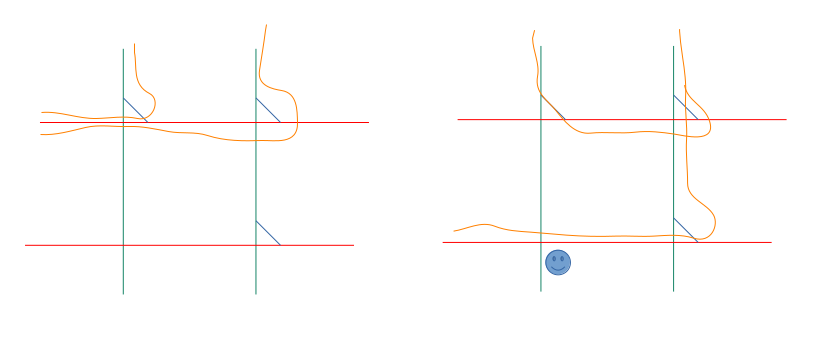
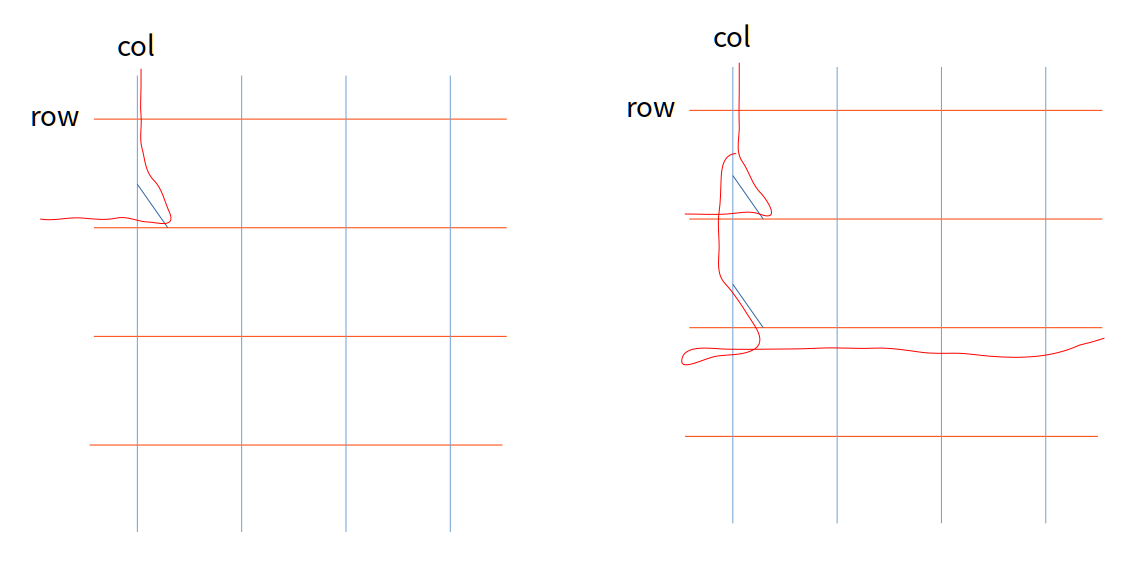
아무튼 layer가 기본이다~ row는 병렬이다~ tensor도 병렬이다~ 라는데
일단 내꺼가 구형이라 그런가 layer가 전반적으로 더 잘나온다.
D:\study\llm\llama-b8918-bin-win-cuda-12.4-x64>llama-cli -m ..\gemma-4-E4B-it-UD-Q8_K_XL.gguf -sm graph ggml_cuda_init: found 2 CUDA devices (Total VRAM: 22527 MiB): Device 0: NVIDIA GeForce GTX 1080 Ti, compute capability 6.1, VMM: yes, VRAM: 11263 MiB Device 1: NVIDIA GeForce GTX 1080 Ti, compute capability 6.1, VMM: yes, VRAM: 11263 MiB load_backend: loaded CUDA backend from D:\study\llm\llama-b8918-bin-win-cuda-12.4-x64\ggml-cuda.dll load_backend: loaded RPC backend from D:\study\llm\llama-b8918-bin-win-cuda-12.4-x64\ggml-rpc.dll load_backend: loaded CPU backend from D:\study\llm\llama-b8918-bin-win-cuda-12.4-x64\ggml-cpu-haswell.dll error while handling argument "-sm": invalid value
usage: -sm, --split-mode {none,layer,row,tensor} how to split the model across multiple GPUs, one of: - none: use one GPU only - layer (default): split layers and KV across GPUs (pipelined) - row: split weight across GPUs by rows (parallelized) - tensor: split weights and KV across GPUs (parallelized, EXPERIMENTAL) (env: LLAMA_ARG_SPLIT_MODE)
to show complete usage, run with -h
pcie 버전과 x8 에 2개로 나눠져서 그런가? layer가 더 처참하다
gemma-4-E4B-it-UD-Q8_K_XL.gguf 8.05GB
none
40 t/s
layer
36 t/s
row
9 t/s
tensor
24 t/s
Qwen3.6-35B-A3B-UD-IQ1_M.gguf 9.35GB
none
40 t/s
layer
44 t/s
row
9 t/s
tensor
21 t/s
커지면 좀 layer가 효과가 생기나?
gemma-4-26B-A4B-it-UD-Q4_K_XL.gguf 15.9GB
none
13 t/s
layer
43 t/s
row
-
tensor
-
row 로드실패 D:\study\llm\llama-b8918-bin-win-cuda-12.4-x64>llama-cli.exe -m ..\gemma-4-26B-A4B-it-UD-Q4_K_XL.gguf -sm row ggml_cuda_init: found 2 CUDA devices (Total VRAM: 22527 MiB): Device 0: NVIDIA GeForce GTX 1080 Ti, compute capability 6.1, VMM: yes, VRAM: 11263 MiB Device 1: NVIDIA GeForce GTX 1080 Ti, compute capability 6.1, VMM: yes, VRAM: 11263 MiB load_backend: loaded CUDA backend from D:\study\llm\llama-b8918-bin-win-cuda-12.4-x64\ggml-cuda.dll load_backend: loaded RPC backend from D:\study\llm\llama-b8918-bin-win-cuda-12.4-x64\ggml-rpc.dll load_backend: loaded CPU backend from D:\study\llm\llama-b8918-bin-win-cuda-12.4-x64\ggml-cpu-haswell.dll
Might also be worth trying to build with an older architecture, e.g. -DCMAKE_CUDA_ARCHITECTURES="75" (which will be run via PTX JIT compilation), to check whether the issue is related to building with 80.