embeded/Cortex-M4 STM2026. 3. 19. 12:21

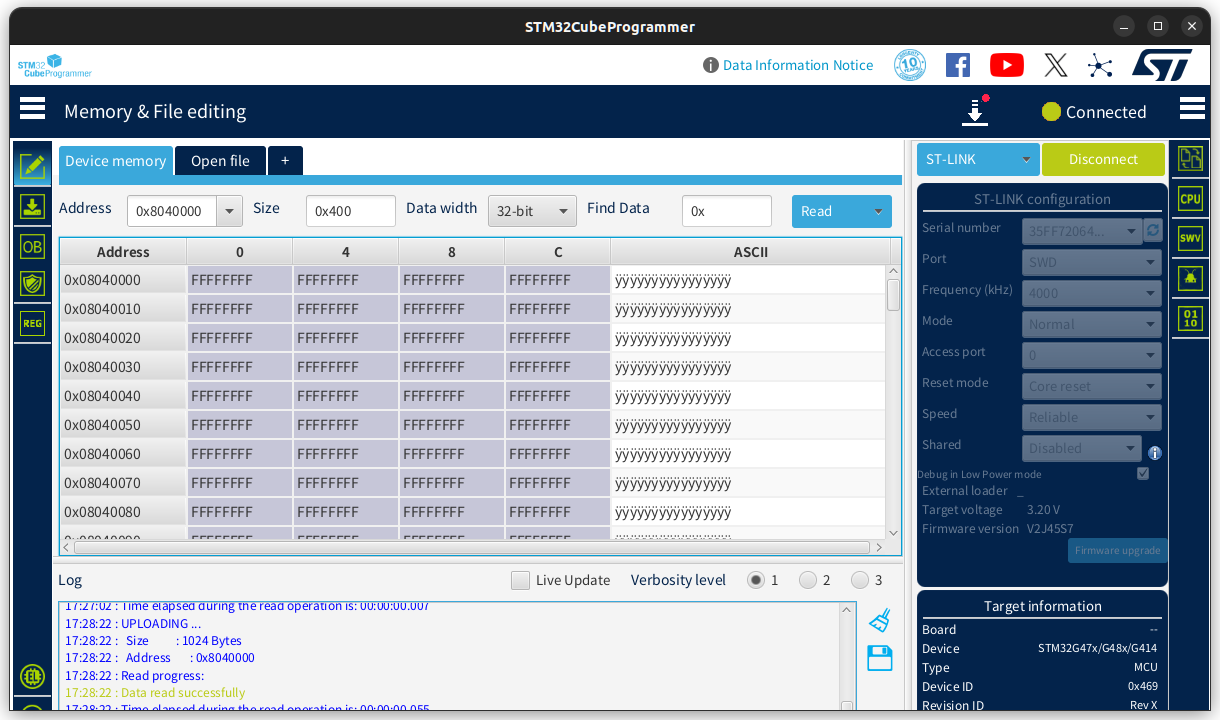
option byte를 설정하고 알아서 reconnect 하는데 이때 리부팅이 되는것 같긴하다.

./STM32_Programmer_CLI -c port=SWD -ob DBANK=1 -d ~/STM32CubeIDE/stm32g473/stm32g476/Debug/stm32g476.elf -v -rst
      -------------------------------------------------------------------
                        STM32CubeProgrammer v2.21.0                  
      -------------------------------------------------------------------

ST-LINK SN  : 35FF72064D53373233492143
ST-LINK FW  : V2J45S7
Board       : --
Voltage     : 3.25V
SWD freq    : 4000 KHz
Connect mode: Normal
Reset mode  : Software reset
Device ID   : 0x469
Revision ID : Rev X
Device name : STM32G47x/G48x/G414
Flash size  : 256 KBytes
Device type : MCU
Device CPU  : Cortex-M4
BL Version  : 0xD5
Debug in Low Power mode enabled


UPLOADING OPTION BYTES DATA ...

  Bank          : 0x00
  Address       : 0x40022020 
  Size          : 20 Bytes

[==================================================] 100% 

  Bank          : 0x01
  Address       : 0x40022044 
  Size          : 16 Bytes

[==================================================] 100% 

  Bank          : 0x02
  Address       : 0x40022070 
  Size          : 8 Bytes

[==================================================] 100% 


PROGRAMMING OPTION BYTES AREA ...

  Bank          : 0x00
  Address       : 0x40022020 
  Size          : 20 Bytes

[==================================================] 100% 


Reconnecting...
Reconnected !


UPLOADING OPTION BYTES DATA ...

  Bank          : 0x00
  Address       : 0x40022020 
  Size          : 20 Bytes

[==================================================] 100% 

  Bank          : 0x01
  Address       : 0x40022044 
  Size          : 16 Bytes

[==================================================] 100% 

  Bank          : 0x02
  Address       : 0x40022070 
  Size          : 8 Bytes

[==================================================] 100% 

OPTION BYTE PROGRAMMING VERIFICATION:

Option Bytes successfully programmed
Time elapsed during option Bytes configuration: 00:00:01.187


Opening and parsing file: stm32g476.elf


Memory Programming ...
  File          : stm32g476.elf
  Size          : 18.32 KB 
  Address       : 0x08000000


Erasing memory corresponding to segment 0:
Erasing internal memory sectors [0 9]
Download in Progress:
[==================================================] 100% 

File download complete
Time elapsed during download operation: 00:00:00.589


Verifying...


Read progress:
[==================================================] 100% 

Time elapsed during verifying operation: 00:00:00.120


Download verified successfully


MCU Reset

Software reset is performed


도움말

$ ./STM32_Programmer_CLI 
      -------------------------------------------------------------------
                        STM32CubeProgrammer v2.21.0                  
      -------------------------------------------------------------------


Usage : 
STM32_Programmer_CLI.exe [command_1] [Arguments_1][[command_2] [Arguments_2]...] 

Generic commands:

 -?, -h, --help         : Show this help
 -c,     --connect      : Establish connection to the device
     <port=<PortName>   : Interface identifier. ex COM1, /dev/ttyS0, usb1,
                          JTAG, SWD, JLINK...)
    USB port optional parameters:  
     [sn=<serialNumber>]   : Serial number of the usb dfu
     [PID=<Product ID>]    : Product ID. ex: 0xA38F, etc, default 0xDF11
     [VID=<Vendor ID>]     : Vendor ID. ex: 0x0389, etc, default x0483
    UART port optional parameters:  
     [br=<baudrate>]    : Baudrate. ex: 115200, 9600, etc, default 115200
     [P=<parity>]       : Parity bit, value in {NONE,ODD,EVEN}, default EVEN
     [db=<data_bits>]   : Data bit, value in {6, 7, 8} ..., default 8
     [sb=<stop_bits>]   : Stop bit, value in {1, 1.5, 2} ..., default 1
     [fc=<flowControl>] : Flow control 
                          Value in {OFF,Hardware,Software} ..., default OFF
     rts=<status>       : low or high
     dtr=<status>       : low or high
                          Not supported for STM32MP
     [noinit=noinit_bit]: Set No Init bits, value in {0,1} ..., default 0
     [console]          : Enter UART console mode
    JTAG/SWD debug port optional parameters:  
     [freq=<frequency>] : Frequency in KHz. Default frequencies: 
                          4000 SWD 9000 JTAG with STLINKv2
                          8000 SWD 21333 with STLINKv3
     [index=<index>]    : Index of the debug probe. default index 0
     [sn=<serialNumber>]: Serial Number of the debug probe
     [ap=<accessPort>]  : Access Port index to connect to. default ap 0
     [mode=<mode>]      : Connection mode. Value in {UR/HOTPLUG/NORMAL/POWERDOWN/HWRSTPULSE}
                          default mode: NORMAL
     [reset=<mode>]     : Reset modes: SWrst/HWrst/Crst. Default mode: SWrst
                          Reset mode with UR connection mode is HWrst
     [shared]           : Enable shared mode allowing connection of two or more
                          instances of STM32CubeProgrammer or other debugger
                          to the same ST-LINK probe.
     [tcpport=<Port>]   : Port used for running ST-Link Server, default 7184
     [LPM]              : Enable debug in Low Power mode(default mode)
     [dLPM]             : Disable debug in Low Power mode
     [getAuthID]        : Get device identification (Option only for STM32U5 series)
     [speed=<Reliable/fast>]: Choose flashing  Reliable/fast (Option only for STM32U5 series)
     [TargetSel=<TargetSel>]: Specifies the target device by its Target Sel value
    SPI port optional parameters:  
     [br=<baudrate>]    : Baudrate.
     [cpha=<cpha_val>]  : 1Edge or 2Edge. default 1Edge
     [cpol=<cpol_val>]  : low or high
     [crc=<crc_val>]    : enable or disable (0/1).
     [crcpol=<crc_pol>] : crc polynom value.
     [datasize=<size>]  : 8bit/16bit
     [direction=<val>]  : Direction: 2LFullDuplex/2LRxOnly/1LRx/1LTx
     [firstbit=<val>]   : First Bit: MSB/LSB
     [frameformat=<val>]: Frame Format: Motorola/TI
     [mode=<val>]       : Mode: master/slave
     [nss=<val>]        : NSS: soft/hard
     [nsspulse=<val>]   : NSS pulse: Pulse/NoPulse
     [delay=<val>]      : Delay: Delay/NoDelay, delay of few microseconds
     [noinit=noinit_bit]: Set No Init bits, value in {0,1} ..., default 0
    CAN port optional parameters:  
     [br=<rbaudrate>]   : Baudrate : 125, 250, 500, 1000 Kbps, default 125
     [mode=<canmode>]   : CAN Mode : NORMAL, LOOPBACK..., default NORMAL
     [ide=<type>]       : CAN Type : STANDARD or EXTENDED, default STANDARD
     [rtr=<format>]     : Frame Format: DATA or REMOTE, default DATA
     [fifo=<afifo>]     : Msg Receive : FIFO0 or FIFO1, default FIFO0
     [fm=<fmode]        : Filter Mode : MASK or LIST, default MASK
     [fs=<fscale>]      : Filter Scale: 16 or 32, default 32
     [fe=<fenable>]     : Filter Activation : ENABLE or DISABLE, default ENABLE
     [fbn=<fbanknb>]    : Filter Bank Number : 0 to 13, default 0
     [noinit=noinit_bit]: Set No Init bits, value in {0,1} ..., default 0
    I2C port optional parameters:  
     [add=<ownadd>]     : Slave address : address in hex format
     [br=<sbaudrate>]   : Baudrate : 100 or 400 Kbps, default 400
     [sm=<smode>]       : Speed Mode : STANDARD or FAST, default FAST
     [am=<addmode>]     : Address Mode : 7 or 10 bits, default 7
     [af=<afilter>]     : Analog filter : ENABLE or DISABLE, default ENABLE
     [df=<dfilter>]     : Digital filter : ENABLE or DISABLE, default DISABLE
     [dnf=<dnfilter>]   : Digital noise filter : 0 to 15, default 0
     [rt=<rtime>]       : Rise time : 0-1000(STANDARD), 0-300(FAST), default 0
     [ft=<ftime>]       : Fall time : 0-300 (STANDARD), 0-300(FAST), default 0
     [noinit=noinit_bit]: Set No Init bits, value in {0,1} ..., default 0
 -version, --version    : Displays the tool's version
 -l,     --list         : List all available communication interfaces
     <uart>             : UART interface
     <usb>              : USB interface
     <st-link>          : st-link interface
     <stlink>           
     <st-link-only>     : Enumarte st-link list without connecting and intruse the target
     <stlink-only>        Access port number is set to zero.
     <shared>           : Allowing to list all boards connected to other instance(s)
     <stlink-shared>      of STM32CubeProgrammer where the shared mode is enabled.
 -getTargetSelList      : List all devices currently connected through SWD Multidrop
 -q,     --quietMode    : Enable quiet mode. No progress bar displayed
 -log,   --log          : Store the detailed output in log file
     [<file_Path.log>]  : Path of the log file,
                          default path = $HOME/.STM32Programmer/trace.log
 -vb,    --verbosity    : Specify verbosity level
     <Level>            : Verbosity level, value in {1, 2, 3}
 -y, --yes              : Ignore confirmation prompt message

Available commands for STM32 MCU:

 --skipErase            : Skip sector erase before programming
 -sl,    --safelib      : Add a segment into a firmware file (elf,bin
                          hex,srec and s19) containing computed CRC values
                          To use only with the safety lib component
     <file_path>        : File path to be modified
     <start_address>    : Flash memory start address
     <end_address>      : Flash memory end address
     <slice_size>       : Size of data per CRC value
     <pattern>          : Optional pattern from 0x0 to 0xFF. Default pattern 0x00
 -ms,    --mergesbsfu   : Add a binary header and a sbsfu segment to an elf file
     <elf_file_path>    : File path to be modified
     <header_file_path> : Header file path
     <sbsfu_file_path>  : SBSFU file path
 -e,     --erase        : Erase memory pages/sectors devices: 
                          Not supported for STM32MP
     [all]              : Erase all sectors
     [<sectorsCodes>]   : Erase the specified sectors identified by sectors
                          codes. ex: 0, 1, 2 to erase sectors 0, 1 and 2
                          for EEPROM : ed1 & ed2  
     [<[start end]>]    : Erase the specified sectors starting from
                          start code to end code, ex: -e [5 10]
 -w,     --write            
 -d,     --download     : Download the content of a file into device memory
     <file_path>        : File path name to be downloaded: (bin, hex, srec, s19
                          elf, stm32 or tsv file)
     [<address>]        : Start address of download
     [incremental]         : Optional, new write mechanism 
     If the parameter [incremental] is not indicated, the tool will use the legacy write mechanism 
     The new write mechanism programs only modified sectors to accelerate the flashing operation
     The legacy write mechanism programs the full firmware into flash memory
 -w32                   : Write a 32-bits data into device memory
     <address>          : Start address of download
     <32-bit_data>      : 32-bit data to be downloaded
                          values should be separated by space
 -w16                   : Write a 16-bits data into device memory
     <address>          : Start address of download
     <16-bit_data>      : 16-bit data to be downloaded
                          values should be separated by space
 -w8                    : Write a 8-bits data into device memory
     <address>          : Start address of download
     <8-bit_data>       : 8-bit data to be downloaded
                          values should be separated by space
 -v,     --verify       : Verify if the programming operation is achieved 
                          successfully
     [fast]         : Optional, new verify mechanism 
     If the parameter [fast] is not indicated, the tool will use the legacy verify mechanism 
     The new verify mechanism verifies the integrity of data sector per sector
     The legacy verify mechanism verifies the integrity of data byte per byte
 -nv,    --noverify     : Do not verify if the programming operation is achieved 
                          successfully, used with -w32/-w16/-w8 commands
 -checksum, --checksum  : Memory checksum calculation
     <address>          : Optional, Start address
     <size>             : Optional, Size of memory region
                        : If the parameters <address> and <size> are not indicated, the tool will calculate the full internal Flash
 -r32                   : Read a 32-bit data from device memory
     <address>          : Read start address
     <size>             : Size of data
 -r16                   : Read a 16-bit data from device memory
     <address>          : Read start address
     <size>             : Size of data
 -r8                    : Read a 8-bit data from device memory
     <address>          : Read start address
     <size>             : Size of data
 -rst                   : Reset system
 -hardRst               : Hardware reset
 -rstbl                 : Reset Bootloader
                          Available only with JTAG/SWD debug port
 -halt                  : Halt core
 -run                   : Run core
 -step                  : Step core
                          Available only with JTAG/SWD debug port
 -score                 : Get core status
                          Available only with JTAG/SWD debug port
 -coreReg               : Read/Write core registers
     [<core_register>]    R0/../R15/PC/LR/PSP/MSP/XPSR/APSR/IPSR/EPSR/
                          PRIMASK/BASEPRI/FAULTMASK/CONTROL
     [core_reg=<value>]   value in case of write opration
                          Note: multiple registers can be handled at once
                          Available only with JTAG/SWD debug port
 -r,     --read         
 -u,     --upload       : Upload the device memory content to a .bin/.hex/.srec/.s19 file
     <address>          : Start address of read and upload
     <size>             : Size of memory content to be read
     <file_path>        : file path with .bin/.hex/.srec/.s19 extension

 -el,     --extload     : Select a custom external memory-loader for JTAG/SWD
     <file_path>        : External memory-loader file path 
 -elbl,   --extloadbl   : Select a custom external memory-loader for Bootloader interface (SFIx only)
     <file_path>        : External memory-loader file path 
 -s,     --start          
 -g,     --go           : Run the code at the specified address.
     [<address>]        : Start address
 -rdu,   --readunprotect: Remove memory's Read Protection by shifting the RDP
                          level from level 1 to level 0.

 -tzenreg,   --tzenregression: Remove TrustZone Protection by disabling the TZEN
                           from 1 to 0.

 -ob,    --optionbytes  : This command allows the user to manipulate the device
                          's OptionBytes by displaying or modifying them.
      [displ]           : This option allows the user to display the whole set
                          of Option Bytes.
      [unlockchip]      : This option allows the user to unlock the chip in case
                          of bad Option Bytes already programmed.
      [OptByte=<value>] : This option allows the user to program the given
                          Option Byte.

 -force_no_da, --force_no_da 
                        : Froce OB programming if the DA is not already configured.
                          Available only for STM32H50x devices

 -noreconnect, --noreconnect 
                        : Programming OB without performing a reconnect
 -w32dbgmcu             : Write a 32-bits data into DBGMCU DBG AUTH HOST register
     <32-bit_data>        32-bit data to be downloaded, only for STM32H5xx devices.

 -lockRDP1, -setOEM1KEY : Lock RDP level 1
     <LSB>              : OEM1 least significant bytes key
     <MSB>              : OEM1 most significant bytes key
 -unlockRDP1            : Unlock RDP level 1
     <LSB>              : OEM1 least significant bytes key
     <MSB>              : OEM1 most significant bytes key
 -lockRDP2, -setOEM2KEY : Lock RDP level 2
     <LSB>              : OEM2 least significant bytes key
     <MSB>              : OEM2 most significant bytes key
 -unlockRDP2            : Unlock RDP level 2
     <LSB>              : OEM2 least significant bytes key
     <MSB>              : OEM2 most significant bytes key
 -ssigfoxc              : Save the chip Certificate, 
                          supported for STM32WL devices
     <file_path>        : Certificate file path

 -wsigfoxc              : Write the Sigfox credential, 
                          supported for STM32WL devices
     <file_path>        : Certificate file path (binary, header)
     <address>          : start address for write

 -fillmemory            : Fill memory with the given pattern from the chosen address.
     <start_address>    : Start address for write. The address 0x08000000 is used by default
     [size=<value>]     : Size of the data to write
     [pattern=<value>]  : The pattern value to write.
     [dataWidth=8|16|32]: The filling data size:
                          8 bits is selected by default.
 -blankcheck            : Verifies that the STM32 Flash memory is blank.
                          If the Flash memory is not blank, the first address with data is highlighted in a message.
 -fchecksum, --file-checksum  : File checksum calculation 
     <file_path>              : File path

Beta commands: 

 -regdump                     : Read and dump Core and MCU registers
     <file_path>              : Log file path with extension .log or .txt
     [choice=<number>]        : Device number from the list of compatible devices (optional), this list
                                is displayed if the command is performed without this optional argument
 -hf                          : Hard fault analyzer
                                Helps to identify system faults that occur when the CPU
                                is driven into a fault condition by the application code.
 -pwr, --power                : Perform power ON/OFF, only for STLINK supporting this capability
     <on/off>                 : Select the power type
     [index=<number>]         : Index of the debug probe.
 -r32fast                     : Read a 32-bit data from device memory with direct access
                                Only for accessible internal memories via ST-LINK interfaces
     <address>                : Read start address
     <size>                   : Size of data

Available commands for STM32 MPU:

 -c,     --connect      : Establish connection to the device
     <port=<PortName>   : Interface identifer. ex COM1, /dev/ttyS0, usb1)
    USB port optional parameters:  
     [sn=<serialNum>]   : Serial number of the usb dfu
     [serial]           : Activate USB serial Gadget for MPU devices
    UART port optional parameters:  
     [br=<baudrate>]    : Baudrate. ex: 115200, 9600, etc, default 115200
     [P=<parity>]       : Parity bit, value in {NONE,ODD,EVEN}, default NONE
     [db=<data_bits>]   : Data bit, value in {6, 7, 8} ..., default 8
     [sb=<stop_bits>]   : Stop bit, value in {1, 1.5, 2} ..., default 1
     [fc=<flowControl>] : Flow control (Not yet supported for STM32MP)
                          Value in {OFF,Hardware,Software} ..., default OFF
     [noinit=noinit_bit]: Set No Init bits, value in {0,1} ..., default 0
 -s,     --start          
 -g,     --go           : Run the code at the specified partition ID.
     [<partitionID>]    : Partition ID
                          If not specified, last loaded partition
                          will be started
     [<startAdress>]    : Start address
                          If not specified, last loaded segment address
     [<noack>]          : No acknowledgment required
                          If not specified, acknowledgment will be required

 -detach                : Send detach command to DFU

 -wb                    : Write blob 

     <blob_file_path>   : Blob file path
 -pmic                  : Program PMIC NVM 

     <PMIC file_path>   : PMIC file_path
 -gc, --getcertificate  : Get the chip Certificate, 
                          supported for devices with security features
     <file_path>        : Certificate file path into which the chip
                          certificate will be uploaded
     <tfa-ssp-path>     : Input TFA SSP signed firmware path. Used only with STM32MP1 devices

 -p,     --phaseID      : Display the current partition ID to be loaded 

 -w,     --write            
 -d,     --download     : Download the content of a file into device memory
     <file_path>        : File path name to be downloaded: (bin, stm32 file
     <partition_id>     : Partition ID to be downloaded
 -rp,    --readPart     : Upload a memory partion ID content to a .bin file
     <partionID>        : Partion to be read
     [<offset address>] : Offset address of read and upload
     <size>             : Size of partion content to be read
     <file_path>        : Binary file path 

 -ssp, --ssp                  : Program an SSP file
     <ssp_file_path>          : SSP file path to be programmed, bin or ssp extension
     <ssp-fw-path>            : SSP signed firmware path
     [hsm=0|1]                : Set user option for HSM use
                                value in {0 (do not use HSM), 1 (use HSM)}
                                Default value : hsm=0
     <lic_path|slot=slotID>   : Path to the license file (if hsm=0)
                                or reader slot ID if HSM is used (hsm=1)
     plugin=<plugin-fw-path>  : Optional, binary plugin firmware path. Used only with STM32MP2x devices
 -tm                          : Force timeout
     <value>                  : Number of milliseconds
 -rst                         : Reset USB device

  OTP commands :
 -otp displ             : This command allows the user to display all or parts
                          of the OTP structure
      [word=<id>]       : {Optional} display a specific OTP registers {values and status}
                          Up to 96 OTP words [0 to 95], id value in hex/dec format 

 -otp write             : This command allows to fuse or update OTP words
                          Up to 96 OTP words [0 to 95] at the same command line
      [lock]            : {Optional} indicate the operation type, update or permanent lock
      [word=<id>]       : This field contains the OTP word number in hex/dec format
      [value=<value>]   : Value to be written in hex format 

 -otp lock              : This command allows to fuse permanently OTP words
                          Up to 96 OTP words [0 to 95] at the same command line
      [word=<id>]       : This field contains the OTP word number in hex/dec format 

 -otp fwrite            : This command allows to program a binary file
      [lock]            : {Optional} indicate the operation type, update or permanent lock
      <bin_path>        : Binary file path, 32-bits aligned data
      [word=<id>]       : OTP word number in hex/dec format, start word of program 

  STM32WB0 series OTP store command:
 -storekeyotp ,    --storekeyotp   : Store OTP key
     <key_path.c>      : Folder with the public_key.c file to store in OTP
     <start_address> : Start FW address
MCU Secure programming specific commands: 

 -installipmodule, --installipmodule : Install ip module file
     <file_path>               : Path of smu file to be programmed
     [hsm=0|1]                 : Set user option for HSM use
                                 value in {0 (do not use HSM), 1 (use HSM)}
                                 Default value : hsm=0
     <lic_path|slot=slotID>   : Path to the license file (if hsm=0)
                                or reader slot ID if HSM is used (hsm=1)
                               note that if it is the case of global license,
                               please use hsm  = 0 with license path.
     [<address>]              : Destination address of the smu module
 -updateipmodule, --updateipmodule : update ip module. 
     <file_path>              : Path of SMU file containing the update.
     [<address>]              : Destination address of the smu module
 -sfi, --sfi                  : Program an sfi file
     [<protocol=Ptype>]       : Protocol type to be used : static/live
                                Only static protocol is supported so far
                                Default value static
     <file_path>              : Path of sfi file to be programmed
     [hsm=0|1]                : Set user option for HSM use
                                value in {0 (do not use HSM), 1 (use HSM)}
                                Default value : hsm=0
     <lic_path|slot=slotID>   : Path to the SFI license file (if hsm=0)
                                or reader slot ID if HSM is used (hsm=1)
 -ssfi, --ssfi                : Program an ssfi file
     <ssfi_file_path>              : Path of ssfi file to be programmed
     <rsse_file_path>              : RSSe file path

 -rsse, --rsse                : Set the RSSe file path, 
                                supported for devices with security extension
     <file_path>              : RSSe file path

 -mcsv, --mcsv                : Set the MCSV file path indicating SFI's modules configuration
                                supported for STM32H5xx devices
     <file_path>              : MCSV file path with .mcsv extension

 -ecsv, --ecsv                : Set the ECSV file path indicating SFI's external modules configuration
                                supported for STM32H5xx devices
     <file_path>              : ECSV file path with .ecsv extension

 -a, --abort                  : This command allows the user
                                to clean a not properly finished process.
                                The currently ongoing operation will stop
                                and the system will return to idle state

 -dsecurity                   : Disable the security for STM32WL
 
 -setdefaultob                : Set default Option Bytes for STM32WL
 
 -rssgetversion, --rssgetversion : get the version of RSS
HSM related commands:
 -hsmgetinfo                : Read the HSM available information
     [slot=<SlotID>]        : Slot ID of the Smart Card Reader
                              Default value: slot=1 (the PC integrated SC reader)
 -hsmgetcounter             : Read the current value of the license counter
     [slot=<SlotID>]        : Slot ID of the Smart Card Reader
                              Default value: slot=1 (the PC integrated SC reader)
 -hsmgetfwid                : Read the Firmware/Module Identifier
     [slot=<SlotID>]        : Slot ID of the Smart Card Reader
                              Default value: slot=1 (the PC integrated SC reader)
 -hsmgetstatus              : Read the current card life-cycle state
     [slot=<SlotID>]        : Slot ID of the Smart Card Reader
                              Default value: slot=1 (the PC integrated SC reader)
 -hsmgetlicense             : Get a license for the current chip
                              if counter is not null
     <file_path>            : File path into which the received license
                              will be stored
     [slot=<SlotID>]        : Slot ID of the Smart Card Reader
                              Default value: slot=1 (the PC integrated SC reader)
     [protocol=<Ptype>]     : Protocol type to be used : static/live
                              Only static protocol is supported so far
                              Default value static
     <tfa-ssp-path>         : Input TFA SSP signed firmware path. Used only for STM32MP1 devices

 -hsmgetlicensefromcertifbin, -hsmglfcb : Get a license for the input certificate
                                          if counter is not null
     <certif_file_path.bin>             : Input certificate file path
     <license_file_path.bin>            : File path into which the received license
                                          will be stored
     [slot=<SlotID>]                    : Slot ID of the Smart Card Reader
                                          Default value: slot=1 (the PC integrated SC reader)
     [protocol=<Ptype>]                 : Protocol type to be used : static/live
                                          Only static protocol is supported so far
                                          Default value static

STM32WBxx specific commands:

 -getuid64              : Read the device UID
 -fusgetstate           : Read the FUS state
 -fusopgetversion       : Read the FUS Operator version
 -antirollback          : Perform the antirollback operation (Only on Bootloader interface) 
 -startfus              : Perform the startfus operation
  Firmware Upgrade commands:
 -fwdelete              : Delete the BLE stack firmware
 -fwupgrade             : Upgrade the BLE stack firmware or the FUS firmware
     <file_path>        : New firmware image file path
     <address>          : Start address of download
     [firstinstall=0|1] : 1 if it is a first install otherwise 0
                          optional, Default value: firstinstall=0
     [startstack=0|1]   : 1 to start the stack after the upgrade otherwise 0
                          optional, Default value: startstack=1
      -v                : Verify if the download operation is achieved 
                          successfully before starting upgrade
 -startwirelessstack    : Start the wireless stack
  Key management commands:
 -authkeyupdate         : Authentication key update
     <file_path>        : New authentication key file path.
                        : This is the public key generated by
                        : STM32TrustedPackageCreator using -sign command.
 -authkeylock           : Authentication key lock
                        : Once locked, it's no longuer possible to change it
                        : using authkeyupdate command
 -wusrkey               : Write user key
     <file_path>        : User key file path
     <keytype=1|2|3>    : User key type, values : 1, 2 or 3.
                        : 1 = simple key, 2 = master key, 3 = encrypted key.
Serial Wire Viewer specific commands:

 -swv                       : Printf via SWO
     <freq=<frequency>>     : System Clock in MHz
     <portnumber=0-31|all>  : ITM port number, values : 0-31, or all for All ports
     [<file_Path.log>]      : Path of the SWV log file (optional),
                            : default path = $USER_HOME/STMicroelectronics/STM32Programmer/SWV_Log/swv.log
      -RA                   : Start the reception of swv automatically
 -startswv                  :  Printf via SWO & Start the reception of swv automatically
Script Manager command:

 -script                    : Start the execution of Script File
 <file_Path.prg>            : Path of the script file (.prg)
Provisionning Command:
 -sdp                    : Start the OBKey Provisioning
 <File_Path>             : OBKey File Path
Provisioning with password :

 -pwd                    : Start Provisioning with password
 value=<password_value>           : Password value
 path=<password_path>             : location of password file to be used in Debug Authentication
Set Product State RSS Command: 

 -psrss                    : Start the RSS Product State
 <Value>                   : An hexadecimal value
Get Product State RSS Command: 

 -psrss displ              : Start the Get RSS Product State
Option Bytes RSS Command:
 -obrss                    : Start the Option Bytes RSS Change
 <Value 1> <Value 2> <Value 3> <Value 4>  : An hexadecimal values
Debug Authentication options: 

      [debugauth=<1|2>]               : to choose starting authentication(1) or discovery(2)
      [pwd=<password_file_path>]      : required in case of authentication with password
      [key=<key_file_path>]           : required in case of authentication with certificate
      [cert=<certificate_file_path>]  : required in case of authentication with certificate
      [per=<requested_permission>]    : required in case of authentication with certificate.
                                      : Each permission is referred to by a specific letter and a numerical bit value.
                                      : Enable debugauth=2 to access the permissions list with bit numbers and letters.
                                      : Debug Authentication requires the selection of one specific permission.
                                      : Certain products also provide optional actions to choose from. Example:Forced Download
Key Wrapping Command
 -rssekw                                                  : Set The Key Wrapping RSSe File Path
                                                            supported for devices with security extension
     <file_path>                                          : RSSe Key Wrapping file path

     <file_path>                                          : Private Key .pem file path [Not to be added for ECC CPVK wrapping using DHUK or DHUK xOR BHK]

     <file_path>                                          : Output .bin file path

     [KeyType=<eccchipfu|eccchiplu>]                      : The Type of the ECC Chip Key to wrap
     [ExportPublicKey=<Yes|No>]                           : Generate or Not the public Key
     [WrappingKeySelect=<DHUK|DHUK_XOR_BHK>]              : Used Method to wrap the private key
     [KeyUsage=<ECDSA_USAGE_SIGN|ECC_USAGE_SCALAR_MUL>]   : Usage of the private key
     [SecAttr=<SECURE|NON_SECURE>]                        : Secure or Non Secure context
     [PrivAttr=<PRIVILEGE|NON_PRIVILEGE>]               : Privileged or Non Priviledged context
     [AESMode=<ECB|CBC|GCM>]                              : AES mode for wrapping with user Key


[링크 : https://blog.naver.com/chandong83/222798494676]

'embeded > Cortex-M4 STM' 카테고리의 다른 글

NUCLEO-WL55JC  (0) 2026.03.17
stm32g473 ART accelerator on/off ?  (0) 2026.02.06
stm32g473 flash doubleword  (0) 2026.02.04
STM32G47x dual bank flash  (0) 2026.02.03
STM32F429I-DISC1 with lvgl  (0) 2026.02.03
Posted by 구차니
embeded/Cortex-M4 STM2026. 3. 17. 11:09

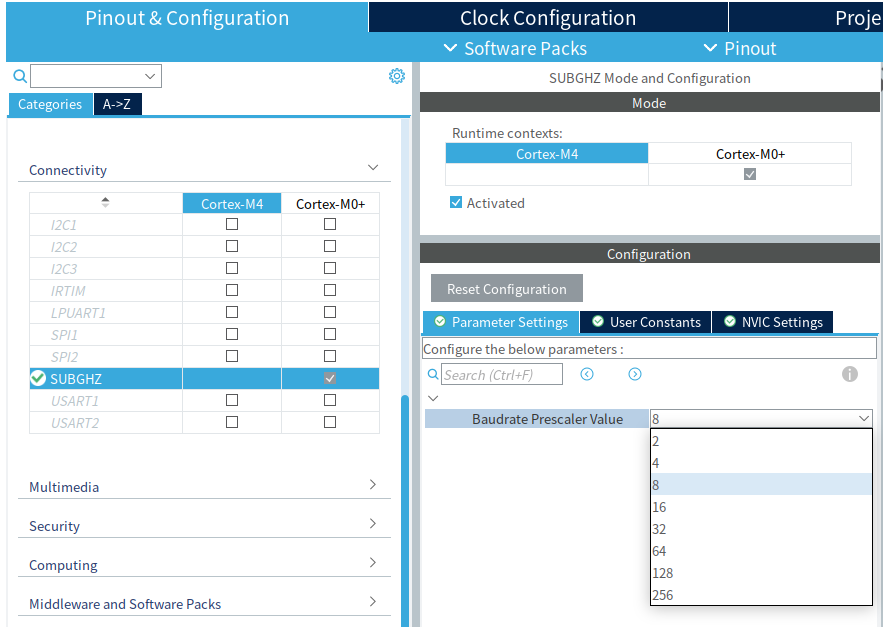
lora를 지원하는녀석. 이래저래 찾다보니 semtech의 sx126x 시리즈  lora ip를 구매해서 넣은듯.

[링크 : https://www.st.com/en/evaluation-tools/nucleo-wl55jc.html#overview]


sub-ghz 에 대해서 크게 설정이 가능한건 별로 없어 보인다.

그 와중에 M4가 아니라 M0+ 코어에 물려있네 -_-

'embeded > Cortex-M4 STM' 카테고리의 다른 글

stm32_programmer_cli 를 이용한 option byte 변경  (0) 2026.03.19
stm32g473 ART accelerator on/off ?  (0) 2026.02.06
stm32g473 flash doubleword  (0) 2026.02.04
STM32G47x dual bank flash  (0) 2026.02.03
STM32F429I-DISC1 with lvgl  (0) 2026.02.03
Posted by 구차니
embeded/Cortex-M4 STM2026. 2. 6. 11:15

ART ON/OFF가 보이는데 정작 끄는법이나 켜는 법 혹은 클럭 트리에서 설정법이 안보여서 찾는데..

G4는 아닌 F4 쪽에서는 아래의 명령을 이용해서 켜고 끈다고 한다.

FLASH->ACR = FLASH_ACR_ICEN |FLASH_ACR_DCEN |FLASH_ACR_LATENCY_5WS;

[링크 : https://community.st.com/t5/stm32-mcus-products/enable-disable-art-accelerator/td-p/551007]


[링크 : https://www.st.com/resource/en/product_training/STM32G4-Memory-Flash_FLASH.pdf]


3.1 Firmware tips and tricks
3.1.1 Common firmware configuration
ART configuration
The ART Accelerator™ is a memory accelerator which is optimized for STM32 ARM® Cortex™-Mx processors. It balances the inherent performance advantage of the ARM Cortex-Mx over Flash memory technologies, which normally requires the processor to wait for the Flash memory at higher operating frequencies. Thanks to the ART Accelerator™, the CPU can operate up to 120 MHz without wait states, thereby increasing the overall system speed and efficiency.
To release the full processor 150 DMIPS performance at this frequency, the accelerator implements an instruction prefetch queue and instruction/data, which enables program execution from Flash memory at up to 120 MHz without wait states.

To avoid extra power consumption it is recommended to configure the ART as follows:
/* Disable prefetch buffer */
 FLASH->ACR & = ~FLASH_ACR_PRFTEN;
/* Enable flash instruction cache */
 FLASH->ACR |= FLASH_ACR_ICEN;
/* Enable flash data cache */
 FLASH->ACR |= FLASH_ACR_DCEN;

The system performance can be adjusted to the current needs. This can be done either from start, according to performance estimations, or on-the-fly on a running system to adjust the performance to the current condition. In this way the prefetch can be enabled or disabled on-the-fly depending on user needs.
Disabling the prefetch buffer avoids extra Flash access that consumes 20 mA for 128-bit line fetching.

[링크 : https://www.st.com/resource/en/application_note/dm00033348.pdf]


I read in that document: STMicroelectronics: AN3430 - Application Note of How to achieve the lowest current consumption with STM32F2xx

On page 17 (3.1.1) they say that enabling the buffer prefetch will consume additional 20mA (for 128-bit-line fetching). Maybe at 168 MHz you power supply gets unstable?? Maybe you can try it with lower clock speed (120MHz), where the cpu is very power efficient.

[링크 : https://stackoverflow.com/questions/11358547/how-to-enable-art-accelerator-stm32f407vgt6]


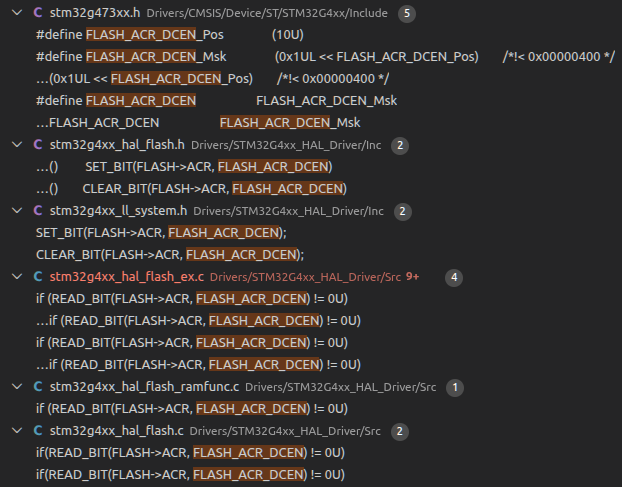
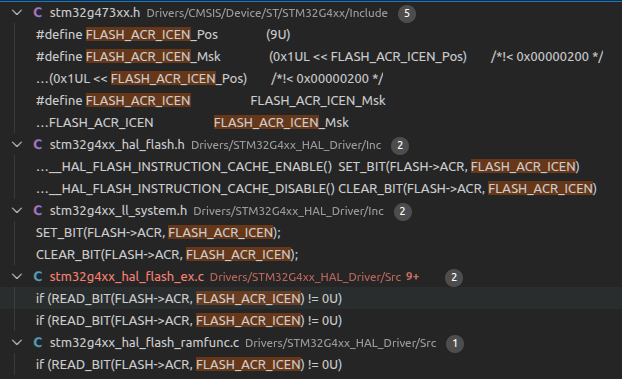
그래서 프로젝트에서 검색해보니 이렇게 걸려 나오는데

HAL_StatusTypeDef HAL_FLASHEx_Erase(FLASH_EraseInitTypeDef *pEraseInit, uint32_t *PageError)
HAL_StatusTypeDef HAL_FLASHEx_Erase_IT(FLASH_EraseInitTypeDef *pEraseInit)

__RAM_FUNC HAL_StatusTypeDef HAL_FLASHEx_OB_DBankConfig(uint32_t DBankConfig)

HAL_StatusTypeDef HAL_FLASH_Program(uint32_t TypeProgram, uint32_t Address, uint64_t Data)
HAL_StatusTypeDef HAL_FLASH_Program_IT(uint32_t TypeProgram, uint32_t Address, uint64_t Data)


ICEN은 Program 쪽에서는 빠진다. 아무래도 데이터 쪽이라 그런가?

HAL_StatusTypeDef HAL_FLASHEx_Erase(FLASH_EraseInitTypeDef *pEraseInit, uint32_t *PageError)
HAL_StatusTypeDef HAL_FLASHEx_Erase_IT(FLASH_EraseInitTypeDef *pEraseInit)

__RAM_FUNC HAL_StatusTypeDef HAL_FLASHEx_OB_DBankConfig(uint32_t DBankConfig)

'embeded > Cortex-M4 STM' 카테고리의 다른 글

stm32_programmer_cli 를 이용한 option byte 변경  (0) 2026.03.19
NUCLEO-WL55JC  (0) 2026.03.17
stm32g473 flash doubleword  (0) 2026.02.04
STM32G47x dual bank flash  (0) 2026.02.03
STM32F429I-DISC1 with lvgl  (0) 2026.02.03
Posted by 구차니
embeded/Cortex-M4 STM2026. 2. 4. 17:12

일단 코드 상으로는 FAST는 안 먹어서 찾아봐야겠고, doubleword 로만 써진다.


일단은 DBANK는 체크되어 있는게 기본값이고


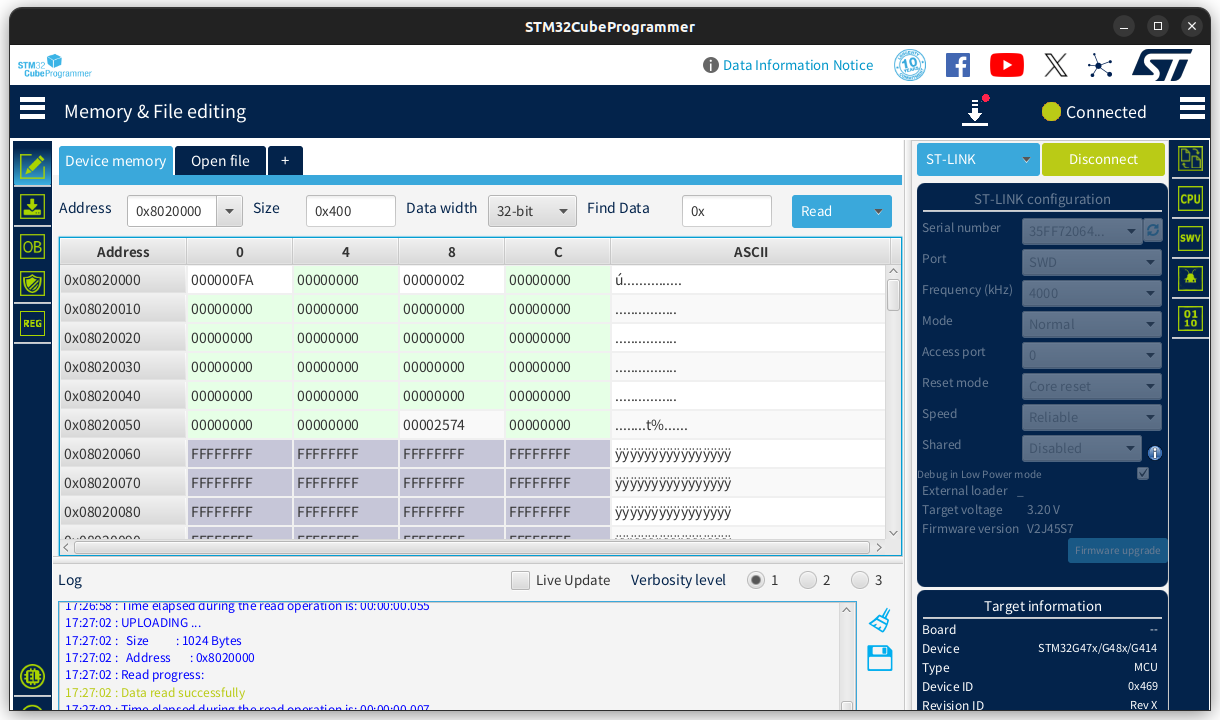
bank1에 0802000에 쓰니 쓰여지긴 한데 64bit wide라서 의도한대로 딱딱 붙어있지 않고 4byte씩 띄엄띄엄 써진다.


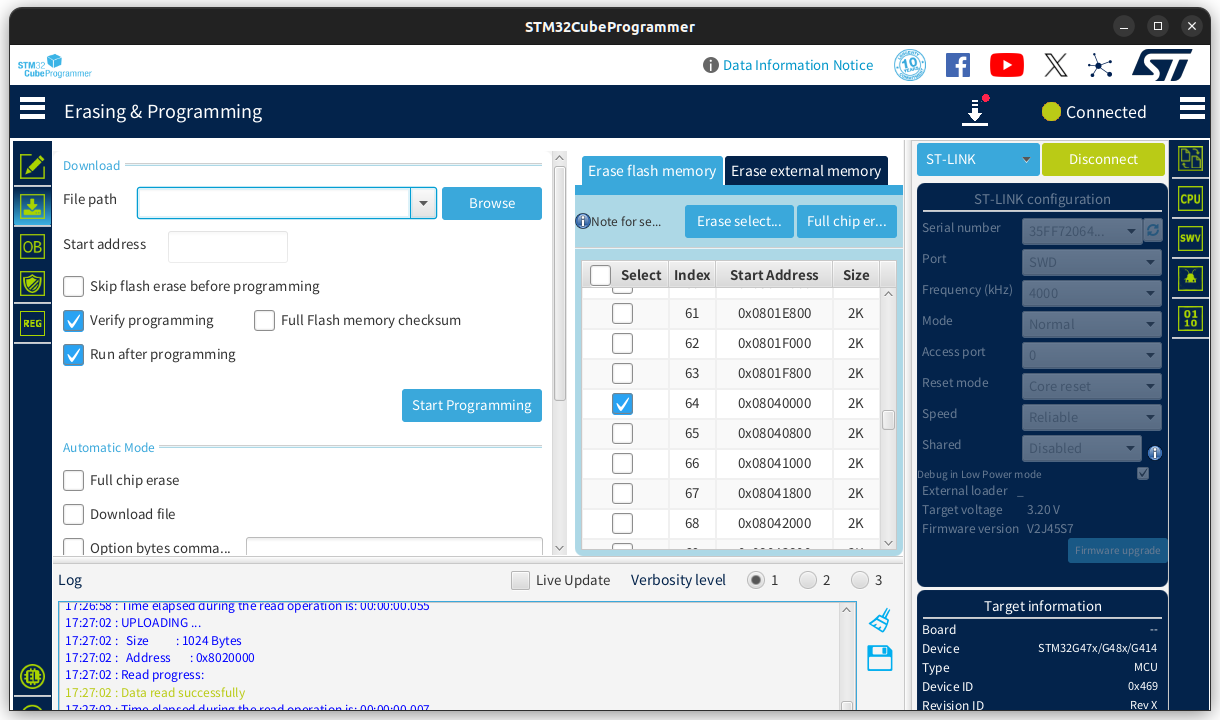
해당 페이지 삭제하려고 했는데 0x0802 0000이 아닌 0x0804 0000 이고

체크하고 삭제하면 삭제되었다고 메시지는 뜨지만


정작 해당 위치를 다시 가면 내용이 남아있다.

그 와중에 0x0804 0000 위치로 가면 비어있는걸로 나온다.


먼가 이상한데.. 머가 이상한거라고 딱찝어 말하기 힘드네..


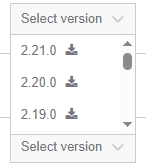
CubeProgrammer를 버전업해봐야하나? 2.21 버전이 최신이었던것 같은데..


2.21.0 흐음... 

[링크 : https://www.st.com/en/development-tools/stm32cubeprog.html]


+

웃긴게 sdk 문제인지

bank 2에 page 0 대신

bank 1 에 page 64로 하면 잘된다. 머냐?

'embeded > Cortex-M4 STM' 카테고리의 다른 글

NUCLEO-WL55JC  (0) 2026.03.17
stm32g473 ART accelerator on/off ?  (0) 2026.02.06
STM32G47x dual bank flash  (0) 2026.02.03
STM32F429I-DISC1 with lvgl  (0) 2026.02.03
32F469IDISCOVERY with lvgl  (0) 2026.02.02
Posted by 구차니
embeded/Cortex-M4 STM2026. 2. 3. 17:58

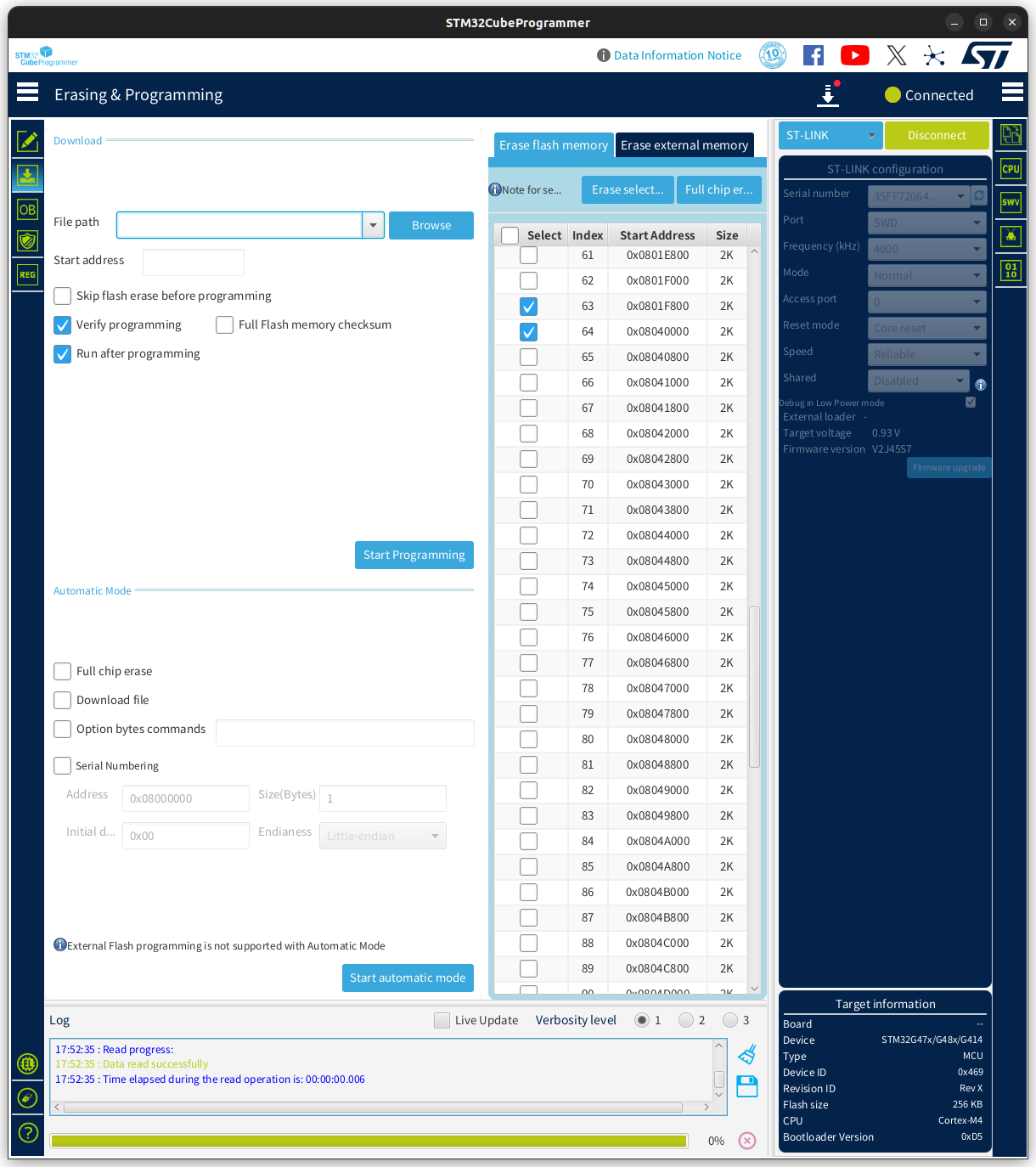
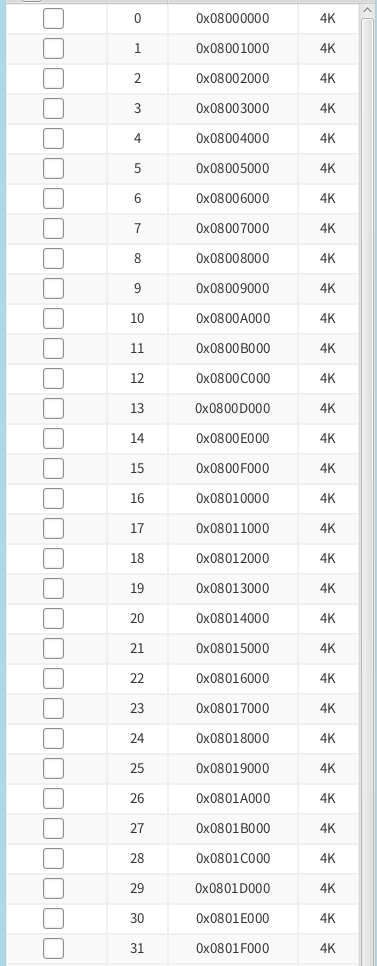
플래시가 연속된 주소가 아니게 보인다.

63번 0x0801 F800

64번 0x0804 0000 신기하네..


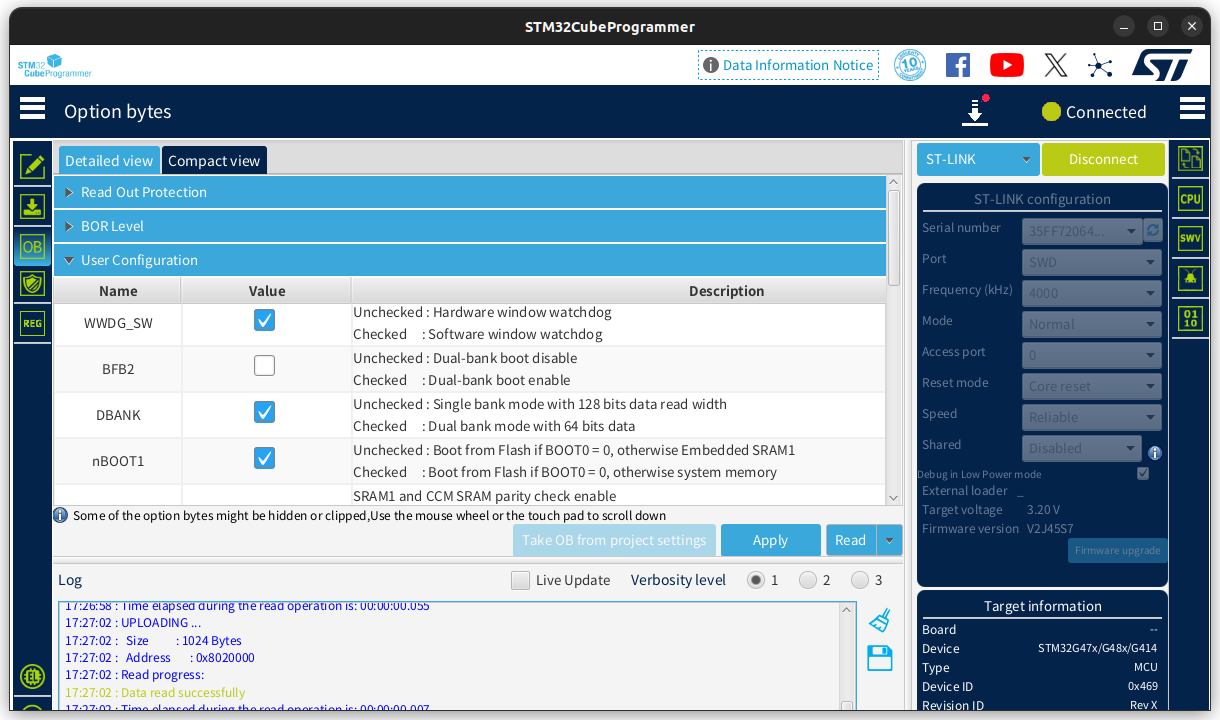
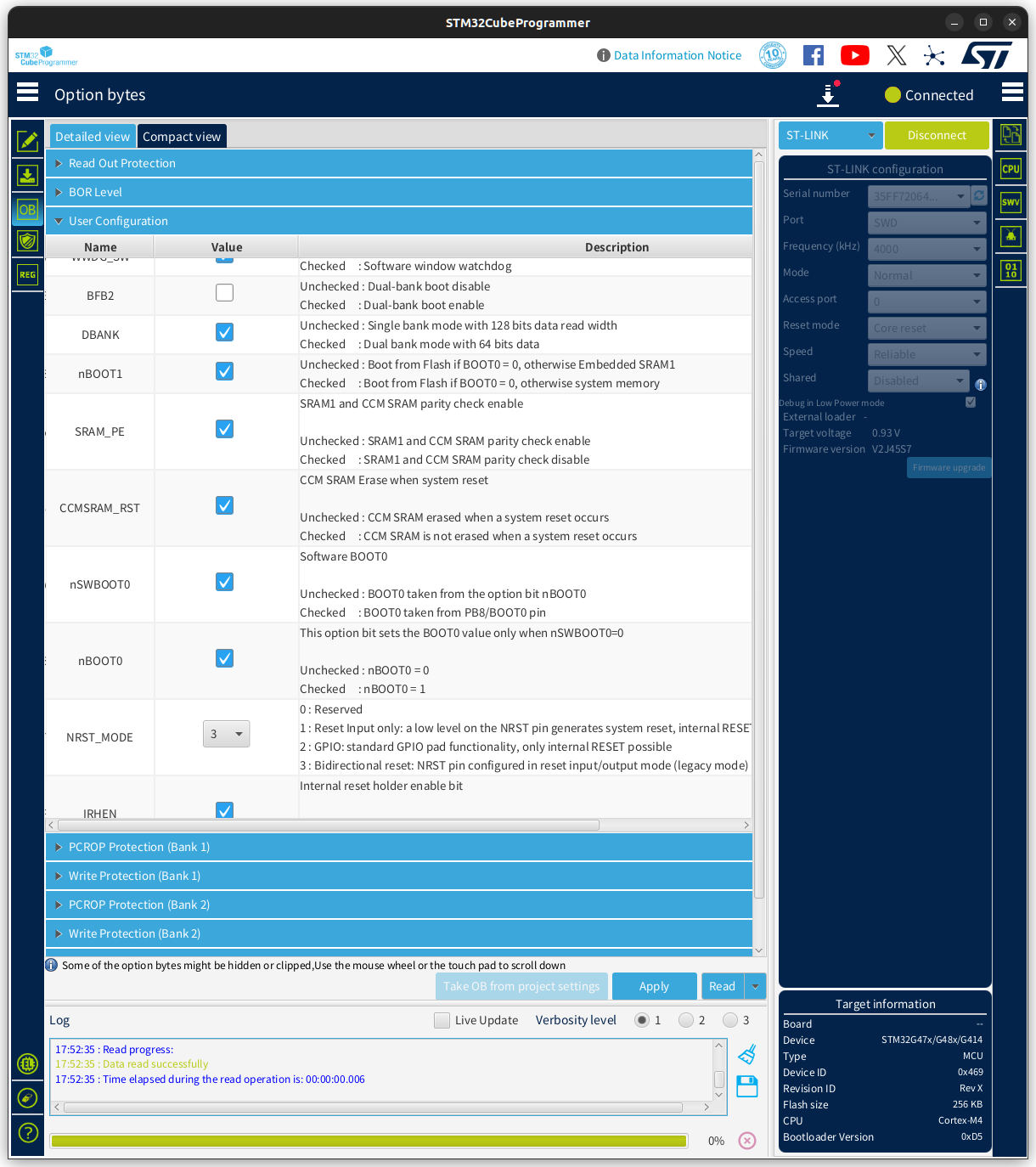
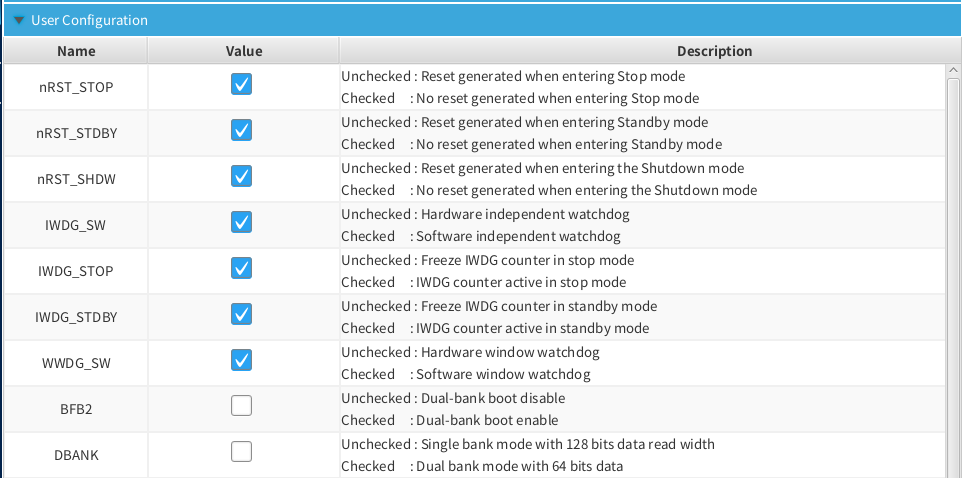
Option Byte 에는 BFB2 / DBANK 등이 처음보는 녀석이고..


내용은 좀 더 봐야 할 듯.

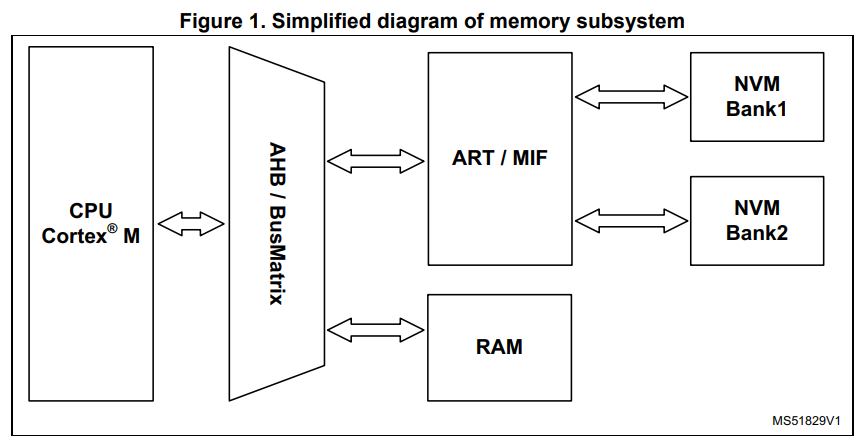
ART/MIF 를 통해서 NVM Bank 1 / 2에 접근하는거라면.. ART를 그럼 사실상 강제하게 되는건가?


서로 다른 채널에 read / write 를 동시에 할 수 있다가 dual bank 의 장점인가?

The dual bank memory can be configured and used as a single large NVM block with continuous addressing (with few exceptions, not covered in this document). There are significant advantages when the NVM is configured to serve as two parallel blocks, the most important is the possibility to write on one bank without interrupting reading (and fetching instructions) from the other bank. This is the most important prerequisite to perform the updates without breaking the execution of the code from the program NVM.

[링크 : https://www.st.com/resource/en/application_note/an4767-onthefly-firmware-update-for-dual-bank-stm32-microcontrollers-stmicroelectronics.pdf]


Option byte의 DBANK 설정에 따라서

뱅크를 1개 쓰냐 2개 쓰냐인데

0으로 하면 싱글 뱅크, 4 Kbyte Page * 128 이 되고

1으로 하면 듀얼 뱅크, 2 Kbyte Page * 128 * 2가 되는건가?


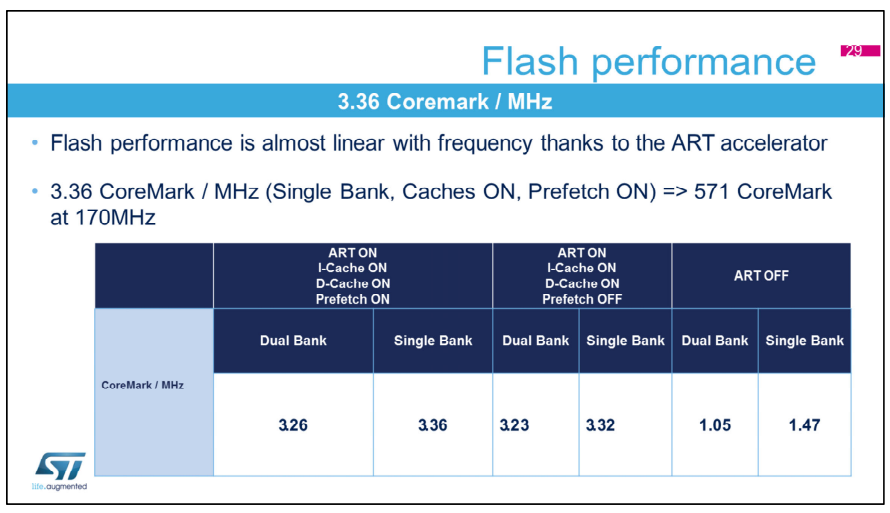
ART를 켜면 올라가는걸 보면 일단 높은 수치가 성능이 좋은거 같은데,

ART OFF 에서 Single Bank가 성능이 더 좋은다고 보면되나?

[링크 : https://www.st.com/resource/en/product_training/STM32G4-Memory-Flash_FLASH.pdf]


+

2026.02.04

심심해서(?) DBANK 풀고


내부 플래시 구조를 보니

개별 페이지(?)당 용량은 2배로 늘고

총 페이지는 절반으로 줄어들었다.

'embeded > Cortex-M4 STM' 카테고리의 다른 글

stm32g473 ART accelerator on/off ?  (0) 2026.02.06
stm32g473 flash doubleword  (0) 2026.02.04
STM32F429I-DISC1 with lvgl  (0) 2026.02.03
32F469IDISCOVERY with lvgl  (0) 2026.02.02
UM2195 audio streaming Expansion Package for STM32Cube  (0) 2026.01.05
Posted by 구차니
embeded/Cortex-M4 STM2026. 2. 3. 11:30

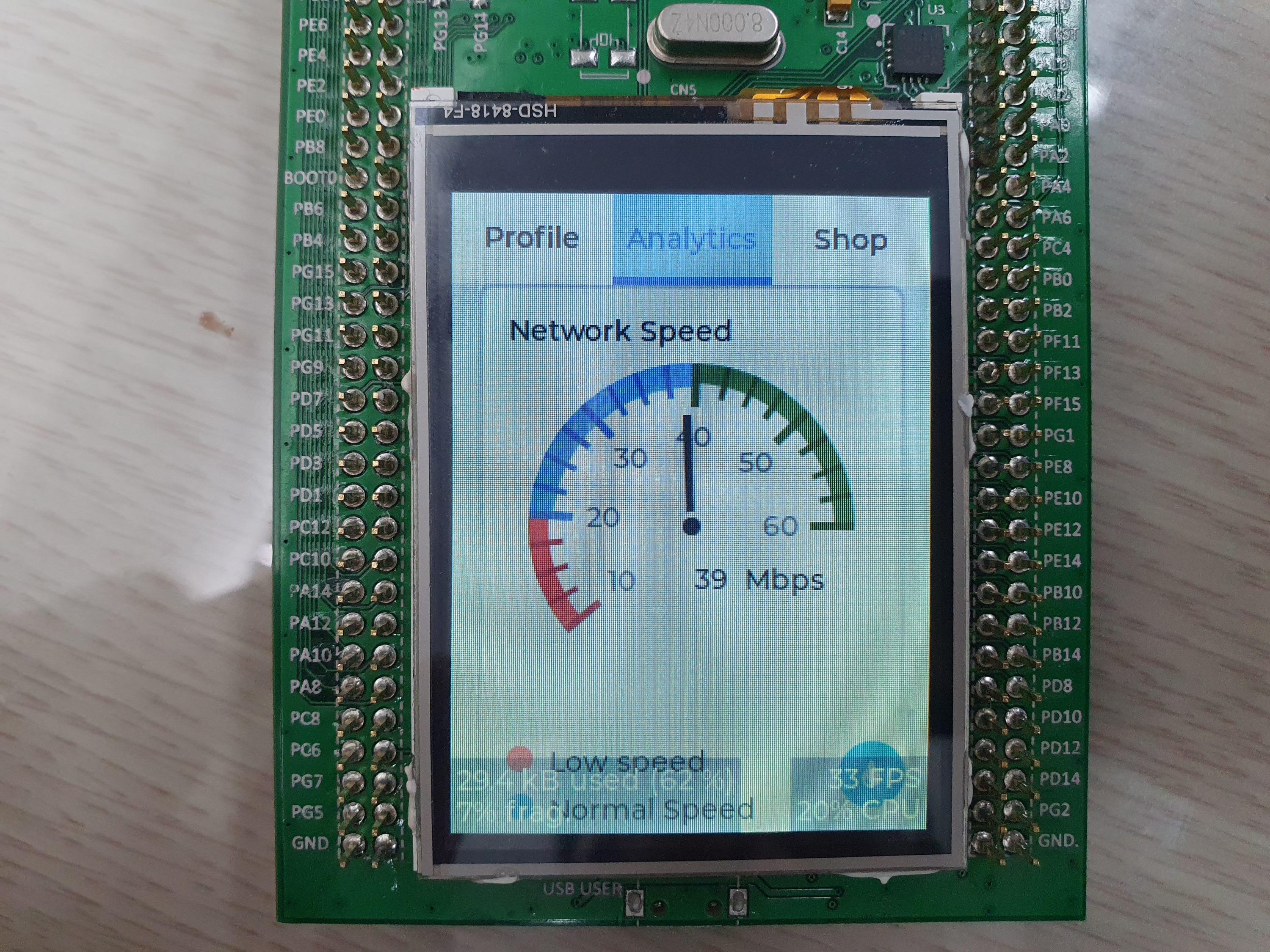
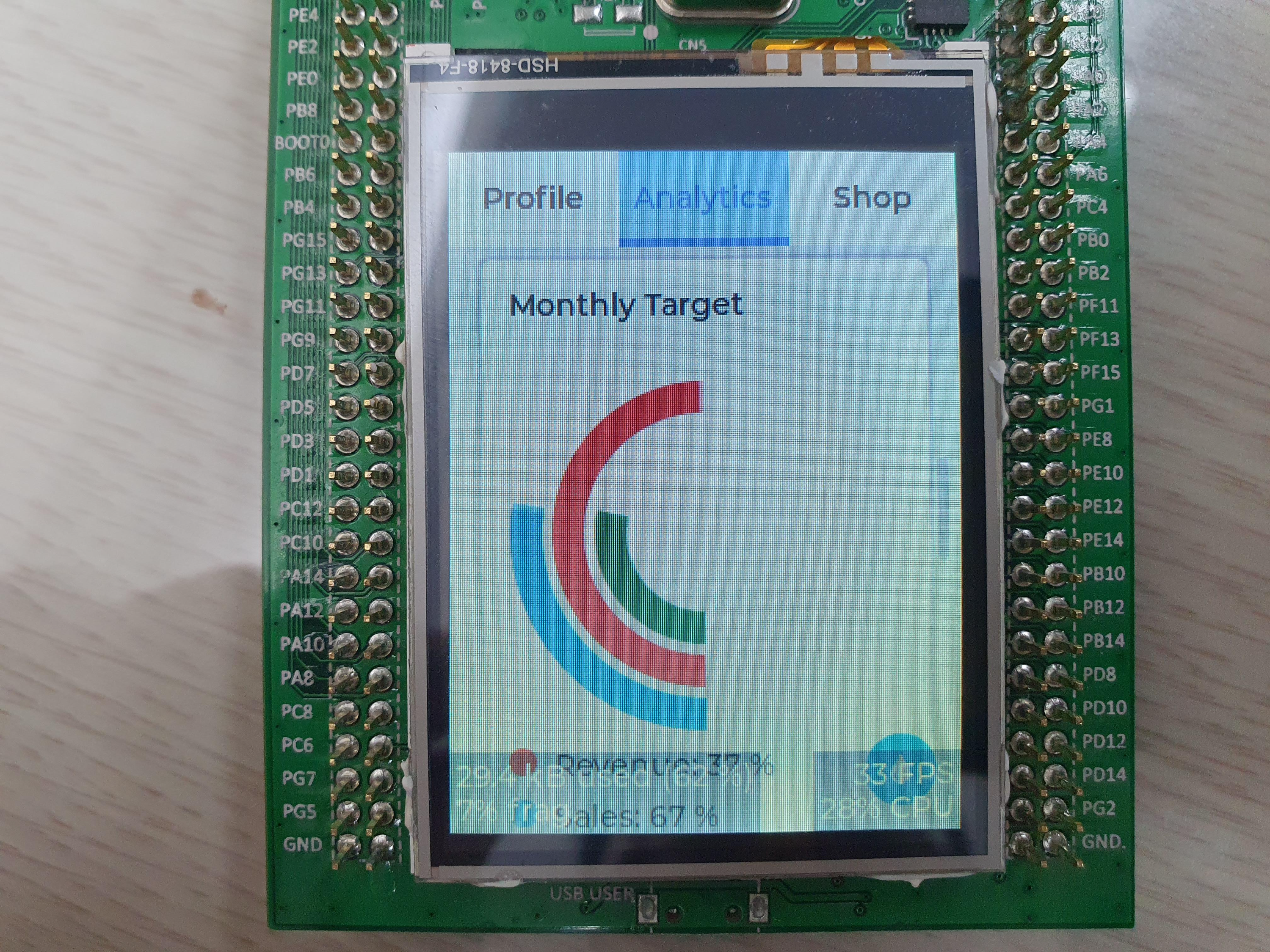
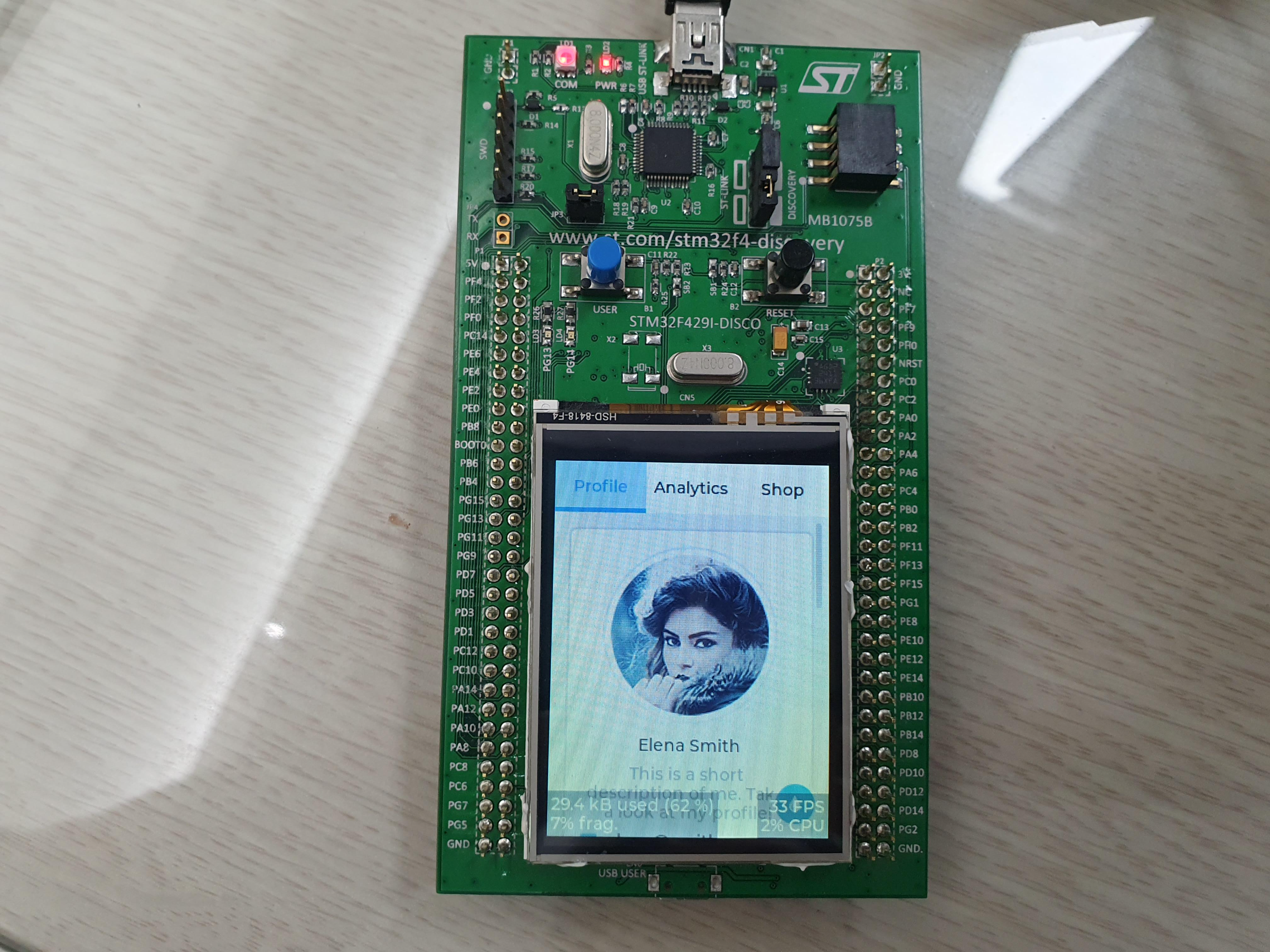
그냥 받아서 하니 잘된다.


git clone https://github.com/littlevgl/stm32f429_disco_no_os_sw4stm32.git --recurse-submodules

[링크 : https://github.com/lvgl/lv_port_stm32f429_disco]


회사에 굴러 다니던게 있었을 줄이야 -_-

[링크 : https://www.st.com/en/evaluation-tools/32f429idiscovery.html]


  • Core: Arm® 32-bit Cortex®-M4 CPU with FPU, Adaptive real-time accelerator (ART Accelerator™) allowing 0-wait state execution from flash memory, frequency up to 180 MHz, MPU, 225 DMIPS/1.25 DMIPS/MHz (Dhrystone 2.1), and DSP instructions
  • Memories
    • 512 bytes of OTP memory
    • Up to 2 MB of flash memory organized into two banks allowing read-while-write
    • Up to 256+4 KB of SRAM including 64 KB of CCM (core coupled memory) data RAM
    • Flexible external memory controller with up to 32-bit data bus: SRAM, PSRAM, SDRAM/LPSDR SDRAM, compact flash/NOR/NAND memories
  • LCD parallel interface, 8080/6800 modes
  • LCD-TFT controller with fully programmable resolution (total width up to 4096 pixels, total height up to 2048 lines and pixel clock up to 83 MHz)
  • Chrom-ART Accelerator™ for enhanced graphic content creation (DMA2D)

[링크 : https://www.st.com/en/microcontrollers-microprocessors/stm32f429zi.html]


그나저나 main 함수 엄청 단촐하다.

int main(void)
{

HAL_Init();

/* Configure the system clock to 180 MHz */
SystemClock_Config();

/*Start up indication*/
BSP_LED_Init(LED3);
uint32_t i;
for (i = 0; i < 8; i++) {
BSP_LED_Toggle(LED3);
HAL_Delay(50);
}

lv_init();

tft_init();
touchpad_init();

// lv_example_scroll_3();
// lv_example_chart_7();

lv_demo_widgets();

while (1)
{
HAL_Delay(3);
lv_task_handler();
}
}


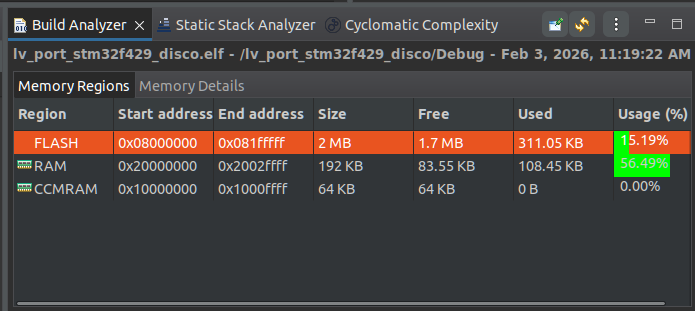
빌드하니 생각외로 용량은 적게 나온다. 이미지는 어떻게 처리한거지?


'embeded > Cortex-M4 STM' 카테고리의 다른 글

stm32g473 flash doubleword  (0) 2026.02.04
STM32G47x dual bank flash  (0) 2026.02.03
32F469IDISCOVERY with lvgl  (0) 2026.02.02
UM2195 audio streaming Expansion Package for STM32Cube  (0) 2026.01.05
stm32g4 cordic fmac  (0) 2025.11.28
Posted by 구차니
embeded/Cortex-M4 STM2026. 2. 2. 17:55

곧 다뤄보게 될 예정.

STM32F469 high-performance MCUs with ARM®Cortex®-M4 core and Chrom-ART Accelerator™
4 inches 800x480 pixel TFT color LCD with MIPI DSI interface and capacitive touch screen

[링크 : https://www.st.com/en/evaluation-tools/32f469idiscovery.html#overview]


spi가 아니라 dsi 라서 걱정했는데 다행히(!) 누군가가 benchmark 포팅해서 올려놔서 좀 날로 먹을수 있을 듯.

[링크 : https://github.com/lvgl/lv_port_stm32f469_disco/tree/master]

'embeded > Cortex-M4 STM' 카테고리의 다른 글

STM32G47x dual bank flash  (0) 2026.02.03
STM32F429I-DISC1 with lvgl  (0) 2026.02.03
UM2195 audio streaming Expansion Package for STM32Cube  (0) 2026.01.05
stm32g4 cordic fmac  (0) 2025.11.28
STM32CubeProgrammer / uart / parity  (0) 2025.11.28
Posted by 구차니
embeded/Cortex-M4 STM2026. 1. 5. 17:46

'embeded > Cortex-M4 STM' 카테고리의 다른 글

STM32F429I-DISC1 with lvgl  (0) 2026.02.03
32F469IDISCOVERY with lvgl  (0) 2026.02.02
stm32g4 cordic fmac  (0) 2025.11.28
STM32CubeProgrammer / uart / parity  (0) 2025.11.28
stm32flash 0.5 0.7 버전과 stm32g473  (0) 2025.11.28
Posted by 구차니
embeded/Cortex-M4 STM2025. 11. 28. 15:50

대충 21페이지에서 발견

3.8 CORDIC
The CORDIC provides hardware acceleration of certain mathematical functions, notably
trigonometric, commonly used in motor control, metering, signal processing and many other
applications.
It speeds up the calculation of these functions compared to a software implementation,
allowing a lower operating frequency, or freeing up processor cycles in order to perform
other tasks.
Cordic features
• 24-bit CORDIC rotation engine
• Circular and Hyperbolic modes
• Rotation and Vectoring modes
• Functions: Sine, Cosine, Sinh, Cosh, Atan, Atan2, Atanh, Modulus, Square root,
Natural logarithm
• Programmable precision up to 20-bit
• Fast convergence: 4 bits per clock cycle
• Supports 16-bit and 32-bit fixed point input and output formats
• Low latency AHB slave interface
• Results can be read as soon as ready without polling or interrupt
• DMA read and write channels


3.9 Filter mathematical accelerator (FMAC)
The filter mathematical accelerator unit performs arithmetic operations on vectors. It
comprises a multiplier/accumulator (MAC) unit, together with address generation logic,
which allows it to index vector elements held in local memory.
The unit includes support for circular buffers on input and output, which allows digital filters
to be implemented. Both finite and infinite impulse response filters can be realized.
The unit allows frequent or lengthy filtering operations to be offloaded from the CPU, freeing
up the processor for other tasks. In many cases it can accelerate such calculations
compared to a software implementation, resulting in a speed-up of time critical tasks.
FMAC features
• 16 x 16-bit multiplier
• 24+2-bit accumulator with addition and subtraction
• 16-bit input and output data
• 256 x 16-bit local memory
• Up to three areas can be defined in memory for data buffers (two input, one output),
defined by programmable base address pointers and associated size registers
• Input and output sample buffers can be circular
• Buffer “watermark” feature reduces overhead in interrupt mode
• Filter functions: FIR, IIR (direct form 1)
• AHB slave interface
• DMA read and write data channels

[링크 : https://www.st.com/resource/en/datasheet/stm32g473cb.pdf]


함수 3회 호출할 만큼 부하를 상쇄할 만큼 하드웨어 계산이 빠른거겠지?

1. Configure the CORDIC:
LL_CORDIC_Config(
    CORDIC,
    LL_CORDIC_FUNCTION_COSINE, /* cosine function */

    LL_CORDIC_PRECISION_6CYCLES, /* max precision for q1.31 cosine */
    LL_CORDIC_SCALE_0, /* no scale */
    LL_CORDIC_NBWRITE_1, /* One input data: angle. Second input data (modulus) is 1 af ter cordic reset */
    LL_CORDIC_NBREAD_2, /* Two output data: cosine, then sine */
    LL_CORDIC_INSIZE_32BITS, /* q1.31 format for input data */
    LL_CORDIC_OUTSIZE_32BITS
); /* q1.31 format for output data */

If only this configuration is used, this step is done once at initialization. Otherwise, it must be repeated each
time one of the above parameters changes.
2. Write the input argument(s):
/* Write angle */
LL_CORDIC_WriteData(CORDIC, ANGLE_CORDIC);
In this case, there is only one argument, the angle (defined as a constant value π/8). The other argument is
the default modulus of 1, so does not need to be written.
As soon as the expected number of arguments is written, the calculation starts.
3. Read the result(s):
/* Read cosine */
cosOutput = (int32_t)LL_CORDIC_ReadData(CORDIC);
/* Read sine */
sinOutput = (int32_t)LL_CORDIC_ReadData(CORDIC);

[링크 : https://www.st.com/resource/en/application_note/an5325-how-to-use-the-cordic-to-perform-mathematical-functions-on-stm32-mcus-stmicroelectronics.pdf]


FMAC configuration
The FMAC can be configured using the HAL driver from the STM32CubeG4 MCU Package. Before accessing
any FMAC registers, the FMAC clock must be enabled:
__HAL_RCC_FMAC_CLK_ENABLE();
An area of system memory must be reserved for the coefficients:
/* Declare an array to hold the filter coefficients */
static int16_t aFilterCoeffB[51];
We must also declare a structure to contain the FMAC parameters:
FMAC_HandleTypeDef hfmac;
Now we can configure the FMAC using the HAL_FMAC_FilterConfig() function:
FMAC_FilterConfigTypeDef sFmacConfig; /* declare a filter configuration structure */
sFmacConfig.CoeffBaseAddress = 0; /* Set the coefficient buffer base address */
sFmacConfig.CoeffBufferSize = 51; /* Set the coefficient buffer size to the number of coeffs */
sFmacConfig.InputBaseAddress = 51; /* Set the Input buffer base address to the next free address */
sFmacConfig.InputBufferSize = 100; /* Set the input buffer size greater than the number of coeffs */
sFmacConfig.InputThreshold = 0; /* Set the input watermark to zero since we are using DMA */
sFmacConfig.OutputBaseAddress = 151; /* Set the Output buffer base address to the next free address */
sFmacConfig.OutputBufferSize = 100; /* Set the output buffer size */
sFmacConfig.OutputThreshold = 0; /* Set the output watermark to zero since we are using DMA */

/* No A coefficients since FIR */

sFmacConfig.pCoeffA = NULL;
sFmacConfig.CoeffASize = 0;
sFmacConfig.pCoeffB = aFilterCoeffB; /* Pointer to the coefficients in memory */
sFmacConfig.CoeffBSize = 51; /* Number of coefficients */
sFmacConfig.Filter = FMAC_FUNC_CONVO_FIR; /* Select FIR filter function */
sFmacConfig.InputAccess = FMAC_BUFFER_ACCESS_DMA; /* Enable DMA input transfer */
sFmacConfig.OutputAccess = FMAC_BUFFER_ACCESS_DMA; /* Enable DMA output transfer */
sFmacConfig.Clip = FMAC_CLIP_ENABLED; /* Enable clipping of the output at 0x7FFF and 0x8000 */
sFmacConfig.P = 51; /* P parameter contains number of coefficients */
sFmacConfig.Q = FILTER_PARAM_Q_NOT_USED; /* Q parameter is not used */
sFmacConfig.R = 0; /* R parameter contains the post-shift value (none) */
if (HAL_FMAC_FilterConfig(&hfmac, &sFmacConfig) != HAL_OK) /* Configure the FMAC */
Error_Handler(); /* Configuration Error */
The HAL_FMAC_FilterConfig() function programs the configuration and control registers, and loads the
coefficients into the FMAC local memory (X2 buffer).

[링크 : https://www.st.com/resource/en/application_note/an5305-digital-filter-implementation-with-the-fmac-using-stm32cubeg4-mcu-package-stmicroelectronics.pdf]

Posted by 구차니
embeded/Cortex-M4 STM2025. 11. 28. 15:41

아무생각없이 57600-None 으로 했더니 정체 불명의(?) NACK가 뜬다.


57600-Even 로 해주니 잘된다.

'embeded > Cortex-M4 STM' 카테고리의 다른 글

UM2195 audio streaming Expansion Package for STM32Cube  (0) 2026.01.05
stm32g4 cordic fmac  (0) 2025.11.28
stm32flash 0.5 0.7 버전과 stm32g473  (0) 2025.11.28
stm32g473 ADC calibration  (0) 2025.11.28
stm32f411 black fill board  (0) 2025.11.22
Posted by 구차니