element는 gst-inspector로 확인하는 개별 기능(?)
pads는 대개 source, sink로 표현되는 입출력
bins는 모르겠고.. pipeline은 element(요소)들을 pads를 통해 데이터를 흐르도록 하는 연결의 모임 으로 보면 될 듯
| element | An element is the most important class of objects in GStreamer |
| pads | Pads are an element's input and output, where you can connect other elements |
| bins | A bin is a container for a collection of elements. |
| pipeline | A pipeline is a top-level bin. |
엘리먼트는 크게 세가지로 나누어 지는데
source만 있는 source element(v4l2src 등)
source와 sink가 있는 filter element, demuxer
sink만 있는 sink element(waylandsink, autoviedeosink 등) 이 있다.
또한 name 을 이용해서 named element로 사용할 수 있다.
| source element | Source elements generate data for use by a pipeline, for example reading from disk or from a sound card. | 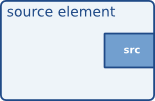 |
| Filters, convertors, demuxers, muxers and codecs | Filters and filter-like elements have both input and outputs pads. |  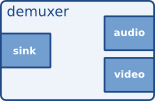 |
| Sink elements | Sink elements are end points in a media pipeline. | 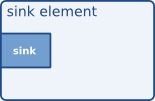 |
element에는 properties가 존재하는데
일부는 설정용도로 쓸 수 있고, 일부는 상태정보를 폴링(polling)으로 읽어갈 수 있다.
| $ gst-inspect-1.0 autovideosink Factory Details: Rank none (0) Long-name Auto video sink Klass Sink/Video Description Wrapper video sink for automatically detected video sink Author Jan Schmidt <thaytan@noraisin.net> Plugin Details: Name autodetect Description Plugin contains auto-detection plugins for video/audio in- and outputs Filename /usr/lib/x86_64-linux-gnu/gstreamer-1.0/libgstautodetect.so Version 1.20.3 License LGPL Source module gst-plugins-good Source release date 2022-06-15 Binary package GStreamer Good Plugins (Ubuntu) Origin URL https://launchpad.net/distros/ubuntu/+source/gst-plugins-good1.0 GObject +----GInitiallyUnowned +----GstObject +----GstElement +----GstBin +----GstAutoDetect +----GstAutoVideoSink Implemented Interfaces: GstChildProxy Pad Templates: SINK template: 'sink' Availability: Always Capabilities: ANY Element has no clocking capabilities. Element has no URI handling capabilities. Pads: SINK: 'sink' Element Properties: async-handling : The bin will handle Asynchronous state changes flags: readable, writable Boolean. Default: false filter-caps : Filter sink candidates using these caps. flags: readable, writable, 0x2000 video/x-raw message-forward : Forwards all children messages flags: readable, writable Boolean. Default: false name : The name of the object flags: readable, writable, 0x2000 String. Default: "autovideosink0" parent : The parent of the object flags: readable, writable, 0x2000 Object of type "GstObject" sync : Sync on the clock flags: readable, writable Boolean. Default: true ts-offset : Timestamp offset in nanoseconds flags: readable, writable Integer64. Range: -9223372036854775808 - 9223372036854775807 Default: 0 |
| Properties and values Properties are used to describe extra information for capabilities. A property consists of a key (a string) and a value. |
주기적으로 읽는게 싫다면 signal을 제공하는 엘리먼트를 통해 이벤트 발생시 값을 수신할 수 있다.
| $ gst-inspect-1.0 fpsdisplaysink Factory Details: Rank none (0) Long-name Measure and show framerate on videosink Klass Sink/Video Description Shows the current frame-rate and drop-rate of the videosink as overlay or text on stdout Author Zeeshan Ali <zeeshan.ali@nokia.com>, Stefan Kost <stefan.kost@nokia.com> Plugin Details: Name debugutilsbad Description Collection of elements that may or may not be useful for debugging Filename /usr/lib/x86_64-linux-gnu/gstreamer-1.0/libgstdebugutilsbad.so Version 1.20.3 License LGPL Source module gst-plugins-bad Source release date 2022-06-15 Binary package GStreamer Bad Plugins (Ubuntu) Origin URL https://launchpad.net/distros/ubuntu/+source/gst-plugins-bad1.0 GObject +----GInitiallyUnowned +----GstObject +----GstElement +----GstBin +----GstFPSDisplaySink Implemented Interfaces: GstChildProxy Pad Templates: SINK template: 'sink' Availability: Always Capabilities: ANY Element has no clocking capabilities. Element has no URI handling capabilities. Pads: SINK: 'sink' Element Properties: async-handling : The bin will handle Asynchronous state changes flags: readable, writable Boolean. Default: false fps-update-interval : Time between consecutive frames per second measures and update (in ms). Should be set on NULL state flags: readable, writable Integer. Range: 1 - 2147483647 Default: 500 frames-dropped : Number of frames dropped by the sink flags: readable Unsigned Integer. Range: 0 - 4294967295 Default: 0 frames-rendered : Number of frames rendered flags: readable Unsigned Integer. Range: 0 - 4294967295 Default: 0 last-message : The message describing current status flags: readable String. Default: null max-fps : Maximum fps rate measured. Reset when going from NULL to READY.-1 means no measurement has yet been done flags: readable Double. Range: -1 - 1.797693e+308 Default: -1 message-forward : Forwards all children messages flags: readable, writable Boolean. Default: false min-fps : Minimum fps rate measured. Reset when going from NULL to READY.-1 means no measurement has yet been done flags: readable Double. Range: -1 - 1.797693e+308 Default: -1 name : The name of the object flags: readable, writable, 0x2000 String. Default: "fpsdisplaysink0" parent : The parent of the object flags: readable, writable, 0x2000 Object of type "GstObject" signal-fps-measurements: If the fps-measurements signal should be emitted. flags: readable, writable Boolean. Default: false silent : Don't produce last_message events flags: readable, writable Boolean. Default: false sync : Sync on the clock (if the internally used sink doesn't have this property it will be ignored flags: readable, writable Boolean. Default: true text-overlay : Whether to use text-overlay flags: readable, writable Boolean. Default: true video-sink : Video sink to use (Must only be called on NULL state) flags: readable, writable Object of type "GstElement" Element Signals: "fps-measurements" : void user_function (GstElement* object, gdouble arg0, gdouble arg1, gdouble arg2, gpointer user_data); |
| Signals GObject signals can be used to notify applications of events specific to this object. Note, however, that the application needs to be aware of signals and their meaning, so if you're looking for a generic way for application-element interaction, signals are probably not what you're looking for. In many cases, however, signals can be very useful. See the GObject documentation for all internals about signals. |
[링크 : https://gstreamer.freedesktop.org/documentation/plugin-development/basics/signals.html?gi-language=c]
bin - pipeline의 하위라는데 알아서 해주는게 포인트라고 보면되나?
| $ gst-inspect-1.0 | grep bin camerabin: camerabin: Camera Bin camerabin: viewfinderbin: Viewfinder Bin camerabin: wrappercamerabinsrc: Wrapper camera src element for camerabin2 closedcaption: cccombiner: Closed Caption Combiner cluttergst3: clutterautovideosink: Generic bin codecalpha: alphacombine: Alpha Combiner codecalpha: vp8alphadecodebin: VP8 Alpha Decoder codecalpha: vp9alphadecodebin: VP9 Alpha Decoder debugutilsbad: testsrcbin: Generic bin dvb: dvbbasebin: DVB bin encoding: encodebin: Encoder Bin encoding: encodebin2: Encoder Bin libav: avdec_binkaudio_dct: libav Bink Audio (DCT) decoder libav: avdec_binkaudio_rdft: libav Bink Audio (RDFT) decoder libav: avdec_binkvideo: libav Bink video decoder libav: avdec_bintext: libav Binary text decoder libav: avdec_xbin: libav eXtended BINary text decoder opengl: glfilterbin: GL Filter Bin opengl: glmixerbin: OpenGL video_mixer empty bin opengl: glsinkbin: GL Sink Bin opengl: glsrcbin: GL Src Bin opengl: glstereomix: OpenGL stereo video combiner opengl: glvideomixer: OpenGL video_mixer bin playback: decodebin: Decoder Bin playback: decodebin3: Decoder Bin 3 playback: parsebin: Parse Bin playback: playbin: Player Bin 2 playback: playbin3: Player Bin 3 playback: uridecodebin: URI Decoder playback: uridecodebin3: URI Decoder playback: urisourcebin: URI reader resindvd: rsndvdbin: rsndvdbin rist: roundrobin: Round Robin rtpmanager: rtpbin: RTP Bin staticelements: bin: Generic bin switchbin: switchbin: switchbin transcode: transcodebin: Transcode Bin transcode: uritranscodebin: URITranscode Bin vaapi: vaapidecodebin: VA-API Decode Bin webrtc: webrtcbin: WebRTC Bin |
| Play a media file using playbin (as in Basic tutorial 1: Hello world!): gst-launch-1.0 playbin uri=https://gstreamer.freedesktop.org/data/media/sintel_trailer-480p.webm A fully operation playback pipeline, with audio and video (more or less the same pipeline that playbin will create internally): gst-launch-1.0 souphttpsrc location=https://gstreamer.freedesktop.org/data/media/sintel_trailer-480p.webm ! matroskademux name=d ! queue ! vp8dec ! videoconvert ! autovideosink d. ! queue ! vorbisdec ! audioconvert ! audioresample ! autoaudiosink |
[링크 : https://gstreamer.freedesktop.org/documentation/tutorials/basic/hello-world.html?gi-language=c]
[링크 : https://gstreamer.freedesktop.org/documentation/tutorials/basic/gstreamer-tools.html?gi-language=c]
[링크 : http://ttps://medium.com/may-i-lab/gstreamer-gstreamer-기초-da5015f531fc]
'프로그램 사용 > gstreamer' 카테고리의 다른 글
| GstPipelineStudio install 실패 (0) | 2025.09.20 |
|---|---|
| gstpipelinestudio (0) | 2025.09.11 |
| gstreamer pipeline (0) | 2025.08.22 |
| gstreamer tee 예제 (0) | 2025.08.21 |
| gstreamer capsfilter (0) | 2025.08.21 |