"""
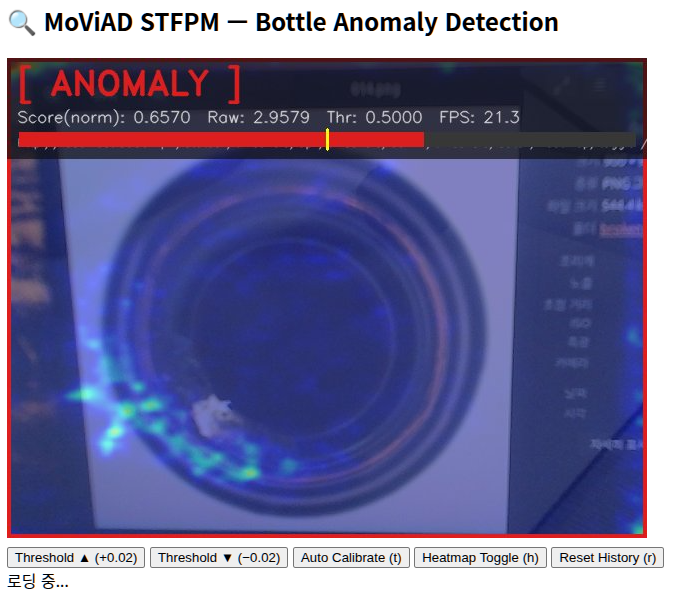
MoViAD STFPM + 웹캠 실시간 이상 감지 (브라우저 스트리밍 버전)
=============================================================
cv2.imshow 없이 HTTP MJPEG 스트리밍으로 브라우저에서 확인합니다.
→ http://localhost:8080 에 접속하면 실시간 영상이 표시됩니다.
[사전 준비]
cd moviad && pip install -e ./
pip install opencv-python-headless torch torchvision
[모델 학습]
python main_scripts/main_stfpm.py \
--train \
--model_name mobilenet_v2 \
--ad_layers 4 7 10 \
--categories bottle \
--dataset_path /path/to/mvtec \
--checkpoint_dir ./checkpoints/stfpm \
--device cuda:0 \
--epochs 100
[실행]
python webcam_stfpm_anomaly.py \
--checkpoint ./checkpoints/stfpm/bottle/mobilenet_v2_100ep_IMAGENET1K_V2_4_7_10_s0.pth.tar
[REST 제어 API] (curl 또는 브라우저로 호출)
GET /threshold/up 임계값 +0.02
GET /threshold/down 임계값 -0.02
GET /threshold/auto 자동 보정 (현재 점수 기준)
GET /heatmap/toggle 히트맵 ON/OFF
GET /reset 점수 히스토리 초기화
GET /status 현재 상태 JSON
"""
import argparse
import sys
import time
import threading
import json
from datetime import datetime
from pathlib import Path
from http.server import HTTPServer, BaseHTTPRequestHandler
from io import BytesIO
import cv2
import numpy as np
import torch
from torchvision import transforms
torch.backends.cudnn.enabled = False
torch.backends.cudnn.benchmark = False
try:
from moviad.models import Stfpm
except ImportError:
sys.exit(
"\n[ERROR] moviad 패키지를 찾을 수 없습니다.\n"
" moviad 레포 루트에서 'pip install -e ./' 를 실행하세요.\n"
)
# ──────────────────────────────────────────────────────────────────
# 전역 공유 상태 (스레드 간 공유)
# ──────────────────────────────────────────────────────────────────
class AppState:
def __init__(self):
self.lock = threading.Lock()
self.jpeg_frame = b"" # MJPEG 브라우저 전송용 프레임
self.threshold = 0.5
self.show_heat = True
self.norm_score = 0.0
self.raw_score = 0.0
self.is_anomaly = False
self.fps = 0.0
self.score_hist: list[float] = []
self.running = True
STATE = AppState()
# ──────────────────────────────────────────────────────────────────
# 전처리
# ──────────────────────────────────────────────────────────────────
IMG_SIZE = 224
RESIZE = 256
def make_preprocess(img_size=224):
resize = int(img_size * 256 / 224)
return transforms.Compose([
transforms.ToPILImage(),
transforms.Resize(resize),
transforms.CenterCrop(img_size),
transforms.ToTensor(),
transforms.Normalize(mean=[0.485, 0.456, 0.406],
std =[0.229, 0.224, 0.225]),
])
# ──────────────────────────────────────────────────────────────────
# 모델 로드
# ──────────────────────────────────────────────────────────────────
def load_stfpm(checkpoint_path: str, device: torch.device) -> Stfpm:
print(f"[INFO] 체크포인트 로드: {checkpoint_path}")
state = torch.load(checkpoint_path, map_location=device)
model = Stfpm()
model.load_state_dict(state, strict=False)
model.to(device)
model.eval()
print(f"[INFO] 백본={model.backbone_model_name} "
f"AD레이어={model.ad_layers} 입력크기={model.input_size}")
return model
# ──────────────────────────────────────────────────────────────────
# 시각화 헬퍼
# ──────────────────────────────────────────────────────────────────
C_NORMAL = (50, 205, 50)
C_ANOMALY = (30, 30, 220)
C_PANEL = (15, 15, 15)
def score_to_heatmap(score_map: torch.Tensor, wh: tuple) -> np.ndarray:
arr = score_map.squeeze().cpu().numpy()
arr = cv2.normalize(arr, None, 0, 255, cv2.NORM_MINMAX).astype(np.uint8)
heat = cv2.applyColorMap(arr, cv2.COLORMAP_JET)
return cv2.resize(heat, wh)
def draw_ui(frame, norm_score, raw_score, threshold,
is_anomaly, fps, heatmap, show_heat) -> np.ndarray:
out = frame.copy()
h, w = out.shape[:2]
if show_heat and heatmap is not None:
out = cv2.addWeighted(out, 0.5, heatmap, 0.5, 0)
color = C_ANOMALY if is_anomaly else C_NORMAL
cv2.rectangle(out, (0, 0), (w-1, h-1), color, 6)
# 반투명 상단 패널
panel_h = 100
overlay = out.copy()
cv2.rectangle(overlay, (0, 0), (w, panel_h), C_PANEL, -1)
cv2.addWeighted(overlay, 0.70, out, 0.30, 0, out)
label = "[ ANOMALY ]" if is_anomaly else "[ NORMAL ]"
cv2.putText(out, label, (10, 36),
cv2.FONT_HERSHEY_DUPLEX, 1.1, color, 2, cv2.LINE_AA)
info = (f"Score(norm): {norm_score:.4f} Raw: {raw_score:.4f} "
f"Thr: {threshold:.4f} FPS: {fps:.1f}")
cv2.putText(out, info, (10, 64),
cv2.FONT_HERSHEY_SIMPLEX, 0.52, (210, 210, 210), 1, cv2.LINE_AA)
cv2.putText(out, "http://localhost:8080 | /status /threshold/up /threshold/down /threshold/auto /heatmap/toggle /reset",
(10, 88), cv2.FONT_HERSHEY_SIMPLEX, 0.38, (160, 160, 160), 1, cv2.LINE_AA)
# 점수 바
bx, by0, by1 = 12, 74, 88
bw = w - 24
fill = int(bw * min(norm_score, 1.0))
tx = bx + int(bw * min(threshold, 1.0))
cv2.rectangle(out, (bx, by0), (bx+bw, by1), (55,55,55), -1)
cv2.rectangle(out, (bx, by0), (bx+fill, by1), color, -1)
cv2.line(out, (tx, by0-3), (tx, by1+3), (0, 255, 255), 2)
return out
# ──────────────────────────────────────────────────────────────────
# 추론 스레드
# ──────────────────────────────────────────────────────────────────
def inference_loop(model, preprocess, device, camera_id, width, height):
cap = cv2.VideoCapture(camera_id)
if not cap.isOpened():
print(f"[ERROR] 카메라(id={camera_id})를 열 수 없습니다.")
STATE.running = False
return
cap.set(cv2.CAP_PROP_FRAME_WIDTH, width)
cap.set(cv2.CAP_PROP_FRAME_HEIGHT, height)
t_prev = time.time()
fps = 0.0
save_dir = Path("captures")
print(f"[INFO] 카메라 시작 (id={camera_id}, {width}x{height})")
print("[INFO] 브라우저에서 http://localhost:8080 접속하세요\n")
while STATE.running:
ret, frame = cap.read()
if not ret:
time.sleep(0.03)
continue
# 추론
rgb = cv2.cvtColor(frame, cv2.COLOR_BGR2RGB)
tensor = preprocess(rgb).unsqueeze(0).to(device)
with torch.no_grad():
score_maps, anomaly_scores = model(tensor)
raw_score = float(anomaly_scores[0].cpu())
# 정규화 (min-max, 최근 500프레임)
with STATE.lock:
STATE.score_hist.append(raw_score)
if len(STATE.score_hist) > 500:
STATE.score_hist.pop(0)
s_min = min(STATE.score_hist)
s_max = max(STATE.score_hist)
norm = (raw_score - s_min) / (s_max - s_min + 1e-8)
threshold = STATE.threshold
show_heat = STATE.show_heat
is_anomaly = norm > threshold
heatmap = score_to_heatmap(score_maps, (frame.shape[1], frame.shape[0]))
# FPS
t_now = time.time()
fps = 0.9 * fps + 0.1 / max(t_now - t_prev, 1e-6)
t_prev = t_now
# 화면 렌더링
display = draw_ui(frame, norm, raw_score, threshold,
is_anomaly, fps, heatmap, show_heat)
# JPEG 인코딩 → 공유 버퍼
ok, buf = cv2.imencode('.jpg', display, [cv2.IMWRITE_JPEG_QUALITY, 85])
if ok:
with STATE.lock:
STATE.jpeg_frame = buf.tobytes()
STATE.norm_score = norm
STATE.raw_score = raw_score
STATE.is_anomaly = is_anomaly
STATE.fps = fps
# 콘솔 출력
tag = "ANOMALY ⚠" if is_anomaly else "normal ✓ "
print(f"\r[{tag}] norm={norm:.4f} raw={raw_score:.4f} "
f"thr={threshold:.4f} fps={fps:.1f} ",
end="", flush=True)
cap.release()
print("\n[INFO] 카메라 종료")
# ──────────────────────────────────────────────────────────────────
# HTTP 서버 (MJPEG + REST API)
# ──────────────────────────────────────────────────────────────────
HTML_PAGE = """\
<!DOCTYPE html>
<html>
<head>
<meta charset="utf-8">
<title>MoViAD STFPM - Bottle Anomaly Detection</title>
<style>
body {{ background:#111; color:#eee; font-family:monospace;
display:flex; flex-direction:column; align-items:center; margin:0; padding:16px; }}
h2 {{ color:#4fc3f7; margin:8px 0; }}
img {{ max-width:100%; border:3px solid #333; border-radius:6px; }}
.controls {{ display:flex; gap:10px; flex-wrap:wrap; justify-content:center; margin:12px 0; }}
button {{ padding:8px 18px; border:none; border-radius:5px; cursor:pointer;
background:#1e88e5; color:#fff; font-size:14px; font-weight:bold; }}
button:hover {{ background:#1565c0; }}
button.danger {{ background:#e53935; }}
button.success {{ background:#43a047; }}
#status {{ background:#1e1e1e; border-radius:6px; padding:12px 20px;
font-size:15px; min-width:340px; text-align:center; margin-top:6px; }}
.normal {{ color:#69f0ae; font-weight:bold; }}
.anomaly {{ color:#ff5252; font-weight:bold; }}
</style>
</head>
<body>
<h2>🔍 MoViAD STFPM — Bottle Anomaly Detection</h2>
<img src="/stream" alt="webcam stream">
<div class="controls">
<button onclick="api('/threshold/up')" >Threshold ▲ (+0.02)</button>
<button onclick="api('/threshold/down')">Threshold ▼ (−0.02)</button>
<button class="success" onclick="api('/threshold/auto')">Auto Calibrate (t)</button>
<button onclick="api('/heatmap/toggle')">Heatmap Toggle (h)</button>
<button class="danger" onclick="api('/reset')" >Reset History (r)</button>
</div>
<div id="status">로딩 중...</div>
<script>
function api(path) {{
fetch(path).then(r=>r.json()).then(updateStatus);
}}
function updateStatus(d) {{
const cls = d.is_anomaly ? 'anomaly' : 'normal';
const lab = d.is_anomaly ? '⚠ ANOMALY' : '✓ NORMAL';
document.getElementById('status').innerHTML =
`<span class="${{cls}}">${{lab}}</span> | `+
`norm: <b>${{d.norm_score.toFixed(4)}}</b> `+
`raw: ${{d.raw_score.toFixed(4)}} `+
`thr: <b>${{d.threshold.toFixed(4)}}</b> `+
`fps: ${{d.fps.toFixed(1)}} `+
`heatmap: ${{d.show_heat ? 'ON' : 'OFF'}}`;
}}
setInterval(() => fetch('/status').then(r=>r.json()).then(updateStatus), 500);
</script>
</body>
</html>
"""
class StreamHandler(BaseHTTPRequestHandler):
def log_message(self, *args):
pass # 콘솔 노이즈 억제
def do_GET(self):
p = self.path.split('?')[0]
# ── MJPEG 스트림 ─────────────────────────────
if p == '/stream':
self.send_response(200)
self.send_header('Content-Type',
'multipart/x-mixed-replace; boundary=frame')
self.end_headers()
try:
while STATE.running:
with STATE.lock:
frame = STATE.jpeg_frame
if frame:
self.wfile.write(
b"--frame\r\n"
b"Content-Type: image/jpeg\r\n\r\n"
+ frame + b"\r\n"
)
time.sleep(0.03)
except (BrokenPipeError, ConnectionResetError):
pass
return
# ── REST API ──────────────────────────────────
with STATE.lock:
if p == '/threshold/up':
STATE.threshold = min(STATE.threshold + 0.02, 0.99)
elif p == '/threshold/down':
STATE.threshold = max(STATE.threshold - 0.02, 0.01)
elif p == '/threshold/auto':
STATE.threshold = float(
np.clip(STATE.norm_score + 0.05, 0.01, 0.99)
)
elif p == '/heatmap/toggle':
STATE.show_heat = not STATE.show_heat
elif p == '/reset':
STATE.score_hist.clear()
resp = {
"threshold" : STATE.threshold,
"norm_score": STATE.norm_score,
"raw_score" : STATE.raw_score,
"is_anomaly": STATE.is_anomaly,
"fps" : STATE.fps,
"show_heat" : STATE.show_heat,
}
# ── HTML 홈 ───────────────────────────────────
if p == '/':
body = HTML_PAGE.encode()
self.send_response(200)
self.send_header('Content-Type', 'text/html; charset=utf-8')
self.send_header('Content-Length', str(len(body)))
self.end_headers()
self.wfile.write(body)
return
body = json.dumps(resp).encode()
self.send_response(200)
self.send_header('Content-Type', 'application/json')
self.send_header('Content-Length', str(len(body)))
self.end_headers()
self.wfile.write(body)
# ──────────────────────────────────────────────────────────────────
# 메인
# ──────────────────────────────────────────────────────────────────
def run(args):
# 디바이스
dev_str = args.device
if "cuda" in dev_str and not torch.cuda.is_available():
print("[WARN] CUDA 불가 — CPU로 전환합니다.")
dev_str = "cpu"
device = torch.device(dev_str)
# 모델 로드
model = load_stfpm(args.checkpoint, device)
# 입력 크기 동기화
img_size = model.input_size[0] if model.input_size else 224
preprocess = make_preprocess(img_size)
STATE.threshold = args.threshold
# 추론 스레드 시작
t = threading.Thread(
target=inference_loop,
args=(model, preprocess, device,
args.camera_id, args.width, args.height),
daemon=True,
)
t.start()
# HTTP 서버 시작
server = HTTPServer(("0.0.0.0", args.port), StreamHandler)
print(f"[INFO] HTTP 서버 시작: http://localhost:{args.port}")
print("[INFO] Ctrl+C 로 종료\n")
try:
server.serve_forever()
except KeyboardInterrupt:
print("\n[INFO] 서버 종료")
finally:
STATE.running = False
server.server_close()
# ──────────────────────────────────────────────────────────────────
# CLI
# ──────────────────────────────────────────────────────────────────
def parse_args():
p = argparse.ArgumentParser(
description="MoViAD STFPM bottle — 웹캠 이상 감지 (브라우저 스트리밍)"
)
p.add_argument("--checkpoint", type=str, required=True,
help=".pth.tar 체크포인트 경로")
p.add_argument("--camera_id", type=int, default=0)
p.add_argument("--device", type=str, default="cuda:0")
p.add_argument("--threshold", type=float, default=0.5)
p.add_argument("--width", type=int, default=640)
p.add_argument("--height", type=int, default=480)
p.add_argument("--port", type=int, default=8080)
return p.parse_args()
if __name__ == "__main__":
run(parse_args()) |