embeded/robot2026. 6. 19. 11:40

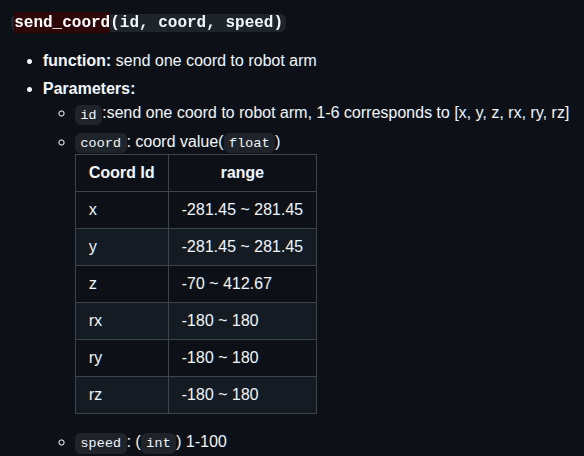
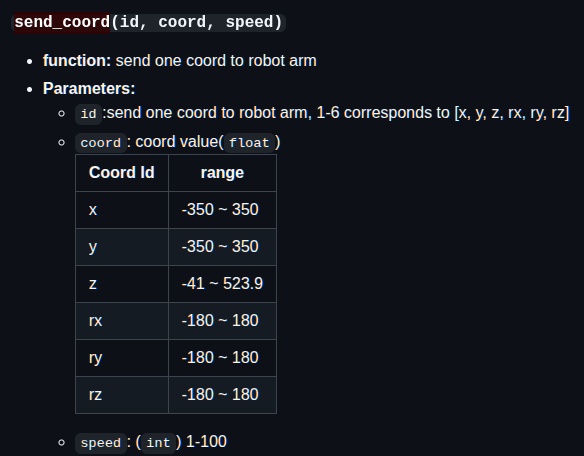
좌표는 mm 단위인가?

mycobot_280 mycobot_320


atom 버튼 누르면 release_all_servos() 를 실행하고

damping 모드 되어있으면 팔이 떨어지진 않을것 같으니 원하는대로 옮기고

atom 버튼 떼면

get_angles() 나 get_coords() 해서 좌표 받고, power_on() 해서 서보 고정하고 끝.. 하면 좀 편하게 되려나?

### 1. System Status
#### `get_modify_version()`
#### `clear_queue()`
#### `check_async_or_sync()`
#### `get_system_version()`
#### `get_basic_version()`
#### `get_error_information()`
#### `clear_error_information()`
#### `get_reboot_count()`

### 2. Overall Status
#### `power_on()`
#### `power_off()`
#### `is_power_on()`
#### `release_all_servos()`
#### `focus_servo(servo_id)`
#### `is_controller_connected()`
#### `read_next_error()`
#### `get_fresh_mode()`
#### `set_fresh_mode()`
#### `set_free_mode()`
#### `is_free_mode()`
#### `focus_all_servos()`
#### `set_vision_mode()`

### 3.MDI Mode and Operation
#### `get_angles()`
#### `get_angles_plan()`
#### `send_angle(id, degree, speed)`
#### `send_angles(angles, speed)`
#### `get_coords()`
#### `get_coords_plan()`
#### `send_coord(id, coord, speed)`
#### `send_coords(coords, speed, mode)`
#### `pause()`
#### `sync_send_angles(angles, speed, timeout=15)`
#### `sync_send_coords(coords, speed, mode=0, timeout=15)`
#### `get_angles_coords()`
#### `is_paused()`
#### `resume()`
#### `stop()`
#### `is_in_position(data, flag)`
#### `is_moving()`
#### `angles_to_coords(angles)`
#### `solve_inv_kinematics(target_coords, current_angles)`
#### `drag_start_record()`
#### `drag_end_record()`
#### `drag_get_record_data()`
#### `drag_get_record_len()`
#### `drag_clear_record_data()`

### 4. JOG Mode and Operation
#### `jog_angle(joint_id, direction, speed)`
#### `jog_coord(coord_id, direction, speed)`
#### `jog_rpy(end_direction, direction, speed)`
#### `jog_increment_angle(joint_id, increment, speed)`
#### `jog_increment_coord(id, increment, speed)`
#### `set_encoder(joint_id, encoder, speed)`
#### `get_encoder(joint_id)`
#### `set_encoders(encoders, speed)`
#### `get_encoders()`

### 5. Running status and Settings
#### `get_joint_min_angle(joint_id)`
#### `get_joint_max_angle(joint_id)`
#### `set_joint_min(id, angle)`
#### `set_joint_max(id, angle)`

### 6. Joint motor control
#### `is_servo_enable(servo_id)`
#### `is_all_servo_enable()`
#### `set_servo_calibration(servo_id)`
#### `release_servo(servo_id)`
#### `focus_servo(servo_id)`
#### `set_servo_data(servo_id, data_id,  value, mode=None)`
#### `get_servo_data(servo_id, data_id, mode=None)`
#### `joint_brake(joint_id)`

### 7. 9g Servo
#### `move_round()`
#### `set_four_pieces_zero()`

### 8. Servo state value
#### `get_servo_speeds()`
#### `get_servo_voltages()`
#### `get_servo_status()`
#### `get_servo_temps()`

### 9. Robotic arm end IO control
#### `set_color(r, g, b)`
#### `set_digital_output(pin_no, pin_signal)`
#### `get_digital_input(pin_no)`
#### `set_pin_mode(pin_no, pin_mode)`

### 10. Robotic arm end gripper control
#### `set_gripper_state(flag, speed, _type_1=None)`
#### `set_gripper_value(gripper_value, speed, gripper_type=None)`
#### `gripper_stop()`
#### `set_gripper_calibration()`
#### `is_gripper_moving()`
#### `get_gripper_value()`
#### `set_pwm_output(channel, frequency, pin_val)`
#### `set_HTS_gripper_torque(torque)`
#### `get_HTS_gripper_torque()`
#### `get_gripper_protect_current()`
#### `set_gripper_protect_current(current)`
#### `init_gripper()`

### 11. Set bottom IO input/output status
#### `set_basic_output(pin_no, pin_signal)`
#### `get_basic_input(pin_no)`

### 12. WLAN Setting
#### `set_ssid_pwd(account, password)`
#### `get_ssid_pwd()`
#### `set_server_port(port)`

### 13. TOF
#### `get_tof_distance()`

### 14. Communication mode
#### `set_transponder_mode(mode)`
#### `get_transponder_mode()`

### 15. Cartesian space coordinate parameter setting
#### `set_tool_reference(coords)`
#### `get_tool_reference(coords)`
#### `set_world_reference(coords)`
#### `get_world_reference()`
#### `set_reference_frame(rftype)`
#### `get_reference_frame()`
#### `set_movement_type(move_type)`
#### `get_movement_type()`
#### `set_end_type(end)`
#### `get_end_type()`

### 16. Raspberry pi -- GPIO
#### `gpio_init()`
#### `gpio_output(pin, v)`

### 17. utils (module)
#### `utils.get_port_list()`
#### `utils.detect_port_of_basic()`

[링크 : https://github.com/elephantrobotics/pymycobot/blob/main/docs/MyCobot_280_en.md]

    [링크 : https://github.com/elephantrobotics/pymycobot]


Gcode 읽어서 그거대로 움직이는 예제가 demo로 있다.

[링크 : https://github.com/elephantrobotics/pymycobot/tree/main/demo/myCobot_280_demo[


'embeded > robot' 카테고리의 다른 글

mycobot280_pi urdf  (0) 2026.06.22
블루로봇 밸런스 스테이지  (0) 2026.06.21
elephant robotics mycobot 280 pi python 예제  (0) 2026.06.16
유니버셜 로봇 polyscope 5  (0) 2026.06.16
로봇 tcp 확인  (0) 2025.04.25
Posted by 구차니
embeded/robot2026. 6. 16. 11:03

오랫만에 하니 다 까먹었고, 정보도 없고 ㅠㅜ

from pymycobot.mycobot import MyCobot
from pymycobot import PI_PORT, PI_BAUD

mc = MyCobot(PI_PORT, PI_BAUD)

mc.set_color(0,0,255) #blue light on
mc.send_angles([0, 0, 0, 0, 0, 0], 30)


>>> PI_PORT
'/dev/ttyAMA0'

>>> PI_BAUD
1000000


[링크 : https://docs.elephantrobotics.com/docs/gitbook-en/7-ApplicationBasePython/7.7_example.html]

[링크 : https://docs.elephantrobotics.com/docs/gitbook-en/7-ApplicationBasePython/7.4_IO.html]

'embeded > robot' 카테고리의 다른 글

블루로봇 밸런스 스테이지  (0) 2026.06.21
elephant robotics cobot python api  (0) 2026.06.19
유니버셜 로봇 polyscope 5  (0) 2026.06.16
로봇 tcp 확인  (0) 2025.04.25
로봇 좌표계, TCP ... 2?  (0) 2024.09.02
Posted by 구차니
embeded/robot2026. 6. 16. 10:25

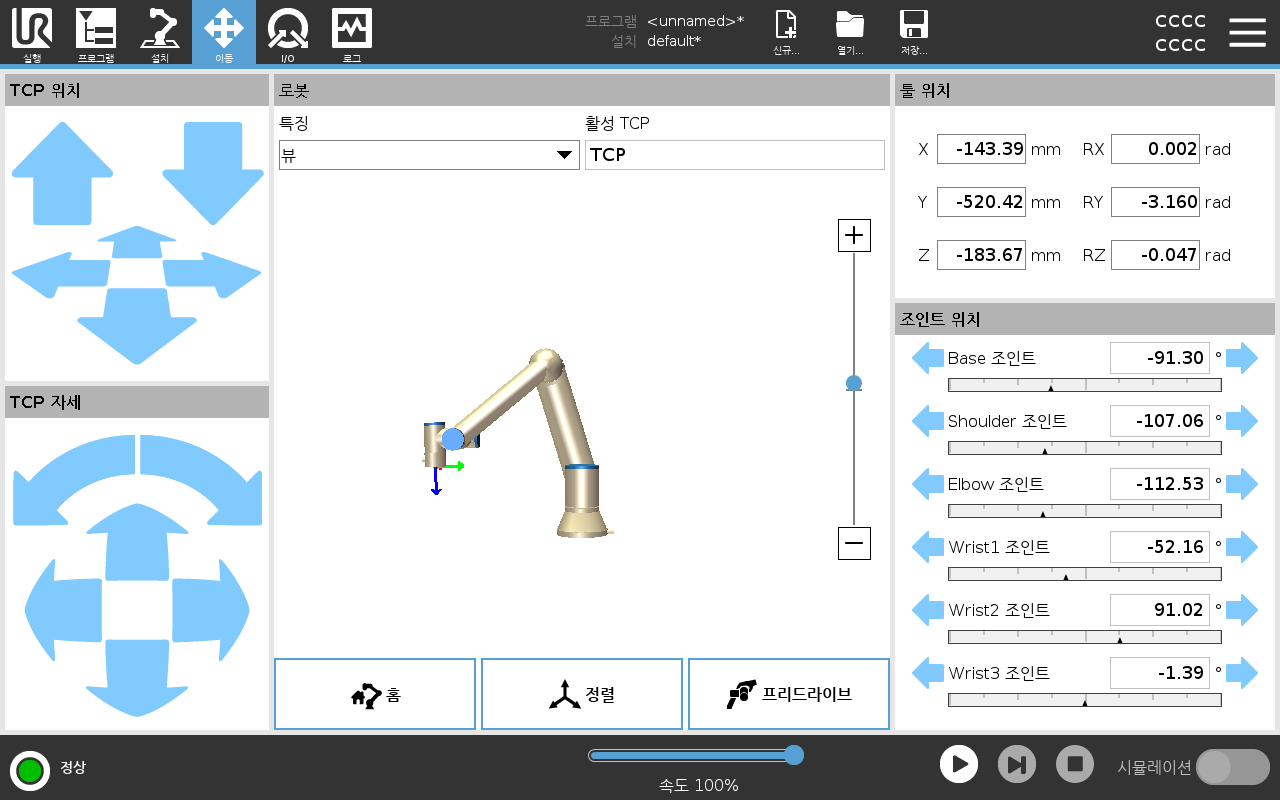
실습하러 갔다 왔었는데 다시 찾아보니 polyscope X 버전이 아닌 5 였나 보다.

[링크 : https://www.universal-robots.com/manuals/ko/HTML/SW5_25_1/Content/prod-usr-man/software/PolyScope/content/move_g5/move_tab_en.htm]


아래는 레인보우 로보틱스의 타블렛 프로그램 UI

jog mode 2로 바꾸고 하면 TCP 자세와 동일하게 조작이 가능할 듯?

'embeded > robot' 카테고리의 다른 글

elephant robotics cobot python api  (0) 2026.06.19
elephant robotics mycobot 280 pi python 예제  (0) 2026.06.16
로봇 tcp 확인  (0) 2025.04.25
로봇 좌표계, TCP ... 2?  (0) 2024.09.02
elephantrobotics Mycobot-pi atom  (0) 2024.07.11
Posted by 구차니
embeded/robot2025. 4. 25. 09:05

rx ry rz 를 조작하면

공구 위치를 고정된채 로봇팔이 움직인다고 한다.


[링크 : https://youtu.be/QgsWCznw8Oo?si=EcLhJN2PKbRUtLBk]

'embeded > robot' 카테고리의 다른 글

elephant robotics mycobot 280 pi python 예제  (0) 2026.06.16
유니버셜 로봇 polyscope 5  (0) 2026.06.16
로봇 좌표계, TCP ... 2?  (0) 2024.09.02
elephantrobotics Mycobot-pi atom  (0) 2024.07.11
elephant robotics cobot python api  (0) 2023.12.21
Posted by 구차니
embeded/robot2024. 9. 2. 18:15

툴 기준인데.. 반대로 툴이 소모되는 경우라면 어떻게 해야하지?

그리고 다빈치 로봇처럼 그 구멍을 고정해서 들락날락 해야 하는 경우는 TCP로 안되는건가?


set_tool_reference([x, y, z, rx, ry, rz]) //Set tool coordinate system
set_end_type(1) //Set the end coordinate system type as tool
Assume that the tool coordinate system T is not rotated relative to O' (rx = ry = rz = 0)
Assume that the origin of the tool coordinate system T is in the coordinate system O’ at (x = 0, y = 0, z = 100mm)
The final tool coordinate system parameter is set_tool_reference(0, 0, 100, 0, 0, 0)

[링크 : https://docs.elephantrobotics.com/docs/gitbook-en/2-serialproduct/2.1-280/Kinematics&Coordinate.html]

[링크 : https://m.blog.naver.com/fa-story/222492370824]

'embeded > robot' 카테고리의 다른 글

유니버셜 로봇 polyscope 5  (0) 2026.06.16
로봇 tcp 확인  (0) 2025.04.25
elephantrobotics Mycobot-pi atom  (0) 2024.07.11
elephant robotics cobot python api  (0) 2023.12.21
산업로봇과 협동로봇의 차이  (0) 2023.12.21
Posted by 구차니
embeded/robot2024. 7. 11. 12:07

오랫만에 만져봤더니 그리퍼가 망가졌나.. 열리는데 닫히질 않는다.


일단 오늘 해본건

ATOM 이라는 부분인데 약자는 못 찾겠다.

E. Atom. Displaying 5X5 RGB LED (G27) and key function (G39).

[링크 : https://docs.elephantrobotics.com/docs/gitbook-en/2-serialproduct/2.1-280/2.1.5.2-RoboticArmElectricalInterface.html]


버튼식 LED의 색상은 아래의 함수를 쓰면 되고

from pymycobot.mycobot import MyCobot
from pymycobot import PI_PORT, PI_BAUD
import time

mc = MyCobot("COM3", 115200)
mc.set_color(0,0,255) #blue light on

[링크 : https://docs.elephantrobotics.com/docs/gitbook-en/7-ApplicationBasePython/7.7_example.html]


버튼이 눌렸는지는 get_digital_input을 이용하여 39번을 읽으면 된다. 1은 누르지 않은 상태, 0은 누른 상태이다(Normal Close?)

>>> mc.get_digital_input(39)
1
>>> mc.get_digital_input(39)
0


2.3 get_digital_input(self, pin_no):

Function: to obtain the working state of the end pin number.
Parameters: pin_no: represents the specific pin number at the end of the robot.
Return Value: pin_signal(int) When the returned value is 0, it means running in the working state; when it is 1, it means the stop state.

[링크 : https://docs.elephantrobotics.com/docs/gitbook-en/7-ApplicationBasePython/7.4_IO.html]


-------------------------

1 servo interface

[링크 : https://docs.elephantrobotics.com/docs/gitbook-en/2-serialproduct/2.1-280/2.1.5.2-RoboticArmElectricalInterface.html]


gripper control

[링크 : https://docs.elephantrobotics.com/docs/gitbook-en/7-ApplicationBasePython/7.5_gripper.html]


atom io

[링크 : https://docs.elephantrobotics.com/docs/gitbook-en/7-ApplicationBasePython/7.4_IO.html]


'embeded > robot' 카테고리의 다른 글

로봇 tcp 확인  (0) 2025.04.25
로봇 좌표계, TCP ... 2?  (0) 2024.09.02
elephant robotics cobot python api  (0) 2023.12.21
산업로봇과 협동로봇의 차이  (0) 2023.12.21
오일러 각 / 짐벌락 / 쿼터니언  (0) 2023.12.21
Posted by 구차니
embeded/robot2023. 12. 21. 18:02

좌표계를 이해할 시간에

차라리 get_coords() 함수로 x,y,z,rx,ry,rz를 읽어서 저장하고

send_coords()를 이용하여 저장된 위치로 이동시키면 간단하게 만들수 있다.


get_coords
Prototype: get_coords()

Description: Get the Coords from robot arm, coordinate system based on base.

Returns: list: A float list of coord - [x, y, z, rx, ry, rz]

send_coords
Prototype: send_coords(coords, speed, mode)

Description: Send all coords to robot arm.

Parameters

coords: a list of coords value(List[float]), length 6.
speed: (int) 0 ~ 100
mode: (int): 0 - angular, 1 - linear
Example

from pymycobot.mycobot import MyCobot
from pymycobot.genre import Coord

mycobot = MyCobot('/dev/ttyUSB0')
mycobot.send_coords([160, 160, 160, 0, 0, 0], 70, 0)

[링크 : https://docs.elephantrobotics.com/docs/gitbook-en/7-ApplicationBasePython/7.8_API.html#getcoords]


atom 버튼을 눌러서 자동으로 좌표 나오게 한다거나

서보의 힘을 빼는게 아니라 약하게 해서 위치를 살짝 트는건 안되려나?

release_all_servo()는 전원 끈마냥 훅 쓰러지니 주의

[링크 : https://docs.elephantrobotics.com/docs/gitbook-en/7-ApplicationBasePython/7.8_API.html#releaseallservos]

'embeded > robot' 카테고리의 다른 글

로봇 좌표계, TCP ... 2?  (0) 2024.09.02
elephantrobotics Mycobot-pi atom  (0) 2024.07.11
산업로봇과 협동로봇의 차이  (0) 2023.12.21
오일러 각 / 짐벌락 / 쿼터니언  (0) 2023.12.21
6축 로봇 좌표계(TCP?)  (0) 2023.12.15
Posted by 구차니
embeded/robot2023. 12. 21. 17:57

대충 요약(?)하자면


안전 측면에서 협동로봇은 산업로봇보다 힘이 약하고 느리며, 안전 펜스도 없어도 됨

설치 측면에서 협동로봇은 사용자가 학습을 시킬수 있으나, 산업로봇은 전문 프로그래머가 바꾸어야 함


반대로 생각하면 협동로봇은

힘이 약하고 느린대신(고출력 모터를 사용하지 않아 가격이 낮아짐?)

안전 펜스등을 통한 사용자와 분리할 필요가 없고(즉 안전관리자나 설치레벨에서의 안전 고려가 빠져도 된다)

사용자가 프로그래밍을 수정할 수 있다(학습/티칭) 정도고 구분이 될 듯


다만 사용자가 프로그램을 수정할 수 있도록 하기 위해

서보에 엔코더가 들어가서 외력에 의해서 움직이는 각도를 읽어낼수 있어야 하기 때문에

저출력으로 인한 가격 하락분이 상쇄될수도 있을 듯.


[링크 : https://www.myrobotsolution.com/contents/success-story/3aOp7xvmOuqBOjWsCbcR]

[링크 : https://blog.naver.com/universalrobots/221565530432]

[링크 : https://www.korearobot.or.kr/wp/wp-content/uploads/2021/06/특허청-로봇IP-협동로봇-특집편.pdf]

'embeded > robot' 카테고리의 다른 글

로봇 좌표계, TCP ... 2?  (0) 2024.09.02
elephantrobotics Mycobot-pi atom  (0) 2024.07.11
elephant robotics cobot python api  (0) 2023.12.21
오일러 각 / 짐벌락 / 쿼터니언  (0) 2023.12.21
6축 로봇 좌표계(TCP?)  (0) 2023.12.15
Posted by 구차니
embeded/robot2023. 12. 21. 13:46

rx,ry,rz 에서 

rx = 90, ry = 0, rz = 0에서

rx = 90 , ry=90, rz = 0 해도 안움직이길래

90도라서 상쇄되서 그런가 아니면 못가는건가 싶었는데


짐벌락 때문에 그런건가 싶기도 하고.. 아직은 헷갈리는 중

[링크 : https://handhp1.tistory.com/3]

[링크 : https://www.youtube.com/watch?v=zc8b2Jo7mno]


쿼터니언(사원수)으로 하면 짐벌락을 피할수 있다고

[링크 : https://showmiso.tistory.com/57]

'embeded > robot' 카테고리의 다른 글

로봇 좌표계, TCP ... 2?  (0) 2024.09.02
elephantrobotics Mycobot-pi atom  (0) 2024.07.11
elephant robotics cobot python api  (0) 2023.12.21
산업로봇과 협동로봇의 차이  (0) 2023.12.21
6축 로봇 좌표계(TCP?)  (0) 2023.12.15
Posted by 구차니
embeded/robot2023. 12. 15. 22:31


TCP - Tool Center Point

[링크 : https://industrial-robot.tistory.com/8]


좌표계 종류

Robot 좌표 (카티젼 좌표, 1사분면이 양수인 그것)

사용자 좌표

도구 좌표

[링크 : https://m.blog.naver.com/new_mark/220586132594]


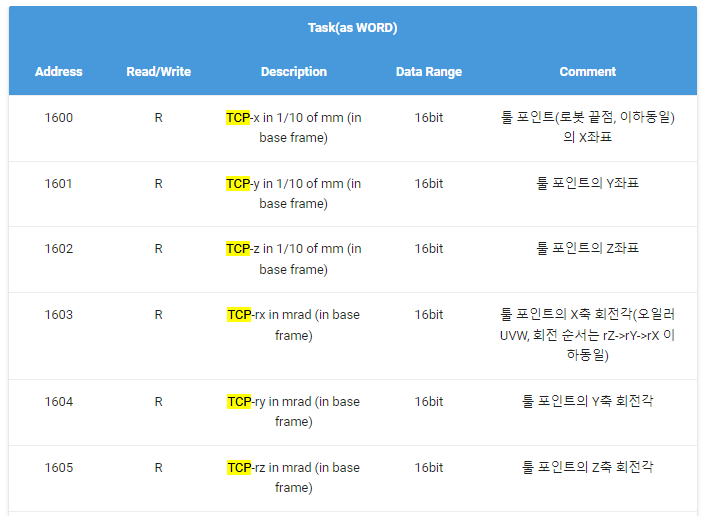
modbusTCP 로 로봇 제어하는 프로토콜

TCP 까진 좌표고, tool에 대한 rx,ry,rz는 회전각(rotate) 인가? 기준은 어디지?

[링크 : http://docs.neuromeka.com/2.2.4/kr/ModbusTCP/section1/]


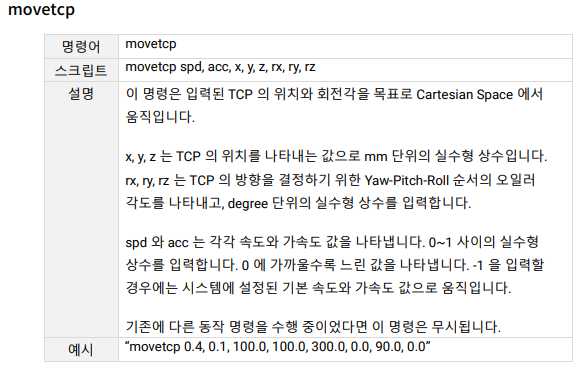
x,y,z는 TCP의 mm 단위 위치

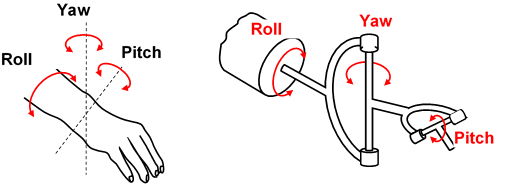
rx,ry,rz는 TCP의 degree 단위 방향 (yaw,pitch,roll)

[링크 : https://www.rainbow-robotics.com/rb]


어우 어렵다 어려워 -_-

[링크 : https://learnchannel-tv.com/en/robot/kinematics-robots/orientation-tcp/]

'embeded > robot' 카테고리의 다른 글

로봇 좌표계, TCP ... 2?  (0) 2024.09.02
elephantrobotics Mycobot-pi atom  (0) 2024.07.11
elephant robotics cobot python api  (0) 2023.12.21
산업로봇과 협동로봇의 차이  (0) 2023.12.21
오일러 각 / 짐벌락 / 쿼터니언  (0) 2023.12.21
Posted by 구차니