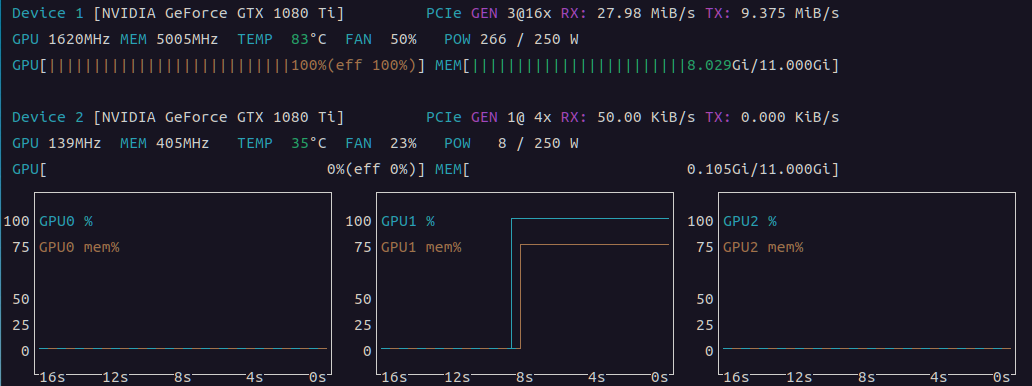
음.. 가장 최신은 아니지만
b11158 를 받아서 빌드된걸 보니 llama-diffusion-cli가 없다.
| /mnt/Downloads/llama-b11158$ ./llama- llama-batched-bench llama-gemma3-cli llama-mtmd-cli llama-results llama-bench llama-gguf-split llama-mtmd-debug llama-server llama-cli llama-imatrix llama-perplexity llama-tokenize llama-completion llama-llava-cli llama-quantize llama-tts llama-fit-params llama-minicpmv-cli llama-qwen2vl-cli |
그래서 빌드해둔거 보니까 있네? 머지?
| :/mnt/Downloads/llama.cpp/build/bin$ ./llama llama llama-lookup llama-batched llama-lookup-create llama-batched-bench llama-lookup-merge llama-bench llama-lookup-stats llama-cli llama-minicpmv-cli llama-completion llama-mtmd-cli llama-convert-llama2c-to-ggml llama-mtmd-debug llama-cvector-generator llama-parallel llama-debug llama-passkey llama-diffusion-cli llama-perplexity llama-embedding llama-q8dot llama-eval-callback llama-quantize llama-export-lora llama-qwen2vl-cli llama-finetune llama-results llama-fit-params llama-retrieval llama-gemma3-cli llama-server llama-gen-docs llama-simple llama-gguf llama-simple-chat llama-gguf-hash llama-speculative llama-gguf-split llama-speculative-simple llama-idle llama-tokenize llama-imatrix llama-tts llama-llava-cli llama-vdot llama-lookahead |
용량 자체는 동일 양자화면 차이가 거의 나지 않는다.
diffusiongemma-26B-A4B-it-Q4_K_M.gguf 16.8 GB
[링크 : https://huggingface.co/unsloth/diffusiongemma-26B-A4B-it-GGUF]
gemma-4-26B-A4B-it-UD-Q4_K_M.gguf 16.9 GB
[링크 : https://huggingface.co/unsloth/gemma-4-26B-A4B-it-GGUF]
근데 실행이 안된다?
| /mnt/Downloads/model/dgemma4-26b$ /mnt/Downloads/llama.cpp/build/bin/llama-diffusion-cli -m ./diffusiongemma-26B-A4B-it-Q4_K_M.gguf 0.00.283.015 E llama_model_load: error loading model: unknown model architecture: 'diffusion-gemma' 0.00.283.023 E llama_model_load_from_file_impl: failed to load model 0.00.283.024 E error: failed to load model './diffusiongemma-26B-A4B-it-Q4_K_M.gguf' |
으음? 봐도 모르겠다!?
| /mnt/Downloads/model/dgemma4-26b$ /mnt/Downloads/llama.cpp/build/bin/llama-diffusion-cli -m ./diffusiongemma-26B-A4B-it-Q4_K_M.gguf -v 0.00.112.071 I llama_model_loader: loaded meta data with 44 key-value pairs and 692 tensors from ./diffusiongemma-26B-A4B-it-Q4_K_M.gguf (version GGUF V3 (latest)) 0.00.112.117 I llama_model_loader: Dumping metadata keys/values. Note: KV overrides do not apply in this output. 0.00.112.125 I llama_model_loader: - kv 0: general.architecture str = diffusion-gemma 0.00.112.126 I llama_model_loader: - kv 1: general.type str = model 0.00.112.126 I llama_model_loader: - kv 2: general.name str = Dg_Rc0P1_Patched 0.00.112.127 I llama_model_loader: - kv 3: general.size_label str = 128x2.6B 0.00.112.130 I llama_model_loader: - kv 4: diffusion-gemma.block_count u32 = 30 0.00.112.131 I llama_model_loader: - kv 5: diffusion-gemma.context_length u32 = 262144 0.00.112.131 I llama_model_loader: - kv 6: diffusion-gemma.embedding_length u32 = 2816 0.00.112.132 I llama_model_loader: - kv 7: diffusion-gemma.feed_forward_length u32 = 2112 0.00.112.132 I llama_model_loader: - kv 8: diffusion-gemma.attention.head_count u32 = 16 0.00.112.147 I llama_model_loader: - kv 9: diffusion-gemma.attention.head_count_kv arr[i32,30] = [8, 8, 8, 8, 8, 2, 8, 8, 8, 8, 8, 2, ... 0.00.112.151 I llama_model_loader: - kv 10: diffusion-gemma.rope.freq_base f32 = 1000000.000000 0.00.112.152 I llama_model_loader: - kv 11: diffusion-gemma.rope.freq_base_swa f32 = 10000.000000 0.00.112.153 I llama_model_loader: - kv 12: diffusion-gemma.attention.layer_norm_rms_epsilon f32 = 0.000001 0.00.112.153 I llama_model_loader: - kv 13: diffusion-gemma.expert_count u32 = 128 0.00.112.154 I llama_model_loader: - kv 14: diffusion-gemma.expert_used_count u32 = 8 0.00.112.155 I llama_model_loader: - kv 15: diffusion-gemma.attention.key_length u32 = 512 0.00.112.155 I llama_model_loader: - kv 16: diffusion-gemma.attention.value_length u32 = 512 0.00.112.156 I llama_model_loader: - kv 17: diffusion-gemma.final_logit_softcapping f32 = 30.000000 0.00.112.157 I llama_model_loader: - kv 18: diffusion-gemma.attention.sliding_window u32 = 1024 0.00.112.157 I llama_model_loader: - kv 19: diffusion-gemma.attention.shared_kv_layers u32 = 0 0.00.112.158 I llama_model_loader: - kv 20: diffusion-gemma.embedding_length_per_layer_input u32 = 0 0.00.112.161 I llama_model_loader: - kv 21: diffusion-gemma.attention.sliding_window_pattern arr[bool,30] = [true, true, true, true, true, false,... 0.00.112.162 I llama_model_loader: - kv 22: diffusion-gemma.attention.key_length_swa u32 = 256 0.00.112.162 I llama_model_loader: - kv 23: diffusion-gemma.attention.value_length_swa u32 = 256 0.00.112.163 I llama_model_loader: - kv 24: diffusion-gemma.expert_feed_forward_length u32 = 704 0.00.112.163 I llama_model_loader: - kv 25: diffusion-gemma.rope.dimension_count u32 = 512 0.00.112.164 I llama_model_loader: - kv 26: diffusion-gemma.rope.dimension_count_swa u32 = 256 0.00.112.164 I llama_model_loader: - kv 27: diffusion-gemma.attention.causal bool = false 0.00.112.165 I llama_model_loader: - kv 28: diffusion.canvas_length u32 = 256 0.00.112.165 I llama_model_loader: - kv 29: tokenizer.ggml.model str = gemma4 0.00.144.043 I llama_model_loader: - kv 30: tokenizer.ggml.tokens arr[str,262144] = ["<pad>", "<eos>", "<bos>", "<unk>", ... 0.00.216.722 I llama_model_loader: - kv 31: tokenizer.ggml.scores arr[f32,262144] = [-1000.000000, -1000.000000, -1000.00... 0.00.223.967 I llama_model_loader: - kv 32: tokenizer.ggml.token_type arr[i32,262144] = [3, 3, 3, 3, 3, 1, 1, 1, 1, 1, 1, 1, ... 0.00.278.765 I llama_model_loader: - kv 33: tokenizer.ggml.merges arr[str,514906] = ["\n\n\n\n\n\n\n\n\n\n\n\n\n\n\n\n\n\n\n\n\n\n\n\n\n\n\n\n\n\n \n", ... 0.00.278.769 I llama_model_loader: - kv 34: tokenizer.ggml.bos_token_id u32 = 2 0.00.278.769 I llama_model_loader: - kv 35: tokenizer.ggml.eos_token_id u32 = 1 0.00.278.770 I llama_model_loader: - kv 36: tokenizer.ggml.unknown_token_id u32 = 3 0.00.278.770 I llama_model_loader: - kv 37: tokenizer.ggml.padding_token_id u32 = 0 0.00.278.786 I llama_model_loader: - kv 38: tokenizer.ggml.mask_token_id u32 = 4 0.00.278.787 I llama_model_loader: - kv 39: tokenizer.ggml.add_space_prefix bool = false 0.00.278.787 I llama_model_loader: - kv 40: tokenizer.ggml.add_bos_token bool = true 0.00.278.788 I llama_model_loader: - kv 41: general.quantization_version u32 = 2 0.00.278.789 I llama_model_loader: - kv 42: general.file_type u32 = 15 0.00.278.792 I llama_model_loader: - kv 43: tokenizer.chat_template str = {%- macro format_parameters(propertie... 0.00.278.795 I llama_model_loader: - type f32: 423 tensors 0.00.278.797 I llama_model_loader: - type q5_0: 33 tensors 0.00.278.798 I llama_model_loader: - type q8_0: 28 tensors 0.00.278.798 I llama_model_loader: - type q4_K: 194 tensors 0.00.278.798 I llama_model_loader: - type q6_K: 14 tensors 0.00.278.801 I print_info: file format = GGUF V3 (latest) 0.00.278.802 I print_info: file type = Q4_K - Medium 0.00.278.805 I print_info: file size = 15.64 GiB (5.32 BPW) 0.00.282.795 E llama_model_load: error loading model: unknown model architecture: 'diffusion-gemma' 0.00.282.802 E llama_model_load_from_file_impl: failed to load model 0.00.282.802 E error: failed to load model './diffusiongemma-26B-A4B-it-Q4_K_M.gguf' |
모델 카드랑 claude에서 해보니
정식으로 gemma-diffusion은 llama.cpp에서 채택이 안되고 특정 커밋으로 가야 한다고 한다.
그래도 돌릴 수 있는게 어디냐~
| git clone https://github.com/ggml-org/llama.cpp cd llama.cpp # check out the DiffusionGemma PR (#24423) gh pr checkout 24423 # or, without the gh CLI: # git fetch origin pull/24423/head:diffusiongemma && git checkout diffusiongemma # build with CUDA (drop -DGGML_CUDA=ON for a CPU-only build) cmake -B build -DGGML_CUDA=ON cmake --build build -j --config Release --target llama-diffusion-cli |
[링크 : https://huggingface.co/unsloth/diffusiongemma-26B-A4B-it-GGUF]
다시 보니 여기서도 diffusion model이라고 하지 gemma-diffusion이라고 하진 않았네
[링크 : https://github.com/ggml-org/llama.cpp/blob/master/examples/diffusion/README.md]
응 니꺼에서는 못돌려~
| /mnt/Downloads/llama.cpp-dgemma/build/bin$ ./llama-diffusion-cli -m /mnt/Downloads/model/dgemma4-26b/diffusiongemma-26B-A4B-it-Q4_K_M.gguf -sm layer -ts 9,10\ > 0.00.773.112 W load: control-looking token: 212 '</s>' was not control-type; this is probably a bug in the model. its type will be overridden 0.00.773.902 W load: control-looking token: 50 '<|tool_response>' was not control-type; this is probably a bug in the model. its type will be overridden 0.00.816.334 W load: special_eog_ids contains '<|tool_response>', removing '</s>' token from EOG list 0.05.615.403 I diffusion: --fit has no effect here; context is sized from -n and the canvas. Set -ngl / --n-cpu-moe to control device memory. 0.05.620.890 W resolve_fused_ops: layer 5 is assigned to device CUDA0 but Flash Attention is assigned to device CPU (usually due to missing support) 0.05.620.893 W resolve_fused_ops: Flash Attention not supported, set to disabled 0.10.954.103 E ggml_backend_cuda_buffer_type_alloc_buffer: allocating 1343.01 MiB on device 0: cudaMalloc failed: out of memory 0.10.954.108 E ggml_gallocr_reserve_n_impl: failed to allocate CUDA0 buffer of size 1408245760 0.10.954.109 E graph_reserve: failed to allocate compute buffers 0.10.954.115 W sched_reserve: compute buffer allocation failed, retrying without pipeline parallelism 0.11.063.993 I diffusion_params: steps=128 schedule=0 algorithm=4 temperature=0.800 eps=0.001000 mask_token=4 0.11.064.183 I diffusion_eb: kv cache auto-off (2 GPUs; pass --diffusion-kv-cache on to force) 0.11.064.184 I diffusion_eb: gpu sampling off (2 GPUs; sc_dev is single-device) 0.11.064.184 I diffusion_eb: gpu sample reduce off (needs --diffusion-gpu-sampling on / sc_dev) 0.11.064.186 I diffusion_eb: max_steps=48 t=[0.400,0.800] entropy_bound=0.1000 stability=1 confidence=0.0050 kv_cache=off gpu_sampling=off sample_reduce=off /mnt/Downloads/llama.cpp-dgemma/ggml/src/ggml-cuda/ggml-cuda.cu:109: CUDA error 0.11.340.213 E CUDA error: out of memory 0.11.340.217 E current device: 0, in function alloc at /mnt/Downloads/llama.cpp-dgemma/ggml/src/ggml-cuda/ggml-cuda.cu:589 0.11.340.218 E cuMemCreate(&handle, reserve_size, &prop, 0) [New LWP 3338013] [New LWP 3338014] [New LWP 3338017] [New LWP 3338018] [New LWP 3338019] [New LWP 3338020] [Thread debugging using libthread_db enabled] Using host libthread_db library "/lib/x86_64-linux-gnu/libthread_db.so.1". 0x00007e23920ea3ef in __GI___wait4 (pid=3338039, stat_loc=0x0, options=0, usage=0x0) at ../sysdeps/unix/sysv/linux/wait4.c:30 30 ../sysdeps/unix/sysv/linux/wait4.c: No such file or directory. #0 0x00007e23920ea3ef in __GI___wait4 (pid=3338039, stat_loc=0x0, options=0, usage=0x0) at ../sysdeps/unix/sysv/linux/wait4.c:30 30 in ../sysdeps/unix/sysv/linux/wait4.c #1 0x00007e2393183e3b in ggml_print_backtrace () from libggml-base.so.0 #2 0x00007e2393183fd2 in ggml_abort () from libggml-base.so.0 #3 0x00007e238b87ad46 in ggml_cuda_error(char const*, char const*, char const*, int, char const*) () from libggml-cuda.so.0 #4 0x00007e238b8928d3 in ggml_cuda_pool_vmm::alloc(unsigned long, unsigned long*) () from libggml-cuda.so.0 #5 0x00007e238b889fab in ggml_cuda_mul_mat_cublas(ggml_backend_cuda_context&, ggml_tensor const*, ggml_tensor const*, ggml_tensor*) () from libggml-cuda.so.0 #6 0x00007e238b88f849 in ggml_backend_cuda_graph_compute(ggml_backend*, ggml_cgraph*) () from libggml-cuda.so.0 #7 0x00007e23931a3d57 in ggml_backend_sched_graph_compute_async () from libggml-base.so.0 #8 0x00007e23929ec7b1 in llama_context::graph_compute(ggml_cgraph*, bool) () from libllama.so.0 #9 0x00007e23929eef65 in llama_context::process_ubatch(llama_ubatch const&, llm_graph_type, llama_memory_context_i*, ggml_status&) () from libllama.so.0 #10 0x00007e23929f6c6a in llama_context::encode(llama_batch const&) () from libllama.so.0 #11 0x00007e23929f90a0 in llama_decode () from libllama.so.0 #12 0x000057ed5b33e814 in diffusion_generate_entropy_bound(llama_context*, int const*, int*, int, diffusion_eb_params const&, int&) () #13 0x000057ed5b32f837 in main::{lambda(std::__cxx11::basic_string<char, std::char_traits<char>, std::allocator<char> > const&)#7}::operator()(std::__cxx11::basic_string<char, std::char_traits<char>, std::allocator<char> > const&) const () #14 0x000057ed5b32db9c in main () [Inferior 1 (process 3338011) detached] Aborted (core dumped) |
클로드 붙여서 어떻게든 돌려보려고 발악(!)
| /mnt/Downloads/llama.cpp-dgemma/build/bin$ ./llama-diffusion-cli -m /mnt/Downloads/model/dgemma4-26b/diffusiongemma-26B-A4B-it-Q4_K_M.gguf -ngl all -sm layer -ts 1,1 -ncmoe 6 -fit off -c 4096 -n 512 -p "Explain what a GPU is in two sentences." 0.00.784.683 W load: control-looking token: 212 '</s>' was not control-type; this is probably a bug in the model. its type will be overridden 0.00.785.427 W load: control-looking token: 50 '<|tool_response>' was not control-type; this is probably a bug in the model. its type will be overridden 0.00.828.578 W load: special_eog_ids contains '<|tool_response>', removing '</s>' token from EOG list 0.00.858.267 W llama_model_loader: tensor overrides to CPU are used with mmap enabled - consider using --load-mode none for better performance 0.05.288.187 I diffusion: -n 512 -> 2 blocks, n_ubatch=2560 n_batch=2560 n_ctx=4096 (canvas_length=256) 0.05.293.211 W resolve_fused_ops: layer 5 is assigned to device CUDA0 but Flash Attention is assigned to device CPU (usually due to missing support) 0.05.293.215 W resolve_fused_ops: Flash Attention not supported, set to disabled 0.10.920.964 I diffusion_params: steps=128 schedule=0 algorithm=4 temperature=0.800 eps=0.001000 mask_token=4 0.10.921.170 I diffusion_eb: kv cache auto-off (2 GPUs; pass --diffusion-kv-cache on to force) 0.10.921.172 I diffusion_eb: gpu sampling off (2 GPUs; sc_dev is single-device) 0.10.921.172 I diffusion_eb: gpu sample reduce off (needs --diffusion-gpu-sampling on / sc_dev) 0.10.921.174 I diffusion_eb: max_steps=48 t=[0.400,0.800] entropy_bound=0.1000 stability=1 confidence=0.0050 kv_cache=off gpu_sampling=off sample_reduce=off diffusion step: 2/48 [== ] 4%0.32.981.464 I I diffusion step: 4/48 [==== ] 8%0.35.566.854 I <|channel>thought * Topic: GPU (Graphics Processing Unit). * Constraint: Exactly two sentences. * Goal: Explain what it is. * What is it? A specialized electronic circuit. * What does it do? Handles image rendering, video, and parallel processing tasks. * How does it differ from a CPU? Many cores optimized for speed. A GPU, or graphics processing unit, is a specialized processor designed to rapidly accelerate the creation and rendering of images for a display. Unlike a standard CPU, it uses many parallel cores to handle multiple complex tasks simultaneously, making it ideal for video editing and artificial intelligence. * Sentence 1: A GPU is a specialized hardware processor designed to rapidly accelerate the creation and rendering of images and video. * Sentence 2: Unlike a standard CPU, it uses many parallel cores to handle multiple complex tasks simultaneously, making it highly effective for gaming and artificial intelligence workloads. * Two sentences? Yes. * Accurate? Yes.<channel|>A GPU, or graphics processing unit, is a specialized hardware processor designed to rapidly accelerate the creation and rendering of images and video. Unlike a standard CPU, it uses many parallel cores to handle multiple complex tasks simultaneously, making it highly effective for gaming and artificial intelligence. total time: 24659.24ms, time per step: 1072.14ms (23 steps over 2 blocks, entropy-bound) throughput: 20.8 tok/s (512 tok in 24659.24ms), in-step parallel 239 tok/s (256-tok canvas x 11.5 steps/block) |
context도 확 줄여도 메모리 엄청 먹나보다. 둘 다 거의 100% 때려버리네

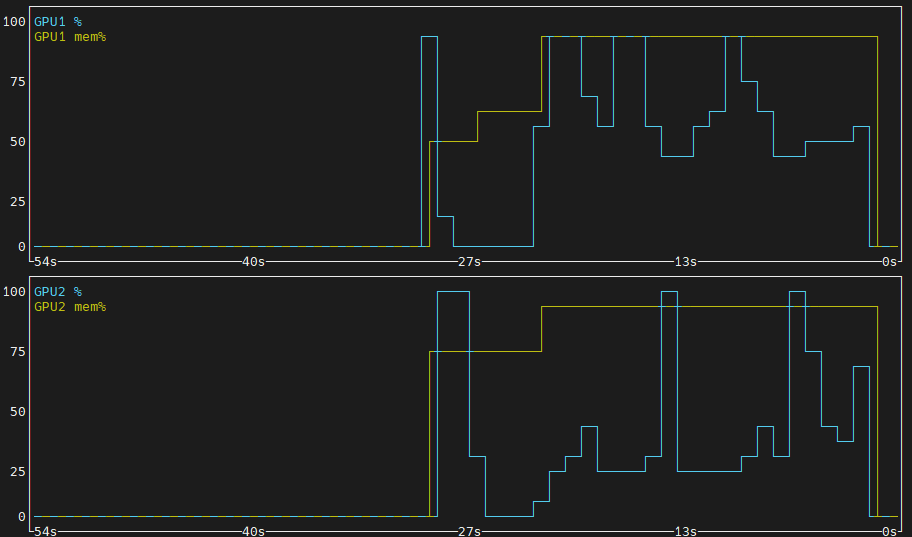
뭔가.. 기본 질문이라도 있나? 프롬프트 없이 돌려도 이러고 난리다
| /mnt/Downloads/llama.cpp-dgemma/build/bin$ ./llama-diffusion-cli -m /mnt/Downloads/model/dgemma4-26b/diffusiongemma-26B-A4B-it-Q4_K_M.gguf -ngl all -sm layer -ts 1,1 -ncmoe 6 -fit off -c 4096 -n 512 0.00.771.302 W load: control-looking token: 212 '</s>' was not control-type; this is probably a bug in the model. its type will be overridden 0.00.772.085 W load: control-looking token: 50 '<|tool_response>' was not control-type; this is probably a bug in the model. its type will be overridden 0.00.815.021 W load: special_eog_ids contains '<|tool_response>', removing '</s>' token from EOG list 0.00.844.927 W llama_model_loader: tensor overrides to CPU are used with mmap enabled - consider using --load-mode none for better performance 0.05.277.471 I diffusion: -n 512 -> 2 blocks, n_ubatch=2560 n_batch=2560 n_ctx=4096 (canvas_length=256) 0.05.282.401 W resolve_fused_ops: layer 5 is assigned to device CUDA0 but Flash Attention is assigned to device CPU (usually due to missing support) 0.05.282.404 W resolve_fused_ops: Flash Attention not supported, set to disabled 0.10.802.856 I diffusion_params: steps=128 schedule=0 algorithm=4 temperature=0.800 eps=0.001000 mask_token=4 0.10.803.053 I diffusion_eb: kv cache auto-off (2 GPUs; pass --diffusion-kv-cache on to force) 0.10.803.055 I diffusion_eb: gpu sampling off (2 GPUs; sc_dev is single-device) 0.10.803.055 I diffusion_eb: gpu sample reduce off (needs --diffusion-gpu-sampling on / sc_dev) 0.10.803.057 I diffusion_eb: max_steps=48 t=[0.400,0.800] entropy_bound=0.1000 stability=1 confidence=0.0050 kv_cache=off gpu_sampling=off sample_reduce=off diffusion step: 9/48 [========= ] 18%0.45.079.364 I <|channel>thought The user has provided an image and wants me to describe or discuss it. 1. **Analyze the image:** * It's a close-up of a person's face. * The person is smiling warmly. * They are looking slightly upwards and to the side of the camera. * The background is blurred (bokeh effect). * The lighting is soft and warm, highlighting the contours of the face. * The person looks like they could be of middle age or slightly older. * They have dark hair and brown eyes. * The overall mood is positive, hopeful, or joyful. 2. **Formulate a description:** * Identify the main subject: A person. * Describe the action/expression: Smiling warmly, looking upwards. * Describe the composition: Close-up shot, shallow depth of field. * Describe the lighting: Warm, soft. * Describe the mood: Happy, peaceful, serene. 3. **Draft the final response:** * Start with a general statement about what is in the image. * Add details about the person's expression. * Mention the photographic style (lighting, focus).<channel|>This is a close-up photograph of a person smiling warmly. They are looking slightly upwards and to the side with an expression that suggests hope or joy. The lighting is soft and warm, and the background is blurred, which keeps the focus entirely on the person's expression. total time: 34290.01ms, time per step: 1071.56ms (32 steps over 2 blocks, entropy-bound) throughput: 14.9 tok/s (512 tok in 34290.01ms), in-step parallel 239 tok/s (256-tok canvas x 16.0 steps/block) |
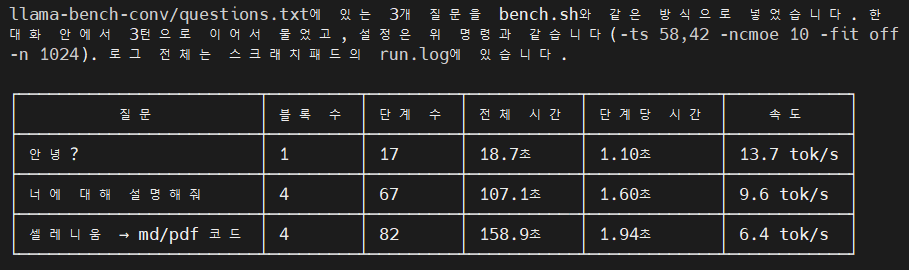
아래 옵션으로 하니 먼가 되기 한다. ai님 만세!
| ./llama-diffusion-cli \ -m /mnt/Downloads/model/dgemma4-26b/diffusiongemma-26B-A4B-it-Q4_K_M.gguf \ -ngl all -sm layer -ts 58,42 -ncmoe 10 -fit off -c 4096 -n 1024 \ -cnv --diffusion-visual --diffusion-visual-progress |
일단 아까 설정한 -n 1024 로 한번에 1024 토큰 생성하는 거라서 그런가
답변이 넘어가면 diffusion step 이 다시 0/... 으로 돌아가버린다.
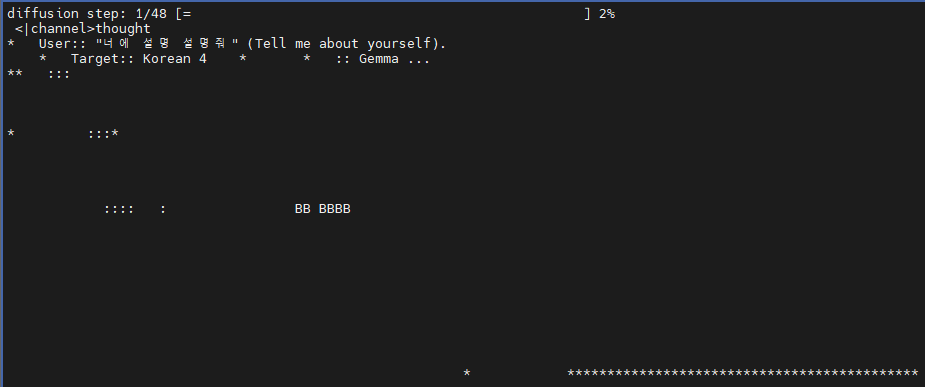

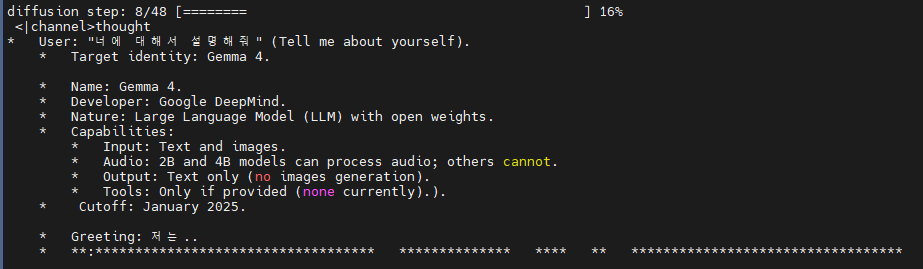
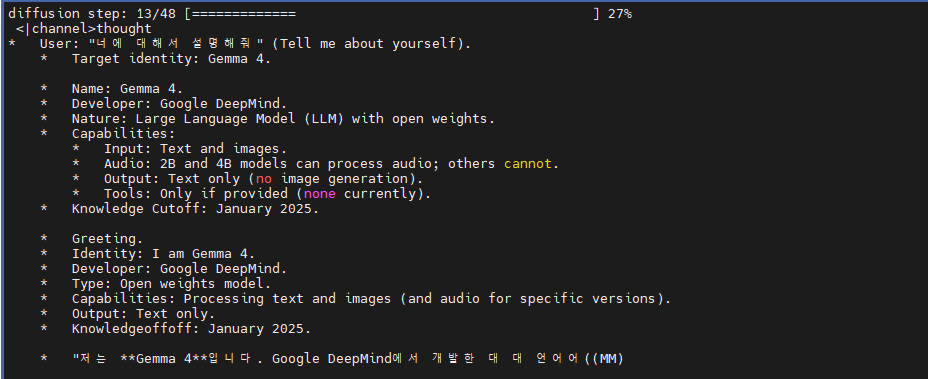
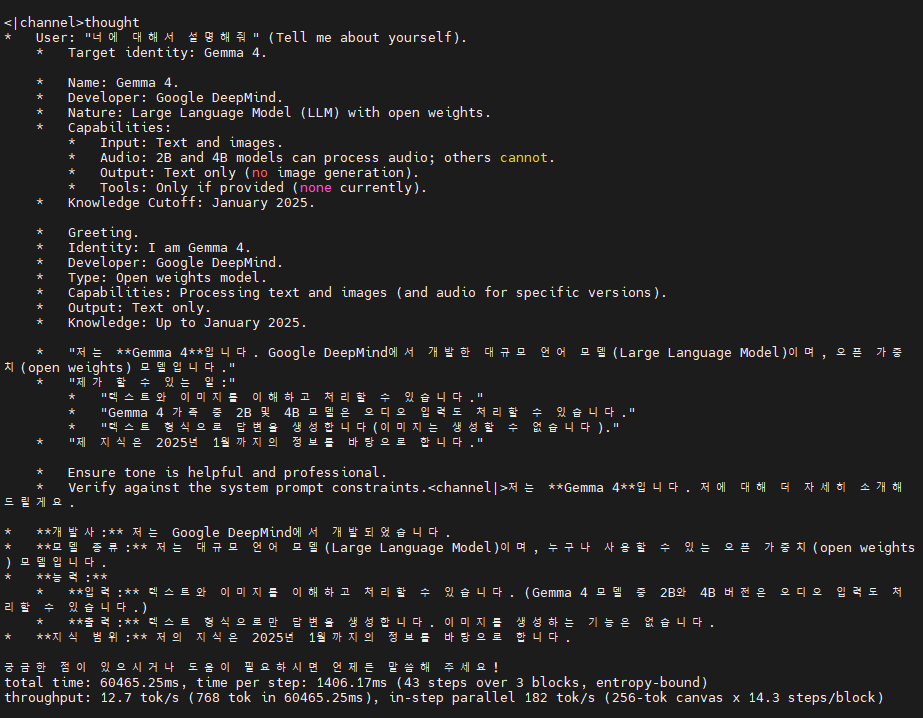
생성 토큰이 짧게 제한되서 그런가 답변이 나오다 끊어진 느낌
그래도 좀 신선하네 ㅎㅎ
| > 파이썬으로 셀레니움을 통해 웹을 서칭하고 텍스트만 추출하고 makrdown 으로 변환후 md 파일과 pdf로 저장하는 기능을 구현해줘 <|channel>thought Implement a Python script using Selenium to search the web, extract text, convert it to Markdown, and save it as both `.md` and `.pdf` files. Python. Selenium (for web automation/scraping), BeautifulSoup (usually helpful for parsing HTML), a Markdown conversion library (like `markdownify`), and a PDF generation library (like `fpdf2` or `pdf2kit`). * *Web Scraping:* Selenium is requested. Needs a driver (Chrome is standard). * *Text Extraction:* BeautifulSoup is better for cleaning HTML than just raw Selenium selectors. * *Markdown Conversion:* `markdownify` is a popular choice for this. * *PDF Generation:* `fpdf2` is straightforward for text-based PDFs. `pdf2kit` is better if converting from HTML/Markdown directly. Let's go with `fpdf2` for simplicity or mention the requirements. * *Step 1: Install Libraries.* Need `selenium`, `beautifulsoup4`, `markdownify`, `fpdf2`. * *Step 2: Setup Selenium.* Initialize Chrome driver. * *Step 3: Search Logic.* Go to a search engine (e.g., Google), type a query, hit enter. * *Step 4: Extraction.* Get page content (titles, paragraphs). * *Step 5: Markdown Conversion.* Use `markdownify`. * *Step 6: PDF Conversion.* Use `fpdf2`. * *Imports:* ```python from selenium import webdriver from seleniuhttp://m.webdriver.chrome.service import Service from seleniuhttp://m.webdriver.common.by import By from seleniuhttp://m.webdriver.common.keys import Keys from bs4 import BeautifulSoup from markdownify import markdownify from fpdf import FPDF import time ``` * *Selenium Setup:* ```python options = webdriver.ChromeOptions() # options.add_argument('--headless') # Run without window driver = webdriver.Chrome(options=options) ``` * *Scraping Logic:* ```python driver.get(f"https://www.google.com/search?q={query}") # Wait for load html = driver.page_source soup = BeautifulSoup(html, 'html.parser') # Extract specific tags (h3, p) ``` * *Markdown Logic:* ```python md_text = markdownify(str(soup.body)) ``` * *PDF Logic:* ```python pdf = FPDF() pdf.add_page() pdf.set_font("Arial", size=12) # Note: Korean needs a custom font! # Need to handle Korean characters in PDF. ``` * *Handling Korean Text:* Standard PDF fonts in FPDF don't support Korean by default. I must mention that the user needs a `.ttf` font (like NanumGothic). * *Structure:* 1. Required libraries. 2. Implementation code. 3. Explanation of each part. 4. Important notes (Font issues, Driver setup). * *Library check:* `pip install selenium beautifulsoup4 markdownify fpdf2`. * *Code refinement:* * Use a class or clear functions for structure. * Add error handling (basic). * Ensure the PDF part handles Unicode encoding for Korean.<channel|>파이썬의 **Selenium**을 사용하여 웹을 검색하고, 추출된 텍스트를 **Markdown**으로 변환한 뒤, 다시 **PDF** 파일로 저장하는 전체 과정을 구현해 드립니다. ### 1. 필요한 라이브러리 설치 터미널(또는 CMD)에서 아래 명령어를 입력하여 필요한 라이브러리를 설치해 주세요. ```bash pip install selenium beautifulsoup4 markdownify fpdf2 ``` ### 2. 파이썬 코드 구현 이 코드는 구글 검색을 예시로 하며, PDF 생성 시 한글 깨짐 방지를 위해 **한글 폰트(.ttf)**가 필요합니다. ```python import time from selenium import webdriver from seleniuhttp://m.webdriver.chrome.service import Service from seleniuhttp://m.webdriver.chrome.options import Options from seleniuhttp://m.webdriver.common.by import By from seleniuhttp://m.webdriver.common.keys import Keys from bs4 import BeautifulSoup from markdownify import markdownify from fpdf import FPDF import os class WebScraperToFiles: def total time: 165742.13ms, time per step: 1883.43ms (88 steps over 4 blocks, entropy-bound) throughput: 6.2 tok/s (1024 tok in 165742.13ms), in-step parallel 136 tok/s (256-tok canvas x 22.0 steps/block) |
'모종의 음모 > ai 프로그램' 카테고리의 다른 글
| diffusion gemma (0) | 2026.09.23 |
|---|---|
| 직접만든 LLM .. part 2 (0) | 2026.09.23 |
| wikimatrix (0) | 2026.09.22 |
| 직접 LLM 만들...기? (0) | 2026.09.22 |
| llama-tokenize (0) | 2026.09.22 |