'잡동사니'에 해당되는 글 14722건
- 2022.09.28 100MBps 지만 그래도 행복해!
- 2022.09.28 golang 의 장단점. 개인적인 생각 2
- 2022.09.28 golang json/encoding marshal() unmarshal()
- 2022.09.28 golang mac address 얻기
- 2022.09.27 golang method
- 2022.09.27 go mod init 과 go build
- 2022.09.27 golang 함수 인자에 함수 넣기
- 2022.09.26 libvncserver 로그인
- 2022.09.26 로지텍 M185
- 2022.09.25 김치 냉장고 지름
golang이 어쩔수 없이 쓰긴 하지만 마음에 들진 않는다 정도가 현재까지 결론
장점.
1. 멀티플랫폼 지원.
> 리눅스건 맥이건 윈도우건 GOOS= 라는 선언 하나 주면 아주 간단하게 크로스빌드가 된다.
2. 정적 바이너리 생성(기본 값)
> 양날의 검. 물론 hello world 하나 출력하는데 2MB 정도 먹고 몇가지 모듈들을 불러오면 기하급수적으로 늘지만
> 별다른 의존성 라이브러리 없이 독립적으로 빌드해서 실행가능한 단일 파일 하나만 복사하면 되는 건
> 임베디드에서 관리의 편의성을 제공함
3. 컴파일 언어
> node.js나 python과 같이 메모리 관리 불가능(?)한 실행환경이 아닌 컴파일 된 바이너리가 실행되는 것.
> 상업 프로그램, 배포환경, 임베디드라는 조건에서는 오히려 장점
4. net/http 등과 같은 고수준 라이브러리 제공
> c로도 curl 을 쓰면 REST 구현은 가능하지만 기본 라이브러리로 푸짐하게 제공하는 golang이 편하긴 하다.
단점.
1. 고정된 문법. 왜 내 마음대로 괄호 위치를 못 하냐고!!!
> c로는 warning 뜰만한 것도 죄다 error로 중단되고, 사용하지 않는 변수 있다고 빌드 에러
> 게다가 if () { 식으로 마치 python 처럼 indent가 문법에서 강요되는 느낌이라 드럽게 거부감이 가시질 않음)
2. IDE 가 약함. vi로 하려면 어우.. 다 외우지 않으면 더 귀찮..
> 방대한 라이브러리를 제공하는 신형 언어들의 득과 실이긴 하지만.. vscode에서 잘 지원되려나
> 외부 라이브러리 등에 대한 자동 완성을 얼마나 지원하는지 테스트는 해봐야 할 듯.
3. npm이나 pip 같은 중앙관리 되는 라이브러리 저장소 부재
> 언어의 발달이 빠른 시기라 라이브러리 버전 문제와 엮여 구버전 소스 빌드가 쉽지 않음
> 게다가 npm 처럼 얼마나 인기있고 숙성된 라이브러리인지 간접적으로 예측할 지표가 없어서
> 매번 검색해서 누군가의 소스를 써야 하는 불안함을 지울 수 없음
4. 문서 부족. tour of go 정도로는 어림도 없다.
> effective go 정도는 봐야 하지 않나 싶은데, 그런 문서를 찾는 것 자체가 어떻게 보면 접근성 측면에서 최악.
> 꼰대가 되서(?!) html 보단 pdf로 된 걸 받고 싶은데 그런 것도 없고
> 어떤 언어를 하나 배우는데 있어서 학습 커브 상승에 상당히 일조하는 부족한 문서
5. 자동화.
> 양면의 날이긴 하지만 자동화로 인해서 자동화 돌리기 위한 구조를 알아야 하는 문제가 발생
> 부족한 문서와 음의 시너지를 일으킴. go build . 으로 빌드는 가능하지만 도대체 어떻게 묶일지
> 빌드 하려면 기본적으로 패키지 이해를 해야 한다. 근데 문서들도 자세한 설명은 없다는게 함정.
결론
특정 환경에서 어쩔수 없는 선택지 라는 수준의 언어.
좋다 나쁘다를 떠나서 내 취향은 아니지만 웹 서비스를 구동하기에는 임베디드에서 이 만한 녀석은 없다는게 슬프다.
'Programming > golang' 카테고리의 다른 글
| cgo (0) | 2022.10.04 |
|---|---|
| golang unsafe package (0) | 2022.10.01 |
| golang json/encoding marshal() unmarshal() (0) | 2022.09.28 |
| golang mac address 얻기 (0) | 2022.09.28 |
| golang method (0) | 2022.09.27 |
encoding/json 의 json.Unmarshal() 이나 json.Marshal()은 특이(?)하게도
구조체의 변수가 대문자여야 변환을 해준다.
어떤 버전이 그런 영향을 주는건진 모르겠지만.. 참고해야 할 듯..
| package main import ( "net" // "net/http" "fmt" "encoding/json" _ "io" "os" ) const conf_file = "config.json" const server_url = "https://localhost" type Config struct { Server string } func main() { var config Config conf, err := os.ReadFile(conf_file) if err != nil { fmt.Println(err) fmt.Println("create default configuration file") config.Server = server_url jsonbyte, _ := json.Marshal(config) fmt.Println(config) fmt.Println(jsonbyte) os.WriteFile(conf_file, jsonbyte, 0644) } fmt.Println(conf) err = json.Unmarshal(conf, &config) fmt.Println(config) fmt.Println("*** Client start ***") temp, _ := net.InterfaceByName("enp0s25") mac := temp.HardwareAddr.String() fmt.Println(mac) } |
[링크 : https://www.joinc.co.kr/w/man/12/golang/json]
[링크 : https://jeonghwan-kim.github.io/dev/2019/01/18/go-encoding-json.html]
[링크 : http://golang.site/go/article/104-JSON-사용]
'Programming > golang' 카테고리의 다른 글
| golang unsafe package (0) | 2022.10.01 |
|---|---|
| golang 의 장단점. 개인적인 생각 (2) | 2022.09.28 |
| golang mac address 얻기 (0) | 2022.09.28 |
| golang method (0) | 2022.09.27 |
| go mod init 과 go build (0) | 2022.09.27 |
"net" 패키지의 Interfaces() 람수를 이용하여 얻어올 수 있다.
[링크 : https://socketloop.com/tutorials/golang-get-local-ip-and-mac-address]
[링크 : https://stackoverflow.com/questions/44859156/get-permanent-mac-address]
HardwareAddr은 MAC address, Name에는 lo, eth 같은 장치식별자가 들어간다.
| type Interface struct { Index int // positive integer that starts at one, zero is never used MTU int // maximum transmission unit Name string // e.g., "en0", "lo0", "eth0.100" HardwareAddr HardwareAddr // IEEE MAC-48, EUI-48 and EUI-64 form Flags Flags // e.g., FlagUp, FlagLoopback, FlagMulticast } |
'Programming > golang' 카테고리의 다른 글
| golang 의 장단점. 개인적인 생각 (2) | 2022.09.28 |
|---|---|
| golang json/encoding marshal() unmarshal() (0) | 2022.09.28 |
| golang method (0) | 2022.09.27 |
| go mod init 과 go build (0) | 2022.09.27 |
| golang 함수 인자에 함수 넣기 (0) | 2022.09.27 |
메소드라길래 먼가 해서 봤더니.. class는 없는 대신 타입 결정적인 함수를 메소드라고 정의하는 듯.
메소드의 타입을 정의하는 것을 리시버 라고 명명한다.
| Methods Go does not have classes. However, you can define methods on types. A method is a function with a special receiver argument. The receiver appears in its own argument list between the func keyword and the method name. In this example, the Abs method has a receiver of type Vertex named v. |
| package main import ( "fmt" "math" ) type Vertex struct { X, Y float64 } func (v Vertex) Abs() float64 { return math.Sqrt(v.X*v.X + v.Y*v.Y) } func main() { v := Vertex{3, 4} fmt.Println(v.Abs()) } |
[링크 : https://go.dev/tour/methods/1]
[링크 : https://dev-yakuza.posstree.com/ko/golang/method/]
[링크 : https://kamang-it.tistory.com/entry/Go15메소드Method와-리시버Receiver]
포인터를 넘길수도 있긴 하다.
[링크 : http://golang.site/go/article/17-Go-메서드]
'Programming > golang' 카테고리의 다른 글
| golang json/encoding marshal() unmarshal() (0) | 2022.09.28 |
|---|---|
| golang mac address 얻기 (0) | 2022.09.28 |
| go mod init 과 go build (0) | 2022.09.27 |
| golang 함수 인자에 함수 넣기 (0) | 2022.09.27 |
| golang package main (0) | 2022.09.23 |
먼가 복잡하다.
일단 모듈 패스는 초기 모듈/경로/패키지 명 식으로 잡히는 듯.
편리하다면 편리한데.. 직관적으로 와닫진 않는 느낌.. 그냥 .a나 .o로 빌드하고 링크 하는건 가능하려나?
아 그리고 go build 명령에 의해서 빌드 될 때
mod init의 가장 마지막 명칭으로 바이너리가 생성된다.
test/m 으로 패키지를 지었기에, 바이너리가 m으로 생성되었다.
| $ tree . ├── go.mod ├── lib │ ├── div │ │ └── div.go │ └── sub │ └── sub.go ├── m ├── main.go └── sum └── sum.go |
$ go build # test/m ./main.go:5:2: imported and not used: "test/m/lib/div" ./main.go:6:2: imported and not used: "test/m/sum" |
$ go mod init test/m go: creating new go.mod: module test/m go: to add module requirements and sums: go mod tidy $ cat go.mod module test/m go 1.18 |
| $ cat main.go package main import ( "fmt" "test/m/lib/div" "test/m/sum" ) func main() { fmt.Println("hello world") } |
$ cat lib/div/div.go package div func div(a float32, b float32) float32 { return a / b } |
$ cat sum/sum.go package sum func sum (a int, b int) int { return a + b } |
'Programming > golang' 카테고리의 다른 글
| golang mac address 얻기 (0) | 2022.09.28 |
|---|---|
| golang method (0) | 2022.09.27 |
| golang 함수 인자에 함수 넣기 (0) | 2022.09.27 |
| golang package main (0) | 2022.09.23 |
| golang REST client (0) | 2022.09.23 |
말이 애매한데. 걍 C언어의 함수 포인터를 어떻게 사용이 가능할까 찾아보는 중.
| package main import ( "fmt" "strings" ) func Index(vs []string, t string) int { for i, v := range vs { if v == t { return i } } return -1 } func Include(vs []string, t string) bool { return Index(vs, t) >= 0 } func Any(vs []string, f func(string) bool) bool { for _, v := range vs { if f(v) { return true } } return false } func All(vs []string, f func(string) bool) bool { for _, v := range vs { if !f(v) { return false } } return true } func Filter(vs []string, f func(string) bool) []string { vsf := make([]string, 0) for _, v := range vs { if f(v) { vsf = append(vsf, v) } } return vsf } func Map(vs []string, f func(string) string) []string { vsm := make([]string, len(vs)) for i, v := range vs { vsm[i] = f(v) } return vsm } func main() { var strs = []string{"peach", "apple", "pear", "plum"} fmt.Println(Index(strs, "pear")) fmt.Println(Include(strs, "grape")) fmt.Println(Any(strs, func(v string) bool { return strings.HasPrefix(v, "p") })) fmt.Println(All(strs, func(v string) bool { return strings.HasPrefix(v, "p") })) fmt.Println(Filter(strs, func(v string) bool { return strings.Contains(v, "e") })) fmt.Println(Map(strs, strings.ToUpper)) } |
[링크 : https://gobyexample.com/collection-functions]
| package main import "fmt" func upper(input string) string { return "hola" } func Validate(spec string, validations []func(string) string) { for _, exec := range validations { fmt.Println(exec(spec)) } } func main() { Validate("Hola", []func(string) string{upper}) } |
[링크 : https://stackoverflow.com/questions/50913022/array-of-functions-to-as-argument-in-golang]
'Programming > golang' 카테고리의 다른 글
| golang method (0) | 2022.09.27 |
|---|---|
| go mod init 과 go build (0) | 2022.09.27 |
| golang package main (0) | 2022.09.23 |
| golang REST client (0) | 2022.09.23 |
| golang 'go doc' (0) | 2022.09.15 |
rfbCheckPasswordByList()는 계정-패스워드 쌍으로 되어있는 값을 이용하여 로그인을 구현하는 기본 함수이다.
희망(?)을 가졌던 newClientHook 이벤트는 시도때도 없이 발생했고(원래 기대했던 것은 로그인 시 1회)
로그인 별로 어떤 계정이 로그인 성공,실패 했는지는 함수를 확장해서 만들어야 할 듯..
newClientHook 에서도 cl->viewOnly가 설정되지 않는 걸 보면, vnc client 측의 설정과는 별개 인 듯
| /* for this method, authPasswdData is really a pointer to an array of char*'s, where the last pointer is 0. */ rfbBool rfbCheckPasswordByList(rfbClientPtr cl,const char* response,int len) { char **passwds; int i=0; for(passwds=(char**)cl->screen->authPasswdData;*passwds;passwds++,i++) { uint8_t auth_tmp[CHALLENGESIZE]; memcpy((char *)auth_tmp, (char *)cl->authChallenge, CHALLENGESIZE); rfbEncryptBytes(auth_tmp, *passwds); if (memcmp(auth_tmp, response, len) == 0) { if(i>=cl->screen->authPasswdFirstViewOnly) cl->viewOnly=TRUE; return(TRUE); } } rfbErr("authProcessClientMessage: authentication failed from %s\n", cl->host); return(FALSE); } |
[링크 : https://libvnc.github.io/doc/html/main_8c_source.html#l00786]
'프로그램 사용 > VNC' 카테고리의 다른 글
| libvncserver 기본 인자 (0) | 2022.11.04 |
|---|---|
| libvncserver 종료 절차 (0) | 2022.11.01 |
| libvncserver 접속 끊어짐 문제 (0) | 2022.08.16 |
| libvncserver websocket example (0) | 2022.08.12 |
| libvncserver 마우스 이벤트 (0) | 2022.02.25 |
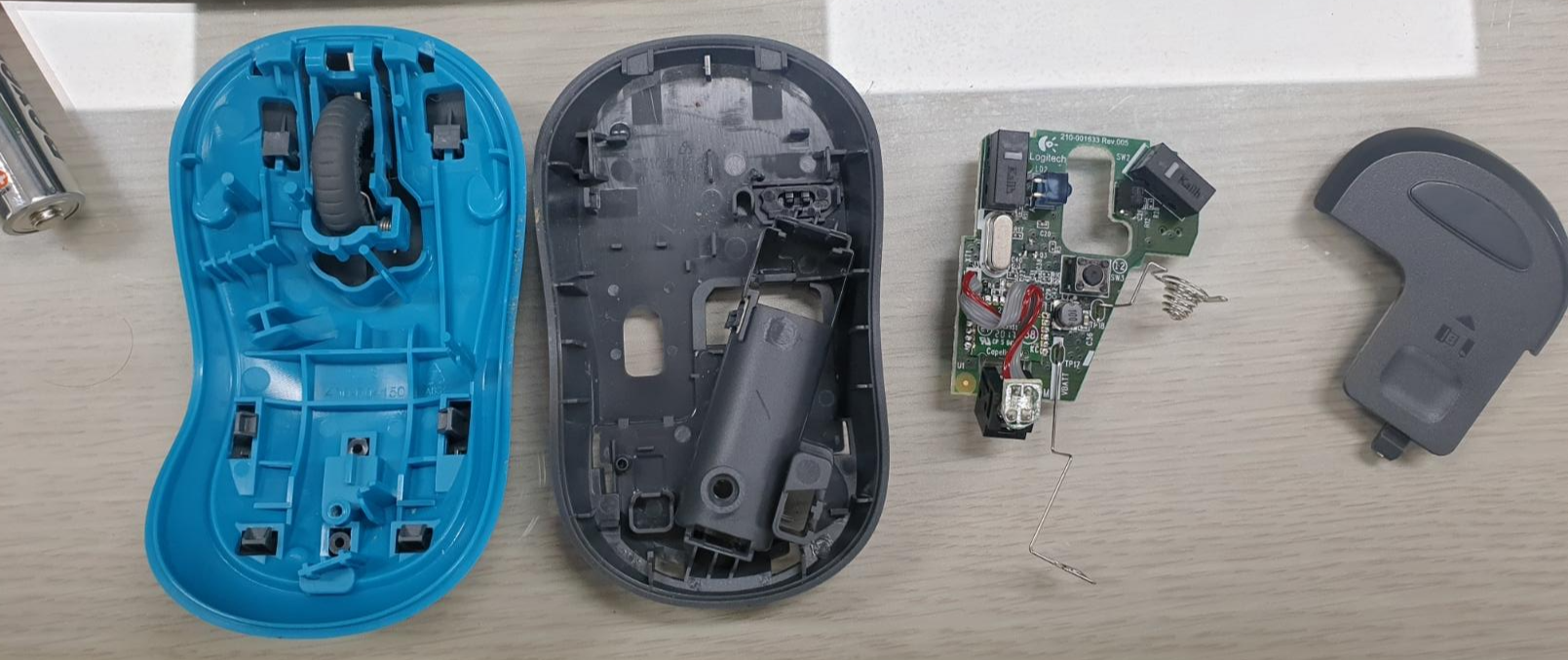
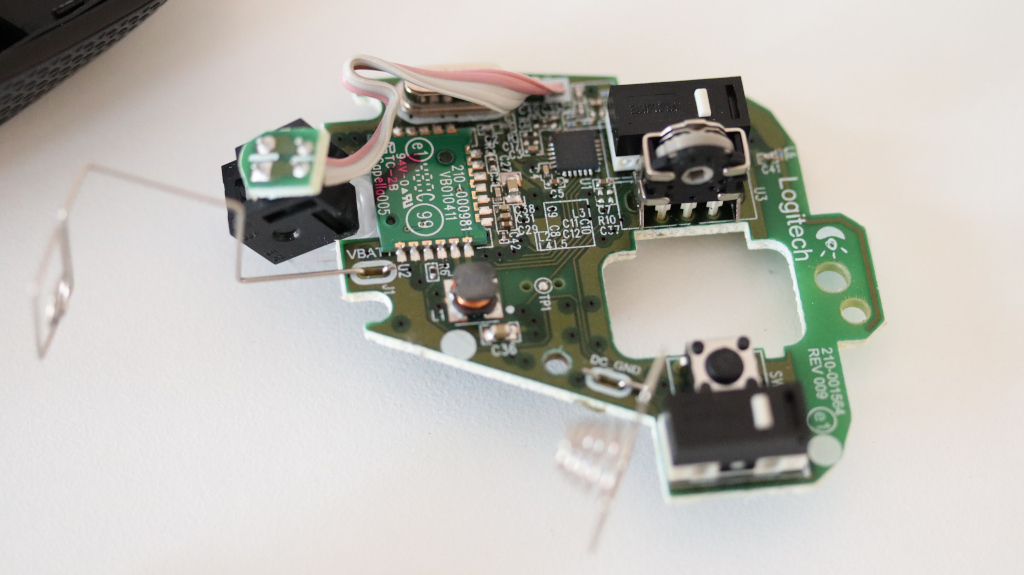
키보드 + 마우스 2.4GHz 리시버라
마우스만 고장나면 이래저래 귀찮아서 수리 (물론 내가 땜질한건 아님 ㅋ)
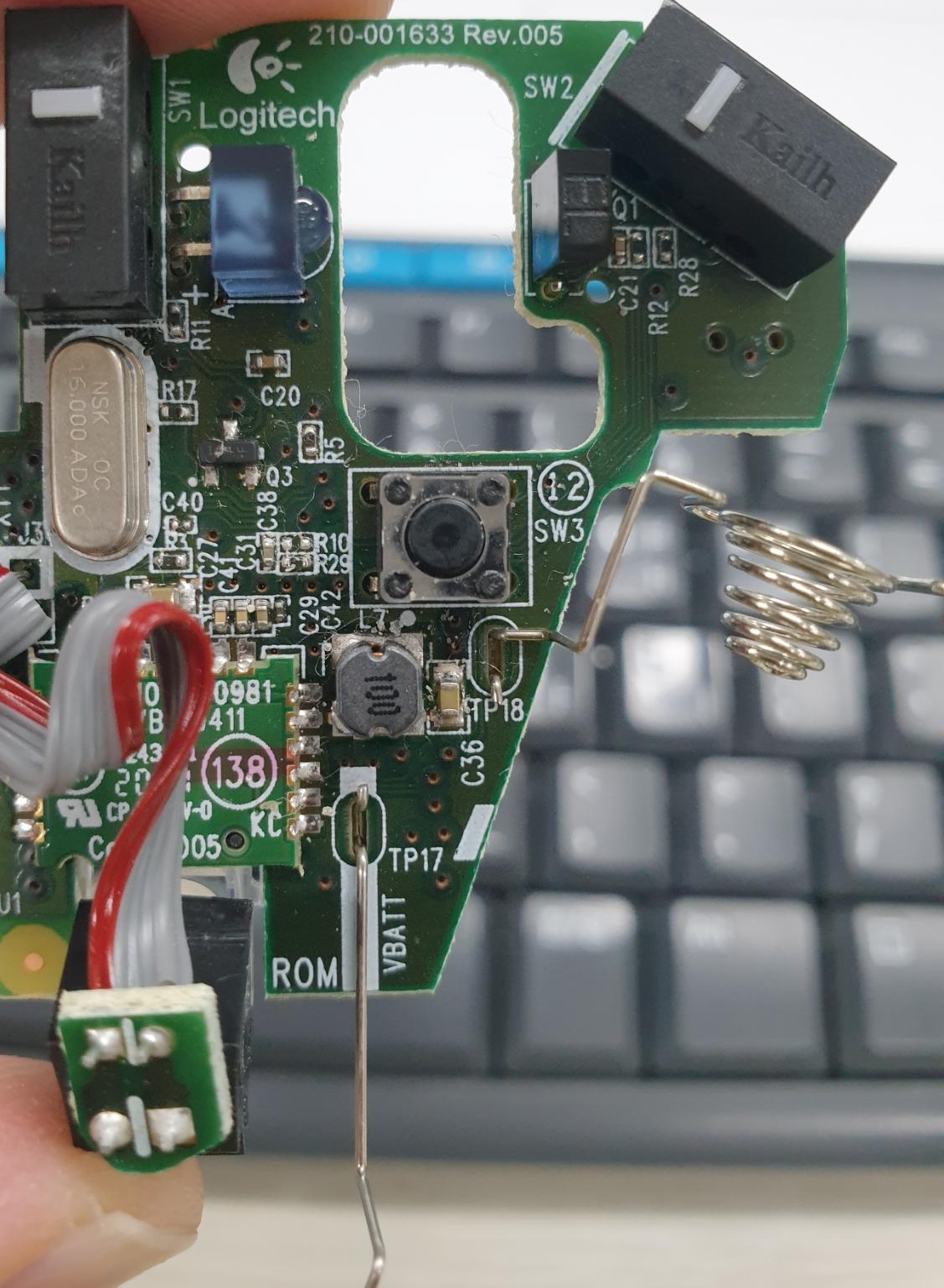
kailh 라는 좌/우 버튼과
너무 싸구려 택 스위치 -_- 그러니 2년 쓰고(!) 고장났지 싶은데
2년 동안 휠로 열고 닫은 창의 갯수를 생각하면 나름 잘 버텨 준 듯?
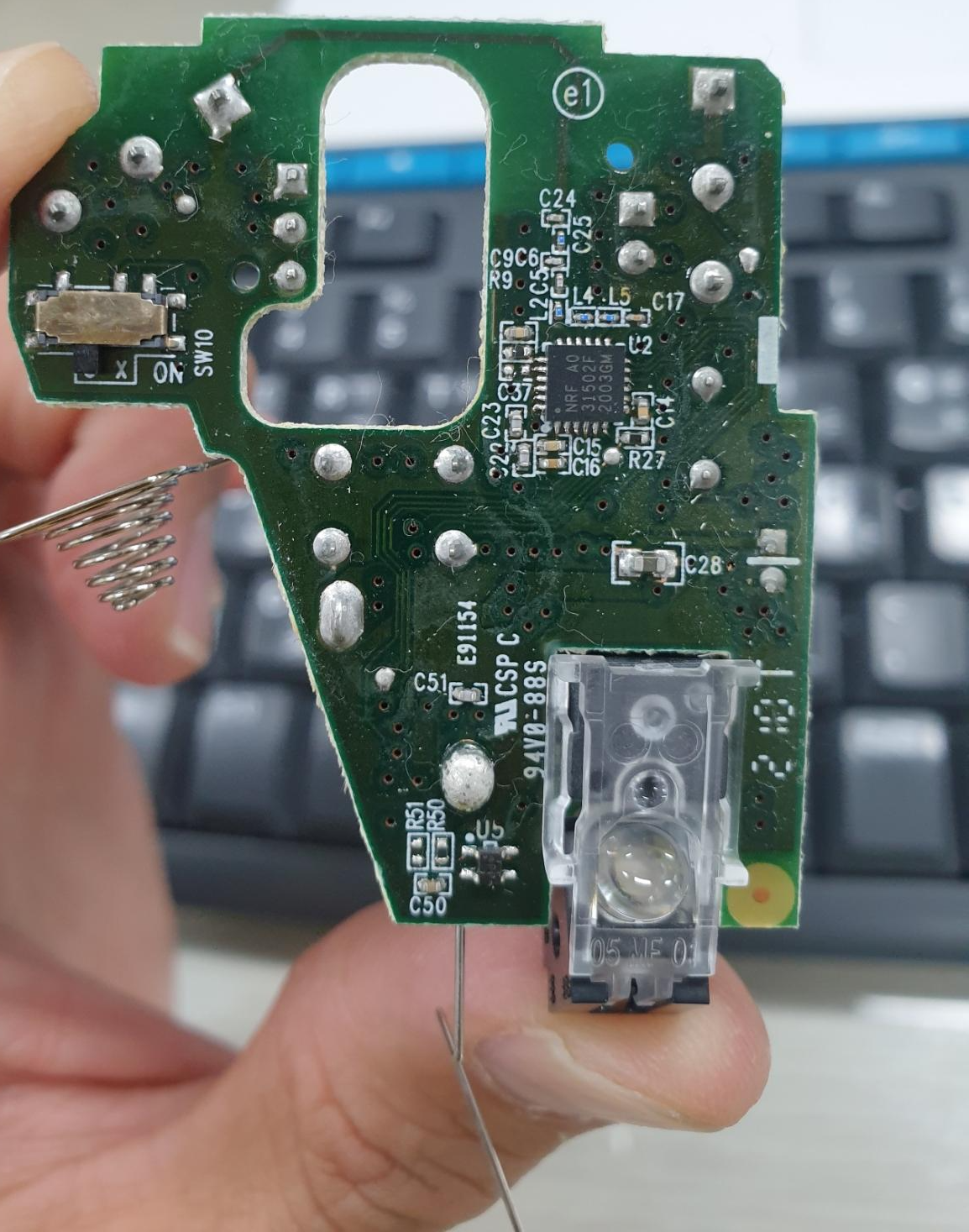
NRF31502F - 2.4GHZ RFIC NRF31
[링크 : https://www.avnet.com/shop/apac/products/nordic-semiconductor/nrf31502-r16q24-r-3074457345635064668/]
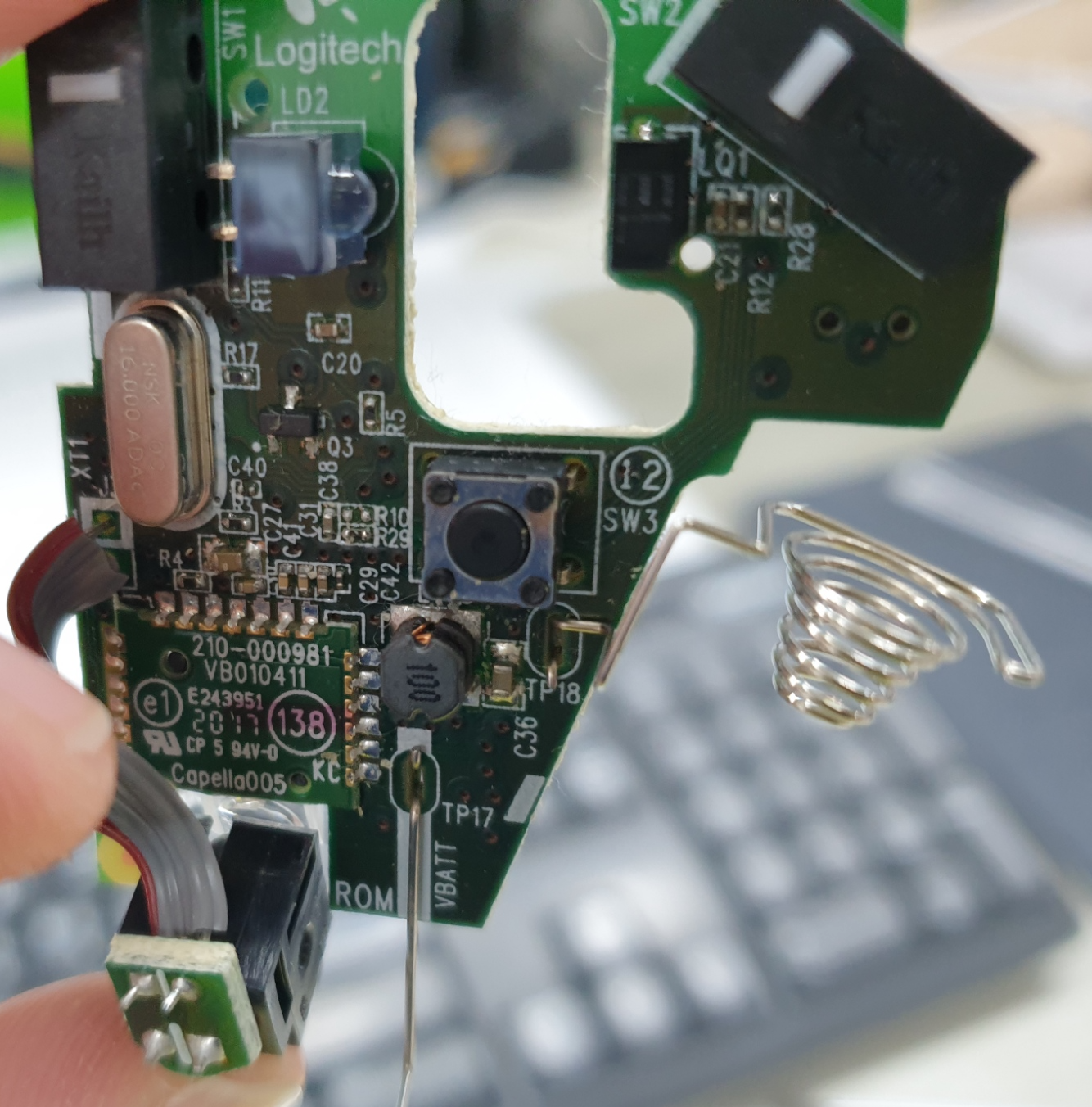
210-000981
VB010411
Capella005 라고 써있는데 영상을 이용한 마우스 이동 감지용 ic 인 것 같은데 영 검색이 안된다.
M170 이라는데 구조가 많이 닮은 듯.
'개소리 왈왈 > 컴퓨터' 카테고리의 다른 글
| 삼성 플렉스 알파 키보드 백라이트.. (0) | 2022.11.09 |
|---|---|
| ai 그림 (0) | 2022.11.07 |
| Xeon 열쇠고...리? (0) | 2022.09.23 |
| 2020년형 올데이 그램 써멀패드 작업 (0) | 2022.09.22 |
| HDMI to USB (capture) (2) | 2022.08.01 |
이마트에서 9월 30일 까지 무슨 신혼 페스타? 이런거 한다고 할인하는데
겸사겸사 김치냉장고 바꿔버림
대충 200만원에 60만원 상품권 이런식으로 해서 카드는 카드대로 나가고
상품권 잔뜩 줘서 다시 쓰게 만드는 사악한(!) 상술인 듯.
결혼 하고 8년차. 결혼기념일 맨날 까먹다가 이렇게 먼가 하나 지르고 넘어가는 듯.
'개소리 왈왈 > 육아관련 주저리' 카테고리의 다른 글
| 어제는 운동회 오늘은 워크샾 (0) | 2022.09.30 |
|---|---|
| 100MBps 지만 그래도 행복해! (0) | 2022.09.28 |
| 병원 투어 (0) | 2022.09.24 |
| 비데 교체 (0) | 2022.09.12 |
| 오랫만에 자전거 그리고 (0) | 2022.09.11 |


