와우 정말 가볍네
'개소리 왈왈 > 컴퓨터' 카테고리의 다른 글
| 키보드 수리 (0) | 2023.02.20 |
|---|---|
| 키보드 부분 고장. 윈도우 키가 불편해!? (0) | 2023.02.18 |
| 컴퓨터.. 옆그레이드? (0) | 2022.12.02 |
| intel HD 630 메모리 채널별 성능 차이 (0) | 2022.11.27 |
| 갑자기 스틱 pc가 가지고싶다 (0) | 2022.11.23 |
와우 정말 가볍네
| 키보드 수리 (0) | 2023.02.20 |
|---|---|
| 키보드 부분 고장. 윈도우 키가 불편해!? (0) | 2023.02.18 |
| 컴퓨터.. 옆그레이드? (0) | 2022.12.02 |
| intel HD 630 메모리 채널별 성능 차이 (0) | 2022.11.27 |
| 갑자기 스틱 pc가 가지고싶다 (0) | 2022.11.23 |
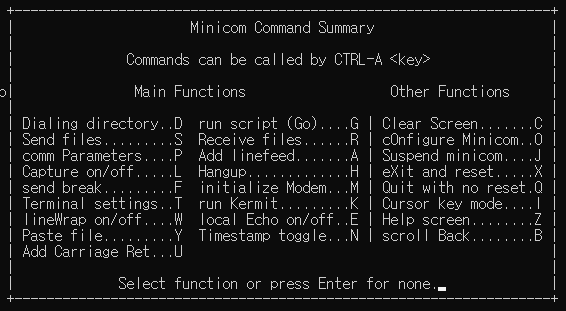
Add carriage Return을 활성화 해주면 자동으로 lf에 cr을 붙여주는 듯.
(ctrl - a,z - u)
| minicom color (0) | 2024.11.06 |
|---|---|
| minicom에서 stty로 터미널 폭 조절하기 (0) | 2023.10.24 |
| minicom 16진수로 보기 (0) | 2022.08.25 |
| minicom 로그 저장하기 (0) | 2021.09.16 |
| minicom timestamp (0) | 2021.09.16 |
수정없이 사용하려면
so로 빌드하고 해당 cpp so를 호출하는 class에 속하지 않은 함수로 만들고
그걸 extern c로 불러와야 할 듯
[링크 : https://stackoverflow.com/questions/2744181/how-to-call-c-function-from-c]
[링크 : http://www.parashift.com/c++-faq-lite/c-calls-cpp.html]
[링크 : https://stackoverflow.com/questions/7281441/elegantly-call-c-from-c]
| float 자릿수 제한 (0) | 2025.10.11 |
|---|---|
| free(): invalid next size (normal) (0) | 2023.12.18 |
| MSB / LSB 변환 (0) | 2022.08.29 |
| kore - c restful api server (1) | 2022.07.07 |
| fopen exclusivly (0) | 2021.07.09 |
어느걸 믿어야 하나...
| $ sudo acpi -V Battery 0: Unknown, 97% Battery 0: design capacity 3530 mAh, last full capacity 3500 mAh = 99% Adapter 0: on-line Thermal 0: ok, 33.0 degrees C Thermal 0: trip point 0 switches to mode critical at temperature 99.0 degrees C Thermal 1: ok, 33.0 degrees C Thermal 1: trip point 0 switches to mode critical at temperature 99.0 degrees C Cooling 0: Processor 0 of 3 Cooling 1: B0D4 no state information available Cooling 2: Processor 0 of 3 Cooling 3: x86_pkg_temp no state information available Cooling 4: Processor 0 of 3 Cooling 5: Processor 0 of 3 Cooling 6: Processor 0 of 3 Cooling 7: SNS2 no state information available Cooling 8: Processor 0 of 3 Cooling 9: iwlwifi_1 no state information available Cooling 10: Processor 0 of 3 Cooling 11: intel_powerclamp no state information available Cooling 12: Processor 0 of 3 Cooling 13: SNS1 no state information available |
| $ upower -i /org/freedesktop/UPower/devices/battery_BAT0 native-path: (null) power supply: no updated: 1970년 01월 01일 (목) 오전 09시 00분 00초 (1672820873 seconds ago) has history: no has statistics: no unknown warning-level: unknown battery-level: unknown icon-name: '(null)' |
[링크 : https://www.cyberciti.biz/faq/linux-laptop-battery-status-temperature/]
| 리눅스 키보드로 강제 종료하기 (0) | 2023.03.10 |
|---|---|
| shopt nohup (0) | 2023.01.27 |
| mpx - Multi-pointer X (0) | 2022.12.27 |
| 간단한 코어덤프 유발 프로그램 (1) | 2022.12.22 |
| libgpiod (0) | 2022.12.16 |
이메일이 와서 그냥 넘기려다 읽어보니..
개인형 스킨을 해도 광고가 추가되는데 그걸 삭제하면 회원의 의무를 다하지 않았으므로
너 폐쇄! 외칠 수 있게 개정 되는 듯.
| 변경 전 | 변경 후 |
| 제9조(서비스 내 광고) 제9조 없음 |
제9조(서비스 내 광고) 신설 회사는 서비스 내에서 광고를 게재할 수 있으며, 게재되는 광고의 형태 및 위치, 노출 빈도, 수익의 귀속 등은 회사가 정합니다. |
| 제10조(회원의 의무) (1) 회원은 아래 각 호의 1에 해당하는 행위를 하여서는 안됩니다. ①회원정보에 허위내용을 등록하는 행위 ②회사의 서비스에 게시된 정보를 변경하거나 서비스를 이용하여 얻은 정보를 회사의 사전 승낙 없이 영리 또는 비영리의 목적으로 복제, 출판, 방송 등에 사용하거나 제3자에게 제공하는 행위 ③회사가 제공하는 서비스를 이용하여 제3자에게 본인을 홍보할 기회를 제공 하거나 제3자의 홍보를 대행하는 등의 방법으로 금전을 수수하거나 서비스를 이용할 권리를 양도하고 이를 대가로 금전을 수수하는 행위 ④회사 기타 제3자의 명예를 훼손하거나 지적재산권을 침해하는 등 회사나 제3자의 권리를 침해하는 행위 ⑤다른 회원의 이메일주소 및 비밀번호를 도용하여 부당하게 서비스를 이용한 경우 ⑥정크메일(junk mail), 스팸메일(spam mail), 행운의 편지(chain letters), 피라미드 조직에 가입할 것을 권유하는 메일, 외설 또는 폭력적인 메시지 ·화상·음성 등이 담긴 메일을 보내거나 기타 공서양속에 반하는 정보를 공개 또는 게시하는 행위 ⑦정보통신망이용촉진및정보보호등에관한법률 등 관련 법령에 의하여 그 전송 또는 게시가 금지되는 정보(컴퓨터 프로그램 등)를 전송, 게시하거나 청소년보호법에서 규정하는 청소년유해매체물을 게시하는 행위 ⑧공공질서 또는 미풍양속에 위배되는 내용의 정보, 문장, 도형, 음성 등을 유포하는 행위 ⑨회사의 직원이나 서비스의 관리자를 가장하거나 사칭하여 또는 타인의 명의를 모용하여 글을 게시하거나 메일을 발송하는 행위 ⑩컴퓨터 소프트웨어, 하드웨어, 전기통신 장비의 정상적인 가동을 방해, 파괴할 목적으로 고안된 소프트웨어 바이러스, 기타 다른 컴퓨터 코드, 파일, 프로그램을 포함하고 있는 자료를 게시하거나 전자우편으로 발송하는 행위 ⑪스토킹(stalking) 등 다른 회원의 서비스 이용을 방해하는 행위 ⑫다른 회원의 개인정보를 그 동의 없이 수집, 저장, 공개하는 행위 ⑬불특정 다수의 회원을 대상으로 하여 광고 또는 선전을 게시하거나 스팸메일을 전송하는 등의 방법으로 회사에서 제공하는 서비스를 이용하여 영리목적의 활동을 하는 행위 ⑭회사가 제공하는 소프트웨어 등을 개작하거나 리버스 엔지니어링, 디컴파일, 디스어셈블 하는 행위 ⑮회사가 제공하는 서비스에 정한 약관 기타 서비스 이용에 관한 규정을 위반하는 행위 |
제11조(회원의 의무) 1) 회원은 아래 각 호의 1에 해당하는 행위를 하여서는 안됩니다. ①회원정보에 허위내용을 등록하는 행위 ②회사의 서비스에 게시된 정보를 변경하거나 서비스를 이용하여 얻은 정보를 회사의 사전 승낙 없이 영리 또는 비영리의 목적으로 복제, 출판, 방송 등에 사용하거나 제3자에게 제공하는 행위 ③회사가 제공하는 서비스를 이용하여 제3자에게 본인을 홍보할 기회를 제공 하거나 제3자의 홍보를 대행하는 등의 방법으로 금전을 수수하거나 서비스를 이용할 권리를 양도하고 이를 대가로 금전을 수수하는 행위 ④회사 기타 제3자의 명예를 훼손하거나 지적재산권을 침해하는 등 회사나 제3자의 권리를 침해하는 행위 ⑤다른 회원의 이메일주소 및 비밀번호를 도용하여 부당하게 서비스를 이용한 경우 ⑥정크메일(junk mail), 스팸메일(spam mail), 행운의 편지(chain letters), 피라미드 조직에 가입할 것을 권유하는 메일, 외설 또는 폭력적인 메시지 ·화상·음성 등이 담긴 메일을 보내거나 기타 공서양속에 반하는 정보를 공개 또는 게시하는 행위 ⑦정보통신망이용촉진및정보보호등에관한법률 등 관련 법령에 의하여 그 전송 또는 게시가 금지되는 정보(컴퓨터 프로그램 등)를 전송, 게시하거나 청소년보호법에서 규정하는 청소년유해매체물을 게시하는 행위 ⑧공공질서 또는 미풍양속에 위배되는 내용의 정보, 문장, 도형, 음성 등을 유포하는 행위 ⑨회사의 직원이나 서비스의 관리자를 가장하거나 사칭하여 또는 타인의 명의를 모용하여 글을 게시하거나 메일을 발송하는 행위 ⑩컴퓨터 소프트웨어, 하드웨어, 전기통신 장비의 정상적인 가동을 방해, 파괴할 목적으로 고안된 소프트웨어 바이러스, 기타 다른 컴퓨터 코드, 파일, 프로그램을 포함하고 있는 자료를 게시하거나 전자우편으로 발송하는 행위 ⑪스토킹(stalking) 등 다른 회원의 서비스 이용을 방해하는 행위 ⑫다른 회원의 개인정보를 그 동의 없이 수집, 저장, 공개하는 행위 ⑬불특정 다수의 회원을 대상으로 하여 광고 또는 선전을 게시하거나 스팸메일을 전송하는 등의 방법으로 회사에서 제공하는 서비스를 이용하여 영리목적의 활동을 하는 행위 ⑭회사가 제공하는 소프트웨어 등을 개작하거나 리버스 엔지니어링, 디컴파일, 디스어셈블 하는 행위 ⑮어떤 방식으로든 서비스 내에 게재된 광고를 포함한 회사가 제공하는 정보 등을 변경, 조작하거나 정상적인 노출을 방해하는 등의 행위 ⑯회사가 제공하는 서비스에 정한 약관 기타 서비스 이용에 관한 규정을 위반하는 행위 |
+
아니나 다를까 이메일에 포함된 링크를 가보니 전부 부정적인 댓글들
정말 티스토리도 떠날때가 다가오는건가..
| 이글루스 서비스 종료 공지 (2) | 2023.03.14 |
|---|---|
| 해피빈 기부 (0) | 2023.02.17 |
| 블로그 공개는 2주나 한달에 한번? (0) | 2022.12.06 |
| 해피빈 기부의 계절 (0) | 2022.11.18 |
| 티스토리 복구는 개뿔 (0) | 2022.10.17 |
먼가 여기저기서 나오는데 정체를 모르겠다.
[링크 : https://pkg.go.dev/reflect]
copy 말고 Copy인데.. copy는 그럼 누구꺼지?
[링크 : https://pkg.go.dev/reflect#Copy]
빌트인 패키지라는데 primitive로 봐도 되려나?
| golang 크로스 컴파일 GOARM GOARCH (0) | 2023.02.03 |
|---|---|
| golang map 에 데이터 추가하기 (0) | 2023.01.13 |
| golang unsafe (0) | 2023.01.03 |
| golang 웹 pprof (0) | 2023.01.03 |
| golang shared memory 모듈 (0) | 2022.11.22 |
멀 하던 성능을 위해서는 unsafe를 쓸 수 밖에 없나?
shared memory의 내용을 Binary Reader를 통해 읽으니 이상하리 만치 너~~~무 느리다.
[링크 : https://hackernoon.com/golang-unsafe-type-conversions-and-memory-access-odz3yrl]
| golang map 에 데이터 추가하기 (0) | 2023.01.13 |
|---|---|
| golang reflect (0) | 2023.01.03 |
| golang 웹 pprof (0) | 2023.01.03 |
| golang shared memory 모듈 (0) | 2022.11.22 |
| golang net.TCPConn (0) | 2022.10.07 |
0.0.0.0:6060 으로 하면 외부에서도 접근 가능하게 설정이 가능하다.
근데 멀 눌러야 사용율이 잘 나올까...
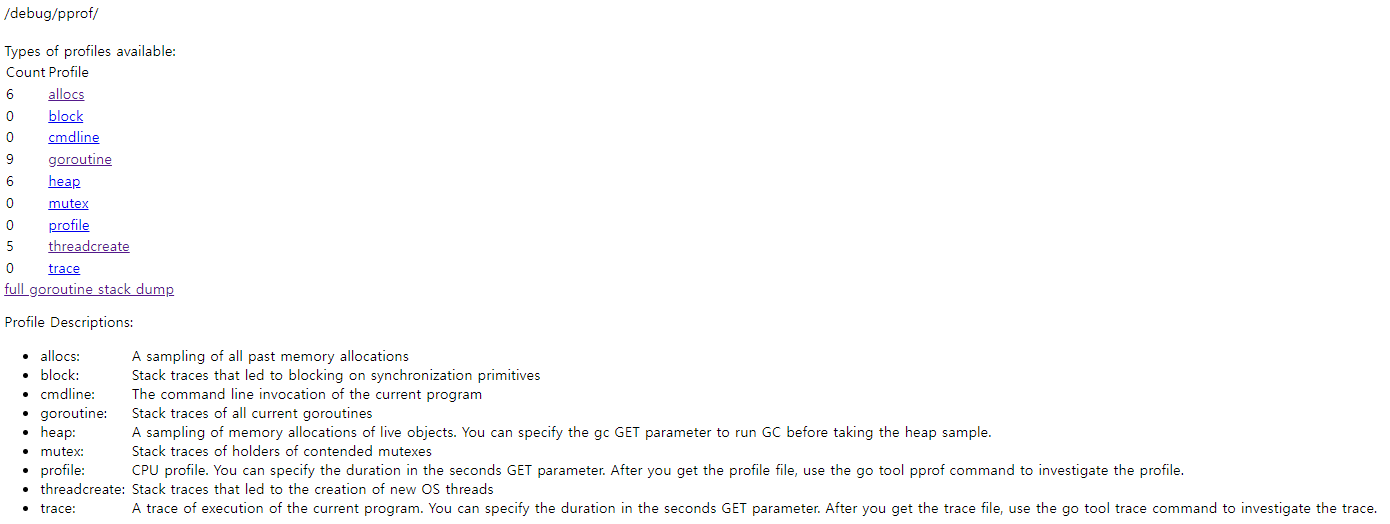
| import _ "net/http/pprof" go func() { log.Println(http.ListenAndServe("localhost:6060", nil)) }() |
[링크 : https://coralogix.com/blog/optimizing-a-golang-service-to-reduce-over-40-cpu/]
| golang reflect (0) | 2023.01.03 |
|---|---|
| golang unsafe (0) | 2023.01.03 |
| golang shared memory 모듈 (0) | 2022.11.22 |
| golang net.TCPConn (0) | 2022.10.07 |
| golang 변수 타입 알아내기 (0) | 2022.10.05 |
요즘은 원격으로 쓰지 컴퓨터를 건너 다니면서 같이 쓰진 않아 관심이 멀어졌었는데
synergy도 유료화 되고 그러면서 남은게(?) barrier 정도 인 듯?
[링크 : https://github.com/debauchee/barrier]
| What is it? Barrier is software that mimics the functionality of a KVM switch, which historically would allow you to use a single keyboard and mouse to control multiple computers by physically turning a dial on the box to switch the machine you're controlling at any given moment. Barrier does this in software, allowing you to tell it which machine to control by moving your mouse to the edge of the screen, or by using a keypress to switch focus to a different system. Barrier was forked from Symless's Synergy 1.9 codebase. Synergy was a commercialized reimplementation of the original CosmoSynergy written by Chris Schoeneman. At the moment, barrier is not compatible with synergy. Barrier needs to be installed on all machines that will share keyboard and mouse. |
[링크 : https://alternativeto.net/software/synergy/]
[링크 : https://bundw.tistory.com/42]
| bytran - hitran 시뮬레이터? (0) | 2023.08.21 |
|---|---|
| kchmviewer (0) | 2023.06.14 |
| fsn (fusion) - file system navigator (0) | 2022.08.26 |
| tsdb influxdb (0) | 2022.07.05 |
| rufus - symbol 'grub_register_command_lockdown' not found (0) | 2022.06.27 |
아! 나이 먹어서 싫다 ㅠㅠ
먼가 마음을 정리하고 사려고 했더니 팔려버리는 마법 ㅜㅜ
| 야근의 시작인가 (0) | 2023.01.12 |
|---|---|
| 피곤 (0) | 2023.01.10 |
| 오픈소스의 몰락? 공급망 공격 (0) | 2022.12.23 |
| 생애 첫 ABS 작동 (2) | 2022.12.21 |
| 주말 출근 (0) | 2022.12.17 |

|


