지인이 dlc에 혹해서 사고 본게임 줌 ㅋ

'게임 > 오리진&스팀&유플레이' 카테고리의 다른 글
| ubisoft 어새신 크리드 2 무료 (0) | 2020.04.17 |
|---|---|
| 스펙 옵스 한글 패치 (0) | 2020.02.24 |
| 우분투 노트북에서 스팀! (0) | 2019.05.17 |
| 무료 험블번들 GRID2 (0) | 2019.03.15 |
| 험블번들 무료 게임 - outcast second contact (0) | 2018.11.23 |
지인이 dlc에 혹해서 사고 본게임 줌 ㅋ
| ubisoft 어새신 크리드 2 무료 (0) | 2020.04.17 |
|---|---|
| 스펙 옵스 한글 패치 (0) | 2020.02.24 |
| 우분투 노트북에서 스팀! (0) | 2019.05.17 |
| 무료 험블번들 GRID2 (0) | 2019.03.15 |
| 험블번들 무료 게임 - outcast second contact (0) | 2018.11.23 |
그래서 쓸게 없네
아아.. 먼가 안써도 된다고 마음 먹어 놓고는 그게 안되는건 왜일까 ㅠㅠ
| 해피빈 기부 (2) | 2019.09.23 |
|---|---|
| 카테고리 500개가 많을줄 알았는데... (2) | 2019.08.24 |
| 도메인 또 1년 연장 (0) | 2019.06.03 |
| 저작권 협상(?) 메일 (3) | 2019.03.25 |
| Copy of: 온라인 명예훼손 출석통지서 - 피싱메일 (4) | 2019.03.08 |
node.js 에서 원하는 갯수를 확인하려면
.length를 통해 array의 갯수를 확인하면 되긴한다.
MeasureSet 의 갯수를 확인하고
| > var result_ele = xpath.select("/ClinVarSet/ReferenceClinVarAssertion/GenotypeSet/MeasureSet", doc); undefined > result_ele.length 2 |
MeasureSet의 인덱스로 접근해서 몇개씩을 가지는지 확인하면 될 듯
| > var result_ele = xpath.select("/ClinVarSet/ReferenceClinVarAssertion/GenotypeSet/MeasureSet[1]/Measure/AttributeSet/Attribute", doc); undefined > result_ele.length 9 > var result_ele = xpath.select("/ClinVarSet/ReferenceClinVarAssertion/GenotypeSet/MeasureSet[2]/Measure/AttributeSet/Attribute", doc); undefined > result_ele.length 7 |
[링크 : https://stackoverflow.com/questions/2407781/get-nth-child-of-a-node-using-xpath]
| xpath concat (0) | 2019.08.08 |
|---|---|
| xpath syntax - attribute 검색 및 특정값 얻기 (0) | 2019.08.08 |
| xmllint string() (0) | 2019.07.25 |
| libxml2 - xmlNodeDump() (0) | 2019.07.09 |
| libxml2 (0) | 2019.07.04 |
일단은.. 8기가 짜리 파일을 잘 토막쳐서 읽고 있다.
예전에는 멀 잘못했는지 오래걸리기도 했고, 조금 읽다 보면 버버버버벅했는데
스트림으로 변경하고 나니 속도 저하도 없고
메모리 사용율 문제나 크래시도 발생하지 않고 있다.
다만.. readline 모듈의 경우 output을 process.stdout으로 해주면 프롬프트랑 섞이면서 난리나고
output을 다른 파일로 연결을 하는법을 아직 찾지 못해 헤매는 중..
(그냥 다른 파일로 직접 쓰는 중)
| node.js xpath 모듈 (0) | 2019.08.08 |
|---|---|
| xpath text() (0) | 2019.08.07 |
| node.js xpath select() select1() (0) | 2019.07.25 |
| node.js xpath apidoc (0) | 2019.07.25 |
| node.js readline() (0) | 2019.06.28 |
간단하네 -ㅁ-?
| Select @@version |
[링크 : https://stackoverflow.com/questions/20351674/how-to-check-sql-server-version]
아래는 우분투 버전 mssql 버전(2019/07/30 확인)
| Microsoft SQL Server 2017 (RTM-CU15-GDR) (KB4505225) - 14.0.3192.2 (X64) Jun 15 2019 00:45:05 Copyright (C) 2017 Microsoft Corporation Express Edition (64-bit) on Linux (Ubuntu 18.04.2 LTS) |
| linux mssql odbc 예제 (0) | 2021.10.22 |
|---|---|
| mssql on docker (0) | 2021.10.22 |
| mssql UDL 파일 (0) | 2021.10.22 |
| mssql import from csv (0) | 2019.07.25 |
| mssql sqlcmd (4) | 2019.05.22 |
awk '{print $2}' | uniq | sort
하면 2번째 열 내용만 추출해서 중복을 제거하고 내용을 정렬해서 출력함
| awk NR, NF (0) | 2019.08.12 |
|---|---|
| smart trip temperature? (0) | 2019.08.05 |
| xz.. 느려!!! (0) | 2019.07.26 |
| musl / uclibc (0) | 2019.07.15 |
| hostnamectl (0) | 2019.07.10 |
아놔.. 머가 꼬였나 드럽게 안되네.. ㅠㅠ
sudo service postgresql restart
로는 정상적으로 재시작 안되는 것으로 보여서(일단 포트를 바꾸어도 변경이 없음)
아래의 명령을 통해서 해야지 재시작이 되는 듯 하다.
$ pg_ctlcluster
Error: Usage: /usr/bin/pg_ctlcluster [-- ]
$ sudo pg_ctlcluster 11 main restart
----
$ sudo apt-get install postgresql
패키지 목록을 읽는 중입니다... 완료
의존성 트리를 만드는 중입니다
상태 정보를 읽는 중입니다... 완료
다음의 추가 패키지가 설치될 것입니다 :
pgdg-keyring postgresql-11 postgresql-client-11 postgresql-client-common postgresql-common sysstat
제안하는 패키지:
postgresql-doc postgresql-doc-11 libjson-perl isag
다음 새 패키지를 설치할 것입니다:
pgdg-keyring postgresql postgresql-11 postgresql-client-11 postgresql-client-common postgresql-common sysstat
0개 업그레이드, 7개 새로 설치, 0개 제거 및 5개 업그레이드 안 함.
1,778 k바이트/16.1 M바이트 아카이브를 받아야 합니다.
이 작업 후 53.6 M바이트의 디스크 공간을 더 사용하게 됩니다.
계속 하시겠습니까? [Y/n] y
받기:1 http://kr.archive.ubuntu.com/ubuntu bionic/main amd64 sysstat amd64 11.6.1-1 [295 kB]
받기:2 http://apt.postgresql.org/pub/repos/apt bionic-pgdg/main amd64 pgdg-keyring all 2018.2 [10.7 kB]
받기:3 http://apt.postgresql.org/pub/repos/apt bionic-pgdg/main amd64 postgresql-client-common all 203.pgdg18.04+1 [85.3 kB]
받기:4 http://apt.postgresql.org/pub/repos/apt bionic-pgdg/main amd64 postgresql-client-11 amd64 11.4-1.pgdg18.04+1 [1,388 kB]
내려받기 1,778 k바이트, 소요시간 3초 (561 k바이트/초)
패키지를 미리 설정하는 중입니다...
Selecting previously unselected package pgdg-keyring.
(데이터베이스 읽는중 ...현재 196920개의 파일과 디렉터리가 설치되어 있습니다.)
Preparing to unpack .../0-pgdg-keyring_2018.2_all.deb ...
Unpacking pgdg-keyring (2018.2) ...
Selecting previously unselected package postgresql-client-common.
Preparing to unpack .../1-postgresql-client-common_203.pgdg18.04+1_all.deb ...
Unpacking postgresql-client-common (203.pgdg18.04+1) ...
Selecting previously unselected package postgresql-client-11.
Preparing to unpack .../2-postgresql-client-11_11.4-1.pgdg18.04+1_amd64.deb ...
Unpacking postgresql-client-11 (11.4-1.pgdg18.04+1) ...
Selecting previously unselected package postgresql-common.
Preparing to unpack .../3-postgresql-common_203.pgdg18.04+1_all.deb ...
'/usr/bin/pg_config의 /usr/bin/pg_config.libpq-dev(으)로 전환, postgresql-common 패키지' 추가하는 중
Unpacking postgresql-common (203.pgdg18.04+1) ...
Selecting previously unselected package postgresql-11.
Preparing to unpack .../4-postgresql-11_11.4-1.pgdg18.04+1_amd64.deb ...
Unpacking postgresql-11 (11.4-1.pgdg18.04+1) ...
Selecting previously unselected package postgresql.
Preparing to unpack .../5-postgresql_11+203.pgdg18.04+1_all.deb ...
Unpacking postgresql (11+203.pgdg18.04+1) ...
Selecting previously unselected package sysstat.
Preparing to unpack .../6-sysstat_11.6.1-1_amd64.deb ...
Unpacking sysstat (11.6.1-1) ...
sysstat (11.6.1-1) 설정하는 중입니다 ...
Creating config file /etc/default/sysstat with new version
update-alternatives: using /usr/bin/sar.sysstat to provide /usr/bin/sar (sar) in auto mode
Created symlink /etc/systemd/system/multi-user.target.wants/sysstat.service → /lib/systemd/system/sysstat.service.
Processing triggers for ureadahead (0.100.0-21) ...
Processing triggers for systemd (237-3ubuntu10.24) ...
Processing triggers for man-db (2.8.3-2ubuntu0.1) ...
pgdg-keyring (2018.2) 설정하는 중입니다 ...
postgresql-client-common (203.pgdg18.04+1) 설정하는 중입니다 ...
postgresql-common (203.pgdg18.04+1) 설정하는 중입니다 ...
Creating config file /etc/postgresql-common/createcluster.conf with new version
Building PostgreSQL dictionaries from installed myspell/hunspell packages...
en_us
ko
Removing obsolete dictionary files:
Created symlink /etc/systemd/system/multi-user.target.wants/postgresql.service → /lib/systemd/system/postgresql.service.
postgresql-client-11 (11.4-1.pgdg18.04+1) 설정하는 중입니다 ...
update-alternatives: using /usr/share/postgresql/11/man/man1/psql.1.gz to provide /usr/share/man/man1/psql.1.gz (psql.1.gz) in auto mode
postgresql-11 (11.4-1.pgdg18.04+1) 설정하는 중입니다 ...
Creating new PostgreSQL cluster 11/main ...
/usr/lib/postgresql/11/bin/initdb -D /var/lib/postgresql/11/main --auth-local peer --auth-host md5
이 데이터베이스 시스템에서 만들어지는 파일들은 그 소유주가 "postgres" id로
지정될 것입니다. 또한 이 사용자는 서버 프로세스의 소유주가 됩니다.
데이터베이스 클러스터는 "ko_KR.UTF-8" 로케일으로 초기화될 것입니다.
기본 데이터베이스 인코딩은 "UTF8" 인코딩으로 설정되었습니다.
initdb: "ko_KR.UTF-8" 로케일에 알맞은 전문검색 설정을 찾을 수 없음
기본 텍스트 검색 구성이 "simple"(으)로 설정됩니다.
자료 페이지 체크섬 기능 사용 하지 않음
이미 있는 /var/lib/postgresql/11/main 디렉터리의 액세스 권한을 고치는 중 ...완료
하위 디렉터리 만드는 중 ...완료
max_connections 초기값을 선택하는 중 ...100
기본 shared_buffers를 선택하는 중... 128MB
selecting default timezone ... Asia/Seoul
사용할 동적 공유 메모리 관리방식을 선택하는 중 ... posix
환경설정 파일을 만드는 중 ...완료
부트스트랩 스크립트 실행 중 ... 완료
부트스트랩 다음 초기화 작업 중 ... 완료
자료를 디스크에 동기화 하는 중 ... 완료
작업완료. 이제 다음 명령을 이용해서 서버를 가동 할 수 있습니다:
pg_ctlcluster 11 main start
Ver Cluster Port Status Owner Data directory Log file
11 main 5432 down postgres /var/lib/postgresql/11/main /var/log/postgresql/postgresql-11-main.log
update-alternatives: using /usr/share/postgresql/11/man/man1/postmaster.1.gz to provide /usr/share/man/man1/postmaster.1.gz (postmaster.1.gz) in auto mode
postgresql (11+203.pgdg18.04+1) 설정하는 중입니다 ...
Processing triggers for systemd (237-3ubuntu10.24) ...
Processing triggers for ureadahead (0.100.0-21) ...
$ pg_ctlcluster 11 main start
Warning: the cluster will not be running as a systemd service. Consider using systemctl:
sudo systemctl start postgresql@11-main
Error: You must run this program as the cluster owner (postgres) or root
$ sudo pg_ctlcluster 11 main start
| ubuntu virtual desktop (0) | 2019.08.28 |
|---|---|
| ubuntu 18.04 fsck 예약(?) (0) | 2019.08.27 |
| bash-completion (0) | 2019.07.09 |
| 우분투 리눅스에 카카오톡 깔기 (2) | 2019.07.09 |
| ubuntu sftp with nautilius (0) | 2019.06.03 |
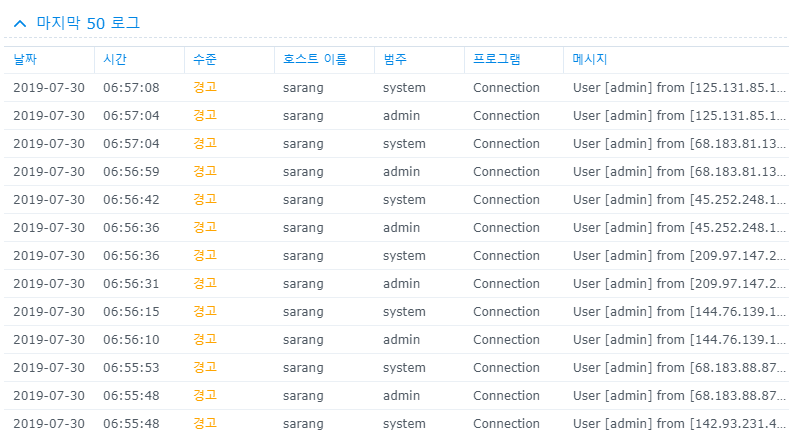
어우.. 요즘 시놀로지 해킹해서 크립토 라커 거는게 심해졌다고 하던데
NAS가 맨날 켜져 있어서 보니.. 헐.. 미친 -_-
게다가 아이피 대역도 완전 달라지면서 2번만 시도하고 도망가서 고민중...
[링크 : https://damduck01.com/551]
| 시놀로지 외부 스토리지 연결하기 (0) | 2020.09.09 |
|---|---|
| D-Link DNS-343 대실망쇼 -_- (0) | 2020.09.08 |
| disk error recovery - TLER(WD) (0) | 2019.03.13 |
| 2.5인치 SAS/SATA 트레이 (0) | 2019.02.28 |
| 시게이트 SSHD 스펙 (0) | 2019.01.16 |
db도 묘하게 버전관리 빡세니까 머...
대충 보기에는 oracle / postgresql / mysql 은 확실히 지원하는 것 같은데..
툴이 어떤 것을 지원하는지(win / mac? / linux?) 가입해야 해서 일단 패스
| Database Deployment/DevOps Flyway SQL Compare Schema Compare for Oracle pgCompare Schema Compare for MySQL SQL Data Compare Data Compare for Oracle SQL Source Control Source Control for Oracle SQL Change Automation |
[링크 : https://flywaydb.org/]
[링크 : https://bkim.tistory.com/2]
| ether / win32diskimager 대체 프로그램 (0) | 2020.03.07 |
|---|---|
| TOAD 단축키 (0) | 2019.12.18 |
| ArduinoDroid (0) | 2019.06.12 |
| ups protocol (0) | 2019.04.29 |
| 열해석 프로그램(오픈소스) (0) | 2019.03.31 |

|


