embeded/Cortex-M3 STM2026. 1. 27. 17:08

startup_stm32f103retx.s

  .syntax unified
  .cpu cortex-m3
  .fpu softvfp
  .thumb

.global g_pfnVectors
.global Default_Handler

/**
 * @brief  This is the code that gets called when the processor first
 *          starts execution following a reset event. Only the absolutely
 *          necessary set is performed, after which the application
 *          supplied main() routine is called.
 * @param  None
 * @retval : None
*/

  .section .text.Reset_Handler
  .weak Reset_Handler
  .type Reset_Handler, %function
Reset_Handler:


/******************************************************************************
*
* The minimal vector table for a Cortex M3.  Note that the proper constructs
* must be placed on this to ensure that it ends up at physical address
* 0x0000.0000.
*
******************************************************************************/
  .section .isr_vector,"a",%progbits
  .type g_pfnVectors%object
  .size g_pfnVectors, .-g_pfnVectors


g_pfnVectors:

  .word _estack
  .word Reset_Handler
  .word NMI_Handler
  .word HardFault_Handler
  .word MemManage_Handler
  .word BusFault_Handler
  .word UsageFault_Handler
  .word 0
  .word 0
  .word 0
  .word 0
  .word SVC_Handler
  .word DebugMon_Handler
  .word 0
  .word PendSV_Handler
  .word SysTick_Handler
  .word WWDG_IRQHandler
  .word PVD_IRQHandler
  .word TAMPER_IRQHandler
  .word RTC_IRQHandler
  .word FLASH_IRQHandler
  .word RCC_IRQHandler
  .word EXTI0_IRQHandler
  .word EXTI1_IRQHandler
  .word EXTI2_IRQHandler
  .word EXTI3_IRQHandler
  .word EXTI4_IRQHandler
  .word DMA1_Channel1_IRQHandler
  .word DMA1_Channel2_IRQHandler
  .word DMA1_Channel3_IRQHandler
  .word DMA1_Channel4_IRQHandler
  .word DMA1_Channel5_IRQHandler
  .word DMA1_Channel6_IRQHandler
  .word DMA1_Channel7_IRQHandler
  .word ADC1_2_IRQHandler
  .word USB_HP_CAN1_TX_IRQHandler
  .word USB_LP_CAN1_RX0_IRQHandler
  .word CAN1_RX1_IRQHandler
  .word CAN1_SCE_IRQHandler
  .word EXTI9_5_IRQHandler
  .word TIM1_BRK_IRQHandler
  .word TIM1_UP_IRQHandler
  .word TIM1_TRG_COM_IRQHandler
  .word TIM1_CC_IRQHandler
  .word TIM2_IRQHandler
  .word TIM3_IRQHandler
  .word TIM4_IRQHandler
  .word I2C1_EV_IRQHandler
  .word I2C1_ER_IRQHandler
  .word I2C2_EV_IRQHandler
  .word I2C2_ER_IRQHandler
  .word SPI1_IRQHandler
  .word SPI2_IRQHandler
  .word USART1_IRQHandler
  .word USART2_IRQHandler
  .word USART3_IRQHandler
  .word EXTI15_10_IRQHandler
  .word RTC_Alarm_IRQHandler
  .word USBWakeUp_IRQHandler
  .word TIM8_BRK_IRQHandler
  .word TIM8_UP_IRQHandler
  .word TIM8_TRG_COM_IRQHandler
  .word TIM8_CC_IRQHandler
  .word ADC3_IRQHandler
  .word FSMC_IRQHandler
  .word SDIO_IRQHandler
  .word TIM5_IRQHandler
  .word SPI3_IRQHandler
  .word UART4_IRQHandler
  .word UART5_IRQHandler
  .word TIM6_IRQHandler
  .word TIM7_IRQHandler
  .word DMA2_Channel1_IRQHandler
  .word DMA2_Channel2_IRQHandler
  .word DMA2_Channel3_IRQHandler
  .word DMA2_Channel4_5_IRQHandler
  .word 0
  .word 0
  .word 0
  .word 0
  .word 0
  .word 0
  .word 0
  .word 0
  .word 0
  .word 0
  .word 0
  .word 0
  .word 0
  .word 0
  .word 0
  .word 0
  .word 0
  .word 0
  .word 0
  .word 0
  .word 0
  .word 0
  .word 0
  .word 0
  .word 0
  .word 0
  .word 0
  .word 0
  .word 0
  .word 0
  .word 0
  .word 0
  .word 0
  .word 0
  .word 0
  .word 0
  .word 0
  .word 0
  .word 0
  .word 0
  .word 0
  .word 0
  .word 0
  .word 0
  .word BootRAM       /* @0x1E0. This is for boot in RAM mode for
                         STM32F10x High Density devices. */


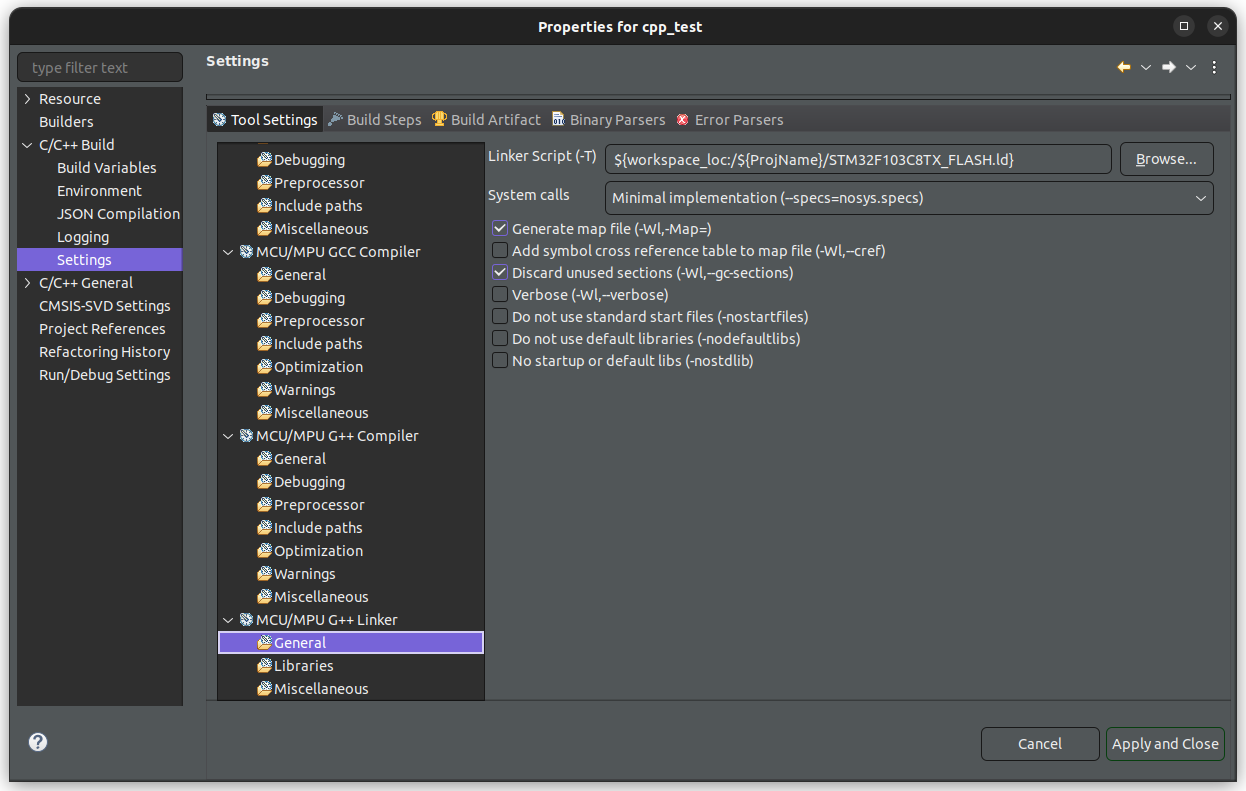
STM32F103RETX_FLASH.ld

/* Memories definition */
MEMORY
{
  RAM    (xrw)    : ORIGIN = 0x20000000,   LENGTH = 64K
  FLASH    (rx)    : ORIGIN = 0x8000000,   LENGTH = 512K
}

/* Sections */
SECTIONS
{
  /* The startup code into "FLASH" Rom type memory */
  .isr_vector :
  {
    . = ALIGN(4);
    KEEP(*(.isr_vector)) /* Startup code */
    . = ALIGN(4);
  } >FLASH

  /* The program code and other data into "FLASH" Rom type memory */
  .text :
  {
    . = ALIGN(4);
    *(.text)           /* .text sections (code) */
    *(.text*)          /* .text* sections (code) */
    *(.glue_7)         /* glue arm to thumb code */
    *(.glue_7t)        /* glue thumb to arm code */
    *(.eh_frame)

    KEEP (*(.init))
    KEEP (*(.fini))

    . = ALIGN(4);
    _etext = .;        /* define a global symbols at end of code */
  } >FLASH

  /* Constant data into "FLASH" Rom type memory */
  .rodata :
  {
    . = ALIGN(4);
    *(.rodata)         /* .rodata sections (constants, strings, etc.) */
    *(.rodata*)        /* .rodata* sections (constants, strings, etc.) */
    . = ALIGN(4);
  } >FLASH
}


$ readelf -a test.elf 
ELF Header:
  Magic:   7f 45 4c 46 01 01 01 00 00 00 00 00 00 00 00 00 
  Class:                             ELF32
  Data:                              2's complement, little endian
  Version:                           1 (current)
  OS/ABI:                            UNIX - System V
  ABI Version:                       0
  Type:                              EXEC (Executable file)
  Machine:                           ARM
  Version:                           0x1
  Entry point address:               0x8009499
  Start of program headers:          52 (bytes into file)
  Start of section headers:          1299152 (bytes into file)
  Flags:                             0x5000200, Version5 EABI, soft-float ABI
  Size of this header:               52 (bytes)
  Size of program headers:           32 (bytes)
  Number of program headers:         4
  Size of section headers:           40 (bytes)
  Number of section headers:         26
  Section header string table index: 25

Section Headers:
  [Nr] Name              Type            Addr     Off    Size   ES Flg Lk Inf Al
  [ 0]                   NULL            00000000 000000 000000 00      0   0  0
  [ 1] .isr_vector       PROGBITS        08000000 001000 0001e4 00   A  0   0  1
  [ 2] .text             PROGBITS        080001e8 0011e8 012144 00  AX  0   0  8
  [ 3] .rodata           PROGBITS        08012330 013330 002338 00   A  0   0  8
  [ 4] .ARM.extab        PROGBITS        08014668 01622c 000000 00   W  0   0  1
  [ 5] .ARM              ARM_EXIDX       08014668 015668 000008 00  AL  2   0  4
  [ 6] .preinit_array    PREINIT_ARRAY   08014670 01622c 000000 04  WA  0   0  1
  [ 7] .init_array       INIT_ARRAY      08014670 015670 000004 04   A  0   0  4
  [ 8] .fini_array       FINI_ARRAY      08014674 015674 000004 04   A  0   0  4
  [ 9] .data             PROGBITS        20000000 016000 00022c 00  WA  0   0  4
  [10] .bss              NOBITS          20000230 016230 001b44 00  WA  0   0  8
  [11] ._user_heap_stack NOBITS          20001d74 016d74 000604 00  WA  0   0  1
  [12] .ARM.attributes   ARM_ATTRIBUTES  00000000 01622c 000029 00      0   0  1
  [13] .debug_info       PROGBITS        00000000 016255 01da16 00      0   0  1
  [14] .debug_abbrev     PROGBITS        00000000 033c6b 0056f5 00      0   0  1
  [15] .debug_aranges    PROGBITS        00000000 039360 001bf8 00      0   0  8
  [16] .debug_rnglists   PROGBITS        00000000 03af58 0015ba 00      0   0  1
  [17] .debug_macro      PROGBITS        00000000 03c512 0206fd 00      0   0  1
  [18] .debug_line       PROGBITS        00000000 05cc0f 022fc5 00      0   0  1
  [19] .debug_str        PROGBITS        00000000 07fbd4 0aae1c 01  MS  0   0  1
  [20] .comment          PROGBITS        00000000 12a9f0 000043 01  MS  0   0  1
  [21] .debug_frame      PROGBITS        00000000 12aa34 008440 00      0   0  4
  [22] .debug_line_str   PROGBITS        00000000 132e74 000064 01  MS  0   0  1
  [23] .symtab           SYMTAB          00000000 132ed8 0072e0 10     24 1208  4
  [24] .strtab           STRTAB          00000000 13a1b8 002ffa 00      0   0  1
  [25] .shstrtab         STRTAB          00000000 13d1b2 00011c 00      0   0  1
Key to Flags:
  W (write), A (alloc), X (execute), M (merge), S (strings), I (info),
  L (link order), O (extra OS processing required), G (group), T (TLS),
  C (compressed), x (unknown), o (OS specific), E (exclude),
  D (mbind), y (purecode), p (processor specific)

There are no section groups in this file.

Program Headers:
  Type           Offset   VirtAddr   PhysAddr   FileSiz MemSiz  Flg Align
  LOAD           0x001000 0x08000000 0x08000000 0x14678 0x14678 R E 0x1000
  LOAD           0x016000 0x20000000 0x08014678 0x0022c 0x0022c RW  0x1000
  LOAD           0x000230 0x20000230 0x080148a4 0x00000 0x01b44 RW  0x1000
  LOAD           0x000d74 0x20001d74 0x080148a4 0x00000 0x00604 RW  0x1000

 Section to Segment mapping:
  Segment Sections...
   00     .isr_vector .text .rodata .ARM .init_array .fini_array 
   01     .data 
   02     .bss 
   03     ._user_heap_stack 

There is no dynamic section in this file.

There are no relocations in this file.

Unwind section '.ARM' at offset 0x15668 contains 1 entry:

0x8000228 <strlen>: 0x1 [cantunwind]


Symbol table '.symtab' contains 1838 entries:
   Num:    Value  Size Type    Bind   Vis      Ndx Name
     0: 00000000     0 NOTYPE  LOCAL  DEFAULT  UND 
     1: 08000000     0 SECTION LOCAL  DEFAULT    1 .isr_vector
     2: 080001e8     0 SECTION LOCAL  DEFAULT    2 .text
     3: 08012330     0 SECTION LOCAL  DEFAULT    3 .rodata
     4: 08014668     0 SECTION LOCAL  DEFAULT    4 .ARM.extab
     5: 08014668     0 SECTION LOCAL  DEFAULT    5 .ARM
     6: 08014670     0 SECTION LOCAL  DEFAULT    6 .preinit_array
     7: 08014670     0 SECTION LOCAL  DEFAULT    7 .init_array
     8: 08014674     0 SECTION LOCAL  DEFAULT    8 .fini_array
     9: 20000000     0 SECTION LOCAL  DEFAULT    9 .data
    10: 20000230     0 SECTION LOCAL  DEFAULT   10 .bss
    11: 20001d74     0 SECTION LOCAL  DEFAULT   11 ._user_heap_stack
(많아서 생략)

No version information found in this file.
Attribute Section: aeabi
File Attributes
  Tag_CPU_name: "7-M"
  Tag_CPU_arch: v7
  Tag_CPU_arch_profile: Microcontroller
  Tag_THUMB_ISA_use: Thumb-2
  Tag_ABI_PCS_wchar_t: 4
  Tag_ABI_FP_denormal: Needed
  Tag_ABI_FP_exceptions: Needed
  Tag_ABI_FP_number_model: IEEE 754
  Tag_ABI_align_needed: 8-byte
  Tag_ABI_enum_size: small
  Tag_CPU_unaligned_access: v6


[링크 : https://hackmd.io/@SgyGB0h2QGWBfbHp9n_ArQ/BygAD3fU_]


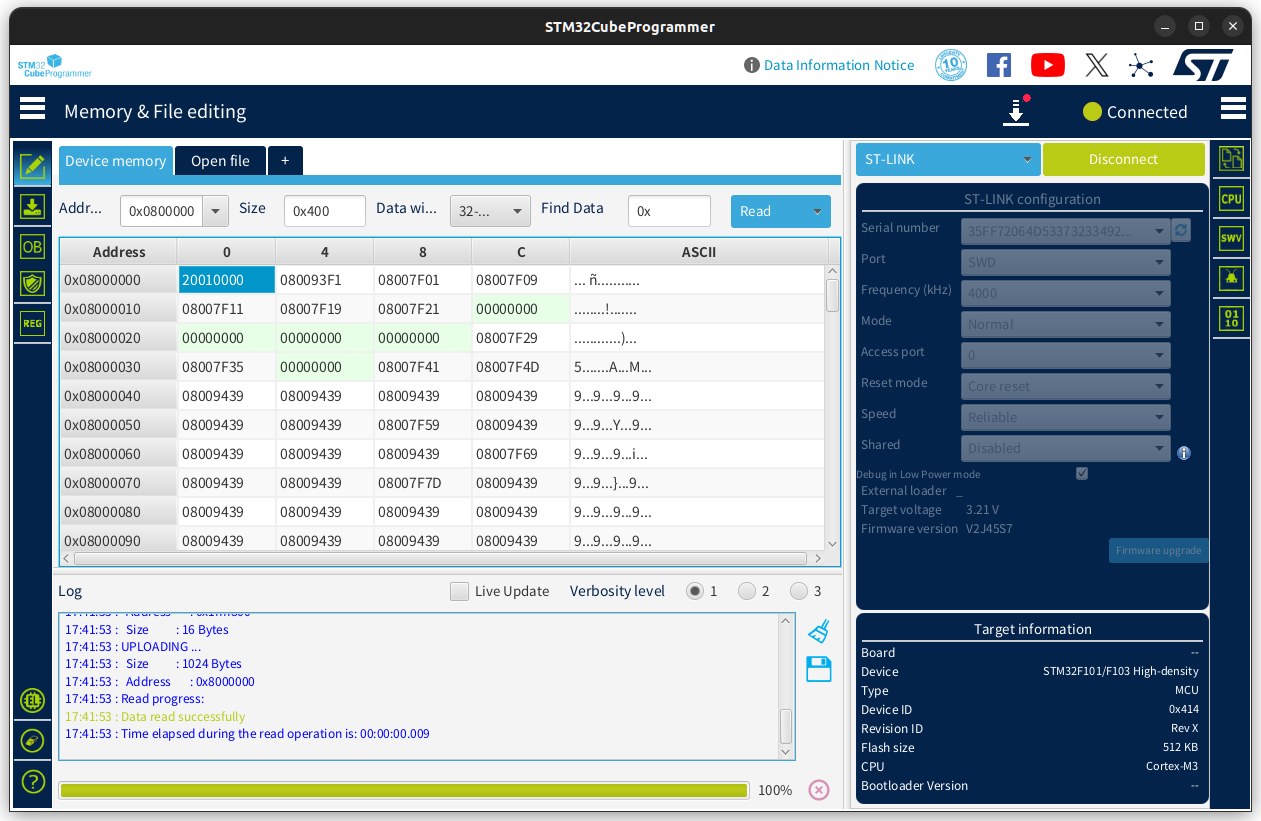
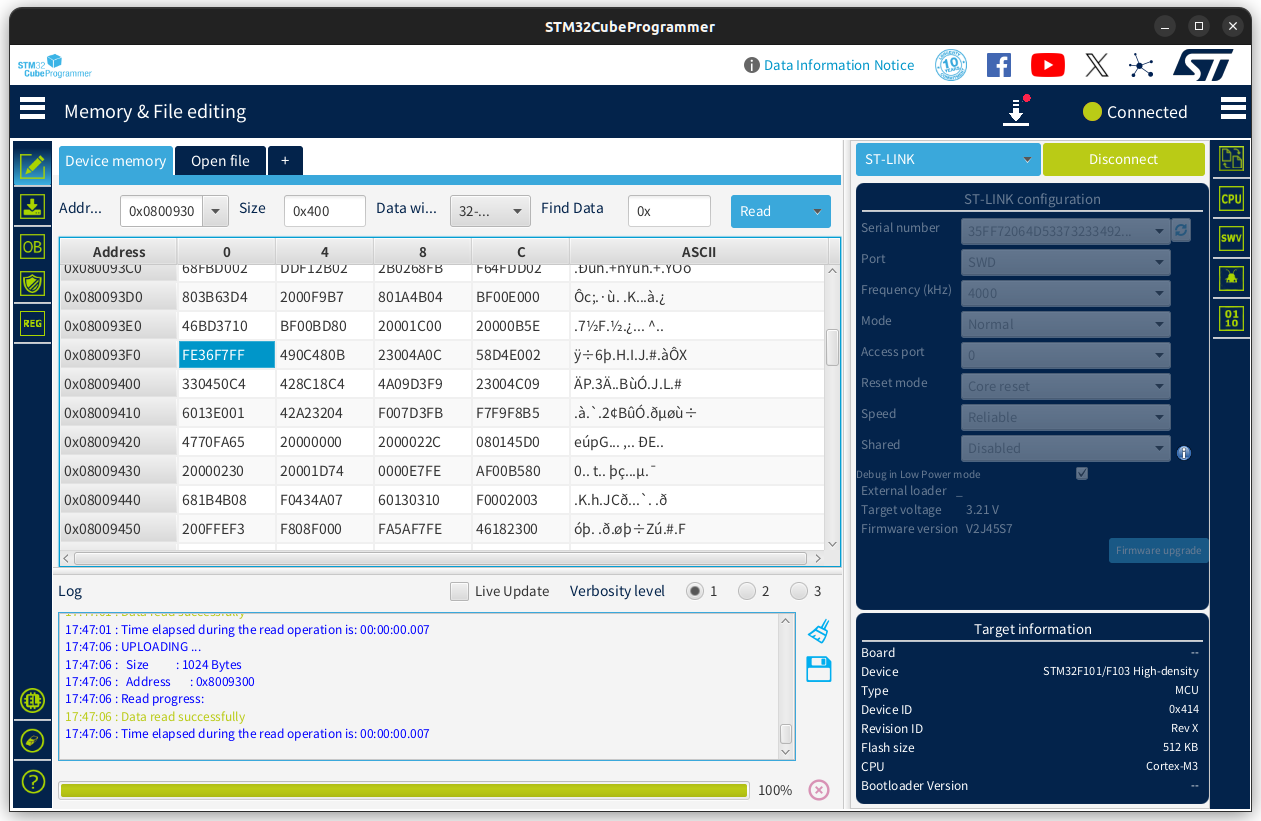
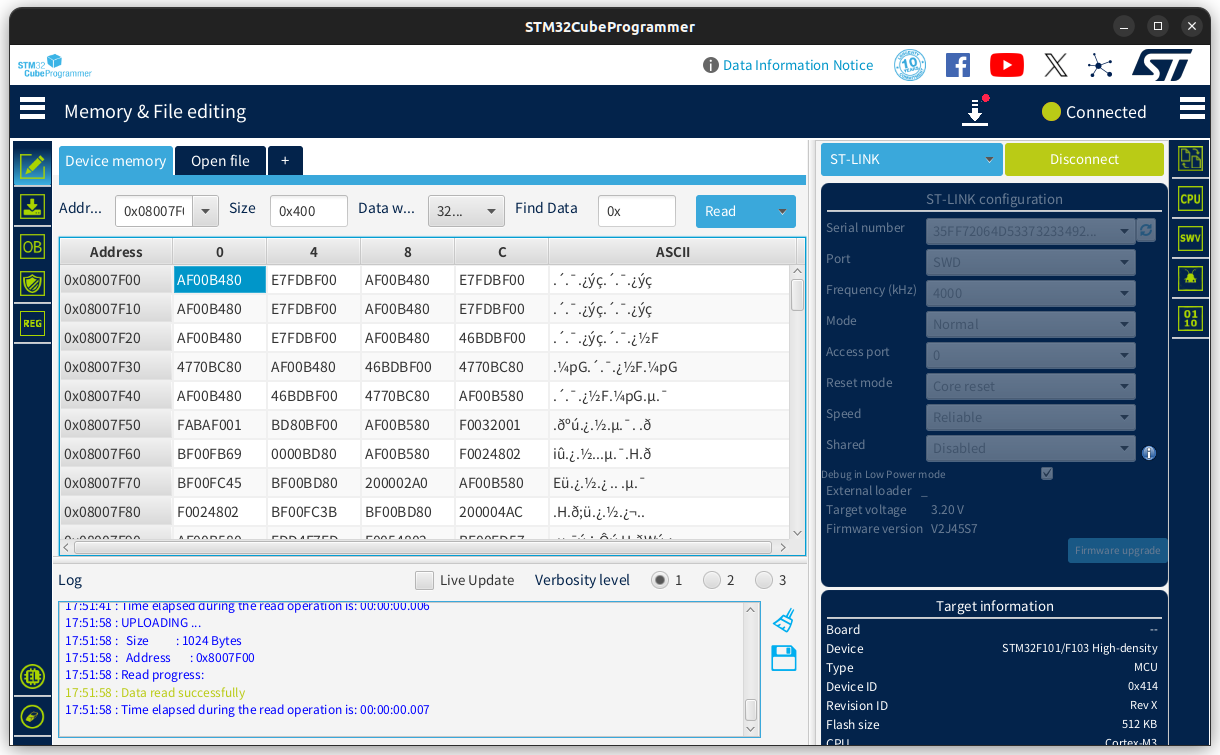
플래시를 읽어보면 

0x8000000 은 _estack 값 같고

0x8000004 는 Reset_Handler의 주소 같다. 그런데 왜 1로 끝나지..? 4바이트 정렬 안하나?


근처에 읽어보면 모르겠...다(!)


NMI_Handler로 보는데 0x0800 7F01 인데 왜 1로 끝나냐도 모르겠고, 본다고 기계어가 어셈으로 눈에 들어오는것도 아니고..

[링크 : https://fuhehe.tistory.com/13]


벡터위치 변경하는 것을 요약하면 


1. 링커스크립트에서 인터럽트벡터가 있는 .isr_vector 섹션의 위치를 수정

2. SystemInit() 함수에서 SCB->VTOR 레지스터를 변경하고자 하는 섹션의 위치로 수정

[링크 : https://m.blog.naver.com/chcbaram/222580261732]


암튼 object는 굳이 표현하면 array 나 variable 이라는데

딱히 pointer라는 개념이.. 어셈에 없을리가 없는데 멀까.

For ELF targets, the .type directive is used like this:

.type name , type description
This sets the type of symbol name to be either a function symbol or an object symbol. There are five different syntaxes supported for the type description field, in order to provide compatibility with various other assemblers.

Because some of the characters used in these syntaxes (such as ‘@’ and ‘#’) are comment characters for some architectures, some of the syntaxes below do not work on all architectures. The first variant will be accepted by the GNU assembler on all architectures so that variant should be used for maximum portability, if you do not need to assemble your code with other assemblers.

The syntaxes supported are:

  .type <name> STT_<TYPE_IN_UPPER_CASE>
  .type <name>,#<type>
  .type <name>,@<type>
  .type <name>,%<type>
  .type <name>,"<type>"
The types supported are:

STT_FUNC
function
Mark the symbol as being a function name.

STT_GNU_IFUNC
gnu_indirect_function
Mark the symbol as an indirect function when evaluated during reloc processing. (This is only supported on assemblers targeting GNU systems).

STT_OBJECT
object
Mark the symbol as being a data object.

[링크 : https://sourceware.org/binutils/docs/as/Type.html?utm_source=chatgpt.com]


The .type directive allows you to tell the assembler what type a symbol is. Most of the time we just use %function and %object.

                    .type               hexTable,%object

...or...

                    .type               qsort,%function

[링크 : https://developer.arm.com/community/arm-community-blogs/b/architectures-and-processors-blog/posts/useful-assembler-directives-and-macros-for-the-gnu-assembler]

[링크 : https://stackoverflow.com/questions/70061418/what-does-the-object-and-object-mean-in-this-inline-assembly?utm_source=chatgpt.com]

Posted by 구차니
embeded/Cortex-M3 STM2026. 1. 27. 11:35

USB 에서 장치를 다시 인식시키려면, D+ 라인을 풀다운 해주어야 한다고 한다.

그래서 reset 누르고 재기동 하면 ACM이 살아는 있지만 정상적으로 작동을 하지 않는건가?

If you reset the bluepill you need to pull down the D+ line for several milliseconds to let know the host that it has to start the enumeration process.

[링크 : https://stackoverflow.com/questions/54939948/stm32-usb-cdc-after-hardware-reset]


USB_DEVICE/App/usb_device.c 에 있는 MX_USB_DEVICE_Init() 을 아래와 같이 추가해준다.

그러면 일정 시간 이후에 다시 붙으면서 /dev/ttyACM0로 데이터가 출력된다.

void MX_USB_DEVICE_Init(void)
{
  /* USER CODE BEGIN USB_DEVICE_Init_PreTreatment */

  /* Rendering hardware reset harmless (no need to replug USB cable): */
  GPIO_InitTypeDef GPIO_InitStruct = {0};

  /* GPIO Ports Clock Enable */
  __HAL_RCC_GPIOA_CLK_ENABLE();

  /*Configure GPIO pin Output Level */
  HAL_GPIO_WritePin(GPIOA, GPIO_PIN_12, GPIO_PIN_RESET);

  /*Configure GPIO pin : PA12, a.k.a. USB_DP */
  GPIO_InitStruct.Pin = GPIO_PIN_12;
  GPIO_InitStruct.Mode = GPIO_MODE_OUTPUT_PP;
  GPIO_InitStruct.Pull = GPIO_NOPULL;
  GPIO_InitStruct.Speed = GPIO_SPEED_FREQ_LOW;
  HAL_GPIO_Init(GPIOA, &GPIO_InitStruct);

  HAL_Delay(5);
  /* Hardware reset rendered harmless! */

  /* USER CODE END USB_DEVICE_Init_PreTreatment */
  ...
}

[링크 : https://stackoverflow.com/questions/54939948/stm32-usb-cdc-after-hardware-reset]

'embeded > Cortex-M3 STM' 카테고리의 다른 글

stm32 hal rcc flag  (0) 2026.01.27
stm32 ivt  (0) 2026.01.27
stm32cubeide 2.0 에서 ioc 파일이 생성 안되네?  (0) 2026.01.11
stm32cubeide에 x-cube-ai 설치  (0) 2026.01.06
stm32f103c9t6(bluepill) + stlinkv2 + cdc(vcp)  (0) 2026.01.05
Posted by 구차니
embeded/Cortex-M3 STM2026. 1. 11. 16:03

프로젝트 생성해서 좀 가지고 놀려고 하는데, 어... ioc파일이 없다? 


그래서 new.. 눌러서 생성가능한걸 보니

stm32 관련해서 많이 사라진 느낌이 든다.


검색해보니, cubeide 2.0 되면서 cubeMX 통합이 풀린 최초의 버전이 되었다는데

[링크 : https://community.st.com/t5/stm32cubeide-mcus/cubeide-2-0-does-not-open-ioc-files/td-p/857295]


전반적으로 다들 분노에 찬 상황 ㅋㅋㅋ

느린(?) eclipse 사용을 감수하는 이유가 cubeMX 설치없이 cubeIDE 에서 다 할 수 있어서 였는데

그 장점을 포기한 분리라.. 왜 이런 쓰레기 결정이 통과된거지?

We are pleased to announce that STM32CubeIDE 2.0.0 release is available.
STM32CubeIDE is now independent from STM32CubeMX.
With this release, device configuration, previously handled within STM32CubeIDE via STM32CubeMX, is now exclusively available through the stand-alone STM32CubeMX tool.
Users will configure microcontroller peripherals and generate initialization code separately in STM32CubeMX, then import the generated projects into STM32CubeIDE for coding and debugging.  
STM32CubeIDE, is now a stand-alone tool, offers the possibility to create empty project through its own MCU/Board selectors now present inside.
What does this change mean for developers? 
  • Separate download and installation: STM32CubeMX is no more integrated in STM32CubeIDE, requiring separate download alongside STM32CubeIDE 2.0.0 for configuration and code generation. 
  • Tool update flexibility: Developers can update and freeze STM32CubeMX and STM32CubeIDE independently, with multiple versions of each installed side-by-side. 
  • Memory footprint and performance: Removing STM32CubeMX integration reduces installation size (~3.7GB to 2.9GB) and lowers CPU/RAM usage, improving stability especially on Linux and Mac. 
Other relevant updates in STM32CubeIDE 2.0.0 
  • Microcontroller, microprocessor, and board lists aligned with STM32CubeMX v6.16.0:
    • Added the support for new microcontrollers in the STM32N6 series
    • Added the support for new microcontrollers in the STM32H5 series
    • Added the support for new microcontrollers in the STM32WBA series
    • Added the support for new microcontrollers in the STM32WL3x product line
    • Added the support for new boards: NUCLEO-WL3RKB1 and NUCLEO-WL3RKB2
  • User authentication removed
  • ST-MCU-FINDER-PC removed
  • Support for ST-ARM-CLANG, STMicroelectronics LLVM-based toolchain for Arm®, through site update mechanism
  • Support for GCC 14 toolchain through site update mechanism
  • Support for semihosting feature through debug via ST-LINK GDB server
  • Support for bundled CMake/Ninja binaries
Main fixed issues in 2.0.0:
Refer to the STM32 microcontroller wiki at:
https://wiki.st.com/stm32mcu/wiki/STM32CubeIDE:STM32CubeIDE_errata_2.0.x
Known problems and limitations in 2.0.0:
Refer to the STM32 microcontroller wiki at:
https://wiki.st.com/stm32mcu/wiki/STM32CubeIDE:STM32CubeIDE_errata_2.0.x
How to get STM32CubeIDE 2.0.0:
  • Under this Link 
  • Or update your current installation of STM32CubeIDE using: Help > Check for updates (The in-tool update does not allow updating the drivers and STLINK server tool. Full installation is required for this to be done).

[링크 : https://community.st.com/t5/stm32cubeide-mcus/stm32cubeide-2-0-0-released/td-p/857110#:~:text=With%20this%20release%2C%20device%20configuration%2C%20previously%20handled%20within%C2%A0STM32CubeIDE%C2%A0via%C2%A0STM32CubeMX%2C%20is%20now%20exclusively%20available%20through%20the%20stand%2Dalone%C2%A0STM32CubeMX%C2%A0tool.]


현재로선 1.19로 돌아가는게 방법일듯.

Posted by 구차니
embeded/Cortex-M3 STM2026. 1. 6. 11:44

cubeide의 help에서 manage embedded software packages로 접근하거나


ioc 파일 열고 software packs - manage software packs로 접근하면 된다.

깔긴했는데 어떻게 띄우지 -ㅁ-?

Posted by 구차니
embeded/Cortex-M3 STM2026. 1. 5. 16:51

대~~충 프로젝트 하나 파고 외부 8MHz로 해서 PLL 사용해 USB에는 48MHz를 넣어준다.


USB Fast Speed 를 지원하도록 하고 CDC(VCP) 를 지원하도록 하면


PA11 / PA12에 USB_DP / USB_DM 이라고 표기된다.

그런데.. D는 D+ 니까 Positive 같은데 왜 D-는 DM이지? negative DN 이어야 하지 않나?

(ai 답변. data minus.. -_-)


아무튼 미들웨어 추가하면, 미들웨어와 USB_DEVICE 라는 디렉토리가 추가된다.


함수 쓰는건 귀찮으니 대충 끌어옴.

int main(void)
{

/* USER CODE BEGIN 1 */
#define BUF_SIZE 30
uint8_t usb_buf[BUF_SIZE];
uint32_t count = 0;
/* USER CODE END 1 */

/* MCU Configuration--------------------------------------------------------*/

/* Reset of all peripherals, Initializes the Flash interface and the Systick. */
HAL_Init();

/* USER CODE BEGIN Init */

/* USER CODE END Init */

/* Configure the system clock */
SystemClock_Config();

/* USER CODE BEGIN SysInit */

/* USER CODE END SysInit */

/* Initialize all configured peripherals */
MX_GPIO_Init();
MX_USB_DEVICE_Init();
/* USER CODE BEGIN 2 */

/* USER CODE END 2 */

/* Infinite loop */
/* USER CODE BEGIN WHILE */
while (1)
{
sprintf((char*)usb_buf, "USB CDC TEST %ld\r\n", count);
CDC_Transmit_FS(usb_buf, BUF_SIZE);
HAL_Delay(1000);
memset(usb_buf,0,BUF_SIZE);
count++;

/* USER CODE END WHILE */

/* USER CODE BEGIN 3 */
}
/* USER CODE END 3 */
}

[링크 : https://eteo.tistory.com/194]


꽂으니 아래처럼 인식한다.

$ sudo demsg -w
[25664.443438] usb 1-2: new full-speed USB device number 26 using xhci_hcd
[25664.574720] usb 1-2: New USB device found, idVendor=0483, idProduct=5740, bcdDevice= 2.00
[25664.574741] usb 1-2: New USB device strings: Mfr=1, Product=2, SerialNumber=3
[25664.574748] usb 1-2: Product: STM32 Virtual ComPort
[25664.574754] usb 1-2: Manufacturer: STMicroelectronics
[25664.579419] cdc_acm 1-2:1.0: ttyACM0: USB ACM device


$ lsusb -t -v
/:  Bus 01.Port 1: Dev 1, Class=root_hub, Driver=xhci_hcd/12p, 480M
    ID 1d6b:0002 Linux Foundation 2.0 root hub
    |__ Port 2: Dev 26, If 0, Class=Communications, Driver=cdc_acm, 12M
        ID 0483:5740 STMicroelectronics Virtual COM Port
    |__ Port 2: Dev 26, If 1, Class=CDC Data, Driver=cdc_acm, 12M
        ID 0483:5740 STMicroelectronics Virtual COM Port

minicom은 9600으로 하던 115200 으로 하던 동일하게 값이 잘 들어온다. 신기하네

다만 많은 데이터가 있을때는 어떻게 될 진 미지수. 나중에 테스트 해봐야지


1회 굽기는 되는데 그 이후로 rebooting이 안될 때

step 1. reset 누르고 connect 누르고 reset 뗀다음 full chip erase


step 2. cubeide에서 swd 핀 할당해주기


"no debug" 로 두면 PA13/PA14가 주황색으로 되는데, 그러면 계속 retry 뜨니까 Serial Wire로 변경해준다.(SWO)

이건 실패시


STMicroelectronics ST-LINK GDB server. Version 7.8.0
Copyright (c) 2024, STMicroelectronics. All rights reserved.

Starting server with the following options:
        Persistent Mode            : Disabled
        Logging Level              : 1
        Listen Port Number         : 61234
        Status Refresh Delay       : 15s
        Verbose Mode               : Disabled
        SWD Debug                  : Enabled

Waiting for debugger connection...
Debugger connected
Waiting for debugger connection...
Debugger connected
Waiting for debugger connection...
      -------------------------------------------------------------------
                        STM32CubeProgrammer v2.17.0                  
      -------------------------------------------------------------------


Log output file:   /tmp/STM32CubeProgrammer_RFILwX.log
ST-LINK SN  : 31000D000D2D343632525544
ST-LINK FW  : V2J45S7
Board       : --
Voltage     : 3.21V
SWD freq    : 4000 KHz
Connect mode: Under Reset
Reset mode  : Hardware reset
Device ID   : 0x410
Revision ID : Rev X
Device name : STM32F101/F102/F103 Medium-density
Flash size  : 128 KBytes
Device type : MCU
Device CPU  : Cortex-M3
BL Version  : --


Memory Programming ...
Opening and parsing file: ST-LINK_GDB_server_byIESj.srec
  File          : ST-LINK_GDB_server_byIESj.srec
  Size          : 31.65 KB 
  Address       : 0x08000000 


Erasing memory corresponding to segment 0:
Erasing internal memory sectors [0 31]
Download in Progress:


File download complete
Time elapsed during download operation: 00:00:01.365


Verifying ...


Download verified successfully 


Shutting down...
Target is not responding, retrying...


이건 설정해주고 잘 될 때

STMicroelectronics ST-LINK GDB server. Version 7.8.0
Copyright (c) 2024, STMicroelectronics. All rights reserved.

Starting server with the following options:
        Persistent Mode            : Disabled
        Logging Level              : 1
        Listen Port Number         : 61234
        Status Refresh Delay       : 15s
        Verbose Mode               : Disabled
        SWD Debug                  : Enabled

Waiting for debugger connection...
Debugger connected
Waiting for debugger connection...
Debugger connected
Waiting for debugger connection...
      -------------------------------------------------------------------
                        STM32CubeProgrammer v2.17.0                  
      -------------------------------------------------------------------


Log output file:   /tmp/STM32CubeProgrammer_0DypHa.log
ST-LINK SN  : 31000D000D2D343632525544
ST-LINK FW  : V2J45S7
Board       : --
Voltage     : 3.21V
SWD freq    : 4000 KHz
Connect mode: Under Reset
Reset mode  : Hardware reset
Device ID   : 0x410
Revision ID : Rev X
Device name : STM32F101/F102/F103 Medium-density
Flash size  : 128 KBytes
Device type : MCU
Device CPU  : Cortex-M3
BL Version  : --


Memory Programming ...
Opening and parsing file: ST-LINK_GDB_server_a2ozrR.srec
  File          : ST-LINK_GDB_server_a2ozrR.srec
  Size          : 31.65 KB 
  Address       : 0x08000000 


Erasing memory corresponding to segment 0:
Erasing internal memory sectors [0 31]
Download in Progress:


File download complete
Time elapsed during download operation: 00:00:01.371


Verifying ...


Download verified successfully 


Shutting down...
Exit.

[링크 : https://blog.naver.com/crucian2k3/221533654464]


stlink/v2 에서는 3v3 핀을 제거하고 usb를 연결해주면 깔끔하게 전원이랑 문제없이 연결된다.


+

2026.01.06

되긴한데.. 먼가 잘되진 않는 느낌. 소스코드 하나 붙여넣고 그러면 정상적으로 나오지 않고

usb 연결한채로 프로그램을 다시 구으면 usb 뽑았다 꽂기 전에는 재기동이 정상적으로 이루어지지 않는다.

클럭을 올려도 (72MHz) 안되는걸 보면 다른게 문제인데... 멀까?

// main.c
void USB_CDC_RxHandler(uint8_t* Buf, uint32_t Len)
{
  for(int idx = 0; idx < Len;idx++)
  if(Buf[idx] == 0x0D) Buf[idx] = 0x0A;
CDC_Transmit_FS(Buf, Len);
}

// usbd_cdc_if.c
static int8_t CDC_Receive_FS(uint8_t* Buf, uint32_t *Len)
{
  /* USER CODE BEGIN 6 */
  USBD_CDC_SetRxBuffer(&hUsbDeviceFS, &Buf[0]);
  USBD_CDC_ReceivePacket(&hUsbDeviceFS);

  USB_CDC_RxHandler(UserRxBufferFS, *Len);
  memset(UserRxBufferFS, '\0', *Len);

  return (USBD_OK);
  /* USER CODE END 6 */
}


[링크 : https://deepbluembedded.com/stm32-usb-cdc-virtual-com-port-vcp-examples/#stm32-usb-cdc-transmit-example]

Posted by 구차니
embeded/Cortex-M3 STM2026. 1. 5. 14:25

PA1이 high로 되어있어야 한다는데

D+가  high로 되어있어야지 usb로 인식되려나?

[링크 : https://jeonhj.tistory.com/29]


그래서 stm32f103c8t6 blue pill 회로도 찾아보니 d+ 라인에 5v pull up이 걸려있다.

내가 가진건 정확한 모델을 알 수 없는 클론이라 머.. 이대로 되어있을거라고 생각해도 되려나?

[링크 : https://stm32-base.org/assets/pdf/boards/original-schematic-STM32F103C8T6-Blue_Pill.pdf]


Full speed 에서는 D+에 1.5k 의 pull up을

Low speed 에서는 D-에 1.5k 의 pull down을 규격으로 내세우고 있다.

[링크 : https://wcours.gel.ulaval.ca/GIF1001/old/h20/docs/USB_20.pdf]

[링크 : https://www.varofla.com/8c2ccda5-dc69-47a7-bd69-dd90aa64e5b1]

'embeded > Cortex-M3 STM' 카테고리의 다른 글

stm32cubeide에 x-cube-ai 설치  (0) 2026.01.06
stm32f103c9t6(bluepill) + stlinkv2 + cdc(vcp)  (0) 2026.01.05
bluepill 보드를 stlink v2로 만들기  (0) 2025.12.16
stm32f103ret crc  (0) 2025.12.09
stm32f103ret middleware - usb  (0) 2025.12.09
Posted by 구차니
embeded/Cortex-M3 STM2025. 12. 16. 16:10

discovery 보드에서 jtag 부분에 stm32f103c8t6을 사용하고 있길래

[링크 : https://www.st.com/en/evaluation-tools/b-l072z-lrwan1.html]


저번에 구매했던 bluepill 보드를 어떻게 하면 jtag으로 개조할 수 있을까 하고 찾아보는데..

합법적이고 공식적인 방법은 없는듯.

[링크 : https://blog.naver.com/chandong83/222586172793]


[링크 : https://www.st.com/en/development-tools/stsw-link007.html] << 펌웨어 업로더

[링크 : https://www.st.com/en/development-tools/stsw-link004.html] << 펌웨어 업로더

[링크 : https://github.com/Krakenw/Stlink-Bootloaders] << 누군가 덤프해둔 stlink 펌웨어


This Firmware is not open source. But it may be delivered in a few cases after request to an FAE or a marketing agent.

[링크 : https://community.st.com/t5/stm32-mcus-boards-and-hardware/st-link-source-code/td-p/711010]


반대로.. jtag을 싸게 팔면 그걸 사서 bluepill 처럼 써버리는것도 방법이려나?

'embeded > Cortex-M3 STM' 카테고리의 다른 글

stm32f103c9t6(bluepill) + stlinkv2 + cdc(vcp)  (0) 2026.01.05
stm32f103 bluepill 회로도, usb 풀업  (1) 2026.01.05
stm32f103ret crc  (0) 2025.12.09
stm32f103ret middleware - usb  (0) 2025.12.09
stm32f103ret connectivity - usb  (0) 2025.12.09
Posted by 구차니
embeded/Cortex-M3 STM2025. 12. 9. 23:03

하드웨어로 구현된거라 소프트웨어로 루프돌리는것 보다 빠르다는게 장점인데 대충(?) 60배 빠르다고 한다.

[링크 : https://www.st.com/resource/en/application_note/an4187-using-the-crc-peripheral-on-stm32-microcontrollers-stmicroelectronics.pdf]


hcrc 라는 핸들이 선언되어 있고

HAL_CRC_Calcuate() 함수를 이용해서 바로 리턴을 받는 구조인 듯.

/* Private variables ---------------------------------------------------------*/
CRC_HandleTypeDef hcrc;

uint32_t HAL_CRC_Calculate(CRC_HandleTypeDef *hcrc, uint32_t pBuffer[], uint32_t BufferLength)
{
  uint32_t index;      /* CRC input data buffer index */
  uint32_t temp = 0U;  /* CRC output (read from hcrc->Instance->DR register) */

  /* Change CRC peripheral state */
  hcrc->State = HAL_CRC_STATE_BUSY;

  /* Reset CRC Calculation Unit (hcrc->Instance->INIT is
  *  written in hcrc->Instance->DR) */
  __HAL_CRC_DR_RESET(hcrc);

  /* Enter 32-bit input data to the CRC calculator */
  for (index = 0U; index < BufferLength; index++)
  {
    hcrc->Instance->DR = pBuffer[index];
  }
  temp = hcrc->Instance->DR;

  /* Change CRC peripheral state */
  hcrc->State = HAL_CRC_STATE_READY;

  /* Return the CRC computed value */
  return temp;
}

[링크 : https://cpattern.tistory.com/218]

[링크 : https://m.blog.naver.com/sheld2/222346016827] crc32 와 동일하게 나오게 하려면 수정 필요

[링크 : https://blog.naver.com/eziya76/221507312819]


[링크 : https://community.st.com/t5/stm32-mcus/crc-computation-in-stm32-mcus-and-post-build-creation/ta-p/49710]


CRC calculation unit, 96-bit unique ID

2.3.3 CRC (cyclic redundancy check) calculation unit
The CRC (cyclic redundancy check) calculation unit is used to get a CRC code from a 32-bit data word and a fixed generator polynomial.
Among other applications, CRC-based techniques are used to verify data transmission or storage integrity. In the scope of the EN/IEC 60335-1 standard, they offer a means of verifying the Flash memory integrity. The CRC calculation unit helps compute a signature of the software during runtime, to be compared with a reference signature generated at linktime and stored at a given memory location.

[링크 : https://www.st.com/resource/en/datasheet/stm32f103rc.pdf]

'embeded > Cortex-M3 STM' 카테고리의 다른 글

stm32f103 bluepill 회로도, usb 풀업  (1) 2026.01.05
bluepill 보드를 stlink v2로 만들기  (0) 2025.12.16
stm32f103ret middleware - usb  (0) 2025.12.09
stm32f103ret connectivity - usb  (0) 2025.12.09
STSW-STM32084 / usb demo  (0) 2025.12.09
Posted by 구차니
embeded/Cortex-M3 STM2025. 12. 9. 17:02

쭈욱 눌러보는데 저 FS가 Full Speed(12Mbps) 였군..

아무튼 지원가능한 클래스는 6가지이다. DFU로도 쓰면서 HID로 쓰고.. 이런식의 구성은 안될 것 같다.


Audio Deivce Class


샘플링 주파수는 250 ~ 48000 sample/s  이 가능하다. 내장  ADC를 어떻게 잘(?) 굴리면 48k 까지 가능하려나?


Communication Device Class (Virtual Port)

그래도 가상 com port인데 baudrate이 없네?


Download Firmware Update Class (DFU)

펍웨어 업로드 할때 쓰기 좋은 DFU 클래스.

USBD_DFU_MEDIA interface 는 무슨 의미이려나? Kg 써있으니 몸무게 같네

@Internal Flash   /0x08000000/03*016Ka,01*016Kg,01*064Kg,07*128Kg,04*016Kg,01*064Kg,07*128Kg


Human Interface Device Class (HID)

가상 키보드, 마우스, 조이스틱 만들기 좋은 HID 클래스


Custom Human Interface Device Class

HID랑 머가 다르려나? class parameter에 IN ENDPOINT, OUT ENDPOINT가 추가 되긴하는데..

송수신이 가능한 HID인가?


Mass Storage Class

microSD hat 붙이면 SD 플래시 메모리 만들수 있겠군


'embeded > Cortex-M3 STM' 카테고리의 다른 글

bluepill 보드를 stlink v2로 만들기  (0) 2025.12.16
stm32f103ret crc  (0) 2025.12.09
stm32f103ret connectivity - usb  (0) 2025.12.09
STSW-STM32084 / usb demo  (0) 2025.12.09
stlink v2 클론 도착!  (0) 2025.11.26
Posted by 구차니
embeded/Cortex-M3 STM2025. 12. 9. 16:45

23새 프로젝트 생성해서 이것저것 눌러보고 있는 중인데 USB는 무조건 48MHz가 들어가야 하나보다.


그 와중에 APB1 클럭은 10~36Mhz는 들어가야 하는 제약이라니


그 와중에  PLL source는 HSE만 허용한다고.. 왜 활성화 안되냐고!


먼가 꼬였었는지 RCC 설정이 없었는데 다시 ioc 파일 열고 외부 클럭 하니 이제야 된다.

USB를 쓰려면 PLL 클럭이 있어야 하고 그러려면 외부 클럭이 있어야 한다.


USB FS 활성화 하니 PA11 / PA12 가 설정된다.


Full Speed 12MB/s 만 선택지에 있고(USB FS - Full Speed)

Link Power Management를 활성화 하려면 Low Power를 Enable 해주어야 한다.

Battery Charging은 멀 하던 Enable 할 수 없네


NVIC Settings 제외하면 딱히 설정할 내용이 없긴한다.


'embeded > Cortex-M3 STM' 카테고리의 다른 글

stm32f103ret crc  (0) 2025.12.09
stm32f103ret middleware - usb  (0) 2025.12.09
STSW-STM32084 / usb demo  (0) 2025.12.09
stlink v2 클론 도착!  (0) 2025.11.26
stm32 cubeide git commit hash  (0) 2025.11.24
Posted by 구차니