'2026/09'에 해당되는 글 82건

  1. 2026.09.24 diffusion gemma 실행해보기
  2. 2026.09.23 diffusion gemma
  3. 2026.09.23 직접만든 LLM .. part 2
  4. 2026.09.23 max7219 8-Digit LED Display Drivers
  5. 2026.09.23 ws2812b vs hub75
  6. 2026.09.23 네오픽셀 ws2812b-64 작동
  7. 2026.09.22 wikimatrix
  8. 2026.09.22 직접 LLM 만들...기?
  9. 2026.09.22 llama-tokenize
  10. 2026.09.22 llama-cli /clear

음.. 가장 최신은 아니지만

b11158 를 받아서 빌드된걸 보니 llama-diffusion-cli가 없다.

/mnt/Downloads/llama-b11158$ ./llama-
llama-batched-bench  llama-gemma3-cli     llama-mtmd-cli       llama-results
llama-bench          llama-gguf-split     llama-mtmd-debug     llama-server
llama-cli            llama-imatrix        llama-perplexity     llama-tokenize
llama-completion     llama-llava-cli      llama-quantize       llama-tts
llama-fit-params     llama-minicpmv-cli   llama-qwen2vl-cli


그래서 빌드해둔거 보니까 있네? 머지?

:/mnt/Downloads/llama.cpp/build/bin$ ./llama
llama                          llama-lookup
llama-batched                  llama-lookup-create
llama-batched-bench            llama-lookup-merge
llama-bench                    llama-lookup-stats
llama-cli                      llama-minicpmv-cli
llama-completion               llama-mtmd-cli
llama-convert-llama2c-to-ggml  llama-mtmd-debug
llama-cvector-generator        llama-parallel
llama-debug                    llama-passkey
llama-diffusion-cli            llama-perplexity
llama-embedding                llama-q8dot
llama-eval-callback            llama-quantize
llama-export-lora              llama-qwen2vl-cli
llama-finetune                 llama-results
llama-fit-params               llama-retrieval
llama-gemma3-cli               llama-server
llama-gen-docs                 llama-simple
llama-gguf                     llama-simple-chat
llama-gguf-hash                llama-speculative
llama-gguf-split               llama-speculative-simple
llama-idle                     llama-tokenize
llama-imatrix                  llama-tts
llama-llava-cli                llama-vdot
llama-lookahead


용량 자체는 동일 양자화면 차이가 거의 나지 않는다.

diffusiongemma-26B-A4B-it-Q4_K_M.gguf 16.8 GB

[링크 : https://huggingface.co/unsloth/diffusiongemma-26B-A4B-it-GGUF]


gemma-4-26B-A4B-it-UD-Q4_K_M.gguf 16.9 GB

[링크 : https://huggingface.co/unsloth/gemma-4-26B-A4B-it-GGUF]


근데 실행이 안된다?

/mnt/Downloads/model/dgemma4-26b$ /mnt/Downloads/llama.cpp/build/bin/llama-diffusion-cli -m ./diffusiongemma-26B-A4B-it-Q4_K_M.gguf

0.00.283.015 E llama_model_load: error loading model: unknown model architecture: 'diffusion-gemma'
0.00.283.023 E llama_model_load_from_file_impl: failed to load model
0.00.283.024 E error: failed to load model './diffusiongemma-26B-A4B-it-Q4_K_M.gguf'


으음? 봐도 모르겠다!?

/mnt/Downloads/model/dgemma4-26b$ /mnt/Downloads/llama.cpp/build/bin/llama-diffusion-cli -m ./diffusiongemma-26B-A4B-it-Q4_K_M.gguf -v
0.00.112.071 I llama_model_loader: loaded meta data with 44 key-value pairs and 692 tensors from ./diffusiongemma-26B-A4B-it-Q4_K_M.gguf (version GGUF V3 (latest))
0.00.112.117 I llama_model_loader: Dumping metadata keys/values. Note: KV overrides do not apply in this output.
0.00.112.125 I llama_model_loader: - kv   0:                       general.architecture str              = diffusion-gemma
0.00.112.126 I llama_model_loader: - kv   1:                               general.type str              = model
0.00.112.126 I llama_model_loader: - kv   2:                               general.name str              = Dg_Rc0P1_Patched
0.00.112.127 I llama_model_loader: - kv   3:                         general.size_label str              = 128x2.6B
0.00.112.130 I llama_model_loader: - kv   4:                diffusion-gemma.block_count u32              = 30
0.00.112.131 I llama_model_loader: - kv   5:             diffusion-gemma.context_length u32              = 262144
0.00.112.131 I llama_model_loader: - kv   6:           diffusion-gemma.embedding_length u32              = 2816
0.00.112.132 I llama_model_loader: - kv   7:        diffusion-gemma.feed_forward_length u32              = 2112
0.00.112.132 I llama_model_loader: - kv   8:       diffusion-gemma.attention.head_count u32              = 16
0.00.112.147 I llama_model_loader: - kv   9:    diffusion-gemma.attention.head_count_kv arr[i32,30]      = [8, 8, 8, 8, 8, 2, 8, 8, 8, 8, 8, 2, ...
0.00.112.151 I llama_model_loader: - kv  10:             diffusion-gemma.rope.freq_base f32              = 1000000.000000
0.00.112.152 I llama_model_loader: - kv  11:         diffusion-gemma.rope.freq_base_swa f32              = 10000.000000
0.00.112.153 I llama_model_loader: - kv  12: diffusion-gemma.attention.layer_norm_rms_epsilon f32              = 0.000001
0.00.112.153 I llama_model_loader: - kv  13:               diffusion-gemma.expert_count u32              = 128
0.00.112.154 I llama_model_loader: - kv  14:          diffusion-gemma.expert_used_count u32              = 8
0.00.112.155 I llama_model_loader: - kv  15:       diffusion-gemma.attention.key_length u32              = 512
0.00.112.155 I llama_model_loader: - kv  16:     diffusion-gemma.attention.value_length u32              = 512
0.00.112.156 I llama_model_loader: - kv  17:    diffusion-gemma.final_logit_softcapping f32              = 30.000000
0.00.112.157 I llama_model_loader: - kv  18:   diffusion-gemma.attention.sliding_window u32              = 1024
0.00.112.157 I llama_model_loader: - kv  19: diffusion-gemma.attention.shared_kv_layers u32              = 0
0.00.112.158 I llama_model_loader: - kv  20: diffusion-gemma.embedding_length_per_layer_input u32              = 0
0.00.112.161 I llama_model_loader: - kv  21: diffusion-gemma.attention.sliding_window_pattern arr[bool,30]     = [true, true, true, true, true, false,...
0.00.112.162 I llama_model_loader: - kv  22:   diffusion-gemma.attention.key_length_swa u32              = 256
0.00.112.162 I llama_model_loader: - kv  23: diffusion-gemma.attention.value_length_swa u32              = 256
0.00.112.163 I llama_model_loader: - kv  24: diffusion-gemma.expert_feed_forward_length u32              = 704
0.00.112.163 I llama_model_loader: - kv  25:       diffusion-gemma.rope.dimension_count u32              = 512
0.00.112.164 I llama_model_loader: - kv  26:   diffusion-gemma.rope.dimension_count_swa u32              = 256
0.00.112.164 I llama_model_loader: - kv  27:           diffusion-gemma.attention.causal bool             = false
0.00.112.165 I llama_model_loader: - kv  28:                    diffusion.canvas_length u32              = 256
0.00.112.165 I llama_model_loader: - kv  29:                       tokenizer.ggml.model str              = gemma4
0.00.144.043 I llama_model_loader: - kv  30:                      tokenizer.ggml.tokens arr[str,262144]  = ["<pad>", "<eos>", "<bos>", "<unk>", ...
0.00.216.722 I llama_model_loader: - kv  31:                      tokenizer.ggml.scores arr[f32,262144]  = [-1000.000000, -1000.000000, -1000.00...
0.00.223.967 I llama_model_loader: - kv  32:                  tokenizer.ggml.token_type arr[i32,262144]  = [3, 3, 3, 3, 3, 1, 1, 1, 1, 1, 1, 1, ...
0.00.278.765 I llama_model_loader: - kv  33:                      tokenizer.ggml.merges arr[str,514906]  = ["\n\n\n\n\n\n\n\n\n\n\n\n\n\n\n\n\n\n\n\n\n\n\n\n\n\n\n\n\n\n \n", ...
0.00.278.769 I llama_model_loader: - kv  34:                tokenizer.ggml.bos_token_id u32              = 2
0.00.278.769 I llama_model_loader: - kv  35:                tokenizer.ggml.eos_token_id u32              = 1
0.00.278.770 I llama_model_loader: - kv  36:            tokenizer.ggml.unknown_token_id u32              = 3
0.00.278.770 I llama_model_loader: - kv  37:            tokenizer.ggml.padding_token_id u32              = 0
0.00.278.786 I llama_model_loader: - kv  38:               tokenizer.ggml.mask_token_id u32              = 4
0.00.278.787 I llama_model_loader: - kv  39:            tokenizer.ggml.add_space_prefix bool             = false
0.00.278.787 I llama_model_loader: - kv  40:               tokenizer.ggml.add_bos_token bool             = true
0.00.278.788 I llama_model_loader: - kv  41:               general.quantization_version u32              = 2
0.00.278.789 I llama_model_loader: - kv  42:                          general.file_type u32              = 15
0.00.278.792 I llama_model_loader: - kv  43:                    tokenizer.chat_template str              = {%- macro format_parameters(propertie...
0.00.278.795 I llama_model_loader: - type  f32:  423 tensors
0.00.278.797 I llama_model_loader: - type q5_0:   33 tensors
0.00.278.798 I llama_model_loader: - type q8_0:   28 tensors
0.00.278.798 I llama_model_loader: - type q4_K:  194 tensors
0.00.278.798 I llama_model_loader: - type q6_K:   14 tensors
0.00.278.801 I print_info: file format = GGUF V3 (latest)
0.00.278.802 I print_info: file type   = Q4_K - Medium
0.00.278.805 I print_info: file size   = 15.64 GiB (5.32 BPW)
0.00.282.795 E llama_model_load: error loading model: unknown model architecture: 'diffusion-gemma'
0.00.282.802 E llama_model_load_from_file_impl: failed to load model
0.00.282.802 E error: failed to load model './diffusiongemma-26B-A4B-it-Q4_K_M.gguf'


모델 카드랑 claude에서 해보니

정식으로 gemma-diffusion은 llama.cpp에서 채택이 안되고 특정 커밋으로 가야 한다고 한다.

그래도 돌릴 수 있는게 어디냐~

git clone https://github.com/ggml-org/llama.cpp
cd llama.cpp

# check out the DiffusionGemma PR (#24423)
gh pr checkout 24423
# or, without the gh CLI:
# git fetch origin pull/24423/head:diffusiongemma && git checkout diffusiongemma

# build with CUDA (drop -DGGML_CUDA=ON for a CPU-only build)
cmake -B build -DGGML_CUDA=ON
cmake --build build -j --config Release --target llama-diffusion-cli

[링크 : https://huggingface.co/unsloth/diffusiongemma-26B-A4B-it-GGUF]


다시 보니 여기서도 diffusion model이라고 하지 gemma-diffusion이라고 하진 않았네

[링크 : https://github.com/ggml-org/llama.cpp/blob/master/examples/diffusion/README.md]


응 니꺼에서는 못돌려~

/mnt/Downloads/llama.cpp-dgemma/build/bin$ ./llama-diffusion-cli -m /mnt/Downloads/model/dgemma4-26b/diffusiongemma-26B-A4B-it-Q4_K_M.gguf -sm layer -ts 9,10\
>
0.00.773.112 W load: control-looking token:    212 '</s>' was not control-type; this is probably a bug in the model. its type will be overridden
0.00.773.902 W load: control-looking token:     50 '<|tool_response>' was not control-type; this is probably a bug in the model. its type will be overridden
0.00.816.334 W load: special_eog_ids contains '<|tool_response>', removing '</s>' token from EOG list
0.05.615.403 I diffusion: --fit has no effect here; context is sized from -n and the canvas. Set -ngl / --n-cpu-moe to control device memory.
0.05.620.890 W resolve_fused_ops: layer 5 is assigned to device CUDA0 but Flash Attention is assigned to device CPU (usually due to missing support)
0.05.620.893 W resolve_fused_ops: Flash Attention not supported, set to disabled
0.10.954.103 E ggml_backend_cuda_buffer_type_alloc_buffer: allocating 1343.01 MiB on device 0: cudaMalloc failed: out of memory
0.10.954.108 E ggml_gallocr_reserve_n_impl: failed to allocate CUDA0 buffer of size 1408245760
0.10.954.109 E graph_reserve: failed to allocate compute buffers
0.10.954.115 W sched_reserve: compute buffer allocation failed, retrying without pipeline parallelism
0.11.063.993 I diffusion_params: steps=128 schedule=0 algorithm=4 temperature=0.800 eps=0.001000 mask_token=4
0.11.064.183 I diffusion_eb: kv cache auto-off (2 GPUs; pass --diffusion-kv-cache on to force)
0.11.064.184 I diffusion_eb: gpu sampling off (2 GPUs; sc_dev is single-device)
0.11.064.184 I diffusion_eb: gpu sample reduce off (needs --diffusion-gpu-sampling on / sc_dev)
0.11.064.186 I diffusion_eb: max_steps=48 t=[0.400,0.800] entropy_bound=0.1000 stability=1 confidence=0.0050 kv_cache=off gpu_sampling=off sample_reduce=off
/mnt/Downloads/llama.cpp-dgemma/ggml/src/ggml-cuda/ggml-cuda.cu:109: CUDA error
0.11.340.213 E CUDA error: out of memory
0.11.340.217 E   current device: 0, in function alloc at /mnt/Downloads/llama.cpp-dgemma/ggml/src/ggml-cuda/ggml-cuda.cu:589
0.11.340.218 E   cuMemCreate(&handle, reserve_size, &prop, 0)
[New LWP 3338013]
[New LWP 3338014]
[New LWP 3338017]
[New LWP 3338018]
[New LWP 3338019]
[New LWP 3338020]
[Thread debugging using libthread_db enabled]
Using host libthread_db library "/lib/x86_64-linux-gnu/libthread_db.so.1".
0x00007e23920ea3ef in __GI___wait4 (pid=3338039, stat_loc=0x0, options=0, usage=0x0) at ../sysdeps/unix/sysv/linux/wait4.c:30
30      ../sysdeps/unix/sysv/linux/wait4.c: No such file or directory.
#0  0x00007e23920ea3ef in __GI___wait4 (pid=3338039, stat_loc=0x0, options=0, usage=0x0) at ../sysdeps/unix/sysv/linux/wait4.c:30
30      in ../sysdeps/unix/sysv/linux/wait4.c
#1  0x00007e2393183e3b in ggml_print_backtrace () from libggml-base.so.0
#2  0x00007e2393183fd2 in ggml_abort () from libggml-base.so.0
#3  0x00007e238b87ad46 in ggml_cuda_error(char const*, char const*, char const*, int, char const*) () from libggml-cuda.so.0
#4  0x00007e238b8928d3 in ggml_cuda_pool_vmm::alloc(unsigned long, unsigned long*) () from libggml-cuda.so.0
#5  0x00007e238b889fab in ggml_cuda_mul_mat_cublas(ggml_backend_cuda_context&, ggml_tensor const*, ggml_tensor const*, ggml_tensor*) () from libggml-cuda.so.0
#6  0x00007e238b88f849 in ggml_backend_cuda_graph_compute(ggml_backend*, ggml_cgraph*) () from libggml-cuda.so.0
#7  0x00007e23931a3d57 in ggml_backend_sched_graph_compute_async () from libggml-base.so.0
#8  0x00007e23929ec7b1 in llama_context::graph_compute(ggml_cgraph*, bool) () from libllama.so.0
#9  0x00007e23929eef65 in llama_context::process_ubatch(llama_ubatch const&, llm_graph_type, llama_memory_context_i*, ggml_status&) () from libllama.so.0
#10 0x00007e23929f6c6a in llama_context::encode(llama_batch const&) () from libllama.so.0
#11 0x00007e23929f90a0 in llama_decode () from libllama.so.0
#12 0x000057ed5b33e814 in diffusion_generate_entropy_bound(llama_context*, int const*, int*, int, diffusion_eb_params const&, int&) ()
#13 0x000057ed5b32f837 in main::{lambda(std::__cxx11::basic_string<char, std::char_traits<char>, std::allocator<char> > const&)#7}::operator()(std::__cxx11::basic_string<char, std::char_traits<char>, std::allocator<char> > const&) const ()
#14 0x000057ed5b32db9c in main ()
[Inferior 1 (process 3338011) detached]
Aborted (core dumped)


클로드 붙여서 어떻게든 돌려보려고 발악(!)

/mnt/Downloads/llama.cpp-dgemma/build/bin$ ./llama-diffusion-cli -m /mnt/Downloads/model/dgemma4-26b/diffusiongemma-26B-A4B-it-Q4_K_M.gguf   -ngl all -sm layer -ts 1,1 -ncmoe 6 -fit off -c 4096 -n 512 -p "Explain what a GPU is in two sentences."
0.00.784.683 W load: control-looking token:    212 '</s>' was not control-type; this is probably a bug in the model. its type will be overridden
0.00.785.427 W load: control-looking token:     50 '<|tool_response>' was not control-type; this is probably a bug in the model. its type will be overridden
0.00.828.578 W load: special_eog_ids contains '<|tool_response>', removing '</s>' token from EOG list
0.00.858.267 W llama_model_loader: tensor overrides to CPU are used with mmap enabled - consider using --load-mode none for better performance
0.05.288.187 I diffusion: -n 512 -> 2 blocks, n_ubatch=2560 n_batch=2560 n_ctx=4096 (canvas_length=256)
0.05.293.211 W resolve_fused_ops: layer 5 is assigned to device CUDA0 but Flash Attention is assigned to device CPU (usually due to missing support)
0.05.293.215 W resolve_fused_ops: Flash Attention not supported, set to disabled
0.10.920.964 I diffusion_params: steps=128 schedule=0 algorithm=4 temperature=0.800 eps=0.001000 mask_token=4
0.10.921.170 I diffusion_eb: kv cache auto-off (2 GPUs; pass --diffusion-kv-cache on to force)
0.10.921.172 I diffusion_eb: gpu sampling off (2 GPUs; sc_dev is single-device)
0.10.921.172 I diffusion_eb: gpu sample reduce off (needs --diffusion-gpu-sampling on / sc_dev)
0.10.921.174 I diffusion_eb: max_steps=48 t=[0.400,0.800] entropy_bound=0.1000 stability=1 confidence=0.0050 kv_cache=off gpu_sampling=off sample_reduce=off
diffusion step: 2/48 [==                                                ] 4%0.32.981.464 I I
diffusion step: 4/48 [====                                              ] 8%0.35.566.854 I
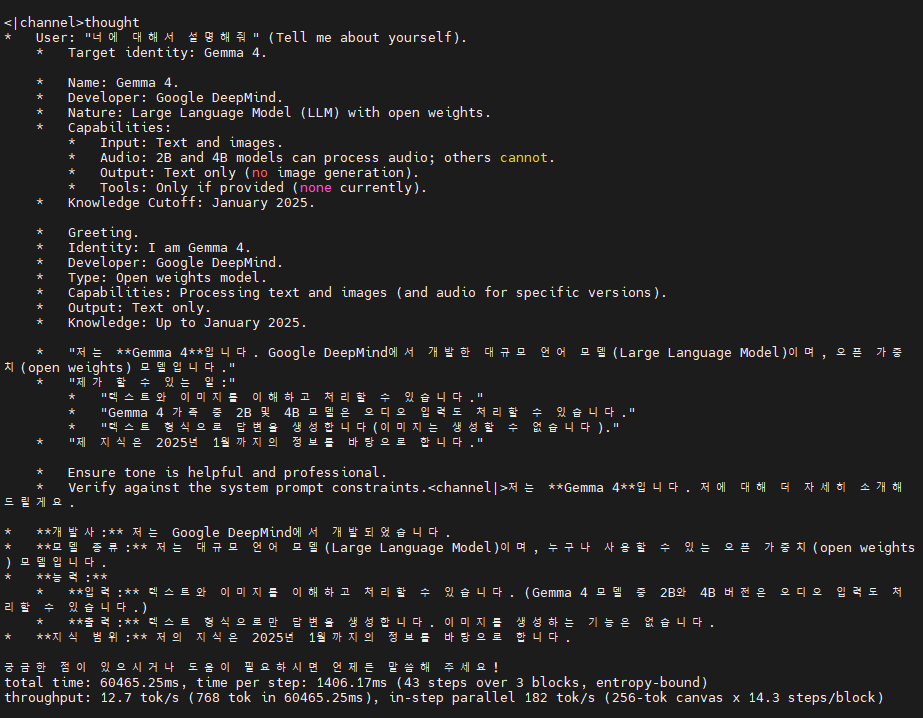
<|channel>thought
*   Topic: GPU (Graphics Processing Unit).
    *   Constraint: Exactly two sentences.
    *   Goal: Explain what it is.

    *   What is it? A specialized electronic circuit.
    *   What does it do? Handles image rendering, video, and parallel processing tasks.
    *   How does it differ from a CPU? Many cores optimized for speed.

    A GPU, or graphics processing unit, is a specialized processor designed to rapidly accelerate the creation and rendering of images for a display. Unlike a standard CPU, it uses many parallel cores to handle multiple complex tasks simultaneously, making it ideal for video editing and artificial intelligence.

    *   Sentence 1: A GPU is a specialized hardware processor designed to rapidly accelerate the creation and rendering of images and video.
    *   Sentence 2: Unlike a standard CPU, it uses many parallel cores to handle multiple complex tasks simultaneously, making it highly effective for gaming and artificial intelligence workloads.

    *   Two sentences? Yes.
    *   Accurate? Yes.<channel|>A GPU, or graphics processing unit, is a specialized hardware processor designed to rapidly accelerate the creation and rendering of images and video. Unlike a standard CPU, it uses many parallel cores to handle multiple complex tasks simultaneously, making it highly effective for gaming and artificial intelligence.
total time: 24659.24ms, time per step: 1072.14ms (23 steps over 2 blocks, entropy-bound)
throughput: 20.8 tok/s (512 tok in 24659.24ms), in-step parallel 239 tok/s (256-tok canvas x 11.5 steps/block)


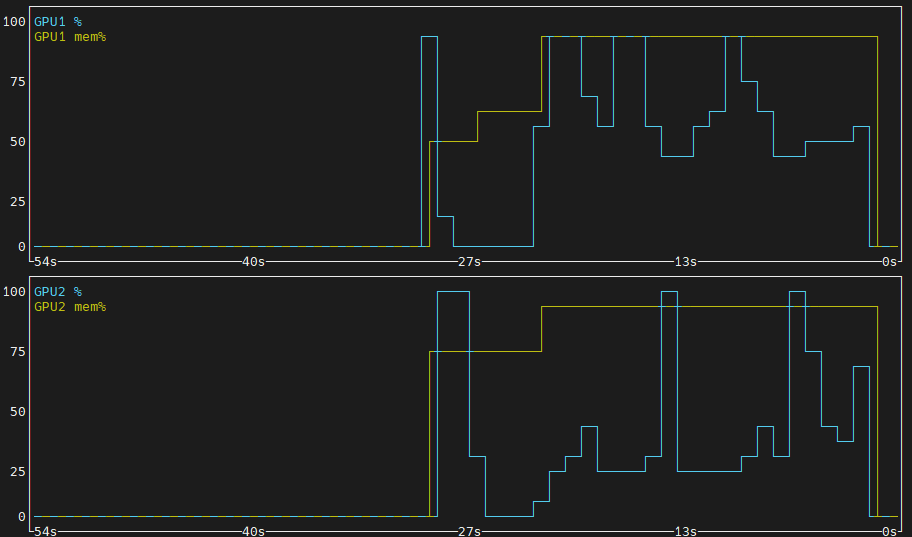
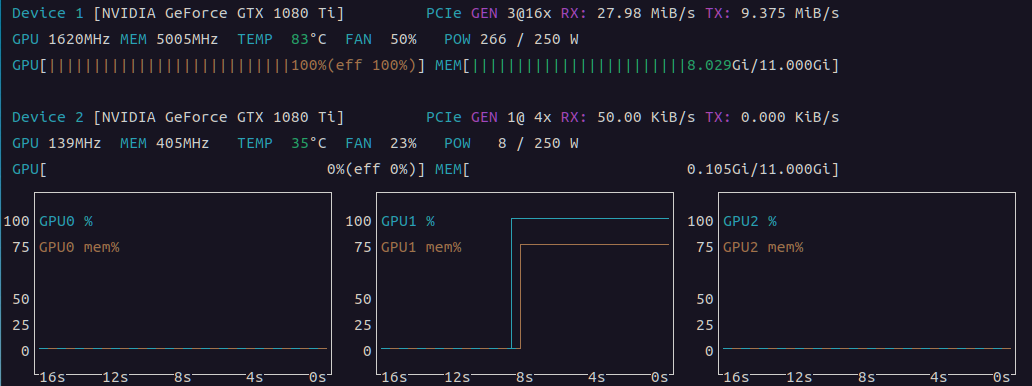
context도 확 줄여도 메모리 엄청 먹나보다. 둘 다 거의 100% 때려버리네

 

뭔가.. 기본 질문이라도 있나? 프롬프트 없이 돌려도 이러고 난리다

/mnt/Downloads/llama.cpp-dgemma/build/bin$ ./llama-diffusion-cli -m /mnt/Downloads/model/dgemma4-26b/diffusiongemma-26B-A4B-it-Q4_K_M.gguf   -ngl all -sm layer -ts 1,1 -ncmoe 6 -fit off -c 4096 -n 512
0.00.771.302 W load: control-looking token:    212 '</s>' was not control-type; this is probably a bug in the model. its type will be overridden
0.00.772.085 W load: control-looking token:     50 '<|tool_response>' was not control-type; this is probably a bug in the model. its type will be overridden
0.00.815.021 W load: special_eog_ids contains '<|tool_response>', removing '</s>' token from EOG list
0.00.844.927 W llama_model_loader: tensor overrides to CPU are used with mmap enabled - consider using --load-mode none for better performance
0.05.277.471 I diffusion: -n 512 -> 2 blocks, n_ubatch=2560 n_batch=2560 n_ctx=4096 (canvas_length=256)
0.05.282.401 W resolve_fused_ops: layer 5 is assigned to device CUDA0 but Flash Attention is assigned to device CPU (usually due to missing support)
0.05.282.404 W resolve_fused_ops: Flash Attention not supported, set to disabled
0.10.802.856 I diffusion_params: steps=128 schedule=0 algorithm=4 temperature=0.800 eps=0.001000 mask_token=4
0.10.803.053 I diffusion_eb: kv cache auto-off (2 GPUs; pass --diffusion-kv-cache on to force)
0.10.803.055 I diffusion_eb: gpu sampling off (2 GPUs; sc_dev is single-device)
0.10.803.055 I diffusion_eb: gpu sample reduce off (needs --diffusion-gpu-sampling on / sc_dev)
0.10.803.057 I diffusion_eb: max_steps=48 t=[0.400,0.800] entropy_bound=0.1000 stability=1 confidence=0.0050 kv_cache=off gpu_sampling=off sample_reduce=off
diffusion step: 9/48 [=========                                         ] 18%0.45.079.364 I
<|channel>thought
The user has provided an image and wants me to describe or discuss it.

1.  **Analyze the image:**
    *   It's a close-up of a person's face.
    *   The person is smiling warmly.
    *   They are looking slightly upwards and to the side of the camera.
    *   The background is blurred (bokeh effect).
    *   The lighting is soft and warm, highlighting the contours of the face.
    *   The person looks like they could be of middle age or slightly older.
    *   They have dark hair and brown eyes.
    *   The overall mood is positive, hopeful, or joyful.

2.  **Formulate a description:**
    *   Identify the main subject: A person.
    *   Describe the action/expression: Smiling warmly, looking upwards.
    *   Describe the composition: Close-up shot, shallow depth of field.
    *   Describe the lighting: Warm, soft.
    *   Describe the mood: Happy, peaceful, serene.

3.  **Draft the final response:**
    *   Start with a general statement about what is in the image.
    *   Add details about the person's expression.
    *   Mention the photographic style (lighting, focus).<channel|>This is a close-up photograph of a person smiling warmly. They are looking slightly upwards and to the side with an expression that suggests hope or joy. The lighting is soft and warm, and the background is blurred, which keeps the focus entirely on the person's expression.
total time: 34290.01ms, time per step: 1071.56ms (32 steps over 2 blocks, entropy-bound)
throughput: 14.9 tok/s (512 tok in 34290.01ms), in-step parallel 239 tok/s (256-tok canvas x 16.0 steps/block)


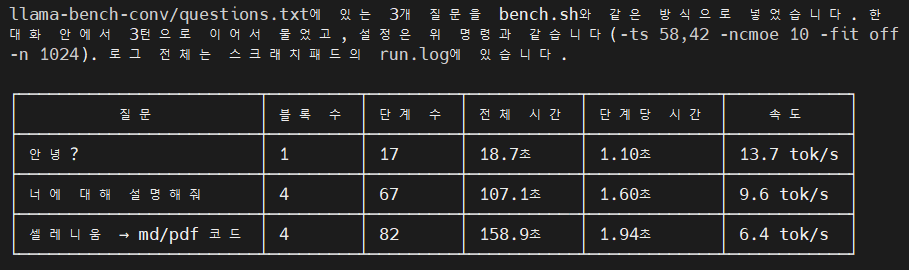
아래 옵션으로 하니 먼가 되기 한다.  ai님 만세!

 ./llama-diffusion-cli \
    -m /mnt/Downloads/model/dgemma4-26b/diffusiongemma-26B-A4B-it-Q4_K_M.gguf \
    -ngl all -sm layer -ts 58,42 -ncmoe 10 -fit off -c 4096 -n 1024 \
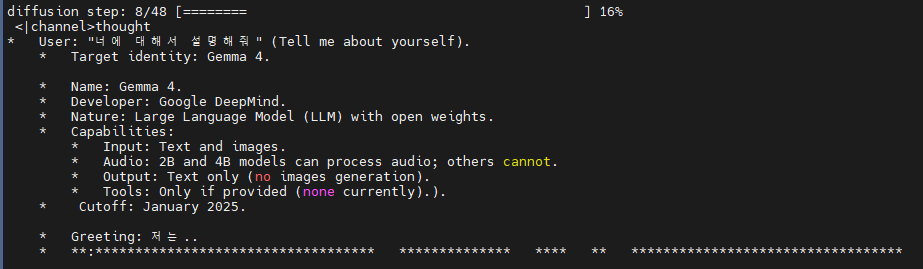
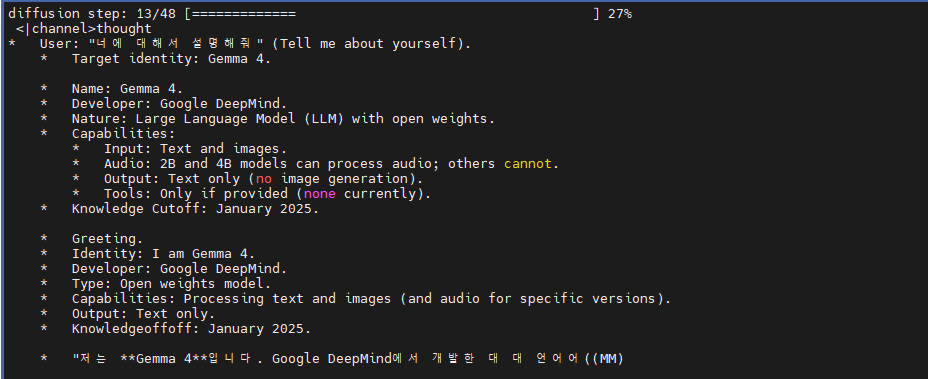
    -cnv --diffusion-visual --diffusion-visual-progress


일단 아까 설정한 -n 1024 로 한번에 1024 토큰 생성하는 거라서 그런가

답변이 넘어가면 diffusion step 이 다시 0/... 으로 돌아가버린다.
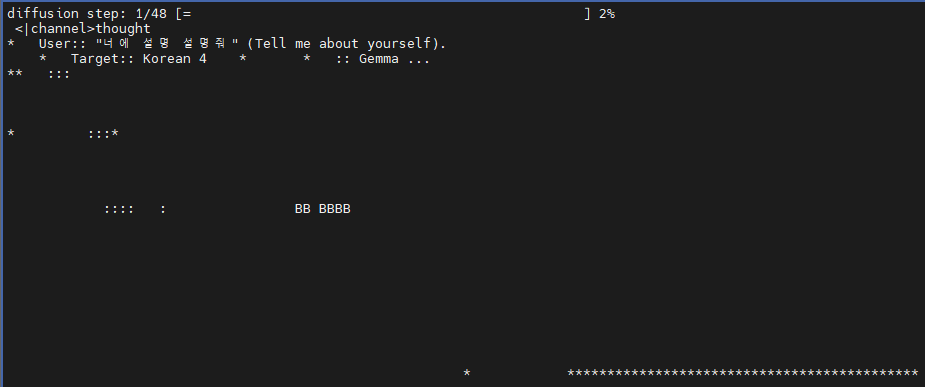
 

생성 토큰이 짧게 제한되서 그런가 답변이 나오다 끊어진 느낌

그래도 좀 신선하네 ㅎㅎ

> 파이썬으로 셀레니움을 통해 웹을 서칭하고 텍스트만 추출하고 makrdown 으로 변환후  md 파일과 pdf로 저장하는 기능을 구현해줘
<|channel>thought
Implement a Python script using Selenium to search the web, extract text, convert it to Markdown, and save it as both `.md` and `.pdf` files.
Python.
Selenium (for web automation/scraping), BeautifulSoup (usually helpful for parsing HTML), a Markdown conversion library (like `markdownify`), and a PDF generation library (like `fpdf2` or `pdf2kit`).

    *   *Web Scraping:* Selenium is requested. Needs a driver (Chrome is standard).
    *   *Text Extraction:* BeautifulSoup is better for cleaning HTML than just raw Selenium selectors.
    *   *Markdown Conversion:* `markdownify` is a popular choice for this.
    *   *PDF Generation:* `fpdf2` is straightforward for text-based PDFs. `pdf2kit` is better if converting from HTML/Markdown directly. Let's go with `fpdf2` for simplicity or mention the requirements.

    *   *Step 1: Install Libraries.* Need `selenium`, `beautifulsoup4`, `markdownify`, `fpdf2`.
    *   *Step 2: Setup Selenium.* Initialize Chrome driver.
    *   *Step 3: Search Logic.* Go to a search engine (e.g., Google), type a query, hit enter.
    *   *Step 4: Extraction.* Get page content (titles, paragraphs).
    *   *Step 5: Markdown Conversion.* Use `markdownify`.
    *   *Step 6: PDF Conversion.* Use `fpdf2`.

    *   *Imports:*
        ```python
        from selenium import webdriver
        from seleniuhttp://m.webdriver.chrome.service import Service
        from seleniuhttp://m.webdriver.common.by import By
        from seleniuhttp://m.webdriver.common.keys import Keys
        from bs4 import BeautifulSoup
        from markdownify import markdownify
        from fpdf import FPDF
        import time
        ```

    *   *Selenium Setup:*
        ```python
        options = webdriver.ChromeOptions()
        # options.add_argument('--headless') # Run without window
        driver = webdriver.Chrome(options=options)
        ```

    *   *Scraping Logic:*
        ```python
        driver.get(f"https://www.google.com/search?q={query}")
        # Wait for load
        html = driver.page_source
        soup = BeautifulSoup(html, 'html.parser')
        # Extract specific tags (h3, p)
        ```

    *   *Markdown Logic:*
        ```python
        md_text = markdownify(str(soup.body))
        ```

    *   *PDF Logic:*
        ```python
        pdf = FPDF()
        pdf.add_page()
        pdf.set_font("Arial", size=12) # Note: Korean needs a custom font!
        # Need to handle Korean characters in PDF.
        ```

    *   *Handling Korean Text:* Standard PDF fonts in FPDF don't support Korean by default. I must mention that the user needs a `.ttf` font (like NanumGothic).

    *   *Structure:*
        1.  Required libraries.
        2.  Implementation code.
        3.  Explanation of each part.
        4.  Important notes (Font issues, Driver setup).

    *   *Library check:* `pip install selenium beautifulsoup4 markdownify fpdf2`.
    *   *Code refinement:*
        *   Use a class or clear functions for structure.
        *   Add error handling (basic).
        *   Ensure the PDF part handles Unicode encoding for Korean.<channel|>파이썬의 **Selenium**을 사용하여 웹을 검색하고, 추출된 텍스트를 **Markdown**으로 변환한 뒤, 다시 **PDF** 파일로 저장하는 전체 과정을 구현해 드립니다.

### 1. 필요한 라이브러리 설치

터미널(또는 CMD)에서 아래 명령어를 입력하여 필요한 라이브러리를 설치해 주세요.

```bash
pip install selenium beautifulsoup4 markdownify fpdf2
```

### 2. 파이썬 코드 구현

이 코드는 구글 검색을 예시로 하며, PDF 생성 시 한글 깨짐 방지를 위해 **한글 폰트(.ttf)**가 필요합니다.

```python
import time
from selenium import webdriver
from seleniuhttp://m.webdriver.chrome.service import Service
from seleniuhttp://m.webdriver.chrome.options import Options
from seleniuhttp://m.webdriver.common.by import By
from seleniuhttp://m.webdriver.common.keys import Keys
from bs4 import BeautifulSoup
from markdownify import markdownify
from fpdf import FPDF
import os

class WebScraperToFiles:
    def
total time: 165742.13ms, time per step: 1883.43ms (88 steps over 4 blocks, entropy-bound)
throughput: 6.2 tok/s (1024 tok in 165742.13ms), in-step parallel 136 tok/s (256-tok canvas x 22.0 steps/block)

'모종의 음모 > ai 프로그램' 카테고리의 다른 글

diffusion gemma  (0) 2026.09.23
직접만든 LLM .. part 2  (0) 2026.09.23
wikimatrix  (0) 2026.09.22
직접 LLM 만들...기?  (0) 2026.09.22
llama-tokenize  (0) 2026.09.22
Posted by 구차니

'모종의 음모 > ai 프로그램' 카테고리의 다른 글

diffusion gemma 실행해보기  (0) 2026.09.24
직접만든 LLM .. part 2  (0) 2026.09.23
wikimatrix  (0) 2026.09.22
직접 LLM 만들...기?  (0) 2026.09.22
llama-tokenize  (0) 2026.09.22
Posted by 구차니

어우 도대체 프론티어 모델들을 돌리는 데이터는 얼마나 어마어마하게 쌓여있어야 하고

얼마나 대단한 컴퓨팅 파워를 필요로 하는걸까?


대답은 이 난리가 나고 있다.

/mnt/llm-ko/3_small/gguf$ /mnt/Downloads/llama-b10488/llama-cli -m base42m-it-q4_0.gguf 


Loading model...  

▄▄ ▄▄
██ ██
██ ██  ▀▀█▄ ███▄███▄  ▀▀█▄    ▄████ ████▄ ████▄
██ ██ ▄█▀██ ██ ██ ██ ▄█▀██    ██    ██ ██ ██ ██
██ ██ ▀█▄██ ██ ██ ██ ▀█▄██ ██ ▀████ ████▀ ████▀
                                    ██    ██
                                    ▀▀    ▀▀

build      : b10488-9d77fa172
model      : base42m-it-q4_0.gguf
ftype      : Q4_0
modalities : text

available commands:
  /exit or Ctrl+C     stop or exit
  /regen              regenerate the last response
  /clear              clear the chat history
  /read <file>        add a text file
  /glob <pattern>     add text files using globbing pattern


> 안녕?
죄송해요, 저는 실시간 검색은 할 수 없어요. 제가 알기 어려워요

[ Prompt: 745.2 t/s | Generation: 868.1 t/s ]

> 서울은 어디야?
 서울은 부산입니다

[ Prompt: 2201.1 t/s | Generation: 719.6 t/s ]

> 대한민국 수도는?
서울이에요

[ Prompt: 888.6 t/s | Generation: 543.7 t/s ]

> 서울이 먼데?
 서울은 서울이에요

[ Prompt: 648.3 t/s | Generation: 268.8 t/s ]

> 넌 누구야?
 서울이에요

[ Prompt: 420.3 t/s | Generation: 172.6 t/s ]

> 마이크로소프트는?
 Microsoft Windows에서 작동하지만, 지금은 그 기능이 이전 버전에서는 작동하지 않는다. 서울은 부산입니다학과를 졸업하고 서울에 입사한 이력이 있는 강사는 김용수(金容洙), 김용수(金容洙), 김용원(金容元)이에요

[ Prompt: 255.9 t/s | Generation: 158.8 t/s ]

> python 예제


[ Prompt: 460.2 t/s | Generation: 113.4 t/s ]

> golang 예제
 많으셨어요?

[ Prompt: 234.1 t/s | Generation: 164.8 t/s ]

> 많겠냐구요
많으셨어요

[ Prompt: 358.2 t/s | Generation: 162.3 t/s ]

> 아니이~
안녕하세요~ 너무 편하게 물어보세요

[ Prompt: 244.9 t/s | Generation: 138.8 t/s ]

> 안편하다고
 보통 대화할 때가 되자요

[ Prompt: 349.4 t/s | Generation: 163.6 t/s ]

> 전화줘
 처음 대화하는 시간을 줄이거나 대화하는 시간을 줄인 편하게 물어보세요

[ Prompt: 317.0 t/s | Generation: 152.1 t/s ]

> 안편한데?
 질문에 대답하지 마세요

[ Prompt: 544.9 t/s | Generation: 149.4 t/s ]

> 야이
 더 쉽게 대화할 수 있어요, 더 잘 보셨나요?

[ Prompt: 267.9 t/s | Generation: 140.7 t/s ]


대충 9 epoch / 23118 스텝 학습

  ┌───────────────┬─────────────────────────────────────────────────────┐
  │               │                                                               │
  ├───────────────┼─────────────────────────────────────────────────────┤
  │ base 사전학습 │ 23,118스텝, 실제 9.42 epoch, val loss 3.4899(ppl 32.8)        │
  ├───────────────┼─────────────────────────────────────────────────────┤
  │ SFT           │ 176스텝(206개 예시), 최고 val loss 2.5465                     │
  ├───────────────┼─────────────────────────────────────────────────────┤
  │ GGUF          │ base/it × f32/q4_0 총 4개 파일 모두 3_small/gguf/에 준비 완료 │
  └───────────────┴─────────────────────────────────────────────────────┘

  ┌─────────────────────┬──────────────────────┬──────────────────────────────┐
  │       데이터        │         용도         │                    규모                     │
  ├─────────────────────┼──────────────────────┼──────────────────────────────┤
  │ 한국어 위키백과     │ 사전학습 본문        │ 문서 676,120개, 문단 316만개, 글자 5.58억자 │
  ├─────────────────────┼──────────────────────┼──────────────────────────────┤
  │ 국립국어원 사전 3종 │ 토크나이저 어휘 시드 │ 뜻풀이 101만 줄, 표제어 32.6만 줄           │
  ├─────────────────────┼──────────────────────┼──────────────────────────────┤
  │ 직접 작성 대화 예시 │ SFT(대화 형식)       │ 206개                                       │
  └─────────────────────┴──────────────────────┴──────────────────────────────┘

  ┌───────┬─────────┬───────────┬───────────────────────┐
  │       │  문서   │   문단    │         토큰          │
  ├───────┼─────────┼───────────┼───────────────────────┤
  │ train │ 672,731 │ 3,144,350 │ 243,428,930 (2.434억) │
  ├───────┼─────────┼───────────┼───────────────────────┤
  │ val   │ 3,389   │ 16,372    │ 1,250,690             │
  └───────┴─────────┴───────────┴───────────────────────┘

  v1 최종 학습량: 약 22.9억 토큰 (2.434억 × 9.42 epoch)
 
  모델

  - 42.3M 파라미터 (8층, 512차원), fp32
  - 임베딩(16.6M)이 전체의 약 39% 차지
 
  SFT

  - 206개 대화 예시(직접 작성, 라이선스 깨끗함), 최종 176스텝(약 8 epoch) 학습
  
  요약하면: 실제 원본 텍스트는 위키 5.58억자를 2.434억 토큰으로 압축해서 갖고 있고, 학습 때는 그걸 약 9.4번 반복해서 총 22.9억 토큰어치를
  모델에 흘려보낸 셈입니다.


-rw-rw-r-- 1 minimonk minimonk 163M  9월 23 14:50 base42m-f32.gguf
-rw-rw-r-- 1 minimonk minimonk 163M  9월 23 14:51 base42m-it-f32.gguf
-rw-rw-r-- 1 minimonk minimonk  28M  9월 23 14:51 base42m-it-q4_0.gguf
-rw-rw-r-- 1 minimonk minimonk  28M  9월 23 14:50 base42m-q4_0.gguf

'모종의 음모 > ai 프로그램' 카테고리의 다른 글

diffusion gemma 실행해보기  (0) 2026.09.24
diffusion gemma  (0) 2026.09.23
wikimatrix  (0) 2026.09.22
직접 LLM 만들...기?  (0) 2026.09.22
llama-tokenize  (0) 2026.09.22
Posted by 구차니
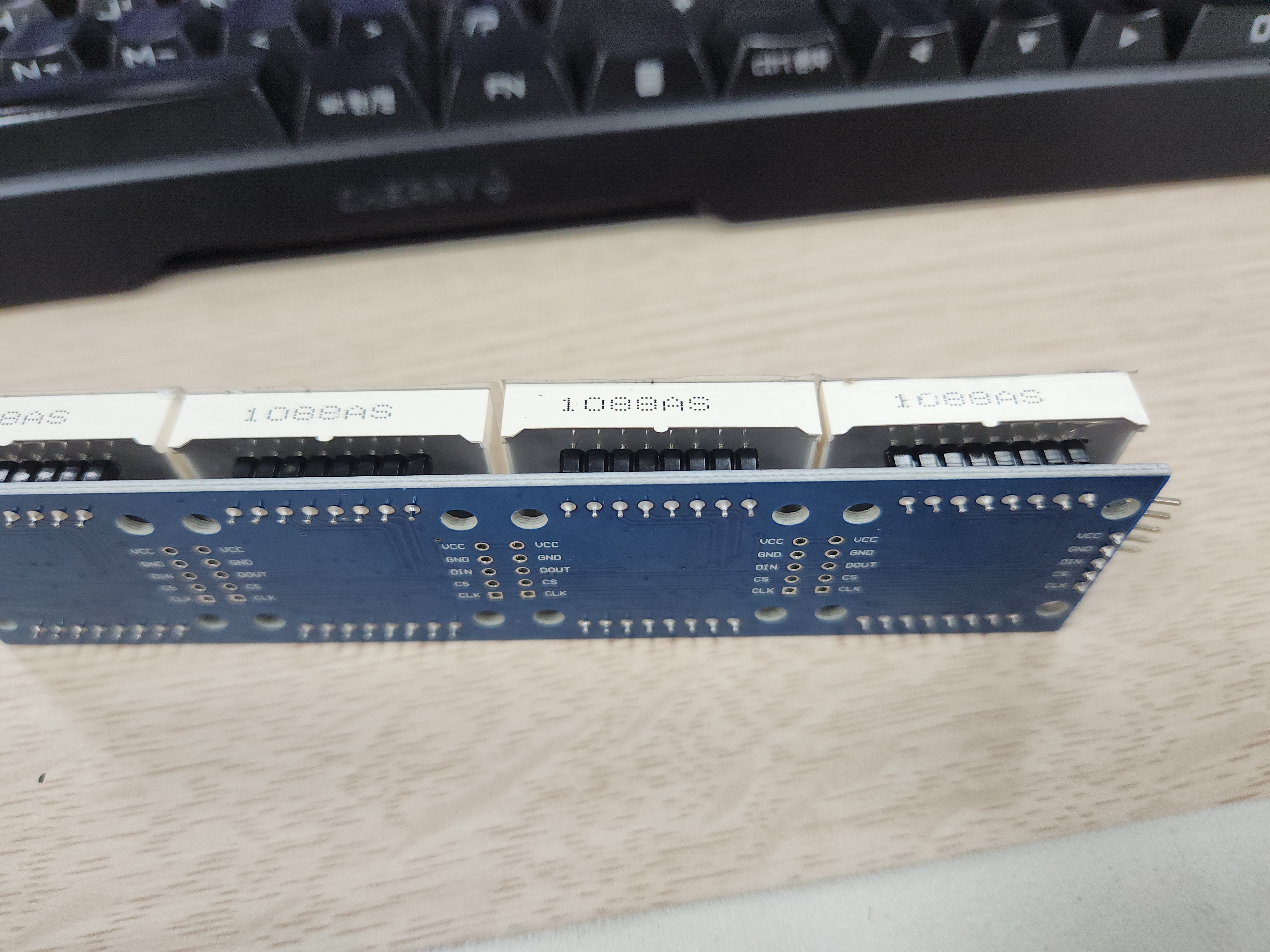
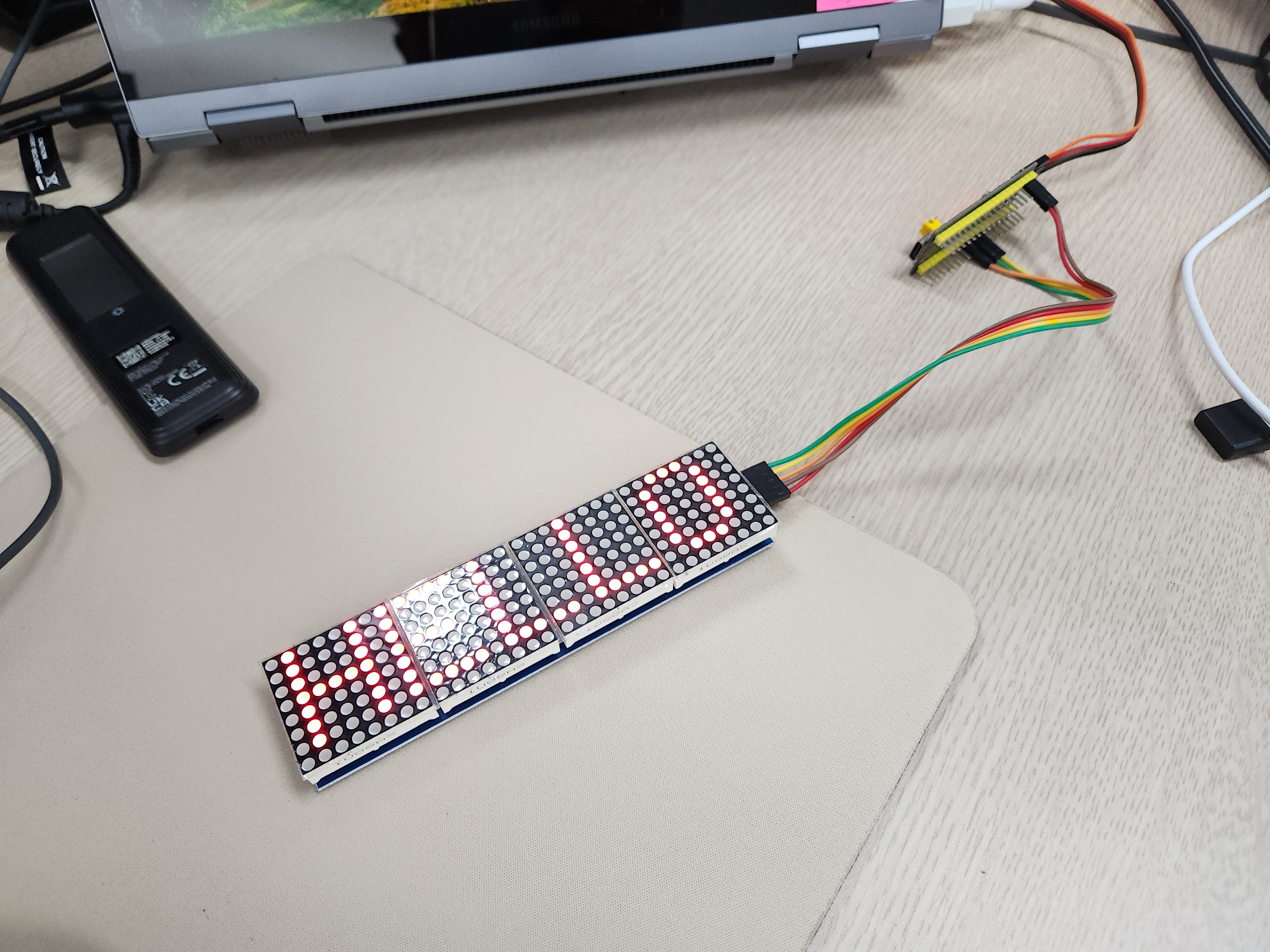
embeded/Cortex-M3 STM2026. 9. 23. 14:17

아두이노 예제밖에 안보이냐..

[링크 : https://mobilitykids.tistory.com/entry/MAX7219-LED-매트릭스-디스플레이Arduino-튜토리얼-포함]

[링크 : https://m.blog.naver.com/eduino/222651170585]


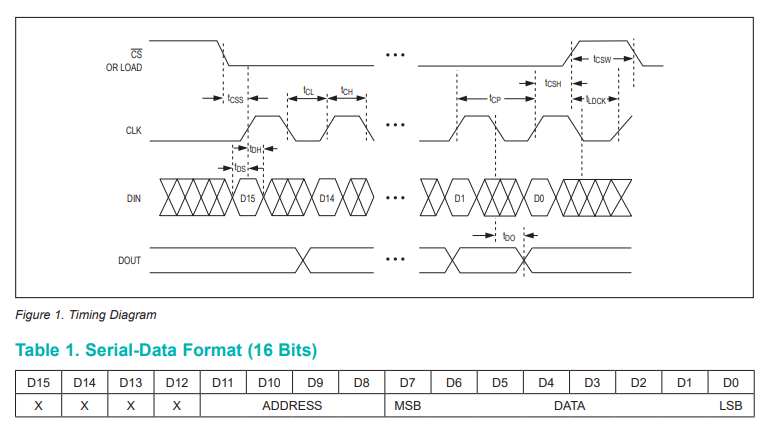
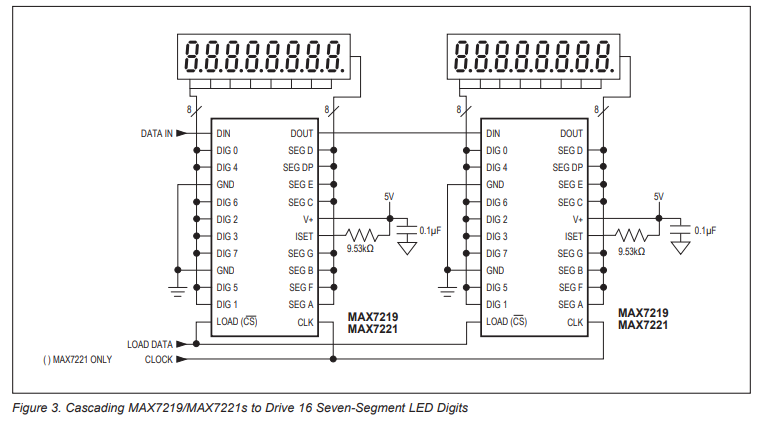
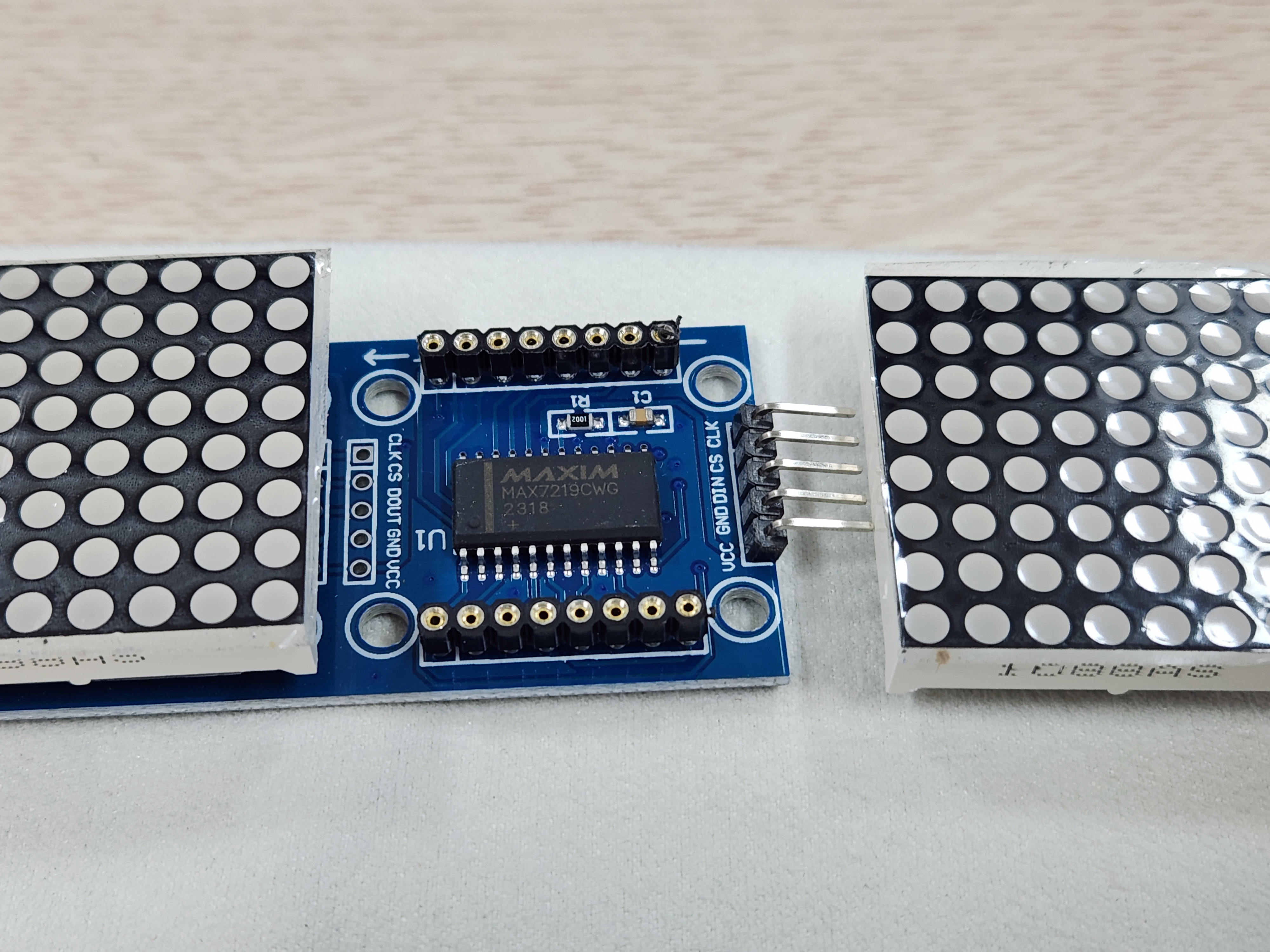
spi 같긴한데.. 원래는 7seg 용으로 개발되었으나 dot matrix에서도 쓰는건가?

Features
● 10MHz Serial Interface
● Individual LED Segment Control
● Decode/No-Decode Digit Selection
● 150μA Low-Power Shutdown (Data Retained)
● Digital and Analog Brightness Control
● Display Blanked on Power-Up
● Drive Common-Cathode LED Display
● Slew-Rate Limited Segment Drivers for Lower EMI (MAX7221)
SPI, QSPI, MICROWIRE Serial Interface (MAX7221)

[링크 : https://www.analog.com/media/en/technical-documentation/data-sheets/max7219-max7221.pdf]


+

선도 연결방법 알려달라고 하고

어떻게 어떻게 해서  claude가 다 해줘버리네. 인간은 멀 취미로 해야하지?

ai가 해준걸 취미라고 해도 될까? 고민되네..


/*
 * max7219.h
 *
 * MAX7219 8x8 도트매트릭스(데이지체인) 구동 + 텍스트 스크롤 드라이버.
 * SPI(하드웨어)로 DIN/CLK를 보내고, CS(LOAD)는 별도 GPIO로 직접 제어한다.
 */
#ifndef __MAX7219_H
#define __MAX7219_H

#ifdef __cplusplus
extern "C" {
#endif

#include "stm32f1xx_hal.h"

/* 체인에 연결된 8x8 모듈 개수. 모듈 1개만 있으면 1로 바꿀 것. */
#define MAX7219_NUM_DEVICES   4

/* 하드웨어 배선에 따라 좌우/모듈 순서가 반대로 보이면 아래 두 값을 바꿔서 조정 */
#define MAX7219_REVERSE_CHAIN 1   /* 텍스트가 모듈 순서상 반대로 표시되면 1 (실측: 4 3 2 1로 나와서 1로 설정) */
#define MAX7219_MIRROR_COLS   0   /* 글자가 좌우 반전되어 보이면 1 */

void MAX7219_Init(SPI_HandleTypeDef *hspi);
void MAX7219_Clear(void);
void MAX7219_SetIntensity(uint8_t level /* 0x0~0xF */);

/* 표시할 문자열을 설정(내부 컬럼 버퍼에 렌더링해 둠). ASCII만 지원(공백,0-9,A-Z,.,!,-) */
void MAX7219_SetText(const char *text);

/* 한 프레임(1컬럼) 스크롤 진행 + 출력. 텍스트가 한 바퀴 돌면 1을 반환(그 외 0). */
uint8_t MAX7219_ScrollStep(void);

/* 진단용: 스크롤 없이 모듈(0번부터)마다 고정 숫자 1,2,3,4...를 동시에 정적으로 표시.
 * 다중 디바이스 주소 지정이 정상인지 확인할 때만 임시로 사용. */
void MAX7219_ShowDeviceIndexTest(void);

#ifdef __cplusplus
}
#endif

#endif /* __MAX7219_H */


/*
 * max7219.c
 *
 * MAX7219 8x8 도트매트릭스 체인 구동 + 좌->우 텍스트 스크롤.
 *
 * 배선(하드웨어 SPI1 사용):
 *   MAX7219 DIN  -> PA7 (SPI1_MOSI)
 *   MAX7219 CLK  -> PA5 (SPI1_SCK)
 *   MAX7219 CS   -> PA4 (일반 GPIO, 소프트웨어 제어)
 *   MAX7219 VCC  -> 5V,  GND -> GND
 *
 * 레지스터 모델: MAX7219는 디코드모드 OFF 상태에서 DIGIT0~7 레지스터 각각이
 * 매트릭스의 "행(row)"이며, 그 8bit가 그 행의 8개 열(column)을 나타낸다.
 * 따라서 프레임을 만들 때는 (행, 각 모듈별 8bit) 형태로 SPI에 실어야 한다.
 */
#include "main.h"
#include "max7219.h"
#include <string.h>
#include <ctype.h>

#define MAX7219_REG_NOOP        0x00
#define MAX7219_REG_DIGIT0      0x01
#define MAX7219_REG_DECODEMODE  0x09
#define MAX7219_REG_INTENSITY   0x0A
#define MAX7219_REG_SCANLIMIT   0x0B
#define MAX7219_REG_SHUTDOWN    0x0C
#define MAX7219_REG_DISPLAYTEST 0x0F

#define MAX7219_TOTAL_COLS      (MAX7219_NUM_DEVICES * 8)

/* 표시 가능한 최대 문자열 길이(글자당 6컬럼 = 5폭+1간격) + 앞뒤 여백 */
#define MAX7219_TEXT_MAX_CHARS  64
#define MAX7219_COLBUF_SIZE     (MAX7219_TOTAL_COLS * 2 + MAX7219_TEXT_MAX_CHARS * 6)

static SPI_HandleTypeDef *s_hspi;
static uint8_t  s_colbuf[MAX7219_COLBUF_SIZE];
static uint32_t s_colbuf_len;
static uint32_t s_scroll_offset;

/* ---- 5x7 폰트: 행(row) 단위 원본 표현. 각 바이트의 bit4..bit0 = 좌->우 5개 컬럼 ---- */
typedef struct { char ch; uint8_t rows[7]; } Glyph5x7;

static const Glyph5x7 s_font[] = {
  {' ', {0b00000,0b00000,0b00000,0b00000,0b00000,0b00000,0b00000}},
  {'0', {0b01110,0b10001,0b10011,0b10101,0b11001,0b10001,0b01110}},
  {'1', {0b00100,0b01100,0b00100,0b00100,0b00100,0b00100,0b01110}},
  {'2', {0b01110,0b10001,0b00001,0b00010,0b00100,0b01000,0b11111}},
  {'3', {0b11111,0b00010,0b00100,0b00010,0b00001,0b10001,0b01110}},
  {'4', {0b00010,0b00110,0b01010,0b10010,0b11111,0b00010,0b00010}},
  {'5', {0b11111,0b10000,0b11110,0b00001,0b00001,0b10001,0b01110}},
  {'6', {0b00110,0b01000,0b10000,0b11110,0b10001,0b10001,0b01110}},
  {'7', {0b11111,0b00001,0b00010,0b00100,0b01000,0b01000,0b01000}},
  {'8', {0b01110,0b10001,0b10001,0b01110,0b10001,0b10001,0b01110}},
  {'9', {0b01110,0b10001,0b10001,0b01111,0b00001,0b00010,0b01100}},
  {'A', {0b01110,0b10001,0b10001,0b11111,0b10001,0b10001,0b10001}},
  {'B', {0b11110,0b10001,0b10001,0b11110,0b10001,0b10001,0b11110}},
  {'C', {0b01111,0b10000,0b10000,0b10000,0b10000,0b10000,0b01111}},
  {'D', {0b11110,0b10001,0b10001,0b10001,0b10001,0b10001,0b11110}},
  {'E', {0b11111,0b10000,0b10000,0b11110,0b10000,0b10000,0b11111}},
  {'F', {0b11111,0b10000,0b10000,0b11110,0b10000,0b10000,0b10000}},
  {'G', {0b01111,0b10000,0b10000,0b10011,0b10001,0b10001,0b01111}},
  {'H', {0b10001,0b10001,0b10001,0b11111,0b10001,0b10001,0b10001}},
  {'I', {0b01110,0b00100,0b00100,0b00100,0b00100,0b00100,0b01110}},
  {'J', {0b00111,0b00010,0b00010,0b00010,0b00010,0b10010,0b01100}},
  {'K', {0b10001,0b10010,0b10100,0b11000,0b10100,0b10010,0b10001}},
  {'L', {0b10000,0b10000,0b10000,0b10000,0b10000,0b10000,0b11111}},
  {'M', {0b10001,0b11011,0b10101,0b10101,0b10001,0b10001,0b10001}},
  {'N', {0b10001,0b11001,0b10101,0b10101,0b10011,0b10001,0b10001}},
  {'O', {0b01110,0b10001,0b10001,0b10001,0b10001,0b10001,0b01110}},
  {'P', {0b11110,0b10001,0b10001,0b11110,0b10000,0b10000,0b10000}},
  {'Q', {0b01110,0b10001,0b10001,0b10001,0b10101,0b10010,0b01101}},
  {'R', {0b11110,0b10001,0b10001,0b11110,0b10100,0b10010,0b10001}},
  {'S', {0b01111,0b10000,0b10000,0b01110,0b00001,0b00001,0b11110}},
  {'T', {0b11111,0b00100,0b00100,0b00100,0b00100,0b00100,0b00100}},
  {'U', {0b10001,0b10001,0b10001,0b10001,0b10001,0b10001,0b01110}},
  {'V', {0b10001,0b10001,0b10001,0b10001,0b10001,0b01010,0b00100}},
  {'W', {0b10001,0b10001,0b10001,0b10101,0b10101,0b10101,0b01010}},
  {'X', {0b10001,0b10001,0b01010,0b00100,0b01010,0b10001,0b10001}},
  {'Y', {0b10001,0b10001,0b01010,0b00100,0b00100,0b00100,0b00100}},
  {'Z', {0b11111,0b00001,0b00010,0b00100,0b01000,0b10000,0b11111}},
  {'.', {0b00000,0b00000,0b00000,0b00000,0b00000,0b01100,0b01100}},
  {'!', {0b00100,0b00100,0b00100,0b00100,0b00100,0b00000,0b00100}},
  {'-', {0b00000,0b00000,0b00000,0b11111,0b00000,0b00000,0b00000}},
};
#define FONT_COUNT (sizeof(s_font) / sizeof(s_font[0]))

static const Glyph5x7 *font_lookup(char c)
{
  if (c >= 'a' && c <= 'z') c = (char)(c - 'a' + 'A'); /* 소문자 -> 대문자 */
  for (uint32_t i = 0; i < FONT_COUNT; i++)
  {
    if (s_font[i].ch == c) return &s_font[i];
  }
  return &s_font[0]; /* 지원 안 하는 문자는 공백으로 */
}

/* row(0=top..6=bottom) 문자열 비트에서 col(0=left..4)에 해당하는 컬럼 바이트를 뽑아
 * bit r 위치에 채운다 (bit0=top row ... bit6=bottom row). */
static uint8_t glyph_col_byte(const Glyph5x7 *g, uint8_t col)
{
  uint8_t val = 0;
  for (uint8_t r = 0; r < 7; r++)
  {
    uint8_t bit = (g->rows[r] >> (4 - col)) & 0x01U;
    val |= (uint8_t)(bit << r);
  }
  return val;
}

/* ---- 저수준 SPI 전송 ---- */

static inline void cs_low(void)  { HAL_GPIO_WritePin(MAX7219_CS_PORT, MAX7219_CS_PIN, GPIO_PIN_RESET); }
static inline void cs_high(void) { HAL_GPIO_WritePin(MAX7219_CS_PORT, MAX7219_CS_PIN, GPIO_PIN_SET); }

/* 체인의 모든 모듈에 동일한 (reg,data)를 전송 (초기화/공통 설정용) */
static void max7219_write_all(uint8_t reg, uint8_t data)
{
  uint8_t buf[2] = { reg, data };
  cs_low();
  for (uint32_t i = 0; i < MAX7219_NUM_DEVICES; i++)
  {
    HAL_SPI_Transmit(s_hspi, buf, 2, HAL_MAX_DELAY);
  }
  cs_high();
}

/* 한 행(row 0~7)에 대해 모듈별 8bit 데이터를 체인에 맞는 순서로 전송.
 * dev_data[0] = MCU와 가장 가까운(첫번째) 모듈. SPI 시프트 특성상 체인에서는
 * 가장 먼 모듈 데이터부터 먼저 밀어넣어야 CS 상승 시 올바르게 래치된다. */
static void max7219_send_row(uint8_t row, const uint8_t *dev_data)
{
  uint8_t reg = (uint8_t)(MAX7219_REG_DIGIT0 + row);
  cs_low();
#if MAX7219_REVERSE_CHAIN
  for (int32_t dev = 0; dev < MAX7219_NUM_DEVICES; dev++)
#else
  for (int32_t dev = MAX7219_NUM_DEVICES - 1; dev >= 0; dev--)
#endif
  {
    uint8_t buf[2] = { reg, dev_data[dev] };
    HAL_SPI_Transmit(s_hspi, buf, 2, HAL_MAX_DELAY);
  }
  cs_high();
}

void MAX7219_Init(SPI_HandleTypeDef *hspi)
{
  s_hspi = hspi;

  max7219_write_all(MAX7219_REG_DISPLAYTEST, 0x00);
  max7219_write_all(MAX7219_REG_SCANLIMIT, 0x07);   /* 8자리(행) 전부 사용 */
  max7219_write_all(MAX7219_REG_DECODEMODE, 0x00);  /* BCD 디코드 없음: 매트릭스 모드 */
  max7219_write_all(MAX7219_REG_INTENSITY, 0x04);   /* 밝기 0x0~0xF */
  max7219_write_all(MAX7219_REG_SHUTDOWN, 0x01);    /* 0=shutdown, 1=normal operation */

  MAX7219_Clear();
}

void MAX7219_SetIntensity(uint8_t level)
{
  max7219_write_all(MAX7219_REG_INTENSITY, (uint8_t)(level & 0x0FU));
}

void MAX7219_Clear(void)
{
  uint8_t zeros[MAX7219_NUM_DEVICES];
  memset(zeros, 0, sizeof(zeros));
  for (uint8_t row = 0; row < 8; row++)
  {
    max7219_send_row(row, zeros);
  }
}

void MAX7219_SetText(const char *text)
{
  uint32_t len = 0;

  /* 화면 밖에서 스크롤 들어오도록 앞쪽 여백(패널 폭만큼 공백) */
  for (uint32_t i = 0; i < MAX7219_TOTAL_COLS && len < MAX7219_COLBUF_SIZE; i++)
  {
    s_colbuf[len++] = 0x00;
  }

  for (const char *p = text; *p != '\0' && len + 6 <= MAX7219_COLBUF_SIZE; p++)
  {
    const Glyph5x7 *g = font_lookup(*p);
    for (uint8_t c = 0; c < 5; c++)
    {
      s_colbuf[len++] = glyph_col_byte(g, c);
    }
    s_colbuf[len++] = 0x00; /* 글자 사이 1컬럼 간격 */
  }

  /* 화면 밖으로 완전히 빠져나가도록 뒤쪽 여백 */
  for (uint32_t i = 0; i < MAX7219_TOTAL_COLS && len < MAX7219_COLBUF_SIZE; i++)
  {
    s_colbuf[len++] = 0x00;
  }

  s_colbuf_len = len;
  s_scroll_offset = 0;
}

static void render_frame(void)
{
  uint8_t dev_row[MAX7219_NUM_DEVICES];

  if (s_colbuf_len == 0) return;

  for (uint8_t row = 0; row < 8; row++)
  {
    for (uint32_t dev = 0; dev < MAX7219_NUM_DEVICES; dev++)
    {
      uint8_t val = 0;
      for (uint8_t c = 0; c < 8; c++)
      {
        uint32_t col_index = (s_scroll_offset + dev * 8U + c) % s_colbuf_len;
        uint8_t bit = (s_colbuf[col_index] >> row) & 0x01U;
#if MAX7219_MIRROR_COLS
        val |= (uint8_t)(bit << c);
#else
        val |= (uint8_t)(bit << (7 - c));
#endif
      }
      dev_row[dev] = val;
    }
    max7219_send_row(row, dev_row);
  }
}

uint8_t MAX7219_ScrollStep(void)
{
  render_frame();

  if (s_colbuf_len == 0) return 1;

  s_scroll_offset++;
  if (s_scroll_offset >= s_colbuf_len)
  {
    s_scroll_offset = 0;
    return 1;
  }
  return 0;
}

/* 각 모듈에 스크롤 없이 고정 숫자를 동시에 정적으로 표시(디버그용).
 * dev=0 -> "1", dev=1 -> "2" ... 모듈이 서로 다른 내용을 "동시에" 보여주는지,
 * 그리고 계속 켜진 상태로 유지되는지(깜빡임/순차갱신 없는지) 확인하는 용도. */
void MAX7219_ShowDeviceIndexTest(void)
{
  uint8_t dev_row[MAX7219_NUM_DEVICES];
  const Glyph5x7 *glyphs[MAX7219_NUM_DEVICES];

  for (uint32_t dev = 0; dev < MAX7219_NUM_DEVICES; dev++)
  {
    char digit = (char)('1' + (dev % 9));
    glyphs[dev] = font_lookup(digit);
  }

  for (uint8_t row = 0; row < 8; row++)
  {
    for (uint32_t dev = 0; dev < MAX7219_NUM_DEVICES; dev++)
    {
      uint8_t val = 0;
      if (row < 7) /* 글꼴은 7행(0~6)까지만 있음, 8번째 행은 항상 빈 줄 */
      {
        for (uint8_t c = 0; c < 5; c++) /* 글꼴 폭 5, 나머지 3컬럼은 여백(0) */
        {
          uint8_t bit = (glyphs[dev]->rows[row] >> (4 - c)) & 0x01U;
#if MAX7219_MIRROR_COLS
          val |= (uint8_t)(bit << (2 + c));
#else
          val |= (uint8_t)(bit << (7 - c));
#endif
        }
      }
      dev_row[dev] = val;
    }
    max7219_send_row(row, dev_row);
  }
}

'embeded > Cortex-M3 STM' 카테고리의 다른 글

ws2812b vs hub75  (0) 2026.09.23
네오픽셀 ws2812b-64 작동  (0) 2026.09.23
stm32 gpio hi-z  (0) 2026.09.10
stm32f103c9t6(bluepill) + keypad  (0) 2026.09.08
stm32 usb composite / report id  (0) 2026.09.04
Posted by 구차니
embeded/Cortex-M3 STM2026. 9. 23. 12:46

짱구 굴려봐도.. ws2812b가 절대 쌀수가 없네..

라즈베리 파이에 ws2612b-64를 8x8로 구성해서

총 64x64 해상도 출력하는데 드는 돈이 장당 2500원 해도 16만원 (실 구매가는 2200원 이긴 한데)

전원이랑 라즈베리 파이 추가하면 총 가격이 어마어마 해진다.


[링크 : https://itempage3.auction.co.kr/DetailView.aspx?itemno=F479040772] HUB75 128x128 13만원


 네, 보통 HUB75가 단위면적당 더 쌉니다. 이유는 구조적입니다.

  근본 이유
  - WS2812B: LED 하나당 드라이버 IC가 하나씩 내장(개별 어드레싱) → LED 개수만큼 IC 비용이 그대로 곱해짐
  - HUB75: LED 여러 개(보통 16개)를 드라이버 IC 하나(MBI5124 등)가 묶어서 구동 → IC 개수가 LED 개수의 1/16
    수준이라 원가가 확 낮음
  - 게다가 HUB75는 옥외광고/전광판 산업에서 이미 수백만 장 양산되는 표준품이라 규모의 경제까지 붙음

  대략적인 단가 비교 (픽셀피치 1cm 기준으로 맞춰서)
  - WS2812B 8×8 모듈(8cm×8cm=64cm²): 약 2,500원 → 약 39원/cm²
  - HUB75 P10 판넬(32×16px, 32cm×16cm=512cm²): 알리 기준 대략 10,000~15,000원 → 약 20~29원/cm²

  → 같은 면적, 비슷한 해상도 밀도 기준으로 HUB75가 30~50% 정도 저렴한 편입니다.

  64×64(64cm×64cm) 전체로 환산하면
  - WS2812B: 아까 계산한 16만원
  - HUB75(같은 픽셀피치 P10 기준, 32×32px 판넬 4장 정도 조합): 대략 4~6만원대로 절반 이하까지 내려갈 수 있음

  덤으로 따라오는 이점
  - HUB75 판넬은 애초에 체이닝용 커넥터 + 판넬 내 전원 분배가 설계되어 있어서, 아까 얘기한 "전원 주입 지점 직접
    설계" 부담이 훨씬 줄어듭니다 (완전히 없어지진 않지만 DIY WS2812보다 훨씬 정형화됨)

  대신 치러야 할 비용은 복잡도
  - 드라이버가 HUB75 전용 스캔+BCM 방식이라 소프트웨어를 새로 짜야 함 (지금 있는 WS2812 코드 재사용 불가, 전에
    말씀드린 대로)
  - MCU도 RPi나 ESP32-S3처럼 DMA로 지속 스캔 감당할 수 있는 걸 써야 함

  정리하면 돈은 HUB75가 이기고, 개발 난이도는 WS2812가 더 쉬움 — 트레이드오프입니다. 64개 패널 사기 전에 HUB75
  견적도 한 번 비교해보시는 게 좋을 것 같아요.

'embeded > Cortex-M3 STM' 카테고리의 다른 글

max7219 8-Digit LED Display Drivers  (0) 2026.09.23
네오픽셀 ws2812b-64 작동  (0) 2026.09.23
stm32 gpio hi-z  (0) 2026.09.10
stm32f103c9t6(bluepill) + keypad  (0) 2026.09.08
stm32 usb composite / report id  (0) 2026.09.04
Posted by 구차니
embeded/Cortex-M3 STM2026. 9. 23. 12:08

stm32f103 / bluepill

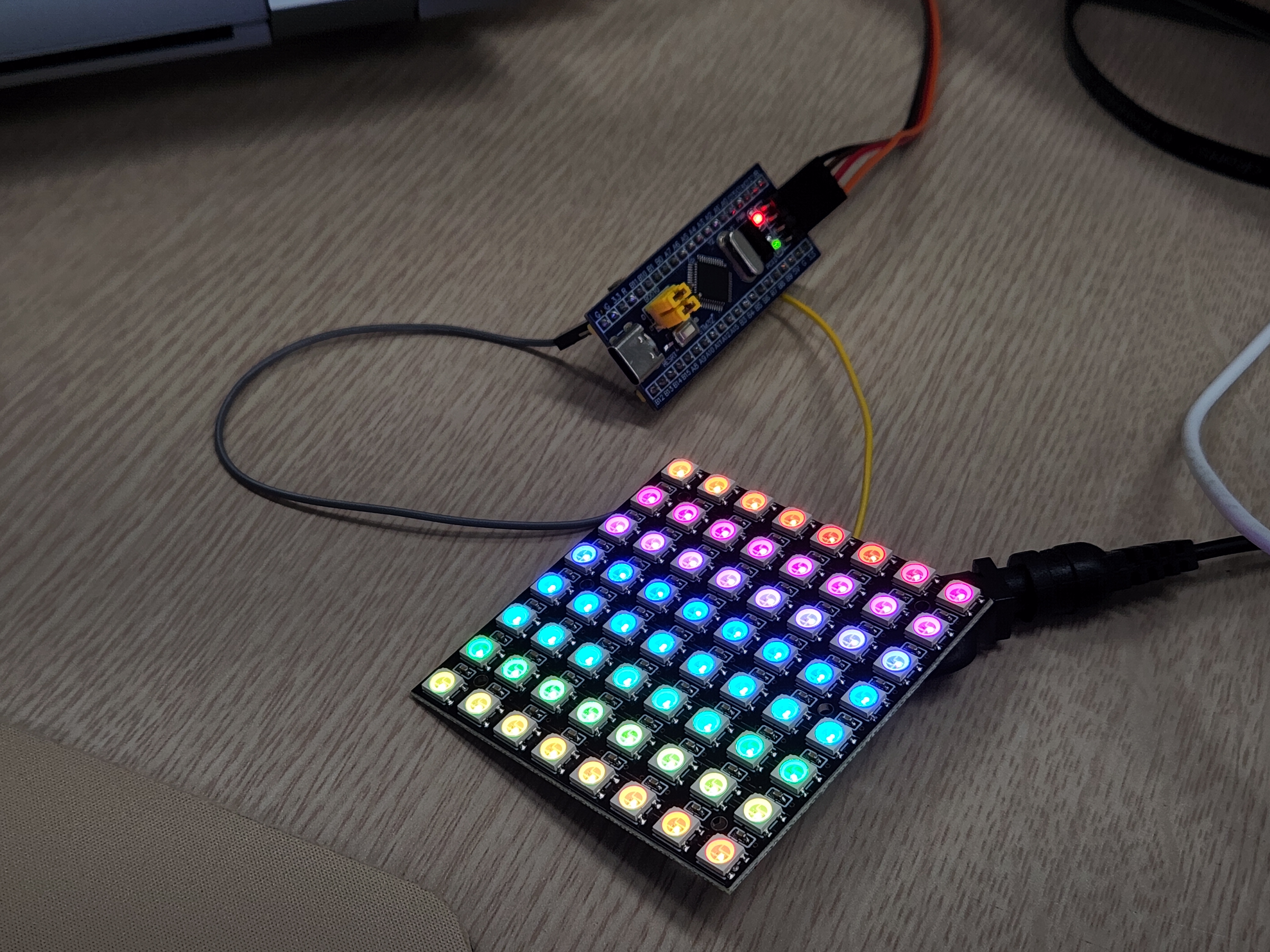
네오픽셀 ws2812b-64

+ claude


PB0 를 신호선으로 GND는 연결해주어야 한다.

white로 하면 최대 밝기가 아니어도 미친듯이 눈이 부시고 4.5V / 1.6A 먹는데

레인보우 패턴으로 바꾸니 4V / 0.15A 정도로 착하게 먹는다.


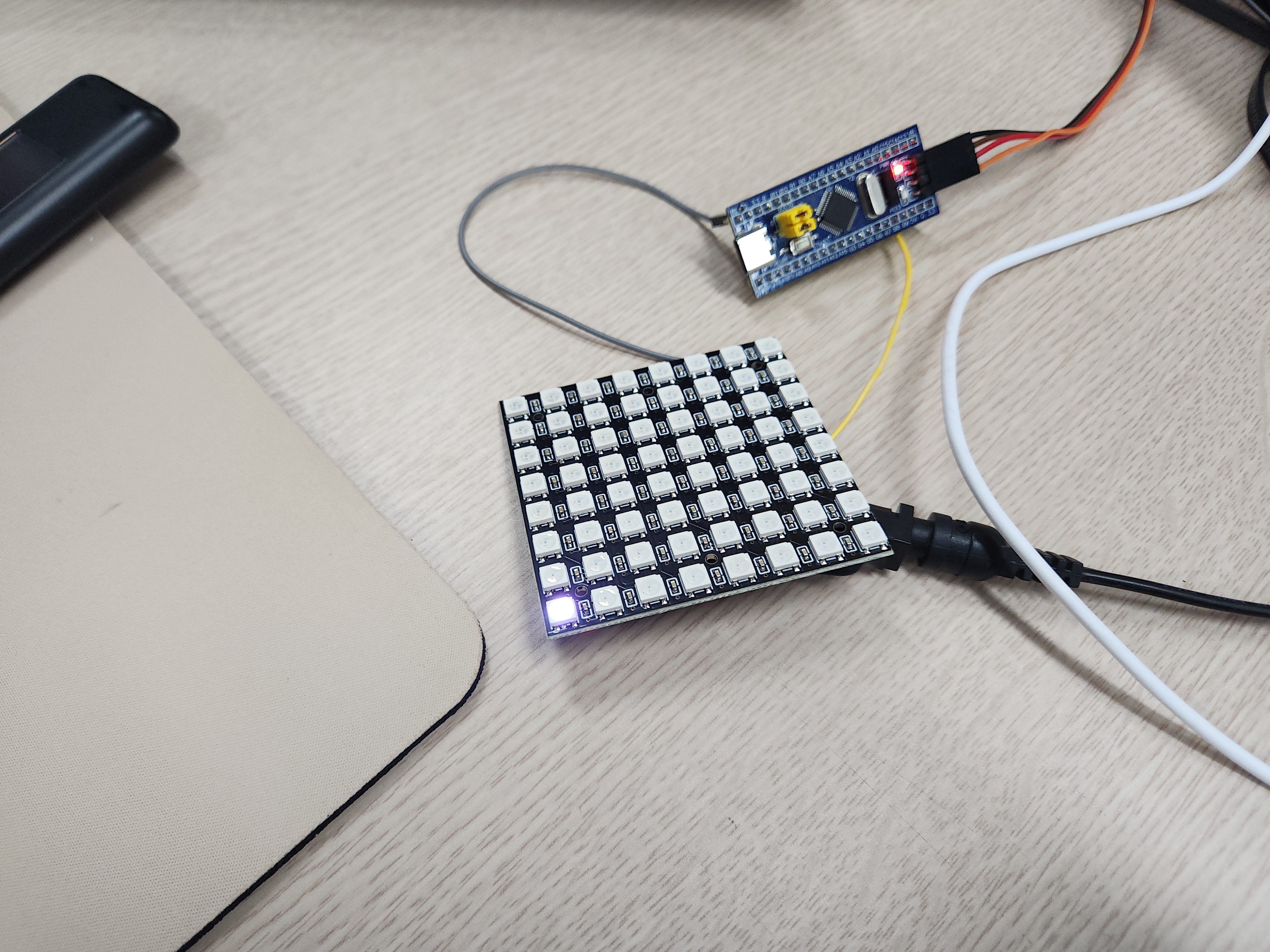
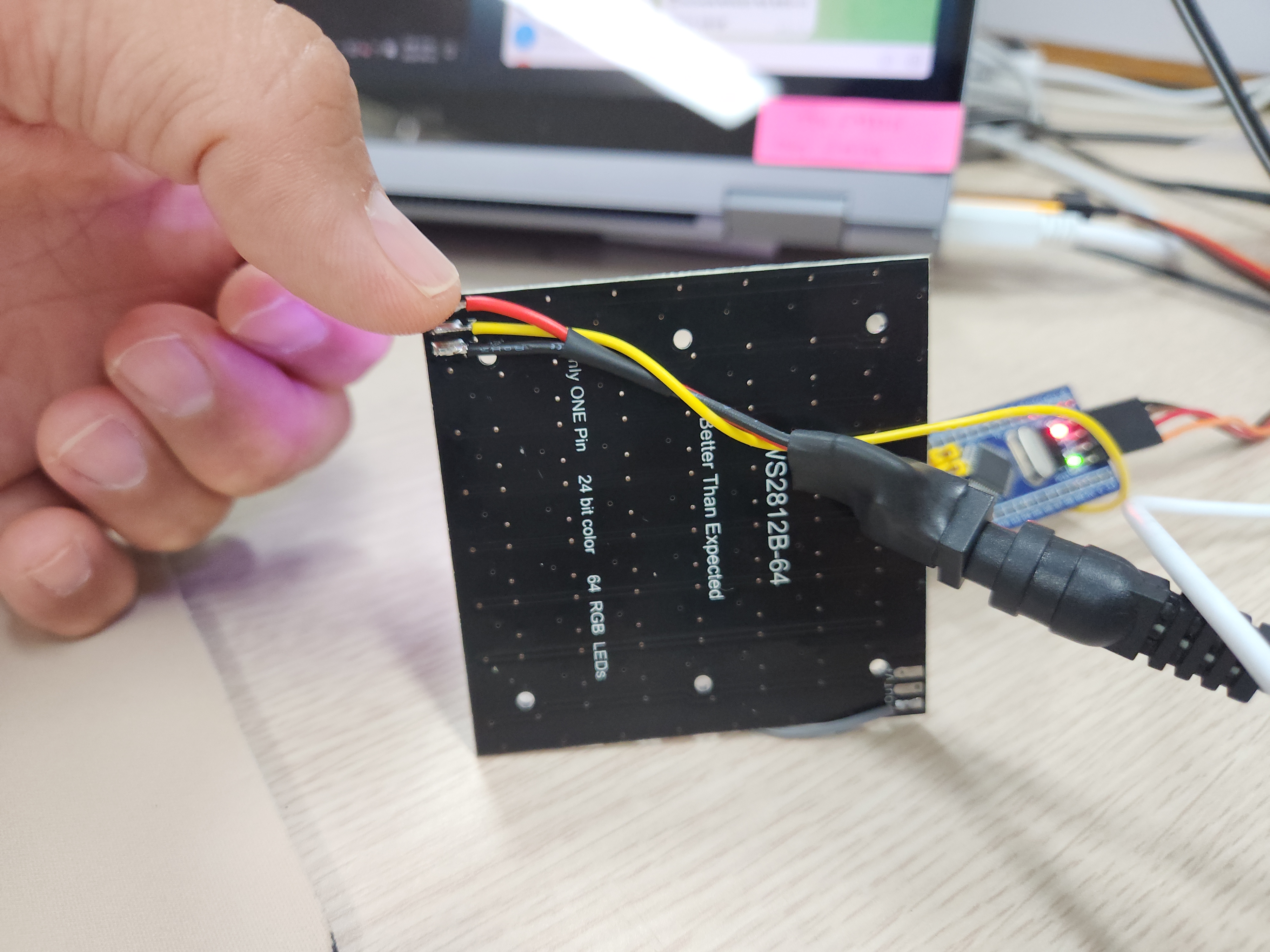
저기가 1번 LED


하나 더 켜진게 led 2번

뒤집으면 입력핀 바로 뒤에있는게 1번이다.


직접 코딩해보려다가 작동만 확인하려고 ai 써서 일단 진행

낮은 클럭으로 하다가 안되서 72MHz로 올리니 정상적으로 작동한다. 역시 SPI로 가야하나?

/* -------------------- WS2812 (PB0, bit-bang, DWT cycle count) -------------------- */

/* Cortex-M3 DWT 사이클 카운터 활성화 (마이크로초 이하 정밀 타이밍용) */
static void DWT_Init(void)
{
  CoreDebug->DEMCR |= CoreDebug_DEMCR_TRCENA_Msk;
  DWT->CYCCNT = 0;
  DWT->CTRL |= DWT_CTRL_CYCCNTENA_Msk;
}

/* 비트 1개 전송: 기준 시각(start) 대비 상대시간으로 High->Low 구간을 제어해
 * 분기/함수호출 오버헤드로 인한 지터를 최소화한다.
 * always_inline: -O0 빌드에서도 GCC가 반드시 인라인하도록 강제 (그냥 inline은
 * -O0에서 무시되어 매 비트마다 진짜 함수호출(push/pop)이 발생, 비트 사이 LOW
 * 구간이 수십배 길어져 스트립이 매 비트를 리셋으로 오인하는 문제가 있었음). */
__attribute__((always_inline)) static inline void ws2812_send_bit(uint8_t bit)
{
  uint32_t start = DWT->CYCCNT;
  uint32_t high_cycles = bit ? WS_T1H_CYCLES : WS_T0H_CYCLES;

  WS2812_PORT->BSRR = WS2812_PIN;                  /* Data line High */
  while ((DWT->CYCCNT - start) < high_cycles) { }
  WS2812_PORT->BSRR = (uint32_t)WS2812_PIN << 16U;  /* Data line Low  */
  while ((DWT->CYCCNT - start) < WS_BIT_CYCLES) { }
}

__attribute__((always_inline)) static inline void ws2812_send_byte(uint8_t byte)
{
  for (int8_t i = 7; i >= 0; i--)
  {
    ws2812_send_bit((byte >> i) & 0x01U);
  }
}

/* led_grb[] 버퍼 내용을 스트립으로 전송. 전송 중 인터럽트(특히 USB)로 인한
 * 타이밍 흐트러짐을 막기 위해 전송 구간만 짧게(약 1.92ms/64LED) IRQ를 끈다.
 *
 * 전송 전에 예상 총 전류(mA)를 계산해서 WS_MAX_TOTAL_MA를 넘으면 전체 밝기를
 * 비율대로 깎아서 보낸다. led_grb[]는 원본 그대로 두고(다음 프레임 색상 계산에
 * 영향 없음), 실제 출력만 스케일한다. */
static void ws2812_show(void)
{
  uint32_t est_ma = (uint32_t)NUM_LEDS * WS_MA_IDLE_PER_LED;
  for (uint32_t i = 0; i < NUM_LEDS; i++)
  {
    uint32_t sum = (uint32_t)led_grb[i][0] + led_grb[i][1] + led_grb[i][2];
    est_ma += (sum * WS_MA_PER_CH_FULL) / 255U;
  }

  /* scale: 256 = 그대로, 그보다 작으면 그 비율만큼 줄임 (고정소수점 8bit) */
  uint32_t scale = 256U;
  if (est_ma > WS_MAX_TOTAL_MA)
  {
    scale = (WS_MAX_TOTAL_MA * 256U) / est_ma;
  }

  __disable_irq();
  for (uint32_t i = 0; i < NUM_LEDS; i++)
  {
    ws2812_send_byte((uint8_t)((led_grb[i][0] * scale) >> 8)); /* G */
    ws2812_send_byte((uint8_t)((led_grb[i][1] * scale) >> 8)); /* R */
    ws2812_send_byte((uint8_t)((led_grb[i][2] * scale) >> 8)); /* B */
  }
  __enable_irq();
  /* Reset/Latch(>=50us Low)은 다음 프레임까지의 HAL_Delay 구간이 충분히 커버함 */
}

/* 0~255 위치값을 무지개 색상(R,G,B)으로 변환 (Adafruit NeoPixel wheel과 동일) */
static void wheel(uint8_t pos, uint8_t *r, uint8_t *g, uint8_t *b)
{
  pos = 255 - pos;
  if (pos < 85)
  {
    *r = 255 - pos * 3;
    *g = 0;
    *b = pos * 3;
  }
  else if (pos < 170)
  {
    pos -= 85;
    *r = 0;
    *g = pos * 3;
    *b = 255 - pos * 3;
  }
  else
  {
    pos -= 170;
    *r = pos * 3;
    *g = 255 - pos * 3;
    *b = 0;
  }
}

int main(void)
{

  /* USER CODE BEGIN 1 */
uint32_t count = 0;       /* 프레임 카운터 (하트비트 타이밍용) */
uint32_t anim_offset = 0; /* 무지개 애니메이션 오프셋 (WS_ANIM_STEP만큼씩 증가) */
#if WS_TEST_ORIENTATION
    /* 방향 확인용: 1번(index 0) LED만 흰색, 나머지는 꺼둠 */
    for (uint32_t i = 0; i < NUM_LEDS; i++)
    {
      uint8_t v = (i == 0) ? WS_BRIGHTNESS : 0;
      led_grb[i][0] = v; /* G */
      led_grb[i][1] = v; /* R */
      led_grb[i][2] = v; /* B */
    }
    ws2812_show();
#else
    for (uint32_t i = 0; i < NUM_LEDS; i++)
    {
      uint8_t wheel_pos = (uint8_t)((i * 256 / NUM_LEDS + anim_offset) & 0xFF);
      uint8_t r, g, b;
      wheel(wheel_pos, &r, &g, &b);
      led_grb[i][0] = (uint8_t)((g * WS_BRIGHTNESS) / 255);
      led_grb[i][1] = (uint8_t)((r * WS_BRIGHTNESS) / 255);
      led_grb[i][2] = (uint8_t)((b * WS_BRIGHTNESS) / 255);
    }
    ws2812_show();
#endif
}


'embeded > Cortex-M3 STM' 카테고리의 다른 글

max7219 8-Digit LED Display Drivers  (0) 2026.09.23
ws2812b vs hub75  (0) 2026.09.23
stm32 gpio hi-z  (0) 2026.09.10
stm32f103c9t6(bluepill) + keypad  (0) 2026.09.08
stm32 usb composite / report id  (0) 2026.09.04
Posted by 구차니

claude랑 ai 학습 시키면서 이것저것 물어보는데

한-영 번역을 어떻게 할수 있나 해서

위키피디아 영문/한글 두개 넣어서 돌리면 알아서 번역가능한거 아니냐 하니 그건또 아니라고 한다. ㅠㅠ

정확하게 매칭된 한 문장이 다른 분장으로 번역된 쌍이 필요한 것 이라고.


그럼 결국 기계번역도 수 많은 번역을 해온 자원봉사자들의 위에 우리가 혜택을 누리는건가..

  한국어 위키의 "서울" 문서와 영어 위키의 "Seoul" 문서는 서로 번역이 아닙니다. 각각 별도의 저자들이 독립적으로 쓴 글이라, 분량도 다르고,
  다루는 내용도 다르고, 문장 순서도 다릅니다. 두 코퍼스를 그냥 섞어서 "다음 토큰 맞추기"로 학습시키면, 모델은 "이 한국어 문단과 저 영어 문단이
  같은 의미다"라는 신호를 전혀 받지 못합니다 — 그냥 같은 파라미터 공간 안에 두 개의 독립된 언어 능력이 나란히 쌓일 뿐이지, 둘을 잇는 다리가
  저절로 생기지 않습니다. 지난번 "베이스 모델이 처음 보는 지식은 SFT로 못 만든다"는 얘기와 같은 원리가 여기도 적용됩니다 — 정렬(alignment) 
  신호가 없는 데이터는 아무리 섞어도 번역 능력을 만들지 않습니다.
  
  실제로 이걸 해낸 방법이 있습니다 — WikiMatrix 

  Meta(당시 Facebook AI)가 정확히 "위키백과에서 자동으로 문장 쌍을 뽑아내는" 문제를 풀었습니다:

  - LASER라는 다국어 문장 임베딩 모델로 93개 언어의 문장을 같은 벡터 공간에 투영
  - 한국어 문장과 영어 문장의 벡터가 얼마나 가까운지(의미적으로 비슷한지) 계산해서, 진짜로 비슷한 뜻인 문장 쌍만 골라냄
  - 이렇게 85개 언어에서 1억 3,500만 개 병렬 문장을 자동으로 채굴했고, 결과물이 공개돼 있습니다

  즉 "위키 두 개를 그냥 넣는 것"과 "WikiMatrix식으로 의미 유사도를 계산해서 진짜 대응 문장만 골라내는 것" 사이엔 **완전히 다른 파이프라인
  하나(문장 임베딩 모델 + 유사도 필터링)**가 끼어 있습니다. 다행히 이건 우리가 처음부터 만들 필요 없이, WikiMatrix가 이미 뽑아놓은 한영 병렬
  문장 쌍을 가져다 쓰는 게 현실적입니다.
 
  정리하면

  ❌ 한국어 위키 + 영어 위키를 그냥 같이 넣기
     → 두 언어를 "따로따로" 아는 모델은 될 수 있어도, 번역은 안 됨
 
  ✅ WikiMatrix 같은 이미 정렬된 병렬 코퍼스를 사전학습/SFT에 넣기
     → "이 한국어 문장 = 이 영어 문장"이라는 신호가 명시적으로 존재


[링크 : https://opus.nlpl.eu/datasets/WikiMatrix]

[링크 : https://huggingface.co/datasets/SEACrowd/wikimatrix]

'모종의 음모 > ai 프로그램' 카테고리의 다른 글

diffusion gemma  (0) 2026.09.23
직접만든 LLM .. part 2  (0) 2026.09.23
직접 LLM 만들...기?  (0) 2026.09.22
llama-tokenize  (0) 2026.09.22
llama-cli /clear  (0) 2026.09.22
Posted by 구차니

ai가 해줘도 직접인가..?

아무튼 중2 개발자가 직접 만든 한글 LLM 이란거에 한달뒤에 늦게 발동해서 해보는데

[링크 : https://news.hada.io/topic?id=32792]

    [링크 :https://github.com/seoan1024/korean-llm-v3]

    [링크 : https://github.com/seoan1024/Korean-llm-v4]


막상 해보고 나니 무슨 의미가 있나 싶기도 하고

일단 gemma4-e4b / gemma4-31B / qwen3.8 등에서 llama-tokenizer 로 돌려보니

생각외로 큰 차이는 없었고(내가 한국어사전을 이용해서 한거라 제법 단어로 될 줄 알았더니 의외로 안되서 실망)

결국 중요한건 학습셋 인가 라는 결론만..


1080ti 1개로

8시간 에 2000 epoch 학습

양자화 하지 않을 경우 163MB / q4_0 양자화시 28MB

생각보다 메모리 많이 먹고 있다.


토큰은 우리말사전을 기준으로 추출

학습셋은 한국어 위키피디아.


+

크기
 
  ┌────────────────────────┬─────────────┐
  │        구성요소        │ 파라미터 수 │
  ├────────────────────────┼─────────────┤
  │ 임베딩 (32,448 × 512)  │ 16,613,376  │
  ├────────────────────────┼─────────────┤
  │ 트랜스포머 블록 × 8층  │ 25,690,112  │
  ├────────────────────────┼─────────────┤
  │ 정규화(RMSNorm) × 17개 │ 9,216       │
  ├────────────────────────┼─────────────┤
  │ 합계                   │ ≈ 42.3M     │
  └────────────────────────┴─────────────┘

  출력층은 별도 파라미터 없이 임베딩 행렬을 그대로 재사용합니다(tied embedding) — 입력 임베딩과 출력 확률 계산이 같은 32,448×512 행렬을 공유해서 파라미터를 아낍니다.

  블록 1개(3,211,264개) 안에서는 어텐션이 1,048,576개, SwiGLU가 2,162,688개로 FFN이 어텐션의 약 2배 차지합니다. 이건 LLaMA류의 전형적인 비율입니다.

  입력 토큰 id
    → 임베딩(emb)                         : id → 512차원 벡터
    → [블록 × 8]
         x = x + Attention(RMSNorm(x))    : 잔차 연결 1
         x = x + SwiGLU(RMSNorm(x))       : 잔차 연결 2
    → 최종 RMSNorm(norm)
    → emb.weight.T 와 곱함                : 512차원 → 32,448개 토큰 확률(logits)

  - RMSNorm: LayerNorm의 경량 버전. 평균을 빼지 않고 제곱평균으로만 스케일을 맞춥니다(x * rsqrt(mean(x²))). 학습 가능한 스케일 벡터 w 하나만
    가집니다(bias 없음). LLaMA/Gemma 계열이 공통으로 쓰는 방식이고, 일반 LayerNorm보다 계산이 싸고 안정적입니다.
  - rope(x, cos, sin): 회전 위치 인코딩(RoPE). Q, K 벡터를 절반씩 잘라(x1, x2) 2D 회전을 적용해서 "이 토큰이 몇 번째 위치인가"를 벡터 자체에
    새겨 넣습니다. 별도의 위치 임베딩 파라미터가 없고, 상대적 거리 정보가 자연스럽게 학습됩니다.
  - Attention:
    - qkv 선형층 하나로 Q/K/V를 한 번에 계산(512 → 1536)
    - 8개 헤드로 나눠 각각 RoPE 적용
    - F.scaled_dot_product_attention(..., is_causal=True) — PyTorch 내장 함수로, 이 안에서 Flash Attention 커널이 자동 선택됩니다(가능한
      하드웨어에서). causal=True라 미래 토큰을 보지 못하게 마스킹됩니다.
    - GQA/MQA 없이 순수 MHA(8쿼리헤드=8키헤드) — 이전에 설명드렸듯 이 모델 크기·문맥길이(512)에서는 KV 캐시 절감 이득보다 품질 손실이 더 클 수
      있어 안 씁니다.
    - 마지막에 o 선형층으로 다시 섞음.
  - SwiGLU: 게이트 달린 FFN. w13이 두 벡터(a, b)를 동시에 뽑고, silu(a) * b로 게이팅한 뒤 w2로 다시 512차원으로 축소. 일반 ReLU-FFN보다
    표현력이 좋다고 알려져 LLaMA/PaLM 계열이 표준으로 씁니다.
  - Block: 위 둘을 Pre-Norm 방식(정규화 먼저, 그다음 서브레이어)으로 감싸고 잔차 연결. GPT-2식 Post-Norm보다 학습이 안정적입니다.
  - 초기화: 일반 가중치는 std=0.02 정규분포. 단, 각 블록의 "잔차에 더해지는 마지막 선형층"(attn.o, mlp.w2)은 0.02/sqrt(2*8)로 더 작게
    초기화합니다 — 층이 깊어질수록 잔차 누적으로 분산이 커지는 걸 막는 GPT-2/nanoGPT식 트릭입니다.
  - forward: 학습 시 targets를 주면 다음 토큰 예측 교차엔트로피 손실까지 한 번에 계산. logits.view(-1, V) 형태로 펴서 전체 배치·시퀀스 위치를
    한꺼번에 손실 계산합니다.
  - generate: 자기회귀 생성 루프.
    - 매 스텝 마지막 block_size(512) 토큰만 잘라서 forward (문맥 길이 제한)
    - temperature로 확률 분포를 누그러뜨리고, top_k로 후보를 40개로 제한한 뒤 multinomial로 샘플링 (확률적 생성 — 어제 보여드린 samples.txt가
      이 방식)
    - eos_id를 만나면 조기 종료 (SFT용으로 <|end|> id를 넘길 수 있게 만들어둔 파라미터)
    - 제가 별도로 검증할 때 쓴 "탐욕적(top_k=1 상당)" 생성은 이 함수를 안 쓰고 argmax로 직접 만든 스크립트였습니다 — 결정적 결과 확인용.

  설정값 (Config)

  ┌──────────────────────────────────┬────────────────────────────────────────────────────────────────────────────────────────────────┐
  │                값                │                                              의미                                              │
  ├──────────────────────────────────┼────────────────────────────────────────────────────────────────────────────────────────────────┤
  │ vocab_size=32448                 │ 실제 토큰 32,408개를 GPU 효율을 위해 64의 배수로 패딩 (GGUF 내보낼 때는 실제 개수로 다시 자름) │
  ├──────────────────────────────────┼────────────────────────────────────────────────────────────────────────────────────────────────┤
  │ block_size=512                   │ 한 번에 볼 수 있는 최대 토큰 수 (문맥 길이) — llama-cli 대화 모드에서 넘치면 에러 나던 원인    │
  ├──────────────────────────────────┼────────────────────────────────────────────────────────────────────────────────────────────────┤
  │ n_layer=8, n_head=8, d_model=512 │ 8층, 헤드당 64차원(512/8)                                                                      │
  ├──────────────────────────────────┼────────────────────────────────────────────────────────────────────────────────────────────────┤
  │ ffn_hidden=1408                  │ SwiGLU 내부 확장 차원                                                                          │
  ├──────────────────────────────────┼────────────────────────────────────────────────────────────────────────────────────────────────┤
  │ rope_base=10000.0                │ RoPE 회전 주파수 기준값 (LLaMA 기본값과 동일)                                                  │
  └──────────────────────────────────┴────────────────────────────────────────────────────────────────────────────────────────────────┘

  총평: 이 모델은 아키텍처 자체는 실제 LLaMA/Mistral과 완전히 동일한 축소판입니다(RMSNorm+RoPE+SwiGLU+tied embedding+causal MHA). 차이는 오직 규모(8층/512차원 vs 수십층/수천차원)와 GQA 유무뿐이라, 여기서 배운 구조 지식은 실제 대형 오픈소스 모델을 읽을 때 그대로 적용됩니다.


암만봐도 이거랑 유사한 단어들이 많이 나온단 말이지..

[링크 : https://github.com/seoan1024/Korean-llm-v4]


아키텍쳐상 계통이 같은 듯?

● 네, 구조상 아키텍처 계열이 같습니다 — 다만 규모와 세부 구현은 상당히 다릅니다.
  
  비교
 
  ┌────────────────────┬───────────────────────────────────────────┬──────────────────────────────────────────────────────────────────────┐
  │        항목        │          이 프로젝트(seoan1024)           │                             llm-ko(여기)                             │
  ├────────────────────┼───────────────────────────────────────────┼──────────────────────────────────────────────────────────────────────┤
  │ 정규화/위치/활성화 │ RMSNorm + RoPE + SwiGLU                   │ 동일                                                                 │
  ├────────────────────┼───────────────────────────────────────────┼──────────────────────────────────────────────────────────────────────┤
  │ 임베딩 공유        │ O                                         │ O                                                                    │
  ├────────────────────┼───────────────────────────────────────────┼──────────────────────────────────────────────────────────────────────┤
  │ 파라미터 수        │ 약 1.09B                                  │ 약 42.3M (25배 작음)                                                 │
  ├────────────────────┼───────────────────────────────────────────┼──────────────────────────────────────────────────────────────────────┤
  │ 레이어/은닉/헤드   │ 20층 / 1920차원 / 10헤드                  │ 8층 / 512차원 / 8헤드                                                │
  ├────────────────────┼───────────────────────────────────────────┼──────────────────────────────────────────────────────────────────────┤
  │ 토크나이저         │ 남의 것 재사용 (beomi/Llama-3-Open-Ko-8B) │ 직접 학습(SentencePiece Unigram, 32,408개)                           │
  ├────────────────────┼───────────────────────────────────────────┼──────────────────────────────────────────────────────────────────────┤
  │ 정밀도             │ BF16                                      │ fp32 (우리 GPU는 Pascal이라 fp16/bf16 이득 없음, 이전에 실측 확인함) │
  ├────────────────────┼───────────────────────────────────────────┼──────────────────────────────────────────────────────────────────────┤
  │ 학습 단계          │ pretrain → SFT 2단계                      │ 동일 구조 (base → sft, pipeline.sh)                                  │
  ├────────────────────┼───────────────────────────────────────────┼──────────────────────────────────────────────────────────────────────┤
  │ 라이선스           │ GPL-3.0                                   │ 목표: Apache-2.0/MIT                                                 │
  ├────────────────────┼───────────────────────────────────────────┼──────────────────────────────────────────────────────────────────────┤
  │ 요구 하드웨어      │ RTX 3060 이상, RAM 64GB, 1TB NVMe         │ GTX 1080 Ti ×2 (훨씬 낮은 사양 지향)                                 │
  └────────────────────┴───────────────────────────────────────────┴──────────────────────────────────────────────────────────────────────┘

  왜 비슷해 보이는가

  RMSNorm+RoPE+SwiGLU+임베딩공유 조합은 LLaMA가 2023년에 공개한 이후 사실상 업계 표준이 됐습니다(Mistral, Gemma, Qwen 등도 동일 계열). 이건
  특정 프로젝트의 독창적 아이디어가 아니라 공개된 논문·아키텍처를 다들 그대로 쓰는 것이라, "닮았다"기보다는 같은 표준 설계를 각자 구현한 것에
  가깝습니다. 2단계(pretrain→SFT) 구조도 요즘 오픈소스 LLM 학습의 사실상 정석 흐름이고요.

  실제 차이가 나는 지점은:
  - 규모: 저쪽은 1B급(RTX 4090 권장)까지 키웠고, 우리는 1080 Ti 2장으로 42M급을 목표로 함
  - 토크나이저: 저쪽은 이미 있는 8B짜리 모델의 토크나이저를 가져다 씀. 우리는 처음부터 직접 학습 — 이게 우리 프로젝트에서 꽤 공들인 부분이라
    차별점입니다
  - 라이선스: 여기가 중요한데, 저쪽은 GPL-3.0입니다. 우리는 Apache/MIT를 목표로 하고 있으니 저 저장소의 코드를 참고해서 베끼면 안 됩니다(GPL은
    파생물도 GPL로 강제). 지금까지 우리 코드는 제가 직접 작성했고 저 저장소를 본 적도 없으니 문제없지만, 앞으로도 저기 코드를 보고 옮겨오는
    건 피해야 합니다 — 순수 아키텍처 개념(RMSNorm 수식 등)을 참고하는 것 자체는 문제없지만(아이디어는 저작권 대상이 아님), 코드 구현체를
    그대로 가져오면 라이선스가 섞입니다.
 
  요약하면: "같은 요리법(LLaMA 스타일)으로 만든 다른 레스토랑" 정도입니다. 걱정하실 만한 건 라이선스뿐이고, 그것도 우리가 독립적으로 작성한
  코드라 문제없습니다.

'모종의 음모 > ai 프로그램' 카테고리의 다른 글

직접만든 LLM .. part 2  (0) 2026.09.23
wikimatrix  (0) 2026.09.22
llama-tokenize  (0) 2026.09.22
llama-cli /clear  (0) 2026.09.22
llama-simple  (0) 2026.09.22
Posted by 구차니

llama.cpp 에서 프롬프트가 어떻게 토큰으로 나누어 지는지 확인할수 있다.


우리말 사전으로 학습시켜서 소+아지 라던가 강+아지로 나올줄 알았는데

토큰을 직접 손으로(!) 건드릴수 있으려나?

 /mnt/Downloads/llama-b10488/llama-tokenize -m base42m-q4_0.gguf -p "마이크로소프트"
0.00.303.842 W load: control-looking token:      7 '<|end|>' was not control-type; this is probably a bug in the model. its type will be overridden
  3169 -> ' 마이크로소프트'

$ /mnt/Downloads/llama-b10488/llama-tokenize -m base42m-q4_0.gguf -p 대한민국
0.00.301.255 W load: control-looking token:      7 '<|end|>' was not control-type; this is probably a bug in the model. its type will be overridden
   579 -> ' 대한민국'
0.00.316.277 W llama_context: n_ctx_seq (512) > n_ctx_train (0) -- possible training context overflow

$ /mnt/Downloads/llama-b10488/llama-tokenize -m base42m-q4_0.gguf -p 강아지
0.00.302.451 W load: control-looking token:      7 '<|end|>' was not control-type; this is probably a bug in the model. its type will be overridden
 26760 -> ' 강아지'

$ /mnt/Downloads/llama-b10488/llama-tokenize -m base42m-q4_0.gguf -p 송아지
0.00.305.743 W load: control-looking token:      7 '<|end|>' was not control-type; this is probably a bug in the model. its type will be overridden
  1259 -> ' 송'
   382 -> '아'
   299 -> '지'


혹시나 해서 gemma4 e4b에서 돌려보는데 어라.. 생각외로 그렇게 토큰을 많이 먹진 않는다고 해야하나?

$ /mnt/Downloads/llama-b10488/llama-tokenize -m  gemma-4-E4B-it-Q4_K_M.gguf -p 마이크로소프트
0.00.926.382 W load: control-looking token:    212 '</s>' was not control-type; this is probably a bug in the model. its type will be overridden
0.00.927.107 W load: control-looking token:     50 '<|tool_response>' was not control-type; this is probably a bug in the model. its type will be overridden
0.00.937.154 W load: control-looking token:      1 '<eos>' was not control-type; this is probably a bug in the model. its type will be overridden
0.00.969.157 W load: special_eog_ids contains '<|tool_response>', removing '</s>' token from EOG list
0.01.001.080 W llama_context: n_ctx_seq (512) > n_ctx_train (0) -- possible training context overflow
     2 -> '<bos>'
238098 -> '마'
106427 -> '이크'
237323 -> '로'
238049 -> '소'
128329 -> '프트'


$ /mnt/Downloads/llama-b10488/llama-tokenize -m  gemma-4-E4B-it-Q4_K_M.gguf -p 대한민국
0.00.894.966 W load: control-looking token:    212 '' was not control-type; this is probably a bug in the model. its type will be overridden
0.00.895.695 W load: control-looking token:     50 '<|tool_response>' was not control-type; this is probably a bug in the model. its type will be overridden
0.00.905.756 W load: control-looking token:      1 '' was not control-type; this is probably a bug in the model. its type will be overridden
0.00.938.322 W load: special_eog_ids contains '<|tool_response>', removing '' token from EOG list
0.00.970.177 W llama_context: n_ctx_seq (512) > n_ctx_train (0) -- possible training context overflow
     2 -> ''
146220 -> '대한'
162139 -> '민국'


$ /mnt/Downloads/llama-b10488/llama-tokenize -m  gemma-4-E4B-it-Q4_K_M.gguf -p 강아지
0.00.915.146 W load: control-looking token:    212 '</s>' was not control-type; this is probably a bug in the model. its type will be overridden
0.00.915.894 W load: control-looking token:     50 '<|tool_response>' was not control-type; this is probably a bug in the model. its type will be overridden
0.00.926.166 W load: control-looking token:      1 '<eos>' was not control-type; this is probably a bug in the model. its type will be overridden
0.00.958.649 W load: special_eog_ids contains '<|tool_response>', removing '</s>' token from EOG list
0.00.990.550 W llama_context: n_ctx_seq (512) > n_ctx_train (0) -- possible training context overflow
     2 -> '<bos>'
238865 -> '강'
237534 -> '아'
237308 -> '지'


$ /mnt/Downloads/llama-b10488/llama-tokenize -m  gemma-4-E4B-it-Q4_K_M.gguf -p 송아지
0.00.895.230 W load: control-looking token:    212 '' was not control-type; this is probably a bug in the model. its type will be overridden
0.00.895.969 W load: control-looking token:     50 '<|tool_response>' was not control-type; this is probably a bug in the model. its type will be overridden
0.00.906.303 W load: control-looking token:      1 '' was not control-type; this is probably a bug in the model. its type will be overridden
0.00.939.847 W load: special_eog_ids contains '<|tool_response>', removing '' token from EOG list
0.00.972.088 W llama_context: n_ctx_seq (512) > n_ctx_train (0) -- possible training context overflow
     2 -> ''
239917 -> '송'
237534 -> '아'
237308 -> '지'


 /mnt/Downloads/llama-b10488/llama-tokenize -m Qwen3.8-27B-UD-IQ2_XXS.gguf -p 마이크로소프트
0.00.773.458 W llama_context: n_ctx_seq (512) > n_ctx_train (0) -- possible training context overflow
148763 -> '마'
156847 -> '이크'
 16869 -> '로'
216243 -> '소프트'

$ /mnt/Downloads/llama-b10488/llama-tokenize -m Qwen3.8-27B-UD-IQ2_XXS.gguf -p 대한민국
0.00.728.852 W llama_context: n_ctx_seq (512) > n_ctx_train (0) -- possible training context overflow
178031 -> '대한'
161266 -> '민국'

$ /mnt/Downloads/llama-b10488/llama-tokenize -m Qwen3.8-27B-UD-IQ2_XXS.gguf -p 강아지
0.00.774.480 W llama_context: n_ctx_seq (512) > n_ctx_train (0) -- possible training context overflow
152029 -> '강'
 51181 -> '아'
 20673 -> '지'

$ /mnt/Downloads/llama-b10488/llama-tokenize -m Qwen3.8-27B-UD-IQ2_XXS.gguf -p 송아지
0.00.769.448 W llama_context: n_ctx_seq (512) > n_ctx_train (0) -- possible training context overflow
150491 -> '송'
 51181 -> '아'
 20673 -> '지'


'모종의 음모 > ai 프로그램' 카테고리의 다른 글

wikimatrix  (0) 2026.09.22
직접 LLM 만들...기?  (0) 2026.09.22
llama-cli /clear  (0) 2026.09.22
llama-simple  (0) 2026.09.22
RoPE - Rotary Position Embedding  (0) 2026.09.21
Posted by 구차니

오.. 이런 명령어가 있었구나

이전 대화내용을 날려서 context를 정리하는 명령어


/mnt/llm-ko/3_small/gguf$ /mnt/Downloads/llama-b10488/llama-cli -m base42m-q4_0.gguf -p "대한민국의 수도는" -ngl 0


Loading model...  

▄▄ ▄▄
██ ██
██ ██  ▀▀█▄ ███▄███▄  ▀▀█▄    ▄████ ████▄ ████▄
██ ██ ▄█▀██ ██ ██ ██ ▄█▀██    ██    ██ ██ ██ ██
██ ██ ▀█▄██ ██ ██ ██ ▀█▄██ ██ ▀████ ████▀ ████▀
                                    ██    ██
                                    ▀▀    ▀▀

build      : b10488-9d77fa172
model      : base42m-q4_0.gguf
ftype      : Q4_0
modalities : text

available commands:
  /exit or Ctrl+C     stop or exit
  /regen              regenerate the last response
  /clear              clear the chat history
  /read <file>        add a text file
  /glob <pattern>     add text files using globbing pattern


> 대한민국의 수도는
>>>이다.

[ Prompt: 161.5 t/s | Generation: 285.9 t/s ]

> ㄴㅁㅇㄻㄴㅇㄹ
>>>>>>>>>>>>>>>>>>>>>>>>>>>>>>>>>>>>>>>>>>>>>>>>>>>>>>>>>>>>>>>>>>>>>>>>>>>>>>>>>>>>>>>>>>>>>)에서 이).

[ Prompt: 195.0 t/s | Generation: 115.0 t/s ]

> 세조대호아잉
>>>>>>>>>>>>>>>>>>>>>>>>>>>)의 순서로는 이례적으로, 그리고 이 작품이 나중의 문학적 삶의 방식에서 영감을 받은 것으로 평가된다.

[ Prompt: 213.6 t/s | Generation: 197.3 t/s ]

> 대한민국
>>>>>>>>>>>>>>>>>>>>>>>>>>>>>>>>>>>>>>>>>>>>>>>>>>>>>>>>>>>>>>>>>>>>>>>>>>>>>>>>>>>>>>>>>>>>>>>>>>>>>>>>>>>>>>>>>>>>>>)와 >>>>>>>>>>>>>>>>>>>>>>>>>>>>>>>>>>>>>>>>>>>>)이다.

[ Prompt: 257.0 t/s | Generation: 56.8 t/s ]

> 이다
0.16.540.856 E srv    send_error: task id = 330, error: request (513 tokens) exceeds the available context size (512 tokens), try increasing it
Error: request (513 tokens) exceeds the available context size (512 tokens), try increasing it

[ Prompt: 0.0 t/s | Generation: 0.0 t/s ]

/clear
Chat history cleared.

> 오오
>>>를 통해 “Linkword (rock tit)”의 "아름다운"을 언급하는 것을 고려하면, "아름다운"이라는 용어는 “Linkword”에서 유래한 것이다. 이것은 "Linkword"와 같은 다른 형태의 조합을 포함하는 단어로, 이는 “Linkword”를 의미하는 단어로, 이는 영어로 "Linkword"를 의미하며, 이는 ‘Linkword(newing)’와 같은 축약형에 해당하지 않는다. 이 단어들은 주로 영어 단어에서와 같이 사용되었지만, Linkword가 다른 단어들과 유사하게 자주 인용되는 것은 아니다. Linkword에서의 q-word는 Linkword의 한 구절에 나타난다. Linkword의 다른 구절은 Linkword를 ‘Linkword’에서 q-word와 같은 의미를 가진 단어로, Linkword에서 vii를 ‘Linkword’에서 q-word가 된다. Linkword는 Linkword의 q-word를 의미한다. Linkword의 다른 구절에는 Linkword가 q-word와 같이 Linkword의 q-word의 첫 번째 구절과 두 번째 구절을 공유한다. Linkword의 첫 번째 구절에는 Linkword가 q-word에서의 Linkword의 첫 번째 구절에서 q-word를 나타낸다. Linkword의 첫 번째 구절에는 Linkword의 "Linkword"가 포함되어 있다. Linkword가 q-word를 의미한다. Linkword의 첫 번째 구절은 Linkword가 q-word를 의미한다. Linkword는 Linkword가 q-word를 나타낸다. Linkword는 Linkword와 Linkword가 모두 q-word를 나타낸다. Linkword는 Linkword의 첫 번째 구절에서, Linkword는 Linkword가 q-word를 나타낸다. Linkword의 마지막 구절은 Linkword의 q-word를 나타낸다. Linkword는 Linkword와 Linkword가 q-

[ Prompt: 1393.2 t/s | Generation: 153.5 t/s ]

'모종의 음모 > ai 프로그램' 카테고리의 다른 글

직접 LLM 만들...기?  (0) 2026.09.22
llama-tokenize  (0) 2026.09.22
llama-simple  (0) 2026.09.22
RoPE - Rotary Position Embedding  (0) 2026.09.21
말뭉치, 코퍼스(corpus)  (0) 2026.09.21
Posted by 구차니