Programming/c# & winform2020. 10. 15. 15:58

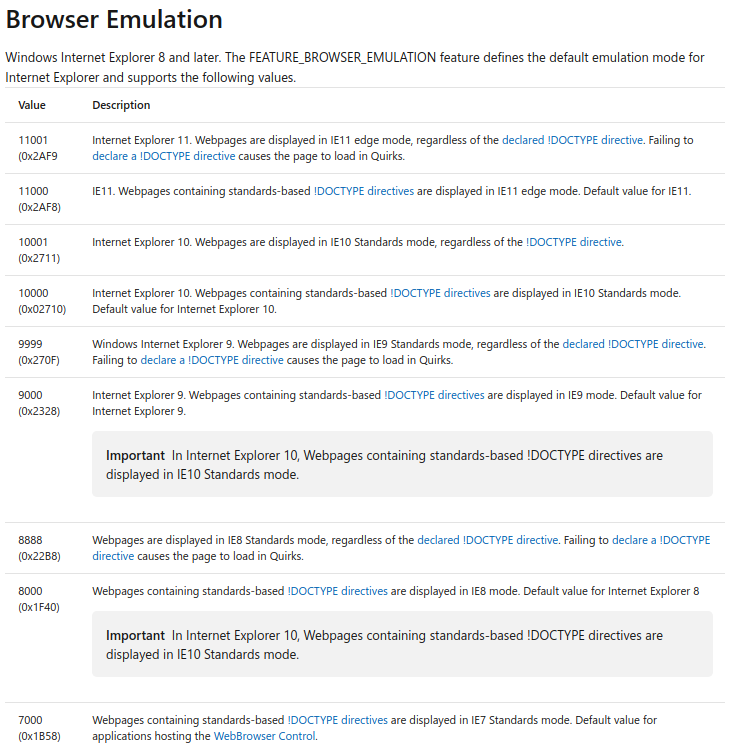
기본적으로 IE7으로 작동하기 때문에 css 등이 적용되지 않는 문제가 있다고 한다.

(구버전으로 맞추면 문제 될 건 없을수도 있지만)


[링크 : https://stackoverflow.com/questions/18576963/webbrowser-control-no-css-applied]

  [링크 : http://ssamlaeng.blogspot.com/2015/08/c-webbrowser-control-css.html]

  [링크 : https://www.pedautreppe.com/post/How-can-we-render-CSS3-in-a-WebBrowser-Control-.aspx]


win10에서 돌리니(2020년 9월 버전) 0x2710 / IE10으로 인식하는 것으로 보인다.


[링크 : https://docs.microsoft.com/en-us/previous-versions/windows/internet-explorer/ie-developer/general-info/ee330730(v=vs.85)#browser-emulation]

[링크 : ]

[링크 : ]

'Programming > c# & winform' 카테고리의 다른 글

c# winform / 버튼클릭 이벤트 호출하기  (2) 2020.10.15
c# webBrowser css 적용하기...?  (0) 2020.10.15
c# webBrowser + markdig  (0) 2020.10.15
c# 파일 읽어서 string에 넣기  (0) 2020.10.15
csharp webbrowser ctrl  (0) 2020.10.15
Posted by 구차니
Programming/c# & winform2020. 10. 15. 15:10

urlrewriter를 이용해서

로컬 파일 + 생성된 html 파일을 원하는대로 표기가 가능하다.

다만 webBrowser control 에서 f5 누르면 날아가버리니 키를 막아야 할 듯?


[링크 : https://www.cyotek.com/blog/writing-custom-markdig-extensions]

[링크 : https://github.com/arthurrump/MarkdigExtensions]

'Programming > c# & winform' 카테고리의 다른 글

c# webBrowser css 적용하기...?  (0) 2020.10.15
c# webBrowser control/class IE 버전  (0) 2020.10.15
c# 파일 읽어서 string에 넣기  (0) 2020.10.15
csharp webbrowser ctrl  (0) 2020.10.15
markdown c#용 라이브러리  (0) 2020.10.15
Posted by 구차니
Programming/c# & winform2020. 10. 15. 14:29

와 c# 만세

이 복합한 걸 한줄에 끝내다니


string text = System.IO.File.ReadAllText(@"C:\Users\Public\TestFolder\WriteText.txt");

[링크 : https://docs.microsoft.com/ko-kr/dotnet/csharp/programming-guide/file-system/how-to-read-from-a-text-file]

'Programming > c# & winform' 카테고리의 다른 글

c# webBrowser control/class IE 버전  (0) 2020.10.15
c# webBrowser + markdig  (0) 2020.10.15
csharp webbrowser ctrl  (0) 2020.10.15
markdown c#용 라이브러리  (0) 2020.10.15
c# nullable annotation context와 attribute?  (0) 2020.10.14
Posted by 구차니
Programming/web 관련2020. 10. 15. 12:07

체크박스

[ ] [x]


이미지

![이미지 대체 텍스트](url)


[링크 : https://stackoverflow.com/questions/47344571/]

[링크 : https://jijong.github.io/2016-12-01/markdown/]


[링크 : https://commonmark.org/]


[링크 : https://www.nuget.org/packages/Markdig.Signed/]

[링크 : https://github.com/lunet-io/markdig]


+

확장된 녀석들이 아니면 체크박스나 텍스트박스는 지원을 안해서

HTML로 입력을 해야 할지도?

[링크 : https://stackoverflow.com/questions/24051693/input-form-in-markdown]

[링크 : https://github.com/brikis98/wmd]]

'Programming > web 관련' 카테고리의 다른 글

web gl on chrome  (0) 2021.12.14
webgl-util.js  (0) 2021.11.12
크롬 확장도구 - json viewer  (0) 2019.08.07
resizable table cell  (0) 2019.06.17
web framework  (0) 2019.06.05
Posted by 구차니
Programming/c# & winform2020. 10. 15. 11:06

URI로 로컬 파일에 접근하려면 절대경로로 입력이 되어야 한다.

string appDir = Path.GetDirectoryName(Assembly.GetExecutingAssembly().GetName().CodeBase);
webBrowser1.Url = new Uri(Path.Combine(appDir, @"Documentation\index.html"));

[링크 : https://stackoverflow.com/questions/7194851/load-local-html-file-in-a-c-sharp-webbrowser]


WebBrwoser class의 경우 Document 와 DocumentText 속성을 제공하는데

해당 속성은 WebBrowser 컨트롤에서 변경된 사항 그대로 출력하게 된다(즉, 불러온 파일을 수정하면 수정한대로 획득이 가능하다)

[링크 : https://docs.microsoft.com/.../system.windows.forms.webbrowser.document?view=netcore-3.1]

[링크 : https://docs.microsoft.com/.../system.windows.forms.webbrowser.documenttext?view=netcore-3.1]


File.WriteAllText(path, browser.Document.Body.Parent.OuterHtml, Encoding.GetEncoding(browser.Document.Encoding));

[링크 : https://stackoverflow.com/questions/2976701/save-webbrowser-control-content-to-html]


[링크 : https://www.c-sharpcorner.com/UploadFile/mahesh/webbrowser-control-in-C-Sharp-and-windows-forms/]

'Programming > c# & winform' 카테고리의 다른 글

c# webBrowser + markdig  (0) 2020.10.15
c# 파일 읽어서 string에 넣기  (0) 2020.10.15
markdown c#용 라이브러리  (0) 2020.10.15
c# nullable annotation context와 attribute?  (0) 2020.10.14
mono .net framework 실행  (0) 2020.10.13
Posted by 구차니
Programming/c# & winform2020. 10. 15. 11:04


[링크 : https://stackoverflow.com/questions/7304693/how-to-parse-markdown-via-c-sharp]

[링크 : https://code.google.com/archive/p/markdownsharp/]


[링크 : https://github.com/Knagis/CommonMark.NET] 유지보수 하지 않음

[링크 : https://github.com/lunet-io/markdig] markdownsharp 보다 인기 좋음

'Programming > c# & winform' 카테고리의 다른 글

c# 파일 읽어서 string에 넣기  (0) 2020.10.15
csharp webbrowser ctrl  (0) 2020.10.15
c# nullable annotation context와 attribute?  (0) 2020.10.14
mono .net framework 실행  (0) 2020.10.13
.net core/.net framework 컨트롤 차이  (0) 2020.10.13
Posted by 구차니
Programming/c# & winform2020. 10. 14. 10:30

string?는 nullable한 string 변수를 사용하겠다는 의미인데

그냥 빌드하면 다음과 같은 경고를 내뱉는다.

warning CS8632: The annotation for nullable reference types should only be used in code within a '#nullable' annotations context.


이 경우에는 아래와 같이 #nullable 어노테이션 컨텍스트를 이용해서 알려주면 경고가 뜨지 않게 된다.

using System;
using System.IO;

class test
{

static void Main()
{
string manyLines=@"This is line one
This is line two
Here is line three
The penultimate line is line four
This is the final, fifth line.";

using (var reader = new StringReader(manyLines))
{
#nullable enable
    string? item;
    do {
        item = reader.ReadLine();
        Console.WriteLine(item);
    } while(item != null);
}
}
}

[링크 : https://stackoverflow.com/questions/55492214/]

[링크 : https://docs.microsoft.com/ko-kr/dotnet/csharp/nullable-references]


특성(attribute)

[링크 : https://docs.microsoft.com/ko-kr/dotnet/csharp/programming-guide/concepts/attributes/]


+

내용만 보면. java annotation에 대응되는건 attribute이고

c#의 annotation은 compiler directive에 가까운 것 같기도 하고... 조금 더 찾아봐야겠다.

[링크 : https://stackoverflow.com/questions/553857/]


+

#define 처럼 #이니까 directive 맞네 -_-

Posted by 구차니
Programming/c# & winform2020. 10. 13. 14:52

.net framework로 만든 프로그램도 기본 컨트롤을 이용했기에 리눅스/mono 에서 구동이 되긴 한다.


동일한 파일을 리눅스 mono로 실행한 화면

메뉴는 너무 처참하게 깨지네.. 다 있는것 같지만 레이아웃도 너무 심각하게 깨지고..

Posted by 구차니
Programming/c# & winform2020. 10. 13. 14:45

.net core에는 멀티플랫폼 지원못하는 부분은 제외되다 보니 꽤 많은 컨트롤들이 누락된다.

일단은.. WebBrowser와 SerialPort가 빠지는게 커보인다.


공용 컨트롤 - WebBrowser


메뉴 및 도구 모음 - ToolStripContainer

데이터 - Chart / BindingNavigator / DataSet

구성요소 - BackgroundWorker / DirectoryEntry / DirectorySearcher / EventLog / FileSystemWatcher / MessageQueue / PerformanceCounter / Process / SerialPort / serviceController


WPF 상호 운용성

Posted by 구차니
Programming/c# & winform2020. 10. 13. 14:33

메뉴를 넣는데 인터넷 검색해보니

예전 MFC 처럼 메뉴를 클릭클릭하면서 생성해낼수 있을줄 알았는데

안되서 혹시? 라는 마음에 해보니


.net core는 메뉴는 생성되지만 개별 메뉴는 일일이 코딩으로 해야 한다면


.net framwork는 기존대로 생성이 가능하다.


멀티플랫폼 갈게 아니라면 .net core로 굳이 가야 하나 라는 생각이 드네..

'Programming > c# & winform' 카테고리의 다른 글

mono .net framework 실행  (0) 2020.10.13
.net core/.net framework 컨트롤 차이  (0) 2020.10.13
winform 에서 이미지 넣기  (0) 2020.10.12
c# strong type langugae  (0) 2020.10.08
c# delagate 대리자  (0) 2020.10.08
Posted by 구차니