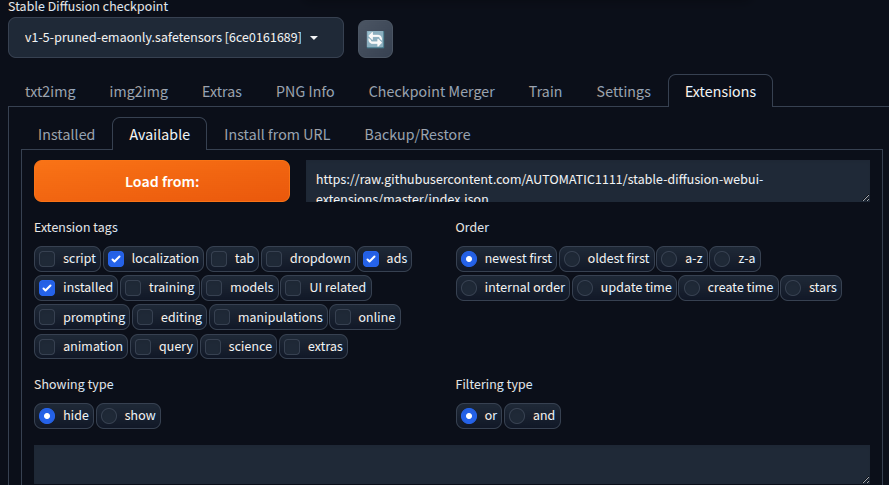
*** Error completing request *** Arguments: ('https://github.com/d8ahazard/sd_dreambooth_extension.git', ['ads', 'localization', 'installed'], 'hide', 'or', 0, '') {} Traceback (most recent call last): File "/mnt/Downloads/stable-diffusion-webui/modules/call_queue.py", line 74, in f res = list(func(*args, **kwargs)) File "/mnt/Downloads/stable-diffusion-webui/modules/ui_extensions.py", line 407, in install_extension_from_index ext_table, message = install_extension_from_url(None, url) File "/mnt/Downloads/stable-diffusion-webui/modules/ui_extensions.py", line 352, in install_extension_from_url check_access() File "/mnt/Downloads/stable-diffusion-webui/modules/ui_extensions.py", line 24, in check_access assert not shared.cmd_opts.disable_extension_access, "extension access disabled because of command line flags" AssertionError: extension access disabled because of command line flags
--server-name=0.0.0.0. 주고 하고 있었는데 이걸 빼고 하니 에러없이 진행된다.
플러그인은 외부사용시에는 설치 못하게 막아둔듯.
Initializing Dreambooth Dreambooth revision: 4244f6b2cf810a0a4dd83a3534b27d92b82e4c21 Checking xformers... Checking bitsandbytes... Checking bitsandbytes (ALL!) Installing bitsandbytes Successfully installed bitsandbytes-0.49.2 cuda-bindings-13.3.1 cuda-pathfinder-1.5.5 cuda-toolkit-13.0.2 nvidia-cublas-13.1.1.3 nvidia-cuda-cupti-13.0.85 nvidia-cuda-nvrtc-13.0.88 nvidia-cuda-runtime-13.0.96 nvidia-cudnn-cu13-9.20.0.48 nvidia-cufft-12.0.0.61 nvidia-cufile-1.15.1.6 nvidia-curand-10.4.0.35 nvidia-cusolver-12.0.4.66 nvidia-cusparse-12.6.3.3 nvidia-cusparselt-cu13-0.8.1 nvidia-nccl-cu13-2.29.7 nvidia-nvjitlink-13.0.88 nvidia-nvshmem-cu13-3.4.5 nvidia-nvtx-13.0.85 torch-2.12.0 triton-3.7.0 Checking Dreambooth requirements... [Installed version of accelerate: 0.21.0 [Dreambooth] accelerate v0.21.0 is already installed. [Installed version of bitsandbytes: 0.49.2 [Dreambooth] bitsandbytes v0.45.2 is already installed. [Dreambooth] dadaptation v3.2 is not installed. Successfully installed dadaptation-3.2 [Dreambooth] diffusers v0.32.2 is not installed. Successfully installed diffusers-0.38.0 importlib_metadata-9.0.0 safetensors-0.8.0 zipp-4.1.0 [Dreambooth] discord-webhook v1.3.1 is not installed. Successfully installed discord-webhook-1.4.1 [Installed version of fastapi: 0.94.0 [Dreambooth] fastapi v0.94.0 is already installed. [Installed version of gitpython: 3.1.32 [Dreambooth] gitpython v3.1.32 is already installed. [Installed version of pillow: 9.5.0 [Dreambooth] pillow v11.3.0 is not installed. Successfully installed pillow-12.2.0 [Dreambooth] pytorch_optimizer v3.4.0 is not installed. Successfully installed pytorch_optimizer-3.10.1 [Installed version of tomesd: 0.1.3 [Dreambooth] tomesd v0.1.3 is already installed. [Installed version of tqdm: 4.67.3 [Dreambooth] tqdm v4.67.1 is already installed. [Installed version of transformers: 4.30.2 [Dreambooth] transformers v4.49.0 is not installed. Successfully installed click-8.4.1 hf-xet-1.5.1 huggingface-hub-1.19.0 tokenizers-0.22.2 transformers-5.11.0 [Dreambooth] xformers v0.0.27.post2 is not installed. Successfully installed xformers-0.0.35 [Dreambooth] tensorboard v2.18.0 is not installed. Successfully installed absl-py-2.4.0 grpcio-1.81.1 markdown-3.10.2 tensorboard-2.20.0 tensorboard-data-server-0.7.2 werkzeug-3.1.8 [+] accelerate version 0.21.0 installed. [+] diffusers version 0.38.0 installed. [+] transformers version 5.11.0 installed. [+] bitsandbytes version 0.49.2 installed. [+] xformers version 0.0.35 installed.
textual inversion은 할 수 있는게 많지 않다는데, 그럴싸하게 나온것 같았는데 아닌가?!
LoRA(Low-Rank Adaptation, 저 랭크 적응?)은 Stable Diffusion 모델을 세부 조정하기 위한 학습 기법입니다. Stable Diffusion에는 Dreambooth와 textual inversion과 같은 학습기법도 있는데, LoRA 는 뭐가 다를까요? LoLA는 파일 크기와 학습 능력간에 적절한 균형을 이루고 있습니다. Dreambooth는 강력하지만, 모델 파일의 크기가 매우 큽니다(2~7GB). 텍스 인버전(textual inversion)은 파일이 아주 작지만(100KB 정도), 할 수 있는 게 많지 않습니다. LoRA는 이 두가지의 중간쯤이라고 보시면 됩니다. 파일 크기는 2~200MB 정도로 부담스럽지 않으며, 학습능력도 괜찮은 편입니다
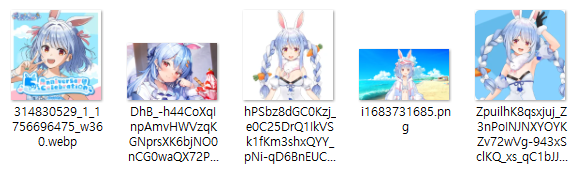
Loss: 0.1782198 Step: 394 Last prompt: a dirty painting of i1683731685, art by portrait of usada pekora Last saved embedding: <none> Last saved image: <none>
Loss: 0.0547138 Step: 395 Last prompt: a painting of _1_1756696475_w360, art by portrait of usada pekora Last saved embedding: <none> Last saved image: <none>
Loss: 0.0913988 Step: 397 Last prompt: a dark painting of hPSbz8dGC0Kzj_e0C25DrQ1IkVSk1fKm3shxQYY_pNi-qD6BnEUCNIuEtYe1a1ri6IHTBFJ7gRuuSrE34KdmxQ, art by portrait of usada pekora Last saved embedding: <none> Last saved image: <none>
Loss: 0.0651186 Step: 398 Last prompt: a rendering of ZpuilhK8qsxjuj_Z3nPoINJNXYOYKZv72wVg-943xSclKQ_xs_qC1bJJM32gGWUuJBNEBaMaAQJQzxaJ7txuHg, art by portrait of usada pekora Last saved embedding: <none> Last saved image: <none>
Loss: 0.0029331 Step: 499 Last prompt: a nice painting of DhB_-h44CoXqInpAmvHWVzqKGNprsXK6bjNO0nCG0waQX72PREOmRxL9tBvqKFcuxnZULq3L3vFskLcRSeNQvA, art by portrait of usada pekora Last saved embedding: <none> Last saved image: <none>
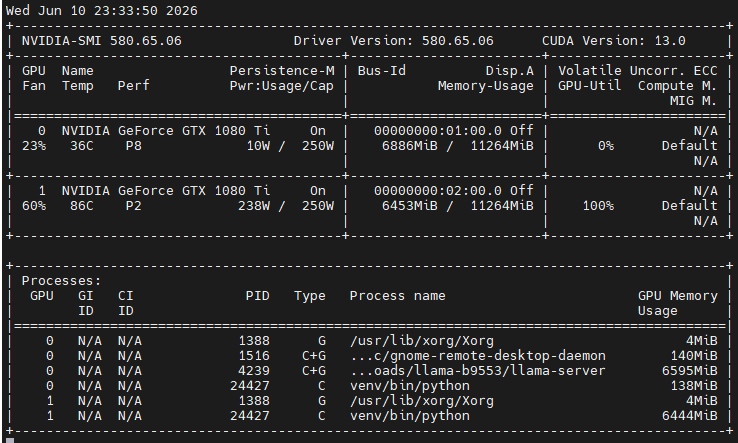
콘솔창 열어보면 먼가 되는거 같긴한데..
gpu도 열심히 갈려 나가는 중. 으어어 온도 괜찮을까?
처음으로 gpu fan 60% 돌파!
cpu가 아주 노는건 아니고, 파일 퍼준다고 조금 사용되는 것 같다.
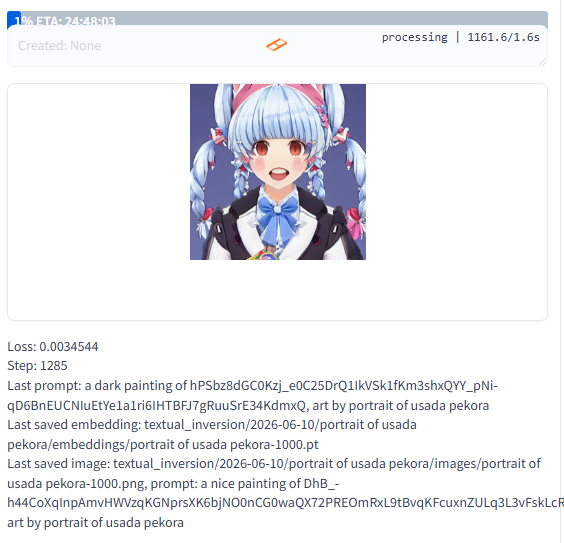
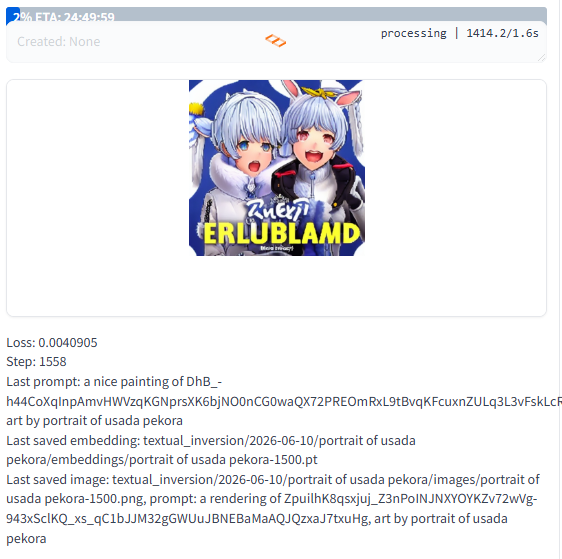
좀 돌다 보니 이런게 막 나온다.
일종의 evaluation 단계에서 하나 빼보는건가?
아마 학습 단계에서 500개마다 save an image 되어있는 부분이, 이렇게 이미지로 나오는 듯
학습 돌리고 나서 usada가 들어간걸 찾아보는데
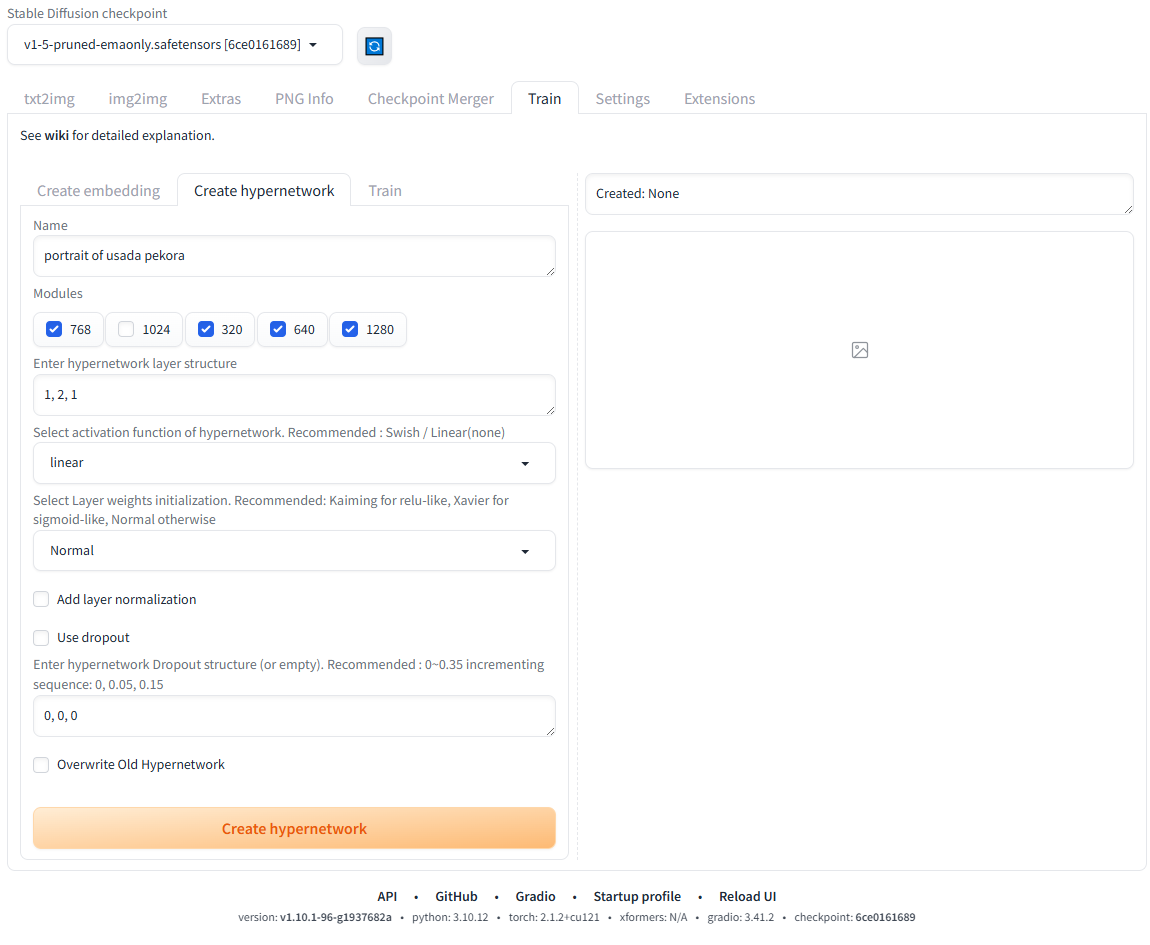
safetensors는 없고 embeddings와 model/hypernetworks 에 pt 확장자로 존재한다.
/mnt/Downloads/stable-diffusion-webui$ find ./ -name *usada* ./embeddings/portrait of usada pekora.pt ./textual_inversion/2026-06-10/portrait of usada pekora ./textual_inversion/2026-06-10/portrait of usada pekora/images/portrait of usada pekora-1500.png ./textual_inversion/2026-06-10/portrait of usada pekora/images/portrait of usada pekora-3500.png ./textual_inversion/2026-06-10/portrait of usada pekora/images/portrait of usada pekora-500.png ./textual_inversion/2026-06-10/portrait of usada pekora/images/portrait of usada pekora-3000.png ./textual_inversion/2026-06-10/portrait of usada pekora/images/portrait of usada pekora-2500.png ./textual_inversion/2026-06-10/portrait of usada pekora/images/portrait of usada pekora-2000.png ./textual_inversion/2026-06-10/portrait of usada pekora/images/portrait of usada pekora-1000.png ./textual_inversion/2026-06-10/portrait of usada pekora/images/portrait of usada pekora-4000.png ./textual_inversion/2026-06-10/portrait of usada pekora/embeddings/portrait of usada pekora-500.pt ./textual_inversion/2026-06-10/portrait of usada pekora/embeddings/portrait of usada pekora-3500.pt ./textual_inversion/2026-06-10/portrait of usada pekora/embeddings/portrait of usada pekora-4000.pt ./textual_inversion/2026-06-10/portrait of usada pekora/embeddings/portrait of usada pekora-3000.pt ./textual_inversion/2026-06-10/portrait of usada pekora/embeddings/portrait of usada pekora-1000.pt ./textual_inversion/2026-06-10/portrait of usada pekora/embeddings/portrait of usada pekora-2500.pt ./textual_inversion/2026-06-10/portrait of usada pekora/embeddings/portrait of usada pekora-2000.pt ./textual_inversion/2026-06-10/portrait of usada pekora/embeddings/portrait of usada pekora-1500.pt ./textual_inversion/2026-06-10/portrait of usada pekora/image_embeddings/portrait of usada pekora-1500.png ./textual_inversion/2026-06-10/portrait of usada pekora/image_embeddings/portrait of usada pekora-3500.png ./textual_inversion/2026-06-10/portrait of usada pekora/image_embeddings/portrait of usada pekora-500.png ./textual_inversion/2026-06-10/portrait of usada pekora/image_embeddings/portrait of usada pekora-3000.png ./textual_inversion/2026-06-10/portrait of usada pekora/image_embeddings/portrait of usada pekora-2500.png ./textual_inversion/2026-06-10/portrait of usada pekora/image_embeddings/portrait of usada pekora-2000.png ./textual_inversion/2026-06-10/portrait of usada pekora/image_embeddings/portrait of usada pekora-1000.png ./textual_inversion/2026-06-10/portrait of usada pekora/image_embeddings/portrait of usada pekora-4000.png ./models/hypernetworks/portrait of usada pekora.pt
26K 6월 11 00:24 'portrait of usada pekora.pt' 84M 6월 10 23:12 'portrait of usada pekora.pt'
26K 6월 10 23:38 'portrait of usada pekora-1000.pt' 26K 6월 10 23:45 'portrait of usada pekora-1500.pt' 26K 6월 10 23:53 'portrait of usada pekora-2000.pt' 26K 6월 11 00:01 'portrait of usada pekora-2500.pt' 26K 6월 11 00:08 'portrait of usada pekora-3000.pt' 26K 6월 11 00:16 'portrait of usada pekora-3500.pt' 26K 6월 11 00:24 'portrait of usada pekora-4000.pt' 26K 6월 10 23:30 'portrait of usada pekora-500.pt'
txt2img 에서 refresh 해보니 아래와 같이 뜬다.
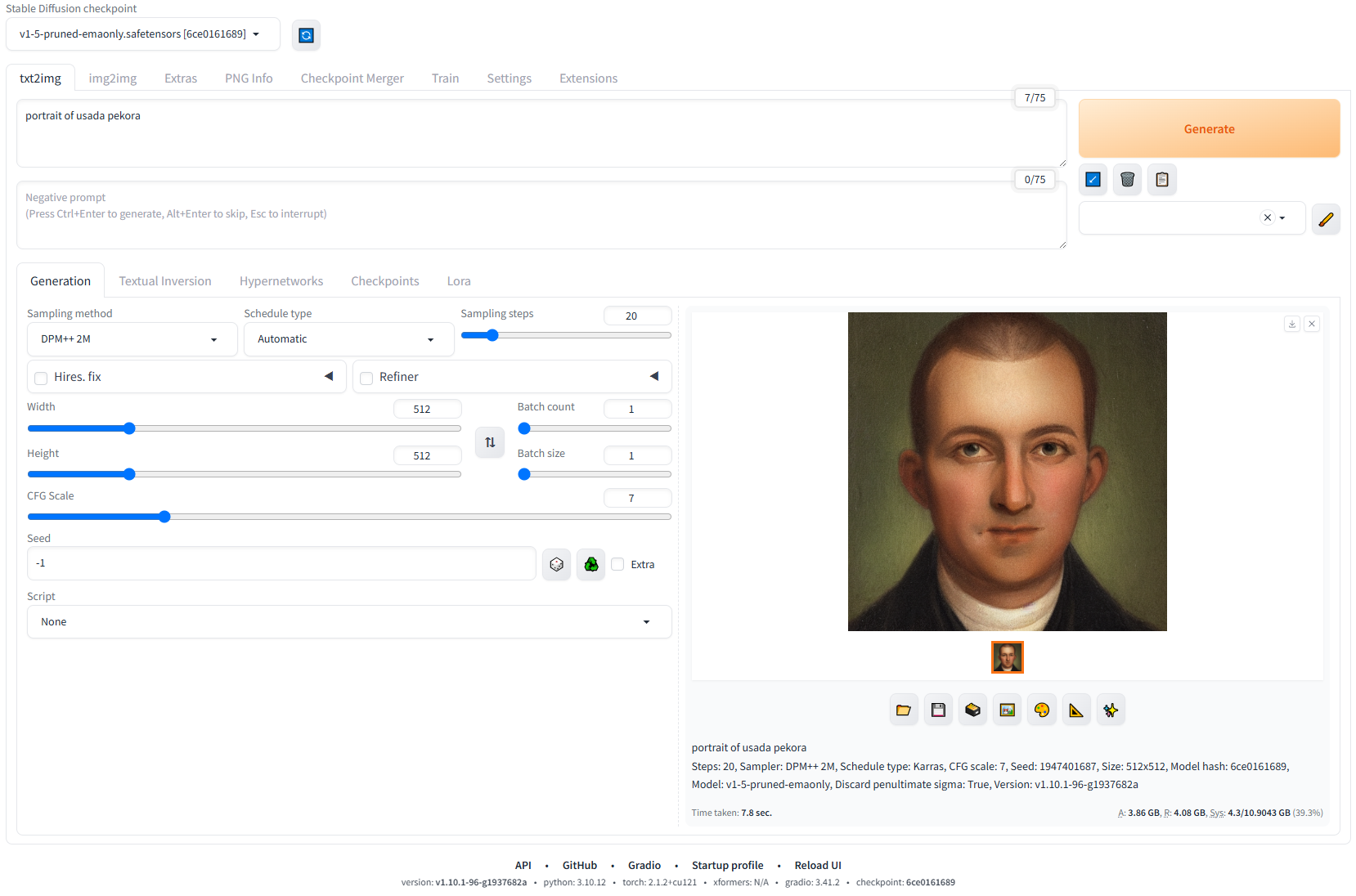
그냥 자동으로 추가되고, generate 누르니 아래와 같이 생성된다.
그나저나 저 이미지는 "portrait of usada pekora" 가 아니면 비슷하게라도 그려지지 않는거 보면
{"choices":[{"finish_reason":"stop","index":0,"message":{"role":"assistant","content":"Python은 표준 라이브러리만으로도 매우 빠르고 간단하게 HTTP 서버를 만들 수 있게 해줍니다.\n\n요구 사항에 따라 두 가지 예제를 제공해 드립니다.\n\n1. **가장 간단한 예제 (파일 서빙):** Python의 내장 `http.server` 모듈을 사용하는 방법. (가장 빠르게 서버를 띄우는 방법)\n2. **커스터마이징 예제 (맞춤 응답):** `BaseHTTPRequestHandler`를 상속받아 GET 요청 등에 대해 직접 응답 내용을 정의하는 방법. (실제 웹 개발의 기본 원리 학습)\n\n---\n\n## 💡 예제 1: 가장 간단한 HTTP 서버 (파일 서빙)\n\n이 방법은 실제 웹 프레임워크를 사용하지 않고, 현재 디렉터리에 있는 파일들을 웹에서 불러올 때(서빙할 때) 사용됩니다. 서버를 띄우는 코드를 작성할 필요 없이, 명령어 한 줄로 가능합니다.\n\n### 💻 코드 (실행 명령어)\n\n```bash\n# Python 3 환경에서 실행\npython3 -m http.server 8000\n```\n\n### 🚀 실행 방법\n\n1. 서버로 사용할 파일들(HTML, 이미지 등)이 있는 디렉터리로 이동합니다.\n2. 위의 명령어를 실행합니다.\n3. 브라우저를 열고 `http://localhost:8000` 에 접속하면 해당 디렉터리의 파일 목록이 보입니다.\n\n**✅ 장점:** 코드가 거의 필요 없고, 즉시 작동합니다.\n**❌ 단점:** 특정 URL 요청에 대해 복잡한 비즈니스 로직을 처리할 수 없습니다.\n\n---\n\n## 🛠️ 예제 2: 맞춤 응답을 처리하는 HTTP 서버 (BaseHTTPRequestHandler 사용)\n\n만약 특정 URL(`http://localhost:8000/hello`)에 접속했을 때, **사용자 정의 메시지**를 반환하고 싶다면 이 방식을 사용해야 합니다.\n\n이 코드는 `http.server` 모듈의 기본 핸들러 클래스를 상속받아, `do_GET` 메소드를 오버라이드(재정의)하여 우리가 원하는 응답을 직접 구성합니다.\n\n### 💻 코드 (`custom_server.py`)\n\n```python\nimport http.server\nimport socketserver\n\n# 사용할 포트 지정\nPORT = 8000\n\nclass CustomHTTPRequestHandler(http.server.BaseHTTPRequestHandler):\n \"\"\"\n HTTP 요청(GET, POST 등)을 처리하는 사용자 정의 핸들러 클래스입니다.\n \"\"\"\n \n def do_GET(self):\n \"\"\"\n GET 요청이 들어왔을 때 실행되는 메서드입니다.\n \"\"\"\n print(f\"--- GET 요청 수신: {self.path} ---\")\n \n # 1. 특정 경로에 대한 응답 처리\n if self.path == '/hello':\n # 응답할 콘텐츠\n response_content = \"안녕하세요! 이것은 커스텀 서버가 보낸 응답입니다.\"\n \n # HTTP 응답 헤더 설정 (상태 코드: 200 OK, Content-Type: text/plain)\n self.send_response(200)\n self.send_header(\"Content-type\", \"text/plain\")\n self.send_header(\"Content-Length\", str(len(response_content)))\n self.end_headers()\n \n # 응답 본문(Body) 전송\n self.wfile.write(bytes(response_content, \"utf-8\"))\n \n # 2. 기본 경로 (/)에 대한 응답 처리\n elif self.path == '/':\n response_content = \"환영합니다! /hello 경로로 접속해 보세요.\"\n self.send_response(200)\n self.send_header(\"Content-type\", \"text/html\")\n self.end_headers()\n self.wfile.write(bytes(response_content, \"utf-8\"))\n \n # 3. 정의되지 않은 경로에 대한 응답 (404 Not Found)\n else:\n self.send_response(404)\n self.send_header(\"Content-type\", \"text/plain\")\n self.end_headers()\n self.wfile.write(bytes(\"404 Not Found\", \"utf-8\"))\n\n\n# 서버를 띄우는 설정\nHandler = CustomHTTPRequestHandler\n\nwith socketserver.TCPServer((\"\", PORT), Handler) as httpd:\n print(f\"*** 서버가 http://localhost:{PORT} 에서 실행 중입니다. ***\")\n print(\"테스트 경로: http://localhost:8000/hello\")\n print(\"---------------------------------------------------\")\n try:\n httpd.serve_forever()\n except KeyboardInterrupt:\n print(\"\\n서버를 종료합니다.\")\n httpd.server_close()\n```\n\n### 🚀 실행 방법\n\n1. 위 코드를 `custom_server.py` 파일로 저장합니다.\n2. 터미널에서 다음 명령어를 실행합니다.\n ```bash\n python3 custom_server.py\n ```\n3. **테스트:**\n * `http://localhost:8000/` 에 접속하면 \"환영합니다!\"가 보입니다.\n * `http://localhost:8000/hello` 에 접속하면 \"안녕하세요! 이것은 커스텀 서버가 보낸 응답입니다.\"가 보입니다.\n\n### ✨ 동작 원리 해설\n\n* **`socketserver`**: 네트워크 소켓을 관리하고 클라이언트 연결을 받아주는 역할을 합니다.\n* **`BaseHTTPRequestHandler`**: HTTP 요청을 파싱하고 응답을 보낼 수 있는 기본 템플릿을 제공합니다.\n* **`do_GET(self)`**: 클라이언트가 `GET` 요청을 보냈을 때 이 함수가 실행됩니다.\n* **`self.send_response(200)`**: 클라이언트에게 응답 상태 코드(200=성공, 404=찾을 수 없음 등)를 보냅니다.\n* **`self.send_header(...)`**: 응답의 종류(Content-type)와 크기(Content-Length) 등의 메타데이터를 보냅니다.\n* **`self.wfile.write(...)`**: 실제 웹 브라우저가 읽을 수 있는 응답 내용(HTML, 텍스트 등)을 전송합니다.\n\n---\n\n## 📚 요약 및 추천\n\n| 구분 | 예제 1: `http.server` | 예제 2: `BaseHTTPRequestHandler` |\n| :--- | :--- | :--- |\n| **용도** | 정적 파일(Static File) 서빙 | 특정 URL에 대한 동적 응답 처리 |\n| **난이도** | ⭐ (매우 쉬움) | ⭐⭐ (중간) |\n| **특징** | 코드 없이 명령어 실행 | HTTP 프로토콜을 직접 제어 |\n| **추천 상황** | 간단한 테스트 서버, 파일 배포 | **웹 개발의 기초 원리 학습** |\n| **실무 사용** | 파일 공유 시 | **Flask/Django 같은 프레임워크 학습의 출발점** |\n\n**👉 만약 실제 서비스를 만들고 싶다면:** 예제 2로 기초 원리를 이해하신 후, **Flask**나 **FastAPI** 같은 경량 프레임워크를 사용하시는 것을 강력히 추천드립니다. 이 프레임워크들이 위의 복잡한 `do_GET` 코드를 훨씬 간결하게 처리해 줍니다.","reasoning_content":"Here's a thinking process that leads to the suggested response:\n\n1. **Analyze the Request:** The user wants an example of an HTTP server written in Python.\n\n2. **Determine the Scope/Level of the Example:**\n * *Option 1: Simple, built-in module (`http.server`).* This is the easiest and fastest way to fulfill the request for a *basic* example. It demonstrates functionality without complex code.\n * *Option 2: Using the `socket` module.* This is much harder, requires handling HTTP protocols manually, and is overkill for a standard \"example.\"\n * *Option 3: Using a framework (Flask/Django).* While common in production, this isn't a *pure* Python HTTP server example using standard libraries, and it might confuse the user if they just want to see how the basic protocol works.\n\n3. **Select the Best Approach (Option 1: `http.server` and Customization):**\n * The best approach is to first provide the simplest, runnable solution using `http.server`.\n * Then, provide a slightly more advanced example (inheriting from `BaseHTTPRequestHandler`) to show how one would customize the handling of different HTTP methods (GET, POST, etc.).\n\n4. **Draft the Code (Simple Server):**\n * Need to import `http.server` and `socketserver`.\n * Need to define the port (e.g., 8000).\n * Need to run the server. (This is the quickest way to run a basic server.)\n\n5. **Draft the Code (Customized Server - The \"Educational\" Example):**\n * Need to import `http.server` and `BaseHTTPRequestHandler`.\n * Define a class (e.g., `SimpleHTTPRequestHandler`).\n * Override the `do_GET` method.\n * In `do_GET`, write the HTTP response structure (Status Line, Headers, Body).\n * Handle the server startup using `http.server.HTTPServer`.\n\n6. **Review and Refine the Explanation (Crucial Step):**\n * The explanation must be clear, easy to follow, and explain *why* the code works.\n * *Add Instructions:* How to save, how to run, and how to test (using a browser or `curl`).\n * *Structure:* Present the simple example first, followed by the advanced/customizable example.\n\n7. **Final Polish (Self-Correction during drafting):** Make sure the custom server example *properly* sends the Content-Type and Content-Length so the browser displays it correctly. (The provided code handles this.)\n\n**(The resulting output matches the structured response provided below.)**"}}],"created":1781067647,"model":"gemma-4-E4B-it-Q4_K_M.gguf","system_fingerprint":"b9553-9e3b928fd","object":"chat.completion","usage":{"completion_tokens":2288,"prompt_tokens":26,"total_tokens":2314,"prompt_tokens_details":{"cached_tokens":6}},"id":"chatcmpl-Mbe6PZU7iilj6DVEI59YH4eoDksRPZXj","timings":{"cache_n":6,"prompt_n":20,"prompt_ms":328.529,"prompt_per_token_ms":16.42645,"prompt_per_second":60.8774263459238,"predicted_n":2288,"predicted_ms":40048.23,"predicted_per_token_ms":17.50359702797203,"predicted_per_second":57.13111415910266}}
시스템 프롬프트를 (role:system) 웹으로는 해봤는데 cli 에서도 가능한지 찾아보는 중
파일에도 넣을수 있고, 미리 넣을수도 있지만 런타임 중에 변경은 불가능 한건가?
llama-b9553$ ./llama-cli --help | grep -i sys -p, --prompt PROMPT prompt to start generation with; for system message, use -sys --mlock force system to keep model in RAM rather than swapping or compressing --numa TYPE attempt optimizations that help on some NUMA systems if run without this previously, it is recommended to drop the system -sys, --system-prompt PROMPT system prompt to use with model (if applicable, depending on chat -sysf, --system-prompt-file FNAME a file containing the system prompt (default: none) hunyuan-vl, kimi-k2, llama2, llama2-sys, llama2-sys-bos, llama2-sys-strip, llama3, llama4, megrez, minicpm, mistral-v1, hunyuan-vl, kimi-k2, llama2, llama2-sys, llama2-sys-bos, llama2-sys-strip, llama3, llama4, megrez, minicpm, mistral-v1,
llama-b9553$ ./llama-cli --help | grep -i prom -tb, --threads-batch N number of threads to use during batch and prompt processing (default: -c, --ctx-size N size of the prompt context (default: 0, 0 = loaded from model) --keep N number of tokens to keep from the initial prompt (default: 0, -1 = -p, --prompt PROMPT prompt to start generation with; for system message, use -sys -f, --file FNAME a file containing the prompt (default: none) -bf, --binary-file FNAME binary file containing the prompt (default: none) number of threads to use during batch and prompt processing (default: --verbose-prompt print a verbose prompt before generation (default: false) --display-prompt, --no-display-prompt whether to print prompt at generation (default: true) -co, --color [on|off|auto] Colorize output to distinguish prompt and user input from generations -sys, --system-prompt PROMPT system prompt to use with model (if applicable, depending on chat -sysf, --system-prompt-file FNAME a file containing the system prompt (default: none) -r, --reverse-prompt PROMPT halt generation at PROMPT, return control in interactive mode will not be interactive if first turn is predefined with --prompt
$ cmake -B build -DGGML_CUDA=ON -DCMAKE_CUDA_ARCHITECTURES=61 CMAKE_BUILD_TYPE=Release -- Warning: ccache not found - consider installing it for faster compilation or disable this warning with GGML_CCACHE=OFF -- CMAKE_SYSTEM_PROCESSOR: x86_64 -- GGML_SYSTEM_ARCH: x86 -- Including CPU backend -- x86 detected -- Adding CPU backend variant ggml-cpu: -march=native -- Unable to find cublas_v2.h in either "/usr/local/cuda/include" or "/usr/math_libs/include" -- CUDA Toolkit found CMake Error at /usr/share/cmake-3.22/Modules/CMakeDetermineCompilerId.cmake:726 (message): Compiling the CUDA compiler identification source file "CMakeCUDACompilerId.cu" failed.
Compiler: /usr/local/cuda/bin/nvcc
Build flags:
Id flags: --keep;--keep-dir;tmp;-gencode=arch=compute_61,code=sm_61 -v
-- Configuring incomplete, errors occurred! See also "/home/falinux/src/llama.cpp/build/CMakeFiles/CMakeOutput.log". See also "/home/falinux/src/llama.cpp/build/CMakeFiles/CMakeError.log".
0.19.888.319 E llama_model_load: error loading model: unknown model architecture: 'gemma4-assistant' 0.19.888.322 E llama_model_load_from_file_impl: failed to load model 0.19.888.324 E srv load_model: failed to load draft model, 'gemma-4-12B-it-MTP-Q8_0.gguf'
Sigmoid Loss for Language Image Pre-Training SigLIP은 CLIP에서 사용된 손실 함수를 간단한 쌍별 시그모이드 손실(pairwise sigmoid loss)로 대체할 것을 제안합니다. 이는 ImageNet에서 제로샷 분류 정확도 측면에서 더 나은 성능을 보입니다.