'프로그램 사용/ai 프로그램'에 해당되는 글 149건

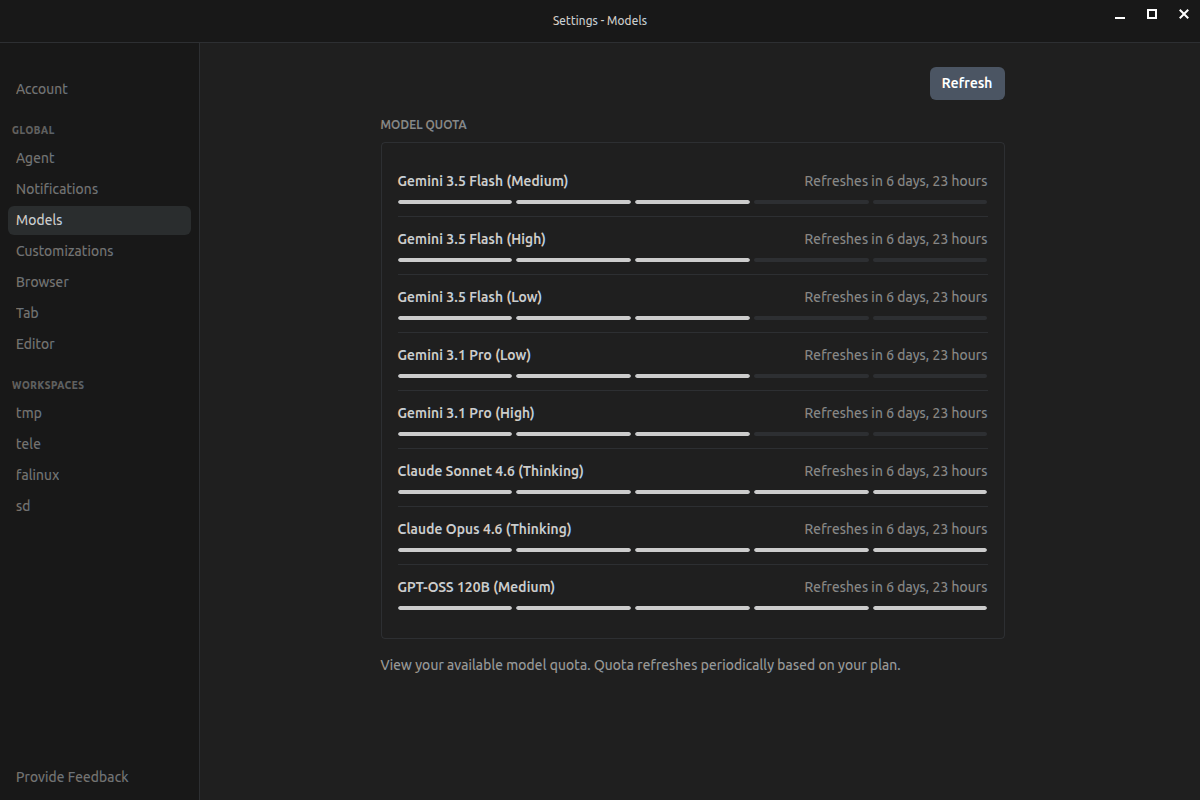
  1. 2026.05.22 antigravity gemini flash 할당량이 깃털 같구만?
  2. 2026.05.22 openclaw agent 구성 관련
  3. 2026.05.22 mxfp4
  4. 2026.05.22 텔레그램 봇 - 메시지 관련
  5. 2026.05.22 openclaw 설치 telegram 신기하네?
  6. 2026.05.21 wan2.2 + comfyui 시도
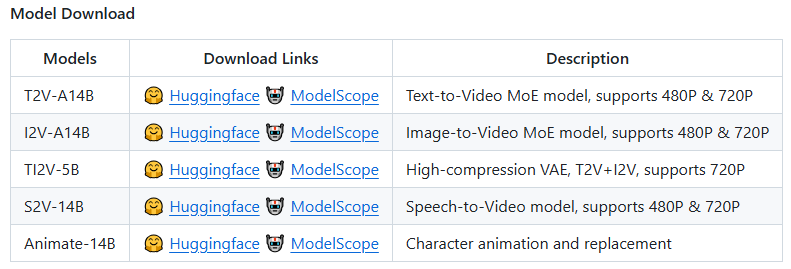
  7. 2026.05.19 wan2.2 + comfyui
  8. 2026.05.19 comfyui 실행
  9. 2026.05.19 llama.cpp kv quantization
  10. 2026.05.18 openai api

한번 찾아보니 가격 3배 이상, 토큰 3배 증가

사실상 9배 증가라는 소문이 있네


[링크 : https://wikidocs.net/blog/@jaehong/13849/]


근데 순식간에(?) geminu 3.0 flash 를 날리고 gemini 3.5 flash + 3.1 pro 를 같은 할당량으로 묶는건 너무 개매너 아니냐 -_-

[링크 : https://ai.google.dev/gemini-api/docs/pricing?hl=ko]


+

2026.05.29

느낌상 질문 하나당 한칸 줄어드는 느낌..

'프로그램 사용 > ai 프로그램' 카테고리의 다른 글

python huggingface 저장경로 변경하기  (0) 2026.05.24
vllm 설치, 실행 실패 -> 사실상 포기  (0) 2026.05.24
openclaw agent 구성 관련  (0) 2026.05.22
mxfp4  (0) 2026.05.22
텔레그램 봇 - 메시지 관련  (0) 2026.05.22
Posted by 구차니

음.. local LLM이 하나 뿐이면 느려서 어떻게 구성해야 할까? ㅜㅠ


[링크 : https://brunch.co.kr/@bbt/53]

[링크 : https://docs.openclaw.ai/ko/concepts/multi-agent]

Posted by 구차니
Posted by 구차니

inlinebutton - 메시지 하단에 생기는 버튼

replybutton - 사용자 입력창 하단에 생기는 버튼

[링크 : https://naimjae.tistory.com/11]


메시지 서식(markdown 등)

[링크 : https://naimjae.tistory.com/8]


[링크 : https://docs.python-telegram-bot.org/en/stable/telegram.menubuttoncommands.html]

    [링크 : https://docs.python-telegram-bot.org/en/stable/telegram.html]


+

2026.05.25

Bot settings

set_my_commands() Used for setting the list of commands
delete_my_commands() Used for deleting the list of commands
get_my_commands() Used for obtaining the list of commands
get_my_default_administrator_rights() Used for obtaining the default administrator rights for the bot
set_my_default_administrator_rights() Used for setting the default administrator rights for the bot
get_chat_menu_button() Used for obtaining the menu button of a private chat or the default menu button
set_chat_menu_button() Used for setting the menu button of a private chat or the default menu button
set_my_description() Used for setting the description of the bot
get_my_description() Used for obtaining the description of the bot
set_my_short_description() Used for setting the short description of the bot
get_my_short_description() Used for obtaining the short description of the bot
set_my_name() Used for setting the name of the bot
get_my_name() Used for obtaining the name of the bot
set_my_profile_photo() Used for setting the profile photo of the bot
remove_my_profile_photo() Used for removing the profile photo of the bot

[링크 : https://docs.python-telegram-bot.org/en/stable/telegram.bot.html]

'프로그램 사용 > ai 프로그램' 카테고리의 다른 글

openclaw agent 구성 관련  (0) 2026.05.22
mxfp4  (0) 2026.05.22
openclaw 설치 telegram 신기하네?  (0) 2026.05.22
wan2.2 + comfyui 시도  (0) 2026.05.21
wan2.2 + comfyui  (0) 2026.05.19
Posted by 구차니

설치

$ curl -fsSL https://openclaw.ai/install.sh | bash


설정. llama-swap에 의해서 돌고 있는 모델 등록

$ openclaw onboard --non-interactive \
  --auth-choice custom-api-key \
  --custom-base-url "http://127.0.0.1:8080/v1" \
  --custom-model-id "gemma4-e4b" \
  --custom-api-key "llama.cpp" \
  --secret-input-mode plaintext \
  --custom-compatibility openai \
  --accept-risk

$ openclaw gateway restart
$ openclaw chat --message "안녕, 지금 어떤 모델이 실행 중이야?"


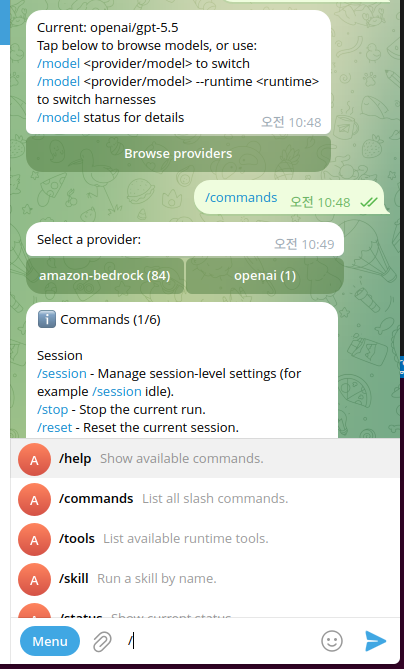
/ 누르면 아래에 자동완성 처럼 뜨는데 신기하네

그리고 browse providers 처럼 먼가.. 내가 하던거랑은 좀 많이 다른(?) 기능들이 있었나 보다.


텔레그램 봇에 등록되는거라 내걸로 돌려도 메뉴가 계속 뜬다. 젠장!


서비스 종료.

$ systemctl stop openclaw-gateway --user


--user를 안하면 없는 서비스라 나온다. 신기하네

$ systemctl status openclaw-gateway
Unit openclaw-gateway.service could not be found.


'프로그램 사용 > ai 프로그램' 카테고리의 다른 글

mxfp4  (0) 2026.05.22
텔레그램 봇 - 메시지 관련  (0) 2026.05.22
wan2.2 + comfyui 시도  (0) 2026.05.21
wan2.2 + comfyui  (0) 2026.05.19
comfyui 실행  (0) 2026.05.19
Posted by 구차니

심심하면(?) VRAM 부족으로 터져서

$ python3 main.py --listen 0.0.0.0
setup plugin alembic.autogenerate.schemas
setup plugin alembic.autogenerate.tables
setup plugin alembic.autogenerate.types
setup plugin alembic.autogenerate.constraints
setup plugin alembic.autogenerate.defaults
setup plugin alembic.autogenerate.comments
WARNING: You need pytorch with cu130 or higher to use optimized CUDA operations.
Found comfy_kitchen backend cuda: {'available': True, 'disabled': True, 'unavailable_reason': None, 'capabilities': ['apply_rope', 'apply_rope1', 'dequantize_nvfp4', 'dequantize_per_tensor_fp8', 'quantize_mxfp8', 'quantize_nvfp4', 'quantize_per_tensor_fp8', 'scaled_mm_nvfp4']}
Found comfy_kitchen backend eager: {'available': True, 'disabled': False, 'unavailable_reason': None, 'capabilities': ['apply_rope', 'apply_rope1', 'dequantize_mxfp8', 'dequantize_nvfp4', 'dequantize_per_tensor_fp8', 'quantize_mxfp8', 'quantize_nvfp4', 'quantize_per_tensor_fp8', 'scaled_mm_mxfp8', 'scaled_mm_nvfp4']}
Found comfy_kitchen backend triton: {'available': True, 'disabled': True, 'unavailable_reason': None, 'capabilities': ['apply_rope', 'apply_rope1', 'dequantize_nvfp4', 'dequantize_per_tensor_fp8', 'quantize_mxfp8', 'quantize_nvfp4', 'quantize_per_tensor_fp8']}
Checkpoint files will always be loaded safely.
Total VRAM 11165 MB, total RAM 31755 MB
pytorch version: 2.7.1+cu118
Set vram state to: NORMAL_VRAM
Device: cuda:0 NVIDIA GeForce GTX 1080 Ti : cudaMallocAsync
Using async weight offloading with 2 streams
Enabled pinned memory 28579.0
Using pytorch attention
Unsupported Pytorch detected. DynamicVRAM support requires Pytorch version 2.8 or later. Falling back to legacy ModelPatcher. VRAM estimates may be unreliable especially on Windows
Python version: 3.10.12 (main, Mar  3 2026, 11:56:32) [GCC 11.4.0]
ComfyUI version: 0.21.1
comfy-aimdo version: 0.3.0
comfy-kitchen version: 0.2.8
comfyui-frontend-package version: 1.43.18
comfyui-workflow-templates version: 0.9.77
comfyui-embedded-docs version: 0.5.0
comfy-kitchen version: 0.2.8
comfy-aimdo version: 0.3.0
[Prompt Server] web root: /home/minimonk/.local/lib/python3.10/site-packages/comfyui_frontend_package/static
Asset seeder disabled

Import times for custom nodes:
   0.0 seconds: /mnt/Downloads/ComfyUI/custom_nodes/websocket_image_save.py

Context impl SQLiteImpl.
Will assume non-transactional DDL.
Starting server

To see the GUI go to: http://0.0.0.0:8188
got prompt
Using pytorch attention in VAE
VAE load device: cuda:0, offload device: cpu, dtype: torch.float32
Found quantization metadata version 1
Using MixedPrecisionOps for text encoder
Requested to load WanTEModel
loaded completely;  6419.48 MB loaded, full load: True
CLIP/text encoder model load device: cpu, offload device: cpu, current: cpu, dtype: torch.float16
Requested to load WanVAE
0 models unloaded.
loaded partially; 0.00 MB usable, 0.00 MB loaded, 484.00 MB offloaded, 45.57 MB buffer reserved, lowvram patches: 0
Found quantization metadata version 1
Detected mixed precision quantization
Using mixed precision operations
Native ops:  , emulated ops: mxfp8, float8_e4m3fn, float8_e5m2, nvfp4
model weight dtype torch.float16, manual cast: torch.float32
model_type FLOW
Requested to load WAN21
0 models unloaded.
loaded partially; 0.00 MB usable, 0.00 MB loaded, 13636.09 MB offloaded, 885.22 MB buffer reserved, lowvram patches: 0
  0%|                                                    | 0/10 [00:33<?, ?it/s]
!!! Exception during processing !!! Allocation on device 
Traceback (most recent call last):
  File "/mnt/Downloads/ComfyUI/execution.py", line 535, in execute
    output_data, output_ui, has_subgraph, has_pending_tasks = await get_output_data(prompt_id, unique_id, obj, input_data_all, execution_block_cb=execution_block_cb, pre_execute_cb=pre_execute_cb, v3_data=v3_data)
  File "/mnt/Downloads/ComfyUI/execution.py", line 335, in get_output_data
    return_values = await _async_map_node_over_list(prompt_id, unique_id, obj, input_data_all, obj.FUNCTION, allow_interrupt=True, execution_block_cb=execution_block_cb, pre_execute_cb=pre_execute_cb, v3_data=v3_data)
  File "/mnt/Downloads/ComfyUI/execution.py", line 309, in _async_map_node_over_list
    await process_inputs(input_dict, i)
  File "/mnt/Downloads/ComfyUI/execution.py", line 297, in process_inputs
    result = f(**inputs)
  File "/mnt/Downloads/ComfyUI/nodes.py", line 1612, in sample
    return common_ksampler(model, noise_seed, steps, cfg, sampler_name, scheduler, positive, negative, latent_image, denoise=denoise, disable_noise=disable_noise, start_step=start_at_step, last_step=end_at_step, force_full_denoise=force_full_denoise)
  File "/mnt/Downloads/ComfyUI/nodes.py", line 1542, in common_ksampler
    samples = comfy.sample.sample(model, noise, steps, cfg, sampler_name, scheduler, positive, negative, latent_image,
  File "/mnt/Downloads/ComfyUI/comfy/sample.py", line 74, in sample
    samples = sampler.sample(noise, positive, negative, cfg=cfg, latent_image=latent_image, start_step=start_step, last_step=last_step, force_full_denoise=force_full_denoise, denoise_mask=noise_mask, sigmas=sigmas, callback=callback, disable_pbar=disable_pbar, seed=seed)
  File "/mnt/Downloads/ComfyUI/comfy/samplers.py", line 1180, in sample
    return sample(self.model, noise, positive, negative, cfg, self.device, sampler, sigmas, self.model_options, latent_image=latent_image, denoise_mask=denoise_mask, callback=callback, disable_pbar=disable_pbar, seed=seed)
  File "/mnt/Downloads/ComfyUI/comfy/samplers.py", line 1070, in sample
    return cfg_guider.sample(noise, latent_image, sampler, sigmas, denoise_mask, callback, disable_pbar, seed)
  File "/mnt/Downloads/ComfyUI/comfy/samplers.py", line 1052, in sample
    output = executor.execute(noise, latent_image, sampler, sigmas, denoise_mask, callback, disable_pbar, seed, latent_shapes=latent_shapes)
  File "/mnt/Downloads/ComfyUI/comfy/patcher_extension.py", line 112, in execute
    return self.original(*args, **kwargs)
  File "/mnt/Downloads/ComfyUI/comfy/samplers.py", line 995, in outer_sample
    output = self.inner_sample(noise, latent_image, device, sampler, sigmas, denoise_mask, callback, disable_pbar, seed, latent_shapes=latent_shapes)
  File "/mnt/Downloads/ComfyUI/comfy/samplers.py", line 981, in inner_sample
    samples = executor.execute(self, sigmas, extra_args, callback, noise, latent_image, denoise_mask, disable_pbar)
  File "/mnt/Downloads/ComfyUI/comfy/patcher_extension.py", line 112, in execute
    return self.original(*args, **kwargs)
  File "/mnt/Downloads/ComfyUI/comfy/samplers.py", line 751, in sample
    samples = self.sampler_function(model_k, noise, sigmas, extra_args=extra_args, callback=k_callback, disable=disable_pbar, **self.extra_options)
  File "/home/minimonk/.local/lib/python3.10/site-packages/torch/utils/_contextlib.py", line 116, in decorate_context
    return func(*args, **kwargs)
  File "/mnt/Downloads/ComfyUI/comfy/k_diffusion/sampling.py", line 205, in sample_euler
    denoised = model(x, sigma_hat * s_in, **extra_args)
  File "/mnt/Downloads/ComfyUI/comfy/samplers.py", line 400, in __call__
    out = self.inner_model(x, sigma, model_options=model_options, seed=seed)
  File "/mnt/Downloads/ComfyUI/comfy/samplers.py", line 954, in __call__
    return self.outer_predict_noise(*args, **kwargs)
  File "/mnt/Downloads/ComfyUI/comfy/samplers.py", line 961, in outer_predict_noise
    ).execute(x, timestep, model_options, seed)
  File "/mnt/Downloads/ComfyUI/comfy/patcher_extension.py", line 112, in execute
    return self.original(*args, **kwargs)
  File "/mnt/Downloads/ComfyUI/comfy/samplers.py", line 964, in predict_noise
    return sampling_function(self.inner_model, x, timestep, self.conds.get("negative", None), self.conds.get("positive", None), self.cfg, model_options=model_options, seed=seed)
  File "/mnt/Downloads/ComfyUI/comfy/samplers.py", line 380, in sampling_function
    out = calc_cond_batch(model, conds, x, timestep, model_options)
  File "/mnt/Downloads/ComfyUI/comfy/samplers.py", line 205, in calc_cond_batch
    return _calc_cond_batch_outer(model, conds, x_in, timestep, model_options)
  File "/mnt/Downloads/ComfyUI/comfy/samplers.py", line 213, in _calc_cond_batch_outer
    return executor.execute(model, conds, x_in, timestep, model_options)
  File "/mnt/Downloads/ComfyUI/comfy/patcher_extension.py", line 112, in execute
    return self.original(*args, **kwargs)
  File "/mnt/Downloads/ComfyUI/comfy/samplers.py", line 325, in _calc_cond_batch
    output = model.apply_model(input_x, timestep_, **c).chunk(batch_chunks)
  File "/mnt/Downloads/ComfyUI/comfy/model_base.py", line 182, in apply_model
    return comfy.patcher_extension.WrapperExecutor.new_class_executor(
  File "/mnt/Downloads/ComfyUI/comfy/patcher_extension.py", line 112, in execute
    return self.original(*args, **kwargs)
  File "/mnt/Downloads/ComfyUI/comfy/model_base.py", line 226, in _apply_model
    model_output = self.diffusion_model(xc, t, context=context, control=control, transformer_options=transformer_options, **extra_conds)
  File "/home/minimonk/.local/lib/python3.10/site-packages/torch/nn/modules/module.py", line 1751, in _wrapped_call_impl
    return self._call_impl(*args, **kwargs)
  File "/home/minimonk/.local/lib/python3.10/site-packages/torch/nn/modules/module.py", line 1762, in _call_impl
    return forward_call(*args, **kwargs)
  File "/mnt/Downloads/ComfyUI/comfy/ldm/wan/model.py", line 644, in forward
    return comfy.patcher_extension.WrapperExecutor.new_class_executor(
  File "/mnt/Downloads/ComfyUI/comfy/patcher_extension.py", line 112, in execute
    return self.original(*args, **kwargs)
  File "/mnt/Downloads/ComfyUI/comfy/ldm/wan/model.py", line 664, in _forward
    return self.forward_orig(x, timestep, context, clip_fea=clip_fea, freqs=freqs, transformer_options=transformer_options, **kwargs)[:, :, :t, :h, :w]
  File "/mnt/Downloads/ComfyUI/comfy/ldm/wan/model.py", line 597, in forward_orig
    x = block(x, e=e0, freqs=freqs, context=context, context_img_len=context_img_len, transformer_options=transformer_options)
  File "/home/minimonk/.local/lib/python3.10/site-packages/torch/nn/modules/module.py", line 1751, in _wrapped_call_impl
    return self._call_impl(*args, **kwargs)
  File "/home/minimonk/.local/lib/python3.10/site-packages/torch/nn/modules/module.py", line 1762, in _call_impl
    return forward_call(*args, **kwargs)
  File "/mnt/Downloads/ComfyUI/comfy/ldm/wan/model.py", line 258, in forward
    y = self.ffn(torch.addcmul(repeat_e(e[3], x), self.norm2(x), 1 + repeat_e(e[4], x)))
  File "/home/minimonk/.local/lib/python3.10/site-packages/torch/nn/modules/module.py", line 1751, in _wrapped_call_impl
    return self._call_impl(*args, **kwargs)
  File "/home/minimonk/.local/lib/python3.10/site-packages/torch/nn/modules/module.py", line 1762, in _call_impl
    return forward_call(*args, **kwargs)
  File "/home/minimonk/.local/lib/python3.10/site-packages/torch/nn/modules/container.py", line 240, in forward
    input = module(input)
  File "/home/minimonk/.local/lib/python3.10/site-packages/torch/nn/modules/module.py", line 1751, in _wrapped_call_impl
    return self._call_impl(*args, **kwargs)
  File "/home/minimonk/.local/lib/python3.10/site-packages/torch/nn/modules/module.py", line 1762, in _call_impl
    return forward_call(*args, **kwargs)
  File "/home/minimonk/.local/lib/python3.10/site-packages/torch/nn/modules/activation.py", line 734, in forward
    return F.gelu(input, approximate=self.approximate)
torch.OutOfMemoryError: Allocation on device 

Memory summary:
|===========================================================================|
|                  PyTorch CUDA memory summary, device ID 0                 |
|---------------------------------------------------------------------------|
|            CUDA OOMs: 0            |        cudaMalloc retries: 0         |
|===========================================================================|
|        Metric         | Cur Usage  | Peak Usage | Tot Alloc  | Tot Freed  |
|---------------------------------------------------------------------------|
| Allocated memory      |   5675 MiB |   7030 MiB |      0 B   |      0 B   |
|       from large pool |      0 MiB |      0 MiB |      0 B   |      0 B   |
|       from small pool |      0 MiB |      0 MiB |      0 B   |      0 B   |
|---------------------------------------------------------------------------|
| Active memory         |   5675 MiB |   7030 MiB |      0 B   |      0 B   |
|       from large pool |      0 MiB |      0 MiB |      0 B   |      0 B   |
|       from small pool |      0 MiB |      0 MiB |      0 B   |      0 B   |
|---------------------------------------------------------------------------|
| Requested memory      |      0 B   |      0 B   |      0 B   |      0 B   |
|       from large pool |      0 B   |      0 B   |      0 B   |      0 B   |
|       from small pool |      0 B   |      0 B   |      0 B   |      0 B   |
|---------------------------------------------------------------------------|
| GPU reserved memory   |  10784 MiB |  10784 MiB |      0 B   |      0 B   |
|       from large pool |      0 MiB |      0 MiB |      0 B   |      0 B   |
|       from small pool |      0 MiB |      0 MiB |      0 B   |      0 B   |
|---------------------------------------------------------------------------|
| Non-releasable memory |      0 B   |      0 B   |      0 B   |      0 B   |
|       from large pool |      0 B   |      0 B   |      0 B   |      0 B   |
|       from small pool |      0 B   |      0 B   |      0 B   |      0 B   |
|---------------------------------------------------------------------------|
| Allocations           |       0    |       0    |       0    |       0    |
|       from large pool |       0    |       0    |       0    |       0    |
|       from small pool |       0    |       0    |       0    |       0    |
|---------------------------------------------------------------------------|
| Active allocs         |       0    |       0    |       0    |       0    |
|       from large pool |       0    |       0    |       0    |       0    |
|       from small pool |       0    |       0    |       0    |       0    |
|---------------------------------------------------------------------------|
| GPU reserved segments |       0    |       0    |       0    |       0    |
|       from large pool |       0    |       0    |       0    |       0    |
|       from small pool |       0    |       0    |       0    |       0    |
|---------------------------------------------------------------------------|
| Non-releasable allocs |       0    |       0    |       0    |       0    |
|       from large pool |       0    |       0    |       0    |       0    |
|       from small pool |       0    |       0    |       0    |       0    |
|---------------------------------------------------------------------------|
| Oversize allocations  |       0    |       0    |       0    |       0    |
|---------------------------------------------------------------------------|
| Oversize GPU segments |       0    |       0    |       0    |       0    |
|===========================================================================|

Got an OOM, unloading all loaded models.
Prompt executed in 154.15 seconds


둘 중에 하나 주면 된다는데 해도 터지고

python3 main.py --listen 0.0.0.0 --lowvram
python3 main.py --listen 0.0.0.0 --novram


멀 하다가 꼬였는지 패키지 문제가 생겨서 다시 밀고 cuda 11.8에 맞춰서 재설치

pip3 uninstall -y torch torchvision torchaudio xformers
pip3 install torch==2.6.0 torchvision torchaudio --index-url https://download.pytorch.org/whl/cu118
pip3 install xformers==0.0.29.post2


그래도 하려니 터져서 768x768 이었던게 왜 800x800이 되었는진 모르겠고 길이가 81로 되어있어서

일단은 512x512에 29 로 바꾸고 재시도


먼가 되는거 같긴한데.. offloaded가 엄청 크네.

got prompt
Requested to load WanVAE
loaded completely; 4417.69 MB usable, 484.06 MB loaded, full load: True
[MultiGPU Runtime] Using runtime device cuda:0 (comfy.sample.sample:ModelPatcher)
Requested to load WAN21
loaded partially; 7397.49 MB usable, 7211.06 MB loaded, 6425.03 MB offloaded, 175.06 MB buffer reserved, lowvram patches: 0
  0%|                                                    | 0/10 [00:00<?, ?it/s]
 20%|████████▌                                  | 2/10 [09:15<37:03, 277.94s/it]


1시간은 족히 넘은거 같은데 (37 띄워놓고 거짓말 쟁이!)

이제야 두번째 KSampler로 넘어갔다!!! 이예!!!


메모리 답이 안나올거 같아서 low_noise가 아닌 high_noise 에 해상도까지 낮추고 했는데

1시간 33분 16 동안 해서 29frame / 16fps 해서 대충 1.8초 짜리 똥을 생성해냄 

loaded completely; 883.22 MB usable, 484.06 MB loaded, full load: True
Prompt executed in 01:33:16


이게 머야 ㅋㅋㅋ


ComfyUI_00006_.webm
1.61MB


+

왜 이번에는 webm이 아니라 webp일까?

그 와중에 49frame / 16fps 약 3초 만드는데 2시간 30분..

2시간 30분 짜리 똥이야!

got prompt
Found quantization metadata version 1
Detected mixed precision quantization
Using mixed precision operations
Native ops:  , emulated ops: float8_e4m3fn, mxfp8, nvfp4, float8_e5m2
model weight dtype torch.float16, manual cast: torch.float32
model_type FLOW
[MultiGPU Runtime] Using runtime device cuda:0 (comfy.sample.sample:ModelPatcher)
Requested to load WAN21
loaded partially; 5509.86 MB usable, 5037.30 MB loaded, 8598.79 MB offloaded, 472.56 MB buffer reserved, lowvram patches: 0
100%|████████████████████████████████████████| 10/10 [1:14:32<00:00, 447.24s/it]
[MultiGPU Runtime] Using runtime device cuda:0 (comfy.sample.sample:ModelPatcher)
Requested to load WAN21
loaded partially; 5495.86 MB usable, 5019.61 MB loaded, 8616.47 MB offloaded, 472.56 MB buffer reserved, lowvram patches: 0
  0%|                                                    | 0/10 [00:00<?, ?it/s]100%|████████████████████████████████████████| 10/10 [1:14:33<00:00, 447.32s/it]
Requested to load WanVAE
Unloaded partially: 2187.40 MB freed, 2832.21 MB remains loaded, 472.56 MB buffer reserved, lowvram patches: 0
loaded completely; 545.46 MB usable, 484.06 MB loaded, full load: True
Prompt executed in 02:30:07


ComfyUI_00008_.webp
1.00MB

'프로그램 사용 > ai 프로그램' 카테고리의 다른 글

텔레그램 봇 - 메시지 관련  (0) 2026.05.22
openclaw 설치 telegram 신기하네?  (0) 2026.05.22
wan2.2 + comfyui  (0) 2026.05.19
comfyui 실행  (0) 2026.05.19
llama.cpp kv quantization  (0) 2026.05.19
Posted by 구차니

'프로그램 사용 > ai 프로그램' 카테고리의 다른 글

openclaw 설치 telegram 신기하네?  (0) 2026.05.22
wan2.2 + comfyui 시도  (0) 2026.05.21
comfyui 실행  (0) 2026.05.19
llama.cpp kv quantization  (0) 2026.05.19
openai api  (0) 2026.05.18
Posted by 구차니


/mnt/Downloads/ComfyUI$ python3 main.py --listen 0.0.0.0
setup plugin alembic.autogenerate.schemas
setup plugin alembic.autogenerate.tables
setup plugin alembic.autogenerate.types
setup plugin alembic.autogenerate.constraints
setup plugin alembic.autogenerate.defaults
setup plugin alembic.autogenerate.comments
WARNING: You need pytorch with cu130 or higher to use optimized CUDA operations.
Found comfy_kitchen backend triton: {'available': True, 'disabled': True, 'unavailable_reason': None, 'capabilities': ['apply_rope', 'apply_rope1', 'dequantize_nvfp4', 'dequantize_per_tensor_fp8', 'quantize_mxfp8', 'quantize_nvfp4', 'quantize_per_tensor_fp8']}
Found comfy_kitchen backend cuda: {'available': True, 'disabled': True, 'unavailable_reason': None, 'capabilities': ['apply_rope', 'apply_rope1', 'dequantize_nvfp4', 'dequantize_per_tensor_fp8', 'quantize_mxfp8', 'quantize_nvfp4', 'quantize_per_tensor_fp8', 'scaled_mm_nvfp4']}
Found comfy_kitchen backend eager: {'available': True, 'disabled': False, 'unavailable_reason': None, 'capabilities': ['apply_rope', 'apply_rope1', 'dequantize_mxfp8', 'dequantize_nvfp4', 'dequantize_per_tensor_fp8', 'quantize_mxfp8', 'quantize_nvfp4', 'quantize_per_tensor_fp8', 'scaled_mm_mxfp8', 'scaled_mm_nvfp4']}
Checkpoint files will always be loaded safely.
Total VRAM 11165 MB, total RAM 15651 MB
pytorch version: 2.7.1+cu118
Set vram state to: NORMAL_VRAM
Device: cuda:0 NVIDIA GeForce GTX 1080 Ti : cudaMallocAsync
Using async weight offloading with 2 streams
Enabled pinned memory 14085.0
Using pytorch attention
Unsupported Pytorch detected. DynamicVRAM support requires Pytorch version 2.8 or later. Falling back to legacy ModelPatcher. VRAM estimates may be unreliable especially on WindowsPython version: 3.10.12 (main, Mar  3 2026, 11:56:32) [GCC 11.4.0]
ComfyUI version: 0.21.1
comfy-aimdo version: 0.3.0
comfy-kitchen version: 0.2.8
comfyui-frontend-package version: 1.43.18
comfyui-workflow-templates version: 0.9.77
comfyui-embedded-docs version: 0.5.0
comfy-kitchen version: 0.2.8
comfy-aimdo version: 0.3.0
[Prompt Server] web root: /home/minimonk/.local/lib/python3.10/site-packages/comfyui_frontend_package/static
Asset seeder disabled

Import times for custom nodes:
   0.0 seconds: /mnt/Downloads/ComfyUI/custom_nodes/websocket_image_save.py

Context impl SQLiteImpl.
Will assume non-transactional DDL.
Starting server

To see the GUI go to: http://0.0.0.0:8188
^C
Stopped server


그냥 켜면 기본으로 있는데

몰라서(!) ComfyUI/models/diffusion_models 에 *.safetensors 파일들을 넣어놓고는 체크포인트 로드에 왜 안뜨나 했는데

ComfyUI/models/checkpoints 에 넣어주고 리프레시 하면 뜬다.

[링크 : https://comfyui-wiki.com/ko/comfyui-nodes/loaders/checkpoint-loader-simple]


선이 먼가 드럽게 꼬여서


정리 하는데. 도대체 저 하나하나 노드들을 멀로 추가해야하나 모르겠다.


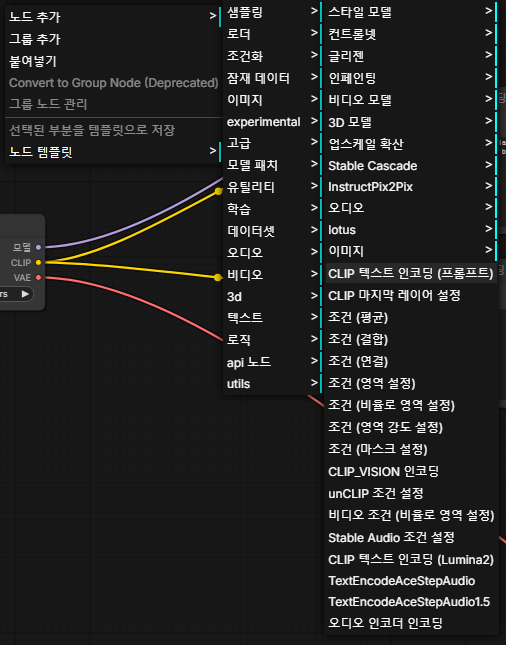
걍 CLIP 부분 드래그 해서 오니 추천으로 "CLIP 테스트 인코딩 (프롬프트)" 가 뜨니

우클릭해서 먼지 찾을 필요가 없을 듯?


굳이.. 하겠다면

노드 추가 - 조건화 - CLIP 텍스트 인코딩 (프롬프트) 로 하면 될 것같은데

CLIP이 먼지 찾아봐야겠다.


+

[링크 : https://youngri.tistory.com/m/40/] api 서버?

[링크 : https://m.blog.naver.com/minwoo932/224142522248]

[링크 : https://comfyui-wiki.com/ko/tutorial/basic/creating-your-first-image-by-the-first-time]


'프로그램 사용 > ai 프로그램' 카테고리의 다른 글

wan2.2 + comfyui 시도  (0) 2026.05.21
wan2.2 + comfyui  (0) 2026.05.19
llama.cpp kv quantization  (0) 2026.05.19
openai api  (0) 2026.05.18
RAG 시도 - postgresql(14) + pgvector  (1) 2026.05.15
Posted by 구차니

128k context length에 2기가 VRAM을 냠냠

$ ./llama-b8925/llama-cli -m model/gemma4-e4b/gemma-4-E4B-it-Q4_K_M.gguf  --verbose
llama_kv_cache: size = 2048.00 MiB (131072 cells,   4 layers,  1/1 seqs), K (f16): 1024.00 MiB, V (f16): 1024.00 MiB
llama_kv_cache: attn_rot_k = 0, n_embd_head_k_all = 512
llama_kv_cache: attn_rot_v = 0, n_embd_head_k_all = 512
llama_kv_cache_iswa: creating     SWA KV cache, size = 1024 cells


k 만 q4로 하니 288MB! 256MB 보단 약간 큰데 아무튼 대충~ 1/4 로 줄었다.

$ ./llama-b8925/llama-cli -m model/gemma4-e4b/gemma-4-E4B-it-Q4_K_M.gguf  --verbose -ctk q4_0 --ctx-size 131072
llama_kv_cache: size = 1312.00 MiB (131072 cells,   4 layers,  1/1 seqs), K (q4_0):  288.00 MiB, V (f16): 1024.00 MiB
llama_kv_cache: attn_rot_k = 1, n_embd_head_k_all = 512
llama_kv_cache: attn_rot_v = 0, n_embd_head_k_all = 512
llama_kv_cache_iswa: creating     SWA KV cache, size = 1024 cells


kv를 q4로 하니 대충 512MB 근처.

$ ./llama-b8925/llama-cli -m model/gemma4-e4b/gemma-4-E4B-it-Q4_K_M.gguf  --verbose -ctk q4_0 -ctv q4_0 --ctx-size 131072
llama_kv_cache: size =  576.00 MiB (131072 cells,   4 layers,  1/1 seqs), K (q4_0):  288.00 MiB, V (q4_0):  288.00 MiB
llama_kv_cache: attn_rot_k = 1, n_embd_head_k_all = 512
llama_kv_cache: attn_rot_v = 1, n_embd_head_k_all = 512
llama_kv_cache_iswa: creating     SWA KV cache, size = 1024 cells


+

2026.05.29

verbose로는 토큰별로 로그가 나와서 성능 저하가 있긴한데

verbose none ctk ctk ctv ctv
단문 50.13 t/s 58.27 t/s 43.67 t/s 51.84 t/s
중문 50.76 t/s 56.41 t/s 43.66 t/s 50.37 t/s
장문 49.70 t/s 54.66 t/s 42.75 t/s 45.81 t/s


생각외로 양자화 한거랑 안한거랑 차이가 별로 없다.

1080 이라 q4를 지원하지 않아서 그런걸지도?

- none ctk ctk ctv ctv
단문 57.48 t/s 57.03 t/s 51.67 t/s 52.35 t/s
중문 59.56 t/s 56.90 t/s 50.20 t/s 49.95 t/s
장문 53.83 t/s 54.82 t/s 46.28 t/s 44.93 t/s


더보기

안녕?
너에 대해서 소개해줘
파이썬으로 셀레니움을 통해 웹을 서칭하고 텍스트만 추출하고 makrdown 으로 변환후  md 파일과 pdf로 저장하는 기능을 구현해줘


/mnt/Downloads/llama-b9305/llama-server --model /mnt/Downloads/model/gemma4-e4b/gemma-4-E4B-it-Q4_K_M.gguf -mm ./model/gemma4-e4b/mmproj-F16.gguf -sm none --ctx-size 131072 --verbose --host 0.0.0.0

gemma-4-E4B-it-Q4_K_M.gguf
Reading
Generation
63 tokens
1.3s
50.13 t/s

gemma-4-E4B-it-Q4_K_M.gguf
Reading
Generation
875 tokens
17s
50.76 t/s

gemma-4-E4B-it-Q4_K_M.gguf
Reading
Generation
3,009 tokens
1min
49.70 t/s

/mnt/Downloads/llama-b9305/llama-server --model /mnt/Downloads/model/gemma4-e4b/gemma-4-E4B-it-Q4_K_M.gguf -mm ./model/gemma4-e4b/mmproj-F16.gguf -sm none  -ctk q4_0 --ctx-size 131072 --verbose --host 0.0.0.0

gemma-4-E4B-it-Q4_K_M.gguf
Reading
Generation
41 tokens
0.7s
58.27 t/s

gemma-4-E4B-it-Q4_K_M.gguf
Reading
Generation
1,025 tokens
18s
56.41 t/s

gemma-4-E4B-it-Q4_K_M.gguf
Reading
Generation
3,098 tokens
56s
54.66 t/s


/mnt/Downloads/llama-b9305/llama-server --model /mnt/Downloads/model/gemma4-e4b/gemma-4-E4B-it-Q4_K_M.gguf -mm ./model/gemma4-e4b/mmproj-F16.gguf -sm none -ctk q4_0 -ctv q4_0 --ctx-size 131072 --verbose --host 0.0.0.0


gemma-4-E4B-it-Q4_K_M.gguf
Reading
Generation
63 tokens
1.4s
43.67 t/s


gemma-4-E4B-it-Q4_K_M.gguf
Reading
Generation
1,059 tokens
24s
43.66 t/s


gemma-4-E4B-it-Q4_K_M.gguf
Reading
Generation
2,558 tokens
59s
42.75 t/s


/mnt/Downloads/llama-b9305/llama-server --model /mnt/Downloads/model/gemma4-e4b/gemma-4-E4B-it-Q4_K_M.gguf -mm ./model/gemma4-e4b/mmproj-F16.gguf -sm none -ctv q4_0 --ctx-size 131072 --verbose --host 0.0.0.0

gemma-4-E4B-it-Q4_K_M.gguf
Reading
Generation
328 tokens
6.3s
51.84 t/s

gemma-4-E4B-it-Q4_K_M.gguf
Reading
Generation
902 tokens
17s
50.37 t/s


gemma-4-E4B-it-Q4_K_M.gguf
Reading
Generation
3,105 tokens
1min 7s
45.81 t/s


---------------------
$ /mnt/Downloads/llama-b9305/llama-server --model /mnt/Downloads/model/gemma4-e4b/gemma-4-E4B-it-Q4_K_M.gguf -mm ./model/gemma4-e4b/mmproj-F16.gguf -sm none -ctv q4_0 --ctx-size 131072 --host 0.0.0.0

gemma-4-E4B-it-Q4_K_M.gguf
Reading
Generation
609 tokens
11s
52.35 t/s

gemma-4-E4B-it-Q4_K_M.gguf
Reading
Generation
850 tokens
17s
49.95 t/s

gemma-4-E4B-it-Q4_K_M.gguf
Reading
Generation
3,472 tokens
1min 17s
44.93 t/s


$ /mnt/Downloads/llama-b9305/llama-server --model /mnt/Downloads/model/gemma4-e4b/gemma-4-E4B-it-Q4_K_M.gguf -mm ./model/gemma4-e4b/mmproj-F16.gguf -sm none -ctk q4_0 --ctx-size 131072 --host 0.0.0.0


gemma-4-E4B-it-Q4_K_M.gguf
Reading
Generation
32 tokens
0.6s
57.03 t/s

gemma-4-E4B-it-Q4_K_M.gguf
Reading
Generation
640 tokens
11s
56.90 t/s

gemma-4-E4B-it-Q4_K_M.gguf
Reading
Generation
3,379 tokens
1min 1s
54.82 t/s


$ /mnt/Downloads/llama-b9305/llama-server --model /mnt/Downloads/model/gemma4-e4b/gemma-4-E4B-it-Q4_K_M.gguf -mm ./model/gemma4-e4b/mmproj-F16.gguf -sm none -ctk q4_0 -ctv q4_0 --ctx-size 131072 --host 0.0.0.0


gemma-4-E4B-it-Q4_K_M.gguf
Reading
Generation
37 tokens
0.7s
51.67 t/s

gemma-4-E4B-it-Q4_K_M.gguf
Reading
Generation
817 tokens
16s
50.20 t/s

gemma-4-E4B-it-Q4_K_M.gguf
Reading
Generation
3,357 tokens
1min 12s
46.28 t/s


$ /mnt/Downloads/llama-b9305/llama-server --model /mnt/Downloads/model/gemma4-e4b/gemma-4-E4B-it-Q4_K_M.gguf -mm ./model/gemma4-e4b/mmproj-F16.gguf -sm none --ctx-size 131072 --host 0.0.0.0


gemma-4-E4B-it-Q4_K_M.gguf
Reading
Generation
45 tokens
0.8s
57.48 t/s


gemma-4-E4B-it-Q4_K_M.gguf
Reading
Generation
737 tokens
12s
59.56 t/s

gemma-4-E4B-it-Q4_K_M.gguf
Reading
Generation
3,291 tokens
1min 1s
53.83 t/s

'프로그램 사용 > ai 프로그램' 카테고리의 다른 글

wan2.2 + comfyui  (0) 2026.05.19
comfyui 실행  (0) 2026.05.19
openai api  (0) 2026.05.18
RAG 시도 - postgresql(14) + pgvector  (1) 2026.05.15
gpt님 만세! - pip torch 버전 낮추기  (0) 2026.05.15
Posted by 구차니


[링크 : https://velog.io/@euisuk-chung/%EC%A0%95%EB%A6%AC-OpenAI-API-Document]

[링크 : https://developers.openai.com/api/reference/resources/responses]

[링크 : https://developers.openai.com/api/docs/guides/text]

[링크 : https://model-spec.openai.com/2025-02-12.html#chain_of_command]


claude에 물어보니 openai 의 api가 랩핑한것일뿐

결국에는 신경망에 특수 토큰으로 인식될 만한 녀석으로 감싸고 그걸 임베딩 해서 벡터로 넣어줄 뿐

무언가(?) 대단한 방법으로 들어가는건 아니라고 한다. imagenary monologue 줄여서 im prefix


다른 모델과의 비교

모델블록 시작블록 끝방식
ChatML (Qwen, Hermes) <|im_start|>role <|im_end|> 범용 role 삽입
LLaMA-3 <|start_header_id|>role<|end_header_id|> <|eot_id|> 헤더 분리
LLaMA-2 [INST] [/INST] role 구분 없음
Mistral [INST] [/INST] role 구분 없음
DeepSeek-R1 <|User|> / <|Assistant|> <|end▁of▁sentence|> role별 고정 토큰


[링크 :
https://claude.ai/share/0bfc9c76-e5a8-46d2-8346-4f84170625db]


#define CHATML_TEMPLATE_SRC                                                               \
    "{%- for message in messages -%}\n"                                                   \
    "  {{- '<|im_start|>' + message.role + '\n' + message.content + '<|im_end|>\n' -}}\n" \
    "{%- endfor -%}\n"                                                                    \
    "{%- if add_generation_prompt -%}\n"                                                  \
    "  {{- '<|im_start|>assistant\n' -}}\n"                                               \
    "{%- endif -%}"
    
    const std::string TOOL_CALL_START = "<|tool_call_start|>";
    const std::string TOOL_CALL_END   = "<|tool_call_end|>";
    const std::string THINK_START     = "<think>";
    const std::string THINK_END       = "</think>";
    const std::string GEN_PROMPT      = "<|im_start|>assistant\n";    

[링크 : https://github.com/ggml-org/llama.cpp/blob/master/common/chat.cpp#L567]


음.. gemma4-e4b 에서는 im_start가 특수 토큰으로 배우진 않은듯?

/mnt/Downloads/model/gemma4-e4b$ ../../llama-b8925/llama-tokenize -m gemma-4-E4B-it-Q4_K_M.gguf -p "<|im_start|>system" --log-disable
     2 -> '<bos>'
236820 -> '<'
236909 -> '|'
   548 -> 'im'
236779 -> '_'
  3041 -> 'start'
111038 -> '|>'
  9731 -> 'system'

/mnt/Downloads/model/gemma4-e4b$ ../../llama-b8925/llama-tokenize -m gemma-4-E4B-it-Q4_K_M.gguf -p "<|im_start|>system" --log-disable  --no-parse-special
     2 -> '<bos>'
236820 -> '<'
236909 -> '|'
   548 -> 'im'
236779 -> '_'
  3041 -> 'start'
111038 -> '|>'
  9731 -> 'system'

/mnt/Downloads/model/gemma4-e4b$ ../../llama-b8925/llama-tokenize -m gemma-4-E4B-it-Q4_K_M.gguf -p "<|im_start|>system" --log-disable  --no-parse-special --ids
[2, 236820, 236909, 548, 236779, 3041, 111038, 9731]


+

모델 읽어들이다가 발견 한 특수 토큰..?

일단은 control token 이라고 나온다.

$ ./llama-b8925/llama-cli -m model/gemma4-e4b/gemma-4-E4B-it-Q4_K_M.gguf  --verbose
load: control token: 258884 '<|video|>' is not marked as EOG
load: control token: 255999 '<|image>' is not marked as EOG
load: control token: 258882 '<image|>' is not marked as EOG
load: control token: 258883 '<audio|>' is not marked as EOG
load: control token:     98 '<|think|>' is not marked as EOG
load: control token:    105 '<|turn>' is not marked as EOG
load: control token: 258880 '<|image|>' is not marked as EOG
load: control token:      2 '<bos>' is not marked as EOG
load: control-looking token:    212 '</s>' was not control-type; this is probably a bug in the model. its type will be overridden
load: control token:      0 '<pad>' is not marked as EOG
load: control-looking token:     50 '<|tool_response>' was not control-type; this is probably a bug in the model. its type will be overridden
load: control token:     46 '<|tool>' is not marked as EOG
load: control token:     47 '<tool|>' is not marked as EOG
load: control token: 256000 '<|audio>' is not marked as EOG
load: control token:      3 '<unk>' is not marked as EOG
load: control token: 258881 '<|audio|>' is not marked as EOG
load: control-looking token:      1 '<eos>' was not control-type; this is probably a bug in the model. its type will be overridden
load: control token:      4 '<mask>' is not marked as EOG
|load: printing all EOG tokens:
load:   - 1 ('<eos>')
load:   - 50 ('<|tool_response>')
load:   - 106 ('<turn|>')
load:   - 212 ('</s>')
load: special_eog_ids contains '<|tool_response>', removing '</s>' token from EOG list


print_info: BOS token             = 2 '<bos>'
print_info: EOS token             = 106 '<turn|>'
print_info: UNK token             = 3 '<unk>'
print_info: PAD token             = 0 '<pad>'
print_info: MASK token            = 4 '<mask>'
print_info: LF token              = 107 '
'
print_info: EOG token             = 1 '<eos>'
print_info: EOG token             = 50 '<|tool_response>'
print_info: EOG token             = 106 '<turn|>'
print_info: max token length      = 93


init: chat template, example_format: '<|turn>system
<|think|>
You are a helpful assistant<turn|>
<|turn>user
Hello<turn|>
<|turn>model
Hi there<turn|>
<|turn>user
How are you?<turn|>
<|turn>model
'
srv          init: init: chat template, thinking = 1

'프로그램 사용 > ai 프로그램' 카테고리의 다른 글

comfyui 실행  (0) 2026.05.19
llama.cpp kv quantization  (0) 2026.05.19
RAG 시도 - postgresql(14) + pgvector  (1) 2026.05.15
gpt님 만세! - pip torch 버전 낮추기  (0) 2026.05.15
wan2.2  (0) 2026.05.13
Posted by 구차니