stable diffusion 에서 내가 원하는 그림체라던가, 새로운 캐릭터를 그리게 하고 싶어서 학습법 찾는 중
이전에는 texual inversion 만 되서 ckpt로 나오는건 아니었는데 어떻게 해야려나..
일단 kohya-ss/ss-scripts는 gui 없이 콘솔로 학습하는 것 같고
bmaltais/kohya_ss는 내 시스템에서 정상적으로 설치가 안된다. 에라이
dreambooth 해보려니까 플러그인 깔다가 망함 ㅋㅋ
그래픽 카드를 30대로 올리던가 해야지 에라이 ㅋㅋ
---
[링크 : https://github.com/bmaltais/kohya_ss.git] << GUI
[링크 : https://github.com/kohya-ss/sd-scripts]
[링크 : https://ongamedev.tistory.com/526]
[링크 : https://infoengineer.tistory.com/134]
available 에서 설치가 가능하다니까 한번 클릭
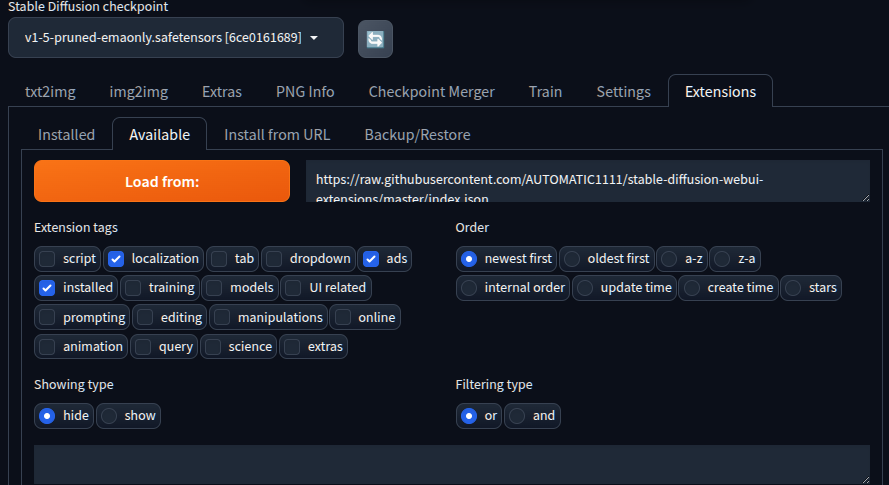
오.. stars가 제법 높네

| *** Error completing request *** Arguments: ('https://github.com/d8ahazard/sd_dreambooth_extension.git', ['ads', 'localization', 'installed'], 'hide', 'or', 0, '') {} Traceback (most recent call last): File "/mnt/Downloads/stable-diffusion-webui/modules/call_queue.py", line 74, in f res = list(func(*args, **kwargs)) File "/mnt/Downloads/stable-diffusion-webui/modules/ui_extensions.py", line 407, in install_extension_from_index ext_table, message = install_extension_from_url(None, url) File "/mnt/Downloads/stable-diffusion-webui/modules/ui_extensions.py", line 352, in install_extension_from_url check_access() File "/mnt/Downloads/stable-diffusion-webui/modules/ui_extensions.py", line 24, in check_access assert not shared.cmd_opts.disable_extension_access, "extension access disabled because of command line flags" AssertionError: extension access disabled because of command line flags |
--server-name=0.0.0.0. 주고 하고 있었는데 이걸 빼고 하니 에러없이 진행된다.
플러그인은 외부사용시에는 설치 못하게 막아둔듯.
| Initializing Dreambooth Dreambooth revision: 4244f6b2cf810a0a4dd83a3534b27d92b82e4c21 Checking xformers... Checking bitsandbytes... Checking bitsandbytes (ALL!) Installing bitsandbytes Successfully installed bitsandbytes-0.49.2 cuda-bindings-13.3.1 cuda-pathfinder-1.5.5 cuda-toolkit-13.0.2 nvidia-cublas-13.1.1.3 nvidia-cuda-cupti-13.0.85 nvidia-cuda-nvrtc-13.0.88 nvidia-cuda-runtime-13.0.96 nvidia-cudnn-cu13-9.20.0.48 nvidia-cufft-12.0.0.61 nvidia-cufile-1.15.1.6 nvidia-curand-10.4.0.35 nvidia-cusolver-12.0.4.66 nvidia-cusparse-12.6.3.3 nvidia-cusparselt-cu13-0.8.1 nvidia-nccl-cu13-2.29.7 nvidia-nvjitlink-13.0.88 nvidia-nvshmem-cu13-3.4.5 nvidia-nvtx-13.0.85 torch-2.12.0 triton-3.7.0 Checking Dreambooth requirements... [Installed version of accelerate: 0.21.0 [Dreambooth] accelerate v0.21.0 is already installed. [Installed version of bitsandbytes: 0.49.2 [Dreambooth] bitsandbytes v0.45.2 is already installed. [Dreambooth] dadaptation v3.2 is not installed. Successfully installed dadaptation-3.2 [Dreambooth] diffusers v0.32.2 is not installed. Successfully installed diffusers-0.38.0 importlib_metadata-9.0.0 safetensors-0.8.0 zipp-4.1.0 [Dreambooth] discord-webhook v1.3.1 is not installed. Successfully installed discord-webhook-1.4.1 [Installed version of fastapi: 0.94.0 [Dreambooth] fastapi v0.94.0 is already installed. [Installed version of gitpython: 3.1.32 [Dreambooth] gitpython v3.1.32 is already installed. [Installed version of pillow: 9.5.0 [Dreambooth] pillow v11.3.0 is not installed. Successfully installed pillow-12.2.0 [Dreambooth] pytorch_optimizer v3.4.0 is not installed. Successfully installed pytorch_optimizer-3.10.1 [Installed version of tomesd: 0.1.3 [Dreambooth] tomesd v0.1.3 is already installed. [Installed version of tqdm: 4.67.3 [Dreambooth] tqdm v4.67.1 is already installed. [Installed version of transformers: 4.30.2 [Dreambooth] transformers v4.49.0 is not installed. Successfully installed click-8.4.1 hf-xet-1.5.1 huggingface-hub-1.19.0 tokenizers-0.22.2 transformers-5.11.0 [Dreambooth] xformers v0.0.27.post2 is not installed. Successfully installed xformers-0.0.35 [Dreambooth] tensorboard v2.18.0 is not installed. Successfully installed absl-py-2.4.0 grpcio-1.81.1 markdown-3.10.2 tensorboard-2.20.0 tensorboard-data-server-0.7.2 werkzeug-3.1.8 [+] accelerate version 0.21.0 installed. [+] diffusers version 0.38.0 installed. [+] transformers version 5.11.0 installed. [+] bitsandbytes version 0.49.2 installed. [+] xformers version 0.0.35 installed. |

그냥 extensions 아래에 포함되는구나.
| /mnt/Downloads/stable-diffusion-webui$ tree -d extensions extensions └── sd_dreambooth_extension ├── configs ├── css ├── dreambooth │ ├── dataclasses │ │ └── __pycache__ │ ├── dataset │ ├── __pycache__ │ └── utils │ └── __pycache__ ├── helpers │ └── __pycache__ ├── io ├── javascript ├── js ├── lora_diffusion ├── module_src ├── preprocess ├── __pycache__ ├── scripts │ └── __pycache__ └── templates ├── config ├── defaults └── locales 25 directories |
[링크 : https://github.com/AUTOMATIC1111/stable-diffusion-webui/issues/4215]
[링크 : https://github.com/d8ahazard/sd_dreambooth_extension]
[링크 : https://github.com/XavierXiao/Dreambooth-Stable-Diffusion]
[링크 : https://github.com/google/dreambooth]
[링크 : https://huggingface.co/docs/diffusers/ko/training/dreambooth]
[링크 : https://www.reddit.com/r/StableDiffusion/comments/1dzsojp/how_do_i_train_my_own_checkpoint/]
textual inversion은 할 수 있는게 많지 않다는데, 그럴싸하게 나온것 같았는데 아닌가?!
| LoRA(Low-Rank Adaptation, 저 랭크 적응?)은 Stable Diffusion 모델을 세부 조정하기 위한 학습 기법입니다. Stable Diffusion에는 Dreambooth와 textual inversion과 같은 학습기법도 있는데, LoRA 는 뭐가 다를까요? LoLA는 파일 크기와 학습 능력간에 적절한 균형을 이루고 있습니다. Dreambooth는 강력하지만, 모델 파일의 크기가 매우 큽니다(2~7GB). 텍스 인버전(textual inversion)은 파일이 아주 작지만(100KB 정도), 할 수 있는 게 많지 않습니다. LoRA는 이 두가지의 중간쯤이라고 보시면 됩니다. 파일 크기는 2~200MB 정도로 부담스럽지 않으며, 학습능력도 괜찮은 편입니다 |
[링크 : https://www.internetmap.kr/entry/How-to-LoRA-Model]
[링크 : https://www.reddit.com/r/StableDiffusion/comments/196ikpo/what_is_a_lora_and_how_do_i_use_it/?tl=ko]
[링크 : https://wikidocs.net/279789]
'모종의 음모 > ai 프로그램' 카테고리의 다른 글
| openai reasoning 옵션 (0) | 2026.06.12 |
|---|---|
| LLM temperature = 0.1 무한 반복 (0) | 2026.06.12 |
| stable diffussion train 시도 (0) | 2026.06.10 |
| curl로 llama-swap 에게 api로 요청하기 (0) | 2026.06.10 |
| llama.cpp prompt 옵션 (0) | 2026.06.10 |


