네트워크 볼륨에 저장하면 날아가지 않는다?

Step 4: Clean up
To avoid incurring unnecessary charges, clean up your Pod resources.
Terminating a Pod permanently deletes all data that isn’t stored in a network volume. Be sure that you’ve saved any data you might need to access again.

[링크 : https://docs.runpod.io/get-started#deploy-via-the-console]

[링크 : https://www.runpod.io/]


256GB 면은 0.07x256 이니까 월 17.92$ 어우 제법 세네

Network volumes are backed by high-performance NVMe SSDs with transfer speeds of 200-400 MB/s (up to 10 GB/s peak).

Pricing
Standard storage:
First 1 TB: $0.07/GB/month
Beyond 1 TB: $0.05/GB/month

[링크 : https://docs.runpod.io/storage/network-volumes]


네트워크 볼륨은 200MB~400MB/s 라는데 피크 10GB/s 라는걸 보면..

nvme는 맞는데 속도 제한을 건걸까 아니면 SATA SSD를 쓰는걸까 싶은 생각이 든다.

아무튼, 얘는 그럼 대역폭을 더 넓게 쓸 수 있는 걸까?

Pricing
High-performance storage is priced per-GB at a premium to standard storage. The console displays per-GB and total monthly cost as you configure a volume.
Exact pricing varies by data center. Check the volume creation flow in the console for current rates.

[링크 : https://docs.runpod.io/storage/high-performance-storage#pricing]


그래픽 카드 변경하려면 pod을 재생성해야 할 것 같은데, 그러면 volume disk 날아가는걸까?

network volume 에 portable between pods 라고 된거 보면.. 그래픽 카드 바꾸려면 pod이 바뀌어야 하는게 맞을지도

volume disk 는 0.10$/GB/month 라서 일할계산될 것 같기도 한데..
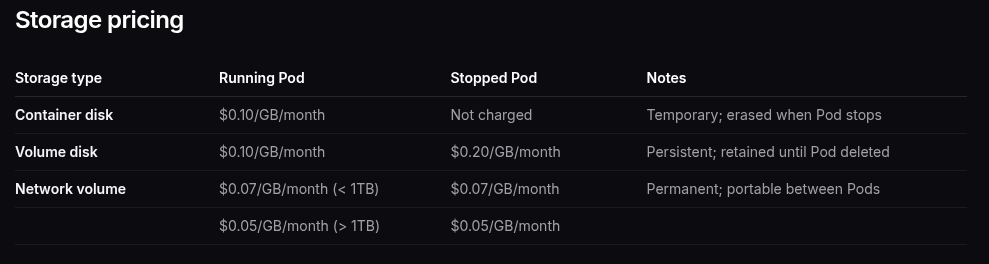
 

볼륨/컨테이터는 초당 계산, 네트워크 볼륨은 시간당 계산. 그런데 금액은 월별이라..

Storage is billed per-second for container and volume disks, and hourly for network volumes. You are not charged if the host machine is unavailable.

[링크 : https://docs.runpod.io/pods/pricing]


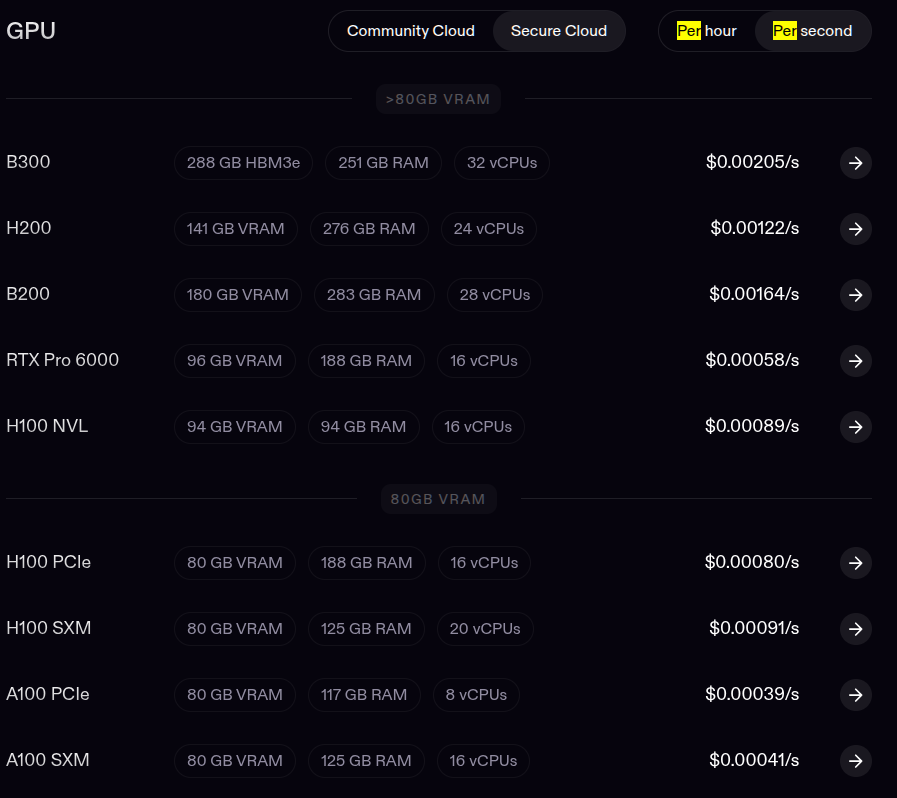
기본적으로 페이지에서 시간당 비용으로 나오는데

요금 자체가 초당 요금도 있어서. 최대한 빠르게 처리하고 삭제하면 시간요금이 아니라 초요금으로 될 것 같기도 하다.
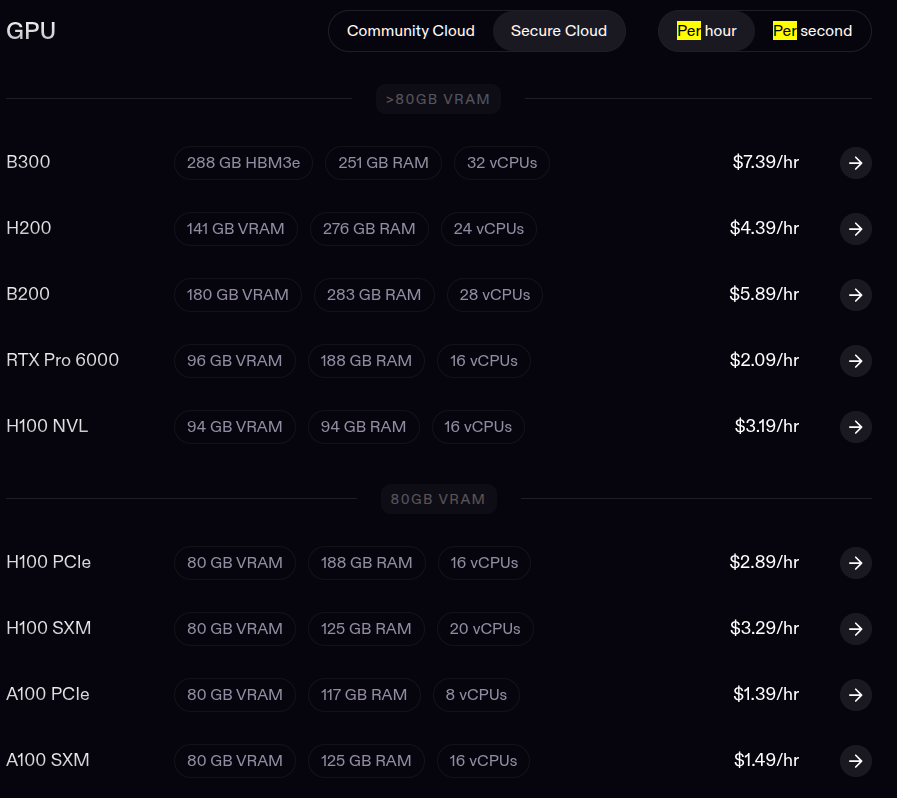
[링크 : https://www.runpod.io/pricing]


v100 sxm 성능이 궁금하긴 했는데 아직 서비스 하고 있긴한건가?
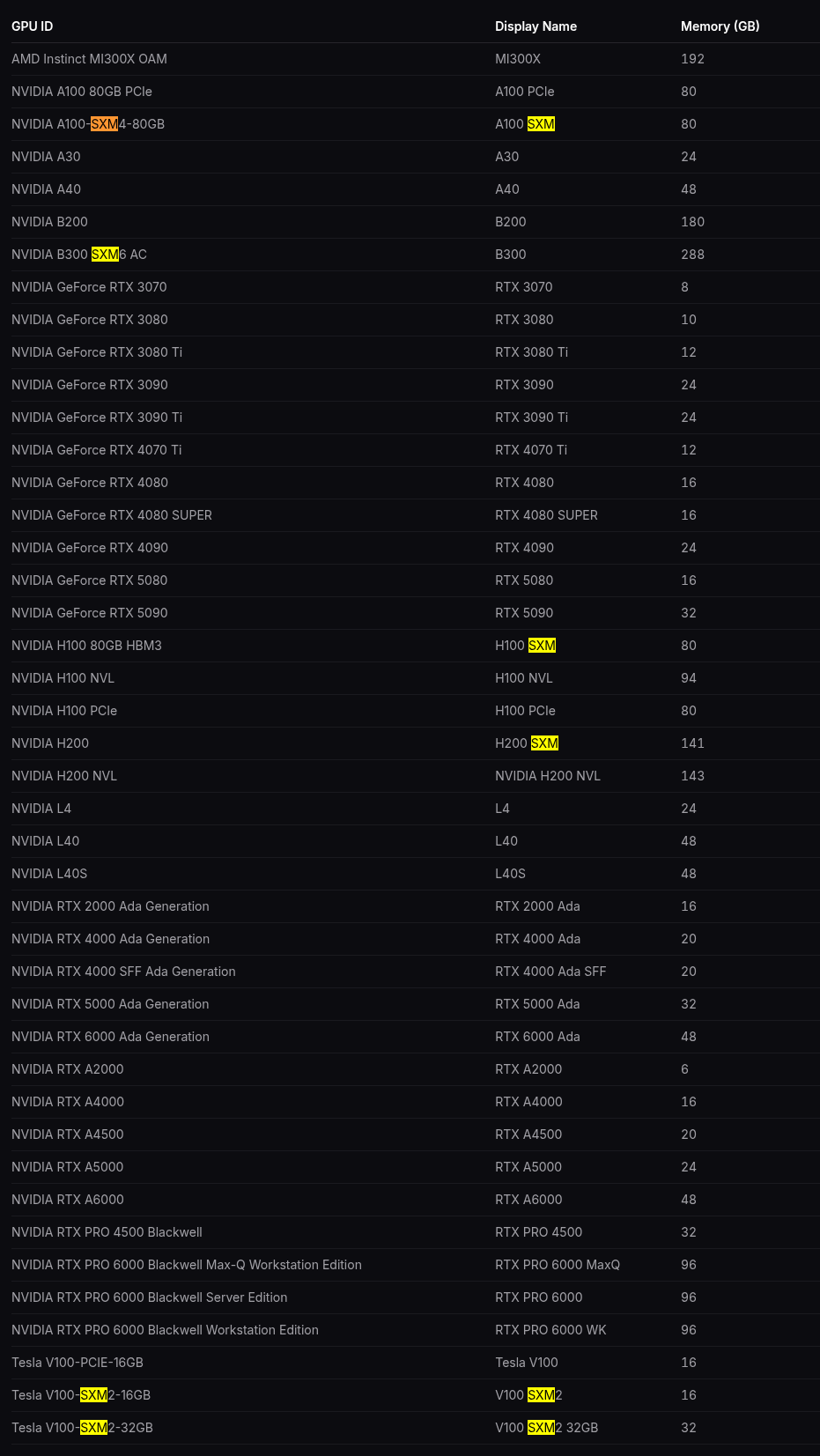
[링크 : https://docs.runpod.io/references/gpu-types]

'모종의 음모 > ai 프로그램' 카테고리의 다른 글

claude.ai / claude code  (0) 2026.07.03
회사 클로드 결제  (2) 2026.07.03
gemini cli 안녕~?  (0) 2026.07.01
mogrify를 이용한 이미지 증강, 배경색 설정  (0) 2026.06.25
local llm - mcp  (0) 2026.06.20
Posted by 구차니

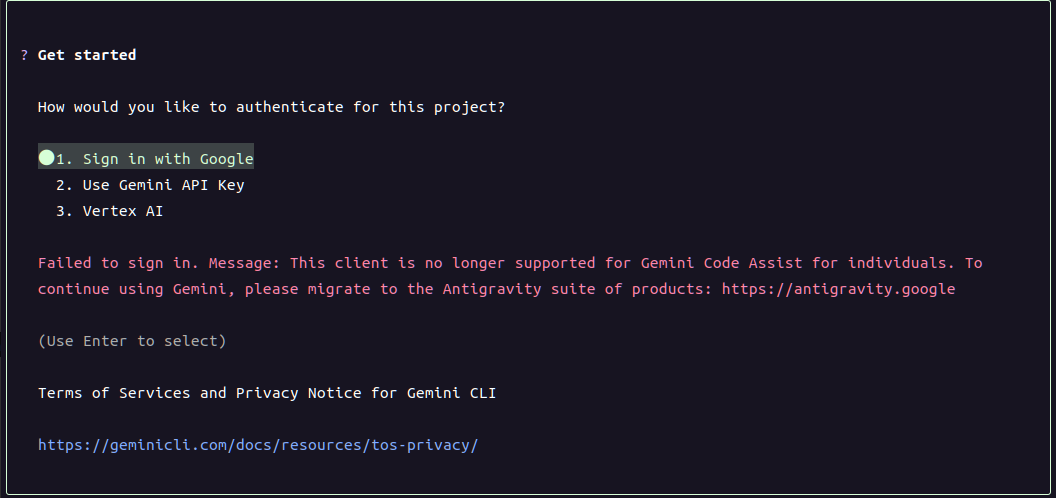
문득 생각나서 gemini cli 업데이트 하고

로그인 성공했다는데 다시 로그인을 시도하게 한다.

아래 에러 메시지를 보니 안티그래비티로 이전하라고 하는데..

기업 계정인데도 안되는건가?

'모종의 음모 > ai 프로그램' 카테고리의 다른 글

회사 클로드 결제  (2) 2026.07.03
runpod 조사중  (0) 2026.07.01
mogrify를 이용한 이미지 증강, 배경색 설정  (0) 2026.06.25
local llm - mcp  (0) 2026.06.20
llama-swap 구현 (채팅)  (0) 2026.06.18
Posted by 구차니

투명 png를 돌리니까 배경이 흰색으로 나와서

딥러닝 학습시 loss 율이 높은 값에서 진동하고 있어서 혹시나 하고 변경해보니 잘된다.

background none은 테스트 안해봄


mkdir -p train_aug

for i in $(seq 1 50)
do
    rot=$((RANDOM % 11 - 5))
    bright=$((85 + RANDOM % 31))

    mogrify \
        -background 'rgba(0,0,0,0)' \
        -path train_aug \
        -format png \
        -rotate "$rot" \
        -modulate "$bright" \
        train/good/*.png

    rename "s/\.png$/_$i.png/" train_aug/*.png
done


[링크 : https://stackoverflow.com/questions/4121155/how-can-i-rotate-a-transparent-png-by-45-degrees-using-imagemagick-and-keep-the]

'모종의 음모 > ai 프로그램' 카테고리의 다른 글

runpod 조사중  (0) 2026.07.01
gemini cli 안녕~?  (0) 2026.07.01
local llm - mcp  (0) 2026.06.20
llama-swap 구현 (채팅)  (0) 2026.06.18
gemma4-e4b mtp..?  (0) 2026.06.18
Posted by 구차니

로컬 LLM 에서 MCP 연결할 수 있으려나?

일일이 만드는것도 귀찮은데 만들어 둔 mcp 들을 쉽게 붙이면 좋을것 같긴하다.


결국은 json 타입으로 이해하기 쉽게 던져주면 알아서 쓴다.. 이런 컨셉이구나

MCP 도구 목록을 LLM이 이해하는 JSON 형식으로 변환하기
MCP 서버에서 가져온 도구 목록은 그대로 LLM에게 전달할 수 없습니다. OpenAI Responses API가 이해할 수 있는 JSON 형식으로 변환해줘야 합니다. 다음은 그 변환 함수와 적용 예시입니다.

[링크 : https://wikidocs.net/287840] fast mcp

    [링크 : https://pypi.org/project/fastmcp/]


[링크 : https://raeul0304.tistory.com/9] mcp-use 

    [링크 : https://pypi.org/project/mcp-use/]

Posted by 구차니

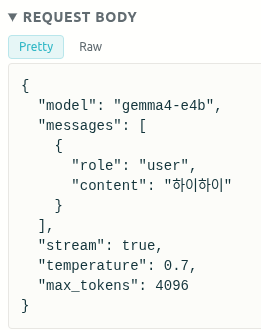
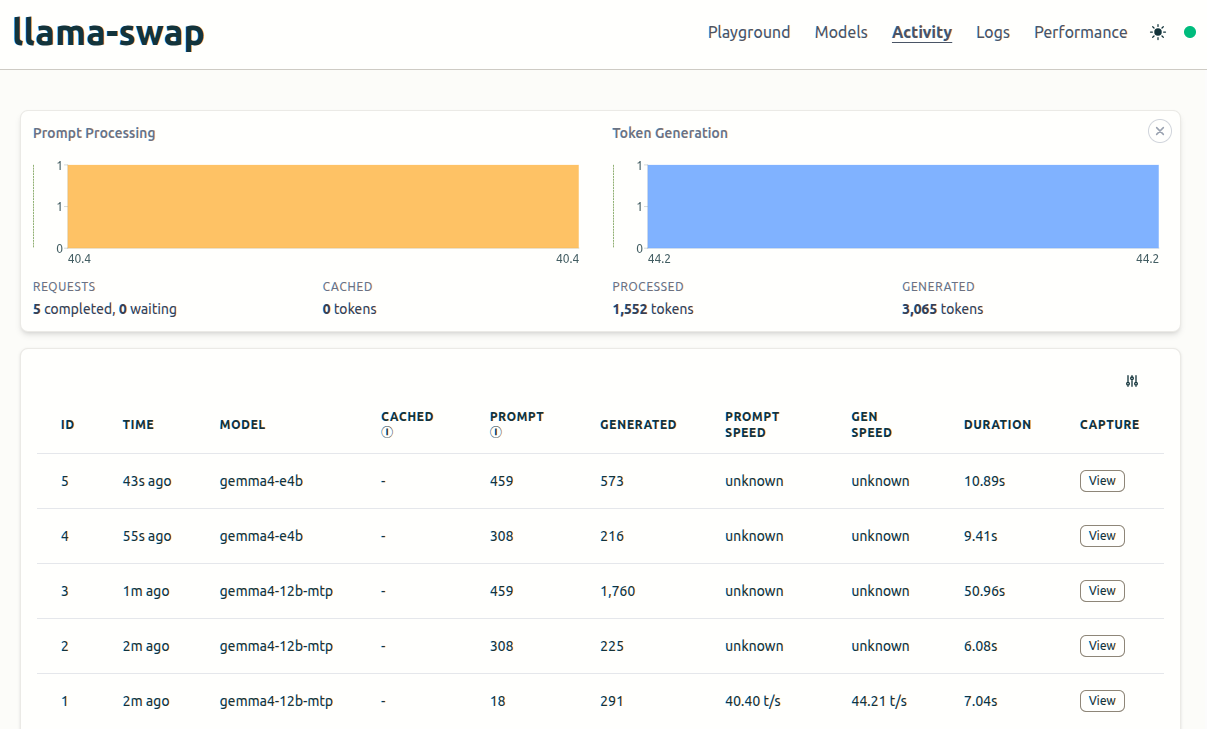
/v1/chat/completions 통해서 문맥을 유지할때 어떻게 구현되나 했더니

llama-swap 에서 대화내용을 보니 이해된다.

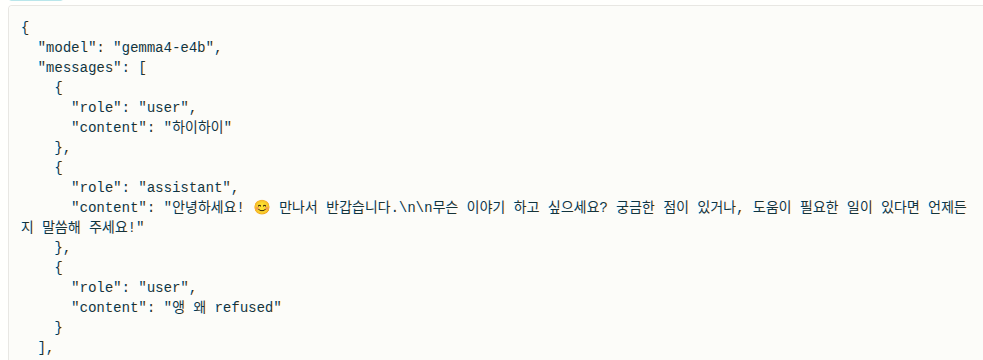
assistant에 ai 대답을 넣는다고만 해서 복수개면 어떻게 하나 했는데


UI 상으로는 이렇게 나오고


로그 상으로는 아래와 같이 나온다

1번 째 질문 "하이하이"


2번 쩨 질문 "엉 왜 refused"

그리고 이전 대화를 messages의 배열에 순서대로 넣으면

가장 마지막 대화를 기준으로 답을 주게 되는걸려나?

당연(?) 하지만 reasoning은 빼고 순수 응답 내용만 assistant에 넣어서 보낸다.

Posted by 구차니

변환해서 내꺼에서 돌려보니 성능 차이가 없...다?

내꺼 그래픽 카드가 구려서 그런가.. 그게 아니라면.. 변환을 잘못했다거나

llama.cpp 에서 지원은 안한다거나 그런건가?


  MTP x MTP 8 MTP 4 MTP 3 MTP 2 MTP 1
직접 61.1  18.6  40.9 58.4  55.6 61.7
unsloth 61.1   45.0  58.6  62.4  68.4 


-------

비교군

$ /mnt/Downloads/llama-b9553/llama-cli --model /mnt/Downloads/model/gemma4-e4b/gemma-4-E4B-it-Q4_K_M.gguf -mm ./model/gemma4-e4b/mmproj-F16.gguf  -sm none #--reasoning off                                                                                                   
...wnloads/llama-b9553/llama-cli       6435MiB
> 안녕?
[ Prompt: 105.7 t/s | Generation: 61.1 t/s ]

> 빨라?
[ Prompt: 51.1 t/s | Generation: 60.6 t/s ]


직접 변환(양자화 안함)

$ /mnt/Downloads/llama-b9553/llama-cli --model /mnt/Downloads/model/gemma4-e4b/gemma-4-E4B-it-Q4_K_M.gguf -mm ./model/gemma4-e4b/mmproj-F16.gguf --model-draft ./gemma-4-E4B-it-assistant/gemma-4-E4B-it-assistant.gguf --spec-type draft-mtp --spec-draft-n-max 8 -fit off -ngl 999 -fa on -sm none #--reasoning off
...wnloads/llama-b9553/llama-cli       6735MiB
> 안녕? 
[ Prompt: 101.1 t/s | Generation: 18.6 t/s ]

> 빨라?
[ Prompt: 351.2 t/s | Generation: 16.9 t/s ]

$ /mnt/Downloads/llama-b9553/llama-cli --model /mnt/Downloads/model/gemma4-e4b/gemma-4-E4B-it-Q4_K_M.gguf -mm ./model/gemma4-e4b/mmproj-F16.gguf --model-draft ./gemma-4-E4B-it-assistant/gemma-4-E4B-it-assistant.gguf --spec-type draft-mtp --spec-draft-n-max 4 -fit off -ngl 999 -fa on -sm none #--reasoning  off                                                                                                                   
...wnloads/llama-b9553/llama-cli       6735MiB
> 안녕?
[ Prompt: 292.5 t/s | Generation: 40.9 t/s ]

> 빨라?
[ Prompt: 207.7 t/s | Generation: 46.6 t/s ]


$ /mnt/Downloads/llama-b9553/llama-cli --model /mnt/Downloads/model/gemma4-e4b/gemma-4-E4B-it-Q4_K_M.gguf -mm ./model/gemma4-e4b/mmproj-F16.gguf --model-draft ./gemma-4-E4B-it-assistant/gemma-4-E4B-it-assistant.gguf --spec-type draft-mtp --spec-draft-n-max 3 -fit off -ngl 999 -fa on -sm none #--reasoning  off                                                                                                                   
...wnloads/llama-b9553/llama-cli       6735MiB
> 안녕? 
[ Prompt: 398.8 t/s | Generation: 58.4 t/s ]

> 빨라?
[ Prompt: 236.3 t/s | Generation: 60.9 t/s ]


$ /mnt/Downloads/llama-b9553/llama-cli --model /mnt/Downloads/model/gemma4-e4b/gemma-4-E4B-it-Q4_K_M.gguf -mm ./model/gemma4-e4b/mmproj-F16.gguf --model-draft ./gemma-4-E4B-it-assistant/gemma-4-E4B-it-assistant.gguf --spec-type draft-mtp --spec-draft-n-max 2 -fit off -ngl 999 -fa on -sm none #--reasoning off                                                                                                                   
...wnloads/llama-b9553/llama-cli       6735MiB
> 안녕?
[ Prompt: 360.7 t/s | Generation: 55.6 t/s ]

> 빨라?
[ Prompt: 284.9 t/s | Generation: 62.7 t/s ]

$ /mnt/Downloads/llama-b9553/llama-cli --model /mnt/Downloads/model/gemma4-e4b/gemma-4-E4B-it-Q4_K_M.gguf -mm ./model/gemma4-e4b/mmproj-F16.gguf --model-draft ./gemma-4-E4B-it-assistant/gemma-4-E4B-it-assistant.gguf --spec-type draft-mtp --spec-draft-n-max 1 -fit off -ngl 999 -fa on -sm none #--reasoning off                                                                                                                   
...wnloads/llama-b9553/llama-cli       6735MiB
> 안녕?
[ Prompt: 314.1 t/s | Generation: 61.7 t/s ]  

> 빨라?
[ Prompt: 441.2 t/s | Generation: 63.7 t/s ]


unsloth 모델

[링크 : https://huggingface.co/unsloth/gemma-4-E4B-it-GGUF]

$ /mnt/Downloads/llama-b9553/llama-cli --model /mnt/Downloads/model/gemma4-e4b/gemma-4-E4B-it-Q4_K_M.gguf -mm ./model/gemma4-e4b/mmproj-F16.gguf --model-draft ./gemma-4-E4B-it-assistant/mtp-gemma-4-E4B-it.gguf --spec-type draft-mtp --spec-draft-n-max 4 -fit off -ngl 999 -fa on -sm none #--reasoning off
...wnloads/llama-b9553/llama-cli       6666MiB
> 안녕?
[ Prompt: 42.4 t/s | Generation: 45.0 t/s ]

> 빨라?
[ Prompt: 302.6 t/s | Generation: 47.4 t/s ]


$ /mnt/Downloads/llama-b9553/llama-cli --model /mnt/Downloads/model/gemma4-e4b/gemma-4-E4B-it-Q4_K_M.gguf -mm ./model/gemma4-e4b/mmproj-F16.gguf --model-draft ./gemma-4-E4B-it-assistant/mtp-gemma-4-E4B-it.gguf --spec-type draft-mtp --spec-draft-n-max 3 -fit off -ngl 999 -fa on -sm none #--reasoning off
...wnloads/llama-b9553/llama-cli       6666MiB
> 안녕?
[ Prompt: 174.0 t/s | Generation: 58.6 t/s ]

> 빨라?
[ Prompt: 327.7 t/s | Generation: 60.2 t/s ]


$ /mnt/Downloads/llama-b9553/llama-cli --model /mnt/Downloads/model/gemma4-e4b/gemma-4-E4B-it-Q4_K_M.gguf -mm ./model/gemma4-e4b/mmproj-F16.gguf --model-draft ./gemma-4-E4B-it-assistant/mtp-gemma-4-E4B-it.gguf --spec-type draft-mtp --spec-draft-n-max 2 -fit off -ngl 999 -fa on -sm none #--reasoning off
...wnloads/llama-b9553/llama-cli       6666MiB
> 안녕?
[ Prompt: 98.5 t/s | Generation: 62.4 t/s ]

> 빨라?
[ Prompt: 331.4 t/s | Generation: 64.7 t/s ]  

$ /mnt/Downloads/llama-b9553/llama-cli --model /mnt/Downloads/model/gemma4-e4b/gemma-4-E4B-it-Q4_K_M.gguf -mm ./model/gemma4-e4b/mmproj-F16.gguf --model-draft ./gemma-4-E4B-it-assistant/mtp-gemma-4-E4B-it.gguf --spec-type draft-mtp --spec-draft-n-max 1 -fit off -ngl 999 -fa on -sm none #--reasoning off
...wnloads/llama-b9553/llama-cli       6666MiB
> 안녕?
[ Prompt: 168.7 t/s | Generation: 68.4 t/s ]  


> 빨라?
[ Prompt: 343.2 t/s | Generation: 67.2 t/s ]


[링크 : https://huggingface.co/google/gemma-4-E4B-it-assistant]

Posted by 구차니

그런데 208 이던 228 이던

client.chat.completions.create 함수를

client.responses.create 로 바꾸었더니 prompt speed / gen speed가 출력되지 않는다.

reasoning off 하기 위해서는 함수를 바꾸어야 하고. 바꾸면 리포트가 안되고 흐음..

걍 서버에서 끄고 해야하나? (llama-cli --reasoning off)


'모종의 음모 > ai 프로그램' 카테고리의 다른 글

llama-swap 구현 (채팅)  (0) 2026.06.18
gemma4-e4b mtp..?  (0) 2026.06.18
llama-swap 버전 업데이트!  (0) 2026.06.18
stable diffusion --device-id  (0) 2026.06.18
stable diffusion illustruousXL LoRA  (0) 2026.06.15
Posted by 구차니

208 에서 228로 올렸더니


1. config.yaml 의 명시적 사용

기존에는 config.yaml을 바로 가져가더니(llama-swap 과 동일 경로에서) 이제는 명시적으로 지정해주어야 한다.1

$ ./llama-swap 
2026/06/18 12:43:40 ERROR -config is required

$ ./llama-swap --help
Usage of ./llama-swap:
  -config string
     path to config file (required)
  -listen string
     listen address (default :8080 or :8443 for TLS)
  -tls-cert-file string
     TLS certificate file
  -tls-key-file string
     TLS key file
  -version
     show version and exit
  -watch-config
     reload config on file change


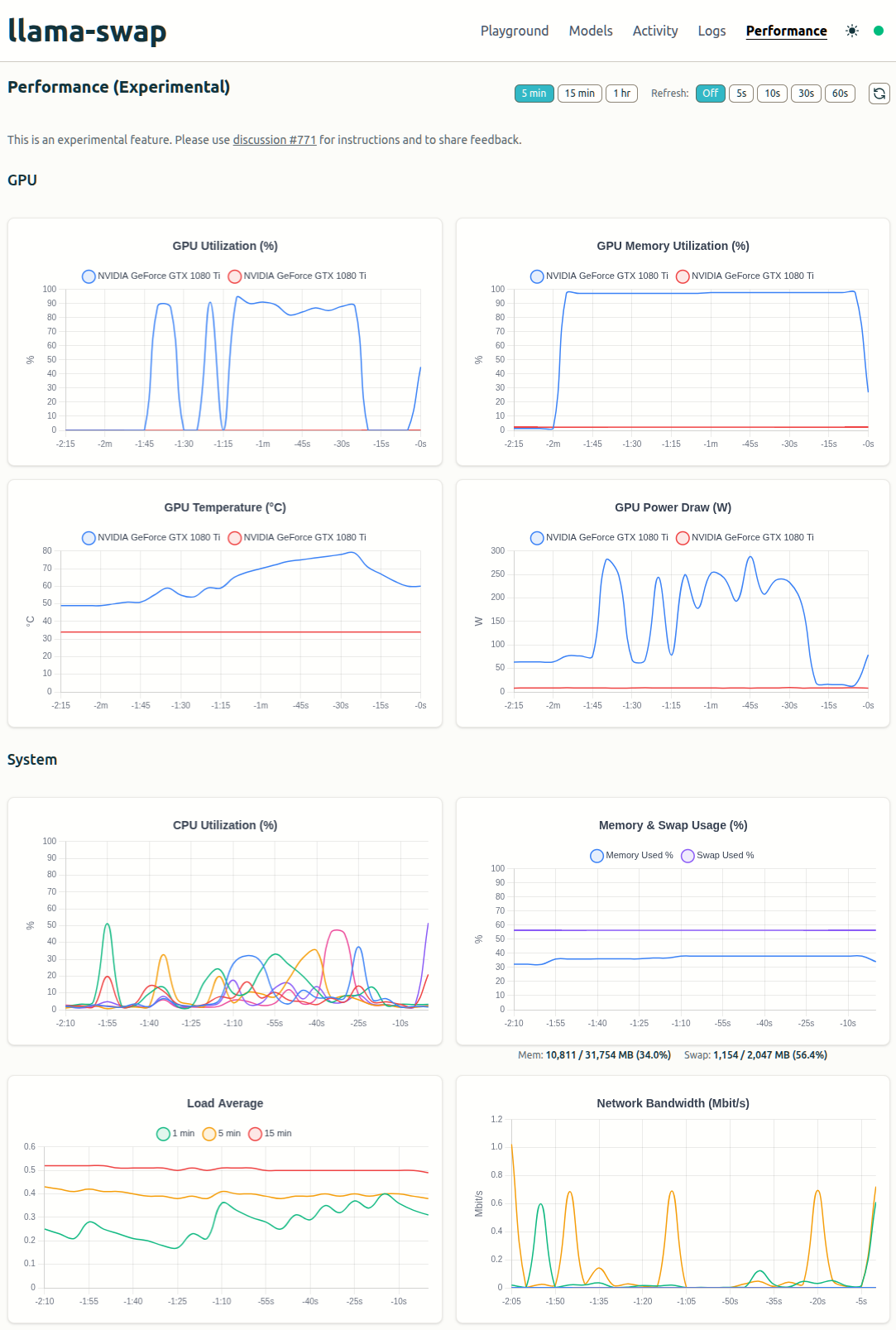
2. 모니터링 추가

performance 탭에서 그래프가 생긴것 같다. 오오 이쁜데?


Posted by 구차니

버전에 따라 안 먹는게 있는지 라고 하기에는

저번에 잘 한거 같기도 한데 잘 모르겠네


아무튼 아래처럼 바꾸어 주면 자로딘다.

./webui.sh --server-name=0.0.0.0 --device-id=1 --api --medvram
CUDA_VISIBLE_DEVICES=1 ./webui.sh --server-name=0.0.0.0 --api --medvram


일단 현재 버전(?)은 아래와 같은 상태.

저번에 확장 깔다가 꼬여서 1.7 버전이라고 받아둔걸로 했더니 안되는건가..

$ git history
commit 1937682a20f7f0442311a1ede68f9f0cb480163b (HEAD -> dev, origin/dev)
Merge: 76759a18 fd0f475a
Author: w-e-w <40751091+w-e-w@users.noreply.github.com>
Date:   Mon Mar 2 16:00:53 2026 +0900

    Merge pull request #17313 from WhizZest/fix-setuptools-version
    
    Fix the issue of `pip install 'setuptools<70'` failing in cmd

$ git branch
* dev
  master

$ git remote -v
origin  https://github.com/AUTOMATIC1111/stable-diffusion-webui.git (fetch)
origin  https://github.com/AUTOMATIC1111/stable-diffusion-webui.git (push)
Posted by 구차니

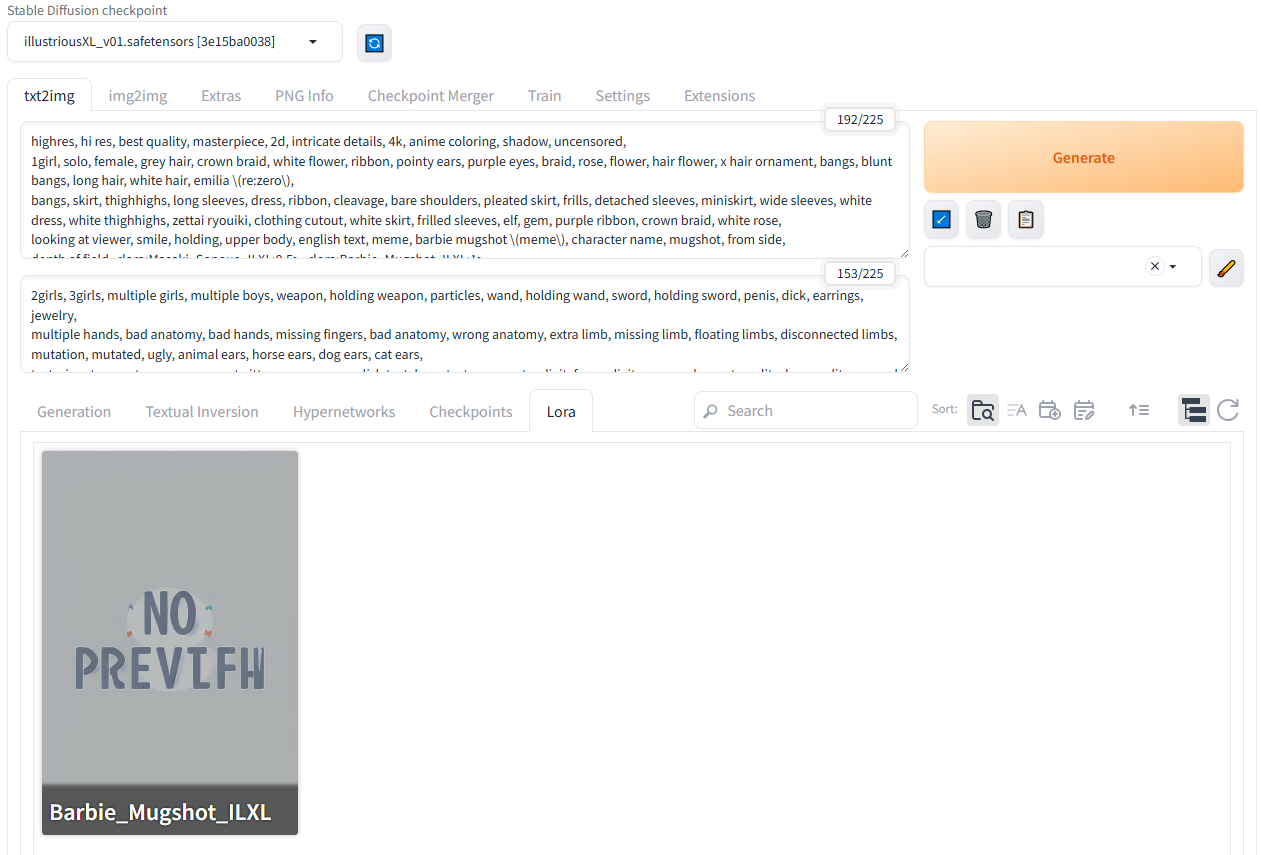
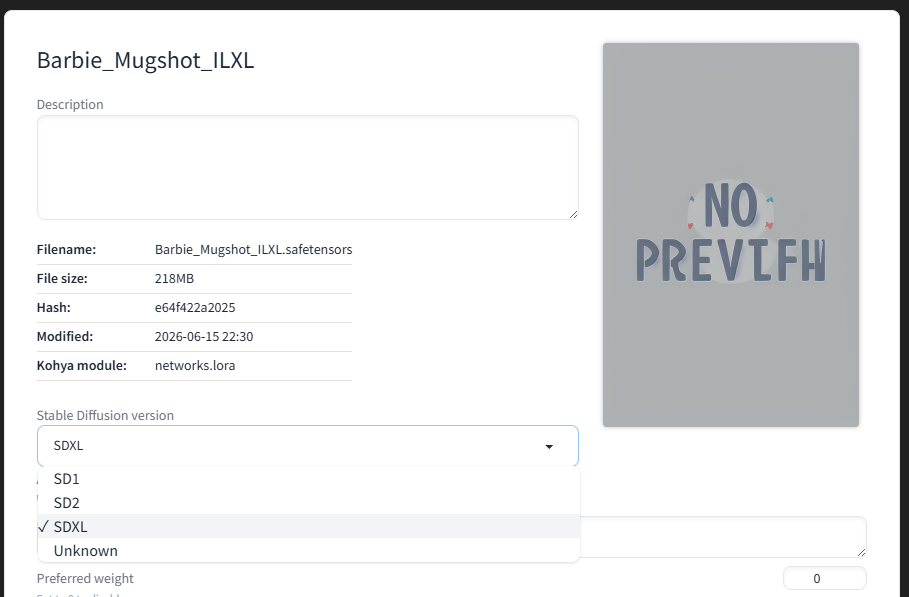
SDXL 이렇게 되어있어서 해봤는데 안되길래

혹시나 해서 illustriousXL 로 찾으니 나왔고 받아보니 된다!


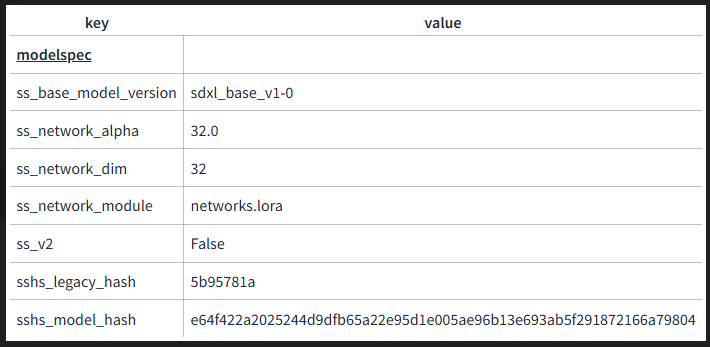
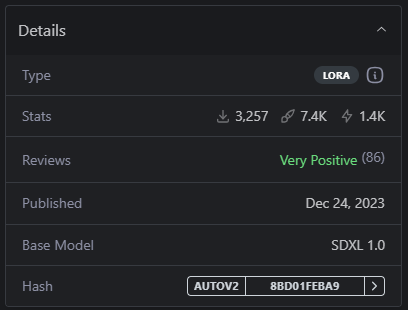
정보를 보니 sdxl_base_v1-0


모델 정보에서 SDXL로 나온다.


[링크 : https://civitai.com/models/1003582/lora-illustriousxl-barbie-mugshot-meme]


요건 일러스트리어스에서는 안되는 놈인데


읭?


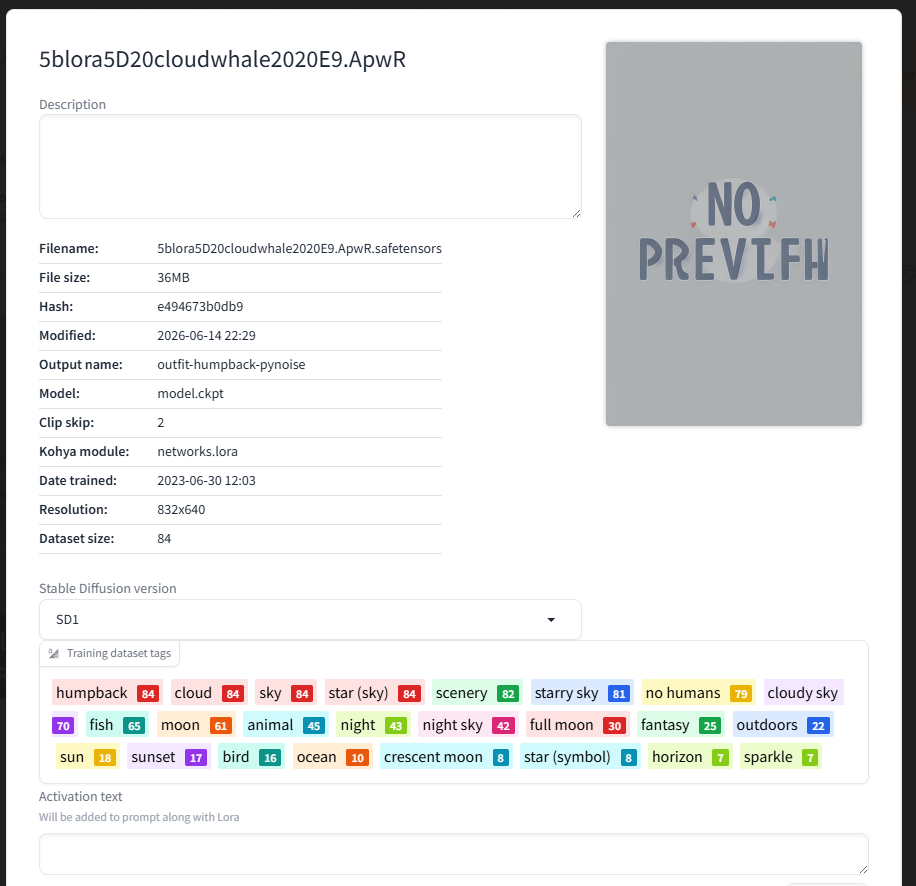
이것도 SD1 용이라 일러스트리어스에 안나온듯.

말로만 sdxl 이지 실제로는 Stable diffusion 계열인듯.

[링크 : https://civitai.com/models/242475/sdxl-lora-photorealistic-female]


요건 SD용 구름에 고래 잘 그려주는 lora.

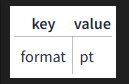
메타데이터가 많은데 얘도 SD1용


일관성있는 어떤 데이터가 아닌가?


civitai 에서 sdxl로 치면 여러가지 나오는데

sdxl 1.0을 하면 되려나?


SDXL 1.0 으로 해서 받으니 일러스트리어스에서 뜨긴한다.

[링크 : https://civitai.com/models/553959/sdxl-lora-v3-pixelized-art-intermediate-edition]

'모종의 음모 > ai 프로그램' 카테고리의 다른 글

llama-swap 버전 업데이트!  (0) 2026.06.18
stable diffusion --device-id  (0) 2026.06.18
statble diffusion XL 해상도  (0) 2026.06.15
stable diffusion, control net  (0) 2026.06.14
stable diffusion, lora  (0) 2026.06.14
Posted by 구차니