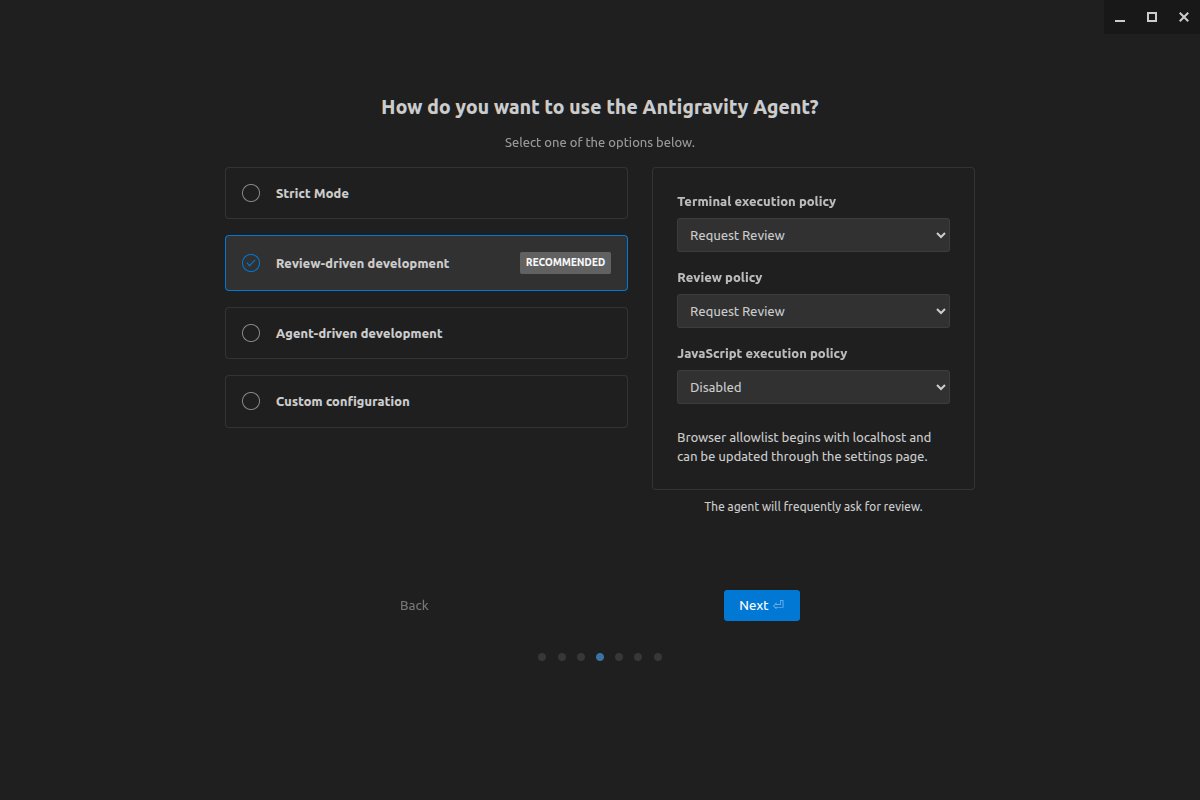
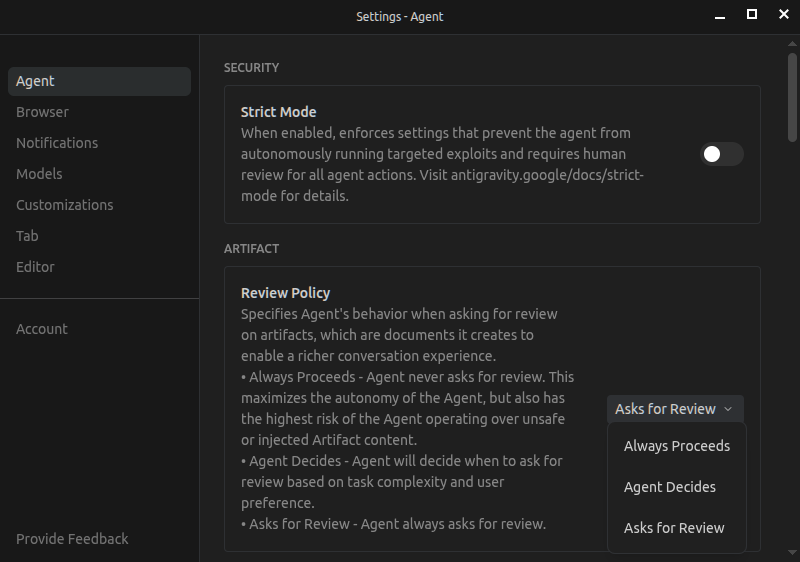
매번 승인하는게 귀찮아서 항상 진행으로 했더니 잊고 있었던 기능
이걸 하면 task와 implementation plan 두개의 md 파일을 생성하고
작업내용을 승인하면 그걸 기반으로 움직이게 된다.
always proceeds 하면 내용 검토없이 그냥 물으면 바로 움직이는데
아무튼 내부적으로는 task와 implementation_plan을 기반으로 움직이니
claude code 등에서 사용하는 기법을 자동으로 쓸 수 있도록 해둔거라고 보면 될 듯.
설정 - Agent - Artifact - Review policy
implementation plan 탭을 우클릭해서 이동한 경로를 보니 홈 디렉토리에서 프로젝트 별로 생성되서 추가되는 듯.
| ~/.gemini/antigravity/brain$ tree . ├── 07d35f57-6625-432b-a6aa-29dd98b41ac6 │ ├── implementation_plan.md │ ├── implementation_plan.md.metadata.json │ ├── implementation_plan.md.resolved │ ├── implementation_plan.md.resolved.0 │ ├── implementation_plan.md.resolved.1 │ ├── implementation_plan.md.resolved.2 │ ├── task.md │ ├── task.md.metadata.json │ ├── task.md.resolved │ ├── task.md.resolved.0 │ ├── task.md.resolved.1 │ ├── task.md.resolved.10 │ ├── task.md.resolved.11 │ ├── task.md.resolved.12 │ ├── task.md.resolved.2 │ ├── task.md.resolved.3 │ ├── task.md.resolved.4 │ ├── task.md.resolved.5 │ ├── task.md.resolved.6 │ ├── task.md.resolved.7 │ ├── task.md.resolved.8 │ ├── task.md.resolved.9 │ ├── walkthrough.md │ ├── walkthrough.md.metadata.json │ ├── walkthrough.md.resolved │ ├── walkthrough.md.resolved.0 │ └── walkthrough.md.resolved.1 ├── 08411e35-62e8-45e6-a38f-3aa4c0b7ba02 │ ├── implementation_plan.md │ ├── implementation_plan.md.metadata.json │ ├── implementation_plan.md.resolved │ ├── implementation_plan.md.resolved.0 │ ├── task.md │ ├── task.md.metadata.json │ ├── task.md.resolved │ ├── task.md.resolved.0 │ ├── task.md.resolved.1 │ ├── task.md.resolved.2 │ ├── task.md.resolved.3 │ └── task.md.resolved.4 ├── 162523f8-0d72-4cea-a46f-8439ed70b37f │ ├── implementation_plan.md │ ├── implementation_plan.md.metadata.json │ ├── implementation_plan.md.resolved │ ├── implementation_plan.md.resolved.0 │ ├── implementation_plan.md.resolved.1 │ ├── implementation_plan.md.resolved.2 │ ├── implementation_plan.md.resolved.3 │ ├── implementation_plan.md.resolved.4 │ ├── media__1771557262432.png │ ├── media__1771564749827.png │ ├── media__1771564909043.png │ ├── media__1771564917373.png │ ├── media__1771564992996.png │ ├── media__1771565144310.png │ ├── media__1771565266414.png │ ├── task.md │ ├── task.md.metadata.json │ ├── task.md.resolved │ ├── task.md.resolved.0 │ ├── task.md.resolved.1 │ ├── task.md.resolved.10 │ ├── task.md.resolved.11 │ ├── task.md.resolved.12 │ ├── task.md.resolved.13 │ ├── task.md.resolved.14 │ ├── task.md.resolved.15 │ ├── task.md.resolved.16 │ ├── task.md.resolved.17 │ ├── task.md.resolved.18 │ ├── task.md.resolved.19 │ ├── task.md.resolved.2 │ ├── task.md.resolved.20 │ ├── task.md.resolved.21 │ ├── task.md.resolved.22 │ ├── task.md.resolved.23 │ ├── task.md.resolved.24 │ ├── task.md.resolved.3 │ ├── task.md.resolved.4 │ ├── task.md.resolved.5 │ ├── task.md.resolved.6 │ ├── task.md.resolved.7 │ ├── task.md.resolved.8 │ ├── task.md.resolved.9 │ ├── walkthrough.md │ ├── walkthrough.md.metadata.json │ ├── walkthrough.md.resolved │ ├── walkthrough.md.resolved.0 │ └── walkthrough.md.resolved.1 ├── 1c0f6781-cc90-4202-a23c-93328770ab37 │ ├── implementation_plan.md │ ├── implementation_plan.md.metadata.json │ ├── implementation_plan.md.resolved │ ├── implementation_plan.md.resolved.0 │ ├── implementation_plan.md.resolved.1 │ ├── task.md │ ├── task.md.metadata.json │ ├── task.md.resolved │ ├── task.md.resolved.0 │ ├── task.md.resolved.1 │ ├── task.md.resolved.2 │ ├── task.md.resolved.3 │ └── task.md.resolved.4 ├── 29940fb1-f34f-4e25-b957-895dd34cb1c4 │ ├── implementation_plan.md │ ├── implementation_plan.md.metadata.json │ ├── implementation_plan.md.resolved │ ├── implementation_plan.md.resolved.0 │ ├── task.md │ ├── task.md.metadata.json │ ├── task.md.resolved │ ├── task.md.resolved.0 │ ├── walkthrough.md │ ├── walkthrough.md.metadata.json │ ├── walkthrough.md.resolved │ └── walkthrough.md.resolved.0 ├── 35309f25-b948-4702-a006-deccd131e163 ├── 50230d93-8a21-40b4-80b6-71c89e45072b │ ├── implementation_plan.md │ ├── implementation_plan.md.metadata.json │ ├── implementation_plan.md.resolved │ ├── implementation_plan.md.resolved.0 │ ├── task.md │ ├── task.md.metadata.json │ ├── task.md.resolved │ ├── task.md.resolved.0 │ ├── walkthrough.md │ ├── walkthrough.md.metadata.json │ ├── walkthrough.md.resolved │ └── walkthrough.md.resolved.0 ├── 545e3f3a-d7b5-4ecb-9db9-289416bf7029 ├── 5c980395-a7aa-45dc-9915-26ecb09d273e │ ├── implementation_plan.md │ ├── implementation_plan.md.metadata.json │ ├── implementation_plan.md.resolved │ ├── implementation_plan.md.resolved.0 │ ├── task.md │ ├── task.md.metadata.json │ ├── task.md.resolved │ ├── task.md.resolved.0 │ ├── task.md.resolved.1 │ ├── task.md.resolved.10 │ ├── task.md.resolved.11 │ ├── task.md.resolved.12 │ ├── task.md.resolved.2 │ ├── task.md.resolved.3 │ ├── task.md.resolved.4 │ ├── task.md.resolved.5 │ ├── task.md.resolved.6 │ ├── task.md.resolved.7 │ ├── task.md.resolved.8 │ └── task.md.resolved.9 ├── 6e47bc0a-c310-4667-960c-74f25deea754 ├── a2acef25-01a8-46b1-bb28-1471ed127de8 │ ├── implementation_plan.md │ ├── implementation_plan.md.metadata.json │ ├── implementation_plan.md.resolved │ ├── implementation_plan.md.resolved.0 │ ├── task.md │ ├── task.md.metadata.json │ ├── task.md.resolved │ ├── task.md.resolved.0 │ ├── task.md.resolved.1 │ ├── task.md.resolved.2 │ ├── task.md.resolved.3 │ ├── task.md.resolved.4 │ ├── task.md.resolved.5 │ ├── task.md.resolved.6 │ ├── walkthrough.md │ ├── walkthrough.md.metadata.json │ ├── walkthrough.md.resolved │ └── walkthrough.md.resolved.0 ├── a7320b66-09e7-4465-964a-aadefb67b0a3 ├── a9b142eb-b16d-463a-9362-5aeebd2eb329 ├── b206280c-ee96-43f7-9071-d4e4006d067a │ ├── implementation_plan.md │ ├── implementation_plan.md.metadata.json │ ├── implementation_plan.md.resolved │ ├── implementation_plan.md.resolved.0 │ ├── implementation_plan.md.resolved.1 │ ├── task.md │ ├── task.md.metadata.json │ ├── task.md.resolved │ ├── task.md.resolved.0 │ ├── task.md.resolved.1 │ ├── task.md.resolved.2 │ ├── task.md.resolved.3 │ ├── task.md.resolved.4 │ ├── task.md.resolved.5 │ ├── task.md.resolved.6 │ ├── task.md.resolved.7 │ ├── task.md.resolved.8 │ ├── task.md.resolved.9 │ ├── walkthrough.md │ ├── walkthrough.md.metadata.json │ ├── walkthrough.md.resolved │ ├── walkthrough.md.resolved.0 │ └── walkthrough.md.resolved.1 ├── cd10dd1b-6772-47bd-bf1a-f0158ed1acd9 │ ├── implementation_plan.md │ ├── implementation_plan.md.metadata.json │ ├── implementation_plan.md.resolved │ └── implementation_plan.md.resolved.0 ├── deb7c212-f8db-47fb-bbd4-aa434574b25e │ ├── implementation_plan.md │ ├── implementation_plan.md.metadata.json │ ├── implementation_plan.md.resolved │ ├── implementation_plan.md.resolved.0 │ ├── implementation_plan.md.resolved.1 │ ├── implementation_plan.md.resolved.2 │ ├── implementation_plan.md.resolved.3 │ ├── implementation_plan.md.resolved.4 │ ├── implementation_plan.md.resolved.5 │ ├── task.md │ ├── task.md.metadata.json │ ├── task.md.resolved │ ├── task.md.resolved.0 │ ├── task.md.resolved.1 │ ├── task.md.resolved.10 │ ├── task.md.resolved.11 │ ├── task.md.resolved.2 │ ├── task.md.resolved.3 │ ├── task.md.resolved.4 │ ├── task.md.resolved.5 │ ├── task.md.resolved.6 │ ├── task.md.resolved.7 │ ├── task.md.resolved.8 │ ├── task.md.resolved.9 │ ├── walkthrough.md │ ├── walkthrough.md.metadata.json │ ├── walkthrough.md.resolved │ ├── walkthrough.md.resolved.0 │ ├── walkthrough.md.resolved.1 │ ├── walkthrough.md.resolved.2 │ ├── walkthrough.md.resolved.3 │ ├── walkthrough.md.resolved.4 │ └── walkthrough.md.resolved.5 ├── ed49ed87-392d-4be8-a7e6-fdf96dbadd32 ├── f430e5d6-559c-4797-a0b9-73185547afc6 │ ├── implementation_plan.md │ ├── implementation_plan.md.metadata.json │ ├── implementation_plan.md.resolved │ ├── implementation_plan.md.resolved.0 │ ├── implementation_plan.md.resolved.1 │ ├── implementation_plan.md.resolved.2 │ ├── task.md │ ├── task.md.metadata.json │ ├── task.md.resolved │ ├── task.md.resolved.0 │ ├── task.md.resolved.1 │ ├── task.md.resolved.2 │ └── task.md.resolved.3 └── tempmediaStorage 19 directories, 235 files |
'모종의 음모 > ai 프로그램' 카테고리의 다른 글
| python 으로 telegram + fatherbot 연동하기 (0) | 2026.04.08 |
|---|---|
| ollama 설치 (2) | 2026.04.08 |
| gemini 동영상 만들기 (유료?) (0) | 2026.02.22 |
| antigravity 사용량 끝! (0) | 2026.02.20 |
| antigravity 설치 (0) | 2026.02.11 |