귀찮아서 명령어 조합 저장
| sudo systemctl stop gdm sudo systemctl stop nvargus-daemon sudo nvidia-smi -pm 1 sudo nvidia-smi -i 0 -mig 1 sudo nvidia-smi mig -cgi 80,83 -C |
----
헛다리를 짚은것 같은데 메모리가 안나오는건 공유 메모리를 써서 인가.. 싶기도 하고?
아무튼 thor iGPU에서는 최대 2개로 나누어 쓸 수 있나 본데
gfx는 외부 출력 포트를 쓸수 있냐 없냐의 차이인것 같고
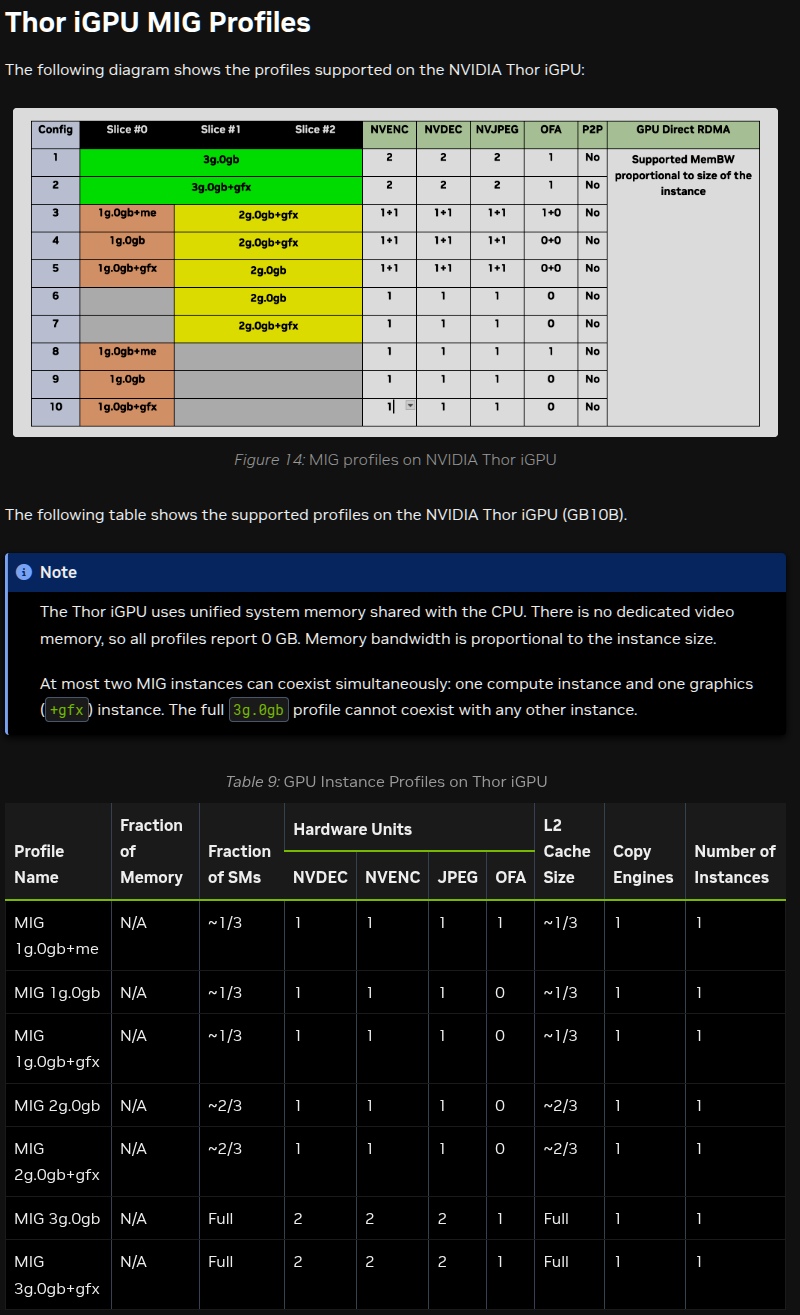
[링크 : https://docs.nvidia.com/datacenter/tesla/mig-user-guide/supported-mig-profiles.html]
| nvidia@localhost:~$ nvidia-smi -L GPU 0: NVIDIA Thor (UUID: GPU-a7c66ad2-6dbb-0ab8-c1a2-37ba6dba3600) nvidia@localhost:~$ nvidia-smi -i 0 -q ==============NVSMI LOG============== Timestamp : Fri Jul 24 11:33:07 2026 Driver Version : 580.00 CUDA Version : 13.0 Attached GPUs : 1 GPU 00000000:01:00.0 Product Name : NVIDIA Thor Product Brand : GeForce Product Architecture : Blackwell Display Mode : Requested functionality has been deprecated Display Attached : No Display Active : Disabled Persistence Mode : Disabled Addressing Mode : ATS MIG Mode Current : Disabled Pending : Disabled Accounting Mode : Disabled Accounting Mode Buffer Size : 4000 Driver Model Current : N/A Pending : N/A Serial Number : N/A GPU UUID : GPU-a7c66ad2-6dbb-0ab8-c1a2-37ba6dba3600 GPU PDI : 0x9257b02c0bd38a20 Minor Number : 0 VBIOS Version : N/A MultiGPU Board : No Board ID : 0x100 Board Part Number : N/A GPU Part Number : 2B00--A1 FRU Part Number : N/A Platform Info Chassis Serial Number : N/A Slot Number : N/A Tray Index : N/A Host ID : N/A Peer Type : N/A Module Id : N/A GPU Fabric GUID : N/A Inforom Version Image Version : N/A OEM Object : N/A ECC Object : N/A Power Management Object : N/A Inforom BBX Object Flush Latest Timestamp : N/A Latest Duration : N/A GPU Operation Mode Current : N/A Pending : N/A GPU C2C Mode : Disabled GPU Virtualization Mode Virtualization Mode : None Host VGPU Mode : N/A vGPU Heterogeneous Mode : N/A GPU Recovery Action : None GSP Firmware Version : 580.00 IBMNPU Relaxed Ordering Mode : N/A PCI Bus : 0x01 Device : 0x00 Domain : 0x0000 Base Classcode : 0x3 Sub Classcode : 0x2 Device Id : 0x2B0010DE Bus Id : 00000000:01:00.0 Sub System Id : 0x00000000 GPU Link Info PCIe Generation Max : 1 Current : 1 Device Current : 1 Device Max : 5 Host Max : 1 Link Width Max : 16x Current : 1x Bridge Chip Type : N/A Firmware : N/A Replays Since Reset : 0 Replay Number Rollovers : 0 Tx Throughput : N/A Rx Throughput : N/A Atomic Caps Outbound : FETCHADD_32 FETCHADD_64 SWAP_32 SWAP_64 CAS_32 CAS_64 Atomic Caps Inbound : N/A Fan Speed : N/A Performance State : N/A Clocks Event Reasons : N/A Clocks Event Reasons Counters SW Power Capping : N/A Sync Boost : N/A SW Thermal Slowdown : N/A HW Thermal Slowdown : N/A HW Power Braking : N/A Sparse Operation Mode : N/A FB Memory Usage Total : N/A Reserved : N/A Used : N/A Free : N/A BAR1 Memory Usage Total : N/A Used : N/A Free : N/A Conf Compute Protected Memory Usage Total : 0 MiB Used : 0 MiB Free : 0 MiB Compute Mode : Default Utilization GPU : 98 % Memory : 0 % Encoder : 0 % Decoder : 0 % JPEG : 0 % OFA : 0 % Encoder Stats Active Sessions : 0 Average FPS : 0 Average Latency : 0 FBC Stats Active Sessions : 0 Average FPS : 0 Average Latency : 0 DRAM Encryption Mode Current : N/A Pending : N/A ECC Mode Current : N/A Pending : N/A ECC Errors Volatile SRAM Correctable : N/A SRAM Uncorrectable Parity : N/A SRAM Uncorrectable SEC-DED : N/A DRAM Correctable : N/A DRAM Uncorrectable : N/A Aggregate SRAM Correctable : N/A SRAM Uncorrectable Parity : N/A SRAM Uncorrectable SEC-DED : N/A DRAM Correctable : N/A DRAM Uncorrectable : N/A SRAM Threshold Exceeded : N/A Aggregate Uncorrectable SRAM Sources SRAM L2 : N/A SRAM SM : N/A SRAM Microcontroller : N/A SRAM PCIE : N/A SRAM Other : N/A Channel Repair Pending : N/A TPC Repair Pending : N/A Retired Pages Single Bit ECC : N/A Double Bit ECC : N/A Pending Page Blacklist : N/A Remapped Rows : N/A Temperature GPU Current Temp : 60 C GPU T.Limit Temp : N/A GPU Shutdown Temp : N/A GPU Slowdown Temp : N/A GPU Max Operating Temp : N/A GPU Target Temperature : N/A Memory Current Temp : N/A Memory Max Operating Temp : N/A GPU Power Readings Average Power Draw : N/A Instantaneous Power Draw : 36.21 W Current Power Limit : N/A Requested Power Limit : N/A Default Power Limit : N/A Min Power Limit : N/A Max Power Limit : N/A GPU Memory Power Readings Average Power Draw : N/A Instantaneous Power Draw : N/A Module Power Readings Average Power Draw : N/A Instantaneous Power Draw : N/A Current Power Limit : N/A Requested Power Limit : N/A Default Power Limit : N/A Min Power Limit : N/A Max Power Limit : N/A Power Smoothing : N/A Workload Power Profiles Requested Profiles : N/A Enforced Profiles : N/A Clocks Graphics : 1575 MHz SM : N/A Memory : N/A Video : 315 MHz Applications Clocks Graphics : Requested functionality has been deprecated Memory : Requested functionality has been deprecated Default Applications Clocks Graphics : Requested functionality has been deprecated Memory : Requested functionality has been deprecated Deferred Clocks Memory : N/A Max Clocks Graphics : N/A SM : N/A Memory : N/A Video : N/A Max Customer Boost Clocks Graphics : N/A Clock Policy Auto Boost : N/A Auto Boost Default : N/A Fabric State : Deprecated; See field Probe State instead Probe State : N/A Status : Deprecated; See field Probe Status instead Probe Status : N/A CliqueId : N/A ClusterUUID : N/A Health Summary : N/A Bandwidth : N/A Route Recovery in progress : N/A Route Unhealthy : N/A Access Timeout Recovery : N/A Incorrect Configuration : N/A Processes GPU instance ID : N/A Compute instance ID : N/A Process ID : 3559 Type : G Name : /usr/lib/xorg/Xorg Used GPU Memory : 95 MiB GPU instance ID : N/A Compute instance ID : N/A Process ID : 3775 Type : G Name : /usr/bin/gnome-shell Used GPU Memory : 58 MiB GPU instance ID : N/A Compute instance ID : N/A Process ID : 8710 Type : C+G Name : ./llama-b10099/llama-cli Used GPU Memory : 33671 MiB Capabilities EGM : disabled nvidia@localhost:~$ nvidia-smi mig -lgip +-------------------------------------------------------------------------------+ | GPU instance profiles: | | GPU Name ID Instances Memory P2P SM DEC ENC | | Free/Total GiB CE JPEG OFA | |===============================================================================| |
[링크 : https://blog.naver.com/techtrip/224167049409]
+
gdm만 죽이나 isolate 해서 죽이나 별반 차이 없는 것 같이 안된다 ㅠㅠ
| nvidia@localhost:~$ nvidia-smi -i 0 Fri Jul 24 11:57:43 2026 +-----------------------------------------------------------------------------------------+ | NVIDIA-SMI 580.00 Driver Version: 580.00 CUDA Version: 13.0 | +-----------------------------------------+------------------------+----------------------+ | GPU Name Persistence-M | Bus-Id Disp.A | Volatile Uncorr. ECC | | Fan Temp Perf Pwr:Usage/Cap | Memory-Usage | GPU-Util Compute M. | | | | MIG M. | |=========================================+========================+======================| | 0 NVIDIA Thor Off | 00000000:01:00.0 Off | N/A | | N/A 40C N/A 2W / N/A | Not Supported | 0% Default | | | | Disabled | +-----------------------------------------+------------------------+----------------------+ +-----------------------------------------------------------------------------------------+ | Processes: | | GPU GI CI PID Type Process name GPU Memory | | ID ID Usage | |=========================================================================================| | 0 N/A N/A 3559 G /usr/lib/xorg/Xorg 95MiB | | 0 N/A N/A 3775 G /usr/bin/gnome-shell 58MiB | +-----------------------------------------------------------------------------------------+ nvidia@localhost:~$ systemctl stop gdm ==== AUTHENTICATING FOR org.freedesktop.systemd1.manage-units ==== Authentication is required to stop 'gdm.service'. Authenticating as: nvidia Password: ==== AUTHENTICATION COMPLETE ==== nvidia@localhost:~$ nvidia-smi -i 0 Fri Jul 24 11:58:10 2026 +-----------------------------------------------------------------------------------------+ | NVIDIA-SMI 580.00 Driver Version: 580.00 CUDA Version: 13.0 | +-----------------------------------------+------------------------+----------------------+ | GPU Name Persistence-M | Bus-Id Disp.A | Volatile Uncorr. ECC | | Fan Temp Perf Pwr:Usage/Cap | Memory-Usage | GPU-Util Compute M. | | | | MIG M. | |=========================================+========================+======================| | 0 NVIDIA Thor Off | 00000000:01:00.0 Off | N/A | | N/A 40C N/A 1W / N/A | Not Supported | 0% Default | | | | Disabled | +-----------------------------------------+------------------------+----------------------+ +-----------------------------------------------------------------------------------------+ | Processes: | | GPU GI CI PID Type Process name GPU Memory | | ID ID Usage | |=========================================================================================| | No running processes found | +-----------------------------------------------------------------------------------------+ nvidia@localhost:~$ nvidia-smi -L GPU 0: NVIDIA Thor (UUID: GPU-a7c66ad2-6dbb-0ab8-c1a2-37ba6dba3600) nvidia@localhost:~$ nvidia-smi -i 0 -mig 1 Unable to enable MIG Mode for GPU 00000000:01:00.0: Insufficient Permissions Terminating early due to previous errors. nvidia@localhost:~$ sudo nvidia-smi -i 0 -mig 1 Enabled MIG Mode for GPU 00000000:01:00.0 Warning: persistence mode is disabled on device 00000000:01:00.0. See the Known Issues section of the nvidia-smi(1) man page for more information. Run with [--help | -h] switch to get more information on how to enable persistence mode. All done. nvidia@localhost:~$ nvidia-smi -L GPU 0: NVIDIA Thor (UUID: GPU-a7c66ad2-6dbb-0ab8-c1a2-37ba6dba3600) nvidia@localhost:~$ sudo nvidia-smi -L GPU 0: NVIDIA Thor (UUID: GPU-a7c66ad2-6dbb-0ab8-c1a2-37ba6dba3600) nvidia@localhost:~$ nvidia-smi Fri Jul 24 12:00:54 2026 +-----------------------------------------------------------------------------------------+ | NVIDIA-SMI 580.00 Driver Version: 580.00 CUDA Version: 13.0 | +-----------------------------------------+------------------------+----------------------+ | GPU Name Persistence-M | Bus-Id Disp.A | Volatile Uncorr. ECC | | Fan Temp Perf Pwr:Usage/Cap | Memory-Usage | GPU-Util Compute M. | | | | MIG M. | |=========================================+========================+======================| | 0 NVIDIA Thor Off | 00000000:01:00.0 Off | N/A | | N/A 40C N/A 3W / N/A | Not Supported | N/A Default | | | | Enabled | +-----------------------------------------+------------------------+----------------------+ +-----------------------------------------------------------------------------------------+ | MIG devices: | +------------------+----------------------------------+-----------+-----------------------+ | GPU GI CI MIG | Shared Memory-Usage | Vol| Shared | | ID ID Dev | Shared BAR1-Usage | SM Unc| CE ENC DEC OFA JPG | | | | ECC| | |==================+==================================+===========+=======================| | No MIG devices found | +-----------------------------------------------------------------------------------------+ +-----------------------------------------------------------------------------------------+ | Processes: | | GPU GI CI PID Type Process name GPU Memory | | ID ID Usage | |=========================================================================================| | No running processes found | +-----------------------------------------------------------------------------------------+ nvidia@localhost:~$ nvidia-smi mig -lgip +-------------------------------------------------------------------------------+ | GPU instance profiles: | | GPU Name ID Instances Memory P2P SM DEC ENC | | Free/Total GiB CE JPEG OFA | |===============================================================================| Failed to display GPU instance profiles: Unknown Error nvidia@localhost:~$ sudo nvidia-smi mig -lgip +-------------------------------------------------------------------------------+ | GPU instance profiles: | | GPU Name ID Instances Memory P2P SM DEC ENC | | Free/Total GiB CE JPEG OFA | |===============================================================================| Failed to display GPU instance profiles: Unknown Error nvidia@localhost:~$ sudo nvidia-smi -pm 1 Enabled Legacy persistence mode for GPU 00000000:01:00.0. All done. nvidia@localhost:~$ sudo nvidia-smi -i 0 -mig 1 Enabled MIG Mode for GPU 00000000:01:00.0 All done. nvidia@localhost:~$ sudo nvidia-smi mig -lgip +-------------------------------------------------------------------------------+ | GPU instance profiles: | | GPU Name ID Instances Memory P2P SM DEC ENC | | Free/Total GiB CE JPEG OFA | |===============================================================================| Failed to display GPU instance profiles: Unknown Error |
driver 버전은 이런데..
| NVIDIA-SMI 580.00 Driver Version: 580.00 CUDA Version: 13.0 |
jetpack 버전은 38.4 같다. 일단 위에서 JetPack 7.2GA/R39.2 라고 했으니 업데이드 해봐야하나?
| $ dpkg-query --show nvidia-l4t-core nvidia-l4t-core 38.4.0-20251230160601 |
[링크 : https://yoo-hk.tistory.com/555]
--
싹다 밀어버리고 컴백
| $ nvidia-smi Fri Jul 24 17:02:29 2026 +-----------------------------------------------------------------------------------------+ | NVIDIA-SMI 595.78 Driver Version: 595.78 CUDA Version: 13.2 | $ dpkg-query --show nvidia-l4t-core nvidia-l4t-core 39.2.0-20260601141651 |
일단 잡을 녀석들 죽이고
| $ sudo systemctl stop gdm $ sudo systemctl stop nvargus-daemon |
일단 persistent mode 하지 않고 하면 목록에서 에러는 나지 않는데 실패
| nvidia@nvidia:~$ nvidia-smi -i 0 -mig 1 Unable to enable MIG Mode for GPU 00000000:01:00.0: Insufficient Permissions Terminating early due to previous errors. nvidia@nvidia:~$ nvidia-smi -L GPU 0: NVIDIA Thor (UUID: GPU-a7c66ad2-6dbb-0ab8-c1a2-37ba6dba3600) nvidia@nvidia:~$ nvidia-smi mig -lgip +-------------------------------------------------------------------------------+ | GPU instance profiles: | | GPU Name ID Instances Memory P2P SM DEC ENC | | Free/Total GiB CE JPEG OFA | |===============================================================================| nvidia@nvidia:~$ sudo nvidia-smi mig -lgip +-------------------------------------------------------------------------------+ | GPU instance profiles: | | GPU Name ID Instances Memory P2P SM DEC ENC | | Free/Total GiB CE JPEG OFA | |===============================================================================| nvidia@nvidia:~$ nvidia-smi mig mig -- Multi Instance GPU management. Usage: nvidia-smi mig [options] Options include: [-h | --help]: Display help information. [-i | --id]: Enumeration index, PCI bus ID or UUID. Provide comma separated values for more than one device. [-gi | --gpu-instance-id]: GPU instance ID. Provide comma separated values for more than one GPU instance. [-ci | --compute-instance-id]: Compute instance ID. Provide comma separated values for more than one compute instance. [-lgip | --list-gpu-instance-profiles]: List supported GPU instance profiles. Option -i can be used to restrict the command to run on a specific GPU. [-lgipp | --list-gpu-instance-possible-placements]: List possible GPU instance placements in the following format, {Start}:Size. Option -i can be used to restrict the command to run on a specific GPU. [-C | --default-compute-instance]: Create compute instance with the default profile when used with the option to create a GPU instance (-cgi). [-cgi | --create-gpu-instance]: Create GPU instances for the given profile tuples. A profile tuple consists of a profile name or ID and an optional placement specifier, which consists of a colon and a placement start index. Provide comma separated values for more than one profile tuple. Option -i can be used to restrict the command to run on a specific GPU. [-dgi | --destroy-gpu-instance]: Destroy GPU instances. Options -i and -gi can be used individually or combined to restrict the command to run on a specific GPU or GPU instance. [-lgi | --list-gpu-instances]: List GPU instances. Option -i can be used to restrict the command to run on a specific GPU. [-lcip | --list-compute-instance-profiles]: List supported compute instance profiles. Options -i and -gi can be used individually or combined to restrict the command to run on a specific GPU or GPU instance. [-lcipp | --list-compute-instance-possible-placements]: List possible compute instance placements in the following format, {Start}:Size. Options -i and -gi can be used individually or combined to restrict the command to run on a specific GPU or GPU instance. [-cci | --create-compute-instance]: Create compute instance for the given profile name or IDs. Provide comma separated values for more than one profile. If no profile name or ID is given, then the default* compute instance profile ID will be used. Options -i and -gi can be used individually or combined to restrict the command to run on a specific GPU or GPU instance. [-dci | --destroy-compute-instance]: Destroy compute instances. Options -i, -gi and -ci can be used individually or combined to restrict the command to run on a specific GPU or GPU instance or compute instance. [-lci | --list-compute-instances]: List compute instances. Options -i and -gi can be used individually or combined to restrict the command to run on a specific GPU or GPU instance. |
persistent mode를 활성화 해주어야 한다. 물론 persistent mode 한다고 해서
전원 off 하고 다시 켠다고 또 되는건 아닌듯. 그럼 왜 persistent mode라고 하는겨?
| nvidia@nvidia:~$ sudo nvidia-smi -pm 1 Enabled Legacy persistence mode for GPU 00000000:01:00.0. All done. nvidia@nvidia:~$ sudo nvidia-smi -i 0 -mig 1 Enabled MIG Mode for GPU 00000000:01:00.0 All done. nvidia@nvidia:~$ sudo nvidia-smi mig -lgip +-------------------------------------------------------------------------------+ | GPU instance profiles: | | GPU Name ID Instances Memory P2P SM DEC ENC | | Free/Total GiB CE JPEG OFA | |===============================================================================| | 0 MIG 1g.0gb+me 78 1/1 0.00 No 6 1 1 | | 1 1 1 | +-------------------------------------------------------------------------------+ | 0 MIG 1g.0gb 80 1/1 0.00 No 6 1 1 | | 1 1 0 | +-------------------------------------------------------------------------------+ | 0 MIG 1g.0gb+gfx 81 1/1 0.00 No 6 1 1 | | 1 1 0 | +-------------------------------------------------------------------------------+ | 0 MIG 2g.0gb 82 1/1 0.00 No 12 1 1 | | 1 1 0 | +-------------------------------------------------------------------------------+ | 0 MIG 2g.0gb+gfx 83 1/1 0.00 No 12 1 1 | | 1 1 0 | +-------------------------------------------------------------------------------+ | 0 MIG 3g.0gb 0 1/1 0.00 No 20 2 2 | | 1 2 1 | +-------------------------------------------------------------------------------+ | 0 MIG 3g.0gb+gfx 32 1/1 0.00 No 20 2 2 | | 1 2 1 | +-------------------------------------------------------------------------------+ |
아무튼 이렇게 해야지 리셋도 된다.
| nvidia@nvidia:~$ sudo systemctl status nvargus-daemon ● nvargus-daemon.service - Argus daemon Loaded: loaded (/etc/systemd/system/nvargus-daemon.service; enabled; preset: enabled) Active: active (running) since Fri 2026-07-24 17:00:50 KST; 14min ago Main PID: 2555 (nvargus-daemon) Tasks: 3 (limit: 150257) Memory: 68.8M (peak: 108.8M) CPU: 285ms CGroup: /system.slice/nvargus-daemon.service └─2555 /usr/sbin/nvargus-daemon Jul 24 17:00:54 nvidia nvargus-daemon[2555]: CaptureService:stop: is requested -------------------------- Jul 24 17:00:55 nvidia nvargus-daemon[2555]: SCF: Error 0x00000008: Service not running (in src/services/power/PowerService.cpp, function stopS> Jul 24 17:00:55 nvidia nvargus-daemon[2555]: SCF: Error 0x00000008: (propagating from src/components/ServiceHost.cpp, function stopServicesInt> Jul 24 17:00:55 nvidia nvargus-daemon[2555]: SCF: Error 0x0000000f: (propagating from src/api/CameraDriver.cpp, function initialize(), line 18> Jul 24 17:00:55 nvidia nvargus-daemon[2555]: SCF: Error 0x00000008: Services are already stopped (in src/components/ServiceHost.cpp, function s> Jul 24 17:00:55 nvidia nvargus-daemon[2555]: SCF: Error 0x0000000f: (propagating from src/api/CameraDriver.cpp, function getCameraDriver(), li> Jul 24 17:00:55 nvidia nvargus-daemon[2555]: (Argus) Error 0x0000000f: (propagating from src/api/GlobalProcessState.cpp, function createCamera> Jul 24 17:00:55 nvidia nvargus-daemon[2555]: === gst-plugin-scanner2811)[2811]: CameraProvider failed to initialize Jul 24 17:00:55 nvidia nvargus-daemon[2555]: === gst-plugin-scanner2811)[2811]: Connection closed (FFFF949B88C0) Jul 24 17:00:55 nvidia nvargus-daemon[2555]: === gst-plugin-scanner2811)[2811]: Connection cleaned up (FFFF949B88C0) nvidia@nvidia:~$ sudo systemctl stop nvargus-daemon nvidia@nvidia:~$ sudo nvidia-smi --gpu-reset -i 0 GPU 00000000:01:00.0 was successfully reset. All done. |
일단 다 죽이고
| $ sudo nvidia-smi mig -dci && sudo nvidia-smi mig -dgi No GPU instances found: Not Found |
| config 1 - 0 config 2 - 32 config 3 - 78, 83 config 4 - 80, 83 config 5 - 81, 82 config 6 - 82 config 7 - 83 config 8 - 78 config 9 - 80 config 10- 81 |
| $ sudo nvidia-smi mig -cgi 80,83 Successfully created GPU instance ID 2 on GPU 0 using profile MIG 1g.0gb (ID 80) Successfully created GPU instance ID 1 on GPU 0 using profile MIG 2g.0gb+gfx (ID 83) nvidia@nvidia:~$ nvidia-smi Fri Jul 24 17:50:43 2026 +-----------------------------------------------------------------------------------------+ | NVIDIA-SMI 595.78 Driver Version: 595.78 CUDA Version: 13.2 | +-----------------------------------------+------------------------+----------------------+ | GPU Name Persistence-M | Bus-Id Disp.A | Volatile Uncorr. ECC | | Fan Temp Perf Pwr:Usage/Cap | Memory-Usage | GPU-Util Compute M. | | | | MIG M. | |=========================================+========================+======================| | 0 NVIDIA Thor On | 00000000:01:00.0 Off | N/A | | N/A 42C N/A 4W / N/A | Not Supported | N/A Default | | | | Enabled | +-----------------------------------------+------------------------+----------------------+ +-----------------------------------------------------------------------------------------+ | MIG devices: | +------------------+----------------------------------+-----------+-----------------------+ | GPU GI CI MIG | Shared Memory-Usage | Vol| Shared | | ID ID Dev | Shared BAR1-Usage | SM Unc| CE ENC DEC OFA JPG | | | | ECC| | |==================+==================================+===========+=======================| | No MIG devices found | +-----------------------------------------------------------------------------------------+ +-----------------------------------------------------------------------------------------+ | Processes: | | GPU GI CI PID Type Process name GPU Memory | | ID ID Usage | |=========================================================================================| | No running processes found | +-----------------------------------------------------------------------------------------+ |
| nvidia@nvidia:~$ sudo nvidia-smi mig -cgi 80,83 -C Successfully created GPU instance ID 2 on GPU 0 using profile MIG 1g.0gb (ID 80) Successfully created compute instance ID 0 on GPU 0 GPU instance ID 2 using profile MIG 1g.0gb (ID 0) Successfully created GPU instance ID 1 on GPU 0 using profile MIG 2g.0gb+gfx (ID 83) Successfully created compute instance ID 0 on GPU 0 GPU instance ID 1 using profile MIG 2g.0gb (ID 1) nvidia@nvidia:~$ nvidia-smi Fri Jul 24 17:53:35 2026 +-----------------------------------------------------------------------------------------+ | NVIDIA-SMI 595.78 Driver Version: 595.78 CUDA Version: 13.2 | +-----------------------------------------+------------------------+----------------------+ | GPU Name Persistence-M | Bus-Id Disp.A | Volatile Uncorr. ECC | | Fan Temp Perf Pwr:Usage/Cap | Memory-Usage | GPU-Util Compute M. | | | | MIG M. | |=========================================+========================+======================| | 0 NVIDIA Thor On | 00000000:01:00.0 Off | N/A | | N/A 41C N/A 4W / N/A | Not Supported | N/A Default | | | | Enabled | +-----------------------------------------+------------------------+----------------------+ +-----------------------------------------------------------------------------------------+ | MIG devices: | +------------------+----------------------------------+-----------+-----------------------+ | GPU GI CI MIG | Shared Memory-Usage | Vol| Shared | | ID ID Dev | Shared BAR1-Usage | SM Unc| CE ENC DEC OFA JPG | | | | ECC| | |==================+==================================+===========+=======================| | 0 1 0 0 | N/A | 12 0 | 1 1 1 0 1 | | | N/A | | | +------------------+----------------------------------+-----------+-----------------------+ | 0 2 0 1 | N/A | 6 0 | 1 1 1 0 1 | | | N/A | | | +------------------+----------------------------------+-----------+-----------------------+ +-----------------------------------------------------------------------------------------+ | Processes: | | GPU GI CI PID Type Process name GPU Memory | | ID ID Usage | |=========================================================================================| | No running processes found | +-----------------------------------------------------------------------------------------+ nvidia@nvidia:~$ nvidia-smi -L GPU 0: NVIDIA Thor (UUID: GPU-a7c66ad2-6dbb-0ab8-c1a2-37ba6dba3600) MIG 2g.0gb Device 0: (UUID: MIG-031bd8db-02a6-5420-968d-7fcdf907f7e4) MIG 1g.0gb Device 1: (UUID: MIG-60591740-f26d-525b-ad5a-5f5ba115bc71) |
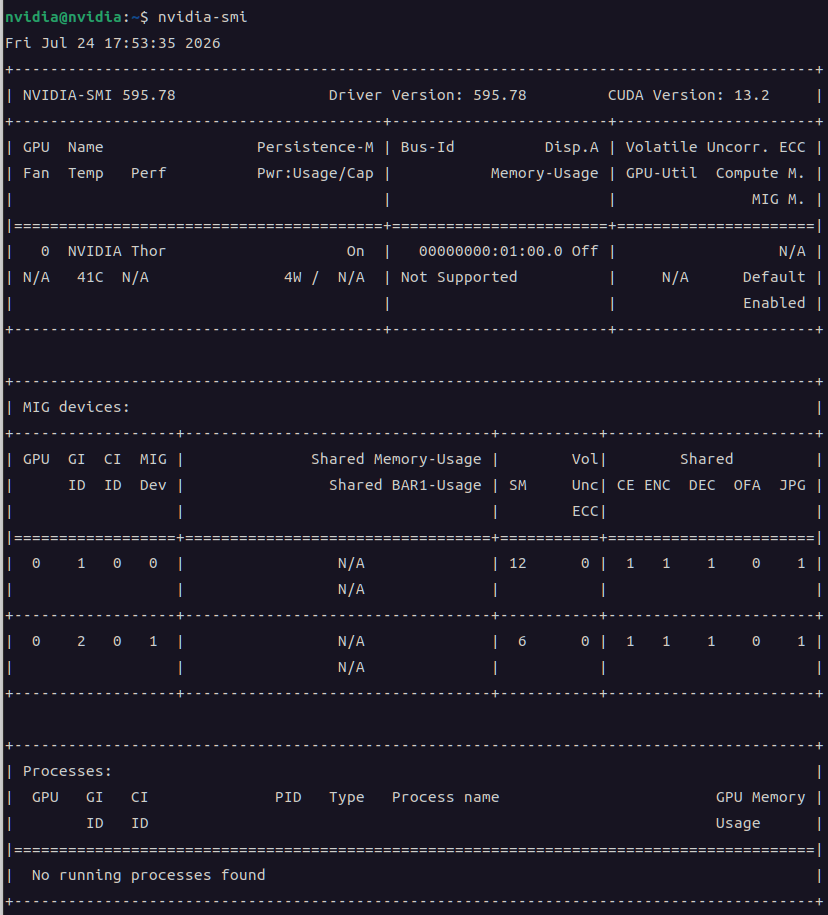
+
2026.07.25
'embeded > jetson' 카테고리의 다른 글
| nvidia-smi mig (0) | 2026.07.26 |
|---|---|
| nvidia jetson agx thor dev kit 설치 - USB boot (0) | 2026.07.24 |
| nvidia jetson agx thor 아니고 nvidia thor? (0) | 2026.07.24 |
| jetson nano + llama.cpp vulkan (0) | 2026.07.21 |
| jetson nano jtop (0) | 2026.07.20 |


