회사에서는 멀티 충전기로 했어서 그런가 wifi 꽂고나서는 안켜지던데
집에서 5V 2A 짜리 단독으로 물리니 문제없이 작동한다.
인터넷 찾아봐도 소비전력 이야기가 딱히 없던데(몇 mW 라던가..) 그냥 그러려니 하고 써야하나?
| $ ifconfig docker0: flags=4099<UP,BROADCAST,MULTICAST> mtu 1500 inet 172.17.0.1 netmask 255.255.0.0 broadcast 172.17.255.255 ether 02:42:58:b4:8a:df txqueuelen 0 (Ethernet) RX packets 0 bytes 0 (0.0 B) RX errors 0 dropped 0 overruns 0 frame 0 TX packets 0 bytes 0 (0.0 B) TX errors 0 dropped 0 overruns 0 carrier 0 collisions 0 eth0: flags=4099<UP,BROADCAST,MULTICAST> mtu 1500 ether 00:04:4b:e5:59:5d txqueuelen 1000 (Ethernet) RX packets 0 bytes 0 (0.0 B) RX errors 0 dropped 0 overruns 0 frame 0 TX packets 0 bytes 0 (0.0 B) TX errors 0 dropped 0 overruns 0 carrier 0 collisions 0 device interrupt 150 base 0xc000 lo: flags=73<UP,LOOPBACK,RUNNING> mtu 65536 inet 127.0.0.1 netmask 255.0.0.0 inet6 ::1 prefixlen 128 scopeid 0x10<host> loop txqueuelen 1 (Local Loopback) RX packets 112 bytes 9000 (9.0 KB) RX errors 0 dropped 0 overruns 0 frame 0 TX packets 112 bytes 9000 (9.0 KB) TX errors 0 dropped 0 overruns 0 carrier 0 collisions 0 rndis0: flags=4099<UP,BROADCAST,MULTICAST> mtu 1500 ether aa:be:7b:09:f3:5d txqueuelen 1000 (Ethernet) RX packets 0 bytes 0 (0.0 B) RX errors 0 dropped 0 overruns 0 frame 0 TX packets 0 bytes 0 (0.0 B) TX errors 0 dropped 0 overruns 0 carrier 0 collisions 0 usb0: flags=4099<UP,BROADCAST,MULTICAST> mtu 1500 ether aa:be:7b:09:f3:5f txqueuelen 1000 (Ethernet) RX packets 0 bytes 0 (0.0 B) RX errors 0 dropped 0 overruns 0 frame 0 TX packets 0 bytes 0 (0.0 B) TX errors 0 dropped 0 overruns 0 carrier 0 collisions 0 wlan0: flags=4099<UP,BROADCAST,MULTICAST> mtu 1500 ether 74:d8:3e:44:9f:17 txqueuelen 1000 (Ethernet) RX packets 0 bytes 0 (0.0 B) RX errors 0 dropped 0 overruns 0 frame 0 TX packets 0 bytes 0 (0.0 B) TX errors 0 dropped 0 overruns 0 carrier 0 collisions 0 |
| $ lspci -t -v -[0000:00]-+-01.0-[01]----00.0 Intel Corporation Wireless 8265 / 8275 \-02.0-[02]----00.0 Realtek Semiconductor Co., Ltd. RTL8111/8168/8411 PCI Express Gigabit Ethernet Controller $ lspci 00:01.0 PCI bridge: NVIDIA Corporation Device 0fae (rev a1) 00:02.0 PCI bridge: NVIDIA Corporation Device 0faf (rev a1) 01:00.0 Network controller: Intel Corporation Wireless 8265 / 8275 (rev 78) 02:00.0 Ethernet controller: Realtek Semiconductor Co., Ltd. RTL8111/8168/8411 PCI Express Gigabit Ethernet Controller (rev 15) $ lspci -v 00:01.0 PCI bridge: NVIDIA Corporation Device 0fae (rev a1) (prog-if 00 [Normal decode]) Flags: bus master, fast devsel, latency 0, IRQ 84 Bus: primary=00, secondary=01, subordinate=01, sec-latency=0 Memory behind bridge: 13000000-130fffff Capabilities: </access denied> Kernel driver in use: pcieport 00:02.0 PCI bridge: NVIDIA Corporation Device 0faf (rev a1) (prog-if 00 [Normal decode]) Flags: bus master, fast devsel, latency 0, IRQ 84 Bus: primary=00, secondary=02, subordinate=02, sec-latency=0 I/O behind bridge: 00001000-00001fff Memory behind bridge: 13100000-131fffff Capabilities: </access denied> Kernel driver in use: pcieport 01:00.0 Network controller: Intel Corporation Wireless 8265 / 8275 (rev 78) Subsystem: Intel Corporation Dual Band Wireless-AC 8265 Flags: bus master, fast devsel, latency 0, IRQ 408 Memory at 13000000 (64-bit, non-prefetchable) [size=8K] Capabilities: </access denied> Kernel driver in use: iwlwifi Kernel modules: iwlwifi 02:00.0 Ethernet controller: Realtek Semiconductor Co., Ltd. RTL8111/8168/8411 PCI Express Gigabit Ethernet Controller (rev 15) Subsystem: Realtek Semiconductor Co., Ltd. RTL8111/8168/8411 PCI Express Gigabit Ethernet Controller Flags: bus master, fast devsel, latency 0, IRQ 406 I/O ports at 1000 [size=256] Memory at 13104000 (64-bit, non-prefetchable) [size=4K] Memory at 13100000 (64-bit, non-prefetchable) [size=16K] Capabilities: </access denied> Kernel driver in use: r8168 |
mini-pciex도 아니고 왜 m.2로 만드는진 모르겠지만
아무튼 m.2 폼팩터의 무선랜이고
i-pex의 MHF4 (혹은 ipex4라고 표기) 커넥터의 듀얼 안테나 제품이다.
랜카드가 7천원 + 3천인데
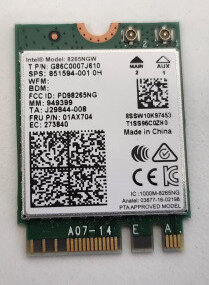
[링크 : https://itempage3.auction.co.kr/DetailView.aspx?itemno=F310755633]
MHF4가 2800원 + 3천원. 배보다 배꼽이 더 큰 느낌이고
그 와중에 저건 또 케이블이라 SMA 2.4GHz 안테나가 필요하다는 것 이 또 추가지출을 하게 하네..
(회사에서 뽀려야지 -_-)
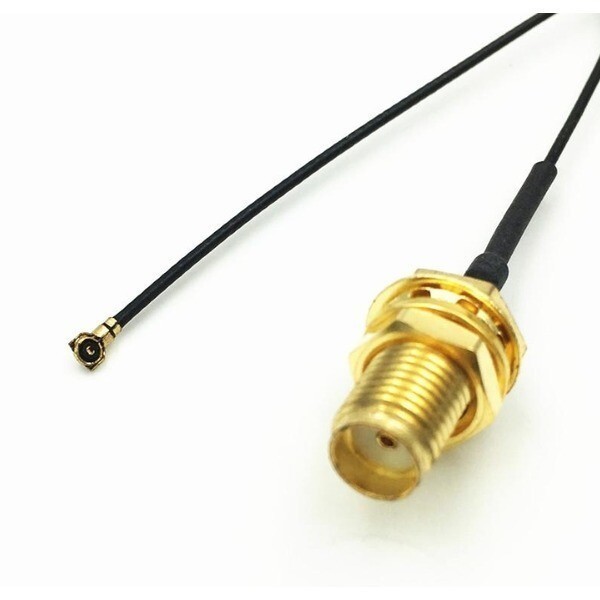
[링크 : https://itempage3.auction.co.kr/DetailView.aspx?itemno=E598839737]
'embeded > jetson' 카테고리의 다른 글
| jetson nano 조이스틱 연결 (0) | 2026.03.31 |
|---|---|
| jetracer 서보는 되는데 모터가 안될때 (0) | 2026.03.30 |
| jetracer jetcard (0) | 2026.03.20 |
| seeed studio J202 carrier (0) | 2026.03.19 |
| jetson nano developer kit 4GB on! (0) | 2026.03.18 |


