Linux/Ubuntu2024. 8. 17. 22:38

22.04 사용중이고

24.04가 나온지 오래되었는데 왜 do-relase-upgrade를 하면 없다고 나올까?

-d 옵션은 개발 릴리즈인데 왜 이걸로 해야 24.04가 나올까?

  -d, --devel-release   지원되는 최신 릴리스를 사용하는 경우, 개발 릴리스로 업그레이드하십시오


do-release-upgrade -c
새 우분투 배포판 확인
사용 가능한 LTS의 개발 버전이 없습니다.
최신 non-LTS 개발 릴리스로 업그레이드 하려면 
/etc/update-manager/release-upgrades 에서 Prompt=normal 을 설정합니다.

$ cat /etc/lsb-release
DISTRIB_ID=Ubuntu
DISTRIB_RELEASE=22.04
DISTRIB_CODENAME=jammy
DISTRIB_DESCRIPTION="Ubuntu 22.04.4 LTS"
minimonk@mini2760p:~$ 

cat /etc/update-manager/release-upgrades
# Default behavior for the release upgrader.

[DEFAULT]
# Default prompting and upgrade behavior, valid options:
#
#  never  - Never check for, or allow upgrading to, a new release.
#  normal - Check to see if a new release is available.  If more than one new
#           release is found, the release upgrader will attempt to upgrade to
#           the supported release that immediately succeeds the
#           currently-running release.
#  lts    - Check to see if a new LTS release is available.  The upgrader
#           will attempt to upgrade to the first LTS release available after
#           the currently-running one.  Note that if this option is used and
#           the currently-running release is not itself an LTS release the
#           upgrader will assume prompt was meant to be normal.
Prompt=lts

$ do-release-upgrade -d
새 우분투 배포판 확인

= Welcome to Ubuntu 24.04 LTS 'Noble Numbat' =

The Ubuntu team is proud to announce Ubuntu 24.04 LTS 'Noble Numbat'.

To see what's new in this release, visit:
  https://wiki.ubuntu.com/NobleNumbat/ReleaseNotes

Ubuntu is a Linux distribution for your desktop or server, with a fast
and easy install, regular releases, a tight selection of excellent
applications installed by default, and almost any other software you
can imagine available through the network.

We hope you enjoy Ubuntu.

== Feedback and Helping ==

If you would like to help shape Ubuntu, take a look at the list of
ways you can participate at

  http://www.ubuntu.com/community/participate/

Your comments, bug reports, patches and suggestions will help ensure
that our next release is the best release of Ubuntu ever.  If you feel
that you have found a bug please read:

  http://help.ubuntu.com/community/ReportingBugs

Then report bugs using apport in Ubuntu.  For example:

  ubuntu-bug linux

will open a bug report in Launchpad regarding the linux package.

If you have a question, or if you think you may have found a bug but
aren't sure, first try asking on the #ubuntu or #ubuntu-bugs IRC
channels on Libera.Chat, on the Ubuntu Users mailing list, or on the
Ubuntu forums:

  http://help.ubuntu.com/community/InternetRelayChat
  http://lists.ubuntu.com/mailman/listinfo/ubuntu-users
  http://www.ubuntuforums.org/


== More Information ==

You can find out more about Ubuntu on our website, IRC channel and wiki.
If you're new to Ubuntu, please visit:

  http://www.ubuntu.com/


To sign up for future Ubuntu announcements, please subscribe to Ubuntu's
very low volume announcement list at:

  http://lists.ubuntu.com/mailman/listinfo/ubuntu-announce


계속 [yN]

'Linux > Ubuntu' 카테고리의 다른 글

dpkg로 설치한 패키지 삭제하기  (0) 2024.09.06
24.04 설치 성공  (0) 2024.08.18
/dev/tty에서 한글 출력하기 fbterm  (0) 2024.08.16
gpm - general purpose mouse  (0) 2024.08.16
ubuntu wake up  (0) 2024.08.12
Posted by 구차니
Linux/Ubuntu2024. 8. 16. 17:40

zhcon 이라는걸 발견했는데 한글 출력은 안된다.

[링크 : https://manpages.ubuntu.com/manpages/trusty/man1/zhcon.1.html]


luit를 사용하면 iso 2022를 지원한다는데 iso 8859-1을 넣어도 안되고.. 멀까..

$ luit -encoding gbk cat a_chinese_file.txt

[링크 : https://unix.stackexchange.com/questions/149348/]


fbterm 이라는 별도의 프로그램을 이용하면 콘솔에서도 한글을 볼 수 있다(입력은... ㅠㅠ)

[링크 : https://askubuntu.com/questions/193391/how-do-i-display-chinese-japanese-characters-in-a-linux-vt-console]

'Linux > Ubuntu' 카테고리의 다른 글

24.04 설치 성공  (0) 2024.08.18
우분투.. 버전 업그레이드 버근가?  (0) 2024.08.17
gpm - general purpose mouse  (0) 2024.08.16
ubuntu wake up  (0) 2024.08.12
우분투 swraid로 설치하기  (0) 2024.07.31
Posted by 구차니
Linux/Ubuntu2024. 8. 16. 17:22

ctrl-alt-(f2~f6) 로 /dev/tty로 접속했을때

마우스가 되지 않아 불편했는데 gpm 을 설치하면 커서가 생긴다고 해서 시도

드래그 하면 복사되고 우클릭하면 붙여 넣기가 된다.


 이걸 이용하면 터미널 간 명령어 복사도 가능해서 조금은 편해질 듯


[링크 : https://www.linux.org/threads/mouse-in-tty.18319/]

[링크 : https://wiki.archlinux.org/title/General_purpose_mouse]

[링크 : https://manpages.ubuntu.com/manpages/trusty/man8/gpm.8.html]

Posted by 구차니
Linux/Ubuntu2024. 8. 12. 11:28

ethtool로 unicast wakeup 하도록 설정해주고

$ sudo ethtool -s enp3s0 wol u


$ sudo ethtool enp3s0 | grep -i wake
Supports Wake-on: pumbg
Wake-on: u

2024.08.07 - [하드웨어/Network 장비] - ethtool wol mode


명령줄로는 아래와 같이 보내주면 절전모드로 전환된다.

$ sudo systemctl suspend

[링크 : https://askubuntu.com/questions/1792/how-can-i-suspend-hibernate-from-command-line]


최대절전모드는 아래와 같이 하라는데, 막상해보면 설정이 안되어 있다보니 따로 해봐야 할 듯.

$ sudo systemctl hibernate
Failed to hibernate system via logind: Not enough swap space for hibernation

[링크 : https://www.geeksforgeeks.org/how-to-enable-hibernate-in-ubuntu-22-04-lts/]


아무튼 ping을 날리거나

ssh 접속 시도, 혹은 접속중이었는데 서버가 sleep으로 갔을 경우 ssh 터미널에 명령을 날리면 다시 살아난다.


노트북도 22.04인데

얘도 hibernate 빠진거 보면 ssd 보급으로 인해 굳이 hibernate를 켜서 공간 잡아 먹을 이유가 없다고 생각한걸려나?

Posted by 구차니
Linux/Ubuntu2024. 7. 31. 10:14

담에 시도해봐야지. 그나저나 server edition만 지원하나? 죄다 CLI로 되어있네?

그런데.. boot 파티션도 raid가 되나?


/boot는 raid 1 에서는 존재가능하고, 나머지는 boot 영역만큼은 다른 스토리지에 넣어줘야 하는 듯

Warning: the /boot filesystem cannot use any softRAID level other than 1 with the stock Ubuntu bootloader. If you want to use some other RAID level for most things, you'll need to create separate partitions and make a RAID1 device for /boot.

[링크 : https://help.ubuntu.com/community/Installation/SoftwareRAID]

[링크 : https://www.servers.com/support/knowledge/linux-administration/how-to-install-ubuntu-with-software-raid-1]

[링크 : https://devjaewoo.tistory.com/41]


+

2024.08.12

desktop edition 에서 시도해봤으나

GUI로는 존재하지 않고, 콘솔에서 mdadm 설치해서 진행하면 가능은 할 것 같은데 일단 패스

server edition 먼저 진행해보고 desktop edition을 시도해보는걸로..

'Linux > Ubuntu' 카테고리의 다른 글

gpm - general purpose mouse  (0) 2024.08.16
ubuntu wake up  (0) 2024.08.12
ssh 보안 취약점 패치 - 우분투 업데이트  (0) 2024.07.08
정체 불명의 우분투 키보드 입력 지연 (TTS)  (0) 2024.06.28
우분투로 공유기 만들기  (2) 2024.02.23
Posted by 구차니
Linux/Ubuntu2024. 7. 8. 17:50

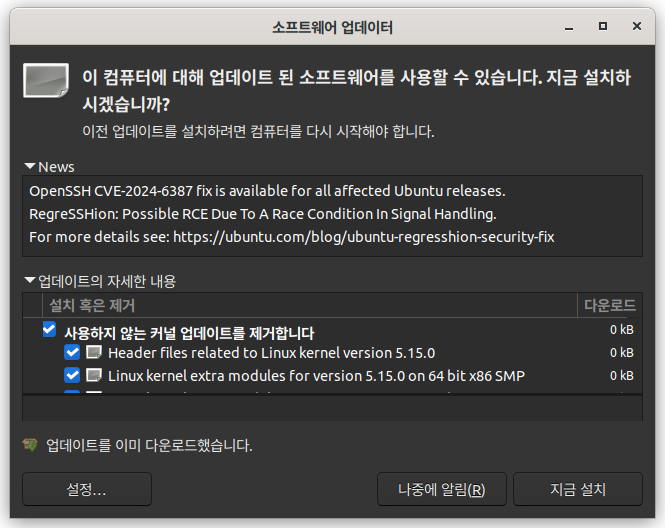
여기저기 난리구만..


'Linux > Ubuntu' 카테고리의 다른 글

ubuntu wake up  (0) 2024.08.12
우분투 swraid로 설치하기  (0) 2024.07.31
정체 불명의 우분투 키보드 입력 지연 (TTS)  (0) 2024.06.28
우분투로 공유기 만들기  (2) 2024.02.23
ubuntu pro?  (2) 2024.01.31
Posted by 구차니
Linux/Ubuntu2024. 6. 28. 13:27

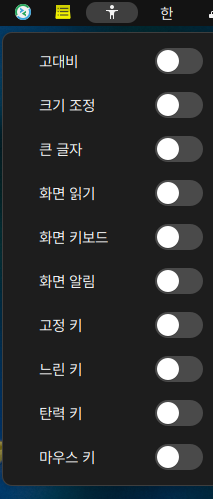
이어폰 꼽고 음악 들으려다 켜져있는걸 발견 -_-

(회사에서는 컴퓨터 무음으로 해놓고 씀)


왜 "화면 읽기" 가 켜져 있는지 모르겠지만

유난히 웹 브라우저에서 키보드가 응답이 느리게 작동했던 것 같은데

아마 일반 어플리케이션에서는 접근성 대응이 덜 되어 있는데 웹 브라우저에서는 잘 되어 있으니

온갖 말을 하다가 더 난리가 났던 듯.


그나저나 누르고 있으니 이 어눌한 말은 왜케 웃기냐 ㅋㅋ

카테고리 없음 이렇게 한글 비슷하게 읽어주는것도 있긴한데 

타자를 막 치고 있으면 이어폰으로 온갖 이상한 소리가 ㅋㅋㅋ


+

Testing
Test your setup by typing in a Terminal

festival

You will be presented with a > prompt. Type

(SayText "Hello")

The computer should say "hello".

To listen to a text file named FILENAME, type

(tts "FILENAME" nil)

Note FILENAME must be in quote marks.


festival 이라는 어플리케이션을 통해서 읽는것 같은데

한글을 넣으면 segmentation fault가 뜨는데

도대체 아까 오른쪽 왼쪽 같은 TTS 음성이 도대체 어떻게 나온걸까?

$ festival

Festival Speech Synthesis System 2.5.0:release December 2017
Copyright (C) University of Edinburgh, 1996-2010. All rights reserved.

clunits: Copyright (C) University of Edinburgh and CMU 1997-2010
clustergen_engine: Copyright (C) Carnegie Mellon University 2005-2017
hts_engine: 
The HMM-Based Speech Synthesis Engine "hts_engine API"
hts_engine API version 1.07 (http://hts-engine.sourceforge.net/)
Copyright (C) The HMM-Based Speech Synthesis Engine "hts_engine API"
Version 1.07 (http://hts-engine.sourceforge.net/)
Copyright (C) 2001-2012 Nagoya Institute of Technology
              2001-2008 Tokyo Institute of Technology
All rights reserved.

All rights reserved.
For details type `(festival_warranty)'
festival> (SayText "an nyung ha se yo")
#<Utterance 0x709fa1a32830>
[링크 : https://help.ubuntu.com/community/TextToSpeech]

'Linux > Ubuntu' 카테고리의 다른 글

우분투 swraid로 설치하기  (0) 2024.07.31
ssh 보안 취약점 패치 - 우분투 업데이트  (0) 2024.07.08
우분투로 공유기 만들기  (2) 2024.02.23
ubuntu pro?  (2) 2024.01.31
debian nvme tool  (0) 2023.08.28
Posted by 구차니
Linux/Ubuntu2024. 2. 23. 19:16

해볼까?

pfsense도 귀찮고..

그냥 필요한건 간단하게 NAT와 포트포워딩, DHCP 정도인데..


NAT

iptable masqurade

[링크 : https://ko.linux-console.net/?p=15300]


iptable - port forward

[링크 : https://www.google.com/amp/s/tecadmin.net/setting-up-a-port-forwarding-using-iptables-in-linux/%3famp]


DHCP

dhcpd

[링크 : https://askubuntu.com/questions/913250/how-can-i-get-isc-dhcp-server-dhcpd-to-listen-on-one-interface-only]


방화벽

suricata

[링크 : https://www.hostinger.com/tutorials/how-to-install-suricata-on-ubuntu]


snort

[링크 : https://fni8383.tistory.com/m/35]

'Linux > Ubuntu' 카테고리의 다른 글

ssh 보안 취약점 패치 - 우분투 업데이트  (0) 2024.07.08
정체 불명의 우분투 키보드 입력 지연 (TTS)  (0) 2024.06.28
ubuntu pro?  (2) 2024.01.31
debian nvme tool  (0) 2023.08.28
edid-read  (0) 2023.08.17
Posted by 구차니
Linux/Ubuntu2024. 1. 31. 10:13

오늘 출근했더니 갑자기 업그레이드 뜨면서 ubuntu pro를 활성화 하겠냐는데

라이센스도 모르고 하니 일단은 다음에 알림으로 설정!


+

설정 누르니 소프트웨어 & 업데이트에서 Ubuntu Pro가 추가되었는데..


Enable Ubuntu Pro 누르니 아래와 같이 먼가 나온다.  가입은 필수인 것 같은데..


홈페이지 뒤져보니 개인은 무료, 기업에서도 30일 무료 라는데

[링크 : https://ubuntu.com/pro]


데스크 탑이라도 해도 유료로는 년 금액인 것 같긴한데

머.. 보안업데이트랑 신경써서 해준다니 어떤 의미로는 나빠보이진 않는 듯.

근데 우분투도 장시간 서버로 써보면 업데이트 많아서 불편(?) 한데, 서버를 더 자주 리부팅 하게 되는건 아니겠지?

[링크 : https://ubuntu.com/pricing/pro]

Posted by 구차니
Linux/Ubuntu2023. 8. 28. 12:27

프리징이 조금씩 걸리는 느낌이라 불안해서 상태보는 걸 찾는 중인데..

nvme 라는 다른 유틸리티로 봐야 하는 듯.. smartctl 로는 안되나?


$ sudo apt-get install nvme-cli
패키지 목록을 읽는 중입니다... 완료
의존성 트리를 만드는 중입니다... 완료
상태 정보를 읽는 중입니다... 완료        
다음 새 패키지를 설치할 것입니다:
  nvme-cli
0개 업그레이드, 1개 새로 설치, 0개 제거 및 3개 업그레이드 안 함.
474 k바이트 아카이브를 받아야 합니다.
이 작업 후 1,136 k바이트의 디스크 공간을 더 사용하게 됩니다.
받기:1 http://kr.archive.ubuntu.com/ubuntu jammy-updates/main amd64 nvme-cli amd64 1.16-3ubuntu0.1 [474 kB]
내려받기 474 k바이트, 소요시간 2초 (229 k바이트/초)
Selecting previously unselected package nvme-cli.
(데이터베이스 읽는중 ...현재 255415개의 파일과 디렉터리가 설치되어 있습니다.)
Preparing to unpack .../nvme-cli_1.16-3ubuntu0.1_amd64.deb ...
Unpacking nvme-cli (1.16-3ubuntu0.1) ...
nvme-cli (1.16-3ubuntu0.1) 설정하는 중입니다 ...
Created symlink /etc/systemd/system/default.target.wants/nvmefc-boot-connections.service → /lib/systemd/system/nvmefc-boot-connections.service.
Created symlink /etc/systemd/system/default.target.wants/nvmf-autoconnect.service → /lib/systemd/system/nvmf-autoconnect.service.
nvmf-connect.target is a disabled or a static unit, not starting it.
Processing triggers for man-db (2.10.2-1) ...


$ sudo nvme list
Node                  SN                   Model                                    Namespace Usage                      Format           FW Rev  
--------------------- -------------------- ---------------------------------------- --------- -------------------------- ---------------- --------
/dev/nvme0n1          S649NL0W000000F      Samsung SSD 980 1TB                      1         229.90  GB /   1.00  TB    512   B +  0 B   3B4QFXO7


$ sudo nvme smart-log /dev/nvme0
Smart Log for NVME device:nvme0 namespace-id:ffffffff
critical_warning : 0
temperature : 41 C (314 Kelvin)
available_spare : 100%
available_spare_threshold : 10%
percentage_used : 0%
endurance group critical warning summary: 0
data_units_read : 483,823
data_units_written : 1,853,867
host_read_commands : 5,443,068
host_write_commands : 31,140,950
controller_busy_time : 94
power_cycles : 48
power_on_hours : 72
unsafe_shutdowns : 9
media_errors : 0
num_err_log_entries : 0
Warning Temperature Time : 0
Critical Composite Temperature Time : 0
Temperature Sensor 1           : 41 C (314 Kelvin)
Temperature Sensor 2           : 40 C (313 Kelvin)
Thermal Management T1 Trans Count : 0
Thermal Management T2 Trans Count : 0
Thermal Management T1 Total Time : 0
Thermal Management T2 Total Time : 0

[링크 : https://linuxhint.com/check-ssd-health-ubuntu/]

[링크 : https://itslinuxfoss.com/test-ssd-hdd-health-in-linux/]

'Linux > Ubuntu' 카테고리의 다른 글

우분투로 공유기 만들기  (2) 2024.02.23
ubuntu pro?  (2) 2024.01.31
edid-read  (0) 2023.08.17
ubutnu file(파일) 에서 삼바 목록 안나오고 부적절한 인수 에러  (0) 2023.07.24
htop graph style  (0) 2023.07.07
Posted by 구차니