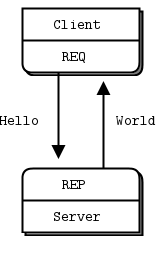
Shared Queue (DEALER and ROUTER sockets) In the Hello World client/server application, we have one client that talks to one service. However, in real cases we usually need to allow multiple services as well as multiple clients. This lets us scale up the power of the service (many threads or processes or nodes rather than just one). The only constraint is that services must be stateless, all state being in the request or in some shared storage such as a database.
Request-Reply Combinations We have four request-reply sockets, each with a certain behavior. We’ve seen how they connect in simple and extended request-reply patterns. But these sockets are building blocks that you can use to solve many problems.
These are the legal combinations:
REQ to REP DEALER to REP REQ to ROUTER DEALER to ROUTER DEALER to DEALER ROUTER to ROUTER
Underneath the brown paper wrapping of ZeroMQ’s socket API lies the world of messaging patterns. ZeroMQ patterns are implemented by pairs of sockets with matching types. The built-in core ZeroMQ patterns are:
Request-reply, which connects a set of clients to a set of services. This is a remote procedure call and task distribution pattern.
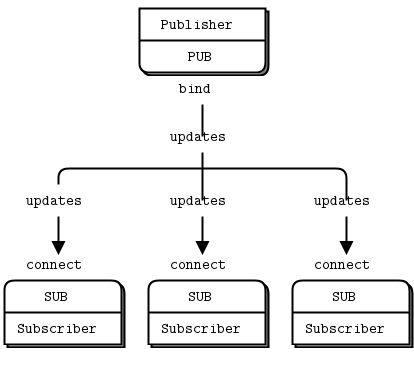
Pub-sub, which connects a set of publishers to a set of subscribers. This is a data distribution pattern.
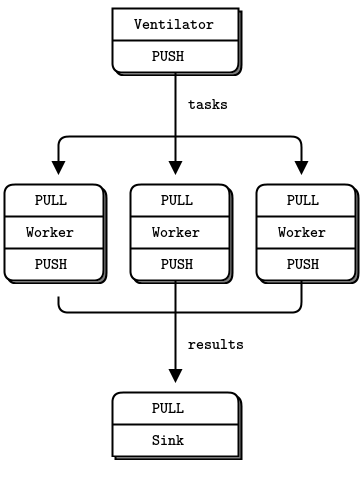
Pipeline, which connects nodes in a fan-out/fan-in pattern that can have multiple steps and loops. This is a parallel task distribution and collection pattern.
Exclusive pair, which connects two sockets exclusively. This is a pattern for connecting two threads in a process, not to be confused with “normal” pairs of sockets.
XPUB socket Same as PUB except that you can receive subscriptions from the peers in form of incoming messages. Subscription message is a byte 1 (for subscriptions) or byte 0 (for unsubscriptions) followed by the subscription body. Messages without a sub/unsub prefix are also received, but have no effect on subscription status.
XSUB socket Same as SUB except that you subscribe by sending subscription messages to the socket. Subscription message is a byte 1 (for subscriptions) or byte 0 (for unsubscriptions) followed by the subscription body. Messages without a sub/unsub prefix may also be sent, but have no effect on subscription status.
int zmq_device (int device, const void *frontend, const void *backend); ZMQ_QUEUE starts a queue device ZMQ_FORWARDER starts a forwarder device ZMQ_STREAMER starts a streamer device
Queue device ZMQ_QUEUE creates a shared queue that collects requests from a set of clients, and distributes these fairly among a set of services. Requests are fair-queued from frontend connections and load-balanced between backend connections. Replies automatically return to the client that made the original request.
This device is part of the request-reply pattern. The frontend speaks to clients and the backend speaks to services. You should use ZMQ_QUEUE with a ZMQ_XREP socket for the frontend and a ZMQ_XREQ socket for the backend. Other combinations are not documented.
Refer to zmq_socket(3) for a description of these socket types.
Forwarder device ZMQ_FORWARDER collects messages from a set of publishers and forwards these to a set of subscribers. You will generally use this to bridge networks, e.g. read on TCP unicast and forward on multicast.
This device is part of the publish-subscribe pattern. The frontend speaks to publishers and the backend speaks to subscribers. You should use ZMQ_FORWARDER with a ZMQ_SUB socket for the frontend and a ZMQ_PUB socket for the backend. Other combinations are not documented.
Refer to zmq_socket(3) for a description of these socket types.
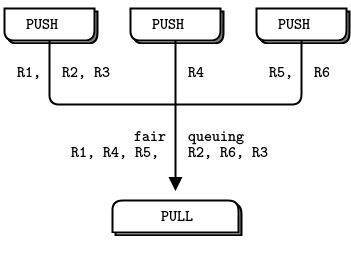
Streamer device ZMQ_STREAMER collects tasks from a set of pushers and forwards these to a set of pullers. You will generally use this to bridge networks. Messages are fair-queued from pushers and load-balanced to pullers.
This device is part of the pipeline pattern. The frontend speaks to pushers and the backend speaks to pullers. You should use ZMQ_STREAMER with a ZMQ_PULL socket for the frontend and a ZMQ_PUSH socket for the backend. Other combinations are not documented.
Refer to zmq_socket(3) for a description of these socket types.
#include <unistd.h> int access(const char *pathname, int mode);
The mode specifies the accessibility check(s) to be performed, and is either the value F_OK, or a mask consisting of the bitwise OR of one or more of R_OK, W_OK, and X_OK. F_OK tests for the existence of the file. R_OK, W_OK, and X_OK test whether the file exists and grants read, write, and execute permissions, respectively.
AXI Slave error로 인해서 abort가 발생, write access가 abort를 발생 D1 domain? precise external abort, nontranslation
도대체 무슨 말이야!!!
SD Indicates whether an AXI Decode or Slave error caused an abort. This bit is only valid for external aborts. For all other aborts this bit Should Be Zero: 0 = AXI Decode error caused the abort, reset value 1 = AXI Slave error caused the abort.
RW Indicates whether a read or write access caused an abort: 0 = read access caused the abort, reset value 1 = write access caused the abort.
Domain Indicates which one of the 16 domains, D15-D0, is accessed when a data fault occurs. This field takes values 0-15.
Status Indicates the type of exception generated. To determine the data fault, bits [12] and [10] must be used in conjunction with bits [3:0]. The following encodings are in priority order, 1 is the highest:
void
init_shell ()
{

  /* See if we are running interactively.  */
  shell_terminal = STDIN_FILENO;
  shell_is_interactive = isatty (shell_terminal);

  if (shell_is_interactive)
    {
      /* Loop until we are in the foreground.  */
      while (tcgetpgrp (shell_terminal) != (shell_pgid = getpgrp ()))
        kill (- shell_pgid, SIGTTIN);

      /* Ignore interactive and job-control signals.  */
      signal (SIGINT, SIG_IGN);
      signal (SIGQUIT, SIG_IGN);
      signal (SIGTSTP, SIG_IGN);
      signal (SIGTTIN, SIG_IGN);
      signal (SIGTTOU, SIG_IGN);
      signal (SIGCHLD, SIG_IGN);

      /* Put ourselves in our own process group.  */
      shell_pgid = getpid ();
      if (setpgid (shell_pgid, shell_pgid) < 0)
        {
          perror ("Couldn't put the shell in its own process group");
          exit (1);
        }

      /* Grab control of the terminal.  */
      tcsetpgrp (shell_terminal, shell_pgid);

      /* Save default terminal attributes for shell.  */
      tcgetattr (shell_terminal, &shell_tmodes);
    }
}
Macro:intSIGTTINA process cannot read from the user’s terminal while it is running as a background job. When any process in a background job tries to read from the terminal, all of the processes in the job are sent aSIGTTINsignal. The default action for this signal is to stop the process. For more information about how this interacts with the terminal driver, seeAccess to the Terminal.
Program received signal SIGFPE, Arithmetic exception.
이름은 Floating Point Exception 에서 유래하긴 했는데
"0으로 나누기와 오버플로우를 포함한 모든 산술에러"에서 발생한다고 한다.
Macro:intSIGFPE
TheSIGFPEsignal reports a fatal arithmetic error. Although the name is derived from “floating-point exception”, this signal actually covers all arithmetic errors, including division by zero and overflow. If a program stores integer data in a location which is then used in a floating-point operation, this often causes an “invalid operation” exception, because the processor cannot recognize the data as a floating-point number.
Actual floating-point exceptions are a complicated subject because there are many types of exceptions with subtly different meanings, and theSIGFPEsignal doesn’t distinguish between them. TheIEEE Standard for Binary Floating-Point Arithmetic (ANSI/IEEE Std 754-1985 and ANSI/IEEE Std 854-1987)defines various floating-point exceptions and requires conforming computer systems to report their occurrences. However, this standard does not specify how the exceptions are reported, or what kinds of handling and control the operating system can offer to the programmer.
zynq> ./test
-sh: ./test: not found

zynq> ls -al /lib/ld-
ld-2.13.so     ld-linux.so.3

zynq> ls -al /lib/ld-linux.so.3
lrwxrwxrwx    1 root     root            10 Nov 27  2012 /lib/ld-linux.so.3 -> ld-2.13.so

zynq> ./test
FATAL: kernel too old
Aborted
/lib/ld-linux-armhf.so.3 와 /lib/ld-linux.so 의 차이 -_-
아니 저정도면 실행시에 링크파일이 없다고 에러나와줘야지 ㅠㅠ
왜 자기 자신이 없다고 에러가 나는게야!!
$ file test
test: ELF 32-bit LSB executable, ARM, EABI5 version 1 (SYSV), dynamically linked, interpreter /lib/ld-linux-armhf.so.3, for GNU/Linux 4.9.0, with debug_info, not stripped
아무튼 빡쳐서(!) static 링크해서 빌드하고 실행했더니
$ file test test: ELF 32-bit LSB executable, ARM, EABI5 version 1 (GNU/Linux), statically linked, for GNU/Linux 4.9.0, with debug_info, not stripped
It's easy to be confused here, and the vendor documentation you'll
find isn't necessarily helpful.  The four modes combine two mode bits:

 - CPOL indicates the initial clock polarity.  CPOL=0 means the
   clock starts low, so the first (leading) edge is rising, and
   the second (trailing) edge is falling.  CPOL=1 means the clock
   starts high, so the first (leading) edge is falling.

 - CPHA indicates the clock phase used to sample data; CPHA=0 says
   sample on the leading edge, CPHA=1 means the trailing edge.

   Since the signal needs to stablize before it's sampled, CPHA=0
   implies that its data is written half a clock before the first
   clock edge.  The chipselect may have made it become available.