'프로그램 사용/openSCAD'에 해당되는 글 6건

  1. 2026.07.13 openSCAD + claude.ai = 파라메트릭 모델링
  2. 2026.06.20 openSCAD MCP
  3. 2026.06.20 pythonSCAD
  4. 2026.06.20 openSCAD cheatsheet
  5. 2026.06.20 openSCAD 설치
  6. 2026.05.27 openscad

혹시나 claude 에게 openSCAD로 그릴수 있어? 하니까

잘 그려줌.

역시 ai던 사람이던 긁으면 잘 해주나? ㅋㅋㅋ

(근데 그리고 나서 프린트 하기 전에 확인해보니 플랜지 부분이 너무 작게 나왔다고.. 야이!!! 좀 더 긁어야겠다)


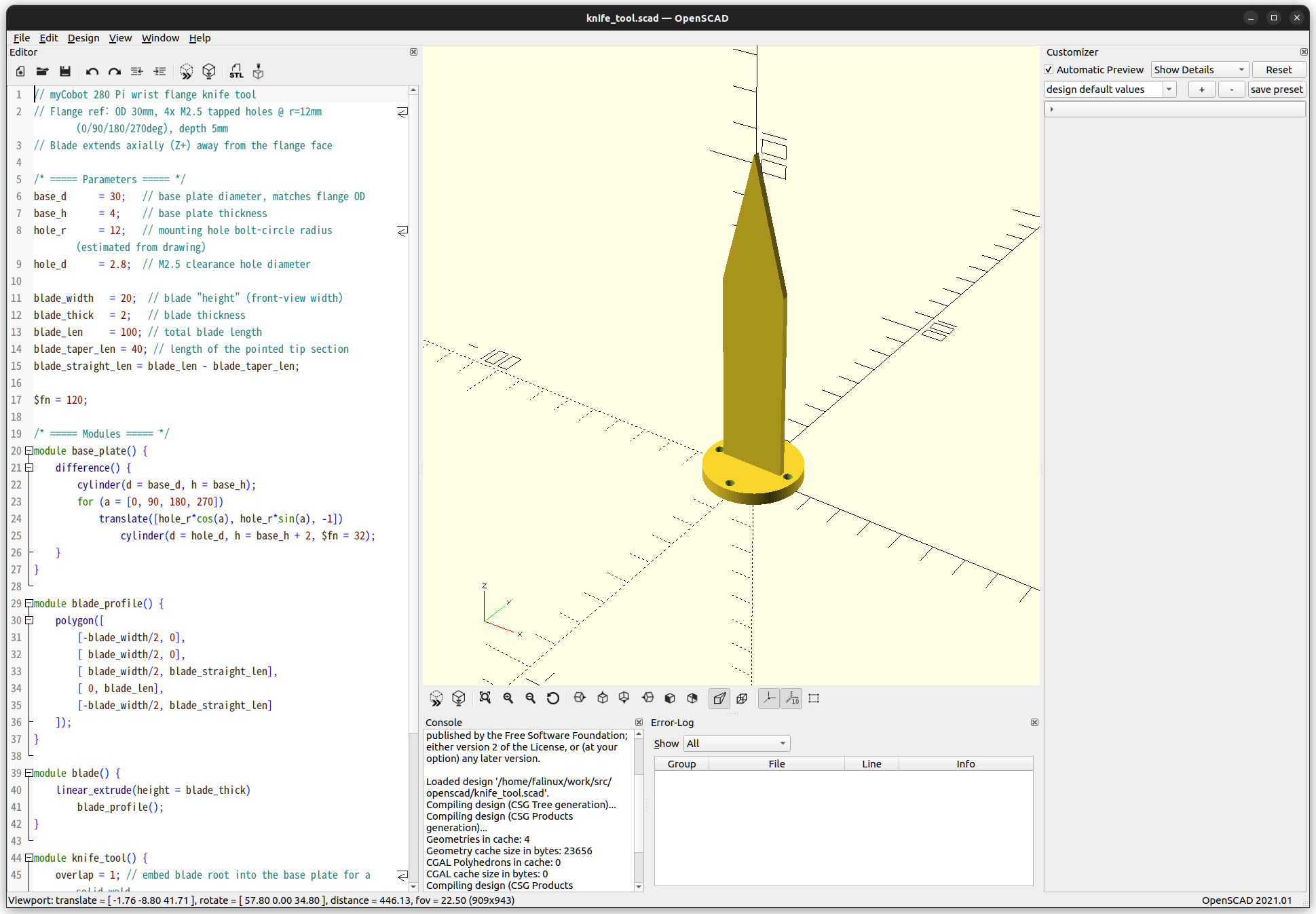
칼 그리고 싶었다는데 먼가 군용 나이프 스타일이 되어버렸고


위 이미지 왼쪽의 소스코드는 모델을 생성하는데 사용된다.

적당~~히 수정하면 변하긴 하는데 직접 짜는건 아직 무리

// myCobot 280 Pi wrist flange knife tool
// Flange ref: OD 30mm, 4x M2.5 tapped holes @ r=12mm (0/90/180/270deg), depth 5mm
// Blade extends axially (Z+) away from the flange face

/* ===== Parameters ===== */
base_d      = 30;   // base plate diameter, matches flange OD
base_h      = 4;    // base plate thickness
hole_r      = 12;   // mounting hole bolt-circle radius (estimated from drawing)
hole_d      = 2.8;  // M2.5 clearance hole diameter

blade_width   = 20;  // blade "height" (front-view width)
blade_thick   = 2;   // blade thickness
blade_len     = 100; // total blade length
blade_taper_len = 40; // length of the pointed tip section
blade_straight_len = blade_len - blade_taper_len;

$fn = 120;

/* ===== Modules ===== */
module base_plate() {
    difference() {
        cylinder(d = base_d, h = base_h);
        for (a = [0, 90, 180, 270])
            translate([hole_r*cos(a), hole_r*sin(a), -1])
                cylinder(d = hole_d, h = base_h + 2, $fn = 32);
    }
}

module blade_profile() {
    polygon([
        [-blade_width/2, 0],
        [ blade_width/2, 0],
        [ blade_width/2, blade_straight_len],
        [ 0, blade_len],
        [-blade_width/2, blade_straight_len]
    ]);
}

module blade() {
    linear_extrude(height = blade_thick)
        blade_profile();
}

module knife_tool() {
    overlap = 1; // embed blade root into the base plate for a solid weld
    union() {
        base_plate();
        translate([0, blade_thick/2, base_h - overlap])
            rotate([90, 0, 0])
            blade();
    }
}

knife_tool();


openscad 에서 자체적으로 stl 출력 기능이 있구나.. 당연한건가?

$ openscad -o knife_tool.stl knife_tool.scad 2>&1


그냥 버텍스만 쭈르르르륵 나오는구만.

solid OpenSCAD_Model
  facet normal -0.956908 -0.290392 0
    outer loop
      vertex 13.3731 0.273126 0
      vertex 13.2934 0.535756 4
      vertex 13.2934 0.535756 0
    endloop
  endfacet
  facet normal -0.956908 -0.290392 0
    outer loop
      vertex 13.2934 0.535756 4
      vertex 13.3731 0.273126 0
      vertex 13.3731 0.273126 4
    endloop
  endfacet
...
  facet normal -1 0 0
    outer loop
      vertex -10 -1 4
      vertex -10 1 63
      vertex -10 1 4
    endloop
  endfacet
  facet normal -1 -0 0
    outer loop
      vertex -10 1 63
      vertex -10 -1 4
      vertex -10 -1 63
    endloop
  endfacet
endsolid OpenSCAD_Model

'프로그램 사용 > openSCAD' 카테고리의 다른 글

openSCAD MCP  (0) 2026.06.20
pythonSCAD  (0) 2026.06.20
openSCAD cheatsheet  (0) 2026.06.20
openSCAD 설치  (0) 2026.06.20
openscad  (0) 2026.05.27
Posted by 구차니

'프로그램 사용 > openSCAD' 카테고리의 다른 글

openSCAD + claude.ai = 파라메트릭 모델링  (0) 2026.07.13
pythonSCAD  (0) 2026.06.20
openSCAD cheatsheet  (0) 2026.06.20
openSCAD 설치  (0) 2026.06.20
openscad  (0) 2026.05.27
Posted by 구차니

python을 통해 직접 컨트롤 하는게 MCP 쓰는것 보다 편할것 같아서 검색


[링크 : https://learn.cadhub.xyz/blog/curated-code-cad/]

[링크 : https://www.pythonscad.org/]

'프로그램 사용 > openSCAD' 카테고리의 다른 글

openSCAD + claude.ai = 파라메트릭 모델링  (0) 2026.07.13
openSCAD MCP  (0) 2026.06.20
openSCAD cheatsheet  (0) 2026.06.20
openSCAD 설치  (0) 2026.06.20
openscad  (0) 2026.05.27
Posted by 구차니

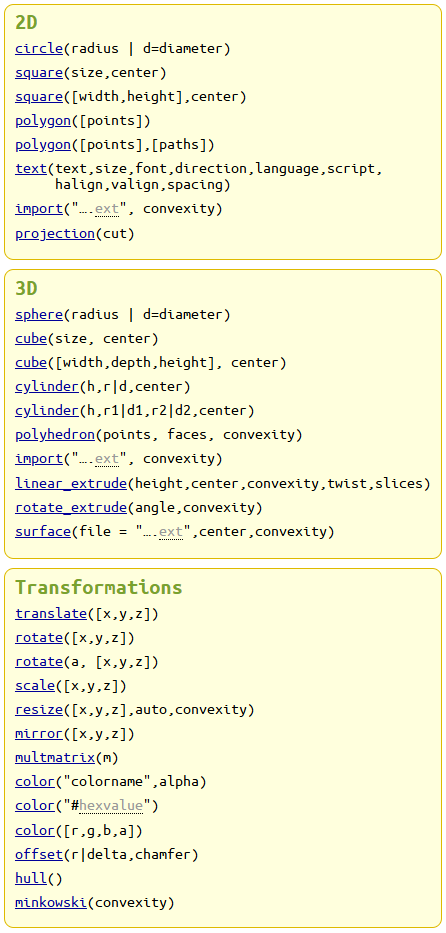
primitive 도형들이 별로 없네?

logo 예제의 difference도 함수였군. 차집합을 만드는..

[링크 : https://openscad.org/cheatsheet/]

'프로그램 사용 > openSCAD' 카테고리의 다른 글

openSCAD + claude.ai = 파라메트릭 모델링  (0) 2026.07.13
openSCAD MCP  (0) 2026.06.20
pythonSCAD  (0) 2026.06.20
openSCAD 설치  (0) 2026.06.20
openscad  (0) 2026.05.27
Posted by 구차니

[링크 : https://openscad.org/]


// logo.scad - Basic example of module, top-level variable and $fn usage

Logo(50);

// The $fn parameter will influence all objects inside this module
// It can, optionally, be overridden when instantiating the module
module Logo(size=50, $fn=100) {
    // Temporary variables
    hole = size/2;
    cylinderHeight = size * 1.25;

    // One positive object (sphere) and three negative objects (cylinders)
    difference() {
        sphere(d=size);
        
        cylinder(d=hole, h=cylinderHeight, center=true);
        // The '#' operator highlights the object
        #rotate([90, 0, 0]) cylinder(d=hole, h=cylinderHeight, center=true);
        rotate([0, 90, 0]) cylinder(d=hole, h=cylinderHeight, center=true);
    }
}

echo(version=version());
// Written by Clifford Wolf <clifford@clifford.at> and Marius
// Kintel <marius@kintel.net>
//
// To the extent possible under law, the author(s) have dedicated all
// copyright and related and neighboring rights to this software to the
// public domain worldwide. This software is distributed without any
// warranty.
//
// You should have received a copy of the CC0 Public Domain
// Dedication along with this software.
// If not, see <http://creativecommons.org/publicdomain/zero/1.0/>.
 

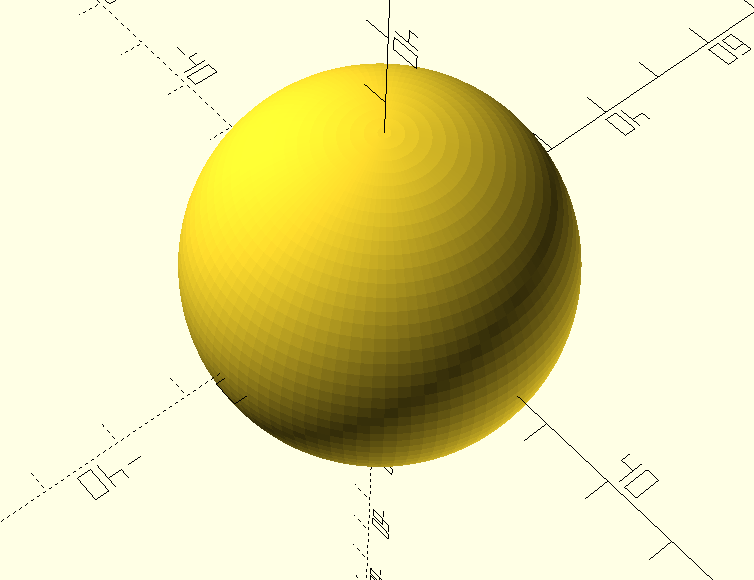
주석 처리는 모르겠고 딱 봐서 sphere만 있으면 구를 그릴것 같아서 해보니 ok

오호.. 이래서 LLM 연동해서 그리기 쉽다고 하는 거였나?

Logo(50);

module Logo(size=50, $fn=100) {
    hole = size/2;
    cylinderHeight = size * 1.25;

    difference() {
        sphere(d=size);
    
    }
}

'프로그램 사용 > openSCAD' 카테고리의 다른 글

openSCAD + claude.ai = 파라메트릭 모델링  (0) 2026.07.13
openSCAD MCP  (0) 2026.06.20
pythonSCAD  (0) 2026.06.20
openSCAD cheatsheet  (0) 2026.06.20
openscad  (0) 2026.05.27
Posted by 구차니

freecad나 blender cad 확장으로는 이래저래 힘들고

python 통해서 제어하면 이상하게 나와서 제어가 유리한 무언가를 찾는 중


[링크 : https://github.com/fogleman/sdf]


[링크 : https://news.hada.io/topic?id=25230]

'프로그램 사용 > openSCAD' 카테고리의 다른 글

openSCAD + claude.ai = 파라메트릭 모델링  (0) 2026.07.13
openSCAD MCP  (0) 2026.06.20
pythonSCAD  (0) 2026.06.20
openSCAD cheatsheet  (0) 2026.06.20
openSCAD 설치  (0) 2026.06.20
Posted by 구차니