qwen 형님으로 모셔야 하나 ㅋㅋㅋ
| D:\study\llm>pip install soundfile torch qwen_tts D:\study\llm>python Python 3.10.6 (tags/v3.10.6:9c7b4bd, Aug 1 2022, 21:53:49) [MSC v.1932 64 bit (AMD64)] on win32 Type "help", "copyright", "credits" or "license" for more information. >>> import torch >>> import soundfile as sf >>> from qwen_tts import Qwen3TTSModel ******** Warning: flash-attn is not installed. Will only run the manual PyTorch version. Please install flash-attn for faster inference. ******** 'sox' is not recognized as an internal or external command, operable program or batch file. SoX could not be found! If you do not have SoX, proceed here: - - - http://sox.sourceforge.net/ - - - If you do (or think that you should) have SoX, double-check your path variables. >>> >>> model = Qwen3TTSModel.from_pretrained( ... "Qwen/Qwen3-TTS-12Hz-1.7B-CustomVoice", ... device_map="cuda:0", ... dtype=torch.bfloat16, ... attn_implementation="flash_attention_2", ... ) config.json: 4.91kB [00:00, 4.70MB/s] C:\Users\minimonk\AppData\Local\Programs\Python\Python310\lib\site-packages\huggingface_hub\file_download.py:143: UserWarning: `huggingface_hub` cache-system uses symlinks by default to efficiently store duplicated files but your machine does not support them in C:\Users\minimonk\.cache\huggingface\hub\models--Qwen--Qwen3-TTS-12Hz-1.7B-CustomVoice. Caching files will still work but in a degraded version that might require more space on your disk. This warning can be disabled by setting the `HF_HUB_DISABLE_SYMLINKS_WARNING` environment variable. For more details, see https://huggingface.co/docs/huggingface_hub/how-to-cache#limitations. To support symlinks on Windows, you either need to activate Developer Mode or to run Python as an administrator. In order to activate developer mode, see this article: https://docs.microsoft.com/en-us/windows/apps/get-started/enable-your-device-for-development warnings.warn(message) model.safetensors: 0%| | 0.00/3.83G [00:00<?, ?B/s] model.safetensors: 100%|██████████████████████████████████████████████████████████| 3.83G/3.83G [04:45<00:00, 13.4MB/s] Traceback (most recent call last): File "<stdin>", line 1, in <module> File "C:\Users\minimonk\AppData\Local\Programs\Python\Python310\lib\site-packages\qwen_tts\inference\qwen3_tts_model.py", line 112, in from_pretrained model = AutoModel.from_pretrained(pretrained_model_name_or_path, **kwargs) File "C:\ Users\minimonk\AppData \Local\Programs\Python\Python310\lib\site-packages\transformers\models\auto\auto_factory.py", line 604, in from_pretrained return model_class.from_pretrained( File "C:\ Users\minimonk\AppData \Local\Programs\Python\Python310\lib\site-packages\qwen_tts\core\models\modeling_qwen3_tts.py", line 1876, in from_pretrained model = super().from_pretrained( File "C:\ Users\minimonk\AppData \Local\Programs\Python\Python310\lib\site-packages\transformers\modeling_utils.py", line 277, in _wrapper return func(*args, **kwargs) File "C:\ Users\minimonk\AppData \Local\Programs\Python\Python310\lib\site-packages\transformers\modeling_utils.py", line 4971, in from_pretrained model = cls(config, *model_args, **model_kwargs) File "C:\ Users\minimonk\AppData \Local\Programs\Python\Python310\lib\site-packages\qwen_tts\core\models\modeling_qwen3_tts.py", line 1817, in __init__ super().__init__(config) File "C:\ Users\minimonk\AppData \Local\Programs\Python\Python310\lib\site-packages\transformers\modeling_utils.py", line 2076, in __init__ self.config._attn_implementation_internal = self._check_and_adjust_attn_implementation( File "C:\ Users\minimonk\AppData \Local\Programs\Python\Python310\lib\site-packages\transformers\modeling_utils.py", line 2686, in _check_and_adjust_attn_implementation applicable_attn_implementation = self.get_correct_attn_implementation( File "C:\ Users\minimonk\AppData \Local\Programs\Python\Python310\lib\site-packages\transformers\modeling_utils.py", line 2714, in get_correct_attn_implementation self._flash_attn_2_can_dispatch(is_init_check) File "C:\ Users\minimonk\AppData \Local\Programs\Python\Python310\lib\site-packages\transformers\modeling_utils.py", line 2422, in _flash_attn_2_can_dispatch raise ImportError(f"{preface} the package flash_attn seems to be not installed. {install_message}") ImportError: FlashAttention2 has been toggled on, but it cannot be used due to the following error: the package flash_attn seems to be not installed. Please refer to the documentation of https://huggingface.co/docs/transformers/perf_infer_gpu_one#flashattention-2 to install Flash Attention 2. |
에라이, 역시 리눅스 환경 기준으로 해야하나?
| D:\study\llm>pip install flash_attn Collecting flash_attn Using cached flash_attn-2.8.3.tar.gz (8.4 MB) ERROR: Could not install packages due to an OSError: [Errno 2] No such file or directory: 'C:\\Users\\minimonk\\AppData\\Local\\Temp\\pip-install-gkk0v5su\\flash-attn_bdc9b907b4714d19aa80016a5ecbd8e6\\csrc/composable_kernel/library/src/tensor_operation_instance/gpu/batched_gemm_add_relu_gemm_add/device_batched_gemm_add_relu_gemm_add_xdl_cshuffle_f16_f16_f16_f16_gmk_gnk_gno_gmo_instance.cpp' HINT: This error might have occurred since this system does not have Windows Long Path support enabled. You can find information on how to enable this at https://pip.pypa.io/warnings/enable-long-paths |
화자와 언어가 달라도 될까 궁금하네
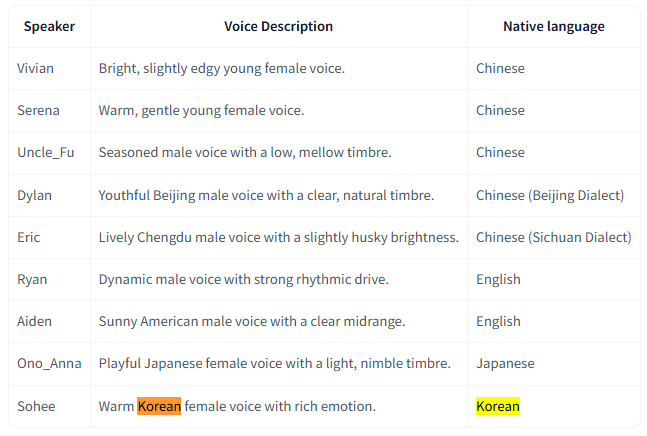
[링크 : https://huggingface.co/Qwen/Qwen3-TTS-12Hz-1.7B-CustomVoice]
'모종의 음모 > ai 프로그램' 카테고리의 다른 글
| litert-lm 와 gemma4-e2b mtp 일단 실패 (0) | 2026.05.10 |
|---|---|
| vLLM (0) | 2026.05.10 |
| supertone/supertonic3 시도 (0) | 2026.05.10 |
| outetts 시도 (0) | 2026.05.10 |
| huggingface 에서 다운로드 받기(python) (0) | 2026.05.10 |


