docker 쓰기 싫어서 pre-built binary로 ㄱㄱ
[링크 : https://github.com/mostlygeek/llama-swap/releases]
그냥 실행하니 config.yaml 없다고 배쨰는데
| $ ./llama-swap Error loading config: open config.yaml: no such file or directory |
다시 잘보니.. 당연하게(?) llama.cpp의 gguf 를 이용해서 바꾸는거라 llama.cpp가 있는데서 해야한다.
| # minimum viable config.yaml models: model1: cmd: llama-server --port ${PORT} --model /path/to/model.gguf |
[링크 : https://github.com/mostlygeek/llama-swap]
+
llama-server도 pre-built로 받았더니 PATH 에 없어서 전체 경로 넣어주게 생겼음 ㅋㅋ
아무튼 --port {PORT}는 빼면 안되는 것 같고
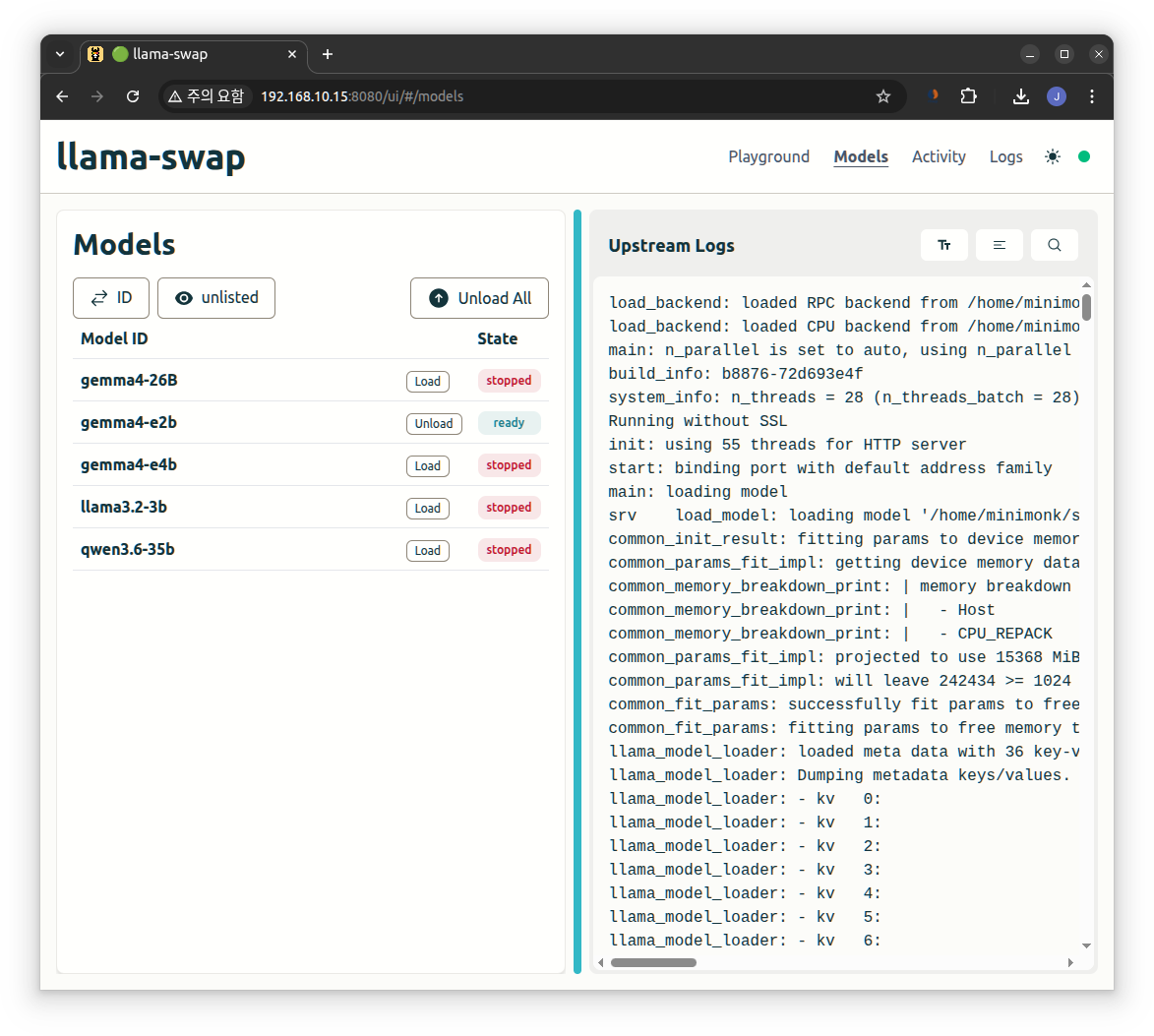
| $ cat config.yaml # minimum viable config.yaml models: gemma4-26B: cmd: /home/minimonk/src/llama-b8876/llama-server --port ${PORT} --model /home/minimonk/src/model/gemma-4-26B-A4B-it-UD-IQ2_M.gguf gemma4-e2b: cmd: /home/minimonk/src/llama-b8876/llama-server --port ${PORT} --model /home/minimonk/src/model/gemma-4-E2B-it-Q4_K_M.gguf gemma4-e4b: cmd: /home/minimonk/src/llama-b8876/llama-server --port ${PORT} --model /home/minimonk/src/model/gemma-4-E4B-it-Q4_K_M.gguf llama3.2-3b: cmd: /home/minimonk/src/llama-b8876/llama-server --port ${PORT} --model /home/minimonk/src/model/Llama-3.2-3B-Instruct-Q4_K_M.gguf qwen3.6-35b: cmd: /home/minimonk/src/llama-b8876/llama-server --port ${PORT} --model /home/minimonk/src/model/Qwen3.6-35B-A3B-UD-Q2_K_XL.gguf |
8080번 포트로 붙으면 상단에 모델 변경하면서 말걸으면 된다.

근데.. 왜?
메모리도 넉넉할텐데 동시 복수의 모델 로드는 안되는거지?
'모종의 음모 > ai 프로그램' 카테고리의 다른 글
| openai 라이브러리(파이썬) (0) | 2026.04.29 |
|---|---|
| llama-swap 과 python 으로 통신하기 (0) | 2026.04.29 |
| llama.cpp offload -ngl (0) | 2026.04.26 |
| llama.cpp windows cuda12 1080 ti 11GB + 1060 6GB 테스트 (0) | 2026.04.25 |
| llama.cpp windows cuda12 1080 ti 11GB * 2 테스트 (0) | 2026.04.25 |


