화면에서는 Next 이런게 나오는데 소스에는 없어서 열어보니 QWizard 라는 클래스를 사용중이라 조사.
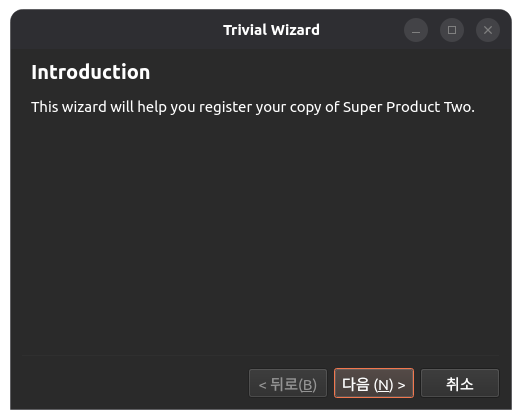
setTitle로 상단에 표시되는 항목이 지정되고
실제 내용이 label 을 통해 별도로 추가된다.
| QWizardPage *createIntroPage() { QWizardPage *page = new QWizardPage; page->setTitle("Introduction"); QLabel *label = new QLabel("This wizard will help you register your copy " "of Super Product Two."); label->setWordWrap(true); QVBoxLayout *layout = new QVBoxLayout; layout->addWidget(label); page->setLayout(layout); return page; } |
위저드를 써서 그런가 엄청 심플해진다.
| QWizard wizard; wizard.addPage(createIntroPage()); wizard.addPage(createRegistrationPage()); wizard.addPage(createConclusionPage()); //! [linearAddPage] wizard.setWindowTitle("Trivial Wizard"); wizard.show(); |
[링크 : https://doc.qt.io/qt-6/qtwidgets-dialogs-trivialwizard-example.html]
'Programming > qt' 카테고리의 다른 글
| qt qrc 리소스 등록 후 이미지로 띄우기 (0) | 2026.03.23 |
|---|---|
| qt 6 프로그래밍 공개 ebook (0) | 2026.03.23 |
| qt widget 화면 전환 (0) | 2026.03.18 |
| qt qml 와 c++ 상호연동 (0) | 2026.01.16 |
| qt quick websocket (0) | 2026.01.14 |


