Programming/qt2026. 3. 23. 12:47

일단 button에 icon 으로 하는 방법과

label을 등록하고 pixmap  으로 등록하는 방법이 qt creator / qt widget designer 에서 마우스로 쉽게 할 수 있는 방법인듯


QButton

[링크 : https://coding-chobo.tistory.com/40]


QLabel

[링크 : https://1d1cblog.tistory.com/37]

[링크 : https://blog.naver.com/hextrial/221109232458]

[링크 : https://stackoverflow.com/questions/5653114/display-image-in-qt-to-fit-label-size]

'Programming > qt' 카테고리의 다른 글

qt5/6 시그널  (0) 2026.03.30
QLCDNumber class  (0) 2026.03.23
qt 6 프로그래밍 공개 ebook  (0) 2026.03.23
QT QWizard  (0) 2026.03.19
qt widget 화면 전환  (0) 2026.03.18
Posted by 구차니
Programming/qt2026. 3. 23. 12:30

'Programming > qt' 카테고리의 다른 글

QLCDNumber class  (0) 2026.03.23
qt qrc 리소스 등록 후 이미지로 띄우기  (0) 2026.03.23
QT QWizard  (0) 2026.03.19
qt widget 화면 전환  (0) 2026.03.18
qt qml 와 c++ 상호연동  (0) 2026.01.16
Posted by 구차니
Programming/qt2026. 3. 19. 16:00

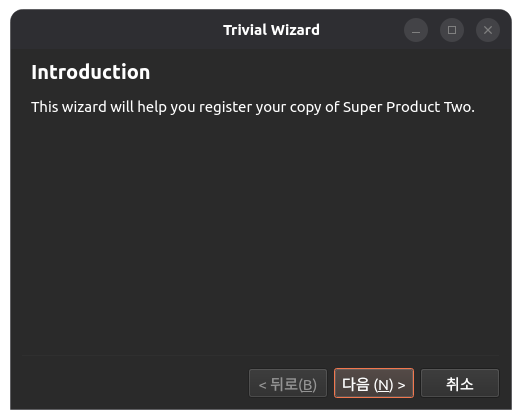
화면에서는 Next 이런게 나오는데 소스에는 없어서 열어보니 QWizard 라는 클래스를 사용중이라 조사.


setTitle로 상단에 표시되는 항목이 지정되고

실제 내용이 label 을 통해 별도로 추가된다.

QWizardPage *createIntroPage()
{
    QWizardPage *page = new QWizardPage;
    page->setTitle("Introduction");

    QLabel *label = new QLabel("This wizard will help you register your copy "
                               "of Super Product Two.");
    label->setWordWrap(true);

    QVBoxLayout *layout = new QVBoxLayout;
    layout->addWidget(label);
    page->setLayout(layout);

    return page;
}


위저드를 써서 그런가 엄청 심플해진다.

    QWizard wizard;
    wizard.addPage(createIntroPage());
    wizard.addPage(createRegistrationPage());
    wizard.addPage(createConclusionPage());
//! [linearAddPage]

    wizard.setWindowTitle("Trivial Wizard");
    wizard.show();

[링크 : https://doc.qt.io/qt-6/qtwidgets-dialogs-trivialwizard-example.html]


[링크 : https://doc.qt.io/qt-6/qwizard.html]

'Programming > qt' 카테고리의 다른 글

qt qrc 리소스 등록 후 이미지로 띄우기  (0) 2026.03.23
qt 6 프로그래밍 공개 ebook  (0) 2026.03.23
qt widget 화면 전환  (0) 2026.03.18
qt qml 와 c++ 상호연동  (0) 2026.01.16
qt quick websocket  (0) 2026.01.14
Posted by 구차니
Programming/qt2026. 3. 18. 17:44

윈도우를 show() hide()로 전환하기

[링크 : https://trading-for-chicken.tistory.com/23]


QStackedWidget::setCurrentIndex()

[링크 : https://chung-n-rang.tistory.com/6]


currentIndex : int

This property holds the index position of the widget that is visible
The current index is -1 if there is no current widget.
By default, this property contains a value of -1 because the stack is initially empty.

[링크 : https://doc.qt.io/qt-6/qstackedwidget.html#currentIndex-prop]

'Programming > qt' 카테고리의 다른 글

qt 6 프로그래밍 공개 ebook  (0) 2026.03.23
QT QWizard  (0) 2026.03.19
qt qml 와 c++ 상호연동  (0) 2026.01.16
qt quick websocket  (0) 2026.01.14
qt qml loader  (0) 2026.01.14
Posted by 구차니
Programming/C++ STL2026. 2. 20. 16:30

sx1276 예제를 보다보니 mbed쪽(?) 드라이버 소스에 함수인데 "= 0"를 해둔게 있어서 이게 머야 하고 검색해보니

순수 가상 함수라는 이상한(?) 이름이 붙은 녀석이 발견되었다.

어떻게 보면 java에서 interface 로 선언되는 녀석과 비슷하게 실 구현체가 없이 선언되고

무조건 구현해서 사용해야 하는 녀석 같은데.. 참 난해한 문법형태구만..

그런데 cpp에 원래 virtual 키워드가 있었던..가?


    /*!
     * @brief Checks if the given RF frequency is supported by the hardware
     *
     * @param [IN] frequency RF frequency to be checked
     * @retval isSupported [true: supported, false: unsupported]
     */
    virtual bool CheckRfFrequency( uint32_t frequency ) = 0;

[링크 : https://hwan-shell.tistory.com/223]

[링크 : https://www.geeksforgeeks.org/cpp/pure-virtual-functions-and-abstract-classes/]


// deriv_VirtualFunctions2.cpp
// compile with: /EHsc
#include <iostream>
using namespace std;

class Base {
public:
   virtual void NameOf();   // Virtual function.
   void InvokingClass();   // Nonvirtual function.
};

// Implement the two functions.
void Base::NameOf() {
   cout << "Base::NameOf\n";
}

void Base::InvokingClass() {
   cout << "Invoked by Base\n";
}

class Derived : public Base {
public:
   void NameOf();   // Virtual function.
   void InvokingClass();   // Nonvirtual function.
};

// Implement the two functions.
void Derived::NameOf() {
   cout << "Derived::NameOf\n";
}

void Derived::InvokingClass() {
   cout << "Invoked by Derived\n";
}

int main() {
   // Declare an object of type Derived.
   Derived aDerived;

   // Declare two pointers, one of type Derived * and the other
   //  of type Base *, and initialize them to point to aDerived.
   Derived *pDerived = &aDerived;
   Base    *pBase    = &aDerived;

   // Call the functions.
   pBase->NameOf();           // Call virtual function.
   pBase->InvokingClass();    // Call nonvirtual function.
   pDerived->NameOf();        // Call virtual function.
   pDerived->InvokingClass(); // Call nonvirtual function.
}


부모 클래스로 바꾸어서 실행해도 virtual 로 선언된 함수는 무조건 자기 자신의 원래 함수를 호출한다.

내가 누구인지 타입 캐스팅이 되어도 원래꺼를 따라가니 일종의 메타데이터를 가지고 있는걸려나?

Derived::NameOf
Invoked by Base
Derived::NameOf
Invoked by Derived

[링크 : https://learn.microsoft.com/ko-kr/cpp/cpp/virtual-functions?view=msvc-170]

[링크 : https://mr-dingo.github.io/c/c++뽀개기/2019/01/10/virtual.html]

'Programming > C++ STL' 카테고리의 다른 글

crt0.o libstdc++.a  (0) 2025.08.12
cpp 그래픽 라이브러리  (0) 2025.04.22
cpp 기본 인자 prototype  (0) 2025.03.28
cpp std::to_string(int)  (0) 2025.02.20
cpp string 끝에 한글자 지우기  (0) 2025.02.06
Posted by 구차니
Programming/qt2026. 1. 16. 14:19

'Programming > qt' 카테고리의 다른 글

QT QWizard  (0) 2026.03.19
qt widget 화면 전환  (0) 2026.03.18
qt quick websocket  (0) 2026.01.14
qt qml loader  (0) 2026.01.14
qstackedwidget, qstackedlayout  (0) 2026.01.13
Posted by 구차니
Programming/C Win32 MFC2026. 1. 16. 10:44

비슷한걸 만들어 보려고 하는데 영 안되는데 신기한 옵션을 찾아서 글 써봄

의도적으로 heap을 넘기는 코드를 작성하고 free() 시에 정말 segmentation fault 가 뜨나 해보는데

$ cat t2.c 
#include <stdio.h>
#include <stdlib.h>

void main()
{
int *arr = NULL;
arr = (int*)malloc(10 * sizeof(int));
int idx = 0;
for(idx = 0; idx < 10000; idx++)
arr[idx] = idx;

printf("before\n");
fflush(stdout);

free(arr);

printf("after\n");
fflush(stdout);
}


아쉽게도 free가 아니라 arr[idx] 에서 범위를 넘어서 에러가 발생함

$ gcc t2.c -g
$ ./a.out 
malloc(): corrupted top size
중지됨 (코어 덤프됨)


fsanitize 라는 플래그를 주면 좀더 잡아 준다는데 컴파일 타임이 아니라 런타임에 작동한다.

해당 플래그를 추가하면 빌드된 용량이 증가한다.

$ gcc t2.c -g -fsanitize=address
$ ls -al
합계 40
-rwxrwxr-x  1 minimonk minimonk 23536  1월 16 10:33 a.out
-rw-rw-r--  1 minimonk minimonk   271  1월 16 10:30 t2.c

$ gcc t2.c -g
$ ls -al
합계 36
-rwxrwxr-x  1 minimonk minimonk 18704  1월 16 10:35 a.out
-rw-rw-r--  1 minimonk minimonk   271  1월 16 10:30 t2.c

[링크 :https://k0n9.tistory.com/entry/AddressSanitizer]

[링크 : https://stackoverflow.com/questions/58262749/how-to-use-gcc-with-fsanitize-address]


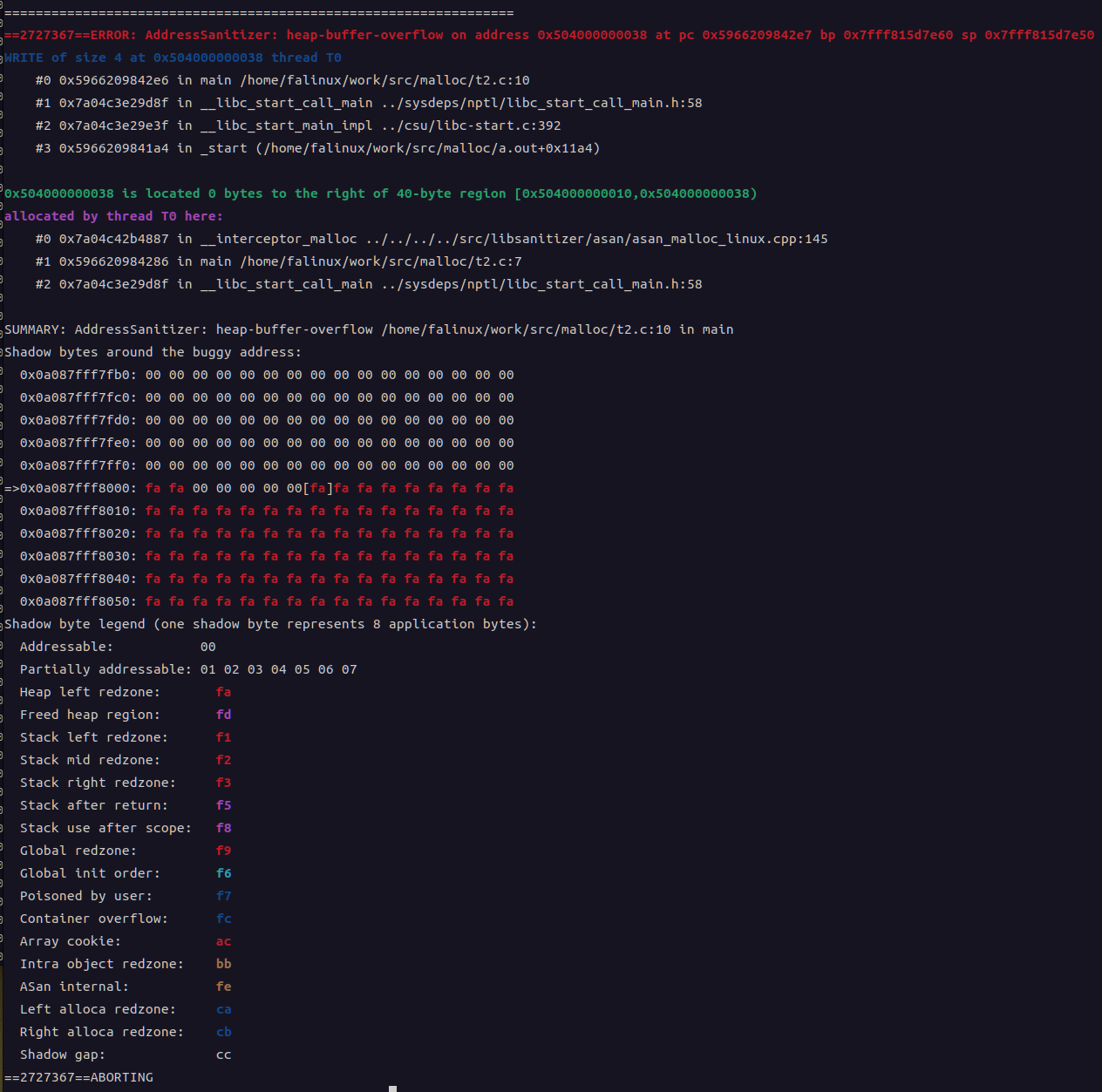
실행해서 터트리면 아래와 같이 먼가 나오는데, 엄청 컬러풀하게 터진다.

눈에 들어오는건 summay 항목의 heap-buffer-overflow

특이한게 배열 loop 돌다 터지는게 아니라 다 돌고 나서 free 가려다가 터진다. 신기하네

$ gcc t2.c -g -fsanitize=address
$ ./a.out 
=================================================================
==2713847==ERROR: AddressSanitizer: heap-buffer-overflow on address 0x504000000038 at pc 0x609d568b42e0 bp 0x7ffdaa34e820 sp 0x7ffdaa34e810
WRITE of size 4 at 0x504000000038 thread T0
    #0 0x609d568b42df in main /home/minimonk/work/src/malloc/t2.c:9
    #1 0x7cc2e8429d8f in __libc_start_call_main ../sysdeps/nptl/libc_start_call_main.h:58
    #2 0x7cc2e8429e3f in __libc_start_main_impl ../csu/libc-start.c:392
    #3 0x609d568b41a4 in _start (/home/minimonk/work/src/malloc/a.out+0x11a4)

0x504000000038 is located 0 bytes to the right of 40-byte region [0x504000000010,0x504000000038)
allocated by thread T0 here:
    #0 0x7cc2e88b4887 in __interceptor_malloc ../../../../src/libsanitizer/asan/asan_malloc_linux.cpp:145
    #1 0x609d568b4286 in main /home/minimonk/work/src/malloc/t2.c:7
    #2 0x7cc2e8429d8f in __libc_start_call_main ../sysdeps/nptl/libc_start_call_main.h:58

SUMMARY: AddressSanitizer: heap-buffer-overflow /home/minimonk/work/src/malloc/t2.c:9 in main
Shadow bytes around the buggy address:
  0x0a087fff7fb0: 00 00 00 00 00 00 00 00 00 00 00 00 00 00 00 00
  0x0a087fff7fc0: 00 00 00 00 00 00 00 00 00 00 00 00 00 00 00 00
  0x0a087fff7fd0: 00 00 00 00 00 00 00 00 00 00 00 00 00 00 00 00
  0x0a087fff7fe0: 00 00 00 00 00 00 00 00 00 00 00 00 00 00 00 00
  0x0a087fff7ff0: 00 00 00 00 00 00 00 00 00 00 00 00 00 00 00 00
=>0x0a087fff8000: fa fa 00 00 00 00 00[fa]fa fa fa fa fa fa fa fa
  0x0a087fff8010: fa fa fa fa fa fa fa fa fa fa fa fa fa fa fa fa
  0x0a087fff8020: fa fa fa fa fa fa fa fa fa fa fa fa fa fa fa fa
  0x0a087fff8030: fa fa fa fa fa fa fa fa fa fa fa fa fa fa fa fa
  0x0a087fff8040: fa fa fa fa fa fa fa fa fa fa fa fa fa fa fa fa
  0x0a087fff8050: fa fa fa fa fa fa fa fa fa fa fa fa fa fa fa fa
Shadow byte legend (one shadow byte represents 8 application bytes):
  Addressable:           00
  Partially addressable: 01 02 03 04 05 06 07 
  Heap left redzone:       fa
  Freed heap region:       fd
  Stack left redzone:      f1
  Stack mid redzone:       f2
  Stack right redzone:     f3
  Stack after return:      f5
  Stack use after scope:   f8
  Global redzone:          f9
  Global init order:       f6
  Poisoned by user:        f7
  Container overflow:      fc
  Array cookie:            ac
  Intra object redzone:    bb
  ASan internal:           fe
  Left alloca redzone:     ca
  Right alloca redzone:    cb
  Shadow gap:              cc
==2713847==ABORTING


idx 값을 보면 10000번 돌았는데

printf 하려고 하면 바로 malloc(): corrupted top size 하면서 터진다.

$ gdb ./a.out 
GNU gdb (Ubuntu 12.1-0ubuntu1~22.04.2) 12.1
Copyright (C) 2022 Free Software Foundation, Inc.
License GPLv3+: GNU GPL version 3 or later <http://gnu.org/licenses/gpl.html>
This is free software: you are free to change and redistribute it.
There is NO WARRANTY, to the extent permitted by law.
Type "show copying" and "show warranty" for details.
This GDB was configured as "x86_64-linux-gnu".
Type "show configuration" for configuration details.
For bug reporting instructions, please see:
<https://www.gnu.org/software/gdb/bugs/>.
Find the GDB manual and other documentation resources online at:
    <http://www.gnu.org/software/gdb/documentation/>.

For help, type "help".
Type "apropos word" to search for commands related to "word"...
Reading symbols from ./a.out...
(gdb) l
1 #include <stdio.h>
2 #include <stdlib.h>
3
4 void main()
5 {
6 int *arr = NULL;
7 arr = (int*)malloc(10 * sizeof(int));
8 int idx = 0;
9 for(idx = 0; idx < 10000; idx++)
10 arr[idx] = idx;
(gdb) l 11
6 int *arr = NULL;
7 arr = (int*)malloc(10 * sizeof(int));
8 int idx = 0;
9 for(idx = 0; idx < 10000; idx++)
10 arr[idx] = idx;
11
12 printf("before\n");
13 fflush(stdout);
14
15 free(arr);
(gdb) b 12
Breakpoint 1 at 0x1201: file t2.c, line 12.
(gdb) r
Starting program: /home/minimonk/work/src/malloc/a.out 
[Thread debugging using libthread_db enabled]
Using host libthread_db library "/lib/x86_64-linux-gnu/libthread_db.so.1".

Breakpoint 1, main () at t2.c:12
12 printf("before\n");
(gdb) print idx
$1 = 10000
(gdb) n
malloc(): corrupted top size

Program received signal SIGABRT, Aborted.
__pthread_kill_implementation (no_tid=0, signo=6, threadid=140737353705280) at ./nptl/pthread_kill.c:44
44 ./nptl/pthread_kill.c: 그런 파일이나 디렉터리가 없습니다.


그래서 printf / fflush 주석처리하고 free를 바로 브레이크 포인트 잡아서 해도 동일하게 

루프 종료되면서 바로 에러가 나는 것 같기도...

15 free(arr);
(gdb) c
Continuing.
malloc(): corrupted top size

Program received signal SIGABRT, Aborted.
__pthread_kill_implementation (no_tid=0, signo=6, threadid=140737353705280) at ./nptl/pthread_kill.c:44
44 ./nptl/pthread_kill.c: 그런 파일이나 디렉터리가 없습니다.
(gdb) 


'Programming > C Win32 MFC' 카테고리의 다른 글

float 자릿수 제한  (0) 2025.10.11
free(): invalid next size (normal)  (0) 2023.12.18
c에서 cpp 함수 불러오기  (0) 2023.01.04
MSB / LSB 변환  (0) 2022.08.29
kore - c restful api server  (1) 2022.07.07
Posted by 구차니
Programming/qt2026. 1. 14. 12:38

socket은 좀더 찾아 봐야 할 것 같은데

내부통신이 아닌 외부장치와의 통신은 qt quick / qml 에서 어떻게 구현되는지 궁금해짐


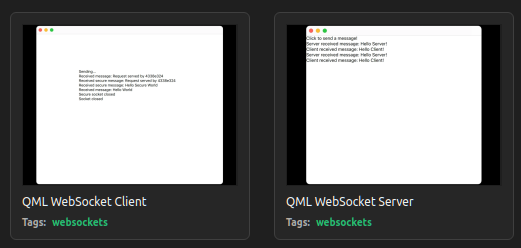
qmlwebsocketserver main.qml qmlwebsocketclient main.qml
// Copyright (C) 2016 Klarälvdalens Datakonsult AB, a KDAB Group company, info@kdab.com, author Milian Wolff <milian.wolff@kdab.com>
// SPDX-License-Identifier: LicenseRef-Qt-Commercial OR BSD-3-Clause

import QtQuick
import QtWebSockets

Rectangle {
    width: 360
    height: 360

    function appendMessage(message) {
        messageBox.text += "\n" + message
    }

    WebSocketServer {
        id: server
        listen: true
        onClientConnected: function(webSocket) {
            webSocket.onTextMessageReceived.connect(function(message) {
                appendMessage(qsTr("Server received message: %1").arg(message));
                webSocket.sendTextMessage(qsTr("Hello Client!"));
            });
        }
        onErrorStringChanged: {
            appendMessage(qsTr("Server error: %1").arg(errorString));
        }
    }

    WebSocket {
        id: socket
        url: server.url
        onTextMessageReceived: function(message) {
            appendMessage(qsTr("Client received message: %1").arg(message));
        }
        onStatusChanged: {
            if (socket.status == WebSocket.Error) {
                appendMessage(qsTr("Client error: %1").arg(socket.errorString));
            } else if (socket.status == WebSocket.Closed) {
                appendMessage(qsTr("Client socket closed."));
            }
        }
    }

    Timer {
        interval: 100
        running: true
        onTriggered: {
            socket.active = true;
        }
    }

    Text {
        id: messageBox
        text: qsTr("Click to send a message!")
        anchors.fill: parent

        MouseArea {
            anchors.fill: parent
            onClicked: {
                socket.sendTextMessage(qsTr("Hello Server!"));
            }
        }
    }
}
// Copyright (C) 2016 Kurt Pattyn <pattyn.kurt@gmail.com>.
// SPDX-License-Identifier: LicenseRef-Qt-Commercial OR BSD-3-Clause
import QtQuick
import QtWebSockets

Rectangle {
    width: 640
    height: 360

    WebSocket {
        id: socket
        url: "ws://ws.ifelse.io"
        onTextMessageReceived: function(message) {
            messageBox.text = messageBox.text + "\nReceived message: " + message
        }
        onStatusChanged: if (socket.status == WebSocket.Error) {
                             console.log("Error: " + socket.errorString)
                         } else if (socket.status == WebSocket.Open) {
                             socket.sendTextMessage("Hello World")
                         } else if (socket.status == WebSocket.Closed) {
                             messageBox.text += "\nSocket closed"
                         }
        active: false
    }

    WebSocket {
        id: secureWebSocket
        url: "wss://ws.ifelse.io"
        onTextMessageReceived: function(message) {
            messageBox.text = messageBox.text + "\nReceived secure message: " + message
        }
        onStatusChanged: if (secureWebSocket.status == WebSocket.Error) {
                             console.log("Error: " + secureWebSocket.errorString)
                         } else if (secureWebSocket.status == WebSocket.Open) {
                             secureWebSocket.sendTextMessage("Hello Secure World")
                         } else if (secureWebSocket.status == WebSocket.Closed) {
                             messageBox.text += "\nSecure socket closed"
                         }
        active: false
    }
    Text {
        id: messageBox
        text: socket.status == WebSocket.Open ? qsTr("Sending...") : qsTr("Welcome!")
        anchors.centerIn: parent
    }

    MouseArea {
        anchors.fill: parent
        onClicked: {
            socket.active = !socket.active
            secureWebSocket.active =  !secureWebSocket.active;
            //Qt.quit();
        }
    }
}


 다른 예제

[링크 : https://makersweb.net/qt/22792]

'Programming > qt' 카테고리의 다른 글

qt widget 화면 전환  (0) 2026.03.18
qt qml 와 c++ 상호연동  (0) 2026.01.16
qt qml loader  (0) 2026.01.14
qstackedwidget, qstackedlayout  (0) 2026.01.13
qt quick 예제 calqlatr 코드분석  (0) 2026.01.13
Posted by 구차니
Programming/qt2026. 1. 14. 10:54

로더라는 말은 몇번 봤는데 예제는 이제 찾아봄.

구현 자체는 무지 쉬워보이는데 라이프 사이클이라던가 좀 봐야할 듯.

import QtQuick

Item {
    width: 200; height: 200

    Loader { id: pageLoader }

    MouseArea {
        anchors.fill: parent
        onClicked: pageLoader.source = "Page1.qml"
    }
}

[링크 : https://doc.qt.io/qt-6/ko/qml-qtquick-loader.html]

[링크 : https://blog.naver.com/ekthatkxkd/221722032058]

[링크 : https://studiodoc.tistory.com/176]

'Programming > qt' 카테고리의 다른 글

qt qml 와 c++ 상호연동  (0) 2026.01.16
qt quick websocket  (0) 2026.01.14
qstackedwidget, qstackedlayout  (0) 2026.01.13
qt quick 예제 calqlatr 코드분석  (0) 2026.01.13
qt qml view  (0) 2026.01.13
Posted by 구차니
Programming/qt2026. 1. 13. 15:46

dialog 띄우고 show, hide 하는것도 방법이지만

layout 에다가 widget을 추가하고 layout을 stack 해서 새 창을 띄울 것들을 새로운 stack에 넣어서 하는 것도 방법이고

아니면 위젯을 스택해서 쓰는것도 방법일 듯 한데

구조적으로는 stackedlayout에 widget을 넣어 운영하는게 좀 더 맞는 듯?


QStackedLayout QStackedWidget
import sys, os

# Qt 바인딩을 PySide6 우선 사용하고, 실패 시 PyQt6 사용
qt_modules = None

# PySide6을 먼저 시도
try:
    from PySide6.QtWidgets import (
        QApplication, QWidget,
        QStackedLayout, QVBoxLayout,
        QLabel,
        QComboBox, 
    )
    from PySide6.QtGui import QPixmap
    qt_modules = 'PySide6'
except ImportError:
    # 실패 시 PyQt6 시도
    try:
        from PyQt6.QtWidgets import (
            QApplication, QWidget,
            QStackedLayout, QVBoxLayout,
            QLabel,
            QComboBox, 
        )
        from PyQt6.QtGui import QPixmap
        qt_modules = 'PyQt6'
    except ImportError:
        # 둘 다 실패하면 메시지 출력 후 종료
        print("There is no Qt Binding for Python.")
        sys.exit(1)

# 사용된 Qt 바인딩 이름 출력
print(f"Using {qt_modules} binding.")

# ------------------------------------

# 메인 윈도우 클래스 정의
class MW(QWidget):
    def __init__(self):
        super().__init__()
        self.init_ui()

    def init_ui(self):
        # 윈도우 타이틀 설정
        self.setWindowTitle("Ex Input Widgets")
        # 메인 위젯 및 레이아웃 구성
        self.setup_main_wnd()
        # 윈도우 표시
        self.show()

    def setup_main_wnd(self):
        # 현재 파일의 절대 경로 기준 디렉토리 경로 얻기
        fpath = os.path.dirname(
            os.path.abspath(__file__)
        )

        # 콤보박스에 표시될 페이지 이름들
        pages = ['faith', 'hope', 'love']

        # 각 페이지에 해당하는 이미지 파일 경로 리스트
        self.imgs = [
            os.path.join(fpath, 'img','faith.png'),
            os.path.join(fpath, 'img','hope.png'),
            os.path.join(fpath, 'img','love.png')
        ]

        # 콤보박스 생성 및 항목 추가
        combo_box = QComboBox()
        combo_box.addItems(pages)
        # 콤보박스 항목이 선택되면 change_page 함수 실행
        combo_box.activated.connect(self.change_page)

        # QStackedLayout 생성 (여러 페이지를 겹쳐서 보관, 하나만 보여줌)
        self.stacked_lm = QStackedLayout()

        # 페이지 수만큼 QLabel 생성 후 QStackedLayout에 추가
        for idx, c in enumerate(pages):
            label = self.setup_page(idx)  # QLabel을 생성하고 이미지 설정
            self.stacked_lm.addWidget(label)  # 스택에 추가

        # 수직 박스 레이아웃 생성
        v_box_lm = QVBoxLayout()
        v_box_lm.addWidget(combo_box)         # 콤보박스를 위에 추가
        # 스택 레이아웃을 아래에 추가
        # v_box_lm.addLayout(self.stacked_lm)  # 이 한줄로 아래 3개라인을 대체 가능.
        tmp_c = QWidget()
        tmp_c.setLayout(self.stacked_lm)
        v_box_lm.addWidget(tmp_c)

        # 최종 레이아웃을 윈도우에 설정
        self.setLayout(v_box_lm)

    # 페이지용 QLabel 설정 함수
    def setup_page(self, page_num):
        label = QLabel()
        pixmap = QPixmap(self.imgs[page_num])     # 해당 이미지 불러오기
        label.setPixmap(pixmap)                   # QLabel에 이미지 설정
        label.setScaledContents(True)             # QLabel 크기에 맞게 이미지 자동 조절
        return label

    # 콤보박스에서 선택된 인덱스에 해당하는 페이지를 보여줌
    def change_page(self, idx):
        self.stacked_lm.setCurrentIndex(idx)

# ------------------------------------

# 프로그램 진입점
if __name__ == "__main__":
    print(os.path.realpath(__file__))  # 현재 실행 중인 파일 경로 출력
    app = QApplication(sys.argv)       # QApplication 인스턴스 생성
    main_wnd = MW()                         # 메인 윈도우 생성
    sys.exit(app.exec())               # 이벤트 루프 실행

import sys, os

# Qt 바인딩을 PySide6 우선, PyQt6는 백업용
qt_modules = None

try:
    from PySide6.QtWidgets import (
        QApplication, QWidget, QLabel,
        QVBoxLayout, QComboBox, QStackedWidget
    )
    from PySide6.QtGui import QPixmap
    qt_modules = 'PySide6'
except ImportError:
    try:
        from PyQt6.QtWidgets import (
            QApplication, QWidget, QLabel,
            QVBoxLayout, QComboBox, QStackedWidget
        )
        from PyQt6.QtGui import QPixmap
        qt_modules = 'PyQt6'
    except ImportError:
        print("There is no Qt Binding for Python.")
        sys.exit(1)

print(f"Using {qt_modules} binding.")

# ------------------------------------

class MW(QWidget):
    def __init__(self):
        super().__init__()
        self.init_ui()

    def init_ui(self):
        self.setWindowTitle("Ex: QStackedWidget with ComboBox")
        self.setup_main_wnd()
        self.show()

    def setup_main_wnd(self):
        # 현재 스크립트 경로를 기준으로 이미지 파일 위치 설정
        fpath = os.path.dirname(os.path.abspath(__file__))

        # 페이지 이름과 이미지 경로 정의
        pages = ['faith', 'hope', 'love']
        self.imgs = [
            os.path.join(fpath, 'img/faith.png'),
            os.path.join(fpath, 'img/hope.png'),
            os.path.join(fpath, 'img/love.png')
        ]

        # 콤보박스 생성 및 페이지 이름 추가
        combo_box = QComboBox()
        combo_box.addItems(pages)
        combo_box.activated.connect(self.change_page)

        # QStackedWidget 생성
        self.stack_widget = QStackedWidget()

        # 각 페이지에 해당하는 QLabel + 이미지 추가
        for idx in range(len(pages)):
            label = QLabel()
            pixmap = QPixmap(self.imgs[idx])
            label.setPixmap(pixmap)
            label.setScaledContents(True)  # 이미지가 QLabel에 맞게 리사이즈됨
            self.stack_widget.addWidget(label)

        # 수직 레이아웃 구성: 콤보박스 위, 이미지 아래
        layout = QVBoxLayout()
        layout.addWidget(combo_box)
        layout.addWidget(self.stack_widget)

        self.setLayout(layout)

    # 콤보박스 인덱스 선택 시 보여줄 페이지 변경
    def change_page(self, idx):
        self.stack_widget.setCurrentIndex(idx)
# ------------------------------------

if __name__ == "__main__":
    print(os.path.realpath(__file__))
    app = QApplication(sys.argv)
    main_wnd = MW()
    sys.exit(app.exec())

[링크 : https://wikidocs.net/185879]

qstackedwidget

[링크 : https://wikidocs.net/162838]

[링크 : https://doc.qt.io/qt-6/qwidget.html]

[링크 : https://doc.qt.io/qt-6/qstackedwidget.html]

[링크 : https://qt-dev.com/board.php?board=qnaboard&page=4&category=1&command=body&no=758]

[링크 : https://hobbylife.tistory.com/entry/PySide6-QStackedWidget-완전-정복-–-클릭-이벤트와-사용법]


qstackedlayout

[링크 : https://m.blog.naver.com/raffiner/222027119916]

[링크 : https://doc.qt.io/qt-6/qstackedlayout.html]

'Programming > qt' 카테고리의 다른 글

qt quick websocket  (0) 2026.01.14
qt qml loader  (0) 2026.01.14
qt quick 예제 calqlatr 코드분석  (0) 2026.01.13
qt qml view  (0) 2026.01.13
qt quick 이미지 클릭  (0) 2026.01.12
Posted by 구차니