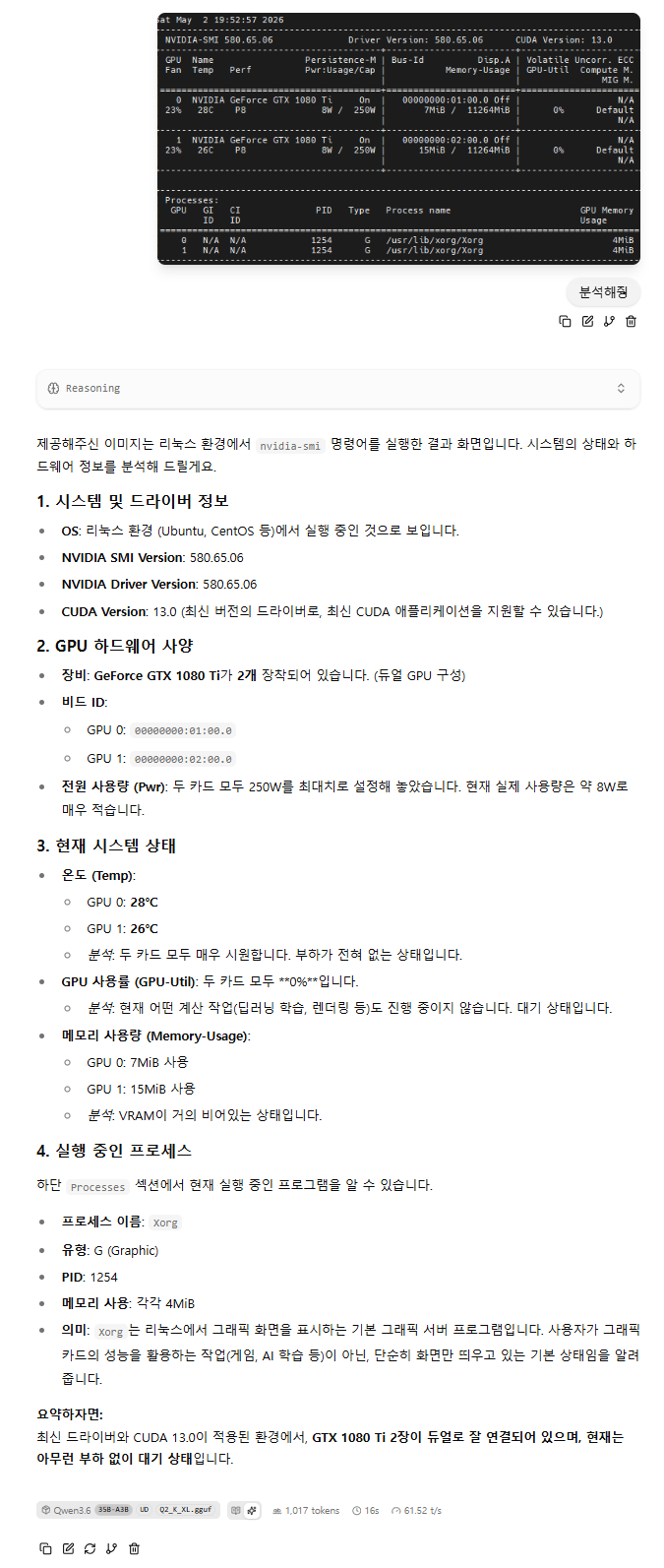
llama.cpp multi modal 시도
llama.cpp 에서 + 눌러보면 이미지가 있는데 활성화가 안되고

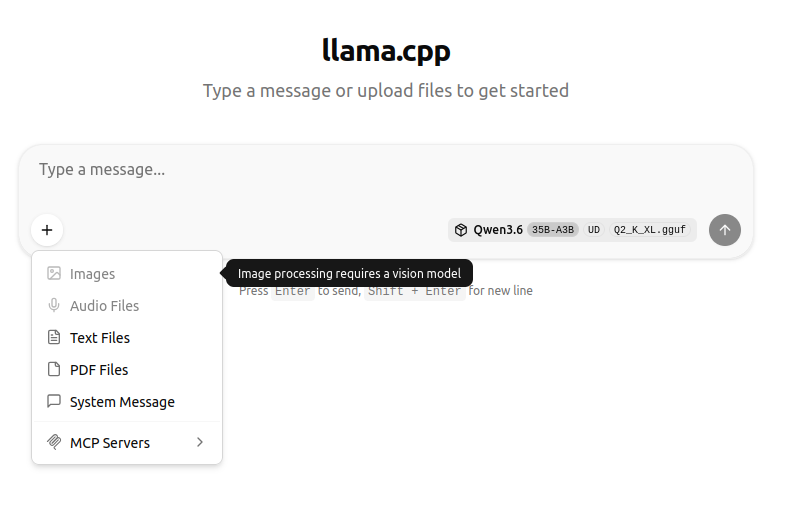
llama-swap 에서는 입력은 가능한데 막상 해보면 500에러가 발생한다.
그래서 찾아보니 음.. --mmproj 옵션?
멀티모달 입력 활성화 방법
예시 명령어
즉시 사용 가능한 멀티모달 모델 목록
|
[링크: https://news.hada.io/topic?id=20822]
제미나이 검색 추천으로 보니 이런 것들이 보인다.
mmproj-model.gguf 음...??
llama-server: You can run a local server that accepts image inputs via an API.
|
도움말을 보니 multi modal proejctor 줄여서 mmproj 라..
| /llama-b8925$ ./llama-server --help load_backend: loaded RPC backend from /mnt/Downloads/llama-b8925/libggml-rpc.so load_backend: loaded Vulkan backend from /mnt/Downloads/llama-b8925/libggml-vulkan.so load_backend: loaded CPU backend from /mnt/Downloads/llama-b8925/libggml-cpu-haswell.so ----- common params ----- -h, --help, --usage print usage and exit -hf, -hfr, --hf-repo <user>/<model>[:quant] Hugging Face model repository; quant is optional, case-insensitive, default to Q4_K_M, or falls back to the first file in the repo if Q4_K_M doesn't exist. mmproj is also downloaded automatically if available. to disable, add --no-mmproj example: ggml-org/GLM-4.7-Flash-GGUF:Q4_K_M (default: unused) (env: LLAMA_ARG_HF_REPO) -hfd, -hfrd, --hf-repo-draft <user>/<model>[:quant] Same as --hf-repo, but for the draft model (default: unused) (env: LLAMA_ARG_HFD_REPO) -hff, --hf-file FILE Hugging Face model file. If specified, it will override the quant in --hf-repo (default: unused) (env: LLAMA_ARG_HF_FILE) -hfv, -hfrv, --hf-repo-v <user>/<model>[:quant] Hugging Face model repository for the vocoder model (default: unused) (env: LLAMA_ARG_HF_REPO_V) -hffv, --hf-file-v FILE Hugging Face model file for the vocoder model (default: unused) (env: LLAMA_ARG_HF_FILE_V) -hft, --hf-token TOKEN Hugging Face access token (default: value from HF_TOKEN environment variable) -mm, --mmproj FILE path to a multimodal projector file. see tools/mtmd/README.md note: if -hf is used, this argument can be omitted (env: LLAMA_ARG_MMPROJ) -mmu, --mmproj-url URL URL to a multimodal projector file. see tools/mtmd/README.md (env: LLAMA_ARG_MMPROJ_URL) --mmproj-auto, --no-mmproj, --no-mmproj-auto whether to use multimodal projector file (if available), useful when using -hf (default: enabled) (env: LLAMA_ARG_MMPROJ_AUTO) --mmproj-offload, --no-mmproj-offload whether to enable GPU offloading for multimodal projector (default: enabled) (env: LLAMA_ARG_MMPROJ_OFFLOAD) --image-min-tokens N minimum number of tokens each image can take, only used by vision models with dynamic resolution (default: read from model) (env: LLAMA_ARG_IMAGE_MIN_TOKENS) --image-max-tokens N maximum number of tokens each image can take, only used by vision models with dynamic resolution (default: read from model) (env: LLAMA_ARG_IMAGE_MAX_TOKENS) -otd, --override-tensor-draft <tensor name pattern>=<buffer type>,... override tensor buffer type for draft model -cmoed, --cpu-moe-draft keep all Mixture of Experts (MoE) weights in the CPU for the draft model (env: LLAMA_ARG_CPU_MOE_DRAFT) -ncmoed, --n-cpu-moe-draft N keep the Mixture of Experts (MoE) weights of the first N layers in the CPU for the draft model |
그래서 gemma4 저장소를 가봤더니 어라?
가장 아래... 전에는 눈치채지 못하고 흘렸던 mmproj 라는 녀석이 있다.
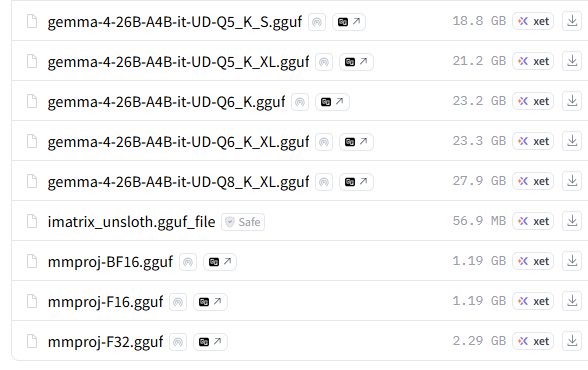
[링크 : https://huggingface.co/unsloth/gemma-4-26B-A4B-it-GGUF/tree/main]
그래서 그걸 다운로드 하고 -mm 옵션을 주면
안되네!? 혹시나 해서 F16 으로 해주니 된다. 역시 falcon이 최고여(??? 응?)
| $ ./llama-b8925/llama-server -m ./model/gemma/gemma-4-E4B-it-Q4_K_M.gguf -mm ./model/gemma/mmproj-BF16.gguf mtmd_init_from_file: error: mismatch between text model (n_embd = 2560) and mmproj (n_embd = 2816) hint: you may be using wrong mmproj srv load_model: failed to load multimodal model, './model/gemma/mmproj-BF16.gguf' srv operator(): operator(): cleaning up before exit... main: exiting due to model loading error |
BF16 은 FP32 와 동일한 8bit 지수, F16은 5bit 지수
간단하게 BF16이 F16 보다 정밀도 면에서 좋다. 인데 하드웨어 지원이 안되면 무의미할테니 머.. 어쩔수 없나?
[링크 : https://g3lu.tistory.com/55]
+
gpt 왈 30 시리즈. ampere 부터 BF16을 지원한다고 한다.역시 3090 이런걸로 크게 갔어야 했나.. 쩝
아무튼 F16.gguf로 돌리니 images가 활성화 된다.
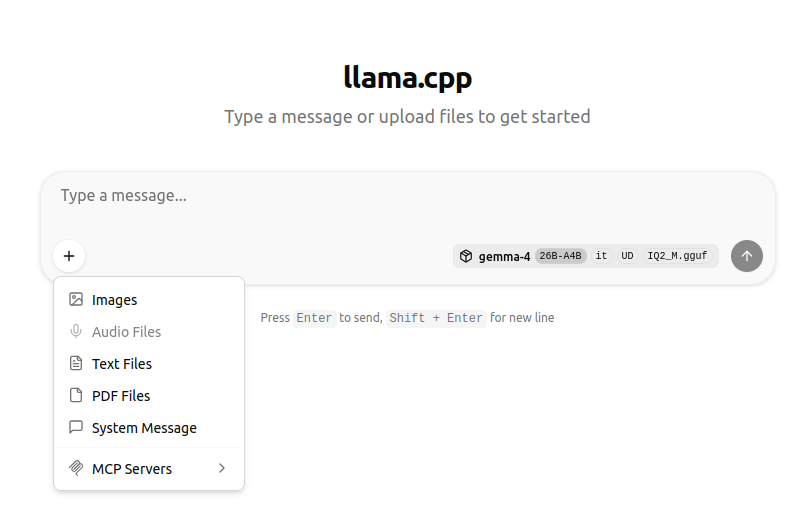
이미지가 커지면 토큰을 많이 먹는지 터지길래 조그많게 이미지 스샷 찍어서 시도 하니
먼가 분석을 시도한다 오오오!
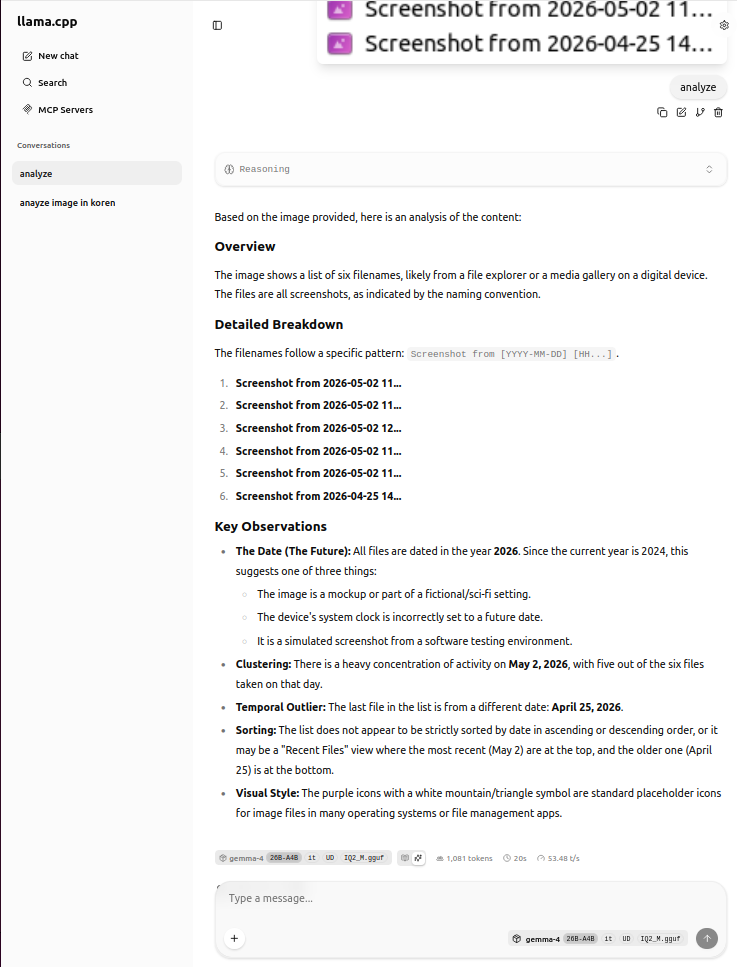
+
이러니 메모리 부족 소리 나오지 -_-
| 기본 문맥 길이(256k) | -c 8192 |
| llama_context: n_ctx_seq (232192) < n_ctx_train (262144) -- the full capacity of the model will not be utilized llama_context: Vulkan_Host output buffer size = 3.79 MiB llama_kv_cache: Vulkan1 KV buffer size = 2267.50 MiB llama_kv_cache: Vulkan2 KV buffer size = 2267.50 MiB llama_kv_cache: size = 4535.00 MiB (232192 cells, 10 layers, 4/1 seqs), K (f16): 2267.50 MiB, V (f16): 2267.50 MiB llama_kv_cache: attn_rot_k = 0, n_embd_head_k_all = 256 llama_kv_cache: attn_rot_v = 0, n_embd_head_k_all = 256 llama_memory_recurrent: Vulkan1 RS buffer size = 150.75 MiB llama_memory_recurrent: Vulkan2 RS buffer size = 100.50 MiB llama_memory_recurrent: size = 251.25 MiB ( 4 cells, 40 layers, 4 seqs), R (f32): 11.25 MiB, S (f32): 240.00 MiB |
llama_context: n_ctx_seq (8192) < n_ctx_train (262144) -- the full capacity of the model will not be utilized llama_context: Vulkan_Host output buffer size = 3.79 MiB llama_kv_cache: Vulkan1 KV buffer size = 80.00 MiB llama_kv_cache: Vulkan2 KV buffer size = 80.00 MiB llama_kv_cache: size = 160.00 MiB ( 8192 cells, 10 layers, 4/1 seqs), K (f16): 80.00 MiB, V (f16): 80.00 MiB llama_kv_cache: attn_rot_k = 0, n_embd_head_k_all = 256 llama_kv_cache: attn_rot_v = 0, n_embd_head_k_all = 256 llama_memory_recurrent: Vulkan1 RS buffer size = 134.00 MiB llama_memory_recurrent: Vulkan2 RS buffer size = 117.25 MiB llama_memory_recurrent: size = 251.25 MiB ( 4 cells, 40 layers, 4 seqs), R (f32): 11.25 MiB, S (f32): 240.00 MiB |
그래서 context 줄이고 mmproj 설정해주니 잘인식한다.
128k 까지는 1080 ti 11GB * 2 에서 돌아간다.
| ./llama-b8925/llama-server --host 0.0.0.0 --model ./model/qwen3.6_35B/Qwen3.6-35B-A3B-UD-Q2_K_XL.gguf -c 8192 -mm ./model/qwen3.6_35B/mmproj-F16.gguf |