qt quick 예제 calqlatr 코드분석
qt quick 으로 작성된 계산기 어플 소스 분석

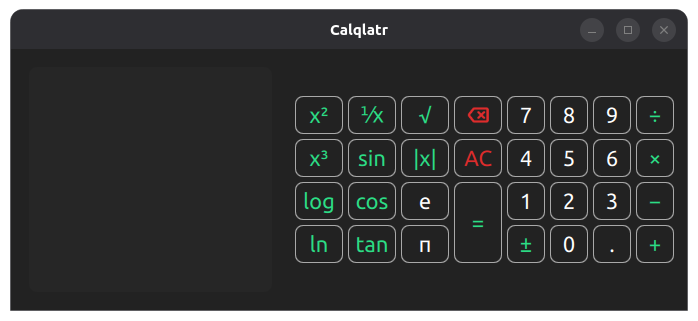
실행하면 평범한 계산기가 뜬다.

가로로 길게 늘리면 공학계산기로 바뀐다.
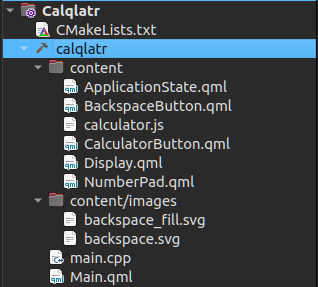
프로젝트는 아래와 같이 구성되어 있고
main.cpp
언제나 그렇듯(?) main.cpp 는 조촐하고 별 내용이 없다.
// Copyright (C) 2020 The Qt Company Ltd.
// SPDX-License-Identifier: LicenseRef-Qt-Commercial OR BSD-3-Clause

#include <QGuiApplication>
#include <QQmlApplicationEngine>
#include <QQuickStyle>

int main(int argc, char *argv[])
{
    QCoreApplication::setOrganizationName("QtProject");
    QCoreApplication::setApplicationName("Calqlatr");

    QGuiApplication app(argc, argv);

    QQuickStyle::setStyle("Basic");

    QQmlApplicationEngine engine;
    QObject::connect(&engine, &QQmlApplicationEngine::objectCreationFailed,
            &app, []() { QCoreApplication::exit(-1); },
            Qt::QueuedConnection);
    engine.loadFromModule("demos.calqlatr", "Main");

    return app.exec();
}
Main.qml
전체 모양을 그리는 녀석인데, design 에서 보면 아래처럼 보인다.
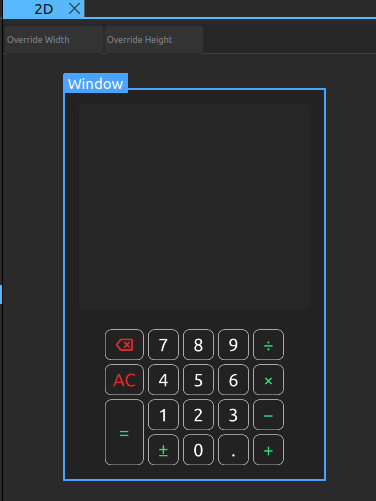
다만 qt designer의 버그인지 ApplicationState 의 id: state 구문이 에러가 나는데
위지윅 에디터에서 보려면 해당 라인을 주석처리 하면 된다. (물론 실행하면 작동안하게 되는 버그 발생)

column, row Layout 으로 배치를 어떻게 하는것 같고
Keys.onPressed: function (event) {} 를 통해서 키 입력시 state에 추가하는 식으로 작동하게 된다.
| // Copyright (C) 2023 The Qt Company Ltd. // SPDX-License-Identifier: LicenseRef-Qt-Commercial OR BSD-3-Clause import QtQuick import QtQuick.Layouts Window { visible: true width: 320 height: 480 minimumWidth: Math.max(numberPad.portraitModeWidth, display.minWidth) + root.margin * 2 minimumHeight: display.minHeight + numberPad.height + root.margin * 3 color: root.backgroundColor Item { id: root anchors.fill: parent anchors.topMargin: parent.SafeArea.margins.top anchors.leftMargin: parent.SafeArea.margins.left anchors.rightMargin: parent.SafeArea.margins.right anchors.bottomMargin: parent.SafeArea.margins.bottom readonly property int margin: 18 readonly property color backgroundColor: "#222222" readonly property int minLandscapeModeWidth: numberPad.landscapeModeWidth + display.minWidth + margin * 3 property bool isPortraitMode: root.width < root.minLandscapeModeWidth ApplicationState { id: state display: display } Display { id: display readonly property int minWidth: 210 readonly property int minHeight: 60 Layout.minimumWidth: minWidth Layout.fillWidth: true Layout.fillHeight: true Layout.margins: root.margin // remove the margin on the side that the numberPad is on, to prevent a double margin Layout.bottomMargin: root.isPortraitMode ? 0 : root.margin Layout.rightMargin: root.isPortraitMode ? root.margin : 0 } NumberPad { id: numberPad Layout.margins: root.margin isPortraitMode: root.isPortraitMode state: state } // define the responsive layouts ColumnLayout { id: portraitMode anchors.fill: parent visible: root.isPortraitMode LayoutItemProxy { target: display Layout.minimumHeight: display.minHeight } LayoutItemProxy { target: numberPad Layout.alignment: Qt.AlignHCenter } } RowLayout { id: landscapeMode anchors.fill: parent visible: !root.isPortraitMode LayoutItemProxy { target: display } LayoutItemProxy { target: numberPad Layout.alignment: Qt.AlignVCenter } } Keys.onPressed: function (event) { switch (event.key) { case Qt.Key_0: state.digitPressed("0"); break; case Qt.Key_1: state.digitPressed("1"); break; case Qt.Key_2: state.digitPressed("2"); break; case Qt.Key_3: state.digitPressed("3"); break; case Qt.Key_4: state.digitPressed("4"); break; case Qt.Key_5: state.digitPressed("5"); break; case Qt.Key_6: state.digitPressed("6"); break; case Qt.Key_7: state.digitPressed("7"); break; case Qt.Key_8: state.digitPressed("8"); break; case Qt.Key_9: state.digitPressed("9"); break; case Qt.Key_E: state.digitPressed("e"); break; case Qt.Key_P: state.digitPressed("π"); break; case Qt.Key_Plus: state.operatorPressed("+"); break; case Qt.Key_Minus: state.operatorPressed("-"); break; case Qt.Key_Asterisk: state.operatorPressed("×"); break; case Qt.Key_Slash: state.operatorPressed("÷"); break; case Qt.Key_Enter: case Qt.Key_Return: state.operatorPressed("="); break; case Qt.Key_Comma: case Qt.Key_Period: state.digitPressed("."); break; case Qt.Key_Backspace: state.operatorPressed("bs"); break; } } } } |
ApplicationState.qml
말로는 qml 인데 design에서 보여지는 요소는 존재하지 않고
main.qml 에서 호출되는 operatorPressed() 나 digitPressed()와 같은 함수가 존재한다.
특이한건 import as 인데 js를 불러서 CalcEngine 으로 사용하는 부분 정도?
그 와중에 Display는 display.qml 에서 끌려오는건가?
| // Copyright (C) 2023 The Qt Company Ltd. // SPDX-License-Identifier: LicenseRef-Qt-Commercial OR BSD-3-Clause import QtQml import "calculator.js" as CalcEngine QtObject { required property Display display function operatorPressed(operator) { CalcEngine.operatorPressed(operator, display); } function digitPressed(digit) { CalcEngine.digitPressed(digit, display); } function isButtonDisabled(op) { return CalcEngine.isOperationDisabled(op, display); } } |
calculator.js
평범한(?) js로 작성된 코드가 존재한다.
| // Copyright (C) 2023 The Qt Company Ltd. // SPDX-License-Identifier: LicenseRef-Qt-Commercial OR BSD-3-Clause let accumulator = 0 let pendingOperator = "" let lastButton = "" let digits = "" function isOperationDisabled(op, display) { if (digits !== "" && lastButton !== "=" && (op === "π" || op === "e")) return true if (digits === "" && !((op >= "0" && op <= "9") || op === "π" || op === "e" || op === "AC")) return true if (op === "bs" && (display.isOperandEmpty() || !((lastButton >= "0" && lastButton <= "9") || lastButton === "π" || lastButton === "e" || lastButton === "."))) return true if (op === '=' && pendingOperator.length != 1) return true if (op === "." && digits.search(/\./) != -1) return true if (op === "√" && digits.search(/-/) != -1) return true if (op === "AC" && display.isDisplayEmpty()) return true return false } function digitPressed(op, display) { if (isOperationDisabled(op, display)) return if (lastButton === "π" || lastButton === "e") return // handle mathematical constants if (op === "π") { lastButton = op digits = Math.PI.toPrecision(display.maxDigits - 1).toString() display.appendDigit(digits) return } if (op === "e") { lastButton = op digits = Math.E.toPrecision(display.maxDigits - 1).toString() display.appendDigit(digits) return } // append a digit to another digit or decimal point if (lastButton.toString().length === 1 && ((lastButton >= "0" && lastButton <= "9") || lastButton === ".") ) { if (digits.length >= display.maxDigits) return digits = digits + op.toString() display.appendDigit(op.toString()) // else just write a single digit to display } else { digits = op.toString() display.appendDigit(digits) } lastButton = op } function operatorPressed(op, display) { if (isOperationDisabled(op, display)) return if (op === "±") { digits = Number(digits.valueOf() * -1).toString() display.setDigit(display.displayNumber(Number(digits))) return } if (op === "bs") { digits = digits.slice(0, -1) if (digits === "-") digits = "" display.backspace() return } lastButton = op if (pendingOperator === "+") { digits = (Number(accumulator) + Number(digits.valueOf())).toString() } else if (pendingOperator === "−") { digits = (Number(accumulator) - Number(digits.valueOf())).toString() } else if (pendingOperator === "×") { digits = (Number(accumulator) * Number(digits.valueOf())).toString() } else if (pendingOperator === "÷") { digits = (Number(accumulator) / Number(digits.valueOf())).toString() } if (op === "+" || op === "−" || op === "×" || op === "÷") { pendingOperator = op accumulator = digits.valueOf() digits = "" display.displayOperator(pendingOperator) return } accumulator = 0 pendingOperator = "" if (op === "=") { display.newLine("=", Number(digits)) } if (op === "√") { digits = (Math.sqrt(digits.valueOf())).toString() display.newLine("√", Number(digits)) } else if (op === "⅟x") { digits = (1 / digits.valueOf()).toString() display.newLine("⅟x", Number(digits)) } else if (op === "x²") { digits = (digits.valueOf() * digits.valueOf()).toString() display.newLine("x²", Number(digits)) } else if (op === "x³") { digits = (digits.valueOf() * digits.valueOf() * digits.valueOf()).toString() display.newLine("x³", Number(digits)) } else if (op === "|x|") { digits = (Math.abs(digits.valueOf())).toString() display.newLine("|x|", Number(digits)) } else if (op === "⌊x⌋") { digits = (Math.floor(digits.valueOf())).toString() display.newLine("⌊x⌋", Number(digits)) } else if (op === "sin") { digits = Number(Math.sin(digits.valueOf())).toString() display.newLine("sin", Number(digits)) } else if (op === "cos") { digits = Number(Math.cos(digits.valueOf())).toString() display.newLine("cos", Number(digits)) } else if (op === "tan") { digits = Number(Math.tan(digits.valueOf())).toString() display.newLine("tan", Number(digits)) } else if (op === "log") { digits = Number(Math.log10(digits.valueOf())).toString() display.newLine("log", Number(digits)) } else if (op === "ln") { digits = Number(Math.log(digits.valueOf())).toString() display.newLine("ln", Number(digits)) } if (op === "AC") { display.allClear() accumulator = 0 lastButton = "" digits = "" pendingOperator = "" } } |
Display.qml
design 상에서는 별 내용이 없어 보이지만

코드에서는 라인별로 추가하는 등 제법 ui를 건드리는 작동을 많이 한다.
| // Copyright (C) 2023 The Qt Company Ltd. // SPDX-License-Identifier: LicenseRef-Qt-Commercial OR BSD-3-Clause pragma ComponentBehavior: Bound import QtQuick Item { id: display property int fontSize: 22 readonly property int maxDigits: Math.min((width / fontSize) + 1, 9) readonly property color backgroundColor: "#262626" readonly property color qtGreenColor: "#2CDE85" property string displayedOperand: "" readonly property string errorString: qsTr("ERROR") readonly property bool isError: displayedOperand === errorString property bool enteringDigits: false function displayOperator(operator) { calculationsListView.model.append({ "operator": operator, "operand": "" }); enteringDigits = true; calculationsListView.positionViewAtEnd(); } function newLine(operator, operand) { displayedOperand = displayNumber(operand); calculationsListView.model.append({ "operator": operator, "operand": displayedOperand }); enteringDigits = false; calculationsListView.positionViewAtEnd(); } function appendDigit(digit) { if (!enteringDigits) calculationsListView.model.append({ "operator": "", "operand": "" }); const i = calculationsListView.model.count - 1; calculationsListView.model.get(i).operand = calculationsListView.model.get(i).operand + digit; enteringDigits = true; calculationsListView.positionViewAtEnd(); } function setDigit(digit) { const i = calculationsListView.model.count - 1; calculationsListView.model.get(i).operand = digit; calculationsListView.positionViewAtEnd(); } function backspace() { const i = calculationsListView.model.count - 1; if (i >= 0) { let operand = calculationsListView.model.get(i).operand.toString().slice(0, -1); if (operand === "-") operand = ""; calculationsListView.model.get(i).operand = operand; return; } return; } function isOperandEmpty() { const i = calculationsListView.model.count - 1; return i >= 0 ? calculationsListView.model.get(i).operand === "" : true; } function isDisplayEmpty() { const i = calculationsListView.model.count - 1; return i == -1 ? true : (i == 0 ? calculationsListView.model.get(0).operand === "" : false); } function clear() { displayedOperand = ""; if (enteringDigits) { const i = calculationsListView.model.count - 1; if (i >= 0) calculationsListView.model.remove(i); enteringDigits = false; } } function allClear() { display.clear(); calculationsListView.model.clear(); enteringDigits = false; } // Returns a string representation of a number that fits in // display.maxDigits characters, trying to keep as much precision // as possible. If the number cannot be displayed, returns an // error string. function displayNumber(num) { if (typeof (num) !== "number") return errorString; // deal with the absolute const abs = Math.abs(num); if (abs.toString().length <= maxDigits) { return isFinite(num) ? num.toString() : errorString; } if (abs < 1) { // check if abs < 0.00001, if true, use exponential form // if it isn't true, we can round the number without losing // too much precision if (Math.floor(abs * 100000) === 0) { const expVal = num.toExponential(maxDigits - 6).toString(); if (expVal.length <= maxDigits + 1) return expVal; } else { // the first two digits are zero and . return num.toFixed(maxDigits - 2); } } else { // if the integer part of num is greater than maxDigits characters, use exp form const intAbs = Math.floor(abs); if (intAbs.toString().length <= maxDigits) return parseFloat(num.toPrecision(maxDigits - 1)).toString(); const expVal = num.toExponential(maxDigits - 6).toString(); if (expVal.length <= maxDigits + 1) return expVal; } return errorString; } Item { anchors.fill: parent Rectangle { anchors.fill: parent radius: 8 color: display.backgroundColor ListView { id: calculationsListView x: 5 y: 10 width: parent.width height: parent.height - 2 * y clip: true delegate: Item { height: display.fontSize * 1.1 width: calculationsListView.width required property string operator required property string operand Text { x: 6 font.pixelSize: display.fontSize color: display.qtGreenColor text: parent.operator Accessible.name: parent.operator } Text { font.pixelSize: display.fontSize anchors.right: parent.right anchors.rightMargin: 16 text: parent.operand Accessible.name: parent.operand color: "white" } } model: ListModel {} onHeightChanged: positionViewAtEnd() } } } } |
Numpad.qml
계산기의 버튼 부분인것 같은데 rectangle 안에 Rowlayout 안에 GridLayout이 있는데 그래서 그런가 이상하게 보여지는 느낌.
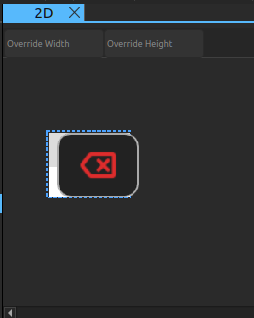
그나저나 제곱이나 sin tan 같은 과학계산기도 넣으려다가 흔적만 남은건가?
| // Copyright (C) 2023 The Qt Company Ltd. // SPDX-License-Identifier: LicenseRef-Qt-Commercial OR BSD-3-Clause pragma ComponentBehavior: Bound import QtQuick import QtQuick.Layouts Item { id: controller required property bool isPortraitMode required property ApplicationState state readonly property color qtGreenColor: "#2CDE85" readonly property color backspaceRedColor: "#DE2C2C" readonly property int spacing: 5 property int portraitModeWidth: mainGrid.width property int landscapeModeWidth: scientificGrid.width + mainGrid.width implicitWidth: isPortraitMode ? portraitModeWidth : landscapeModeWidth implicitHeight: mainGrid.height function updateDimmed() { for (let i = 0; i < mainGrid.children.length; i++) { mainGrid.children[i].dimmed = state.isButtonDisabled(mainGrid.children[i].text); } for (let j = 0; j < scientificGrid.children.length; j++) { scientificGrid.children[j].dimmed = state.isButtonDisabled( scientificGrid.children[j].text); } } component DigitButton: CalculatorButton { onClicked: { controller.state.digitPressed(text); controller.updateDimmed(); } } component OperatorButton: CalculatorButton { dimmable: true implicitWidth: 48 textColor: controller.qtGreenColor onClicked: { controller.state.operatorPressed(text); controller.updateDimmed(); } } Component.onCompleted: updateDimmed() Rectangle { id: numberPad anchors.fill: parent radius: 8 color: "transparent" RowLayout { spacing: controller.spacing GridLayout { id: scientificGrid columns: 3 columnSpacing: controller.spacing rowSpacing: controller.spacing visible: !controller.isPortraitMode OperatorButton { text: "x²" Accessible.name: "x squared" } OperatorButton { text: "⅟x" Accessible.name: "one over x" } OperatorButton { text: "√" } OperatorButton { text: "x³" Accessible.name: "x cubed" } OperatorButton { text: "sin" Accessible.name: "sine" } OperatorButton { text: "|x|" Accessible.name: "absolute value" } OperatorButton { text: "log" } OperatorButton { text: "cos" Accessible.name: "cosine" } DigitButton { text: "e" dimmable: true implicitWidth: 48 } OperatorButton { text: "ln" } OperatorButton { text: "tan" } DigitButton { text: "π" dimmable: true implicitWidth: 48 } } GridLayout { id: mainGrid columns: 5 columnSpacing: controller.spacing rowSpacing: controller.spacing BackspaceButton { onClicked: { controller.state.operatorPressed(this.text); controller.updateDimmed(); } } DigitButton { text: "7" } DigitButton { text: "8" } DigitButton { text: "9" } OperatorButton { text: "÷" implicitWidth: 38 } OperatorButton { text: "AC" textColor: controller.backspaceRedColor accentColor: controller.backspaceRedColor } DigitButton { text: "4" } DigitButton { text: "5" } DigitButton { text: "6" } OperatorButton { text: "×" implicitWidth: 38 } OperatorButton { text: "=" implicitHeight: 81 Layout.rowSpan: 2 } DigitButton { text: "1" } DigitButton { text: "2" } DigitButton { text: "3" } OperatorButton { text: "−" implicitWidth: 38 } OperatorButton { text: "±" implicitWidth: 38 } DigitButton { text: "0" } DigitButton { text: "." dimmable: true } OperatorButton { text: "+" implicitWidth: 38 } } } // RowLayout } } |
BackspaceButton.qml
numpad 에서 호출되는 버튼. 그 외에는 크게 눈에 띄진 않네

| // Copyright (C) 2023 The Qt Company Ltd. // SPDX-License-Identifier: LicenseRef-Qt-Commercial OR BSD-3-Clause import QtQuick import QtQuick.Controls RoundButton { id: button implicitWidth: 48 implicitHeight: 38 radius: buttonRadius icon.source: getIcon() icon.width: 38 icon.height: 38 icon.color: getIconColor() // include this text property as the calculator engine // differentiates buttons through text. The text is never drawn. text: "bs" Accessible.name: "backspace" property bool dimmable: true property bool dimmed: false readonly property color backgroundColor: "#222222" readonly property color borderColor: "#A9A9A9" readonly property color backspaceRedColor: "#DE2C2C" readonly property int buttonRadius: 8 function getBackgroundColor() { if (button.dimmable && button.dimmed) return backgroundColor; if (button.pressed) return backspaceRedColor; return backgroundColor; } function getBorderColor() { if (button.dimmable && button.dimmed) return borderColor; if (button.pressed || button.hovered) return backspaceRedColor; return borderColor; } function getIconColor() { if (button.dimmable && button.dimmed) return Qt.darker(backspaceRedColor); if (button.pressed) return backgroundColor; return backspaceRedColor; } function getIcon() { if (button.dimmable && button.dimmed) return "images/backspace.svg"; if (button.pressed) return "images/backspace_fill.svg"; return "images/backspace.svg"; } background: Rectangle { radius: button.buttonRadius color: button.getBackgroundColor() border.color: button.getBorderColor() } } |
CalculatorButton.qml
numpad 에서 호출되는 버튼. 그 외에는 크게 눈에 띄진 않네 2

| // Copyright (C) 2023 The Qt Company Ltd. // SPDX-License-Identifier: LicenseRef-Qt-Commercial OR BSD-3-Clause import QtQuick import QtQuick.Controls RoundButton { id: button implicitWidth: 38 implicitHeight: 38 radius: buttonRadius property bool dimmable: false property bool dimmed: false readonly property int fontSize: 22 readonly property int buttonRadius: 8 property color textColor: "#FFFFFF" property color accentColor: "#2CDE85" readonly property color backgroundColor: "#222222" readonly property color borderColor: "#A9A9A9" function getBackgroundColor() { if (button.dimmable && button.dimmed) return backgroundColor; if (button.pressed) return accentColor; return backgroundColor; } function getBorderColor() { if (button.dimmable && button.dimmed) return borderColor; if (button.pressed || button.hovered) return accentColor; return borderColor; } function getTextColor() { if (button.dimmable && button.dimmed) return Qt.darker(textColor); if (button.pressed) return backgroundColor; if (button.hovered) return accentColor; return textColor; } background: Rectangle { radius: button.buttonRadius color: button.getBackgroundColor() border.color: button.getBorderColor() } contentItem: Text { text: button.text font.pixelSize: button.fontSize horizontalAlignment: Text.AlignHCenter verticalAlignment: Text.AlignVCenter color: button.getTextColor() Behavior on color { ColorAnimation { duration: 120 easing.type: Easing.OutElastic } } } } |